



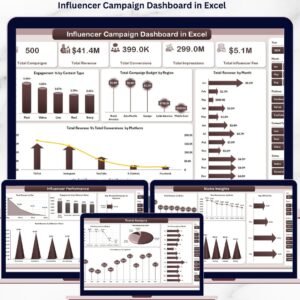
The Influencer Marketing KPI Dashboard in Excel is a powerful tool designed to help marketing teams, brands, and agencies measure and optimize the performance of their influencer marketing campaigns. This Excel-based dashboard tracks essential key performance indicators (KPIs) such as engagement rates, reach, impressions, ROI, and cost-per-engagement to help you evaluate the success of your influencer partnerships and make data-driven decisions to improve future campaigns.
Whether you’re managing a single influencer or a large group of content creators, the Influencer Marketing KPI Dashboard in Excel offers a centralized and organized way to monitor campaign performance, track the effectiveness of your influencer collaborations, and maximize your ROI. With real-time insights into your influencer marketing efforts, you can ensure that your campaigns align with your brand goals and drive better results.
Key Features of the Influencer Marketing KPI Dashboard in Excel
📊 Track Influencer Engagement & Reach
Monitor key engagement metrics such as likes, comments, shares, and overall reach. Track the performance of individual influencers and campaigns to identify the most successful partnerships.
💰 Measure ROI & Cost-Per-Engagement (CPE)
Track the return on investment (ROI) of your influencer marketing campaigns. Measure how much revenue is generated for every dollar spent and evaluate the cost-per-engagement to determine the efficiency of your marketing spend.
⚡ Campaign Impressions & Performance
Track the total impressions and visibility generated by your influencer campaigns. Analyze the reach and impact of each campaign to assess its overall success and compare against other marketing channels.
📈 Monitor Influencer Performance
Evaluate the performance of individual influencers by tracking their engagement rates, audience size, and the results they drive. Make informed decisions about which influencers are best suited for future collaborations.
🖥️ Interactive & Real-Time Insights
The Excel dashboard offers real-time updates on all influencer marketing KPIs. With dynamic charts, slicers, and filters, you can explore campaign data, measure performance, and make data-driven decisions.
Why You’ll Love the Influencer Marketing KPI Dashboard in Excel

✅ Track Influencer Engagement & Reach
Monitor the reach and engagement of each influencer in real-time. Track likes, shares, comments, and overall reach to determine which influencers are driving the best results.
✅ Maximize ROI & Reduce Wasted Spend
Measure the return on investment (ROI) and cost-per-engagement (CPE) for each campaign to ensure that you are getting the most out of your marketing budget.
✅ Optimize Campaign Performance
Analyze campaign impressions, reach, and engagement data to assess the effectiveness of your influencer marketing strategy. Identify the most impactful influencers and campaigns to optimize future efforts.
✅ Make Data-Driven Decisions
Leverage real-time insights to make informed decisions about influencer selection, campaign optimization, and budget allocation. Improve the performance of your influencer marketing campaigns by using data to guide your strategies.
✅ Simplify Campaign Management
With all your influencer marketing metrics in one place, this dashboard helps you save time and streamline your campaign tracking process. It’s easy to compare performance and identify areas for improvement.
What’s Inside the Influencer Marketing KPI Dashboard Template?
- Influencer Engagement & Reach Tracking: Monitor likes, comments, shares, and reach for each influencer and campaign.
- ROI & Cost-Per-Engagement Tracking: Measure ROI and CPE to determine campaign effectiveness and budget efficiency.
- Impressions & Campaign Performance: Track total impressions and visibility generated by your influencer campaigns.
- Influencer Performance Metrics: Evaluate individual influencer performance based on engagement rates and audience size.
- Real-Time Insights: Get live updates on influencer performance and campaign metrics.
- Customizable KPIs: Tailor the dashboard to track the KPIs that matter most for your influencer marketing strategy.
How to Use the Influencer Marketing KPI Dashboard in Excel
1️⃣ Download the Template: Get instant access to your Influencer Marketing KPI Dashboard in Excel.
2️⃣ Input Your Data: Enter your influencer campaign data, including impressions, engagement metrics, and costs, into the dashboard.
3️⃣ Track & Monitor KPIs: Use the dashboard to track key influencer metrics such as engagement, reach, ROI, and CPE in real-time.
4️⃣ Analyze & Optimize: Use the data to assess the success of your influencer campaigns and optimize future efforts.
Who Can Benefit from the Influencer Marketing KPI Dashboard in Excel?
🔹 Marketing Teams & Agencies
🔹 Brand Managers & Social Media Managers
🔹 E-commerce & Retail Brands
🔹 Influencer Marketing Coordinators
🔹 Digital Marketing Analysts
🔹 Anyone Looking to Track & Optimize Influencer Marketing Campaigns
Maximize the impact of your influencer marketing campaigns with the Influencer Marketing KPI Dashboard in Excel. Track key metrics, improve campaign performance, and make data-driven decisions to drive better ROI and business growth.
Click here to read the Detailed blog post
Visit our YouTube channel to learn step-by-step video tutorials
Youtube.com/@PKAnExcelExpert
Compatibility and Requirements
- Works in Microsoft Excel desktop (Excel 2016 or later, or Microsoft 365).
- The dashboard uses charts, slicers and filters. Microsoft explains slicers in Use slicers to filter data.
Frequently Asked Questions
Which KPIs does the Influencer Marketing dashboard track?
Engagement such as likes, comments and shares, reach, impressions, ROI and cost-per-engagement (CPE).
Can I compare individual influencers?
Yes. You can evaluate each influencer by engagement rate, audience size and the results they drive.
What data do I enter?
Your influencer campaign data, including impressions, engagement metrics and costs.
Can I filter the results?
Yes. Dynamic charts, slicers and filters let you explore campaign data.
Is there a Power BI or Google Sheets version?
Yes. See the Influencer Marketing KPI Dashboard in Power BI and the Influencer Marketing KPI Dashboard in Google Sheets.
Related Influencer Templates
- Influencer Marketing KPI Dashboard in Power BI: the same KPIs in Power BI
- Influencer Marketing KPI Dashboard in Google Sheets: the same KPIs in Google Sheets
- Influencer Engagement KPI Dashboard in Excel: focus on engagement metrics
- Influencer ROI KPI Dashboard in Excel: focus on campaign returns
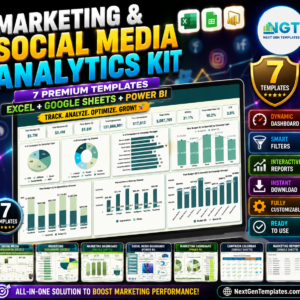
- Marketing and Social Media Analytics Kit: 7 marketing templates in one download
Browse all Excel KPI dashboards or the Excel sales and marketing templates.






Reviews
There are no reviews yet.