

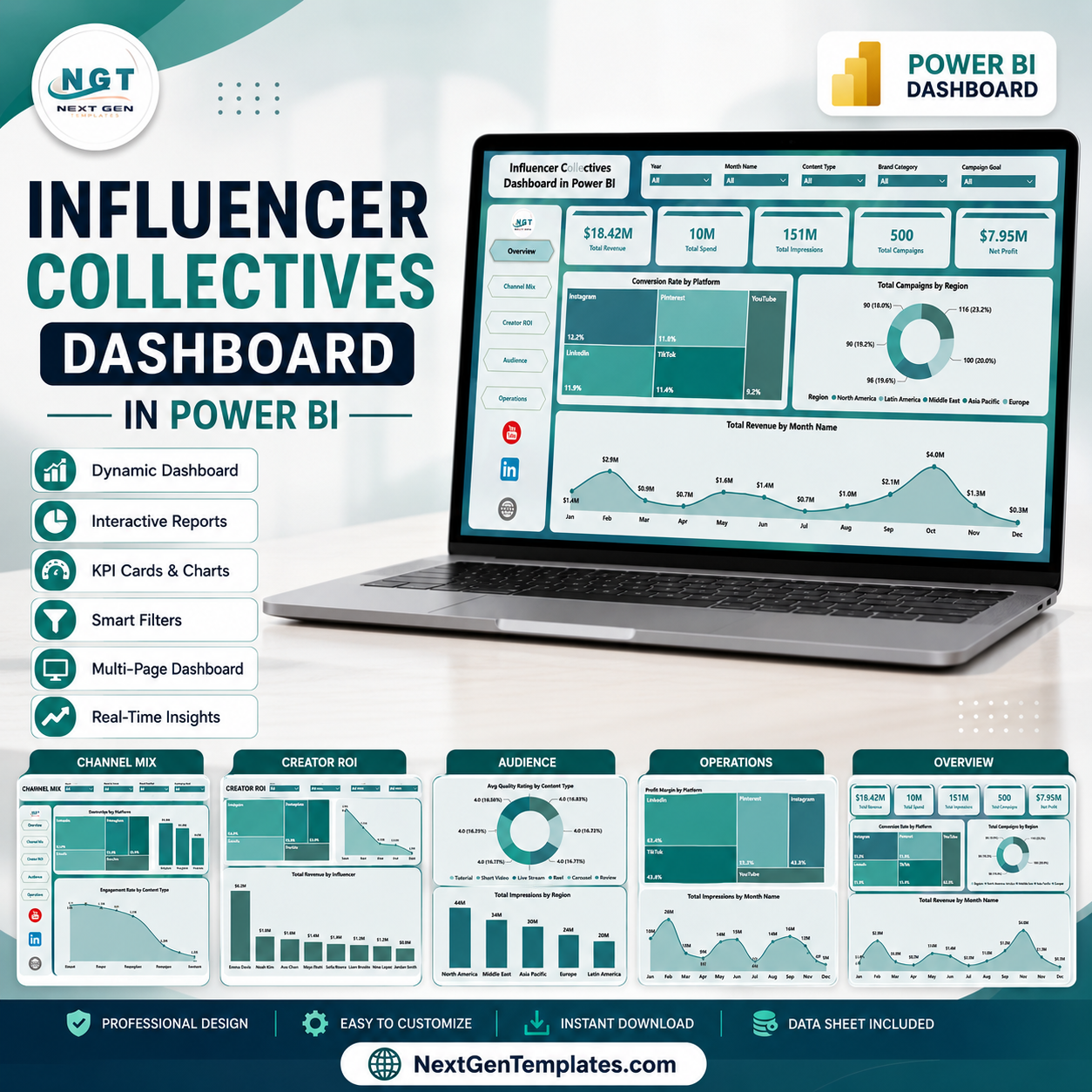
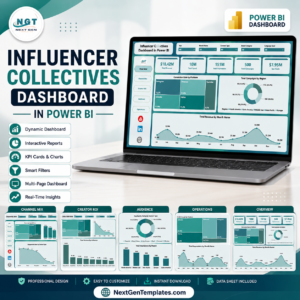
The Influencer Collectives Dashboard in Power BI gives influencer marketing teams a ready PBIX report with 5 report pages, 5 executive KPI cards, 15 focused visuals, and slicers for quick segment review. Influencer programs can spread across creators, regions, platforms, campaign goals, content types, tiers, spend, impressions, conversions, and revenue. When those numbers sit in disconnected reports, ROI decisions slow down. This Power BI dashboard brings the campaign story into one editable report.
Trusted by 8,400+ teams in 40+ countries using NextGenTemplates. Instant download, one-time payment, no subscription, no per-user fee, and lifetime access.
Key Features of Influencer Collectives Dashboard in Power BI
- 5 executive cards for Total Revenue, Total Spend, Total Impressions, Total Campaigns, and Net Profit.
- 5 Power BI pages covering Overview, Channel Mix, Creator ROI, Audience, and Operations.
- 15 analysis visuals for conversion rate, campaigns, revenue, engagement, quality, impressions, profit margin, creators, platforms, and regions.
- Interactive slicers to filter campaign data quickly during weekly reviews or client meetings.
- Editable PBIX file so you can customize visuals, fields, colors, measures, and report pages in Power BI Desktop.
- Marketing performance focus built around influencer collectives, platform mix, creator ROI, audience quality, and operational delivery.
What’s Inside the Influencer Collectives Dashboard in Power BI
1. Overview Page
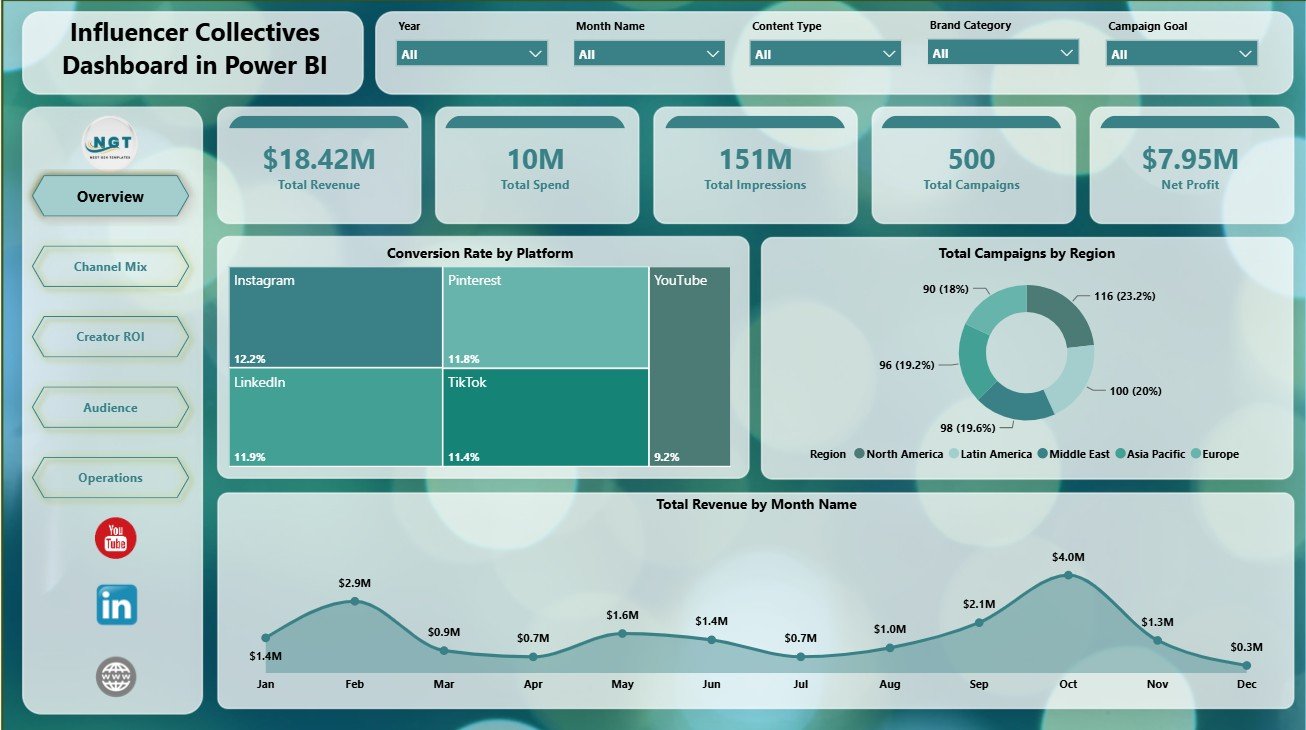
The Overview page gives leaders a high-level read of campaign health. The top cards show Total Revenue, Total Spend, Total Impressions, Total Campaigns, and Net Profit, so teams can review scale, investment, reach, activity volume, and final return in one view.
Conversion Rate by Platform compares how well each platform turns attention into outcomes. Use it to identify channels that deserve more budget or closer creative review.
Total Campaigns by Region shows where influencer campaigns are concentrated. It helps managers see regional coverage and spot markets that may need more activity.
Total Revenue by Month Name tracks monthly revenue movement. This makes it easier to see seasonality, strong campaign periods, and months that need deeper investigation.
Influencer Collectives Dashboard in Power BI
2. Channel Mix
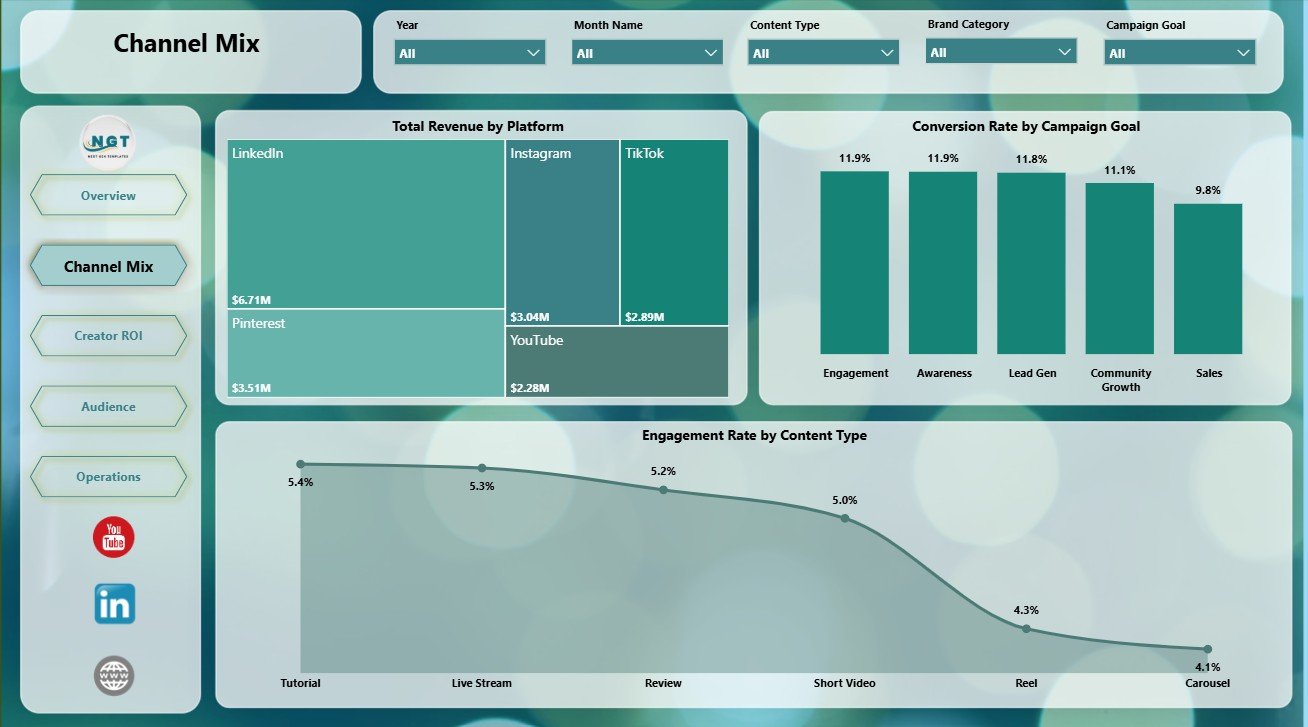
The Channel Mix page compares how platforms, campaign goals, and content types contribute to performance. Total Revenue by Platform shows which channels generate the most value, while Conversion Rate by Campaign Goal helps evaluate goal-level efficiency.
Engagement Rate by Content Type compares audience interaction across formats. This is useful when deciding whether reels, stories, long-form videos, or other content types should receive more future attention.
Channel Mix
3. Creator ROI
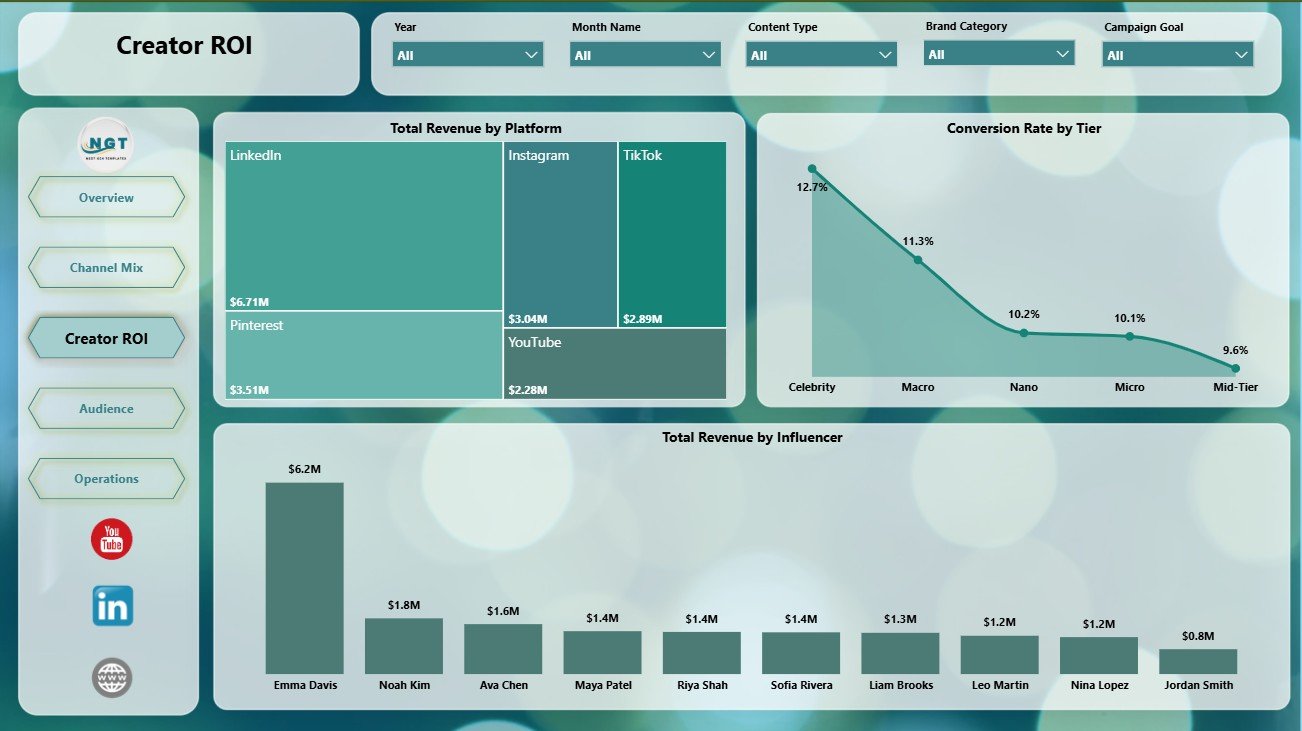
The Creator ROI page focuses on return by platform, creator tier, and influencer. Total Revenue by Platform highlights where campaign revenue is strongest across channels, while Conversion Rate by Tier shows which creator level converts most effectively.
Total Revenue by Influencer ranks creators by revenue contribution. This helps teams support renewal decisions, payout discussions, and creator shortlist planning with data.
Creator ROI
4. Audience
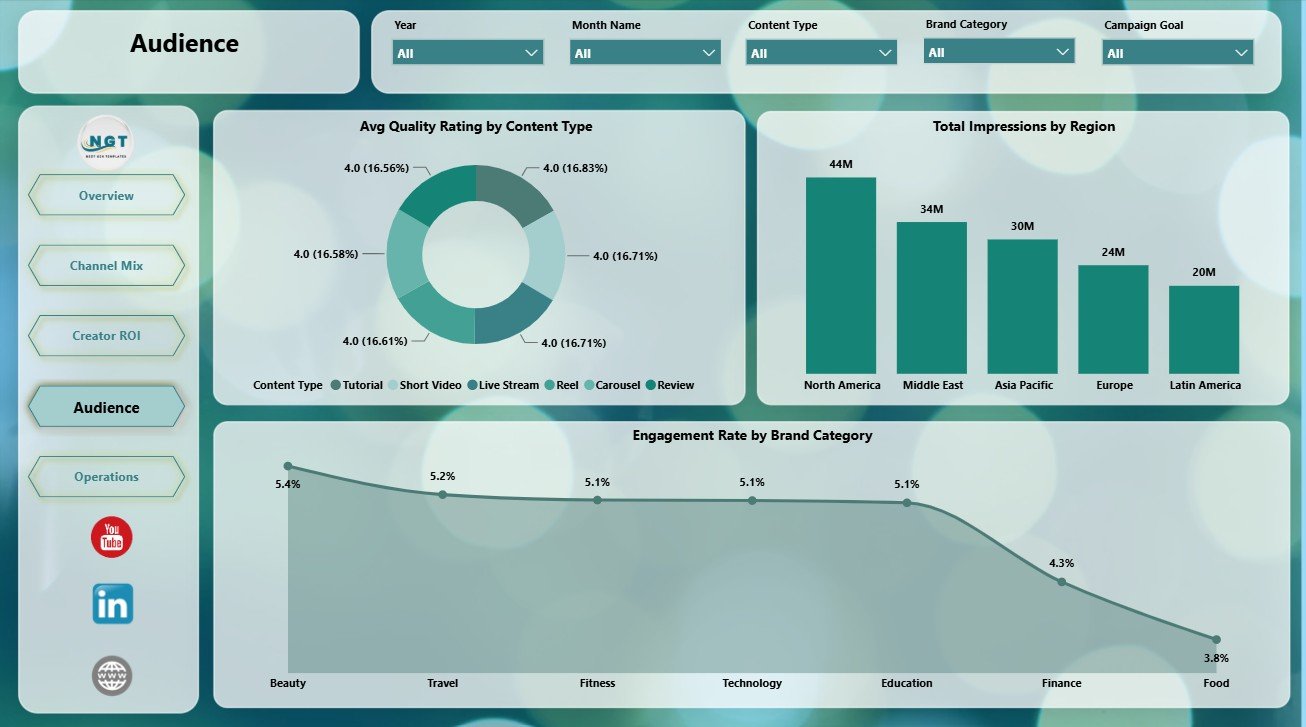
The Audience page examines content quality, regional reach, and engagement. Avg Quality Rating by Content Type shows which formats meet brand standards most consistently.
Total Impressions by Region compares audience reach across markets, while Engagement Rate by Brand Category reveals which categories generate stronger interaction from viewers.
Audience
5. Operations
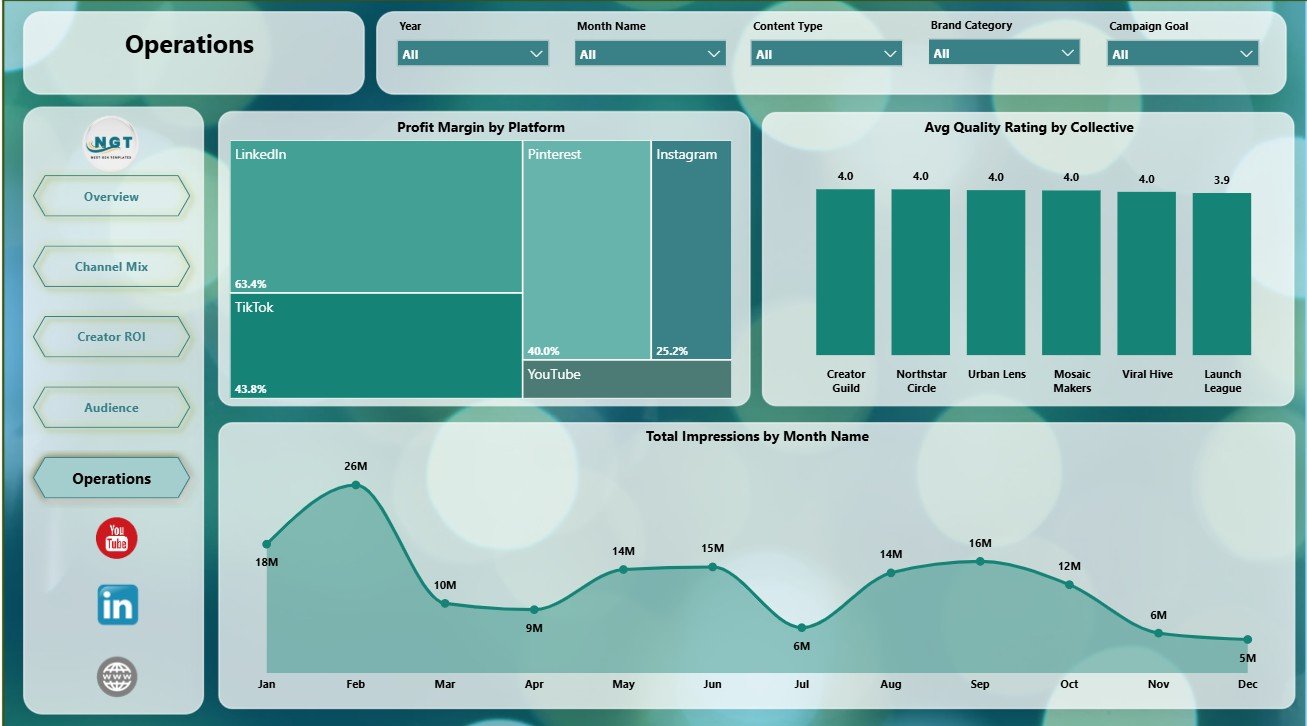
The Operations page supports performance monitoring and execution review. Profit Margin by Platform shows where revenue efficiency is strongest after spend is considered.
Avg Quality Rating by Collective compares execution quality across creator groups. Total Impressions by Month Name tracks monthly reach so managers can see delivery momentum over time.
Operations
Influencer Collectives Dashboard in Power BI vs. Tableau vs. Paid CRM/SaaS – Where This Fits
| Feature | This Power BI Dashboard | Tableau or Qlik Alternative | Paid Influencer SaaS |
|---|---|---|---|
| Cost | $17.99 one-time template | License cost plus report build time | Monthly or annual subscription |
| Platform | Power BI Desktop and Power BI Service | Tableau or Qlik environment | Vendor-hosted web app |
| Setup time | Open PBIX, connect or replace data, refresh | Build model and visuals manually | Implementation and onboarding |
| Team collaboration | Available after publishing to Power BI Service | Available by platform plan | Usually included |
| Customizable fields | Edit fields, pages, measures, slicers, and visuals | Editable with BI skills | Often limited by vendor schema |
| Year-1 cost at 5 users | Template cost plus any Microsoft licensing | License cost plus analyst time | Often hundreds or thousands |
| Best fit | Influencer reporting and ROI analysis | Custom BI environment | Discovery, outreach, contracts, and payments |
Who This Template Is For – and Who It’s Not For
This dashboard is for influencer marketing managers, brand partnership teams, creator agencies, campaign analysts, media teams, and consultants who need repeatable Power BI reporting for campaign performance. It is a strong fit when you already have influencer campaign data and want a ready visual model for meetings, client updates, and budget reviews.
It is not a full influencer management platform. It does not handle creator discovery, automated social API extraction, contract workflows, payment processing, or approval routing. Teams needing those workflows may still use a SaaS platform before sending clean reporting data into Power BI.
How to Use the Influencer Collectives Dashboard in Power BI
- Download and unzip the product file.
- Open the PBIX file in Microsoft Power BI Desktop.
- Review the sample data structure and replace or connect your own campaign data.
- Refresh the report so cards, charts, and slicers update.
- Customize pages, labels, colors, or measures if needed.
- Publish to Power BI Service when you are ready to share with your team.
Real-World Use Cases
Maya, an influencer marketing lead, uses the Overview page before leadership meetings to show revenue, spend, impressions, campaign count, and net profit. Daniel, a creator agency analyst, uses Creator ROI to identify which influencers and tiers deserve renewal. Priya, a brand partnerships consultant, uses Channel Mix and Audience to explain platform, content, and category performance to clients.
Frequently Asked Questions
What KPIs are included?
The Overview page includes Total Revenue, Total Spend, Total Impressions, Total Campaigns, and Net Profit.
Do I need Power BI Desktop?
Yes. Power BI Desktop is needed to open, refresh, and customize the PBIX file. Power BI Service is optional for online sharing.
Can I use my own data?
Yes. Replace or connect the sample source with your own structured influencer campaign data, then refresh the report.
Can I customize the dashboard?
Yes. You can edit visuals, fields, measures, slicers, colors, page names, and report layout in Power BI Desktop.
Does it automatically pull social media data?
No. This is a Power BI reporting template. Automated platform API imports require a separate connector or data pipeline.
Is this suitable for client reporting?
Yes. The page structure is designed for campaign reviews, agency reporting, brand partnership meetings, and management updates.
About the Author
Built by PK – Microsoft Certified Professional with 15+ years of Excel, Google Sheets, and Power BI experience. Founder of NextGenTemplates, reaching 300K+ subscribers across YouTube channels. Every template is hand-built and tested before release.
Explore Related Templates
Explore related marketing templates including Influencer Collectives Dashboard in Excel, Influencer Platforms KPI Dashboard in Excel, and more Power BI Dashboard templates.
Last updated: June 24, 2026. Download the Influencer Collectives Dashboard in Power BI today and turn creator campaign data into clear platform, ROI, audience, and operations reporting.



























Reviews
There are no reviews yet.