

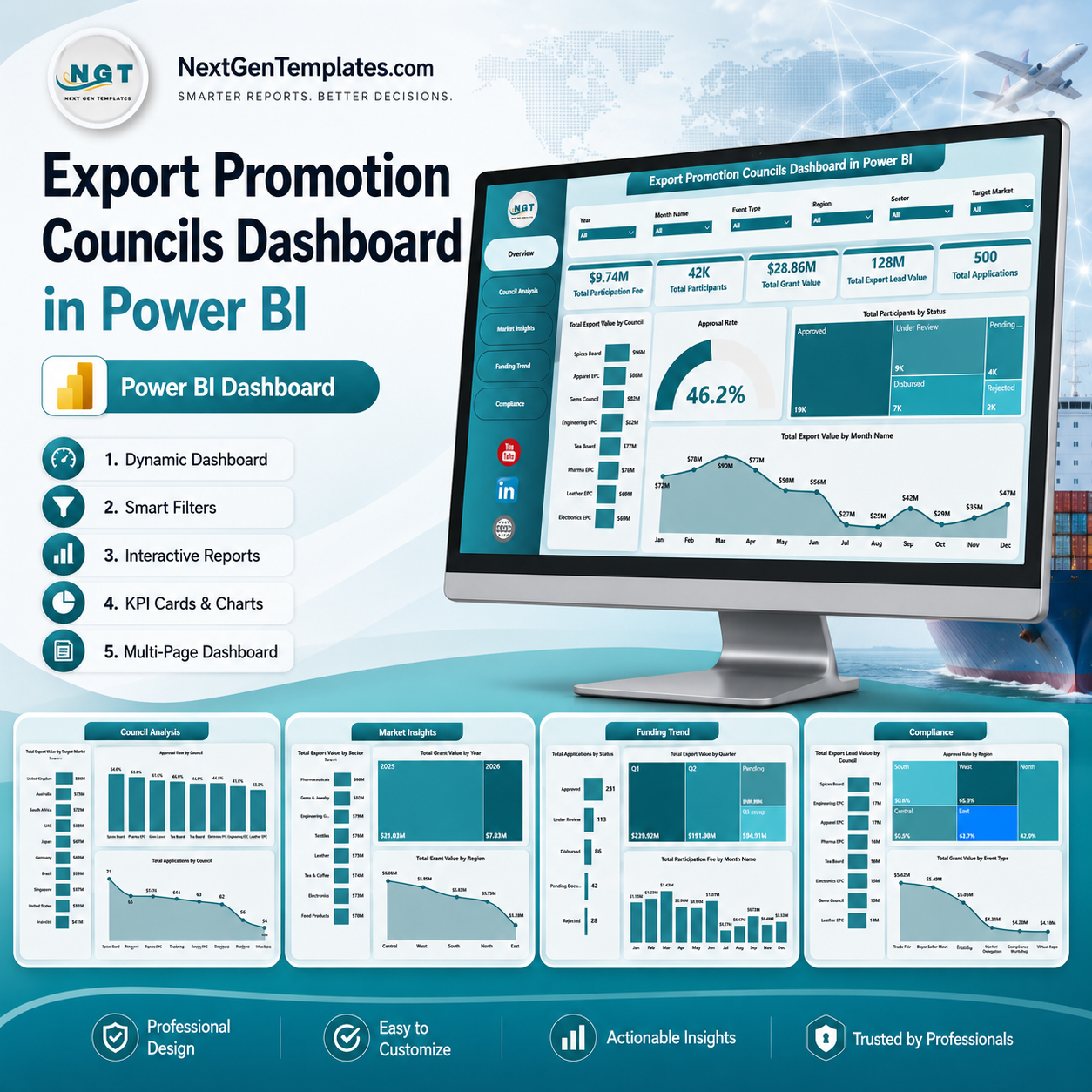
Export Promotion Councils Dashboard in Power BI gives trade promotion agencies, export councils, government departments, grant managers, and analysts a ready .pbix reporting file with 5 report pages, 5 executive KPI cards, 16+ analytical visuals, and slicer-based filtering. For $17.99 one-time, users can analyze participation fees, participants, grant value, export lead value, applications, approval rates, councils, sectors, markets, regions, funding trends, and compliance views without building a Power BI model from scratch. Built by PK, Microsoft Certified Professional with 15+ years of Excel, Google Sheets, and Power BI experience and 300K+ YouTube subscribers, this template is designed for faster stakeholder reviews, practical customization, and clear export promotion reporting.
Key Features of Export Promotion Councils Dashboard in Power BI
- 5 Power BI report pages covering Overview, Council Analysis, Market Insights, Funding Trend, and Compliance.
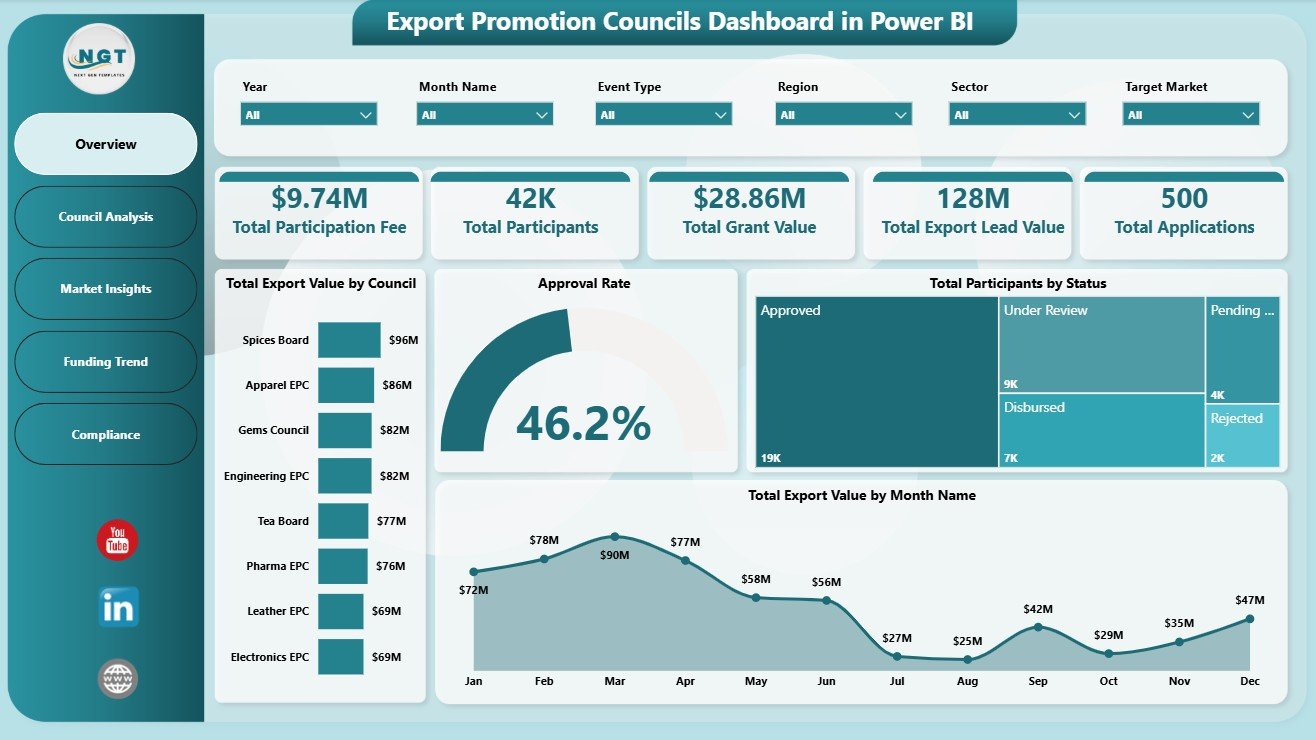
- 5 high-level cards for Total Participation Fee, Total Participants, Total Grant Value, Total Export Lead Value, and Total Applications.
- Overview analytics for export value by council, approval rate by applications, participants by status, and export value by month.
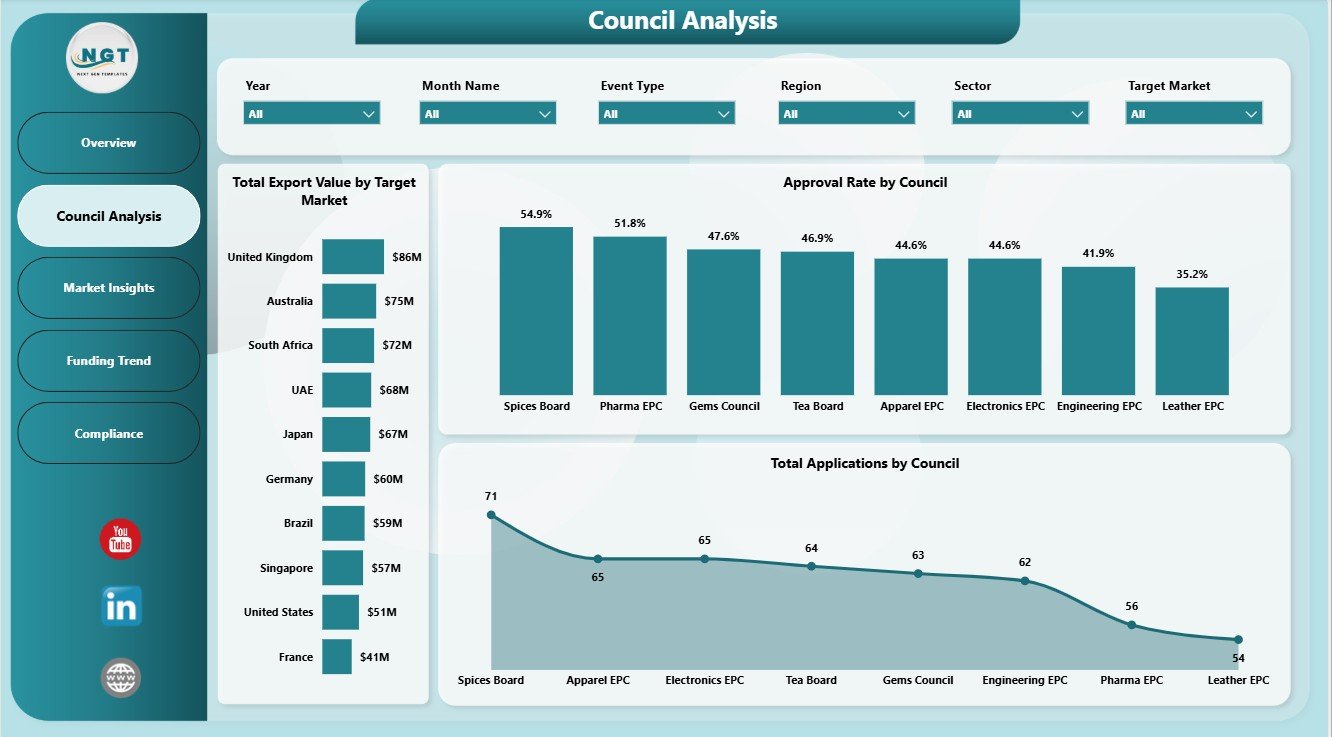
- Council analysis by target market, council approval rate, and total applications by council.
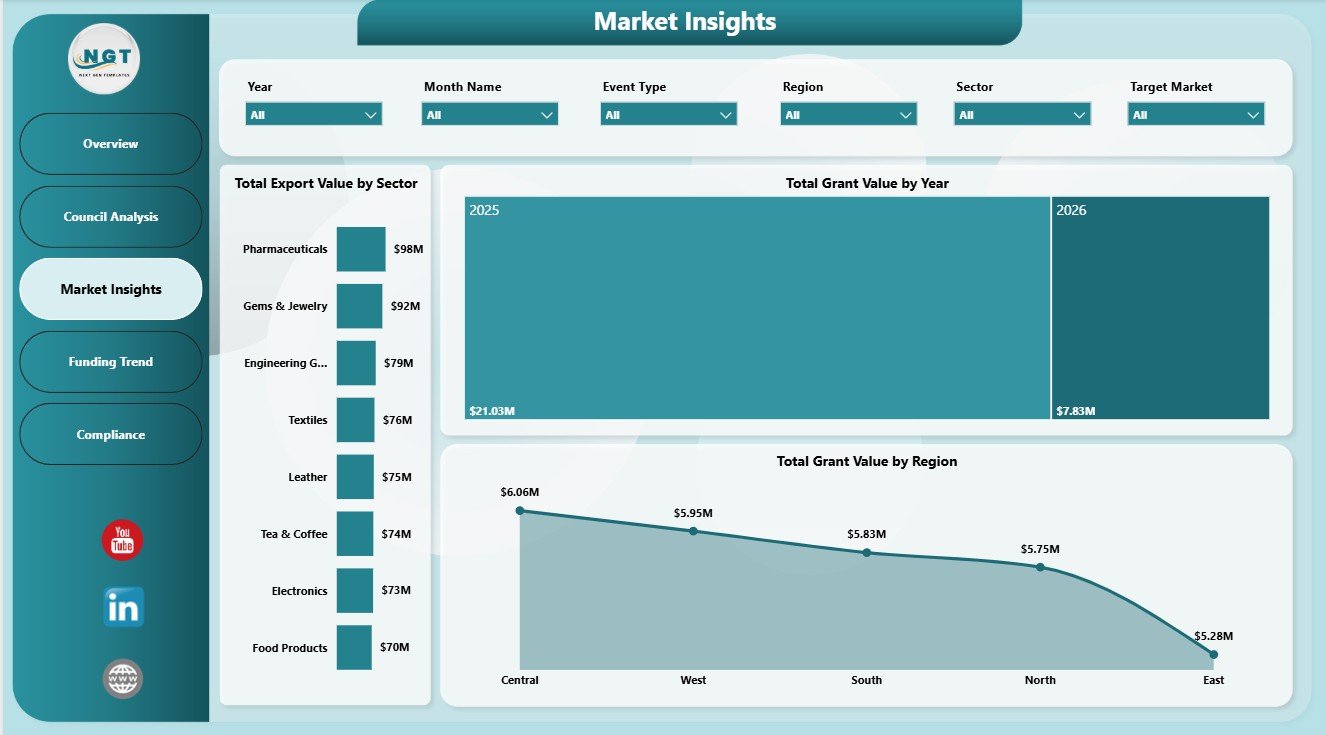
- Market insight pages for export value by sector, grant value by year, and grant value by region.
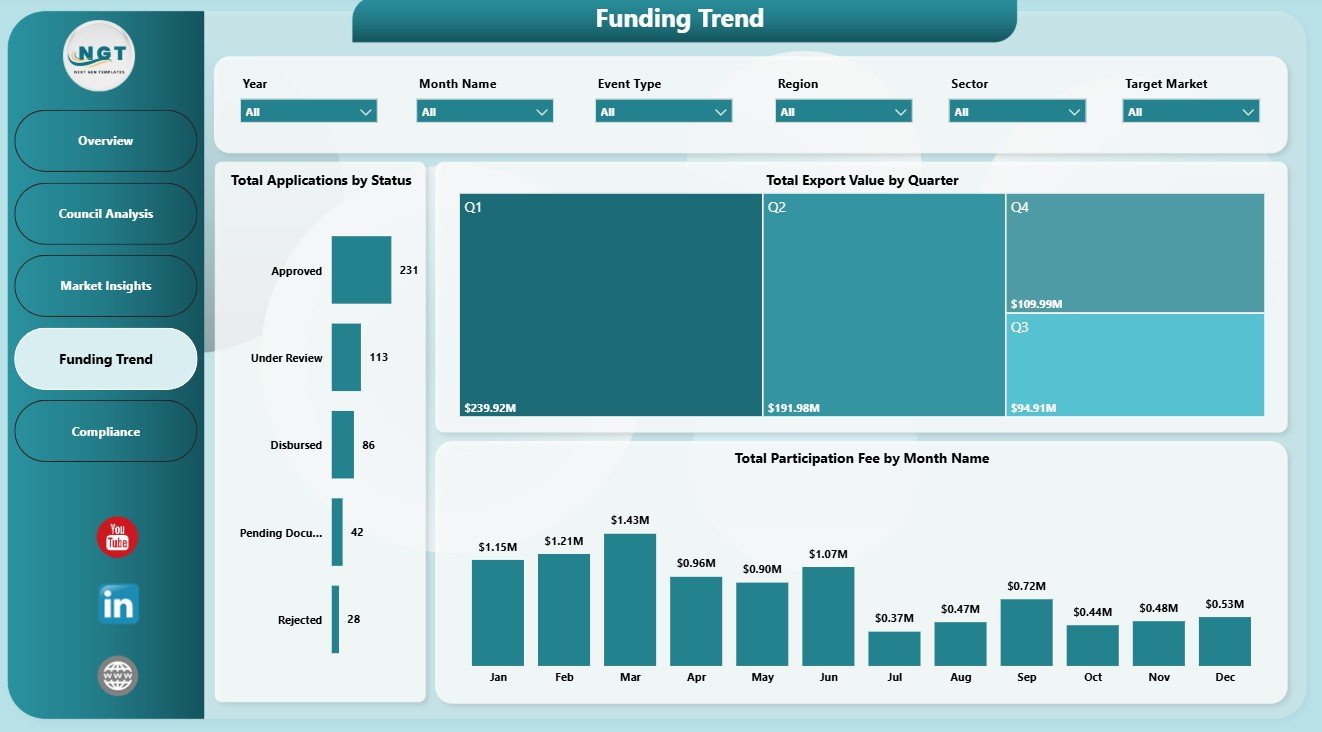
- Funding trend analysis by application status, quarter, and participation fee by month.
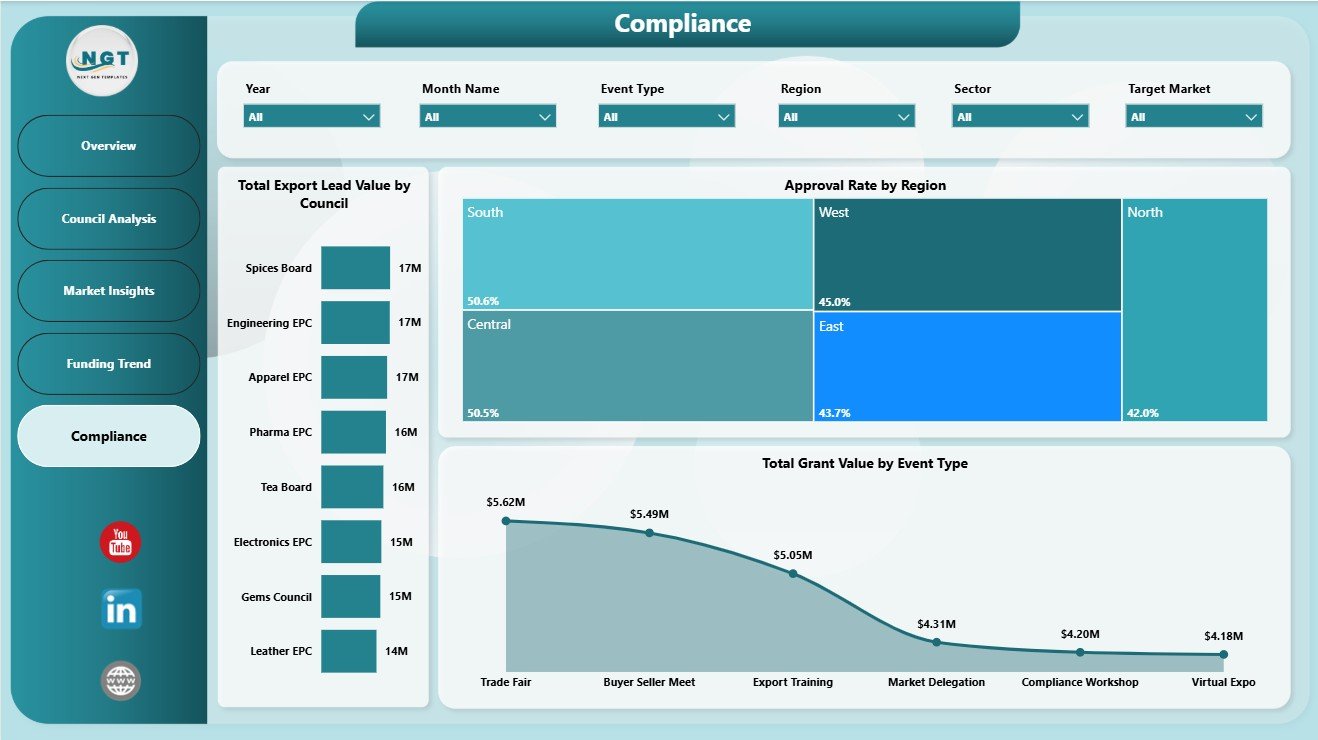
- Compliance reporting for export lead value by council, approval rate by region, and grant value by event type.
- Multiple slicers help users filter report pages quickly during monthly, quarterly, or council-level reviews.
What’s Inside the Export Promotion Councils Dashboard in Power BI
1. Overview Page
The Overview Page is the executive starting point for the report. The top cards show Total Participation Fee, Total Participants, Total Grant Value, Total Export Lead Value, and Total Applications so users can review funding scale, engagement, application volume, and export opportunity value in one screen.
Total Export Value by Council: This chart compares export value across councils and highlights which councils are contributing the strongest economic outcomes. It supports performance reviews, resource planning, and follow-up with councils that need attention.
Approval Rate by Overall Applications: This visual shows how applications convert into approved outcomes. It helps teams understand whether the approval pipeline is healthy or whether process delays need review.
Total Participants by Status: This chart breaks participant records by status so teams can separate active, completed, pending, cancelled, or other groups. It is useful for checking participation movement without reading raw data.
Total Export Value by Month Name: This trend shows how export value changes by month. It helps users detect seasonality, identify strong campaign periods, and prepare monthly reporting narratives.
2. Council Analysis
The Council Analysis page helps users compare council-level performance and market reach. Total Export Value by Target Market shows which markets are generating the most value, Approval Rate by Council compares processing effectiveness, and Total Applications by Council highlights workload and demand across councils.
3. Market Insights
The Market Insights page explains where export promotion activity is concentrated. Total Export Value by Sector identifies high-value sectors, Total Grant Value by Year shows annual funding movement, and Total Grant Value by Region helps users compare regional grant distribution.
4. Funding Trend
The Funding Trend page focuses on application movement, quarterly export value, and participation fee patterns. Total Applications by Status shows the application pipeline, Total Export Value by Quarter highlights short-term performance, and Total Participation Fee by Month Name shows fee movement across the year.
5. Compliance
The Compliance page connects export lead value, approval rates, regions, grant value, and event types. Total Export Lead Value by Council shows pipeline potential by council, Approval Rate by Region compares regional processing outcomes, and Total Grant Value by Event Type explains which activities receive the most grant support.
Export Promotion Councils Dashboard in Power BI vs. Tableau vs. Paid CRM/SaaS – Where This Fits
| Feature | This Power BI Dashboard | Tableau Alternative | Paid CRM/SaaS |
|---|---|---|---|
| Cost | $17.99 one-time | Requires Tableau license or build effort | Monthly or annual subscription |
| Platform | Power BI Desktop | Tableau Desktop or Cloud | Vendor cloud platform |
| Setup time | Replace data source and refresh | Build or adapt a workbook | Configuration and onboarding |
| Real-time team collaboration | Available through Power BI Service setup | Available through Tableau Cloud | Usually included by license |
| Mobile access | Available after publishing | Available after publishing | Usually included |
| Customizable fields | Editable Power BI model and visuals | Editable if you own the workbook | Limited by vendor settings |
| Share with link | Available through Power BI Service | Available through Tableau Cloud | Login controlled |
| Year-1 cost at 5 users | $17.99 plus any Microsoft licensing | License and development cost | Often hundreds or thousands |
| Export promotion analytics | 5 ready report pages | Requires custom build | Depends on plan and configuration |
Who This Template Is For – and Who It’s Not For
This template is for export promotion councils, trade promotion agencies, government export departments, chambers of commerce, sector councils, grant managers, program managers, compliance reviewers, and analysts who need recurring Power BI reporting on participation fees, participants, grants, applications, export value, lead value, markets, regions, sectors, councils, events, and statuses.
It is not a live application portal, grant payment system, CRM, trade compliance engine, or automated case management platform. It works best when source data is already available in clean tables and the user can refresh a Power BI Desktop file.
How to Use the Export Promotion Councils Dashboard in Power BI
- Download and unzip the dashboard package.
- Open the .pbix file in Power BI Desktop.
- Replace the sample source data with your export promotion council records.
- Keep the same field structure where possible so visuals continue working.
- Refresh the report and review each page.
- Use slicers to filter by council, market, region, sector, event, status, month, quarter, or year depending on the available fields.
Real-World Use Cases
Anita, export council program manager: Anita uses the Overview and Council Analysis pages before monthly reviews to explain participation fees, participants, grant value, applications, and approval rates.
Rahul, trade data analyst: Rahul refreshes the Power BI file each month and uses Market Insights to identify high-value sectors, regions, target markets, and year-wise grant movement.
Meera, compliance and funding lead: Meera uses Funding Trend and Compliance pages to connect application status, quarterly export value, approval rates, grant value, event type, and export lead value.
Frequently Asked Questions
What does this Power BI dashboard track?
It tracks participation fee, participants, grant value, export lead value, applications, export value, approval rate, councils, target markets, sectors, years, regions, statuses, quarters, months, and event types.
How many Power BI pages are included?
The report includes five pages: Overview, Council Analysis, Market Insights, Funding Trend, and Compliance.
Do I need advanced Power BI skills?
No. The basic workflow is to open the .pbix file, replace or connect data, and refresh. Advanced users can still edit visuals, measures, model relationships, slicers, and page layouts.
Can I use my own council names, sectors, and regions?
Yes. You can use your own council, market, sector, region, event type, month, quarter, status, and application fields as long as the source data remains structured for the report.
Can this dashboard be published online?
Yes. You can publish it to Power BI Service if you have the required Microsoft account and licensing. Sharing permissions are managed in your Power BI workspace.
Is the file editable?
Yes. The .pbix file is editable, so users can adjust visuals, fields, calculations, colors, slicers, and report pages.
About the Author
Built by PK – Microsoft Certified Professional with 15+ years of Excel, Google Sheets, and Power BI experience. Founder of NextGenTemplates, reaching 300K+ subscribers across YouTube channels. Every template is hand-built and tested before release.
Explore Related Templates
- Export Promotion Councils Dashboard in Excel
- Export Promotion Councils KPI Dashboard in Excel
- Executive Coaching Dashboard in Power BI
- Browse Power BI Dashboard Templates
- Browse Power BI Templates
Download the Export Promotion Councils Dashboard in Power BI and turn council participation, export value, grants, applications, markets, regions, funding trends, and compliance data into clear Power BI reporting.
Last updated: June 10, 2026.









Reviews
There are no reviews yet.