

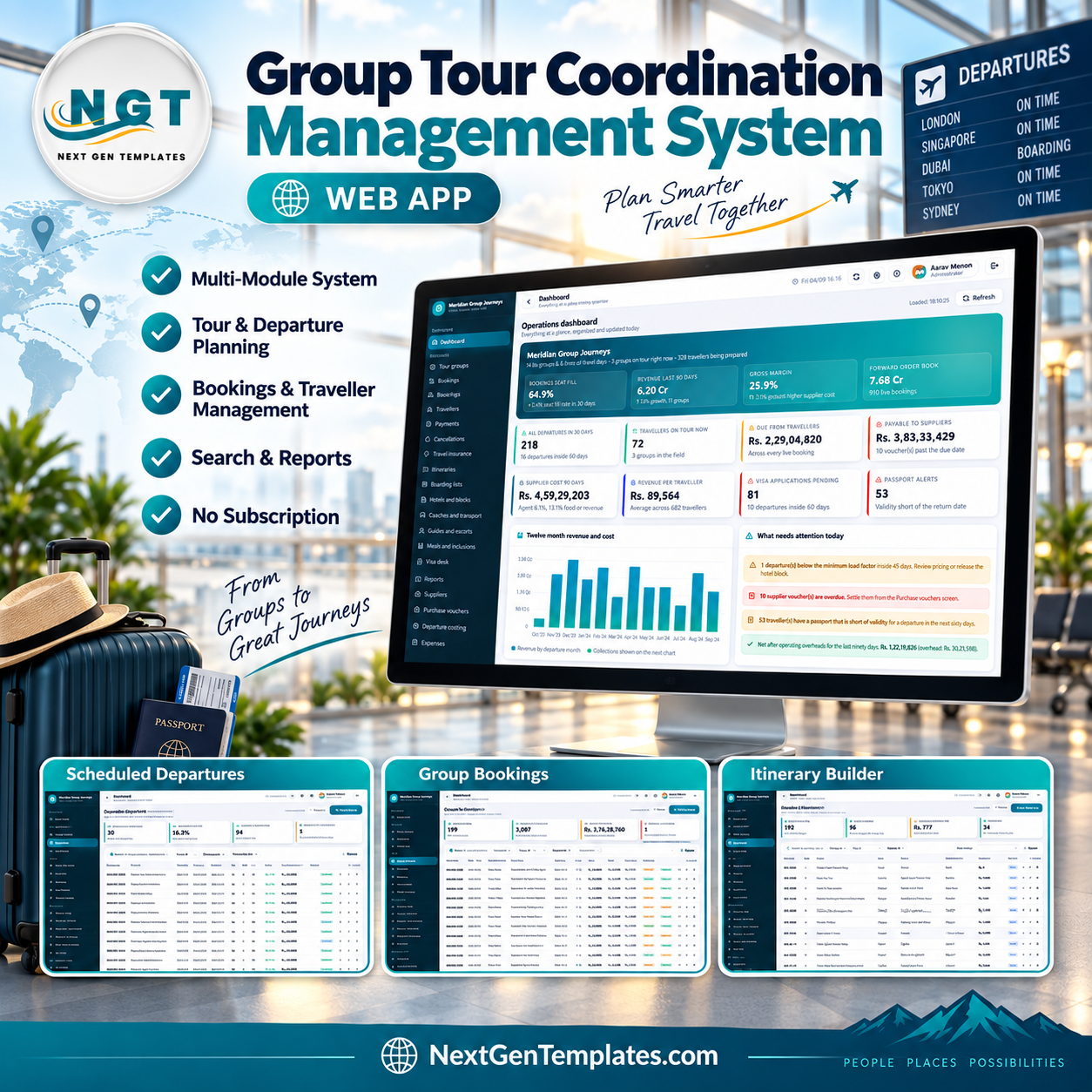

A single escorted departure touches a package, an itinerary, a seat count, a rooming list, a hotel block, a coach, a guide, a meal plan, a visa file and a supplier voucher. Miss one and the tour still leaves — just without the room, the seat or the visa. The Group Tour Coordination Management System web app puts all of that into one Google Apps Script console: 27 screens over 28 database tables, 17 built-in reports, 6 roles across 52 server-checked permissions, and a demo database seeded with 14,176 rows so every screen has something in it the moment you sign in. You own the source outright, it runs on your own Google account, and there is no monthly fee.
Try the Live Demo Before You Buy
The system is deployed and running right now. Open it, sign in with any of the accounts below and click through the modules before you spend anything.
Demo sign-in details
| Role | Username | Password |
|---|---|---|
| Administrator | admin | Tours@2024 |
| Operations Manager | manager | Manager@2024 |
| Reservations Officer | reservations | Reserve@2024 |
| Reservations Officer | reservations2 | Booking@2024 |
| Tour Coordinator | coordinator | Coord@2024 |
| Tour Coordinator | coordinator2 | Journey@2024 |
| Accounts Officer | accounts | Accounts@2024 |
| Visa Officer | visa | Visadesk@2024 |
Sign in as visa or accounts rather than admin and you will see the point in ten seconds: the sidebar shrinks to that role’s screens, and the server refuses the writes it is not allowed to make. These credentials are public on purpose — they belong to a shared demo instance that resets, not to anybody’s live deployment. Your own copy starts with its own database in your own Drive.
Key Features of the Group Tour Coordination Management System
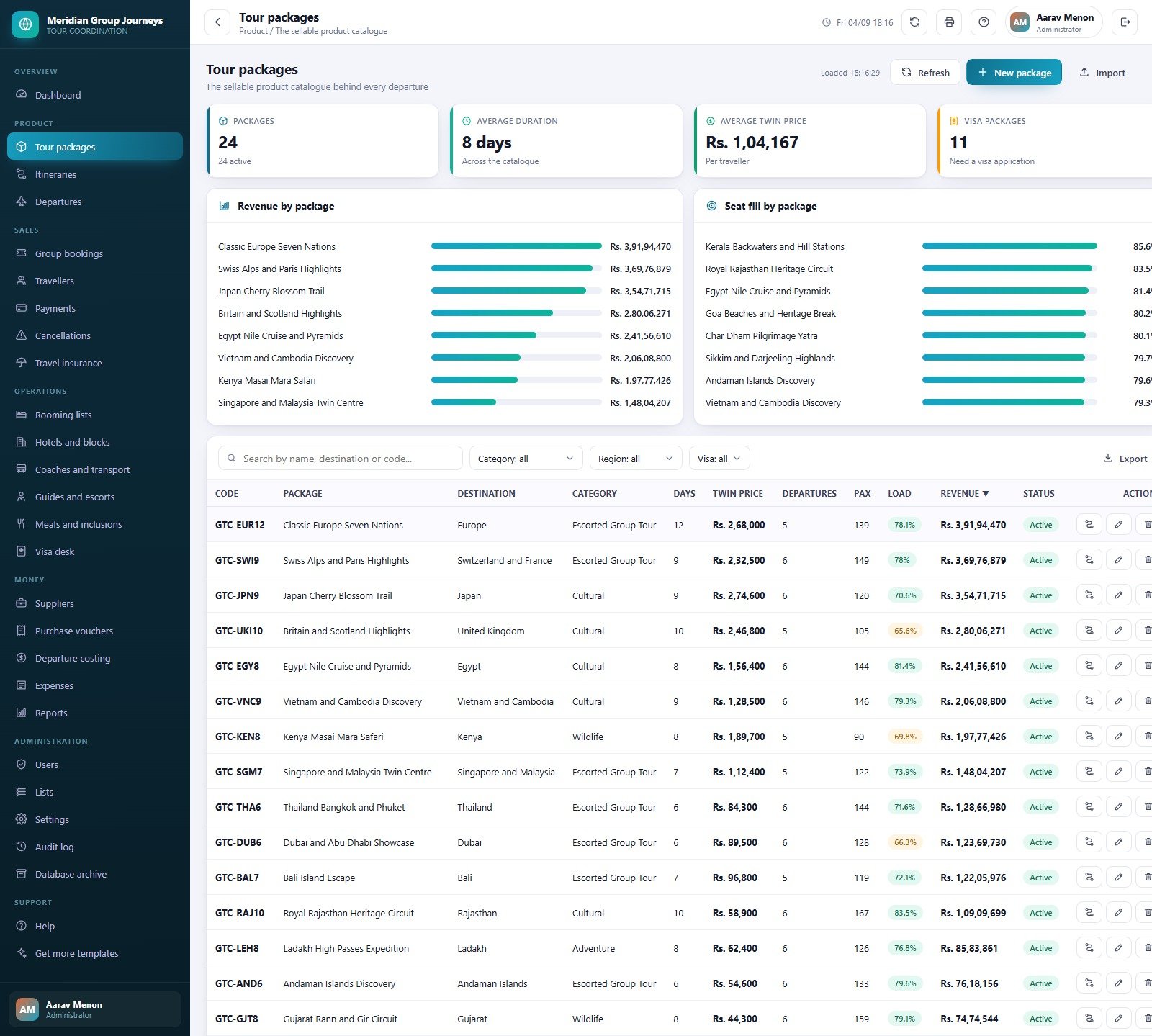
- Sellable product catalogue. Tour packages carry a code, destination, category, duration, twin price and status; the demo ships 24 active packages with an 8-day average duration.
- Day-by-day itinerary builder. 192 itinerary days across 96 overnight and touring cities, each with meals, overnight city, entrance fee and a walking grade.
- Departures with live seat inventory. Capacity, sold, free and load factor recalculate themselves; a below-load-threshold counter flags the departures inside 45 days that are not selling.
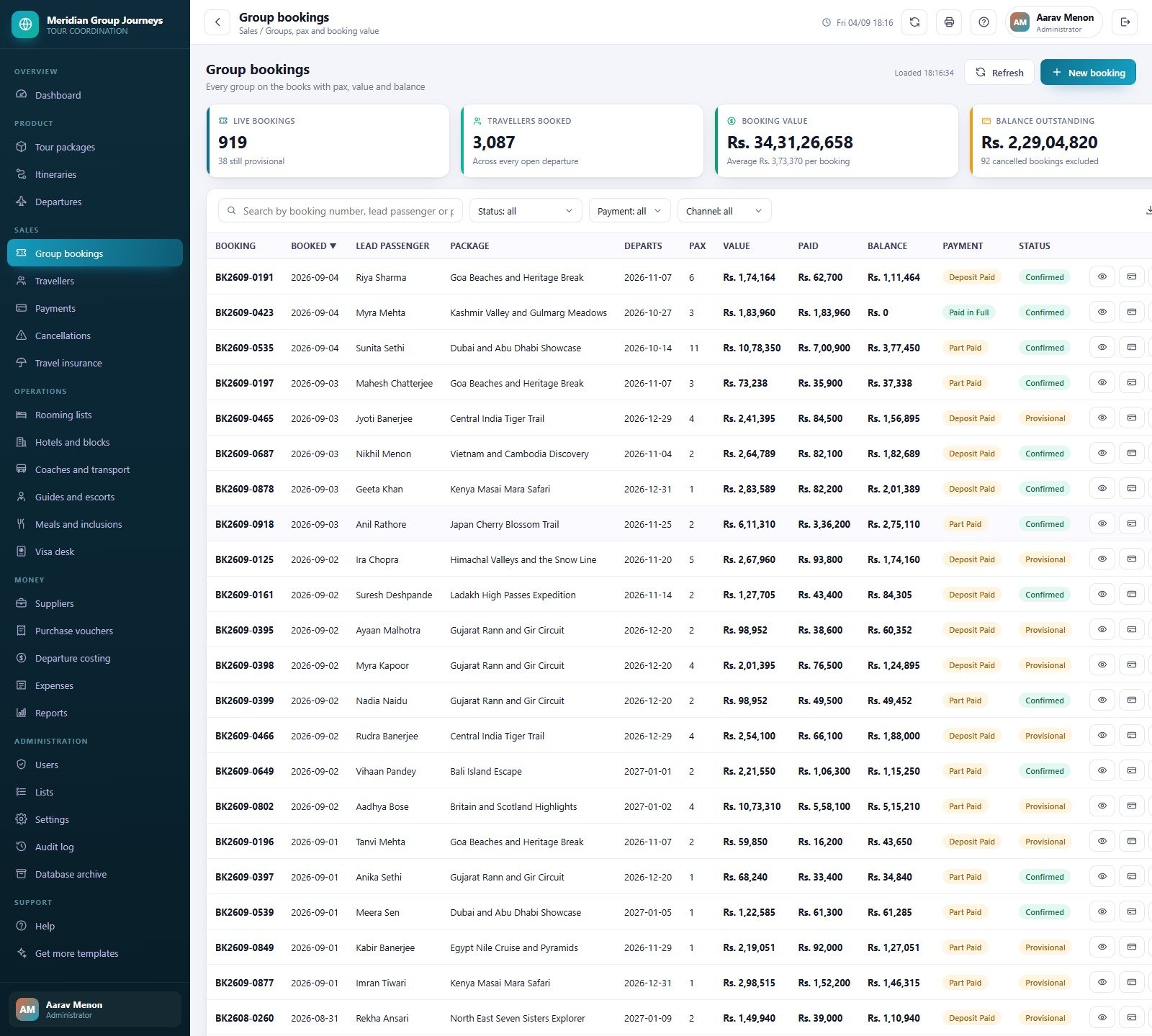
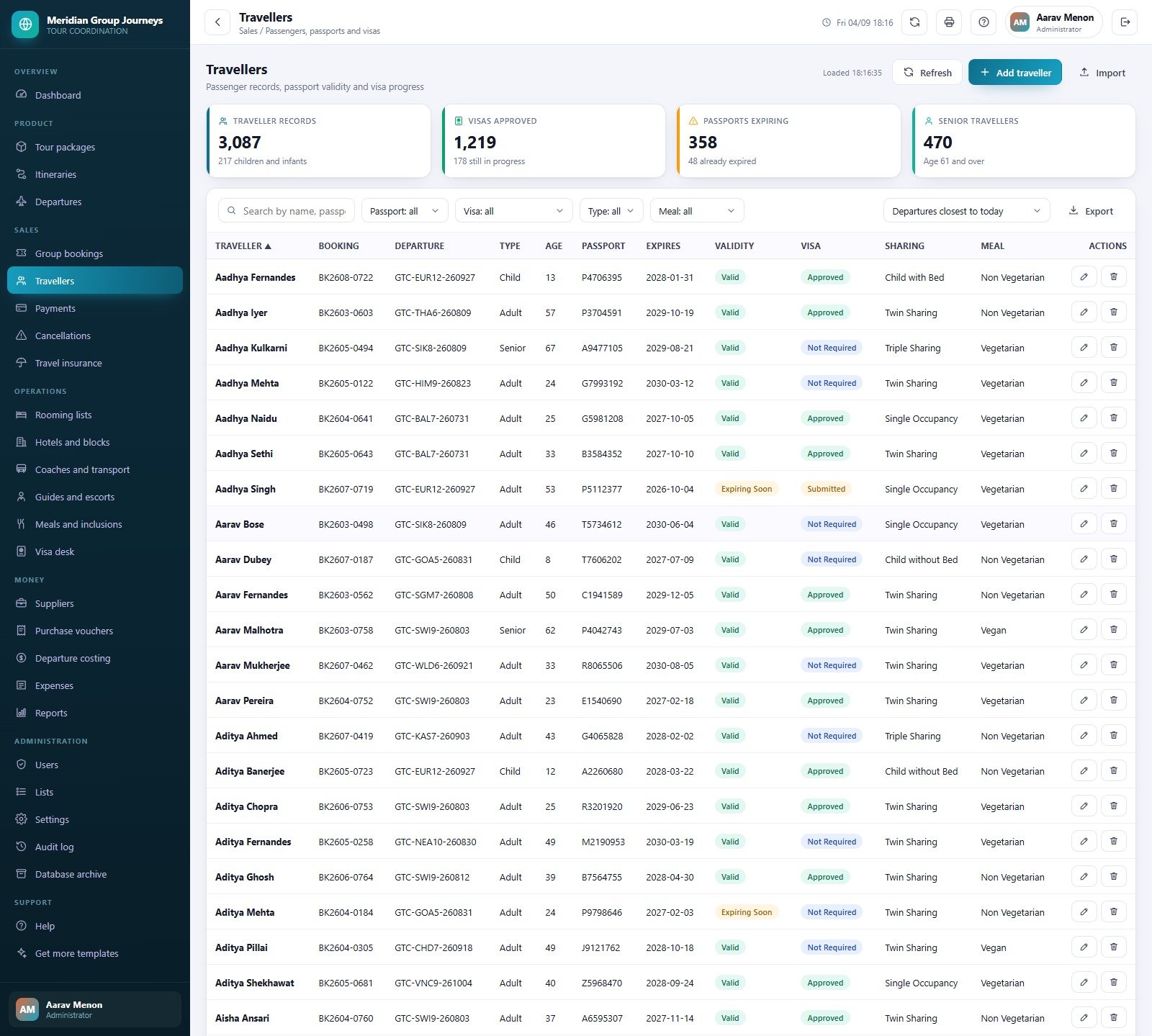
- Group bookings and traveller records. 1,011 bookings and 3,087 traveller rows, each traveller carrying passport number, expiry, validity flag, visa state, sharing type and meal preference.
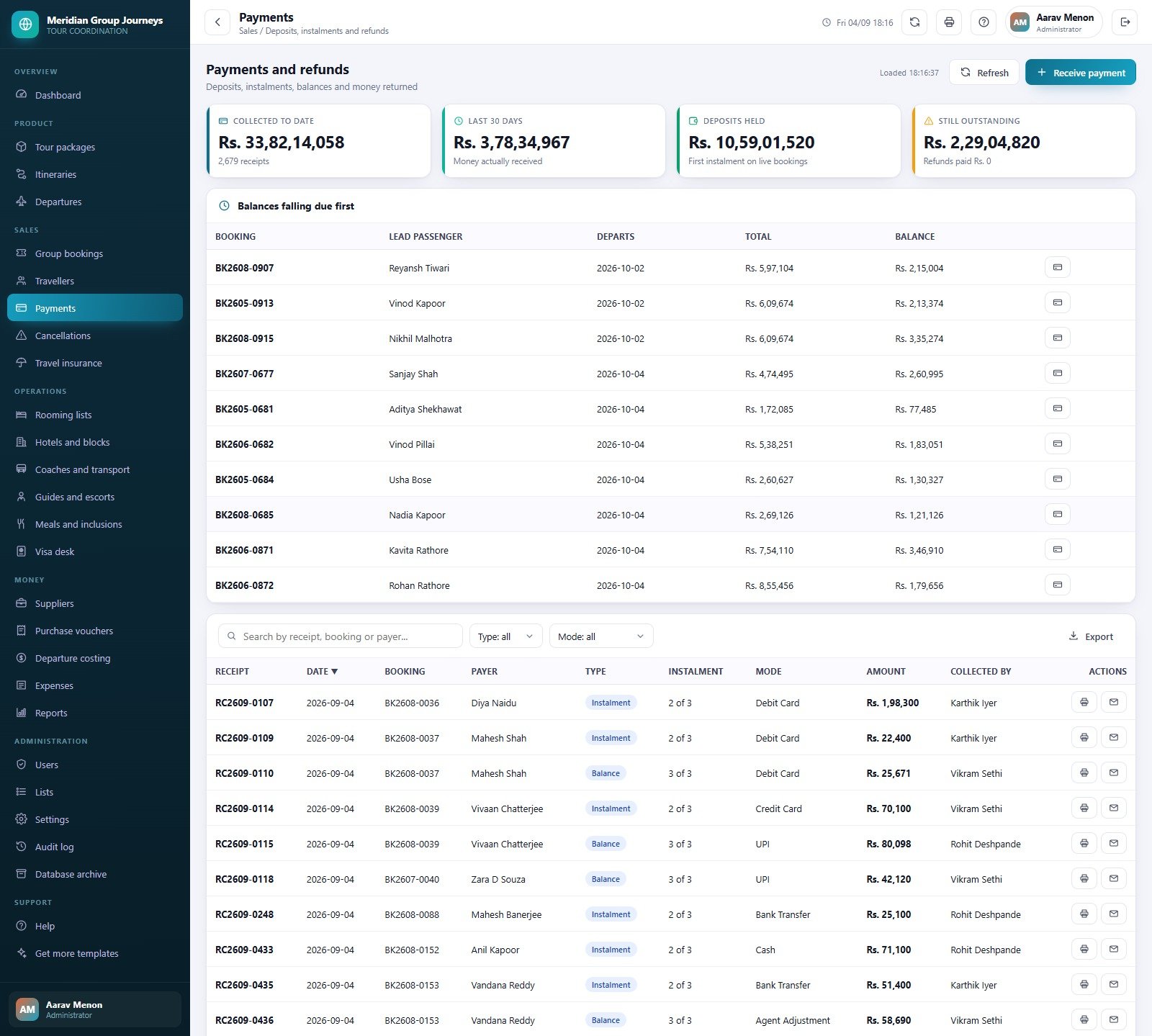
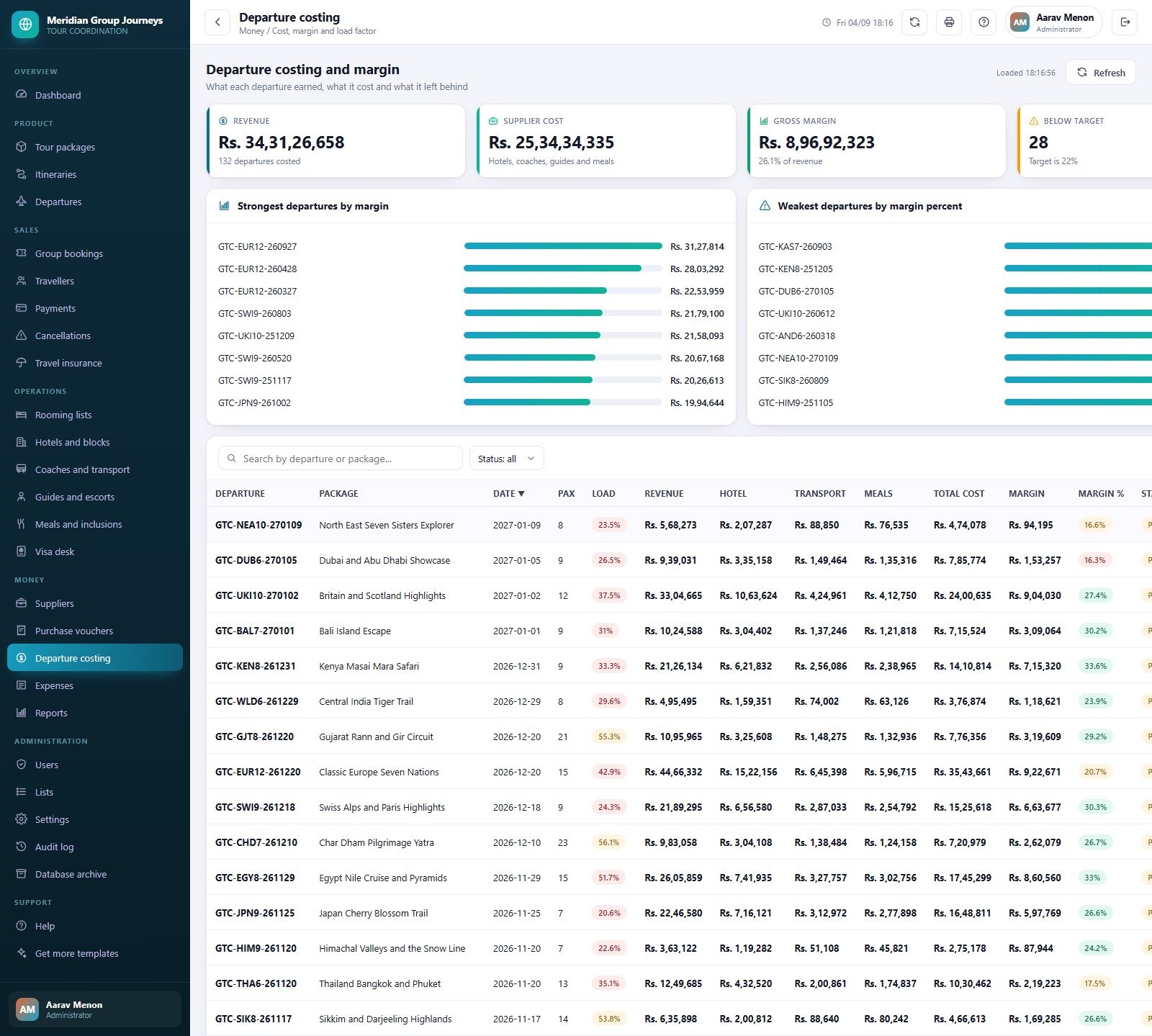
- Money in and money out. Deposits, instalments, balances and refunds on one side; supplier purchase vouchers, departure costing and operating expenses on the other, with margin percent per departure.
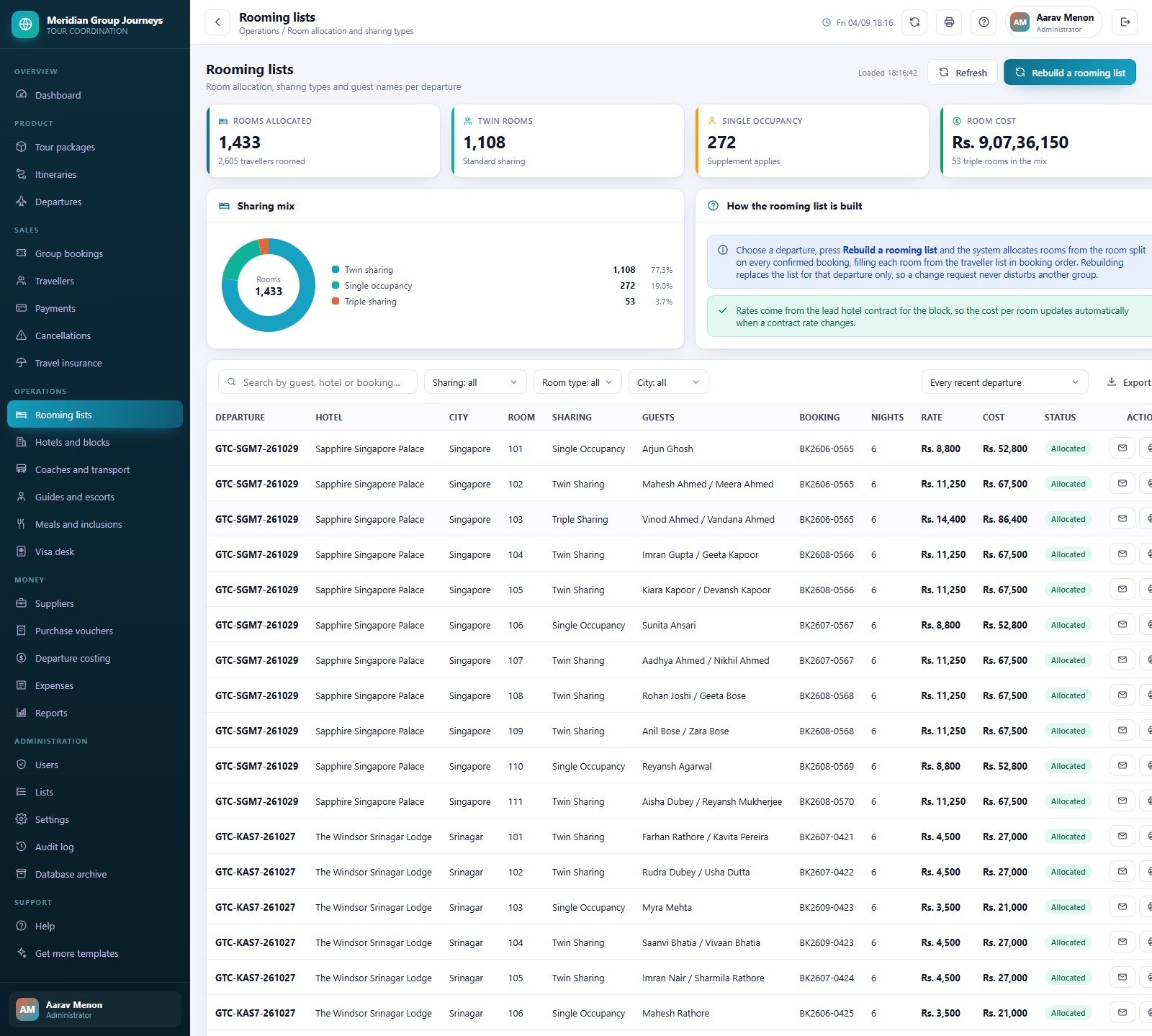
- Ground arrangements in one place. Rooming lists, hotel blocks with confirmation numbers and release dates, coach allocation per leg, guide assignments and meal covers.
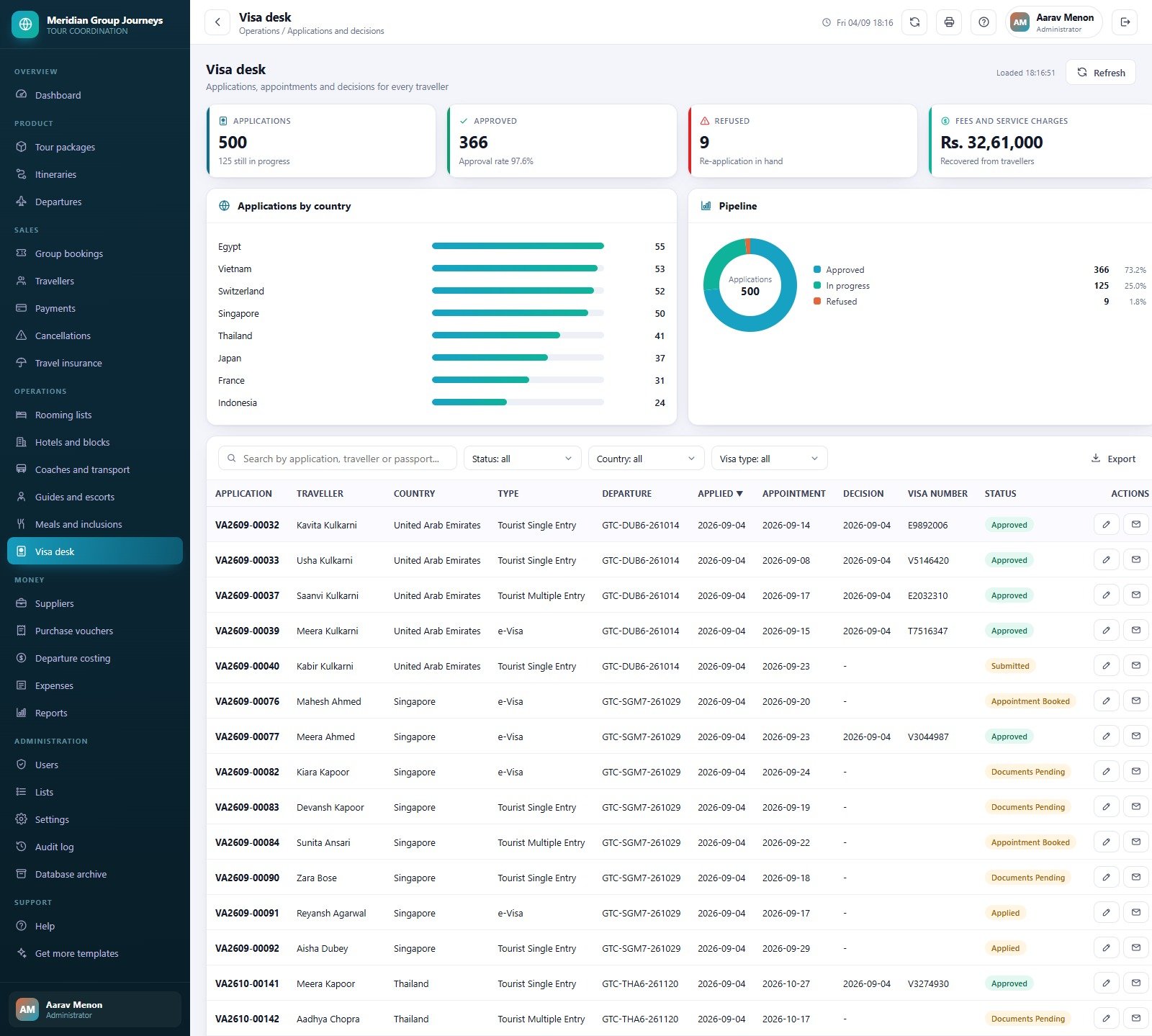
- A working visa desk. Applications, appointment dates, decisions and visa numbers per traveller, plus a passport validity watch against the return date.
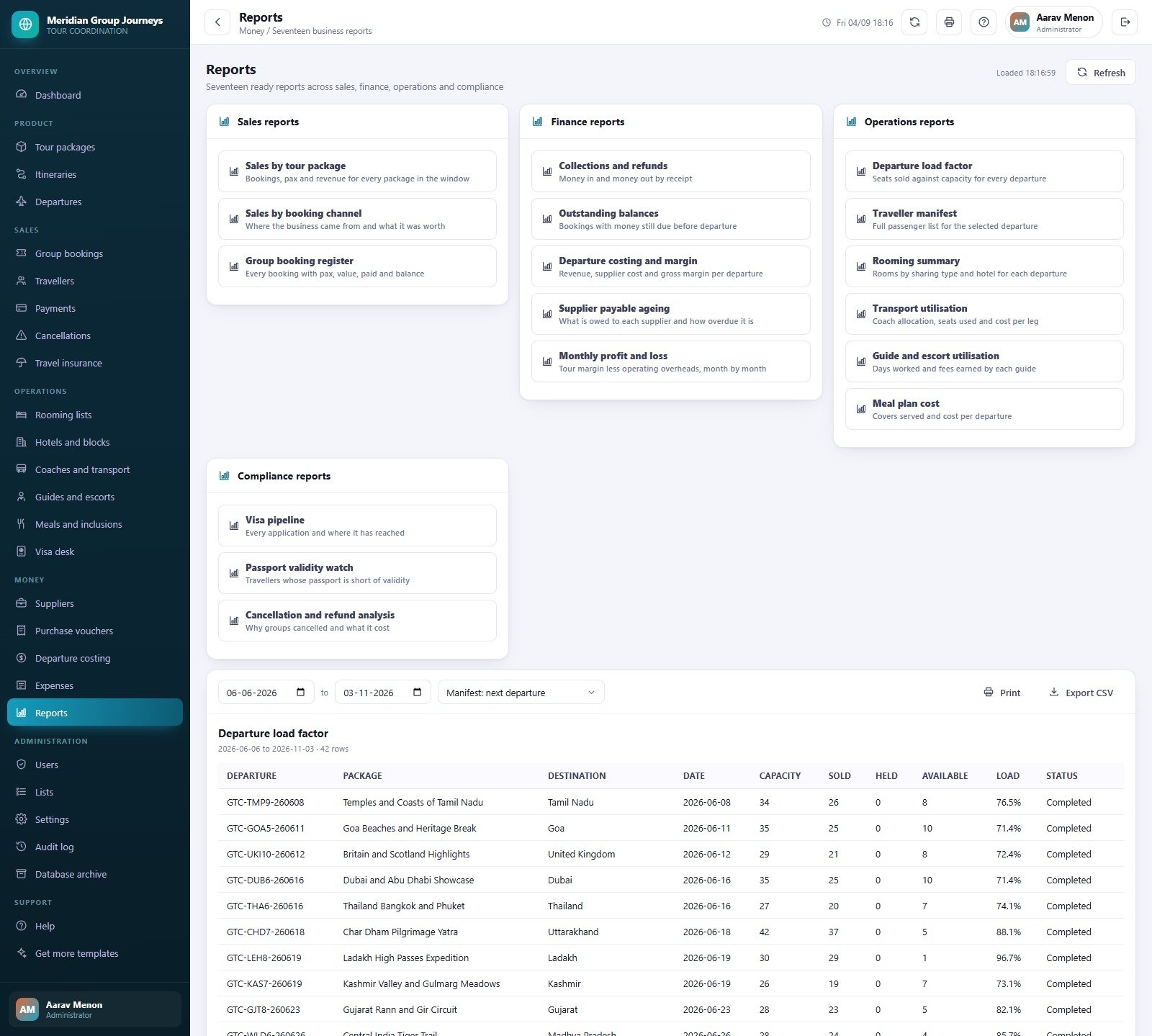
- 17 reports, printable and exportable. Every report honours the date range at the top of the screen, prints at A4, 4 inch or 3 inch, and exports to CSV.
- Role security that is enforced server side. The permission map drives the sidebar and the guard on every write, so a hidden screen cannot be reached by editing the page.
- Housekeeping built in. Salted SHA-256 passwords, 12-hour server-issued sessions, a full audit log, one-click backup and a dated database archive.
What’s Inside the Group Tour Coordination Management System Web App
The download is a ZIP holding Code.cs.txt, Index.txt and the illustrated user manual PDF. Deployment is eight steps: create a standalone Apps Script project, paste the two files, deploy as a web app, run setup once and sign in. Setup builds its own Google Sheet database, creates 28 tables, seeds the sample data and is staged and resumable, so a free Gmail account that hits the six-minute execution limit queues a trigger and finishes on its own.
The modules are grouped the way a tour desk actually works: Product (tour packages, itineraries, departures), Sales (group bookings, travellers, payments, cancellations, travel insurance), Operations (rooming lists, hotels and blocks, coaches and transport, guides and escorts, meals and inclusions, visa desk), Money (suppliers, purchase vouchers, departure costing, expenses, reports) and Administration (users, lists, settings, audit log, database archive).
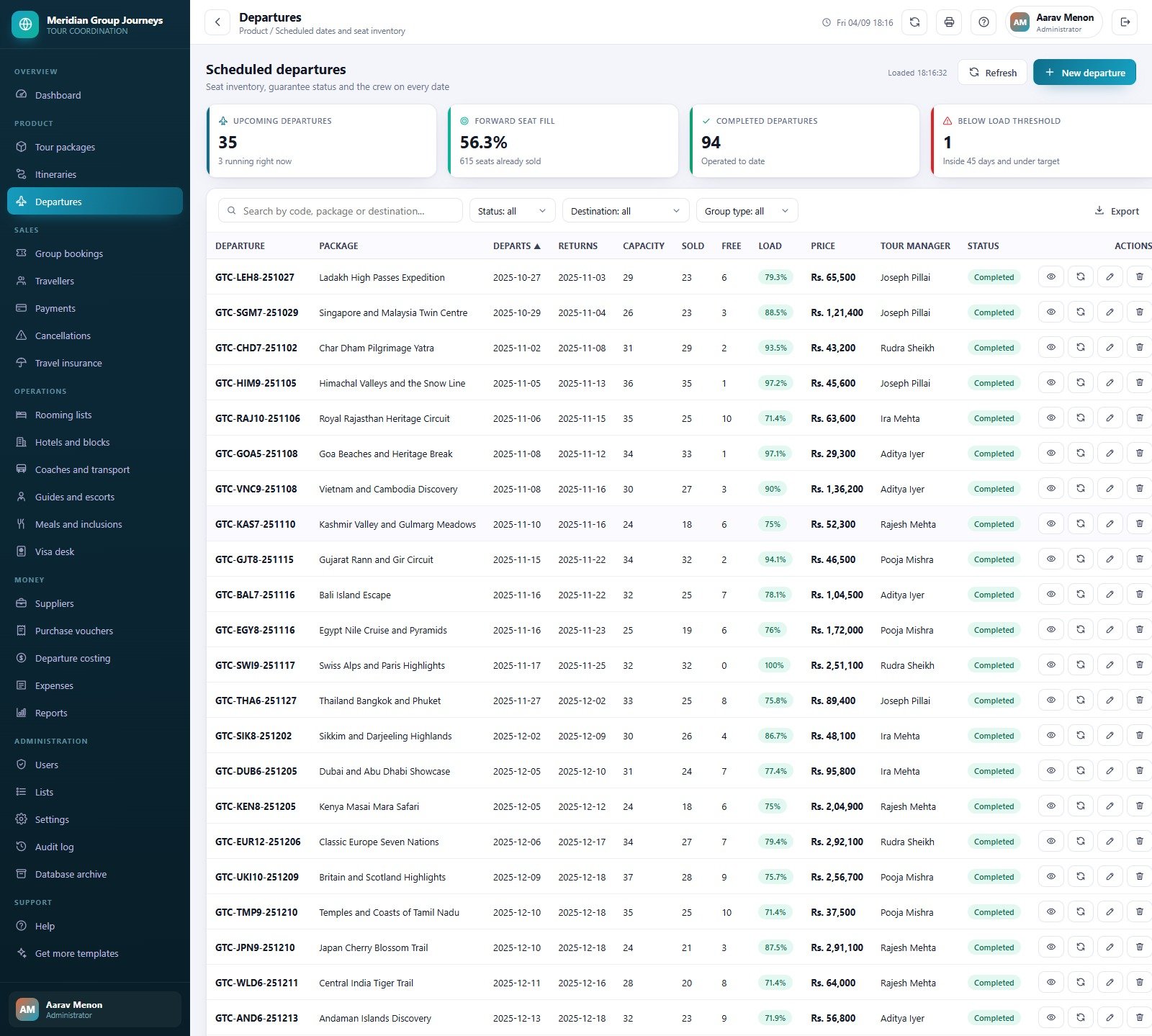
The seed is dated relative to the day you install it — roughly 340 days of trading history behind today and 130 days of forward inventory ahead — which is why a handful of departures are always in progress the first time you open the dashboard.
Group Tour Coordination Management System vs. a Spreadsheet vs. Paid Tour Operator SaaS
| This web app | Spreadsheet tracker | Paid tour operator SaaS | |
|---|---|---|---|
| Cost | One payment, yours to keep | Free | Roughly $60-$200 per user per month |
| Platform | Google Apps Script + Google Sheets | Excel or Google Sheets | Vendor cloud |
| Setup time | About 15 minutes | Immediate, then weeks of formulas | Days of onboarding |
| Real-time team collaboration | Yes, 8 seeded accounts | Partial, file locking and versions | Yes |
| Mobile access | Yes, browser based | Clumsy | Yes |
| Customizable fields | Yes, you hold the source | Yes | Only what the vendor exposes |
| Share with link | Yes, one deployment URL | Yes, whole file | Yes |
| Year-1 cost at 5 users | One payment | Free plus your time | Roughly $3,600-$12,000 |
| Role-based permissions | 6 roles, 52 permissions, server enforced | None worth the name | Yes |
| Who owns the data | You, in your own Drive | You | The vendor |
Who This Template Is For – and Who It’s Not For
It fits outbound and inbound tour operators running escorted group departures, pilgrimage and yatra organisers, school and college tour desks, corporate offsite planners and destination management companies with a handful of coordinators who currently share three spreadsheets and a WhatsApp group.
It does not fit if you sell single FIT bookings with no fixed departure, if you need live GDS or airline inventory, if you need a public booking engine with online card payments, or if you need accounting-grade ledgers — this records money against bookings and vouchers, it is not a replacement for your books. It is also not a certified or licensed travel system: IATA, tour operator licensing, insurance intermediation and consumer-protection rules are yours to satisfy, and the sample GSTIN, IATA number and insurer names in the demo are made-up placeholders.
How to Use the Group Tour Coordination Management System
- Open the live demo first and click through as two different roles before you buy.
- Deploy your own copy — new Apps Script project, paste
Code.cs.txtandIndex.txt, deploy as a web app with access set to Anyone, runsetuponce. - Change every seeded password from the Users screen, then add your own coordinators.
- Build the product. Create a tour package, then add one itinerary day per day of the tour.
- Schedule a departure with its date, seat capacity and selling price; the return date and load factor calculate themselves.
- Take a booking, add the travellers with passport and meal details, then record the deposit, the instalments and the balance.
- Confirm the ground — block hotel rooms with a confirmation number, allocate a coach per leg, assign a tour manager and plan the meals.
- Watch the margin. Raise purchase vouchers against suppliers, recalculate the departure costing and check the margin percent before the coach rolls.
Real-World Use Cases
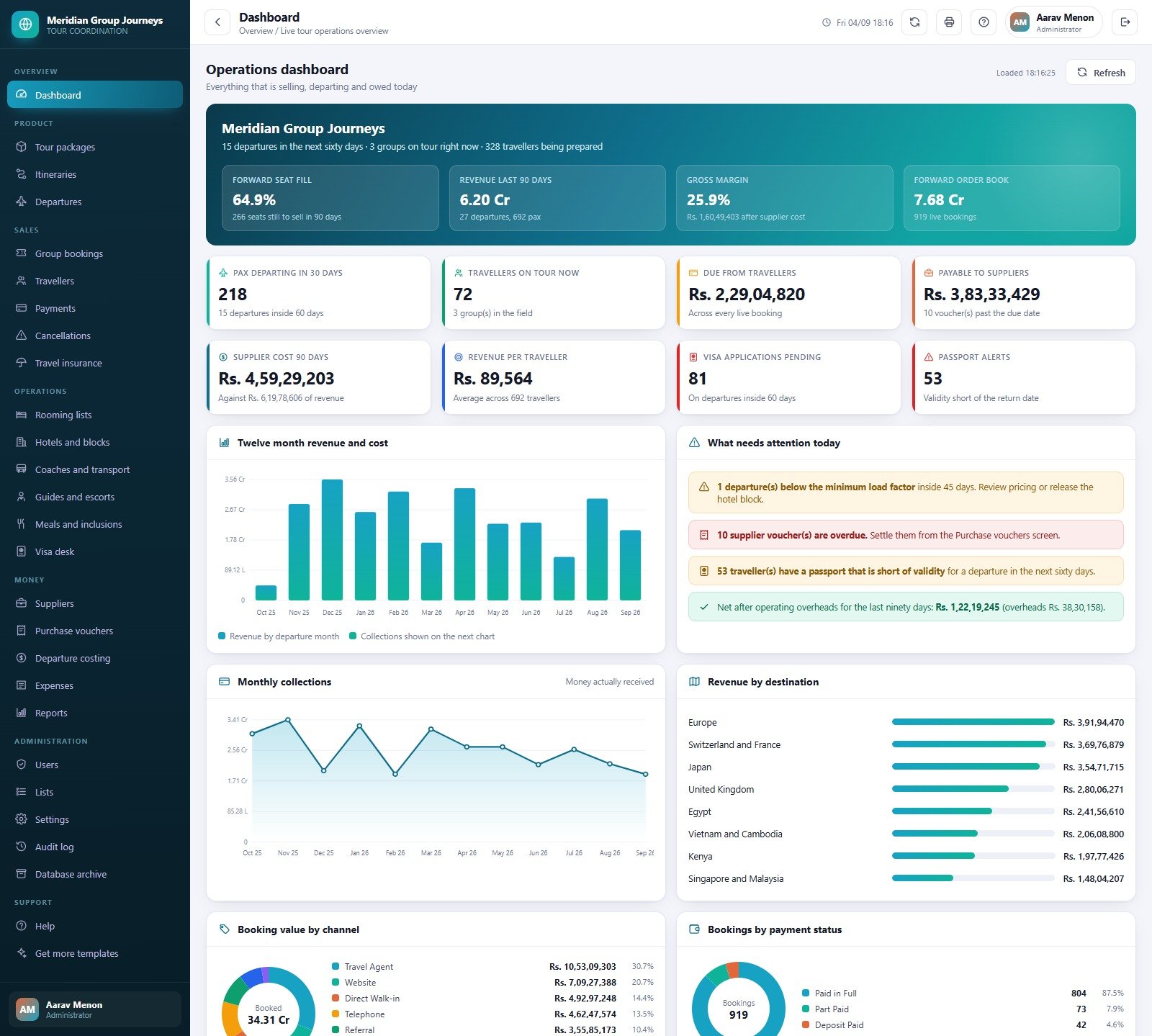
Priya runs a 14-coordinator outbound desk. She lives on the dashboard’s four alert lines: departures below the minimum load factor inside 45 days, overdue supplier vouchers, travellers whose passport is short of validity for a departure inside sixty days, and net margin after overheads for the last ninety days. Three of those used to be a Monday morning phone call.
Rahul organises pilgrimage groups. Most of his travellers are seniors, so the traveller list’s age band, meal preference and sharing type matter more than the price. He prints the traveller manifest and the rooming summary at A4 for the tour manager and emails the rooming list to the hotel from the same screen.
Anita handles visas for a mid-size operator. She signs in as the Visa Officer, works the applications from documents pending to approved, and the passport validity watch tells her which files to chase before the departure is inside the embassy’s window.
Frequently Asked Questions
Can I try it before buying?
Yes — the live demo above is the real system with all eight seeded accounts. Sign in, create a booking, run a report. Nothing you do there touches your own copy.
Do I need a Google Workspace subscription?
No. It runs on a free Gmail account. Setup is staged so it survives the six-minute execution limit that free accounts impose.
Where is my data stored?
In a Google Sheet that setup creates in your own Drive, under your own Google account. Attachments go into a Drive folder tree created alongside it. Nothing is sent anywhere else.
Can I change the fields, the roles or the branding?
Yes. You receive the full Apps Script source, so every screen, permission and printed document can be edited. The operator name, address, GSTIN, currency, tax percent, deposit percent and print sizes are already editable from Settings without touching code.
Does it send email?
Yes, through MailApp on your own Google quota — booking confirmations, payment receipts, supplier vouchers, rooming lists and visa updates. You can turn all of it off with one switch in Settings.
How many users can sign in?
As many as you create. The demo ships 8 accounts across 6 roles; you add or remove them from the Users screen, and each role’s permission set is checked on the server, not just in the browser.
What happens when the database gets big?
The Database archive screen moves rows older than a cutoff into a dated Drive copy and removes them from the live file. The copy can be reconnected and searched read-only from the same screen.
About the Author
Built by PK – Microsoft Certified Professional with 15+ years of Excel, Google Sheets, and Power BI experience. Founder of NextGenTemplates, reaching 300K+ subscribers across YouTube channels. Every template is hand-built and tested before release.
Explore Related Templates
- Adventure Sports Booking Management System Web App – the same architecture for activity operators selling sessions rather than departures.
- Airport Transfer Management System Web App – pairs with this one for the arrival and departure transfer legs.
- Backpacker Hostel Management System Web App – bed-level inventory for the accommodation side.
- Car Rental Management System Web App – fleet, contracts and damage for self-drive.
- Travel and Tourism Dashboard in Google Sheets – a lighter reporting-only view if you are not ready for a full system.
- Hospitality & Resorts Dashboard in Google Sheets – occupancy and revenue analytics for the property side.
- Browse the whole Mini Web Apps category, or the Google Sheets range.
Ready to run every departure from one screen? Open the live demo, sign in as the Visa Officer or the Accounts Officer to see the role separation, then buy the source and deploy your own copy in about fifteen minutes.
Last updated: 09 September 2026 · version 1.0.0
Compatibility and Requirements
- Runs as a Google Apps Script web app on a free Google account. You need a web browser and nothing else to install.
- The system stores its data in a Google Sheet that setup creates in your own Drive. Google explains how sheets work in Get started with Google Sheets.
































Reviews
There are no reviews yet.