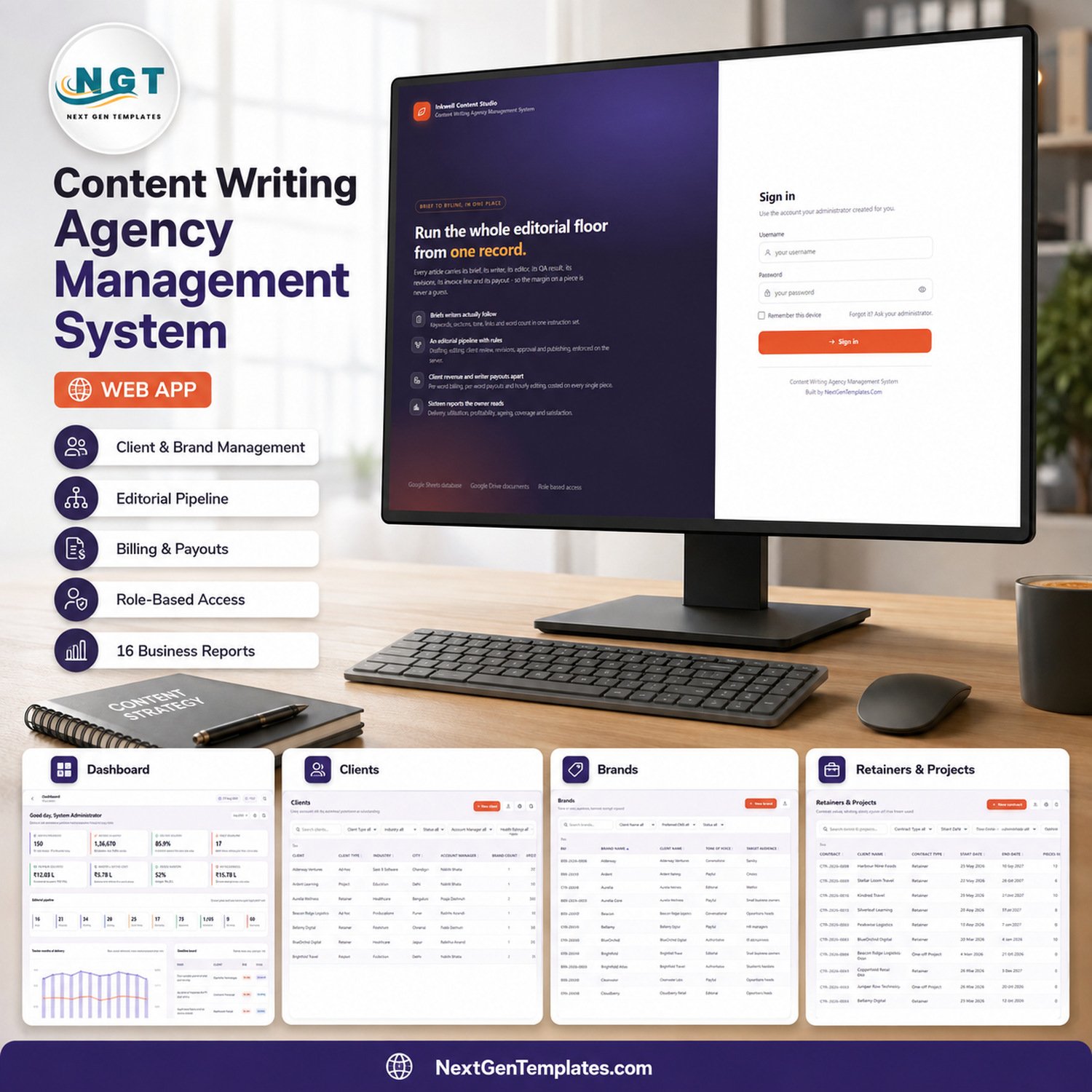
The Content Writing Agency Management System Web App is a Google Apps Script web application that runs a content studio from one database: 27 sidebar screens, 28 Google Sheets tables, 6 roles, 10 pipeline stages and 16 built-in reports. The demo deployment ships seeded with 13,670 rows so every screen is populated the moment you sign in.
Every article carries its brief, its writer, its editor, its QA result, its revisions, its invoice line and its payout – so the margin on a single piece is a number you can read, not a guess.
🌍 Join 8,400+ teams in 40+ countries using NextGenTemplates to replace paid SaaS seats with one-time-purchase Excel, Google Sheets, Power BI and Apps Script templates.
✅ Instant download · One-time payment · No subscription · No per-user fees · Runs in your own Google account
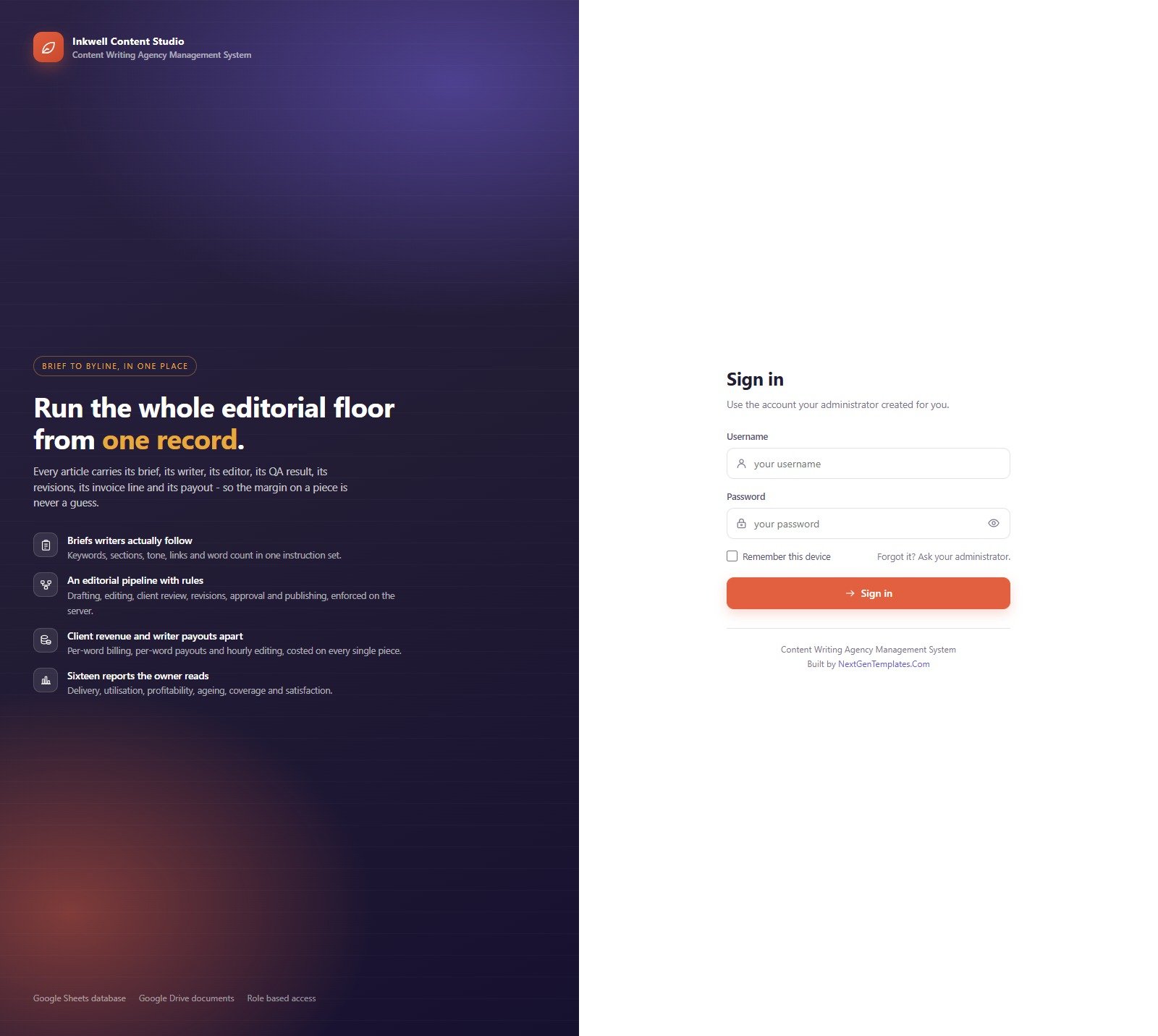
Sign-in Screen
Role-based sign-in against accounts your administrator creates. Passwords are stored as salted SHA-256 hashes, sessions are server-side tokens with a sliding timeout, and default credentials are never displayed on the page.
🚀 Try the Live Demo Before You Buy
We have deployed the Content Writing Agency Management System Web App in our own Google account so you can test every page and every role – with a full agency of sample data – before purchasing. No signup, no email required.
🔑 Test Login Credentials
Sign in as admin to see everything, then sign in again as writer to watch the same system shrink to one person’s own work with every money column removed. That contrast is the product.
The seed also contains second accounts for the shared roles – manager2, editor2, writer2 and writer3 – each with the same password as the first account of its role, so you can test hand-offs between two people in the same seat.
💡 These demo credentials are public on purpose. They are the seeded logins of one shared demo instance that is reset from time to time, so please expect other visitors to be editing the same sample agency while you look around – it is not a system you are buying a seat on. What you get after purchase is the full source code (Code.gs + Index.html) plus a step-by-step deployment guide, so you can build your own private instance in your own Google account in about fifteen minutes.
🔑 Key Features of the Content Writing Agency Management System Web App
🧭 27 screens in one sidebar, grouped the way an agency actually works. Overview, Accounts (Clients, Brands, Retainers & Projects), Editorial (Content Briefs, Content Pipeline, Assignments, Writers & Editors, QA Checks, Revisions, Keyword Planning, Published Library), Finance (Invoices & Billing, Payments, Writer Payouts, Expenses), Insight (Client Feedback, Documents, Reports), Admin (Import / Export, User Management, List Management, Settings, Audit Log, Database Archive) and Support.
🔐 Six roles with a server-side “may see money” switch. Admin, Agency Owner, Account Manager, Managing Editor, Writer and Finance. Roles without the money permission never receive client rates, invoice totals, revenue, delivery cost or margin – those fields are stripped from the payload on the server before it reaches the browser, so they cannot be recovered by editing the page. The same permission map drives the sidebar and the guard on every server endpoint.
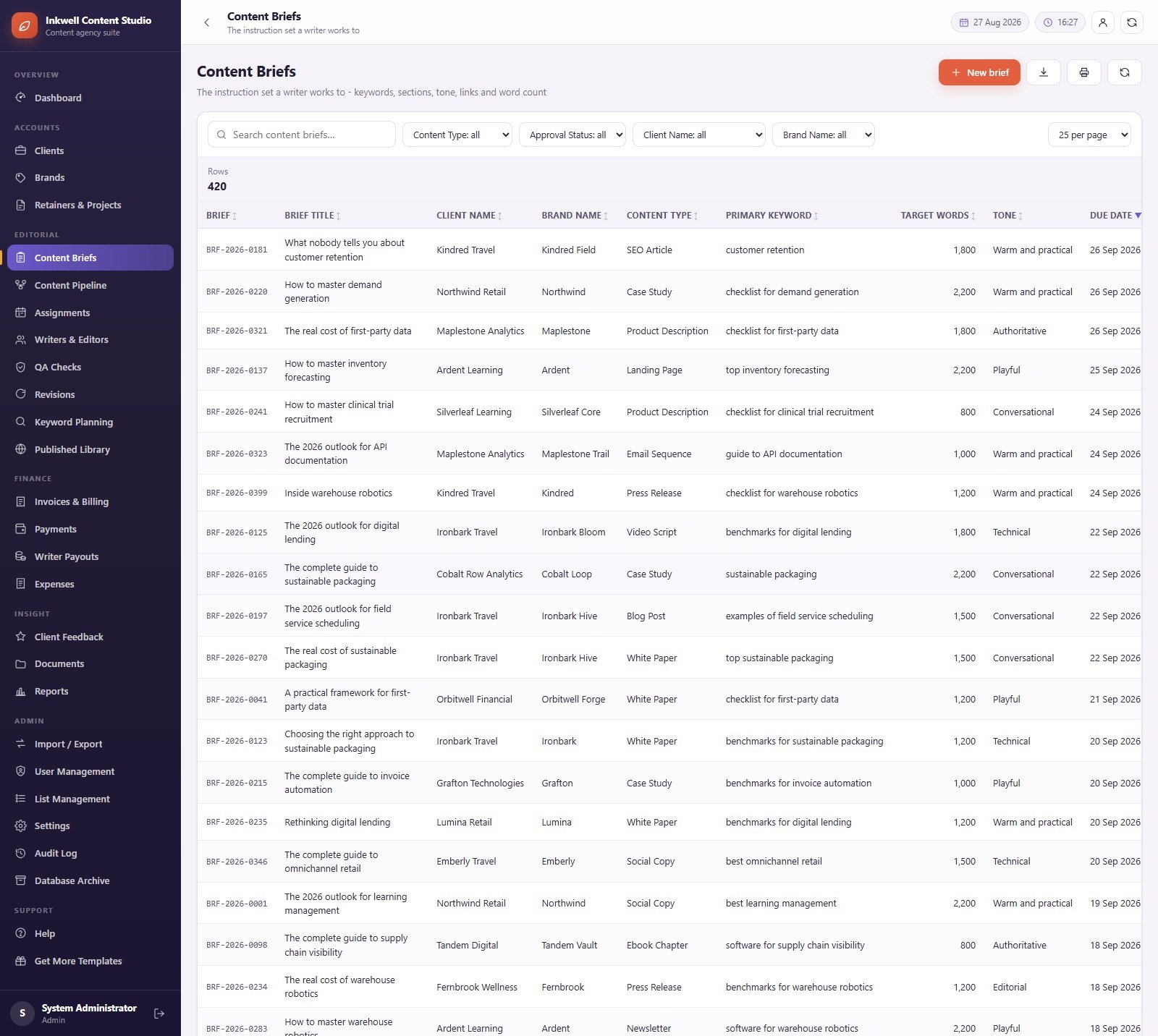
📝 A brief format writers can actually follow. Each of the 420 seeded briefs carries a client, a brand, a content type, a primary keyword, a target word count, a tone and a due date, with filters for content type, approval status, client and brand.
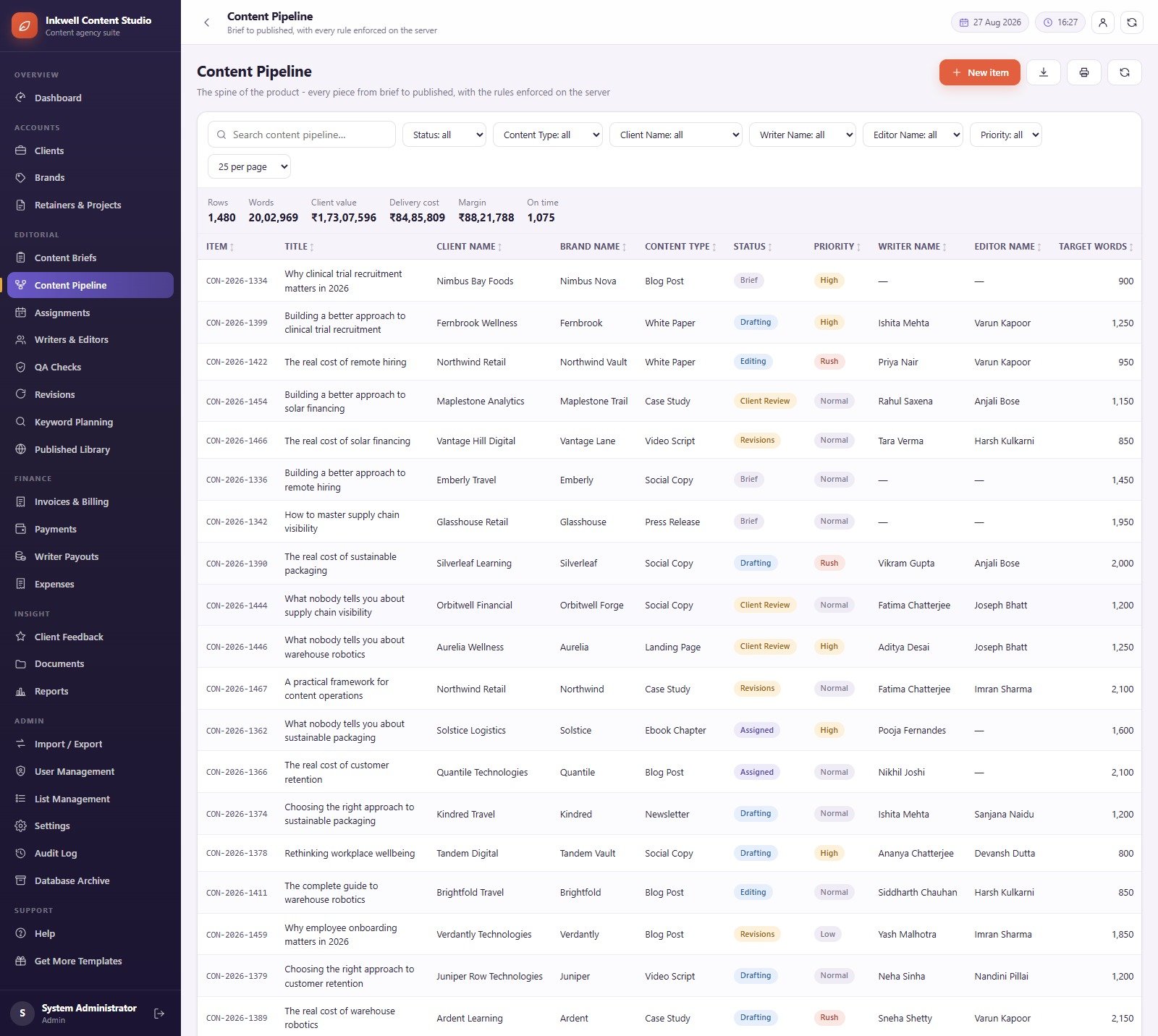
🔄 A ten-stage editorial pipeline enforced on the server. Brief, Assigned, Drafting, Editing, Client Review, Revisions, Approved, Published, On Hold and Cancelled. The pipeline grid totals rows, words, client value, delivery cost, margin and on-time count at the top of the table, and filters by status, content type, client, writer, editor and priority.
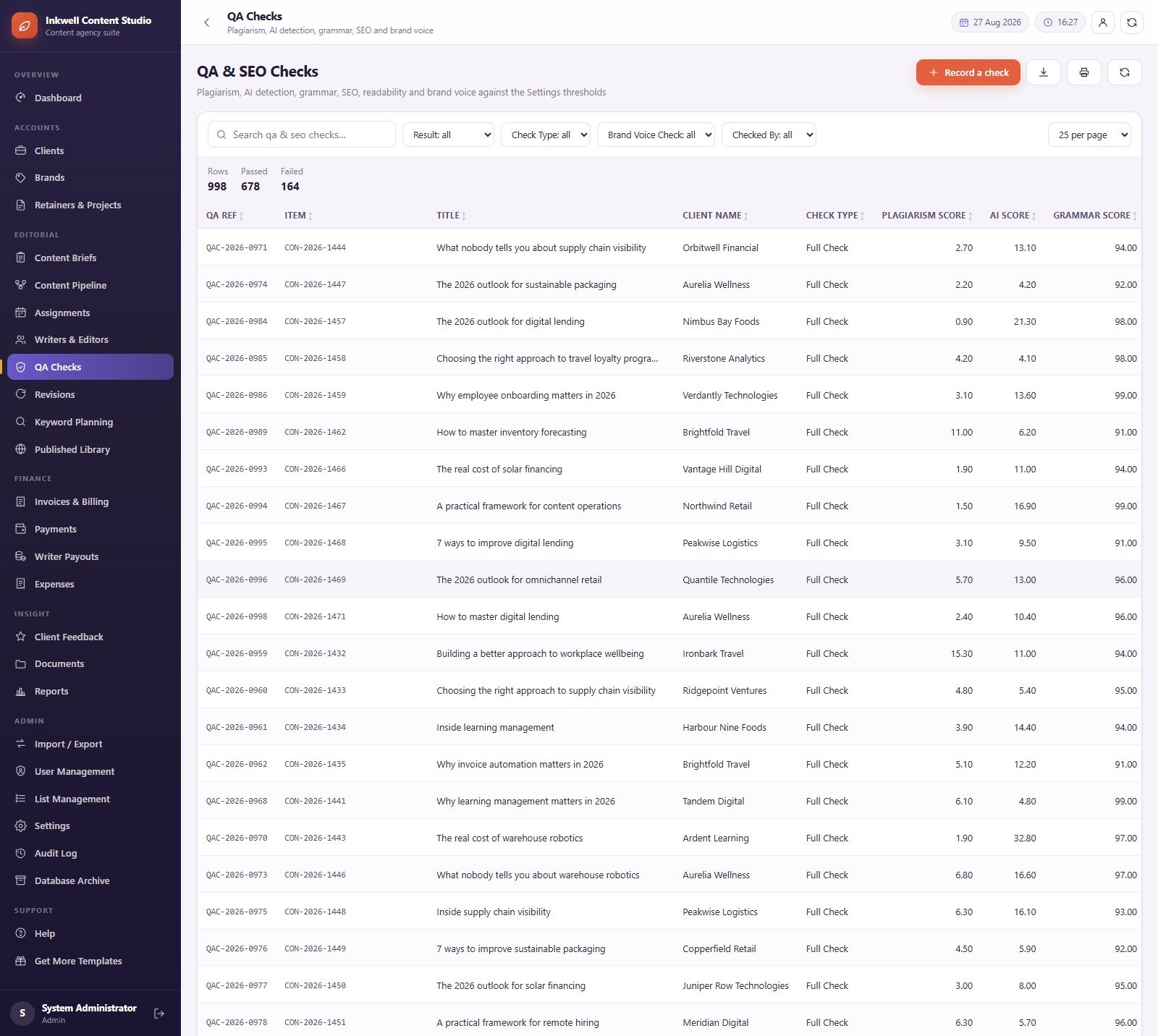
✅ A QA register with your own thresholds. Record plagiarism, AI-detection, grammar, SEO, readability and brand-voice scores from whichever tools your agency already pays for, and the register marks each check passed or failed against the thresholds you set in Settings. The demo carries 998 recorded checks.
💵 Client revenue and writer cost kept apart. Invoices are built from the pieces approved or published in a period, with retainer fee, discount, tax and grand total per invoice. Payout runs are built from completed assignments, per word for writers and per hour for editors, with deductions, net payable and a payment mode against each run.
📊 Sixteen filterable, printable, exportable reports. Every report takes a date range, a client and a writer/editor filter, prints, and exports to CSV.
📦 What’s Inside the Content Writing Agency Management System Web App
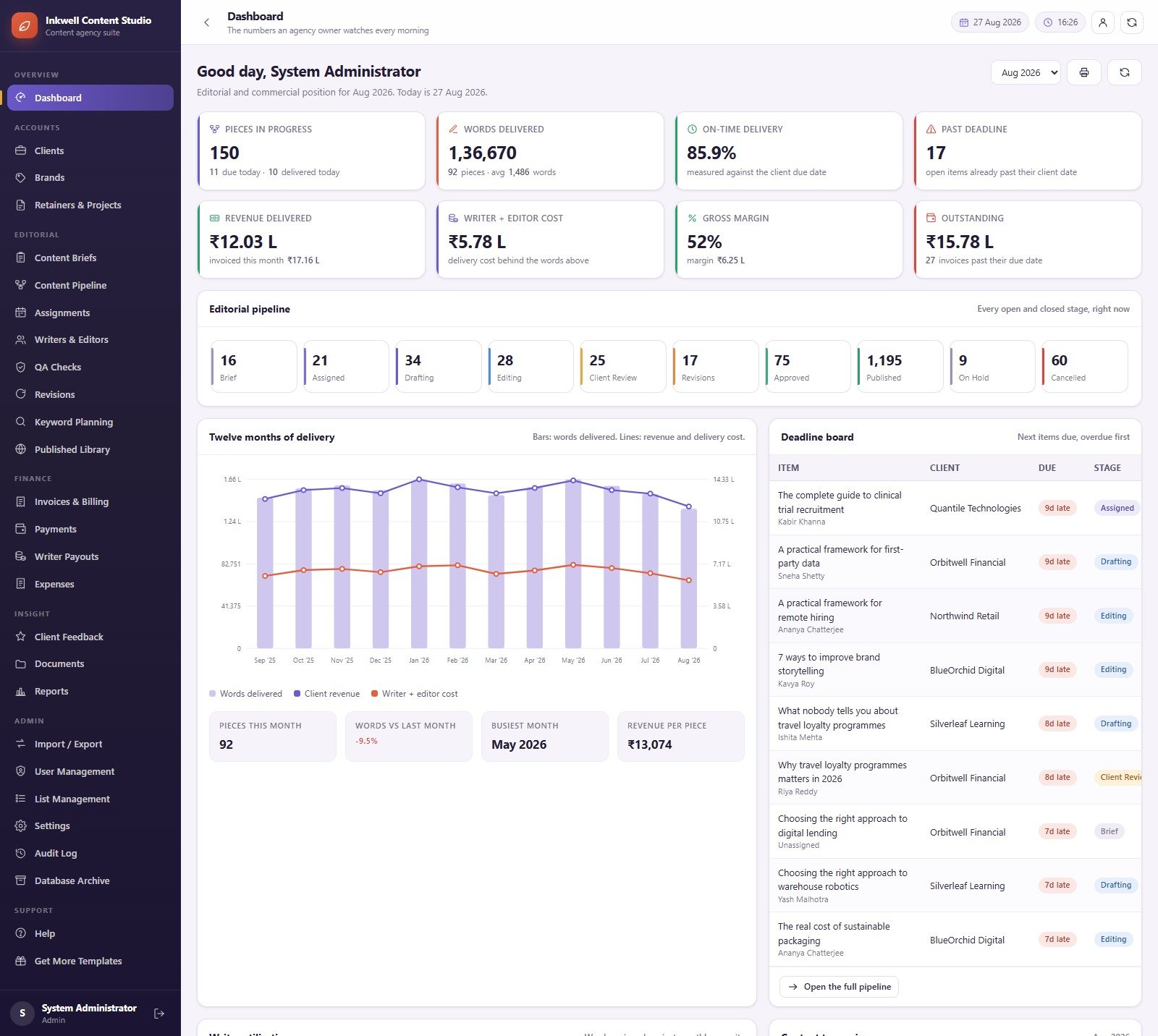
Dashboard
Eight KPI cards – Pieces in Progress, Words Delivered, On-Time Delivery, Past Deadline, Revenue Delivered, Writer + Editor Cost, Gross Margin and Outstanding – above a live count of every open and closed pipeline stage. Below that sit a twelve-month delivery chart with words delivered as bars and client revenue and delivery cost as lines, a deadline board of the next items due with the most overdue first, and a strip showing Pieces This Month, Words vs Last Month, Busiest Month and Revenue Per Piece. A month picker at the top right re-reads the whole page.
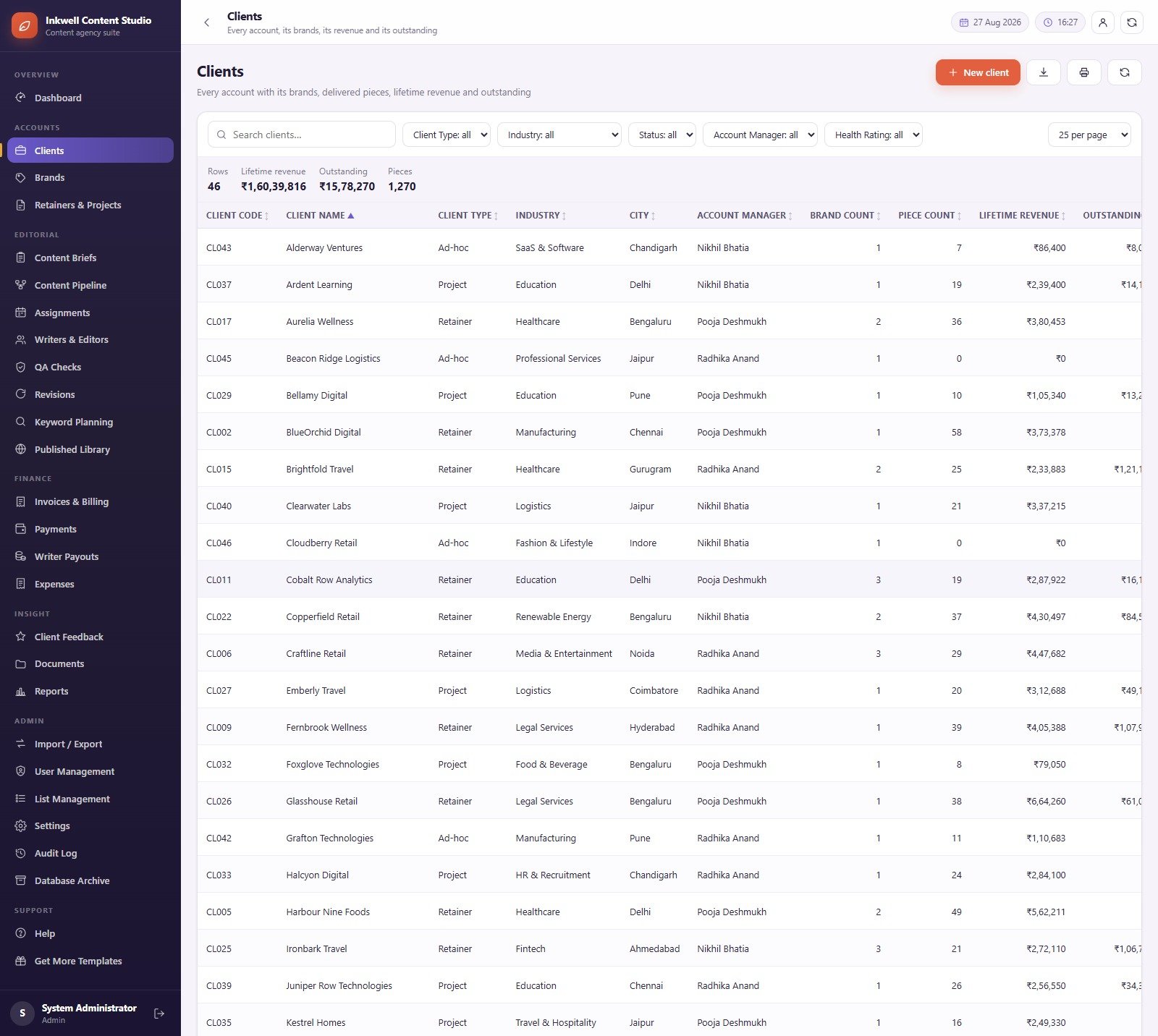
Clients
Every account with its commercial position and outstanding balance, filtered by client type, industry, status, account manager and health rating. Each client row carries its city, its account manager and its brand count, so a manager can see at a glance which accounts carry more than one brand.
Content Briefs
The instruction set a writer works to – keywords, sections, tone, links and word count in one record. Columns cover brief reference, brief title, client, brand, content type, primary keyword, target words, tone and due date, with filters for content type, approval status, client name and brand name.
Content Pipeline
The spine of the product: every piece from brief to published, with the stage rules enforced on the server rather than in the browser. The totals strip above the grid shows rows, words, client value, delivery cost, margin and on-time count for whatever the filters currently select, and each row carries its item reference, title, client, brand, content type, status, priority, writer, editor and target words.
QA & SEO Checks
A register of plagiarism, AI-detection, grammar, SEO, readability and brand-voice scores recorded against each piece and compared with the Settings thresholds. Rows, passed and failed totals sit above the grid, and the list filters by result, check type, brand-voice check and who ran the check.
Invoices & Billing
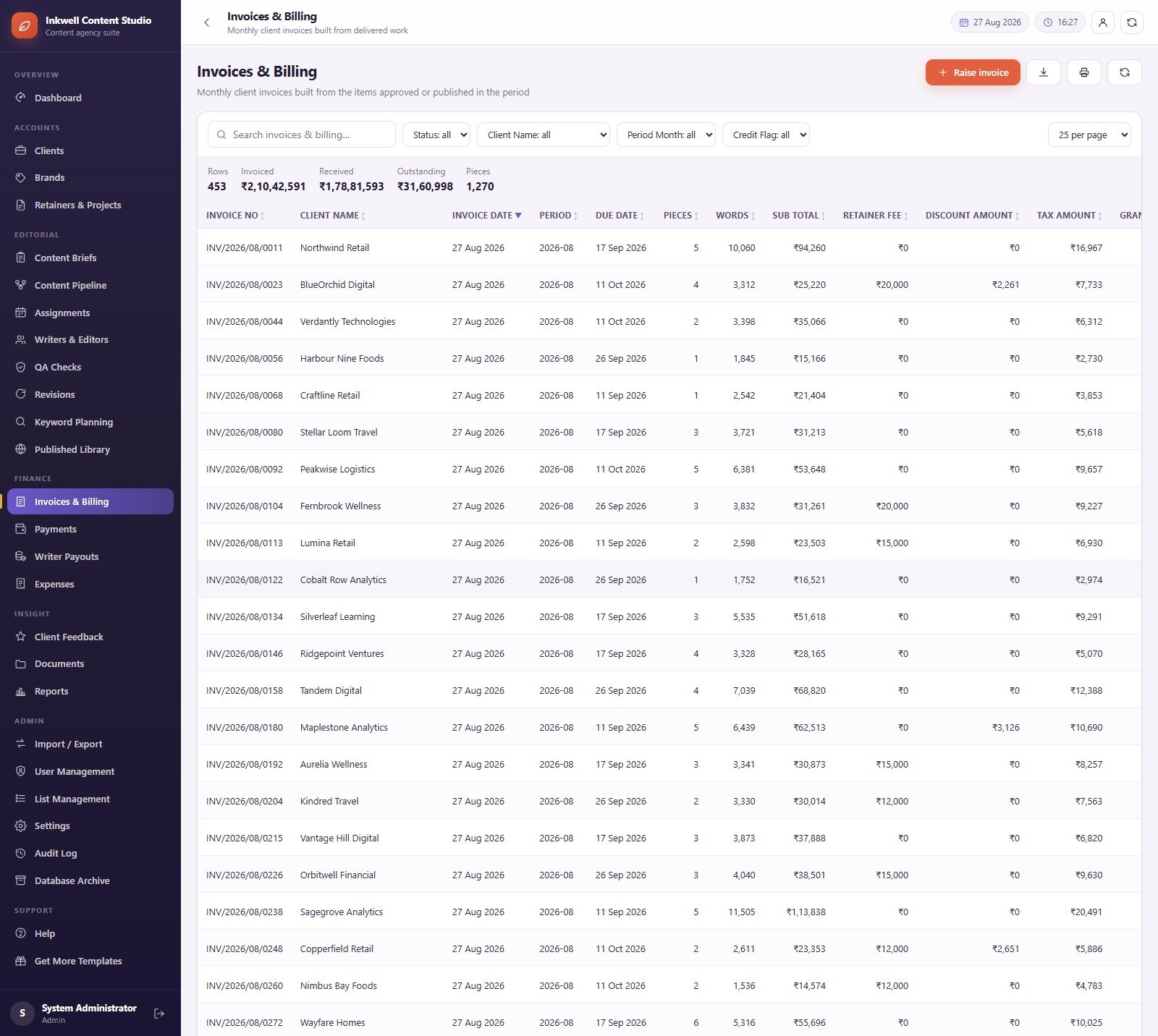
Monthly client invoices built from the items approved or published in the period. The header totals rows, invoiced, received, outstanding and pieces, and each invoice carries its number, client, invoice date, period, due date, piece count, word count, sub total, retainer fee, discount amount, tax amount and grand total. Filters cover status, client, period month and credit flag.
Writer Payouts
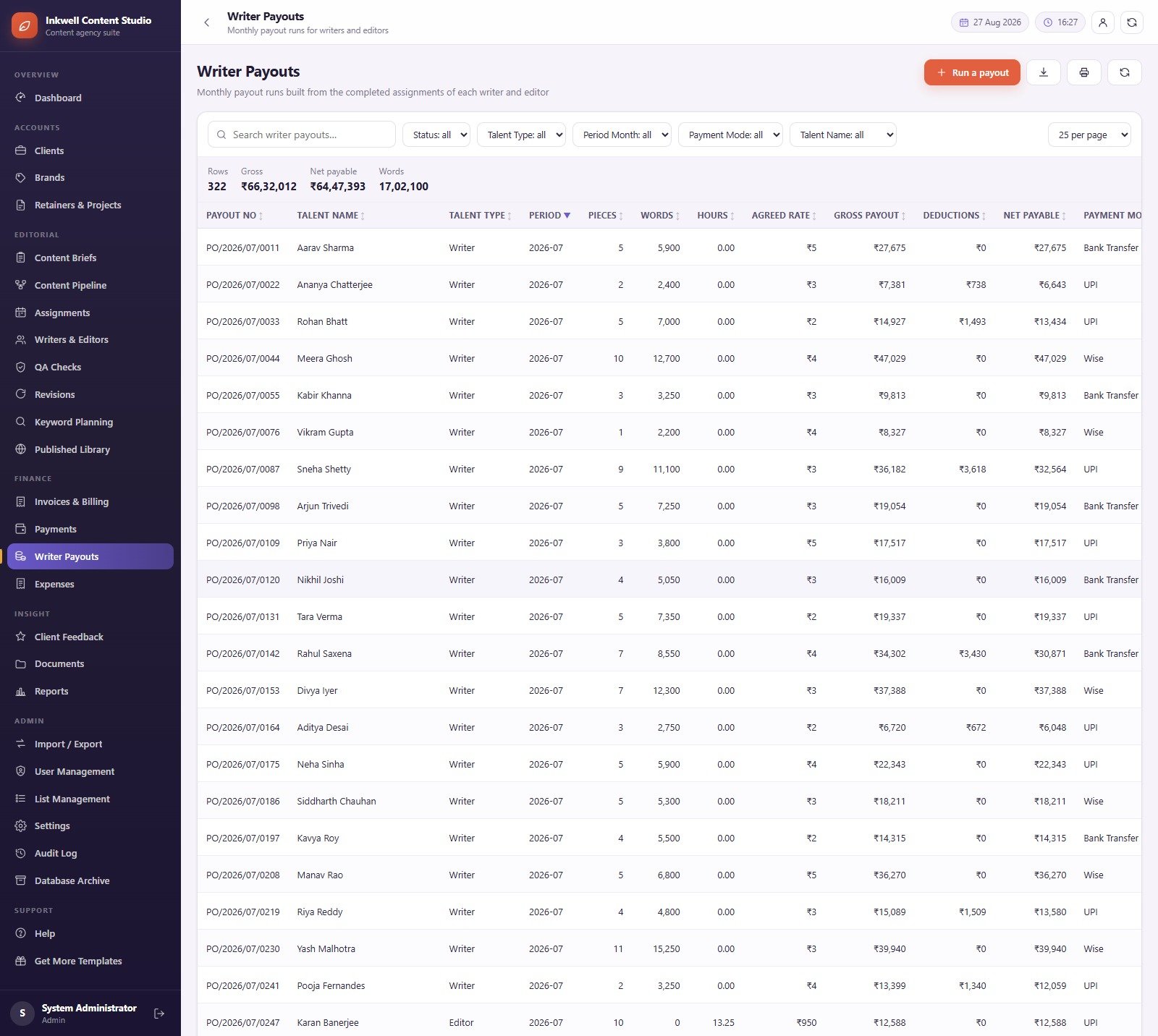
Monthly payout runs built from the completed assignments of each writer and editor. Gross, net payable and total words head the grid, and every run shows talent name, talent type, period, pieces, words, hours, agreed rate, gross payout, deductions, net payable and payment mode – so a per-word writer and a per-hour editor are costed side by side on the same page.
Report Centre
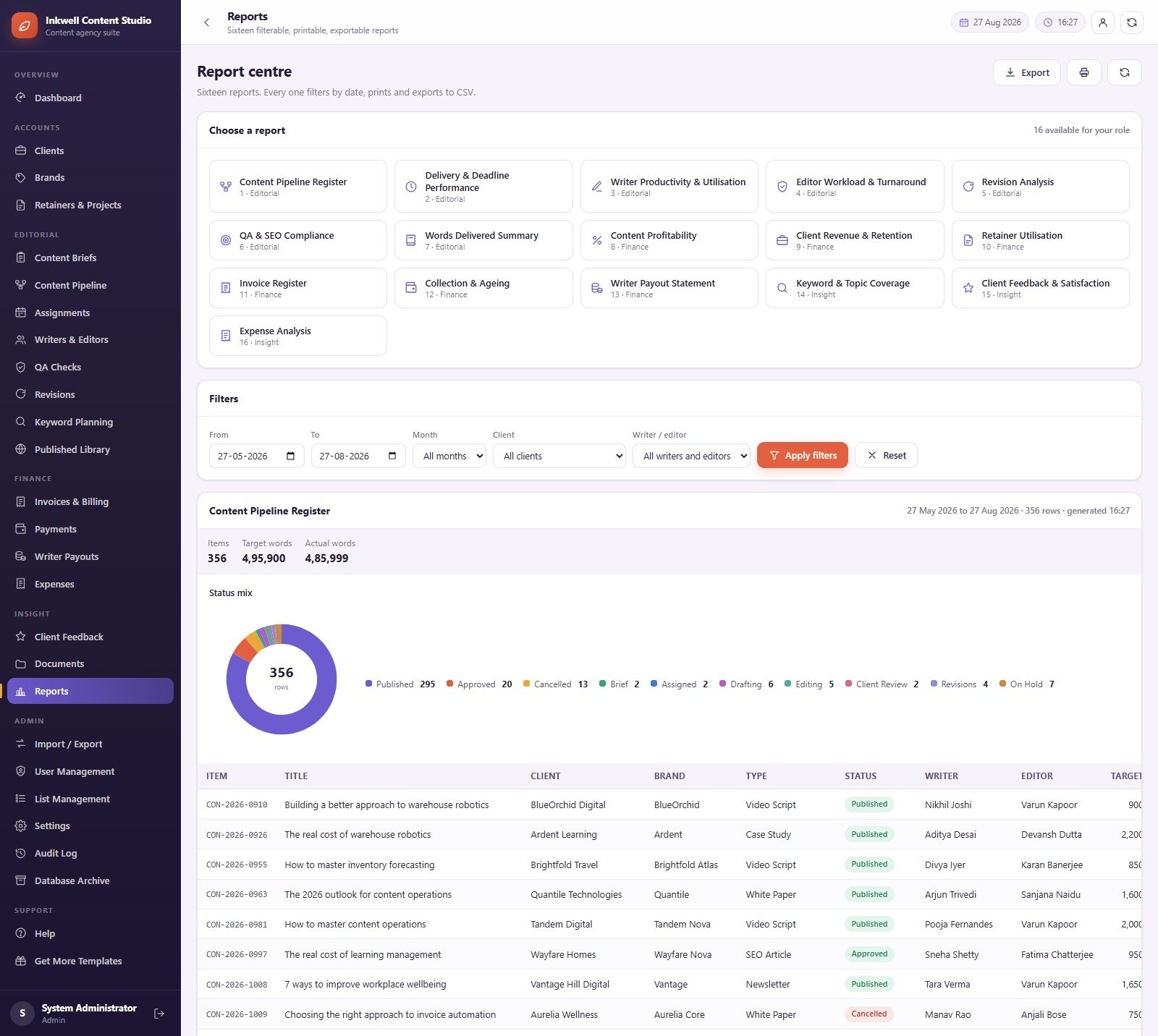
Sixteen reports grouped Editorial, Finance and Insight: Content Pipeline Register, Delivery & Deadline Performance, Writer Productivity & Utilisation, Editor Workload & Turnaround, Revision Analysis, QA & SEO Compliance, Words Delivered Summary, Content Profitability, Client Revenue & Retention, Retainer Utilisation, Invoice Register, Collection & Ageing, Writer Payout Statement, Keyword & Topic Coverage, Client Feedback & Satisfaction and Expense Analysis. Each one takes a from/to date range, a month, a client and a writer or editor, renders its own summary and status mix, prints, and exports to CSV.
Settings
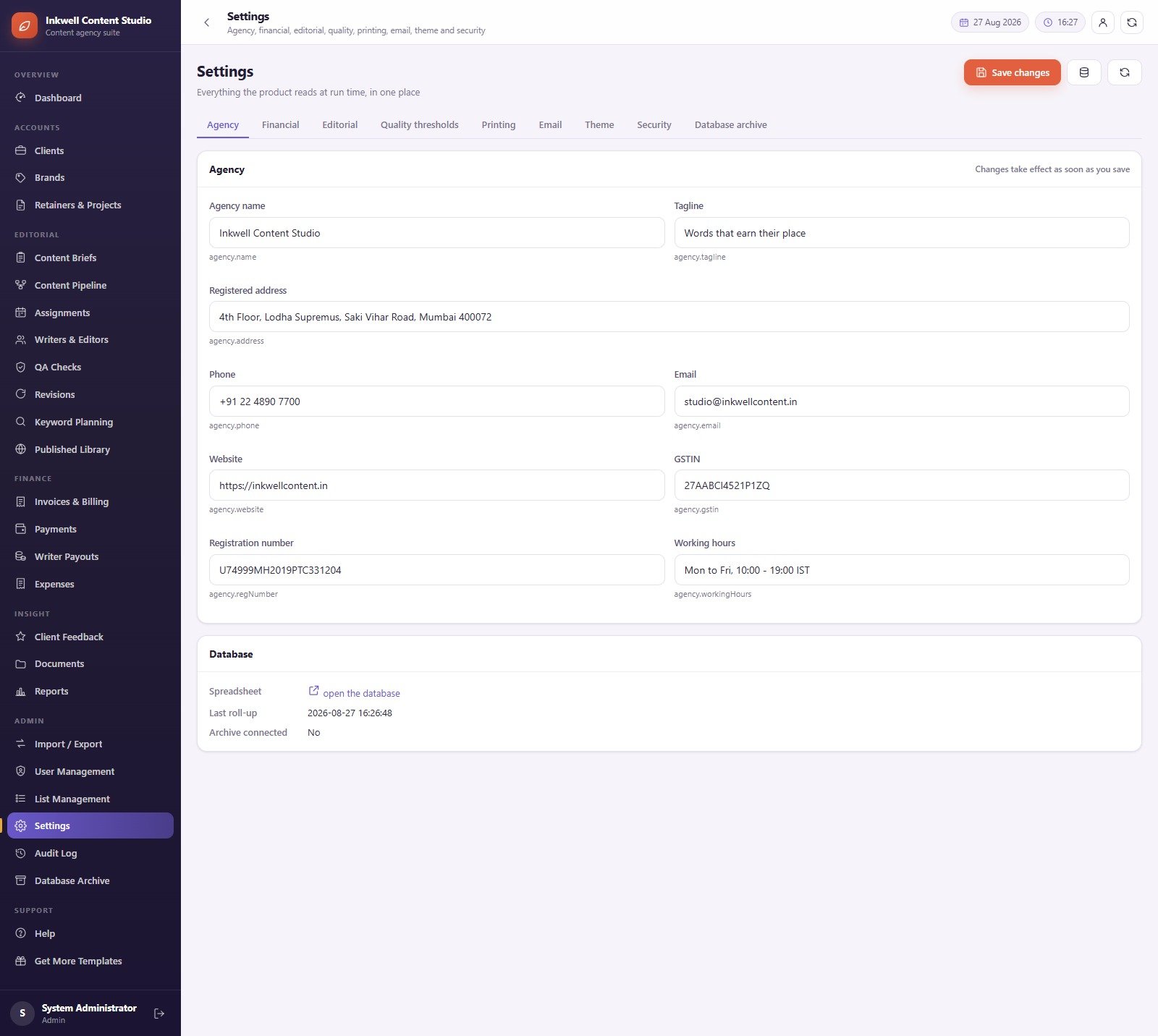
Nine tabs – Agency, Financial, Editorial, Quality thresholds, Printing, Email, Theme, Security and Database archive – hold everything the product reads at run time. The agency name, tagline, address, phone, email, website, tax registration and working hours all come from here, which is why the demo brands itself “Inkwell Content Studio”: change the agency name and the whole app renames itself. The currency, rates and tax behaviour of the seeded demo are set on the Financial tab, so set them to your own before you read any money column as your own.
Also included and not pictured above: Brands (tone of voice and target audience per brand), Retainers & Projects (contract value, start and end date, pieces per month), Assignments (who is writing and editing what, and by when), Writers & Editors (34 seeded talent records with rates and capacity), Revisions, Keyword Planning (search volume, difficulty, intent, cluster, priority and planned month per keyword, with a flag for planned keywords that still have no content), Published Library, Payments, Expenses, Client Feedback, Documents, Import / Export, User Management with its Roles & Permissions grid, List Management, Audit Log and Database Archive.
📊 Content Writing Agency Management System vs. a Spreadsheet Stack vs. Paid SaaS – Where This Fits
| Feature | Content Writing Agency Management System | Shared spreadsheets + docs | Asana / Monday.com / ClickUp |
|---|---|---|---|
| Cost | $39.99 one-time ✅ | Free, but you build and maintain it | $10-30 / user / month |
| Platform | Google Apps Script web app on a Google Sheets database | Google Sheets or Excel files | Vendor cloud |
| Deployment | Your own Google account, about 15 minutes ✅ | Immediate | Sign-up plus configuration |
| Role permissions | 6 roles, module-level, enforced on the server ✅ | Sheet-level sharing only | Seat-based roles ✅ |
| Hiding rates and margins from writers | Money fields stripped server-side per role ✅ | Separate hidden files | Usually a paid tier |
| Client invoices from delivered work | Built in, with retainer, discount and tax ✅ | Manual | Add-on or separate billing tool |
| Per-word and per-hour payout runs | Built in ✅ | Manual | Rarely native |
| Reports | 16, filterable, printable, CSV export ✅ | Pivot tables you maintain | Dashboards on higher tiers |
| Year-1 cost at 5 users | $39.99 total ✅ | $0 plus your time | $600-1,800 |
For a content studio that wants brief-to-payout structure without paying per seat every month, the Content Writing Agency Management System sits in the sweet spot.
👥 Who This Template Is For – and Who It’s Not For
✅ This template is built for:
- Content writing and SEO agencies with 3-50 writers and editors who need briefs, deadlines and payouts in one place
- Agency owners who want the margin on each piece visible without letting writers see client rates
- Managing editors juggling several clients, brands and tones at once
- Freelance content leads who subcontract writing and need clean per-word payout runs
- Teams already living inside Google Workspace who would rather own the tool than rent a seat
❌ This template is NOT for:
- Anyone wanting an editorial CMS – this manages the work around your content, it does not store, format or publish the articles themselves and has no CMS or publishing integration
- Teams expecting the app to run plagiarism, AI-detection or grammar checks for them – it records the scores your own tools produce and compares them with your thresholds
- Anyone needing live SEO rank tracking – Keyword Planning is a plan you maintain, not a rank tracker
- Agencies that need to collect card payments in-app – there is no payment gateway; payments are recorded, not processed
- Teams that need contract drafting, e-signature or IP-rights assurance
- Enterprises requiring SSO, SOC 2 or a dedicated database engine
⚙️ How to Use the Content Writing Agency Management System
- Try the demo first. Open the live demo above and sign in as
admin, then again aswriter. Ten seconds in the writer account tells you whether the role separation is what your agency needs. - Download the ZIP and open the user manual PDF that ships inside it.
- Create a new project at script.google.com, paste
Code.cs.txtintoCode.gs, add an HTML file named exactlyIndexand pasteIndex.txtinto it. - Run
setuponce and accept the Google permission prompt. Setup is staged and resumable – if Google stops the run at six minutes, run it again; it never duplicates a row. - Deploy as a web app with “Execute as: Me” and “Who has access: Anyone”, then open the /exec URL and sign in as admin.
- Change the admin password immediately from the profile button, then open Settings and set your agency name, currency, rates, tax and quality thresholds.
- Add your real people in User Management, tick the modules each role may open in Roles & Permissions, then load your clients, brands and retainers.
- Work the pipeline: raise a brief, assign it, record QA, approve, publish, invoice the client and run the payout.
💼 Real-World Use Cases
Radhika runs a twelve-person content studio in Pune. She opens the Dashboard every morning, reads gross margin and the past-deadline count, and uses the deadline board to decide which four pieces get chased before lunch – without paying for a project tool that still would not tell her what a single article cost to produce.
Sarita is the managing editor. Her account never shows a rate or an invoice total, so she works only where she should: briefs, the pipeline, assignments, QA results and revisions. She is the reason the money switch exists.
Farah handles finance one week a month. She raises the client invoices from the pieces published in the period, runs the writer and editor payouts from completed assignments, and prints the Collection & Ageing and Writer Payout Statement reports for the owner – all from the same database the editors were working in.
❓ Frequently Asked Questions
Can I try it before buying?
Yes. A full demo of the Content Writing Agency Management System is deployed and linked at the top of this page, with logins for all six roles. The credentials are shared and the instance is reset periodically, so treat it as a showroom – the copy you buy runs privately in your own Google account.
What do I actually receive when I buy?
A ZIP containing the complete Code.cs.txt server code, the Index.txt single-page front end, and a user manual PDF covering every module, the roles and permissions, deployment and the maintenance functions. There is no licence key and no seat limit.
How long does setup take?
About fifteen minutes for a working deployment. Create an Apps Script project, paste two files, run setup once and deploy as a web app. Setup builds the 28-sheet database in stages and resumes safely if Google interrupts it at the six-minute execution limit.
Can writers see client rates and margins?
No, unless you let them. Each role in the Content Writing Agency Management System carries a “may see money” switch, and roles without it never receive rates, invoice totals, revenue, delivery cost or margin – the server removes those fields before sending the page.
Does it check plagiarism or AI-written content for me?
No. The QA module is a register: you record the plagiarism, AI-detection, grammar, SEO, readability and brand-voice scores your own tools produce, and the system marks each check passed or failed against the thresholds you set in Settings.
How does this compare to Asana or Monday.com?
Those are general project tools charged per user per month. The Content Writing Agency Management System is a one-time $39.99 purchase built specifically around content: briefs with keywords and tone, a ten-stage editorial pipeline, QA scoring, per-word and per-hour payouts, and client invoices built from delivered work.
What currency does it use?
Whatever you set. The seeded demo is configured for one currency and tax profile purely as sample data; the Financial tab in Settings controls currency, rates and tax for your own deployment.
Where is my data stored?
In a Google Sheets database inside your own Google Drive, with documents kept in Drive alongside it. Nothing is sent to NextGenTemplates, and the Database Archive and backup functions let you copy or roll off old data yourself.
👤 About the Author
Built by PK – Microsoft Certified Professional with 15+ years of Excel, Google Sheets, Apps Script and Power BI experience. Founder of NextGenTemplates, reaching 300K+ subscribers across YouTube channels (@PK-AnExcelExpert, @NextGenTemplates, @NeoTechNavigators). Every template is hand-built and tested before release.
🔗 Explore Related Templates
- Copywriting and Content Dashboard in Google Sheets – the reporting side of the same discipline, if you want the numbers without running the workflow.
- Copywriting & Content Creation Dashboard in Excel and the same dashboard in Power BI – for teams whose reporting lives outside Google.
- Business Writing Agencies Dashboard in Power BI – agency-level analytics to sit alongside this system.
- Copywriting & Content Creation KPI Dashboard in Excel / in Power BI – a monthly KPI scorecard for the same metrics.
- Same web-app line, different trade: Gaming Zone & Arcade Management System Web App and Cybersecurity Service Management System Web App.
- Browse more Mini Web Apps and Google Sheets Dashboards.
📖 Click here to read the Detailed Blog Post
🎥 Visit our YouTube channel for step-by-step video tutorials
👉 YouTube.com/@NextGenTemplates
📅 Last updated: September 2026