


The fisheries industry operates in one of the most unpredictable environments—changing marine conditions, fluctuating fuel prices, seasonal patterns, and strict regulations. Fleet owners, managers, and government agencies need fast, accurate, and real-time insights to make better decisions. Traditional spreadsheets cannot keep up with these demands.
The Fisheries Dashboard in Power BI solves this challenge with a complete, visual, and interactive reporting system. It brings together operational, financial, and compliance data into one smart dashboard so teams understand performance, cost, seasonality, and resource utilization instantly. Whether you monitor fleet segments, captain output, fishing methods, or revenue trends, this dashboard gives you the clarity you need.
This fully-designed Power BI dashboard is ready to use with an Excel backend, making it suitable for organizations of all sizes. Just update your data file and the entire dashboard refreshes automatically—no technical skills required.
✨ Key Features of the Fisheries Dashboard in Power BI
(H2 Heading)
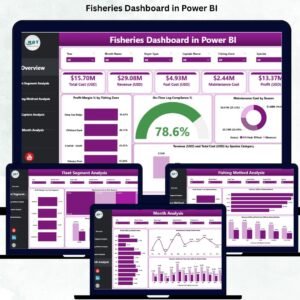
This dashboard includes five powerful analytical pages, each built to simplify fisheries operations and financial decision-making.
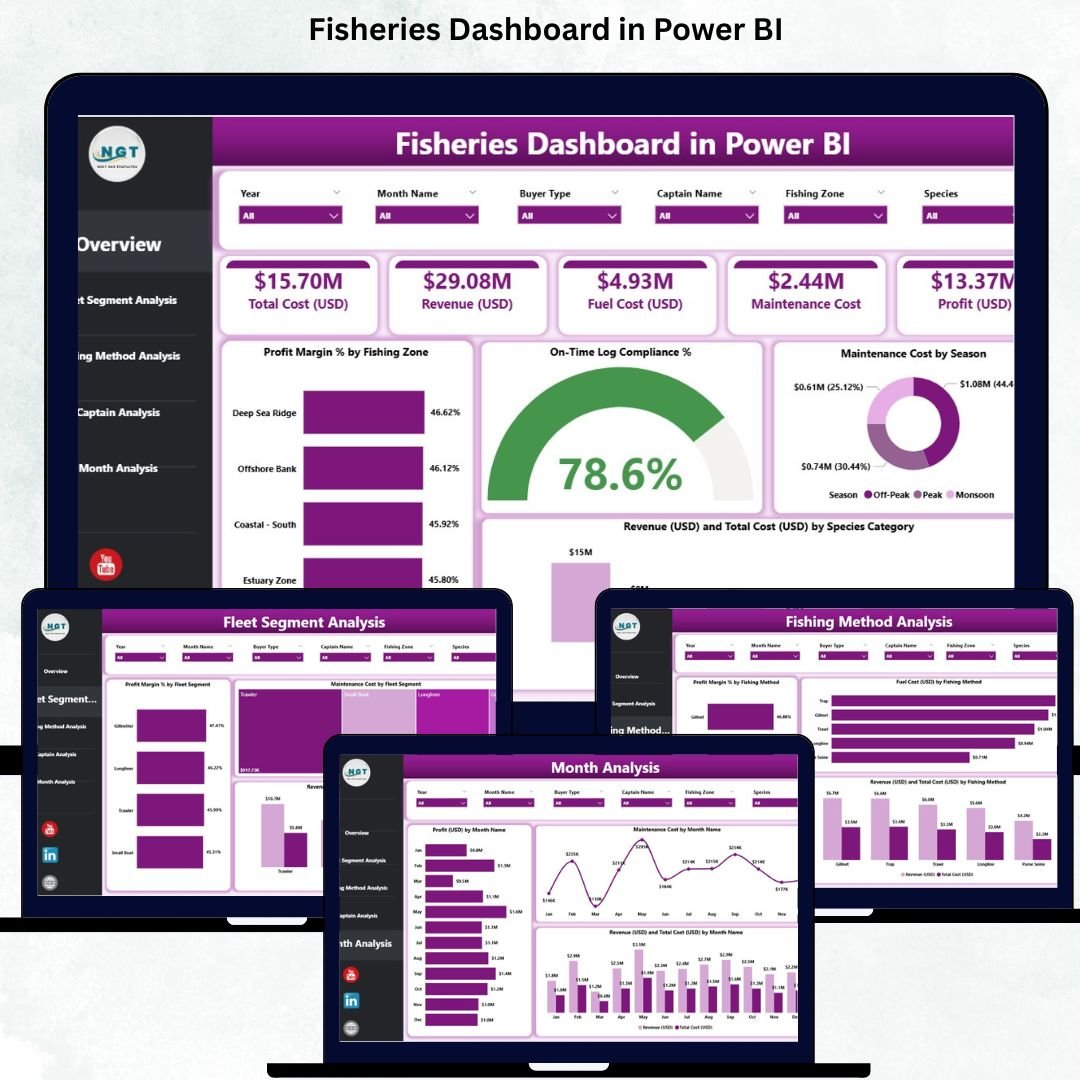
🟦 1. Overview Page – Complete Fisheries Summary
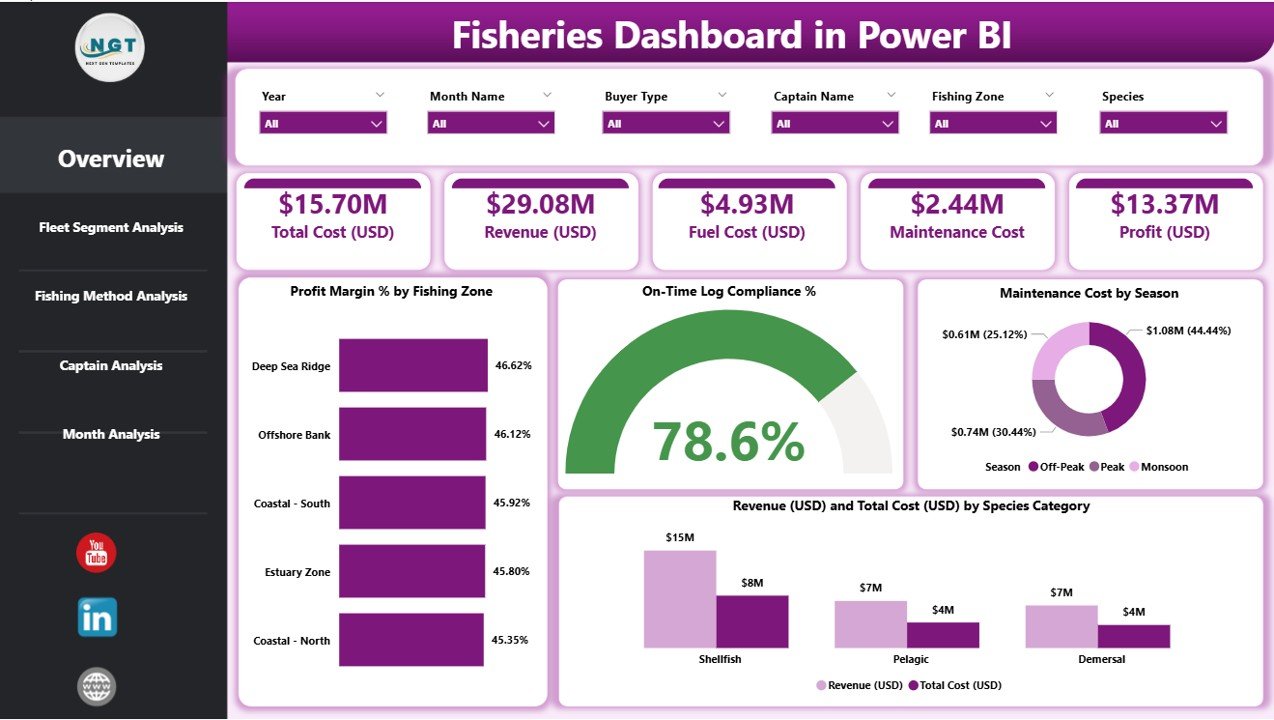
The Overview Page brings together the most important KPIs in one place so decision-makers understand performance at a glance.
It includes:
✔ Dynamic Slicers
Filter by month, fleet segment, fishing zone, method, and species.
✔ KPI Cards
Total Profit Margin %
On-Time Log Compliance %
Total Maintenance Cost
Total Revenue
✔ Insightful Charts
Profit Margin % by Fishing Zone
On-Time Log Compliance %
Maintenance Cost by Season
Revenue & Total Cost by Species Category
This page gives you instant clarity about fleet health, compliance, and cost behavior.
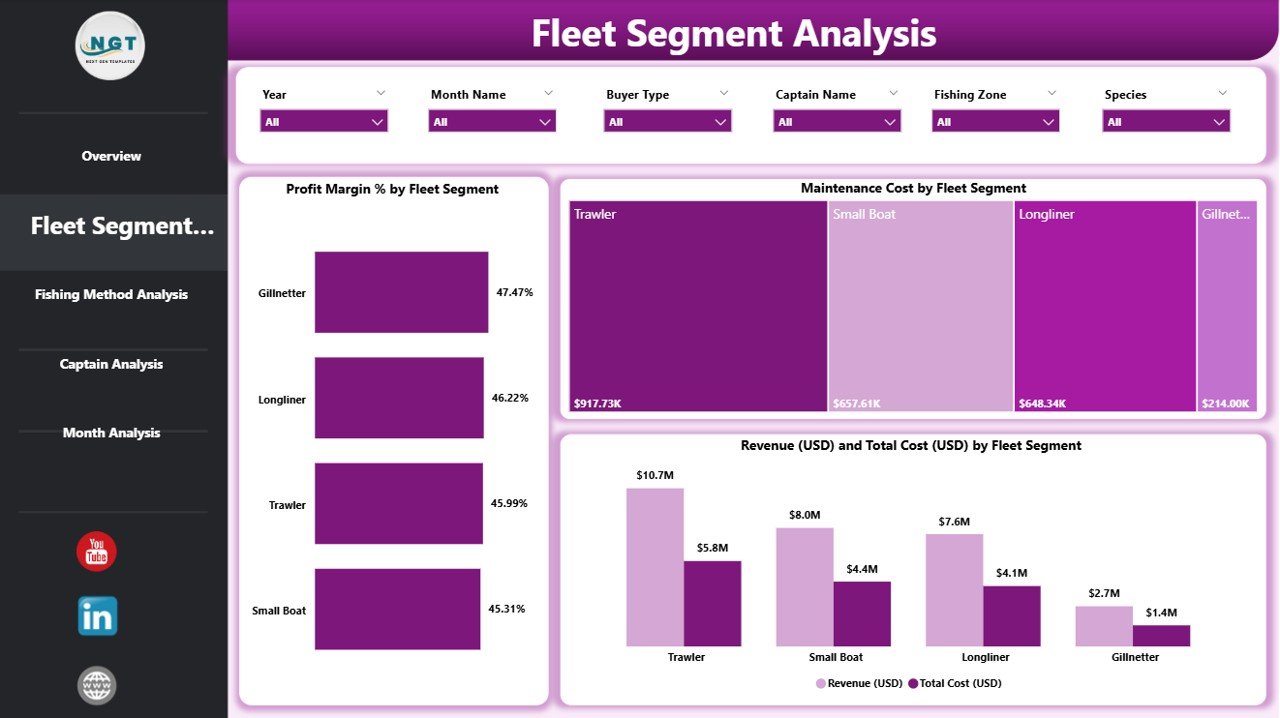
🟦 2. Fleet Segment Analysis – Track Performance by Fleet Category
Different fleet types behave differently. Some require more fuel, some catch high-value species, and some show better profit margins.
This page displays:
Profit Margin % by Fleet Segment
Maintenance Cost by Fleet Segment
Revenue & Total Cost by Fleet Segment
Use this section to identify top-performing fleets and those needing operational improvement.
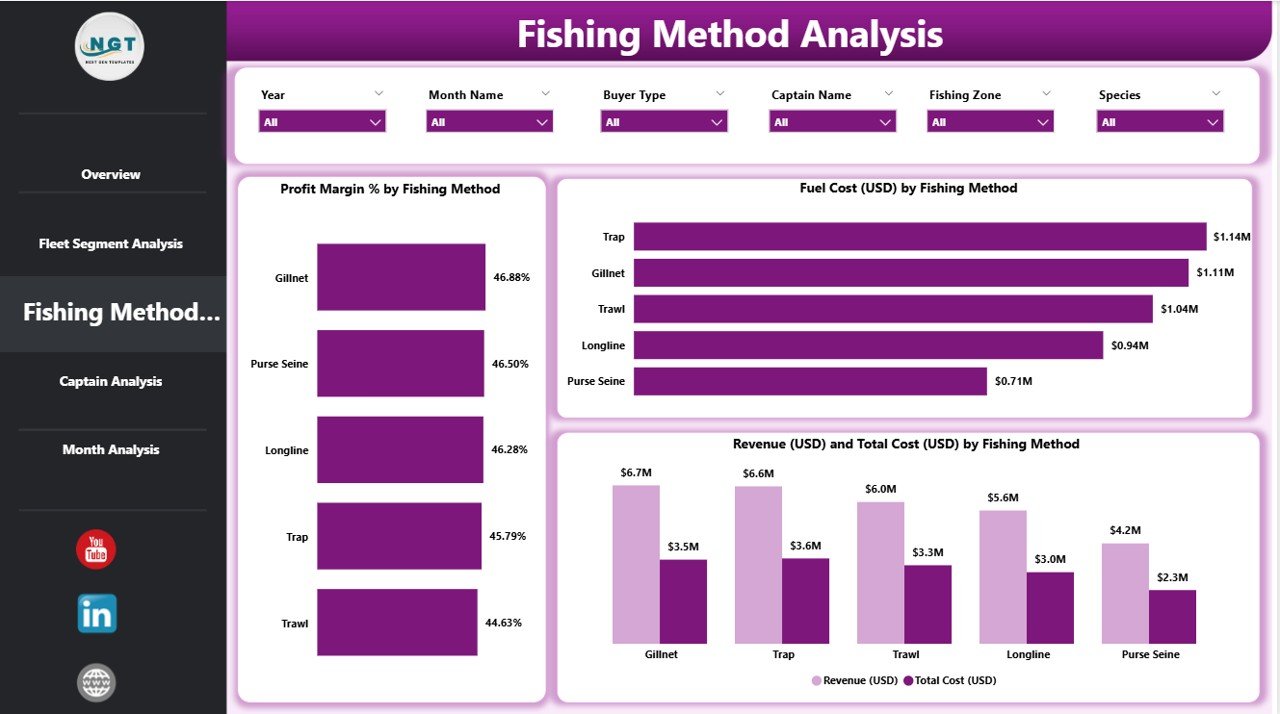
🟦 3. Fishing Method Analysis – Compare Techniques & Efficiency
Fishing methods like longlining, gillnetting, trawling, and purse seining impact fuel usage, cost, and profitability.
This page shows:
Profit Margin % by Fishing Method
Fuel Cost (USD) by Method
Revenue & Total Cost by Method
This helps optimize fishing strategies and choose techniques that produce higher efficiency.
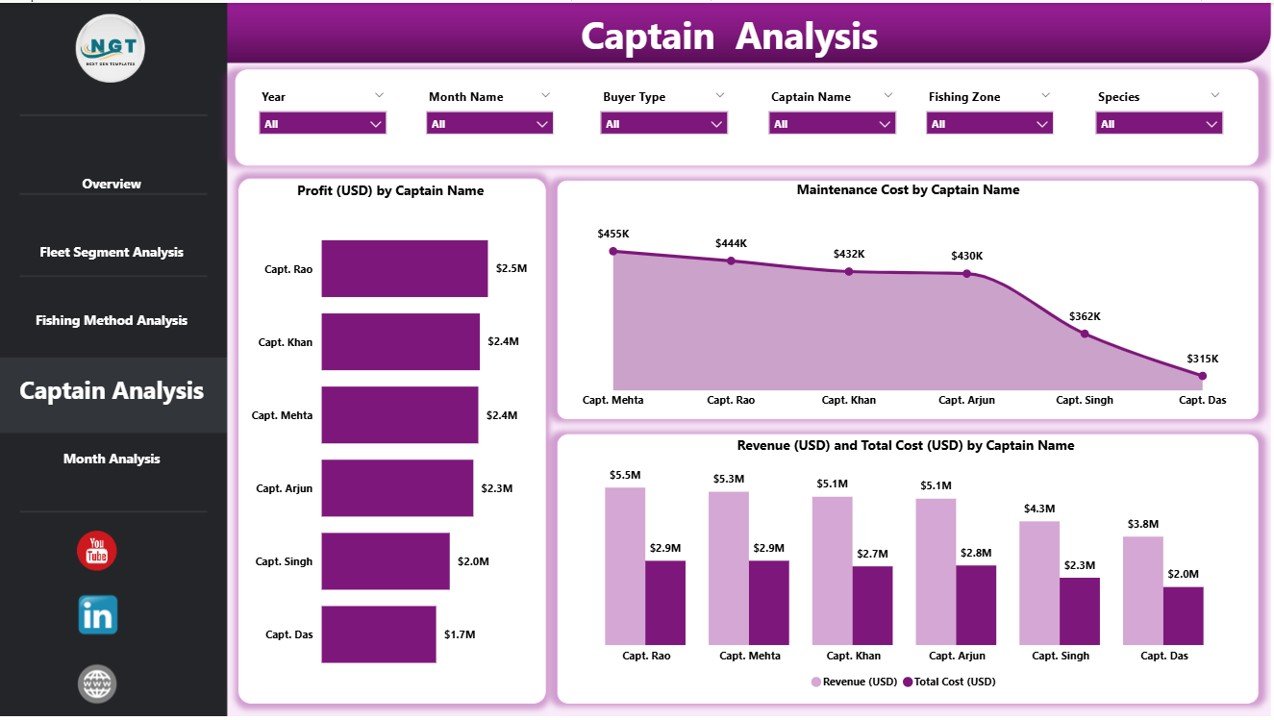
🟦 4. Captain Analysis – Evaluate Crew Leadership & Contribution
Captains drive fleet success through experience, route selection, and operational discipline.
This page highlights:
Revenue by Captain
Total Cost by Captain
Profit Margin % by Captain
This encourages accountability and helps identify training needs or performance gaps.
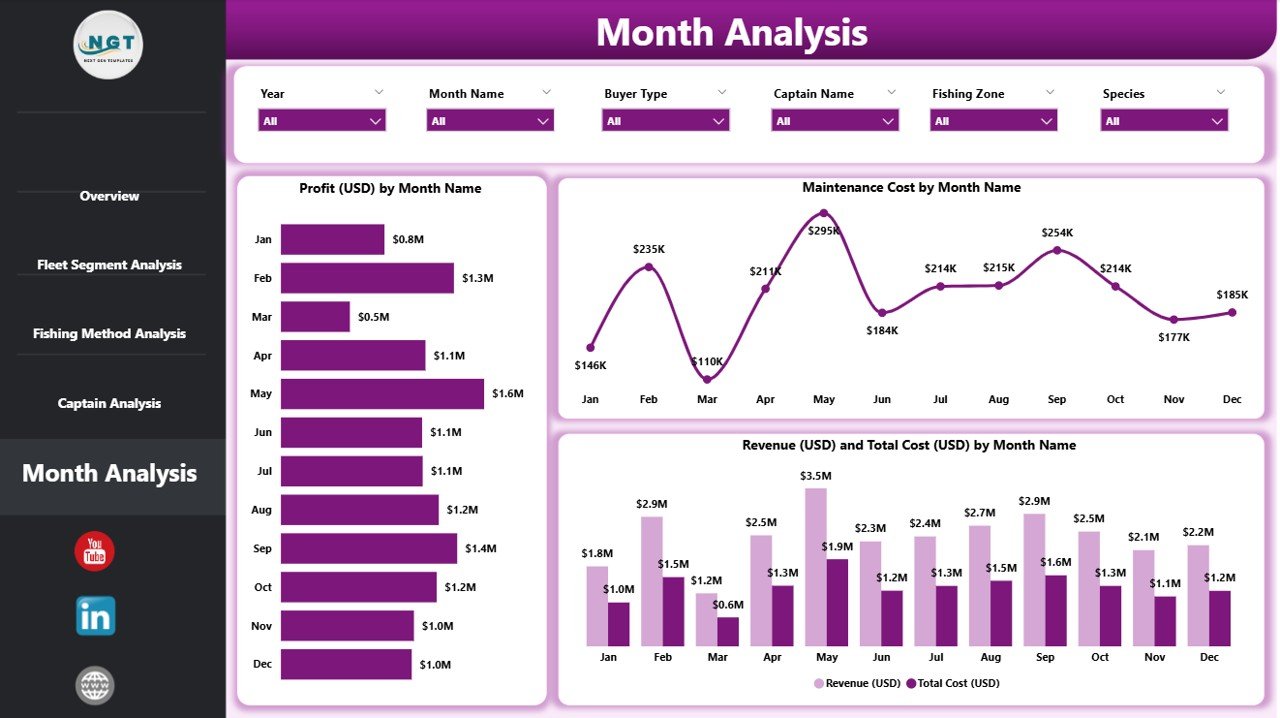
🟦 5. Monthly Trends – Understand Seasonality & Market Behavior
Marine conditions, species availability, and weather impact business monthly.
This page includes:
Profit (USD) by Month
Maintenance Cost by Month
Revenue & Total Cost by Month
These visuals support forecasting, budgeting, maintenance planning, and seasonal preparation.
🛠 How This Dashboard Helps Fisheries Improve Decisions
(H2 Heading)
With this Power BI dashboard, fishing companies can:
Detect cost leakages early
Improve maintenance scheduling
Control fuel consumption
Track captain performance
Optimize fleet resource allocation
Strengthen compliance
Increase profit margins using real data
The dashboard turns complex fishing operations into simple, actionable insights.
🌟 Advantages of the Fisheries Dashboard in Power BI
(H2 Heading)
✔ Real-time operational visibility
✔ Improved profitability tracking
✔ Stronger compliance monitoring
✔ Better fleet and method optimization
✔ Clear seasonal insights
✔ Easy-to-understand visuals
✔ Automated reporting with no manual calculation
This dashboard acts as a complete performance management system for the fisheries industry.
📘 What’s Included in Your Download
(H2 Heading)
Fully designed Power BI (.pbix) dashboard
Editable Excel data file
Pre-built slicers, KPIs, and visuals
Clear navigation for all five pages
Clean data structure for easy updates
Just replace the sample data with your own numbers and start analyzing immediately.
🧭 Who Should Use This Dashboard?
(H2 Heading)
Fisheries managers
Fleet owners
Marine operations teams
Government fisheries departments
Compliance officers
Sustainability teams
Financial and planning departments
This template works for organizations of all sizes—from small fleets to large marine enterprises.
▶️ Visit our YouTube channel for step-by-step tutorials
Visit our YouTube channel to learn step-by-step video tutorials
🔗 Click here to read the Detailed blog post
Watch the step-by-step video tutorial:
Compatibility and Requirements
- Works in Power BI Desktop, which is free to download. Power BI Desktop runs on Windows.
- The data sits in an editable Excel file. Replace the sample data with your own and refresh the report.
- Microsoft explains the install in Get Power BI Desktop.
Frequently Asked Questions
How many report pages does the dashboard have?
Five pages: Overview, Fleet Segment Analysis, Fishing Method Analysis, Captain Analysis and Monthly Trends.
What KPIs are on the Overview page?
Total Profit Margin %, On-Time Log Compliance %, Total Maintenance Cost and Total Revenue. You can filter them with slicers for month, fleet segment, fishing zone, method and species.
How do I load my own data?
Open the Excel data file, replace the sample figures with yours, then refresh the report in Power BI Desktop. The visuals update from the new data.
Can I compare fishing methods?
Yes. The Fishing Method Analysis page shows Profit Margin %, Fuel Cost (USD) and Revenue and Total Cost for each method.
Is there an Excel version?
Yes. See the Fisheries Dashboard in Excel. There is also a Fisheries KPI Dashboard in Power BI.
Related Fisheries Templates
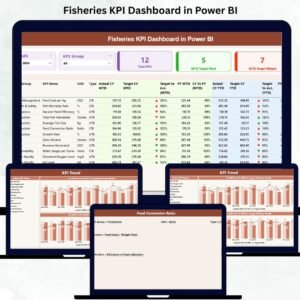
- Fisheries KPI Dashboard in Power BI: a KPI-focused Power BI report for fisheries
- Fisheries Dashboard in Excel: the same topic in Excel
- Fisheries KPI Dashboard in Excel: fisheries KPIs in Excel
- Expense Tracking Dashboard in Power BI: track operating costs by category
- Power BI Dashboard Mega Collection: 15 Power BI templates in one download
Browse all Power BI dashboards.
































Reviews
There are no reviews yet.