

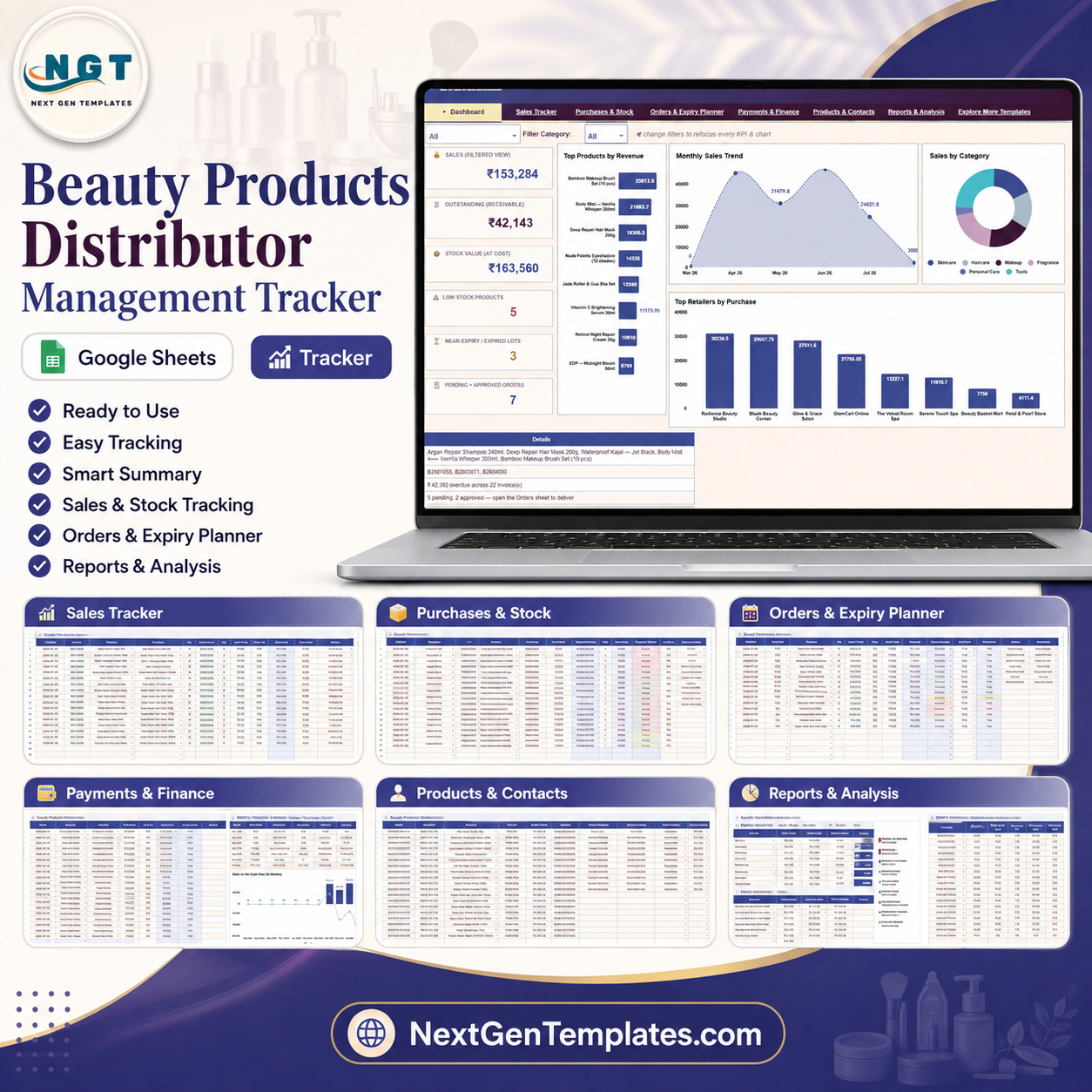
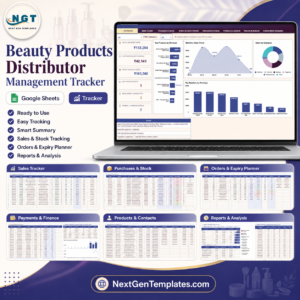
Beauty Products Distributor Management Tracker in Google Sheets gives cosmetics distributors a 7-tab operating tracker with 6 top-level KPI cards, 36 ready-made analyses, and slicers for fast filtered reporting. Built by PK, a Microsoft Certified Professional with 15+ years of spreadsheet and dashboard experience and a 300K+ subscriber learning audience, this template helps you replace scattered sales, stock, expiry, order, payment, and finance files with one editable Google Sheet. It is a one-time purchase with no monthly SaaS fee, no per-user charge, and full Google Sheets sharing control.
Key Features of Beauty Products Distributor Management Tracker in Google Sheets
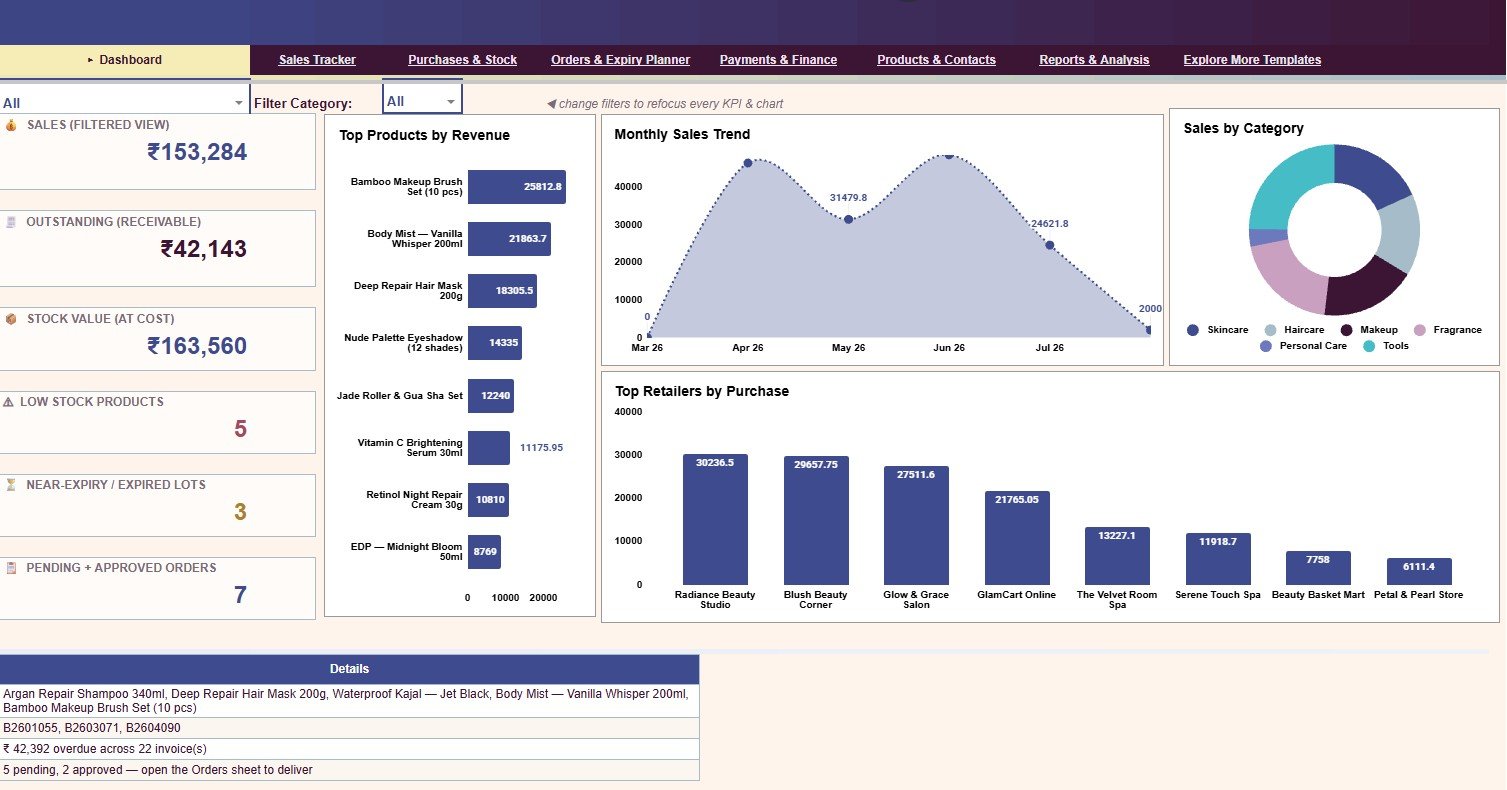
- Overview KPI cards: Sales (Filtered View), Outstanding (Receivable), Stock Value (At Cost), Low Stock Products, Near-Expiry or Expired Lots, and Pending + Approved Orders.
- Sales and receivables tracking: Analyze Sales Amount by Retailer, Sales Amount by Product, Payment Status by Invoice, Received Amount by Invoice, Balance by Due Date, and Days Overdue by Invoice.
- Purchase and stock control: Track stock quantity, total cost, expiry status, on-hand stock, stock value, and reorder levels by supplier, product, and batch.
- Orders and expiry planning: Review order value, order quantity, order status, expected delivery, days left by batch, and recommended action by expiry status.
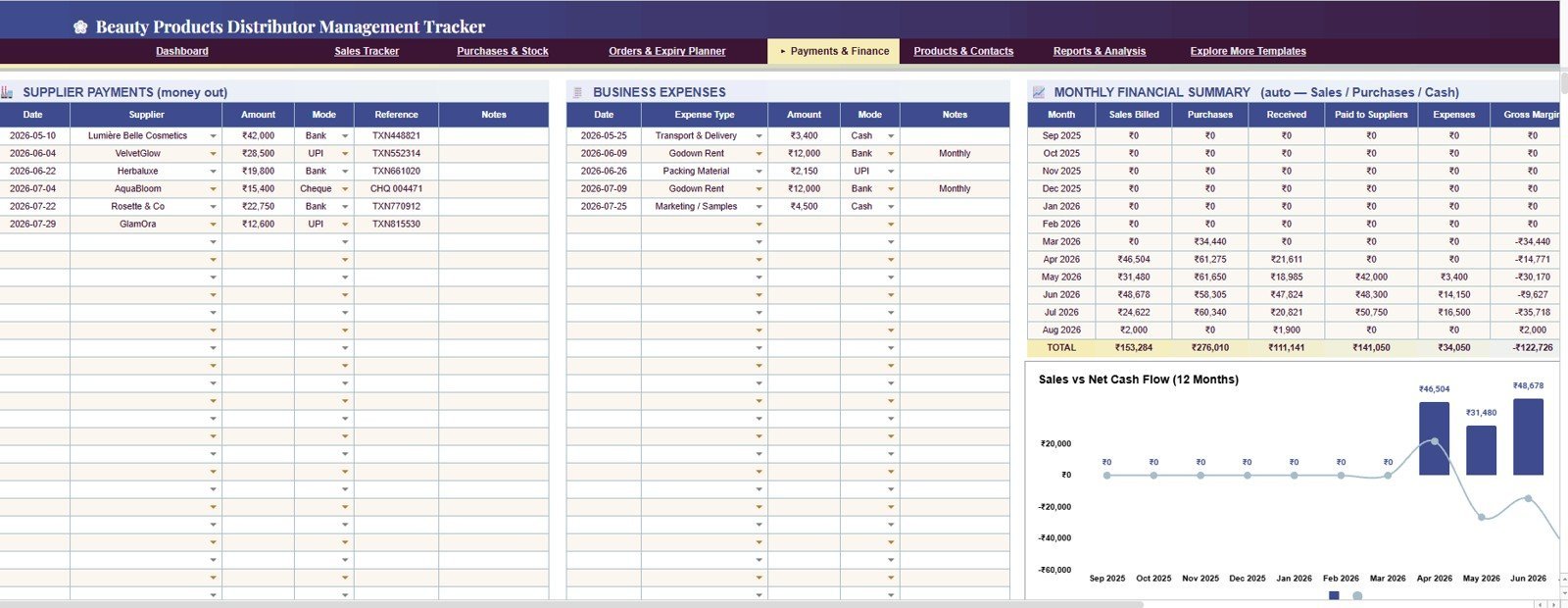
- Payments and finance view: Monitor supplier payments, business expenses, sales billed, purchases, received cash, gross margin, and net cash flow by month.
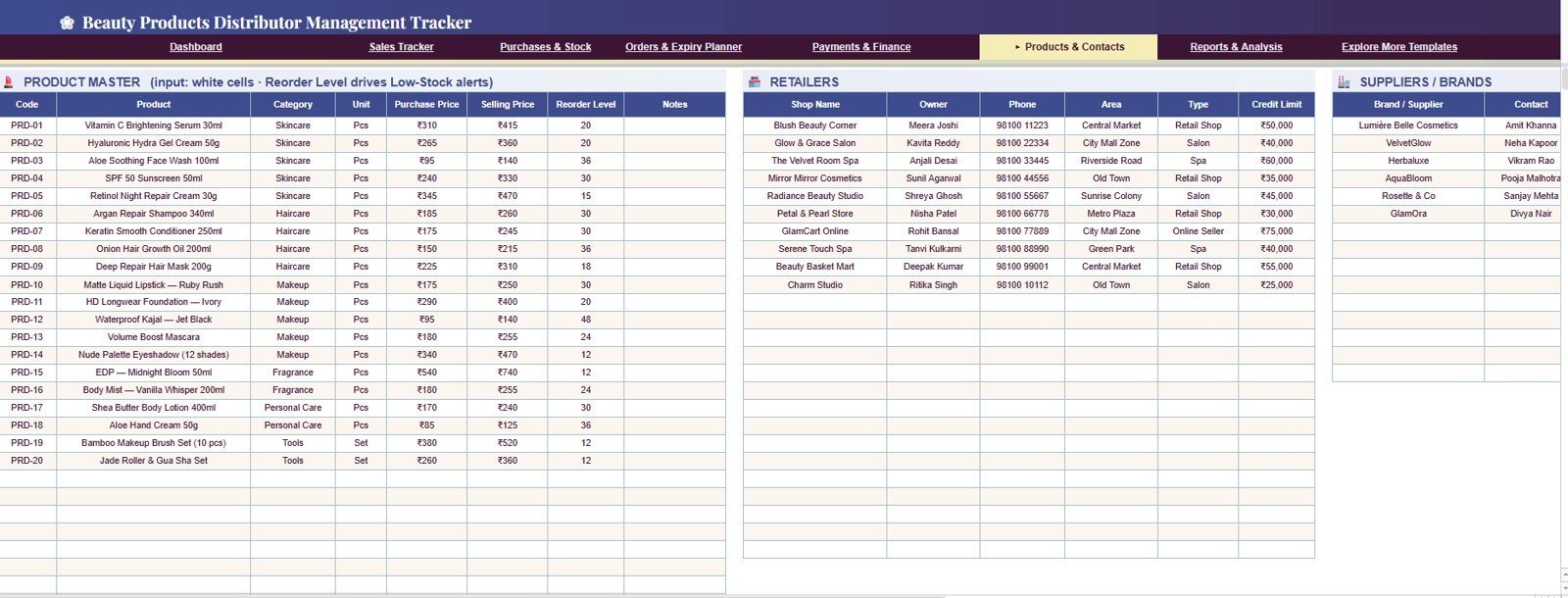
- Master data tab: Maintain products, retailers, and suppliers in one Products & Contacts sheet so dropdowns, pivots, charts, and reports stay consistent.
What’s Inside the Beauty Products Distributor Management Tracker in Google Sheets
1. Overview Page
The Overview Page is the main command center. The top KPI cards show Sales (Filtered View), Outstanding (Receivable), Stock Value (At Cost), Low Stock Products, Near-Expiry or Expired Lots, and Pending + Approved Orders, while slicers help you filter the whole dashboard quickly by the available business dimensions.
Revenue by Product: This chart highlights which beauty products produce the most revenue. Use it to focus reorder decisions, sales offers, and retailer follow-up on the SKUs that matter most.
Sales by Month: This chart shows monthly sales movement. It helps you spot seasonal demand, campaign impact, and slow months before cash flow becomes tight.
Sales by Category: This chart compares categories such as skincare, haircare, makeup, or personal care. It helps you see whether one category is carrying sales or whether the product mix is balanced.
Purchase Value by Retailer: This chart compares retailer purchase value. It helps you identify key accounts, dormant retailers, and stores that may need a stronger follow-up plan.
Beauty Products Distributor Management Tracker in Google Sheets
2. Sales Tracker
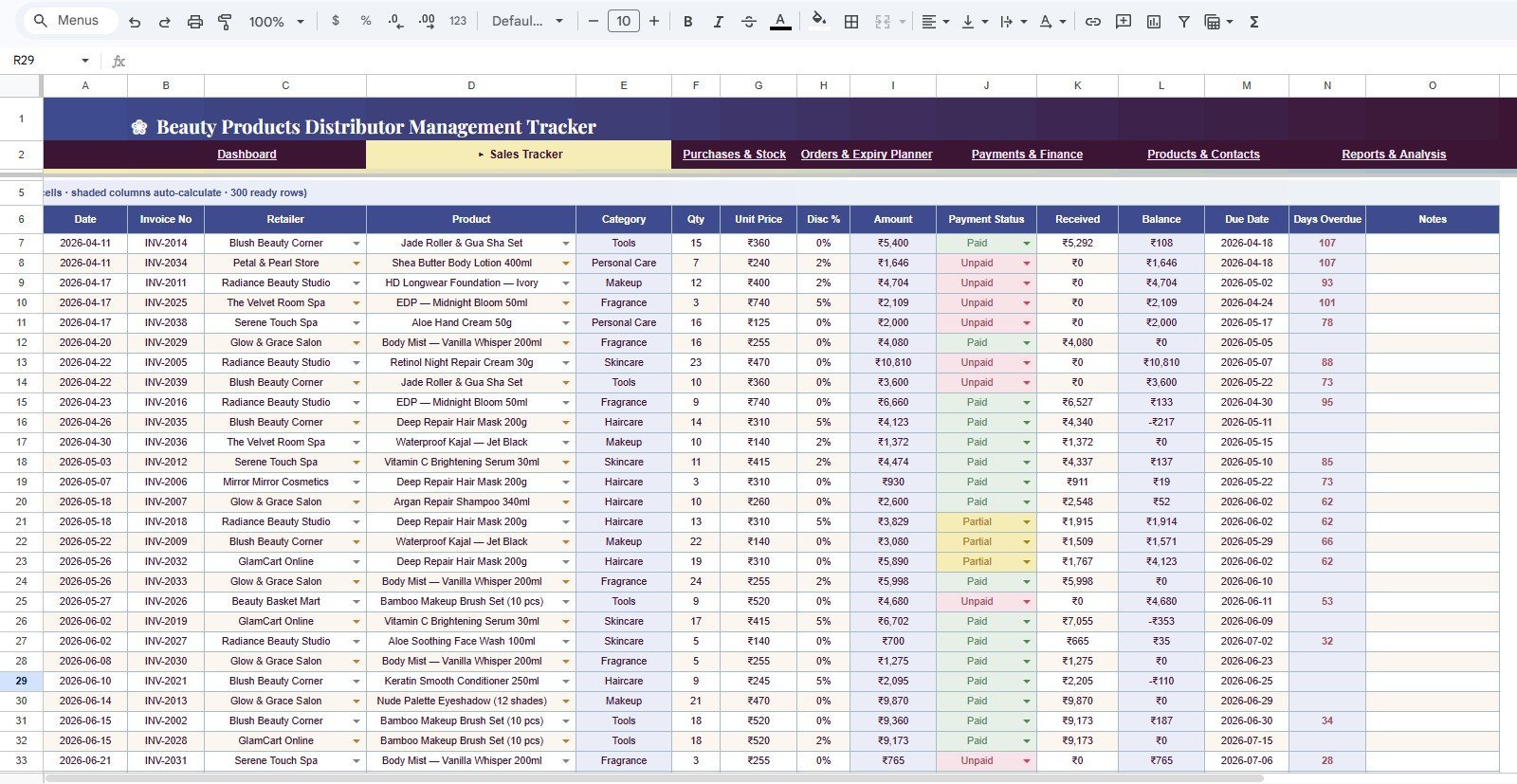
The Sales Tracker tab focuses on invoices, retailer sales, receipts, and outstanding balances. It includes Sales Amount by Retailer, Sales Amount by Product, Payment Status by Invoice, Received Amount by Invoice, Balance by Due Date, and Days Overdue by Invoice so you can see who bought, who paid, and who is late.
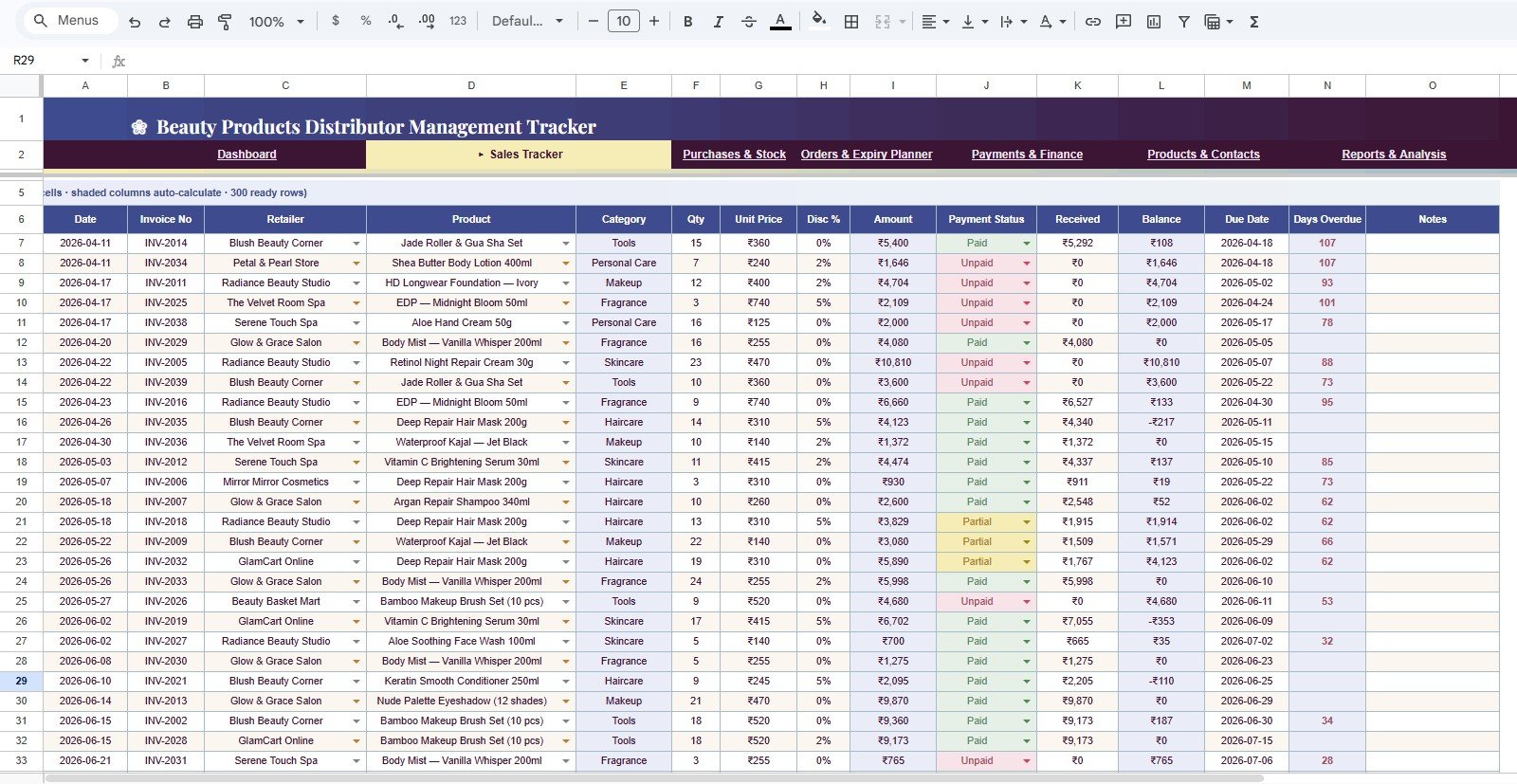
Sales Tracker
3. Purchases & Stock
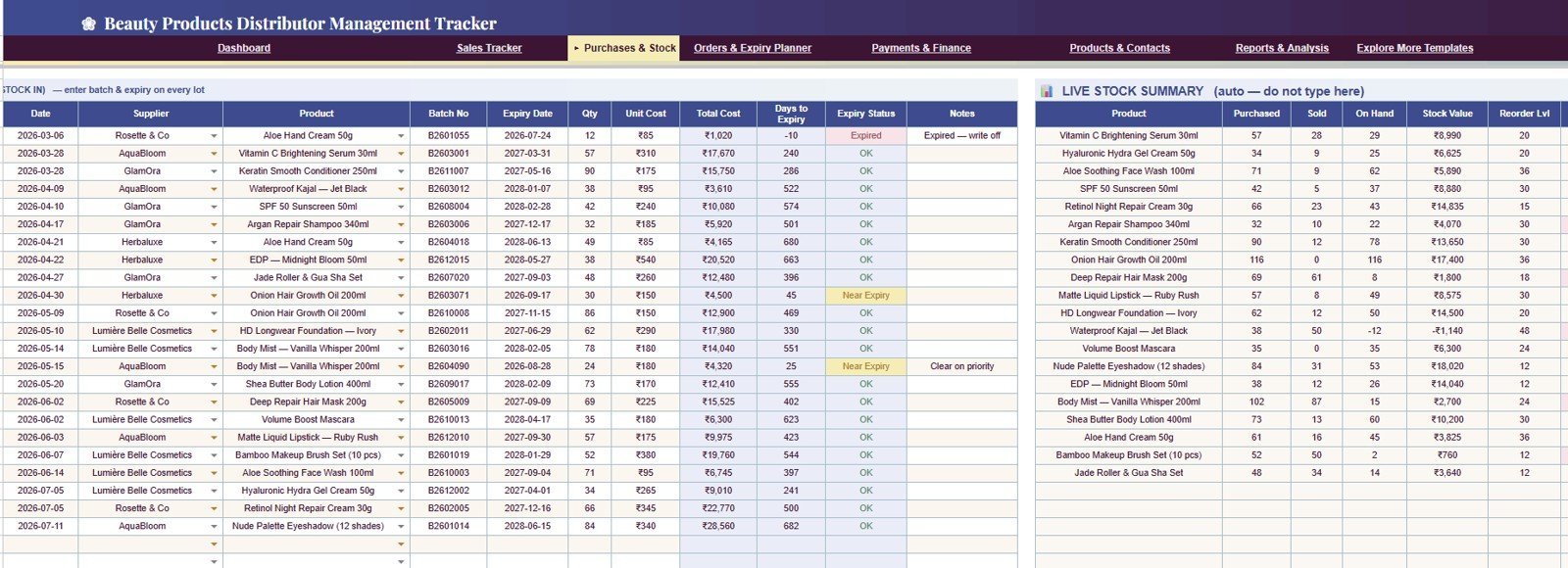
The Purchases & Stock tab tracks supplier stock, product cost, batch expiry, on-hand quantity, stock value, and reorder levels. This is useful for beauty distributors because creams, serums, cosmetics, and haircare products often need expiry-aware replenishment, not just quantity tracking.
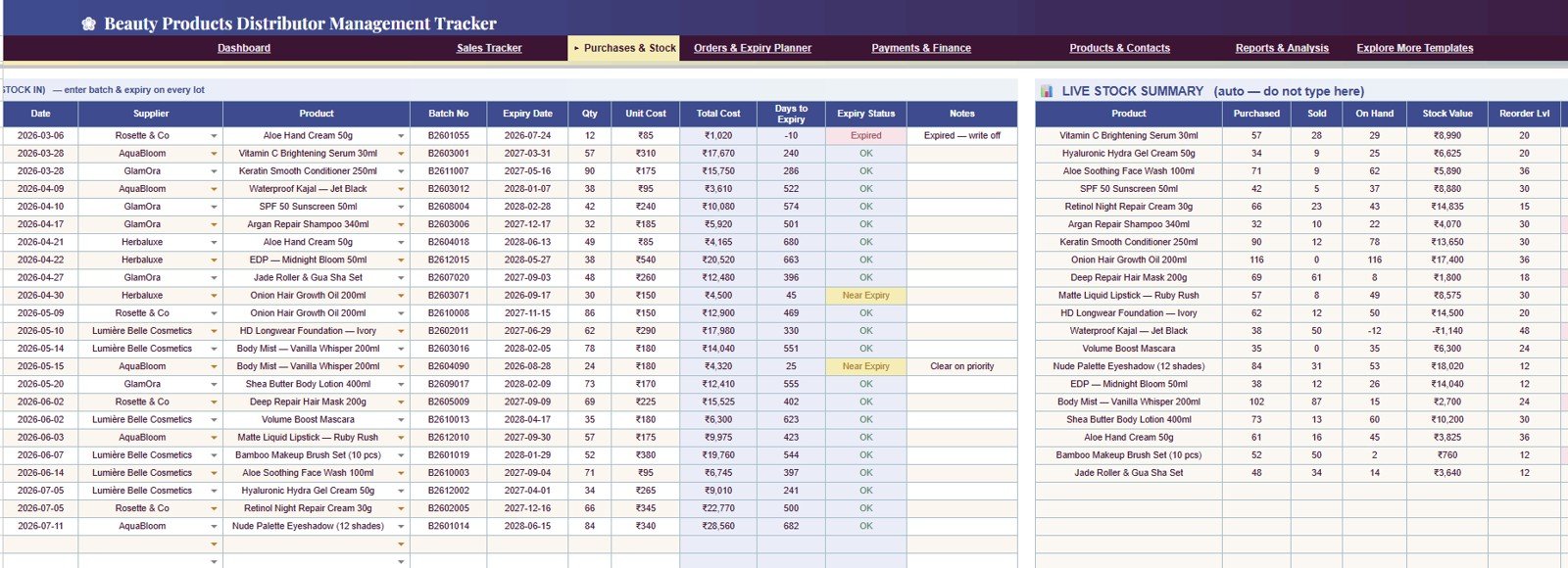
Purchases & Stock
4. Orders & Expiry Planner
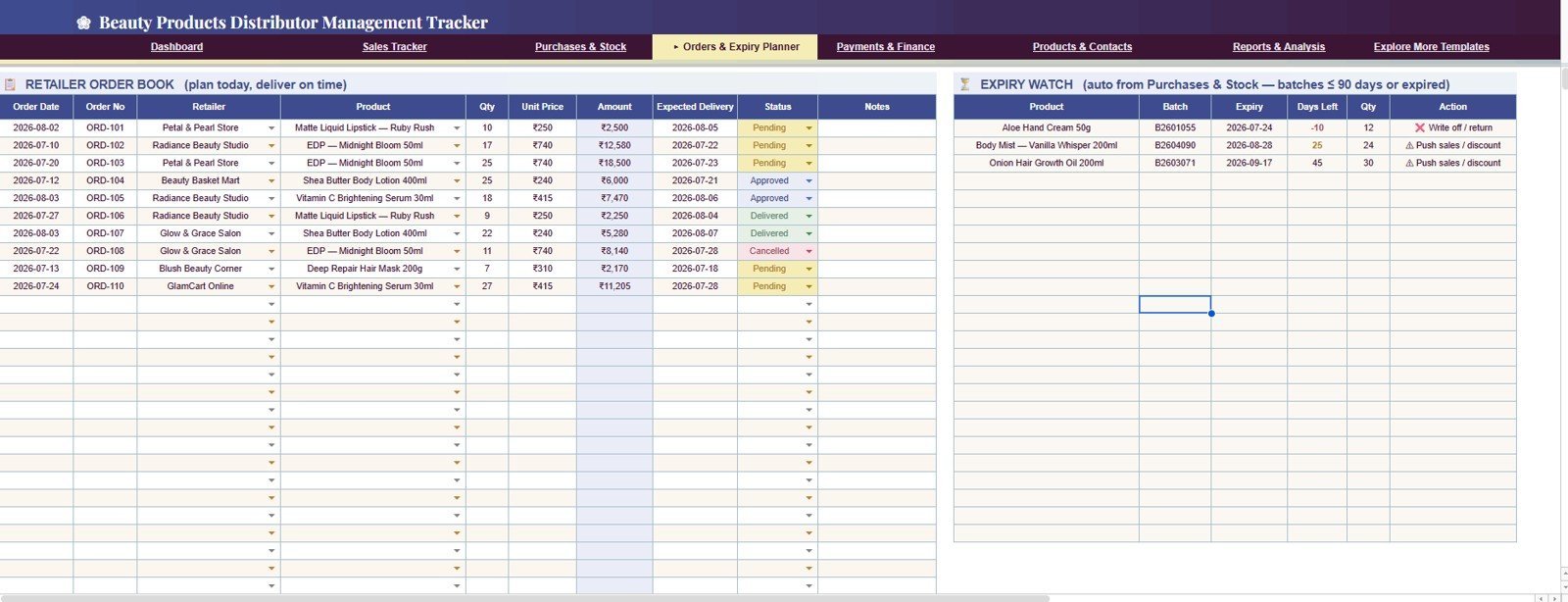
The Orders & Expiry Planner tab connects retailer demand with batch life. It includes Order Amount by Retailer, Order Quantity by Product, Order Status by Order, Expected Delivery by Order, Days Left by Batch, and Action by Expiry Status so you can prioritize stock before it becomes a loss.
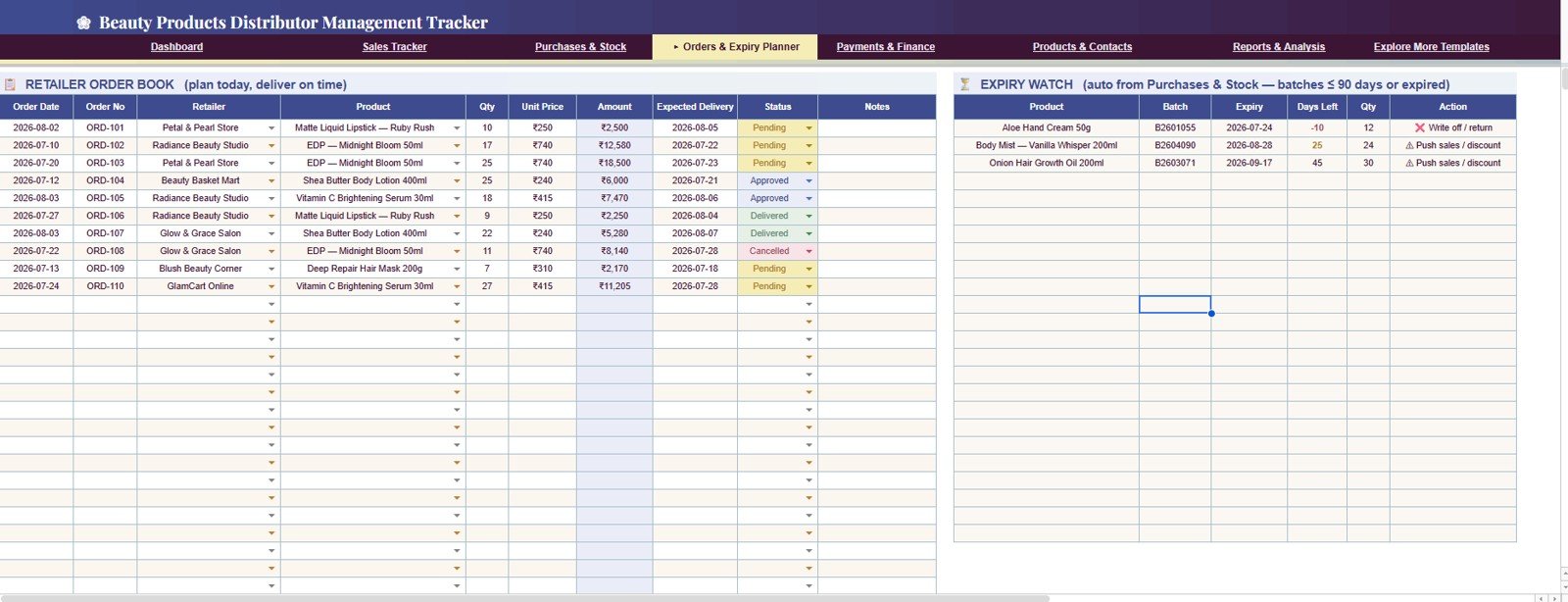
Orders & Expiry Planner
5. Payments & Finance
The Payments & Finance tab shows supplier payment amount, business expenses, sales billed, purchases, received cash, gross margin, and net cash flow by month. It gives owners and finance users a simple monthly view of cash movement without building a separate reporting file.
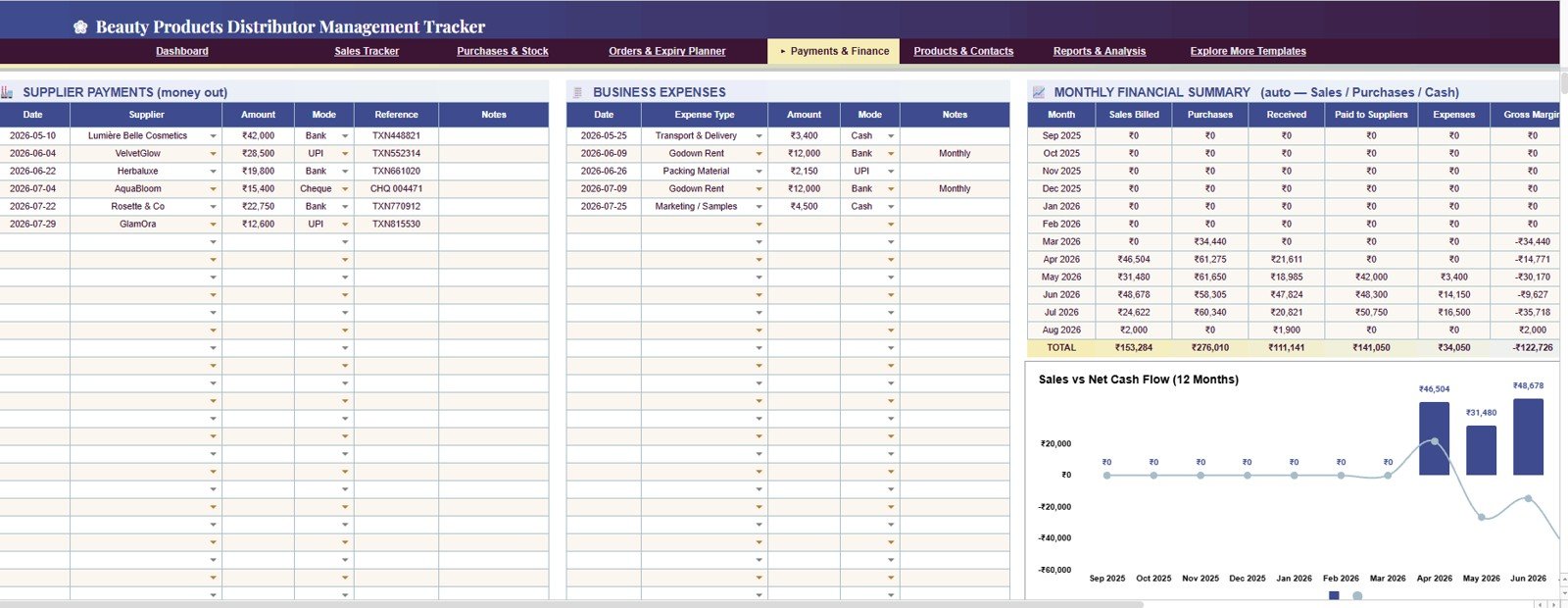
Payments & Finance
6. Products & Contacts Tab
This is the master data sheet. Add product, retailer, and supplier details in the same format shown in the tab so the tracker can use clean names, categories, contacts, and dropdown values across the workbook.
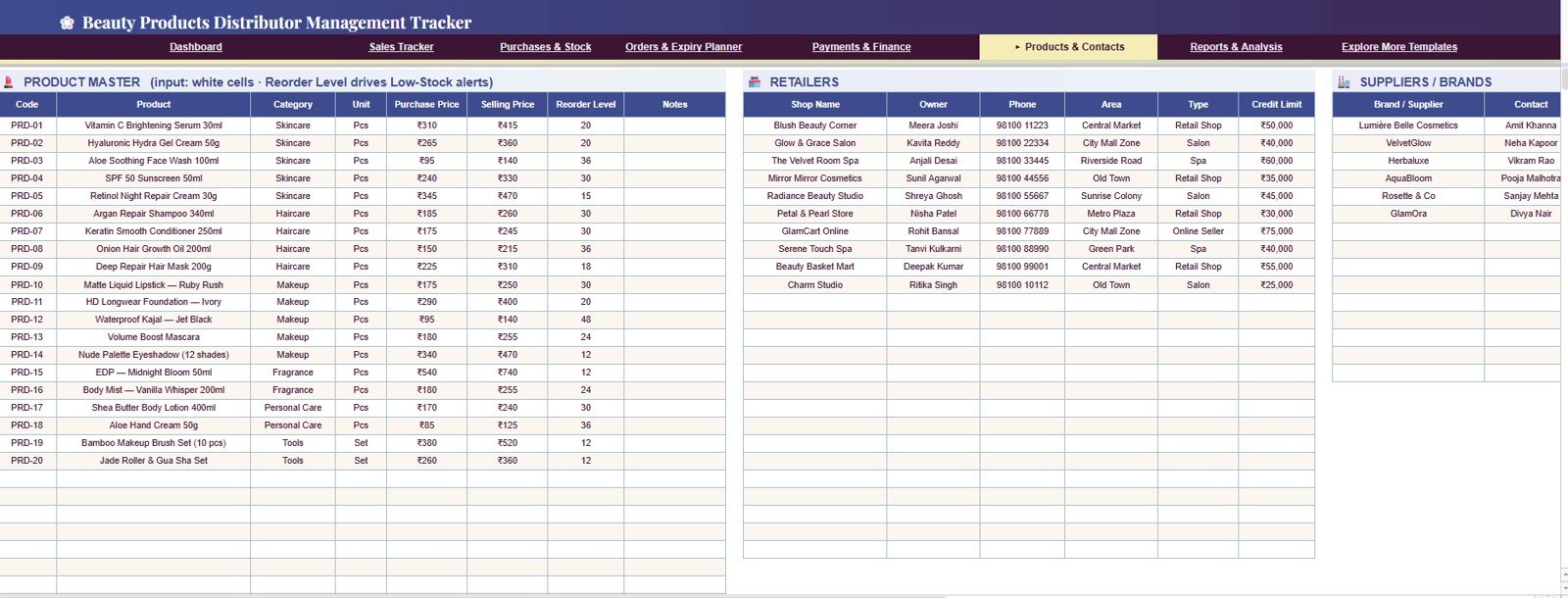
Products & Contacts tab
7. Reports & Analysis
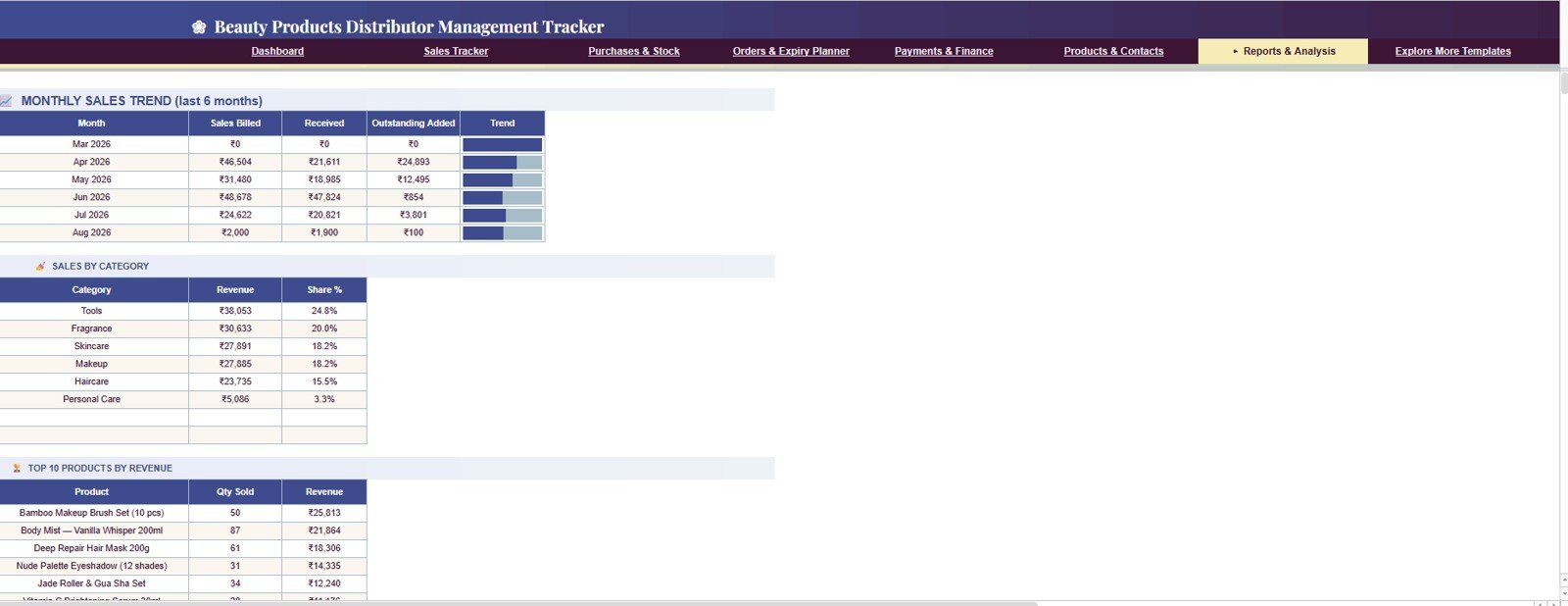
The Reports & Analysis tab adds month-end views for Sales Billed by Month, Received Cash by Month, Outstanding Added by Month, Revenue by Category, Share by Category, Quantity Sold by Product, and Revenue by Product. Use this tab for review meetings, owner updates, and simple performance checks.
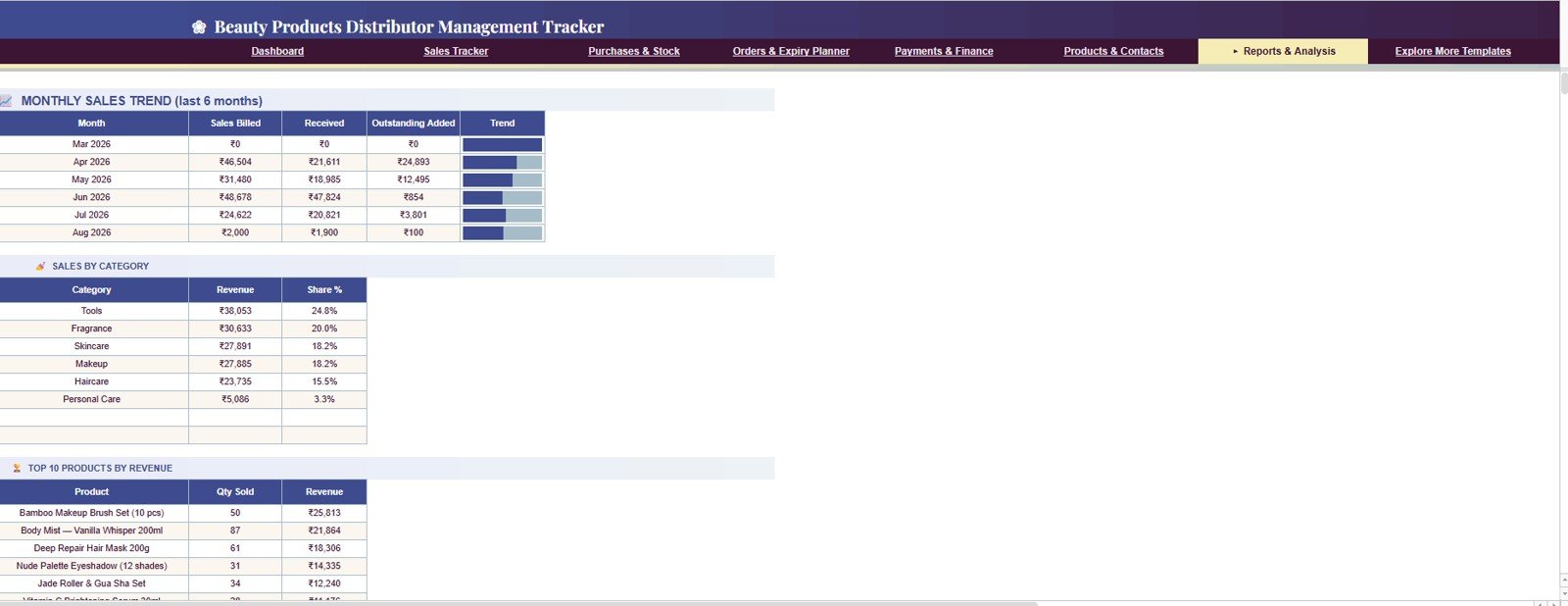
Reports & Analysis
Beauty Products Distributor Management Tracker in Google Sheets vs. Excel Dashboard vs. Paid CRM/SaaS – Where This Fits
| Feature | This Google Sheets tracker | Microsoft Excel alternative | Paid inventory/CRM SaaS |
|---|---|---|---|
| Cost | $9.99 one-time sale price | Template cost plus Microsoft access | Usually monthly or annual subscription |
| Platform | Google Sheets in Google Drive | Excel desktop or Excel Online | Vendor-hosted cloud app |
| Setup time | Copy the file and add master data | Download and configure workbook | Account setup, onboarding, and data migration |
| Real-time team collaboration | Native Google sharing | Depends on OneDrive or SharePoint | Usually included, plan dependent |
| Mobile access | Google Sheets app or browser | Excel app or browser | Vendor app |
| Customizable fields | Editable sheets, formulas, pivots, and charts | Editable if workbook is unlocked | Limited by vendor settings |
| Share with link | Yes, through Google Drive permissions | Yes, through Microsoft sharing | Usually account based |
| Year-1 cost at 5 users | $9.99 before any Google Workspace costs | Template plus Microsoft access | Can become hundreds or thousands per year |
| Beauty distribution fit | Sales, receivables, stock, orders, payments, and expiry in one file | May need extra formulas or tabs | Best for teams needing automation and integrations |
Who This Template Is For – and Who It’s Not For
This template is for beauty product distributors, cosmetics wholesalers, skincare and haircare suppliers, salon product suppliers, small importers, retailer account managers, and owners who need a shared tracking file for sales, stock, expiry, orders, and payments.
It is not a full ERP, barcode system, accounting package, automated invoicing tool, or GST/VAT compliance system. If you need user logins, role-based access, automated pages, and a browser app experience, review the Beauty Products Distributor Management System Web App.
How to Use the Beauty Products Distributor Management Tracker in Google Sheets
- Open the PDF guide included with your purchase and use the Google Sheets copy link.
- Create your own editable copy in Google Drive.
- Add products, retailers, and suppliers in the Products & Contacts tab.
- Enter purchases, stock batches, sales invoices, received payments, retailer orders, supplier payments, and business expenses in the relevant tabs.
- Use slicers on the Overview Page to filter cards and charts quickly.
- Review Reports & Analysis for monthly sales, cash, outstanding, category share, and product performance.
Real-World Use Cases
Ritika, salon products distributor: Ritika uses the Sales Tracker to review Days Overdue by Invoice every Monday and follow up with retailers who are late on payments.
Marcus, skincare importer: Marcus uses Days Left by Batch and Action by Expiry Status to promote near-expiry stock before it becomes a write-off.
Ayesha, cosmetics wholesale owner: Ayesha shares the tracker with her assistant so one person can enter purchases while the other records sales and payments.
Frequently Asked Questions
What is included in the Beauty Products Distributor Management Tracker in Google Sheets?
It includes 7 linked tabs: Overview, Sales Tracker, Purchases & Stock, Orders & Expiry Planner, Payments & Finance, Products & Contacts, and Reports & Analysis.
Does it track expiry dates?
Yes. The tracker includes Expiry Status by Batch, Days Left by Batch, Action by Expiry Status, and a Near-Expiry or Expired Lots KPI card.
Can my team use the file together?
Yes. Since it runs in Google Sheets, you can share the file through Google Drive and allow view or edit access based on your workflow.
Can I customize product categories and retailer names?
Yes. Update the Products & Contacts tab with your own products, categories, retailers, and suppliers, then keep the same format for clean reporting.
Is this a billing or accounting system?
No. It tracks invoice amounts, received amounts, balances, payments, expenses, and cash flow for analysis, but it does not generate compliant invoices or file taxes.
Do I need add-ons or macros?
No. The tracker is designed for Google Sheets, so you can use it in a browser or in the Google Sheets mobile app without Excel macros.
About the Author
Built by PK – Microsoft Certified Professional with 15+ years of Excel, Google Sheets, and Power BI experience. Founder of NextGenTemplates, reaching 300K+ subscribers across YouTube channels. Every template is hand-built and tested before release.
Explore Related Templates
- Read the detailed blog post for this Google Sheets tracker.
- Beauty Products Distributor Management System Web App for a login-based distributor workflow.
- Fashion and Apparel Dashboard in Google Sheets for retail category analysis.
- Purchase and GRN Data-Entry System in Excel for purchase receiving workflows.
- Salon Appointment Data Entry System in Excel for beauty service businesses.
- Browse more Google Sheets tracker templates.
Ready to track beauty distributor sales, receivables, stock value, low stock, expiry, orders, supplier payments, expenses, gross margin, and cash flow in one shared spreadsheet? Get the Beauty Products Distributor Management Tracker in Google Sheets and start with a ready-made operating file.
Watch the step-by-step video Demo:
Last updated: August 3, 2026






















Reviews
There are no reviews yet.