



In the ever-evolving world of hybrid and remote work, educational institutions need more than just basic spreadsheets—they need smart, intuitive, and reliable planning tools. That’s where our Education HR Remote Work Calendar in Excel steps in. Built for HR professionals in schools, colleges, and universities, this powerful Excel template helps manage remote work with ease, visibility, and control.
Whether you’re juggling faculty schedules, coordinating support teams, or aligning staff availability with academic events, this calendar keeps your HR operations organized and efficient—all within a familiar Excel environment.
✅ Key Features of the Education HR Remote Work Calendar
Our calendar is more than just rows and columns—it’s an automated, user-friendly Excel solution tailored for educational HR teams.
5 Smartly Structured Sheets: Switch between Annual, Monthly, and Daily views effortlessly.
Control Panel Customization: Select year, start month, week start day, and color theme.
Interactive Buttons: Navigate across views, add/edit/delete events with a single click.
Auto-generated Event IDs: Maintain unique identification for every scheduled activity.
Dynamic Highlighting: Emphasize weekends, holidays, and event days visually.
No Coding Needed: Everything runs on native Excel functions and VBA forms.
📂 What’s Inside the Education HR Remote Work Calendar

Here’s a breakdown of what each worksheet offers:
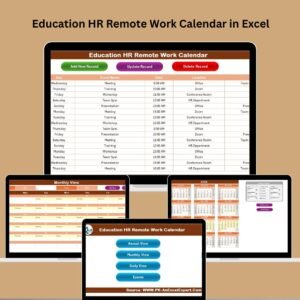
🏠 Home Sheet Tab: Index page with buttons to jump to Annual, Monthly, Daily views, or the master Events sheet.
📆 Annual View: 12-month calendar with full customization—control panel for layout, color themes, and day highlights. Add or view events quickly using intuitive buttons.
📅 Monthly View: Shows the first event of each day and indicates if more are scheduled. Easy access to event details with a click.
📋 Daily View: Filter by any custom date range. Perfect for weekly HR reviews or daily event tracking.
📊 Events Sheet: Centralized database with auto-generated IDs, Date, Day, Event Name, Time, Location, and Description. Add, update, or delete events using VBA-powered forms.
🛠️ How to Use the Education HR Remote Work Calendar
Using this template is refreshingly simple. Just follow these steps:
Open the Excel file and go to the Home Sheet.
Use the Annual View to set the year, start month, and theme.
Click Add New Event to enter events across departments or teams.
Use Monthly View for specific month-based scheduling.
Filter in Daily View for daily or weekly planning.
Use the Events Sheet to manage, edit, or delete records via forms.
Highlight weekends or holidays using the built-in options.
Backup the file weekly and print views as needed!
With built-in forms and navigation, you don’t have to be an Excel expert to use this template effectively.
🎓 Who Can Benefit from This Calendar?
This tool is built specifically for HR departments in education, but its versatility makes it useful for others too:
School HR Teams – Manage administrative staff and teacher schedules with precision.
Colleges & Universities – Schedule remote working days for faculty, academic support, or student service teams.
Training Centers – Coordinate trainer availability and class schedules.
Education Consultants – Track project events, HR deliverables, and remote team logistics.
IT & Admin Departments – Plan remote infrastructure tasks and team rotations.
Whether you’re managing 10 or 100 employees, this template scales with your needs.
### 📖 Click here to read the Detailed blog post
🔗 Visit our YouTube channel to learn step-by-step video tutorials
Watch the step-by-step video tutorial:
Compatibility and Requirements
- Works in Microsoft Excel desktop on Windows with macros enabled. The Add, Edit and Delete event forms run on VBA, so the file does not run in Excel for the web, Google Sheets or mobile apps. Microsoft explains the setting in Enable or disable macros in Microsoft 365 files.
- You set the year, start month, week start day and color theme from the control panel on the Annual View sheet.
Frequently Asked Questions
Which sheets does the calendar have?
Five sheets: Home Sheet, Annual View, Monthly View, Daily View and Events Sheet.
How do I add an event?
Click Add New Event and fill in the form. The Events Sheet stores the Date, Day, Event Name, Time, Location and Description, and each event gets an auto-generated ID.
Can I change the start month or the first day of the week?
Yes. The control panel on the Annual View lets you pick the year, start month, week start day and color theme.
Can I filter events by date range?
Yes. The Daily View filters events by any date range you choose, which suits weekly HR reviews.
Does it need macros?
Yes. The forms for adding, updating and deleting events are VBA-powered, so enable macros when you open the file in desktop Excel.
Is there a version for other departments?
Yes. For example, see the Education Operations Remote Work Calendar in Excel and the HR Remote Work Calendar in Excel.
Related Remote Work Templates
- HR Remote Work Calendar in Excel: the same calendar for general HR teams
- Education Compliance Remote Work Calendar in Excel: the education edition for compliance teams
- Education Operations Remote Work Calendar in Excel: the education edition for operations staff
- Remote Work KPI Dashboard in Excel: track remote work metrics
- Remote Work Request Form Template in MS Word and Google Docs: a free request form for staff
Browse all Excel calendar templates and Excel education templates.




Reviews
There are no reviews yet.