



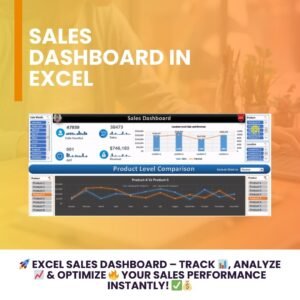
The Dynamic Dashboard with Tablet and Mobile Shape in Excel is an innovative and visually appealing tool designed to transform how you present and analyze data. This Excel-based dashboard offers a modern, tablet- and mobile-shaped layout that is not only eye-catching but also functional, making it ideal for business presentations, reports, or personal data tracking.
With this dynamic dashboard, you can present key metrics, KPIs, and trends in a stylish and interactive format. Whether you’re tracking sales, marketing performance, or project progress, this template enables you to visualize data on mobile and tablet-shaped screens, giving your reports a modern and professional touch. It’s fully customizable and can be adapted to any data set, making it an essential tool for professionals, managers, and analysts.

Key Features of the Dynamic Dashboard with Tablet and Mobile Shape in Excel
📌 Tablet and Mobile Layout
The dashboard layout mimics the shape of a tablet or mobile device, making it perfect for displaying on digital screens or using as part of mobile-first presentations.
🛠 Interactive and Dynamic Data
This dashboard allows you to interact with your data through dynamic charts, graphs, and slicers. The interactivity allows users to filter and adjust the data views based on specific parameters like time, region, or category.
💡 Visual Data Representation
With the mobile and tablet layout, this dashboard transforms raw data into beautiful visualizations. It uses various chart types such as bar, line, and pie charts, allowing for easy interpretation of key metrics and trends.
🔢 Customizable and Flexible
You can tailor the dashboard to display any data relevant to your business or project. Whether you’re analyzing sales performance, customer satisfaction, or other KPIs, you can easily customize the data fields, categories, and chart types to suit your needs.
🚀 Real-Time Updates
With real-time data integration, the dashboard automatically updates when new data is entered into your Excel sheet. This ensures that you always have up-to-date information at your fingertips without any manual updates.
📊 Multiple Data Points in One View
Track multiple KPIs or metrics on a single page, providing a comprehensive view of your performance. This makes it easier to see how different data points are interconnected and to make informed decisions quickly.
⚙ Simple to Use
No advanced Excel skills are required to use this template. Its user-friendly interface and clear layout make it accessible for users of all experience levels, from beginners to advanced Excel users.
🚀 Why You’ll Love This Dynamic Dashboard with Tablet and Mobile Shape
✅ Stylish and Professional Layout – Stand out with a modern, tablet-shaped design that’s perfect for mobile-first presentations. ✅ Interactive Features – Use slicers and dynamic charts to interact with your data and get instant insights. ✅ Easy Customization – Adapt the template to fit any data set or business need. ✅ Real-Time Updates – Get up-to-the-minute data without having to update manually. ✅ Improved Decision-Making – Visualize trends and key metrics in one view to make data-driven decisions quickly.
📂 What’s Inside the Dynamic Dashboard with Tablet and Mobile Shape in Excel?
- Mobile and Tablet Layout: A unique design with interactive elements for enhanced data visualization.
- Dynamic Charts and Graphs: Automatically updated charts and graphs that respond to changes in your data.
- Slicers for Filtering: Filter and adjust data views with ease using slicers.
- Customizable Fields: Change the data fields and chart types to suit your specific needs.
- User-Friendly Interface: No advanced Excel knowledge required to operate the dashboard.
🔍 How to Use the Dynamic Dashboard with Tablet and Mobile Shape in Excel
1️⃣ Download the Template – Instant access to the Excel template upon purchase. 2️⃣ Customize the Dashboard – Modify the fields, categories, and charts to reflect your data. 3️⃣ Enter Your Data – Input your data into the provided fields. 4️⃣ Use the Interactive Features – Adjust slicers and watch the charts update in real-time. 5️⃣ Present and Analyze – Use the dashboard for presentations, reports, or data analysis.
🎯 Who Can Benefit from This Dynamic Dashboard with Tablet and Mobile Shape? 🔹 Business Analysts 🔹 Marketing Teams 🔹 Project Managers 🔹 Sales Teams 🔹 Executives and Decision-Makers 🔹 Anyone needing a stylish and functional dashboard for data tracking and analysis
With its modern tablet and mobile design, the Dynamic Dashboard with Tablet and Mobile Shape in Excel is an essential tool for those who want to present and analyze their data in a visually stunning and interactive way.
Click here to read the Detailed blog post
https://www.pk-anexcelexpert.com/dynamic-dashboard-with-tablet-and-mobile-shape-in-excel/
Visit our YouTube channel to learn step-by-step video tutorials
Watch the step-by-step video tutorial:
Also check our Incentive Dashboard in Excel
Compatibility and Requirements
- Works in Microsoft Excel desktop (Excel 2016 or later, or Microsoft 365).
- The charts respond to slicers, so use a desktop version of Excel that supports slicers.
- Need help with slicers? See the Microsoft guide Use slicers to filter data.
Frequently Asked Questions
What makes this dashboard different?
The layout is drawn in the shape of a tablet and a mobile screen, which suits mobile style presentations and reports.
Can I use my own data?
Yes. You enter your data in the provided fields and can change the data fields, categories and chart types.
How do the filters work?
Slicers filter the charts by values such as time, region or category, and the charts update as you click.
Do I need advanced Excel skills?
No. The layout is clear enough for beginners as well as advanced users.
Related Excel Dashboard Templates
- Power BI Sales Dashboard Design for Mobile: a mobile layout built in Power BI
- Incentive Dashboard in Excel: track sales incentives in Excel
- Daily Sales Dashboard in Excel: day by day sales reporting
- Data Analyst’s Chart & Visualization Pack: 10 chart templates in one bundle
Browse all Excel dashboards or the Excel sales and marketing templates.


































Reviews
There are no reviews yet.