

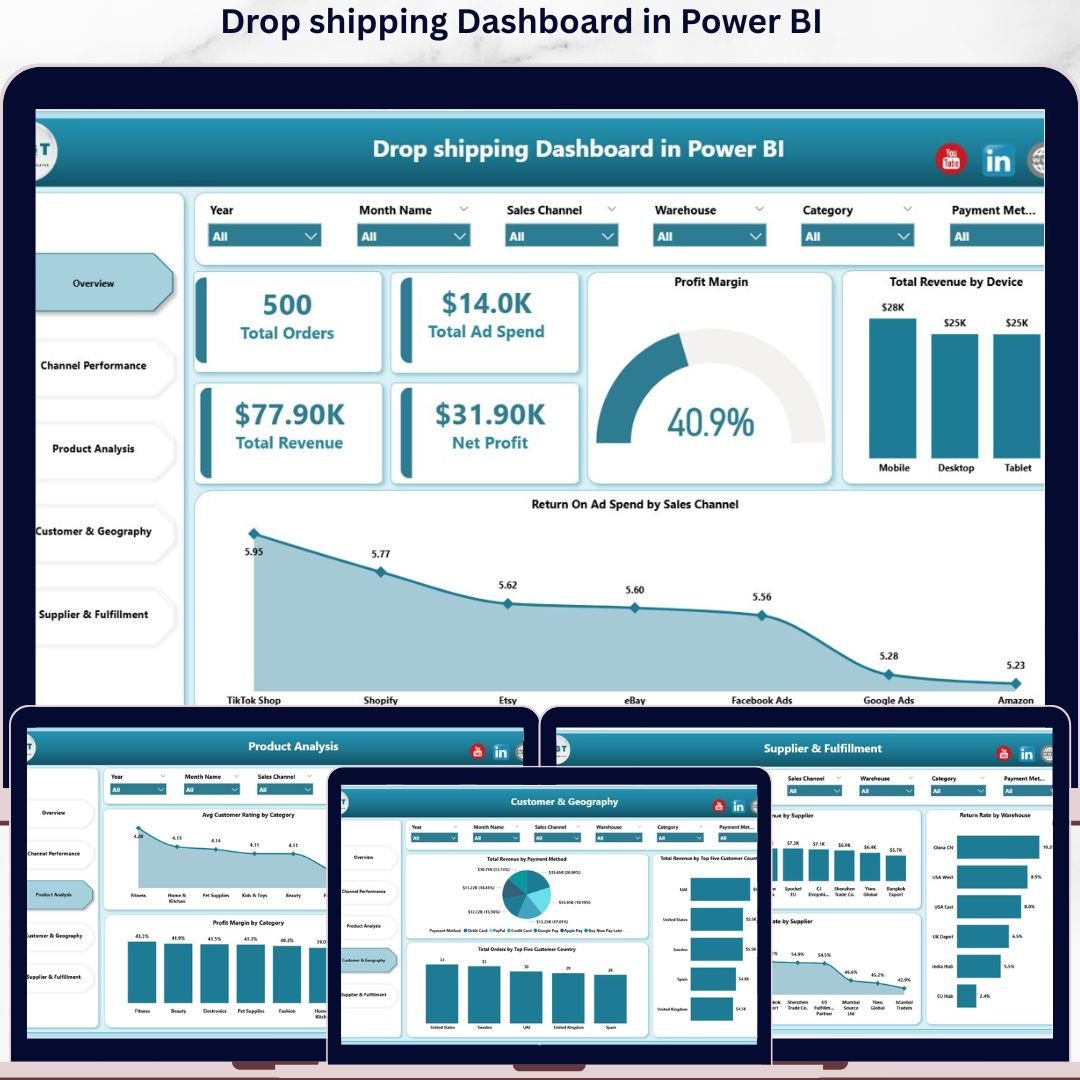
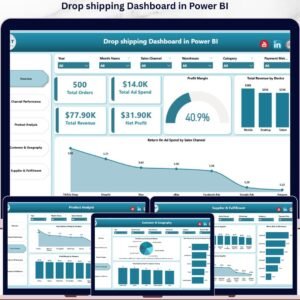
The Drop Shipping Dashboard in Power BI tracks 5 core KPIs (Total Orders, Total Ad Spend, Total Revenue, Net Profit, Profit Margin) across 5 interactive report pages and 13+ pre-built visuals covering channel ROAS, product category margin, supplier fulfillment, and customer geography. Setup takes under 10 minutes — point the .pixy file at your data source and every visual, slicer, and KPI card refreshes through the built-in DAX measures.
🌍 Join 8,400+ teams in 40+ countries using Nextgen Templates to replace paid SaaS analytics tools with one-time-purchase Excel, Google Sheets, Power BI, and HTML templates.
✅ Instant download · One-time payment · No subscription · No per-user fees · Lifetime access
🔑 Key Features of the Drop Shipping Dashboard in Power BI
📊 5-Page Interactive Analytics Suite – The dashboard covers Overview, Channel Performance, Product Analysis, Customer & Geography, and Supplier & Fulfillment. Each page filters together through shared Power BI slicers, so a single click on a date range, sales channel, or supplier instantly refreshes every visual and KPI card across all five pages.
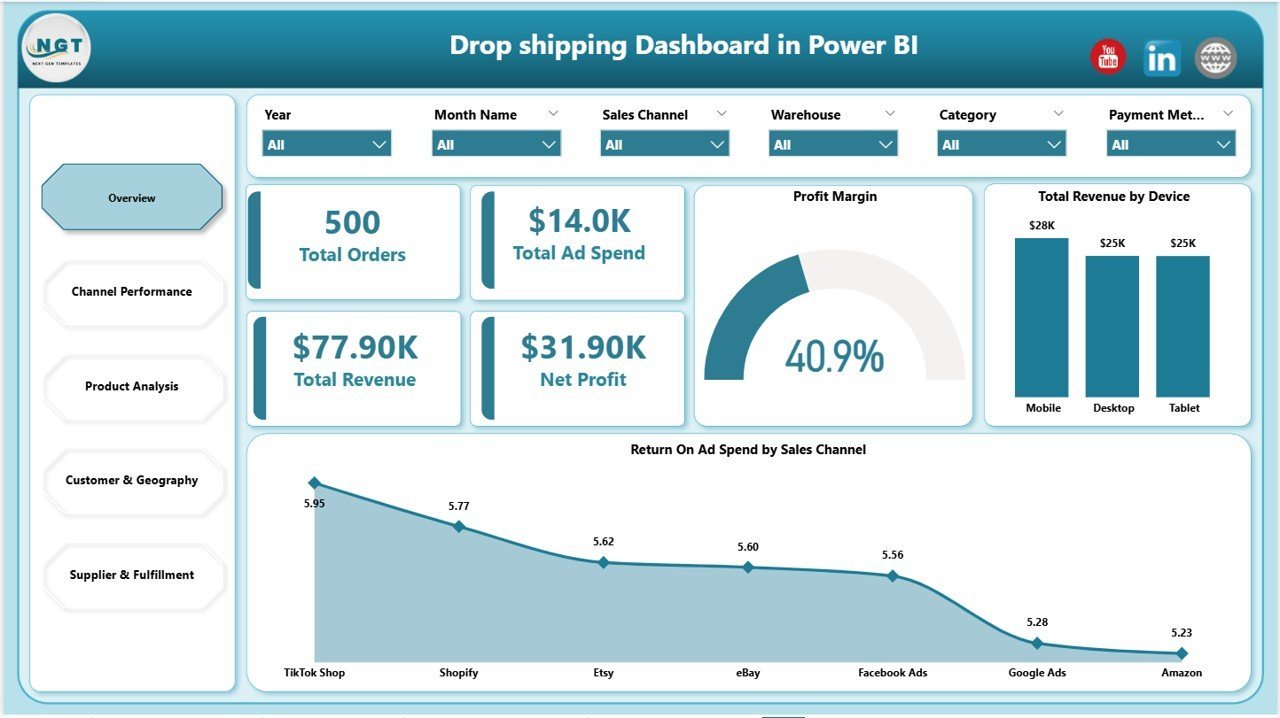
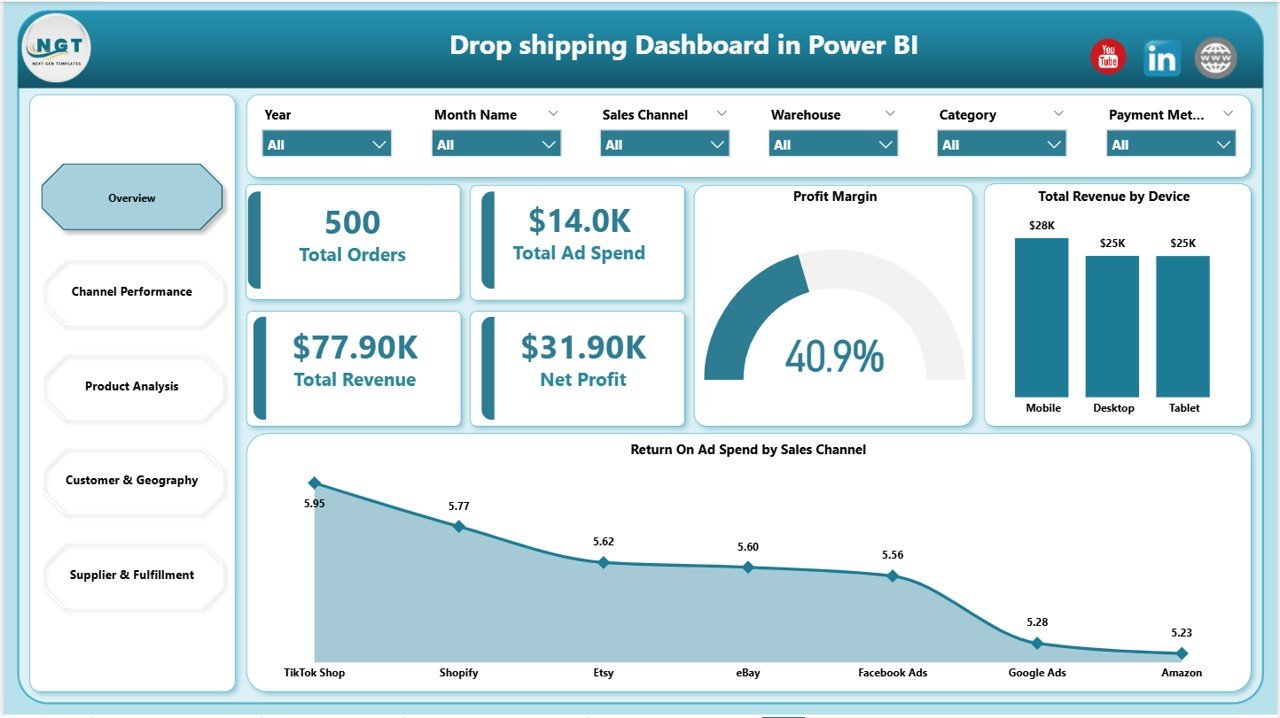
💰 5 Executive KPI Cards – The Overview page surfaces Total Orders, Total Ad Spend, Total Revenue, Net Profit, and Profit Margin. These are the exact five numbers most dropshipping operators need to see before anything else, calculated dynamically through DAX measures on the underlying data model.
📈 13+ Pre-Built Visuals – Every chart is driven by DAX. Visuals include Total Revenue by Device, Return On Ad Spend by Sales Channel, Total Ad Spend by Sales Channel, Total Revenue and Net Profit by Sales Channel, Profit Margin by Sales Channel, Avg Customer Rating by Category, Profit Margin by Category, Total Revenue and Net Profit by Category, Total Revenue by Payment Method, Total Orders by Top Five Customer Country, Total Revenue by Top Five Customer Country, Total Revenue by Supplier, Delivery Rate by Supplier, and Return Rate by Warehouse.
🎛️ Multi-Slicer Filtering – Slicers on every page let you filter by Sales Channel (Shopify, Amazon, eBay, Etsy, TikTok Shop), Date Range, Country, Supplier, Category, Device, and Payment Method. A single slicer click cascades across the entire report through Power BI’s cross-filter behavior.
🔄 One-Click Refresh Architecture – After updating the source data file, click Home > Refresh in the Power BI Desktop ribbon and every visual and KPI updates simultaneously. No DAX measures to rewrite, no relationships to reconfigure.
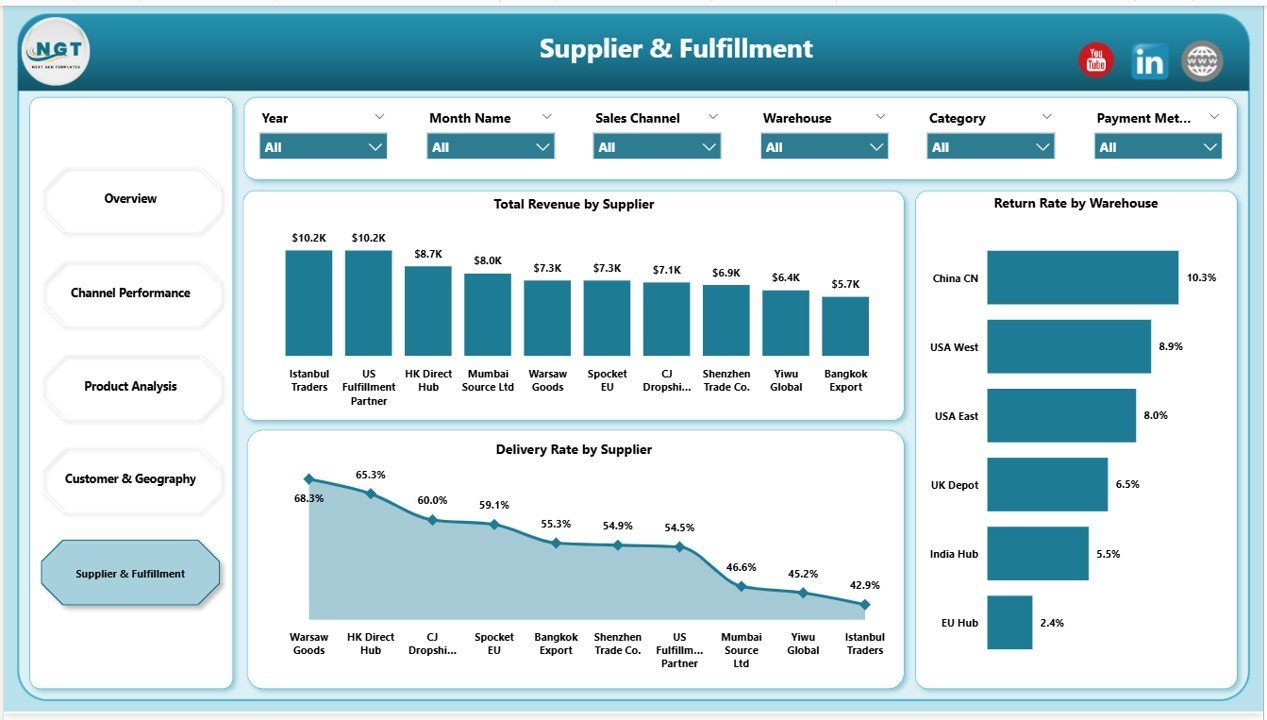
📦 Supplier & Fulfillment Visibility – Track which suppliers generate the most revenue, which suppliers deliver the highest on-time rate, and which warehouses have the highest return rate — three numbers that decide whether a dropshipping store scales or stalls.
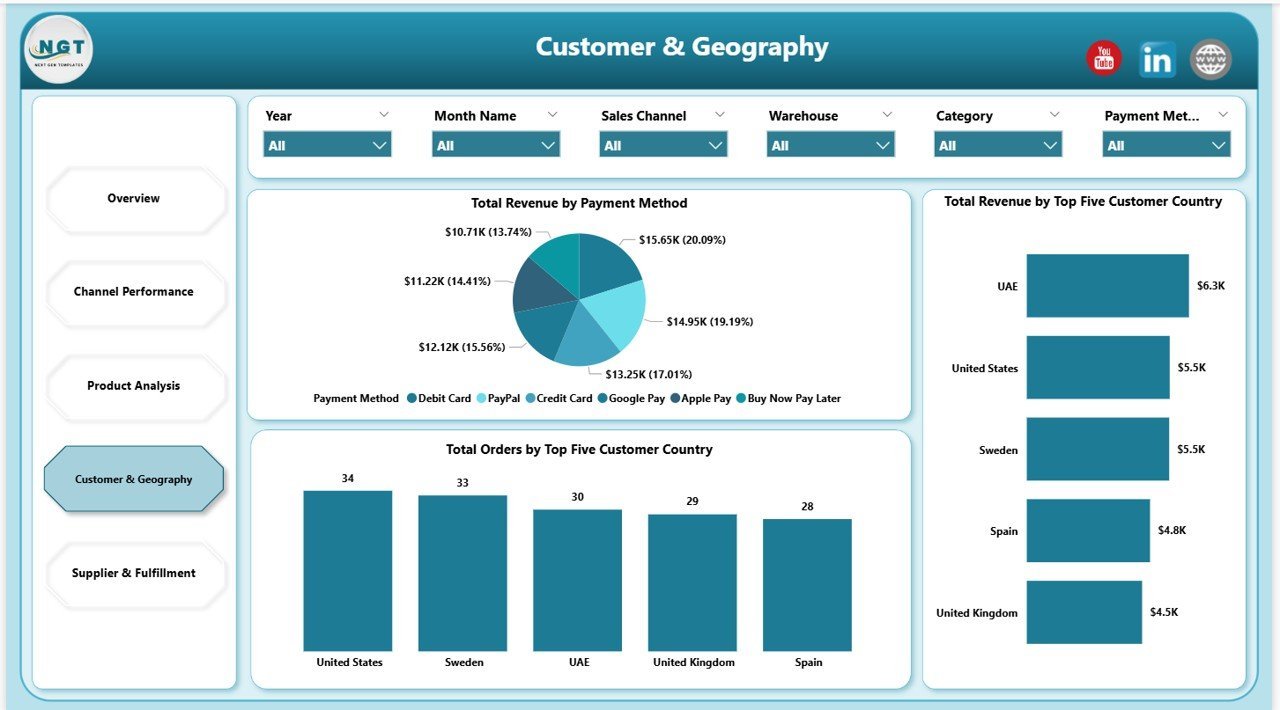
🌐 Customer Geography Analytics – See total orders and total revenue split by your top 5 customer countries plus revenue by payment method, helping you decide where to scale ad spend and which payment options drive the highest conversion.
📦 What’s Inside the Drop Shipping Dashboard in Power BI
The file ships as a single .pixy Power BI Desktop file with 5 interactive report pages:
Page 1 — Overview
This page shows 5 KPI cards (Total Orders, Total Ad Spend, Total Revenue, Net Profit, Profit Margin) and charts including Total Revenue by Device and Return On Ad Spend by Sales Channel. Multi-slicer filtering at the top of the page makes every visual respond to a single click on channel, date, or country.
Page 2 — Channel Performance
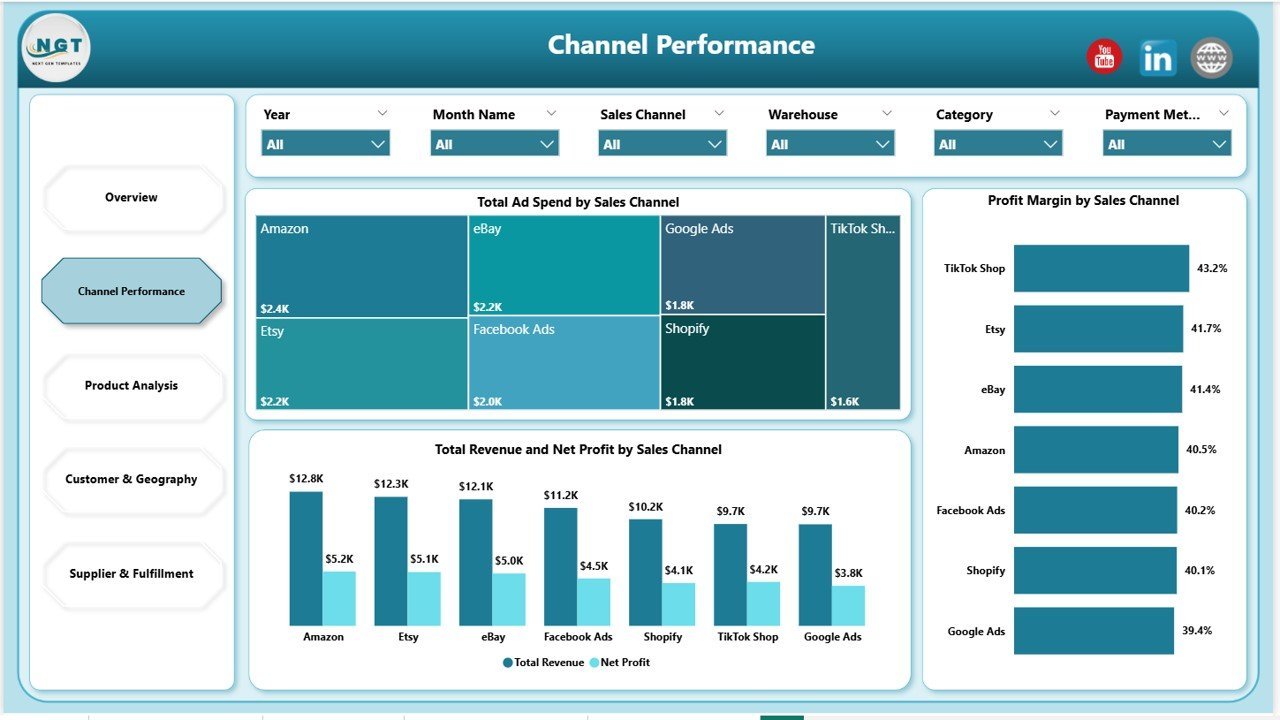
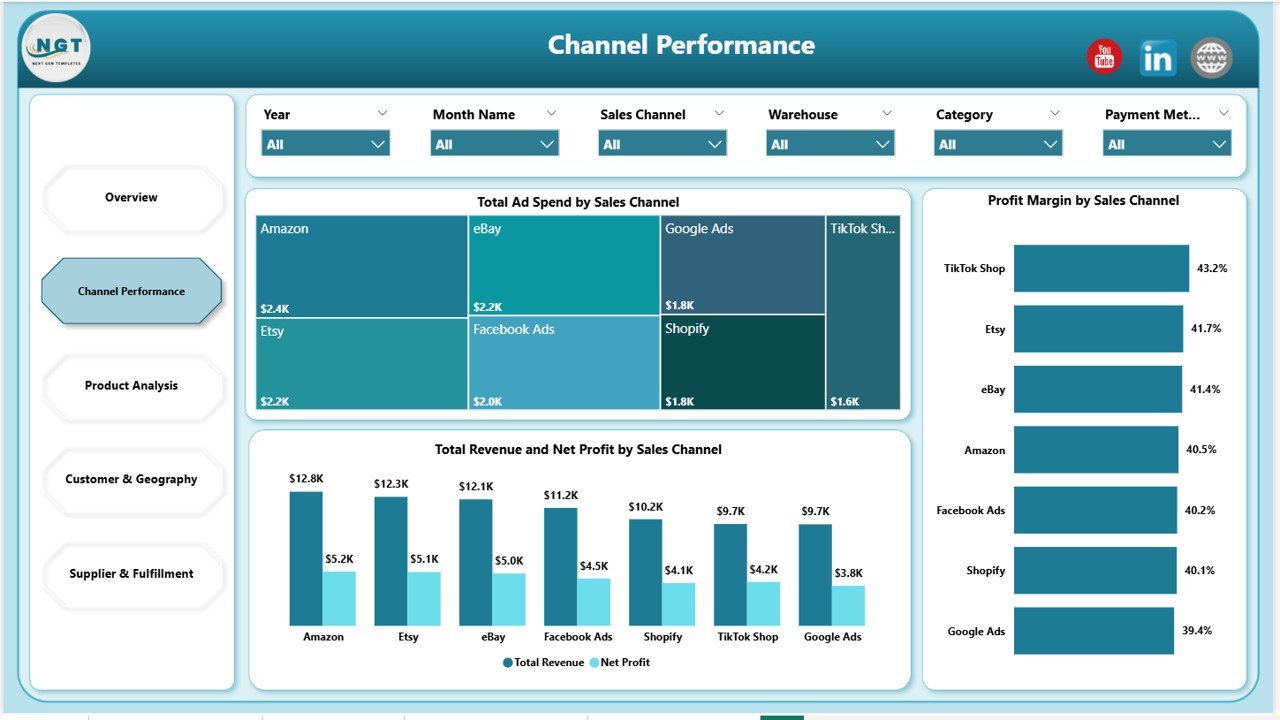
This page shows Total Ad Spend by Sales Channel, Total Revenue and Net Profit by Sales Channel, and Profit Margin by Sales Channel — designed to answer “which channel is actually profitable, not just busy?” before you scale ad spend.
Page 3 — Product Analysis
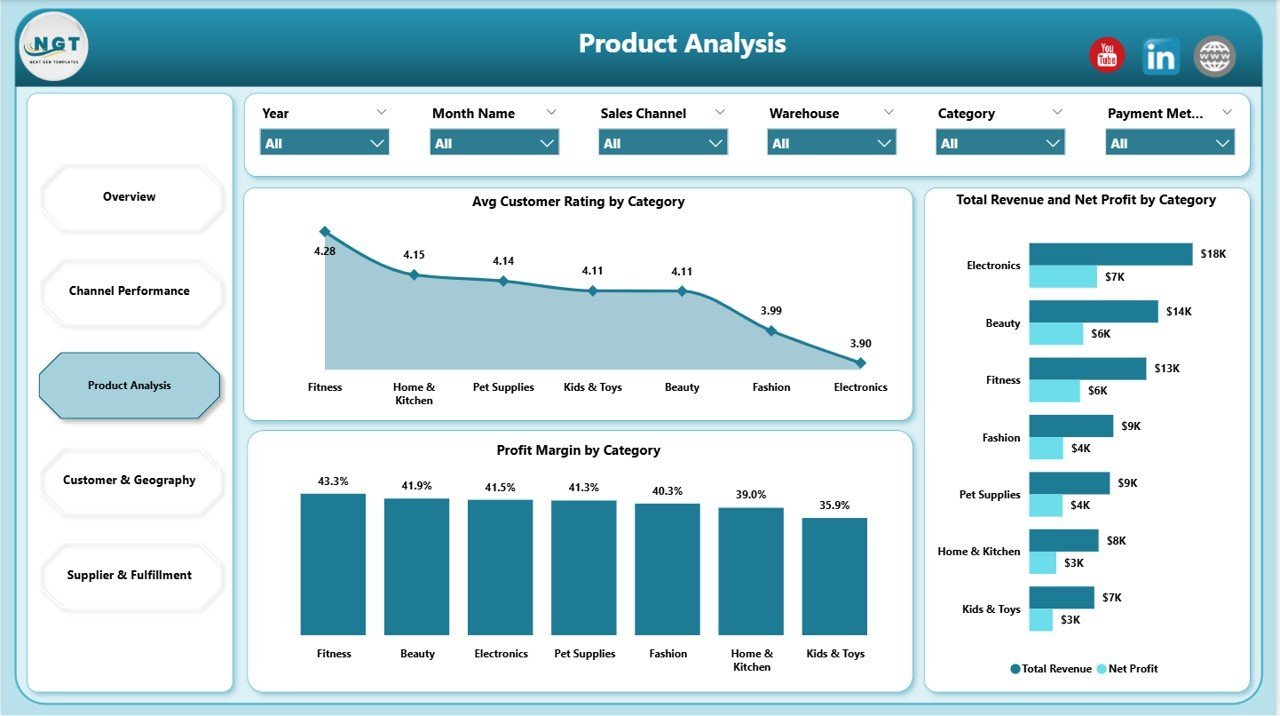
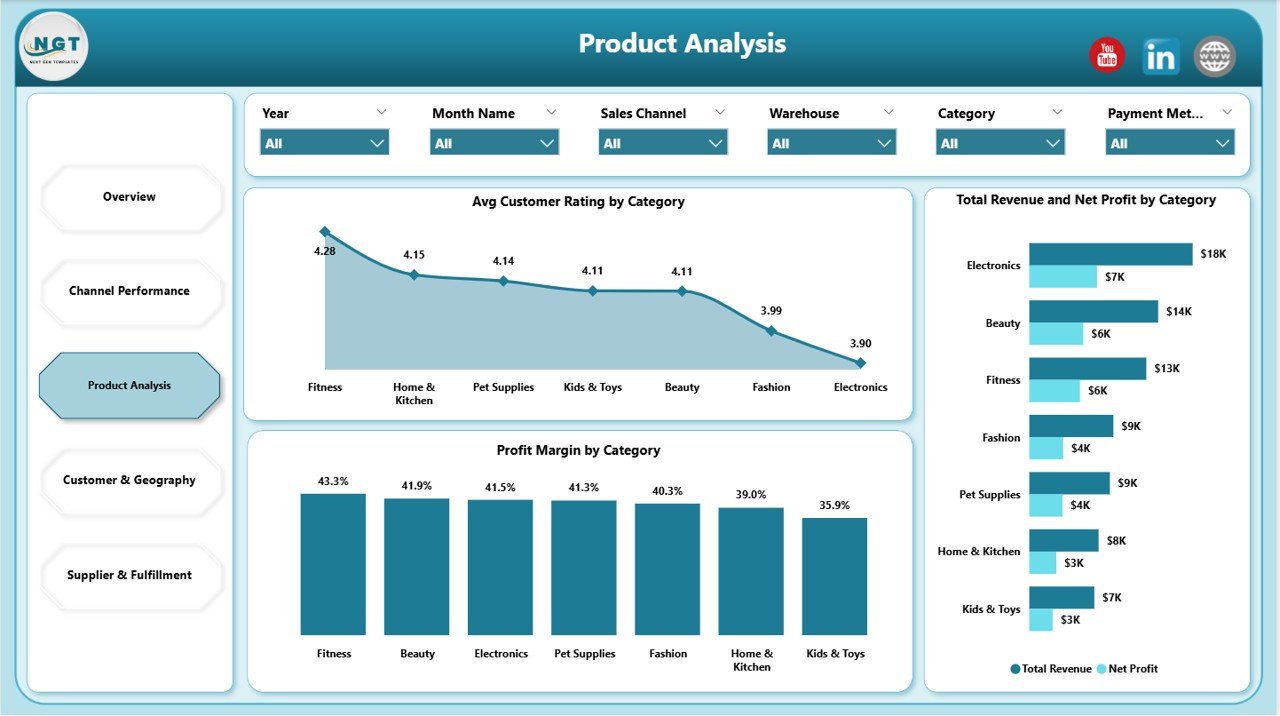
This page shows Avg Customer Rating by Category, Profit Margin by Category, and Total Revenue and Net Profit by Category. Identify hero SKUs, dead inventory, and the categories whose ratings are dragging down repeat purchases.
Page 4 — Customer & Geography
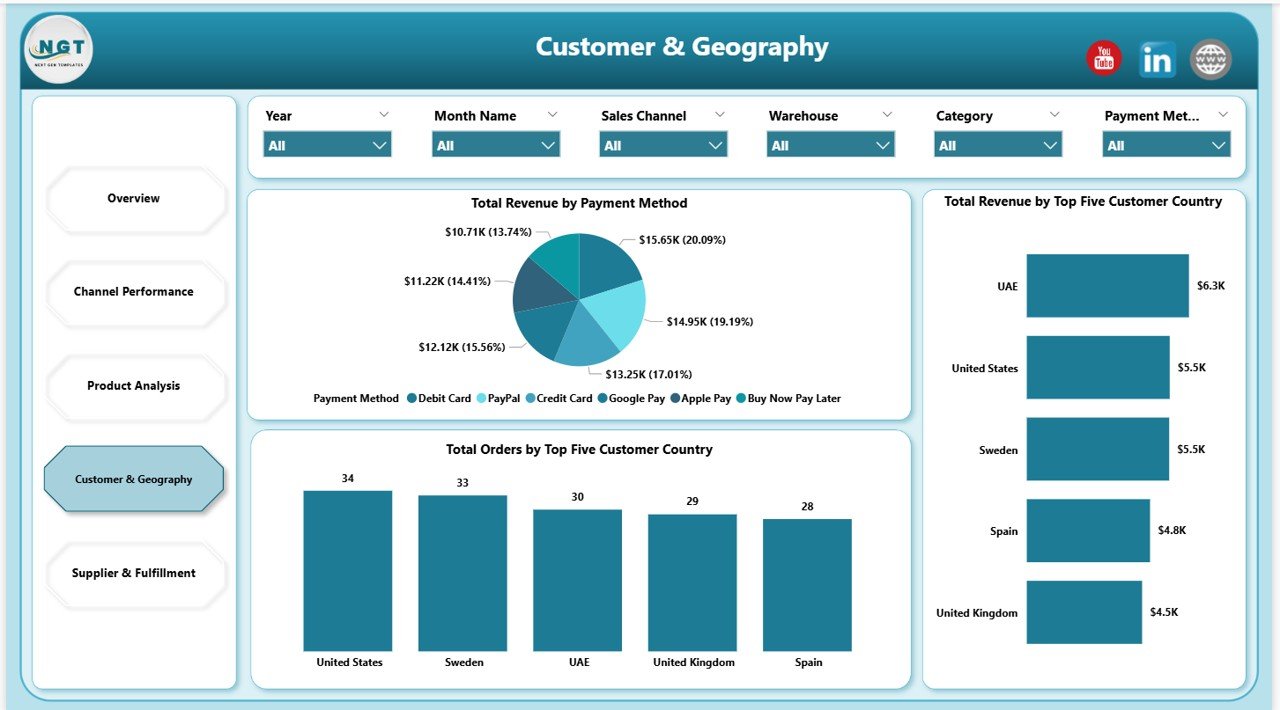
This page shows Total Revenue by Payment Method, Total Orders by Top Five Customer Country, and Total Revenue by Top Five Customer Country. Pick the markets to scale and the payment methods to prioritize at checkout.
Page 5 — Supplier & Fulfillment
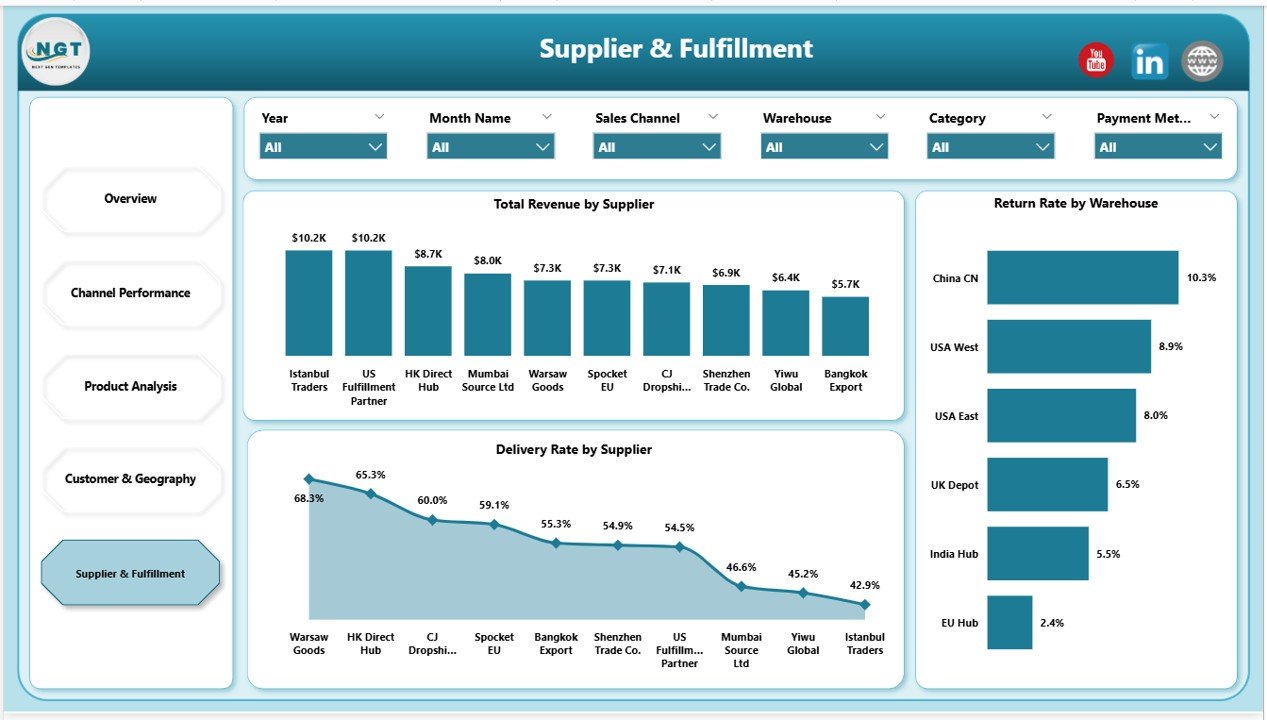
This page shows Total Revenue by Supplier, Delivery Rate by Supplier, and Return Rate by Warehouse. Critical for any operator running 3+ suppliers where one bad fulfillment partner can erase a month of margin.
📊 Drop Shipping Dashboard in Power BI vs. Tableau / Qlik vs. Triple Whale / Polar — Where This Fits
| Feature | Drop Shipping Dashboard in Power BI | Tableau / Qlik alternative | Triple Whale / Polar |
|---|---|---|---|
| Cost | $17.99 one-time | $70-150 / user / month | $129-499 / month |
| Platform | Power BI Desktop (free) | Tableau / Qlik Cloud | Cloud SaaS |
| Setup time | Under 10 minutes | 1-3 days | 2-5 days (integrations) |
| Sales channel ROAS (Shopify, Amazon, eBay, TikTok) | ✅ Pre-built | Build from scratch | ✅ Auto-sync |
| Supplier cost & margin tracking | ✅ Pre-built | Manual modeling | ❌ Not native |
| Customer geography (top 5 country) | ✅ Pre-built | Build from scratch | ✅ Available |
| Works offline / private data | ✅ | ❌ | ❌ |
| Year-1 cost at 5 users | $17.99 | $4,200 – $9,000 | $1,548 – $5,988 |
| Customizable DAX & visuals | ✅ Full Power BI access | ✅ Tableau Calc | Limited (UI only) |
For dropshippers who want channel ROAS, supplier margin, and customer geography in one Power BI file without paying $1,500+ per year for a SaaS analytics suite or $4,000+ per year for Tableau, the Drop Shipping Dashboard in Power BI sits in the sweet spot.
👥 Who This Template Is For — and Who It’s Not For
✅ This template is built for:
- Solo dropshippers and small teams ($10K-$500K monthly revenue) running Shopify, WooCommerce, or multi-marketplace stores
- Operators selling on 2+ channels (Shopify + Amazon, Etsy + TikTok Shop, etc.) who need a single ROAS view in Power BI
- Stores using 3+ drop shipping suppliers who need supplier-level delivery rate and return rate tracking
- Agencies or consultants delivering monthly Power BI performance reports to dropshipping clients
- Power BI-comfortable founders who already use Power BI Desktop and don’t want a separate $129-499/month cloud analytics tool
❌ This template is NOT for:
- Stores needing real-time API sync with Shopify / Meta Ads / Google Ads (use Triple Whale or Polar)
- Teams that work entirely in Google Sheets or Excel and won’t open .pbix files
- Enterprises requiring published Power BI Service workspaces with row-level security (this is a Desktop .pbix file)
- Anyone wanting a real-time mobile app — Power BI mobile works but requires publishing to Power BI Service
⚙️ How to Use the Drop Shipping Dashboard
- Download and unzip the file, then open the .pixy in Power BI Desktop (free download from Microsoft).
- Open the data source in Power BI’s Power Query Editor and point it at your own order-level data file — keep the column headers exactly as-is.
- Click Home > Refresh in the Power BI Desktop ribbon. Every visual, KPI card, and slicer updates in 2-3 seconds.
- Use slicers at the top of each page to filter by sales channel, date range, supplier, country, category, or device.
- Customize colors by editing the report theme JSON, or use View > Themes to apply a built-in Power BI theme.
- Publish to Power BI Service (optional) if you want web/mobile access and scheduled refresh — requires a Pro license.
💼 Real-World Use Cases
Marcus runs a 4-person Shopify drop shipping team selling pet accessories on Shopify, Amazon, and TikTok Shop. He uses the Drop Shipping Dashboard in Power BI every Monday morning to review the previous week’s ROAS by channel — last quarter he killed his TikTok Shop spend after the dashboard surfaced a 0.8x ROAS while Shopify direct was running at 3.2x. Replaced his $199/month Triple Whale subscription with this $17.99 file.
Priya is a Mumbai-based ecommerce consultant managing 7 dropshipping clients. She drops each client’s monthly export into a copy of this Power BI dashboard and sends a 5-page PDF report exported straight from Power BI. Setup takes 8 minutes per client. Before this, she was spending 3 hours per client building reports from scratch in Tableau.
Jamie operates a solo print-on-demand store with 12 suppliers across AliExpress, Printful, and Spocket. The Supplier & Fulfillment page surfaced that one supplier was running a 14% return rate vs. 3% for the rest — they swapped suppliers and recovered roughly $4,200/month in margin. The dashboard paid for itself 200x over in the first quarter.
❓ Frequently Asked Questions
What KPIs does the Drop Shipping Dashboard in Power BI track?
The Drop Shipping Dashboard in Power BI tracks 5 core KPIs (Total Orders, Total Ad Spend, Total Revenue, Net Profit, Profit Margin) plus 13+ visual-level metrics including ROAS by sales channel, profit margin by category, supplier delivery rate, warehouse return rate, and revenue by top 5 customer country. All metrics are calculated through DAX measures.
How long does setup take?
Setup for the Drop Shipping Dashboard in Power BI takes under 10 minutes. Download and unzip the .pbix, open it in Power BI Desktop, point the data source at your own order-level file, and click Home > Refresh. Every visual, KPI card, and slicer updates automatically through the pre-built DAX measures and data model.
How does this compare to Triple Whale or Polar?
The Drop Shipping Dashboard in Power BI is a $17.99 one-time purchase versus Triple Whale’s $129-499 monthly subscription. The trade-off is that this Power BI template requires manual data refresh (CSV export from Shopify or marketplace), while Triple Whale auto-syncs via API. For stores under $500K monthly revenue, the Power BI option saves $1,500-$6,000 per year.
Do I need a Power BI Pro license?
No. The Drop Shipping Dashboard runs entirely in Power BI Desktop, which is a free download from Microsoft. You only need Power BI Pro ($14/user/month) if you want to publish the report to the Power BI Service for browser/mobile access or scheduled refresh. The .pbix file works fully offline without any license.
Which sales channels does the Drop Shipping Dashboard support?
The Drop Shipping Dashboard supports any sales channel you have data for — the sample dataset uses Shopify, Amazon, eBay, Etsy, and TikTok Shop, but you can rename or add channels in the data source. The slicer auto-populates from your data, so adding a new channel requires zero DAX edits.
Can I customize the colors and add my logo?
Yes. The Drop Shipping Dashboard in Power BI uses a standard Power BI report theme, so you can edit colors via the theme JSON, swap to any built-in theme under View > Themes, replace fonts, and insert your logo on any page. All visuals and DAX measures are unlocked and fully editable.
Is the data private?
Yes. The Drop Shipping Dashboard in Power BI is a local .pixy file — your order data, supplier costs, and customer information stay on your computer unless you explicitly publish to the Power BI Service. There’s no telemetry and no third-party access. This is a key advantage over SaaS analytics tools that store your data on their servers.
👤 About the Author
Built by PK — Microsoft Certified Professional with 15+ years of Excel, Google Sheets, and Power BI experience. Founder of Nextgen Templates, reaching 300K+ subscribers across YouTube channels (@PK-AnExcelExpert, @NextGenTemplates, @NeoTechNavigators). Every template is hand-built and tested before release.
🔗 Explore Related Templates
Looking for adjacent templates? Browse our full Power BI Dashboard Templates library, or pick from these direct fits:
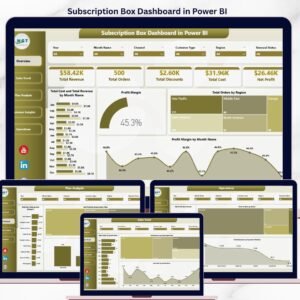
- 📊 Subscription Box Dashboard in Power BI — adjacent ecommerce model (recurring revenue + churn)
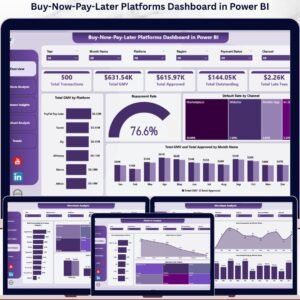
- 💳 Buy-Now-Pay-Later Platforms Dashboard in Power BI — checkout payment optimization
- 🛒 Ecommerce Conversion Rate KPI Dashboard in Google Sheets — pair with this to plug funnel leaks
- 🏬 Etsy Seller Analytics Dashboard in Google Sheets — for sellers focused exclusively on Etsy
- 📊 Also available as: Drop shipping Dashboard in Excel for teams who prefer the Excel pivot engine
📖 Click here to read the Detailed Blog Post
🎥 Visit our YouTube channel for step-by-step video tutorials
👉 YouTube.com/@NextGenTemplates
📅 Last updated: May 2026
Watch the step-by-step video tutorial:
YouTube


























Reviews
There are no reviews yet.