

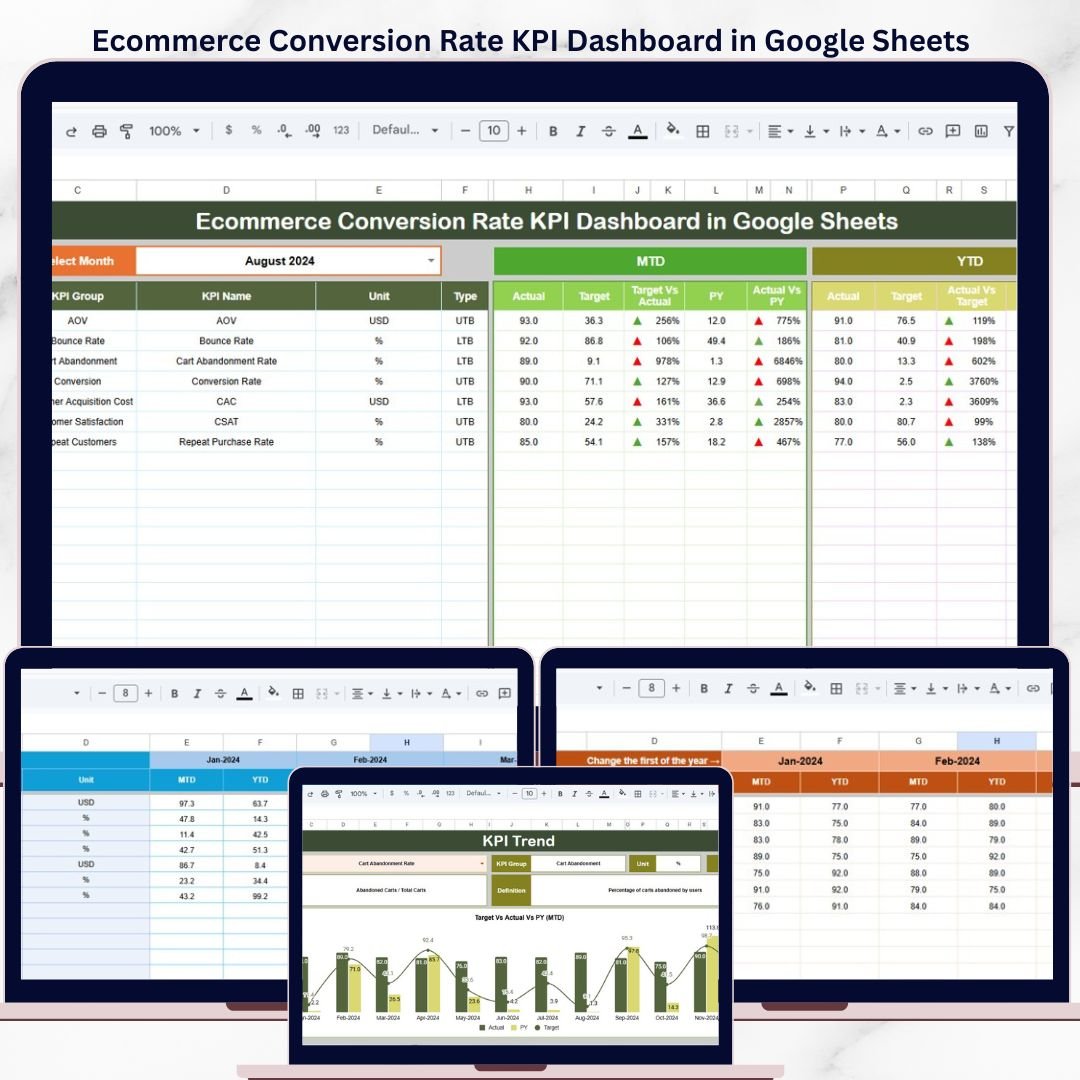
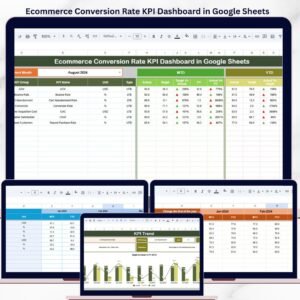
The Ecommerce Conversion Rate KPI Dashboard in Google Sheets tracks 15+ ecommerce KPIs across 6 interactive worksheets, with MTD and YTD comparisons, trend charts, and conditional formatting arrows. Setup takes under 10 minutes — just replace the sample data and every metric updates automatically.Ecommerce Conversion Rate KPI Dashboard in Google Sheets
🌍 Join 8,400+ teams in 40+ countries using NextGenTemplates to replace paid SaaS tools with one-time-purchase Excel, Google Sheets, Power BI, and HTML templates.Ecommerce Conversion Rate KPI Dashboard in Google Sheets
✅ Instant download · One-time payment · No subscription · No per-user fees · Lifetime access
🔑 Key Features of Ecommerce Conversion Rate KPI Dashboard in Google Sheets
This dashboard tracks 15+ ecommerce conversion rate KPIs including cart abandonment rate, checkout completion rate, add-to-cart rate, product page conversion, bounce rate, average order value, and customer acquisition cost. Each KPI displays MTD Actual, Target, and Previous Year data alongside YTD metrics — giving you a complete performance picture on one screen.Ecommerce Conversion Rate KPI Dashboard in Google Sheets
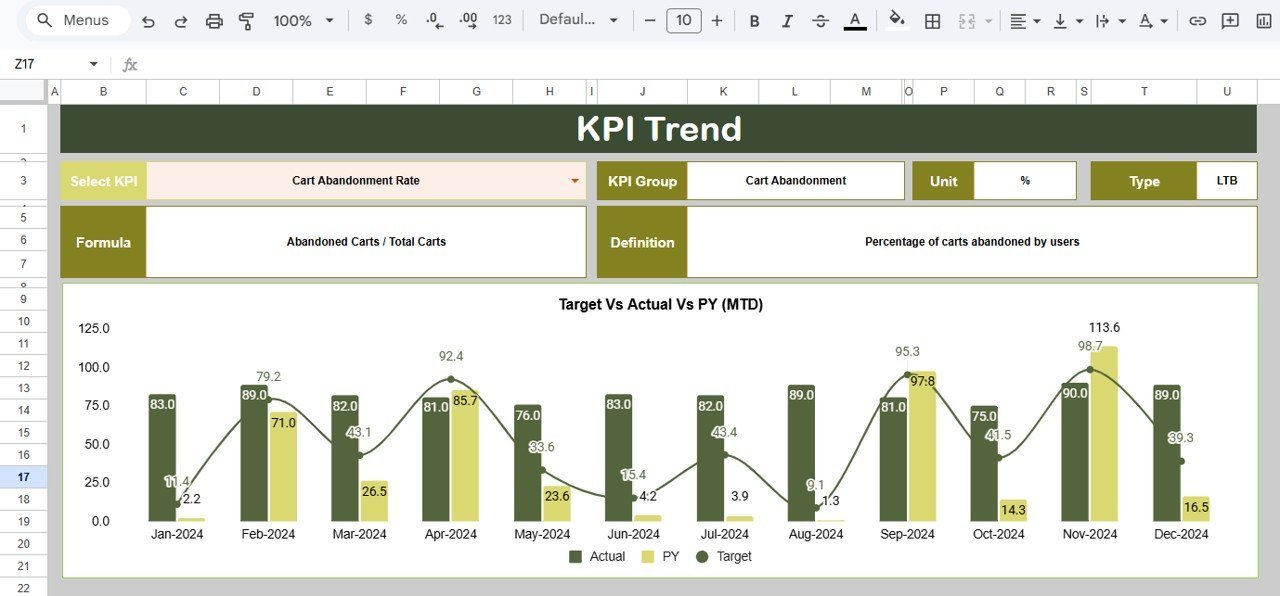
📊 The KPI Trend sheet lets you select any individual KPI from a drop-down and instantly view its 12-month trend chart comparing Actual, Target, and Previous Year lines. Every KPI includes its group classification, unit of measurement, calculation formula, definition, and whether it is LTB (Lower the Better) or UTB (Upper the Better).Ecommerce Conversion Rate KPI Dashboard in Google Sheets
📈 Conditional formatting arrows provide instant visual feedback — green up arrows for positive variances and red down arrows for negative variances across both Target vs Actual and Previous Year vs Actual columns. This eliminates manual analysis and makes performance gaps visible at a glance.Ecommerce Conversion Rate KPI Dashboard in Google Sheets
If you manage order fulfillment metrics alongside conversion rates, check out the Order Fulfillment KPI Dashboard in Google Sheets for a dedicated operations view.Ecommerce Conversion Rate KPI Dashboard in Google Sheets
📦 What’s Inside the Ecommerce Conversion Rate KPI Dashboard
The template includes 6 worksheets designed to give you full control over your ecommerce KPI tracking:
📋 Dashboard Sheet – The main control center. Select any month from the drop-down on cell D3 and the entire dashboard refreshes. View MTD Actual, Target, Previous Year alongside YTD Actual, Target, Previous Year. Target vs Actual and PY vs Actual columns use conditional formatting with up/down arrows.Ecommerce Conversion Rate KPI Dashboard in Google Sheets
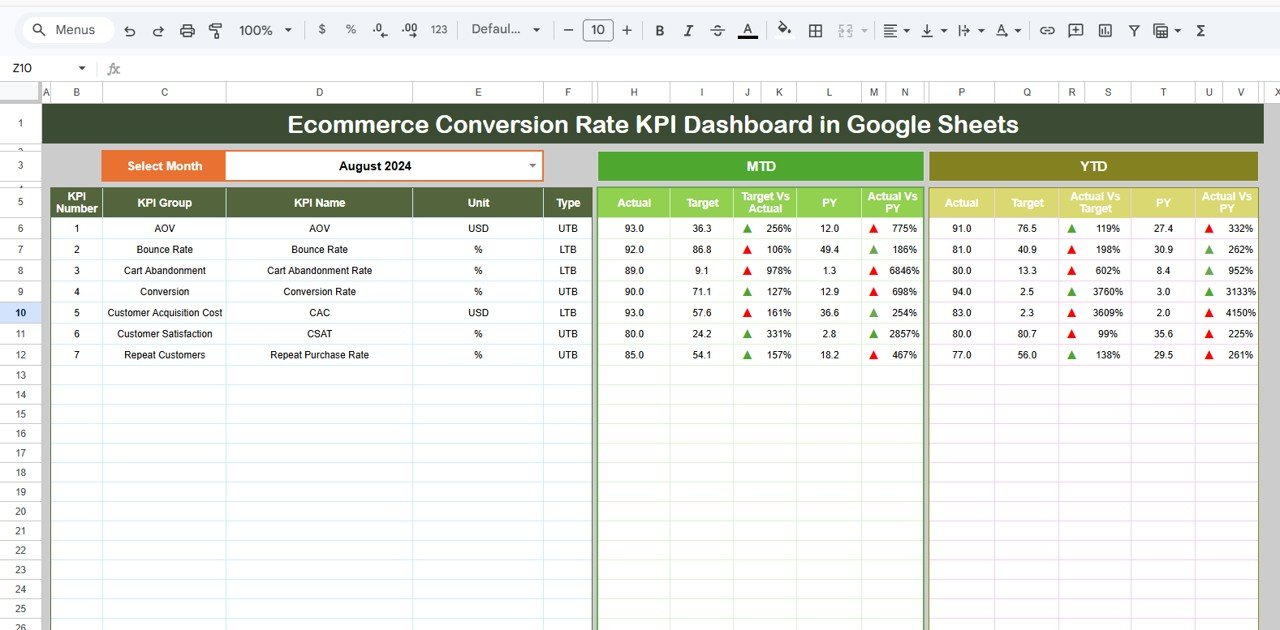
Ecommerce Conversion Rate KPI Dashboard in Google Sheets
📉 KPI Trend Sheet – Select any KPI name from the drop-down on cell C3. View the KPI Group, Unit, Type (LTB/UTB), Formula, and Definition. Two trend charts show MTD and YTD monthly comparisons for Actual, Target, and Previous Year.
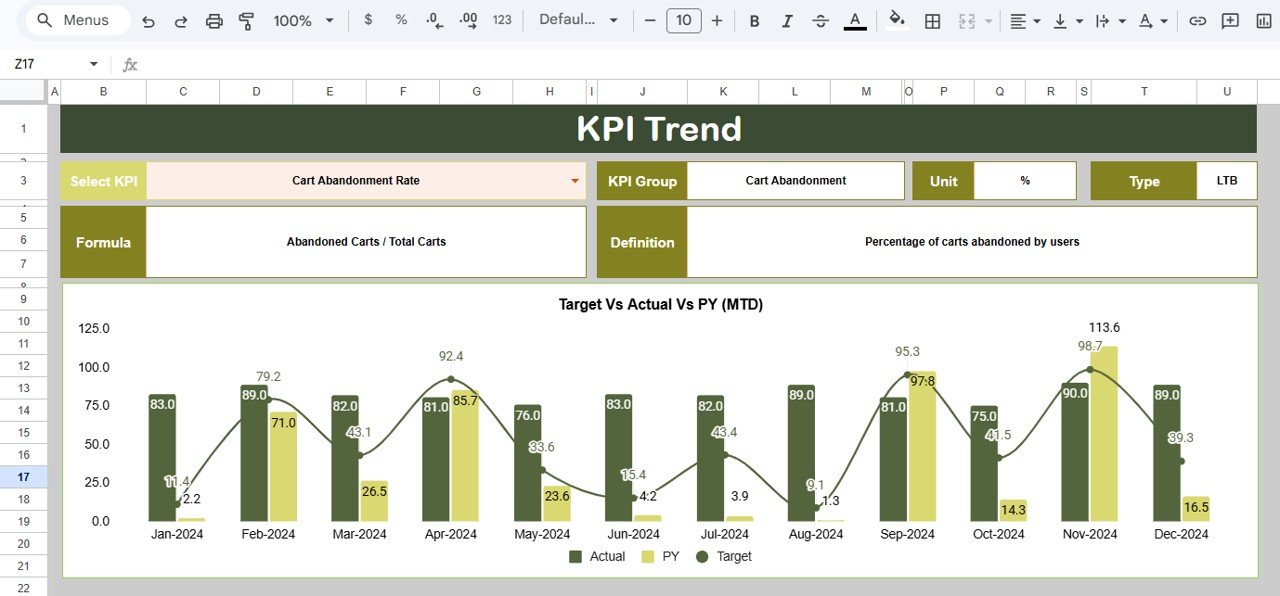
KPI Trend Sheet
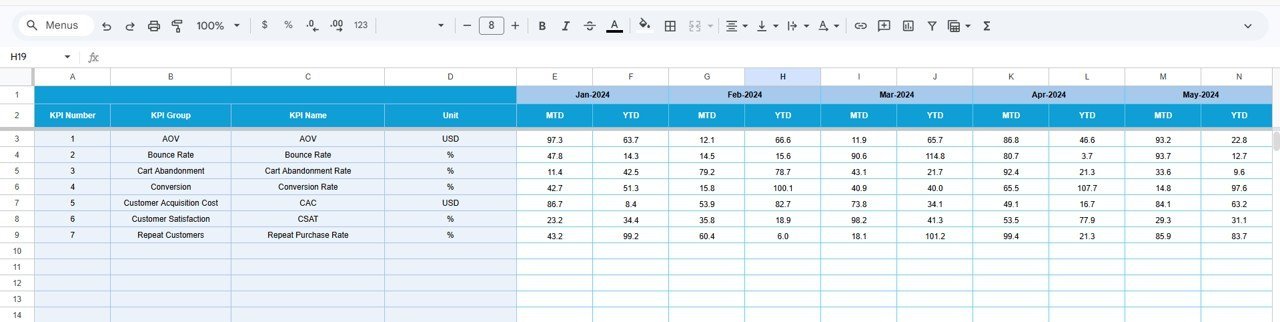
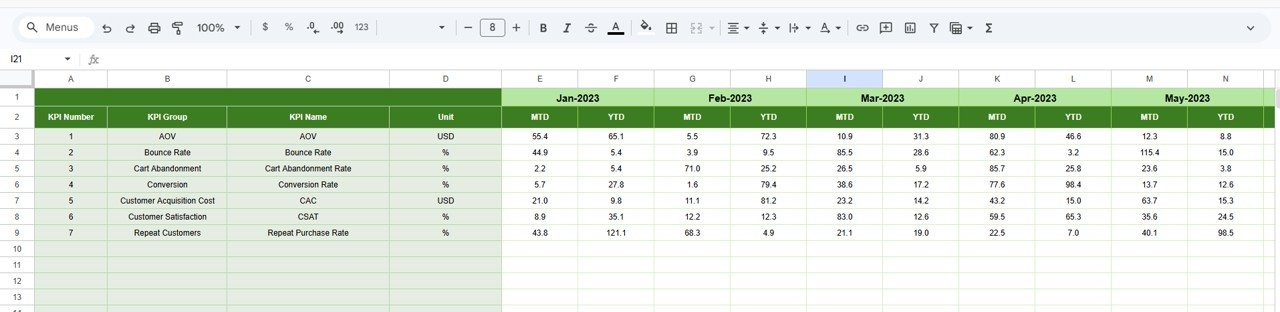
📝 Actual Numbers Input Sheet – Enter your actual MTD and YTD numbers for each KPI per month. Change the starting month on cell E1 to align with your fiscal year.
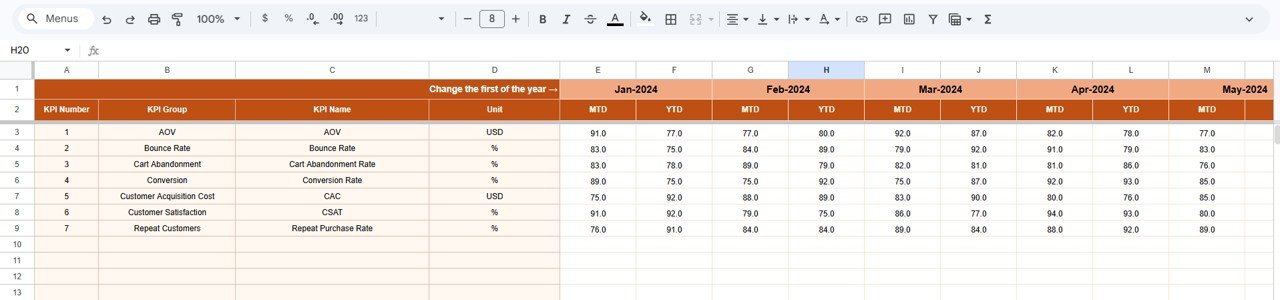
Actual Numbers Input Sheet
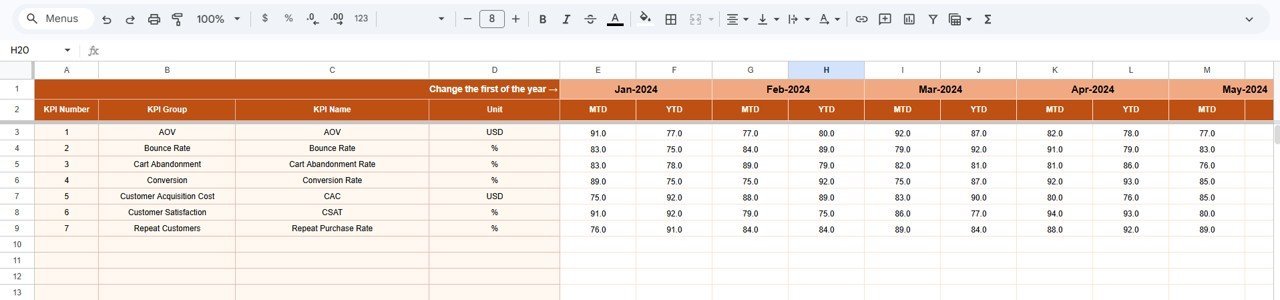
🎯 Target Number Input Sheet – Enter target numbers for each KPI for every month, both MTD and YTD values.
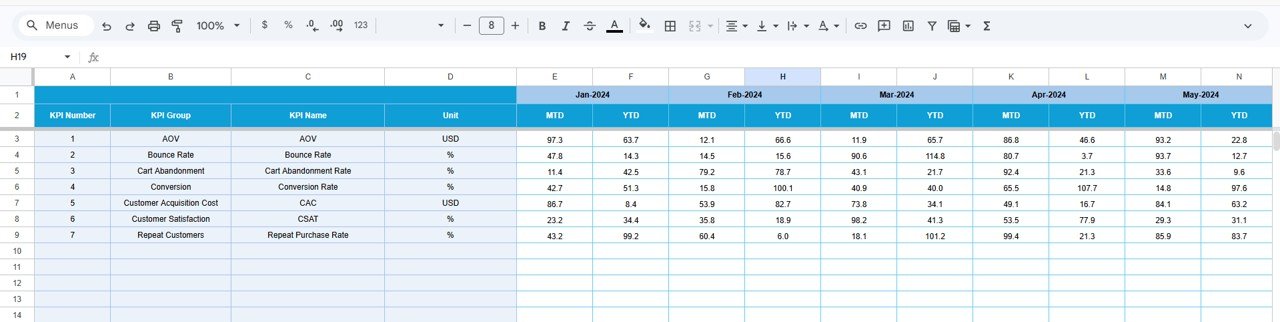
Target Number Input Sheet
📅 Previous Year Number Sheet – Enter prior year data in the same format as the current year for accurate year-over-year comparisons.
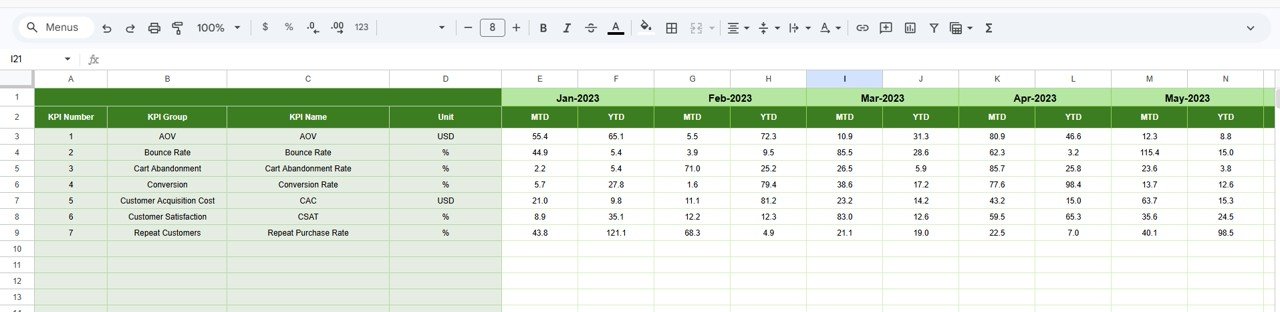
Previous Year Number Input Sheet
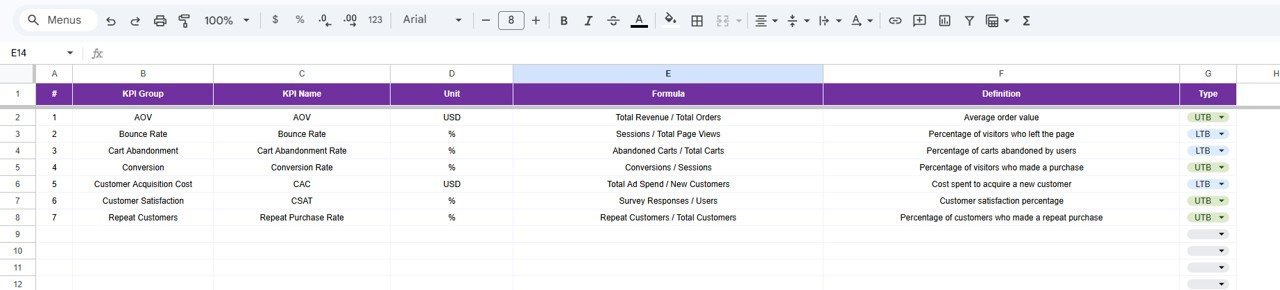
📖 KPI Definition Sheet – Define each KPI’s Name, Group, Unit, Formula, Definition, and Type (LTB or UTB). This sheet feeds the KPI Trend page with metadata for each metric.
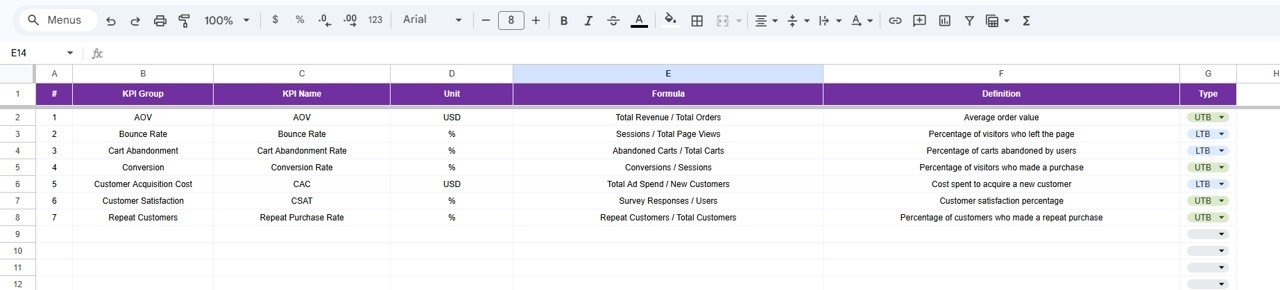
KPI Definition Sheet
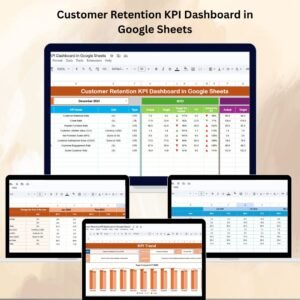
Looking for customer retention metrics? The Customer Retention KPI Dashboard in Google Sheets tracks churn rate, CLV, repeat purchase rate, and more.
📊 Ecommerce Conversion Rate KPI Dashboard vs. Microsoft Excel Dashboard vs. Shopify Analytics — Where This Fits
| Feature | Ecommerce Conversion Rate KPI Dashboard (Google Sheets) | Microsoft Excel Dashboard | Shopify Analytics / Google Analytics 4 |
|---|---|---|---|
| Cost | $8.99 one-time | $15-20 one-time (template) | Free (basic) / $79-399/mo (Shopify plans) |
| Platform | Google Sheets (free, browser-based) | Microsoft Excel (license required) | Web-based SaaS |
| Setup Time | Under 10 minutes | 10-15 minutes | 30-60 minutes (configuration) |
| Real-time Team Collaboration | ✅ Built-in (Google Sheets) | ❌ Requires OneDrive/SharePoint | ✅ Yes |
| Mobile Access | ✅ Google Sheets app | Limited (Excel mobile) | ✅ Yes |
| Custom KPI Definitions | ✅ Fully customizable | ✅ Manual setup | ❌ Fixed metrics |
| MTD + YTD + PY Comparison | ✅ All three built-in | ✅ With formulas | ❌ Limited PY comparison |
| Share with Link | ✅ One click | ❌ File sharing only | ✅ Dashboard links |
| Year-1 Cost (5 users) | $8.99 total | $15-20 + Excel licenses | $948-$4,788/year |
For ecommerce teams that want full KPI tracking with MTD, YTD, and Previous Year comparisons without paying monthly SaaS fees, the Ecommerce Conversion Rate KPI Dashboard sits in the sweet spot.
👥 Who This Template Is For — and Who It’s Not For
✅ This template is built for:
- Ecommerce managers tracking conversion rates, cart abandonment, and AOV across their online store
- Small to mid-size DTC brands wanting structured KPI reporting without expensive analytics platforms
- Marketing teams comparing monthly and yearly ecommerce performance against targets
- Freelance ecommerce consultants creating KPI reports for multiple clients
❌ This template is NOT for:
- Enterprise ecommerce teams needing real-time API integration with Shopify, WooCommerce, or Magento
- Teams requiring automated data pulls — this template uses manual data entry
- Businesses needing multi-currency or multi-store consolidated reporting
⚙️ How to Use the Ecommerce Conversion Rate KPI Dashboard
1️⃣ Open the Google Sheets copy link from the PDF guide included in your download.
2️⃣ Go to the KPI Definition sheet and enter your ecommerce KPIs with their groups, units, formulas, and LTB/UTB type.
3️⃣ Navigate to the Actual Numbers Input sheet, set the starting month on cell E1, and enter your MTD and YTD actual numbers.
4️⃣ Fill in target numbers on the Target Number Input sheet for each KPI per month.
5️⃣ Enter previous year data on the Previous Year Number sheet for year-over-year comparisons.
6️⃣ Go to the Dashboard sheet, select any month from the drop-down on D3, and review your complete KPI performance.
7️⃣ Use the KPI Trend sheet to drill into individual KPI trends by selecting a KPI from the C3 drop-down.
💼 Real-World Use Cases
Priya runs a DTC skincare brand with 2,000 monthly orders. She uses the Ecommerce Conversion Rate KPI Dashboard to track add-to-cart rate, checkout completion, and cart abandonment month over month. Her team reviews the dashboard every Monday and adjusts ad spend based on conversion trends — replacing a $199/month analytics subscription.
Marcus manages ecommerce operations for a mid-size electronics retailer. He enters weekly conversion data and shares the Google Sheet with his leadership team for monthly performance reviews. The PY vs Actual comparison helps him quantify seasonal improvements and justify budget requests.
Aisha is a freelance ecommerce consultant. She creates a copy of this dashboard for each of her 5 clients, customizing the KPI definitions per niche. The professional formatting and trend charts save her 3+ hours per client on monthly reporting.
Explore more ecommerce templates in our Google Sheets Dashboard Templates collection.
❓ Frequently Asked Questions
What KPIs does the Ecommerce Conversion Rate KPI Dashboard track?
The Ecommerce Conversion Rate KPI Dashboard tracks 15+ KPIs including cart abandonment rate, checkout completion rate, add-to-cart rate, product page conversion, bounce rate, average order value, and customer acquisition cost. All metrics update automatically when you enter your data.
Can I add custom KPIs to this dashboard?
Yes. The KPI Definition sheet lets you add, remove, or modify any KPI. Enter the KPI name, group, unit, formula, definition, and LTB/UTB type. The dashboard and trend charts adjust automatically to reflect your custom KPIs.
How does this compare to Shopify Analytics?
Shopify Analytics provides real-time data from your store but lacks customizable MTD + YTD + Previous Year comparison views. This dashboard costs $8.99 one-time vs Shopify’s monthly plans and gives you full control over KPI definitions, targets, and trend analysis.
How long does setup take?
Setup takes under 10 minutes. Open the Google Sheets copy link, define your KPIs on the KPI Definition sheet, enter your actual and target numbers, and the Dashboard sheet generates your complete performance view instantly.
Does this work on mobile devices?
Yes. The dashboard works fully on the Google Sheets mobile app for iOS and Android. You can view KPIs, switch months, and check trend charts from your phone or tablet without any functionality loss.
Can I share this dashboard with my team?
Yes. Google Sheets supports real-time collaboration. Share the file via link or email, set view or edit permissions, and your entire team can access the dashboard simultaneously without additional licenses.
Is this template compatible with Google Workspace?
Yes. The Ecommerce Conversion Rate KPI Dashboard works with both free Google accounts and Google Workspace business accounts. No macros, add-ons, or third-party integrations are required.
👤 About the Author
Built by PK — Microsoft Certified Professional with 15+ years of Excel, Google Sheets, and Power BI experience. Founder of NextGenTemplates, reaching 300K+ subscribers across YouTube channels (@PK-AnExcelExpert, @NextGenTemplates, @NeoTechNavigators). Every template is hand-built and tested before release.
🔗 Explore Related Templates
📊 Order Fulfillment KPI Dashboard in Google Sheets – Track fulfillment rates, shipping accuracy, and delivery timelines for your ecommerce operations.
📊 Customer Retention KPI Dashboard in Google Sheets – Monitor churn rate, customer lifetime value, repeat purchase rate, and retention trends.
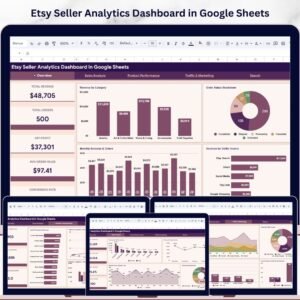
📊 Etsy Seller Analytics Dashboard in Google Sheets – Dedicated analytics for Etsy sellers including views, favorites, conversion, and revenue tracking.
📊 Digital Marketing Campaign Dashboard in Google Sheets – Track campaign performance, ROI, and channel-level metrics for your marketing spend.
📖 Click here to read the Detailed Blog Post
🎥 Visit our YouTube channel for step-by-step video tutorials
👉 YouTube.com/@NextGenTemplates



























Reviews
There are no reviews yet.