

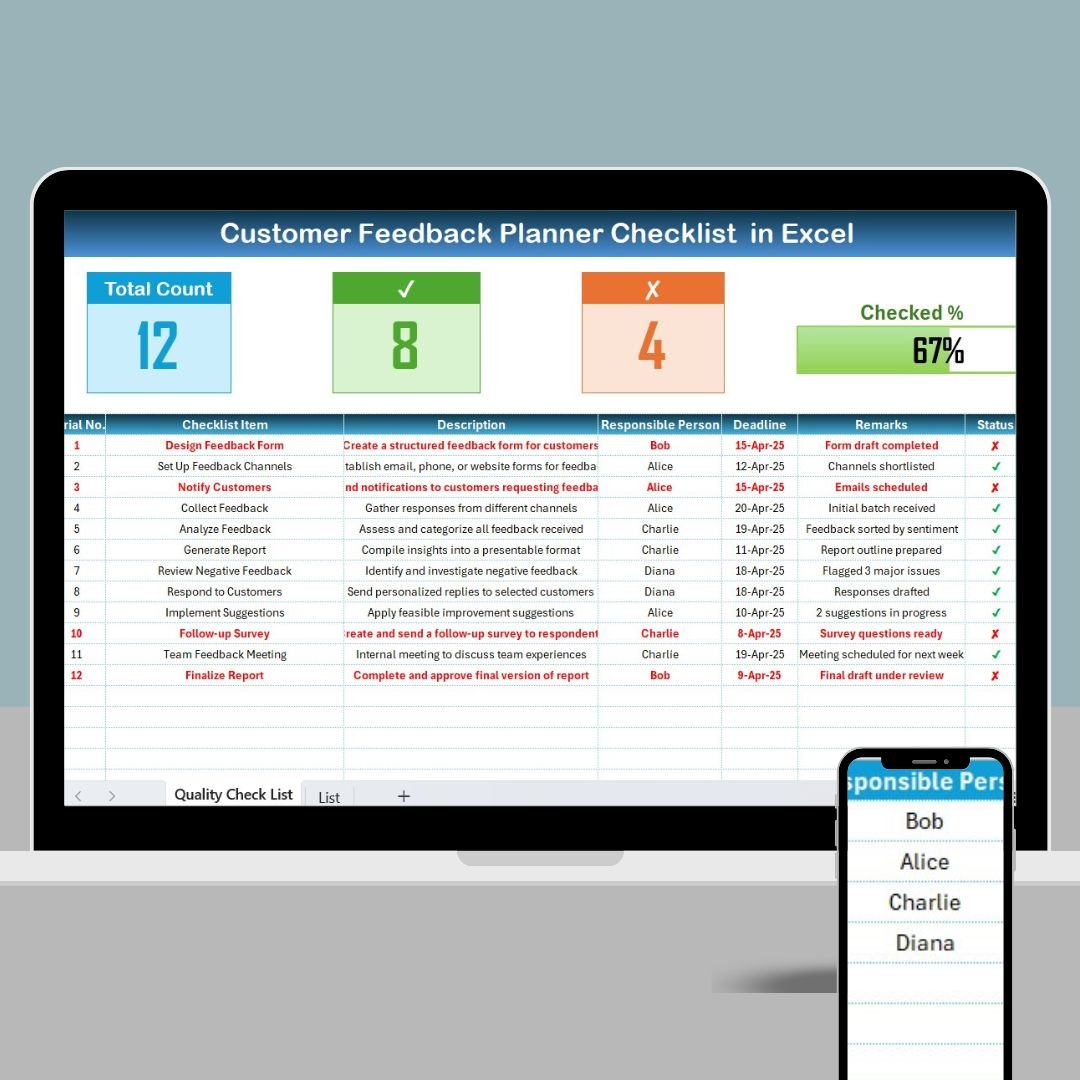

The Customer Feedback Planner Checklist in Excel is a powerful tool designed to help businesses and organizations effectively gather, track, and manage customer feedback. Whether you’re looking to improve customer satisfaction, enhance your products, or fine-tune services, this checklist ensures that every piece of feedback is captured and acted upon in an organized manner.
The checklist makes it easy to document feedback from various channels, categorize responses, and assign actions for improvement. Whether you’re managing a small business or running a large organization, the Excel-based tool helps you stay on top of customer insights, ensuring that no feedback is overlooked, and every issue is addressed in a timely manner.
Key Features of the Customer Feedback Planner Checklist in Excel
📋 Feedback Collection & Categorization
Capture feedback from various sources such as surveys, direct customer input, and online reviews. Categorize feedback into relevant topics such as product quality, customer service, delivery, etc., to streamline the review process.
💬 Actionable Insights
Assign action items based on the feedback received. Prioritize the issues that need immediate attention and track the progress of each action item to ensure that improvements are made.
📅 Tracking Feedback Progress
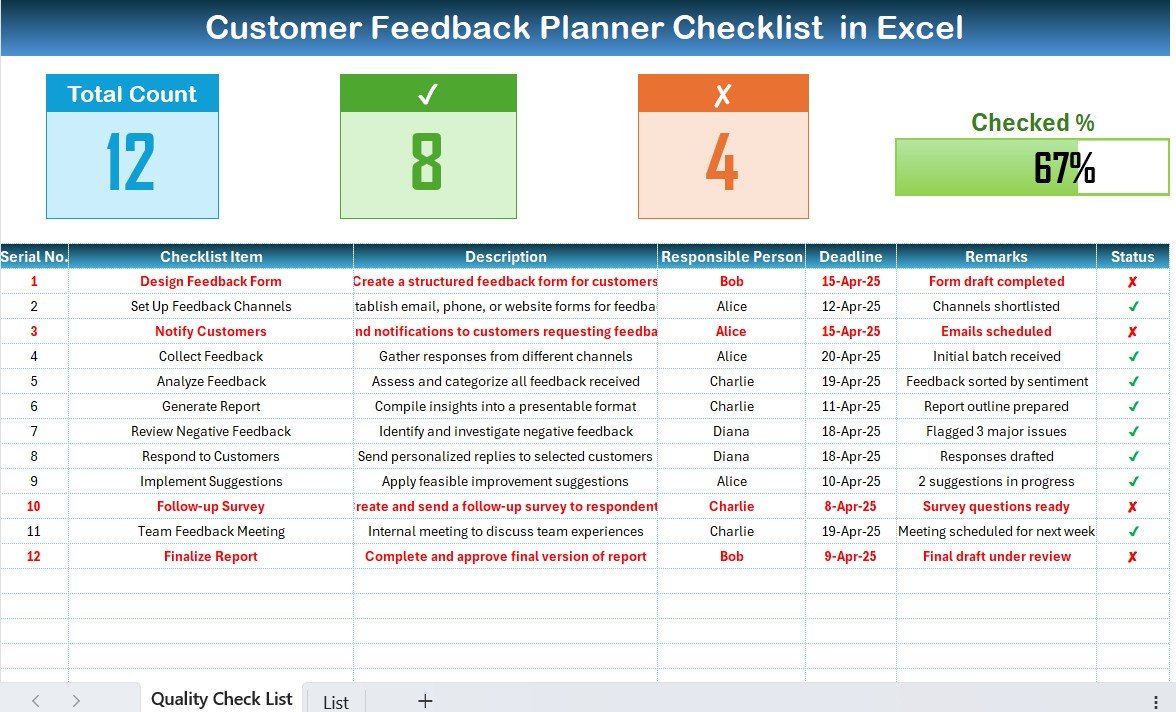
Track the status of customer feedback, from collection to resolution. Monitor progress and ensure that all feedback is addressed, improving overall customer experience.
🔑 Customizable Template
Easily customize the checklist to fit your business’s unique needs. Add additional categories, feedback channels, or tracking columns to better suit your customer feedback strategy.
📊 Reporting & Analytics
Generate insightful reports that highlight feedback trends, recurring issues, and areas needing improvement. Use this data to drive decision-making and implement changes that positively impact customer satisfaction.
⚙️ User-Friendly Interface
With its intuitive layout and simple navigation, this checklist is easy to use for any team member, from customer support agents to management. Easily track feedback and manage action plans with minimal effort.
Why You’ll Love the Customer Feedback Planner Checklist in Excel
✅ Efficient Feedback Management
Stay organized and ensure that all customer feedback is captured, categorized, and acted upon without missing any crucial insights.
✅ Improved Customer Satisfaction
Track, resolve, and act on customer issues in a timely manner, leading to better satisfaction and stronger customer loyalty.
✅ Streamlined Action Plans
Quickly turn feedback into actionable items and assign them to relevant team members, improving response time and resolution efficiency.
✅ Data-Driven Decisions
Use customer feedback data and insights to guide business decisions, product improvements, and service enhancements.
✅ Customizable & Scalable
Tailor the checklist to fit your unique feedback collection strategy, whether you’re working with a small team or handling feedback from large customer bases.
What’s Inside the Customer Feedback Planner Checklist in Excel?
Feedback Collection & Categorization: Capture feedback from different sources and categorize it by topic.
Actionable Insights: Assign action items and track resolution progress.
Tracking & Progress Monitoring: Track the feedback process from collection to resolution.
Customizable Template: Modify categories, columns, and data fields to suit your needs.
Reporting & Analytics: Generate reports on trends, issues, and improvements.
User-Friendly Interface: Easy-to-use design that requires minimal training.
How to Use the Customer Feedback Planner Checklist in Excel
1️⃣ Download the Template: Instantly access the Customer Feedback Planner Checklist in Excel.
2️⃣ Capture Feedback: Collect feedback from your customers through surveys, reviews, or direct communication.
3️⃣ Categorize & Prioritize: Organize feedback into relevant categories and prioritize action items based on urgency.
4️⃣ Assign & Track Actions: Assign actions to the right team members and monitor their progress in real-time.
5️⃣ Analyze Trends & Make Improvements: Use reports and analytics to identify trends and implement changes to improve your offerings.
Who Can Benefit from the Customer Feedback Planner Checklist in Excel?
🔹 Customer Support Teams
🔹 Marketing & Product Development Teams
🔹 Business Owners & Managers
🔹 Quality Assurance Teams
🔹 Small & Medium Businesses (SMBs)
🔹 Enterprises with a Large Customer Base
Enhance your customer feedback process with the Customer Feedback Planner Checklist in Excel. Stay organized, track customer satisfaction, and take action on valuable insights to improve your products, services, and customer relationships.
Click here to read the Detailed blog post
Visit our YouTube channel to learn step-by-step video tutorials
Youtube.com/@PKAnExcelExpert
Watch the step-by-step video Demo:
Compatibility and Requirements
- Works in Microsoft Excel desktop (Excel 2016 or later, or Microsoft 365).
- New to Excel? Start with Microsoft’s Excel for Windows training.
Frequently Asked Questions
Where can the feedback come from?
Surveys, direct customer input and online reviews. You can add other feedback channels as columns.
How do I organize the feedback?
Group each item into a topic such as product quality, customer service or delivery, then set a priority.
Can I assign follow-up actions?
Yes. Assign action items to team members and track each one from collection to resolution.
Can I add my own categories?
Yes. Add categories, feedback channels and tracking columns to match your process.
Related Customer Feedback Templates
- Customer Feedback Review Checklist in Excel: review feedback item by item
- Customer Feedback To-Do List Checklist in Excel: a to-do list for feedback actions
- Customer Feedback Tracker in Excel: log and analyze feedback
- Customer Feedback Checklist in Google Sheets: a Google Sheets checklist
- Checklist & SOP Pack: 12 checklist templates in one download
Browse all Excel checklists.





























Reviews
There are no reviews yet.