

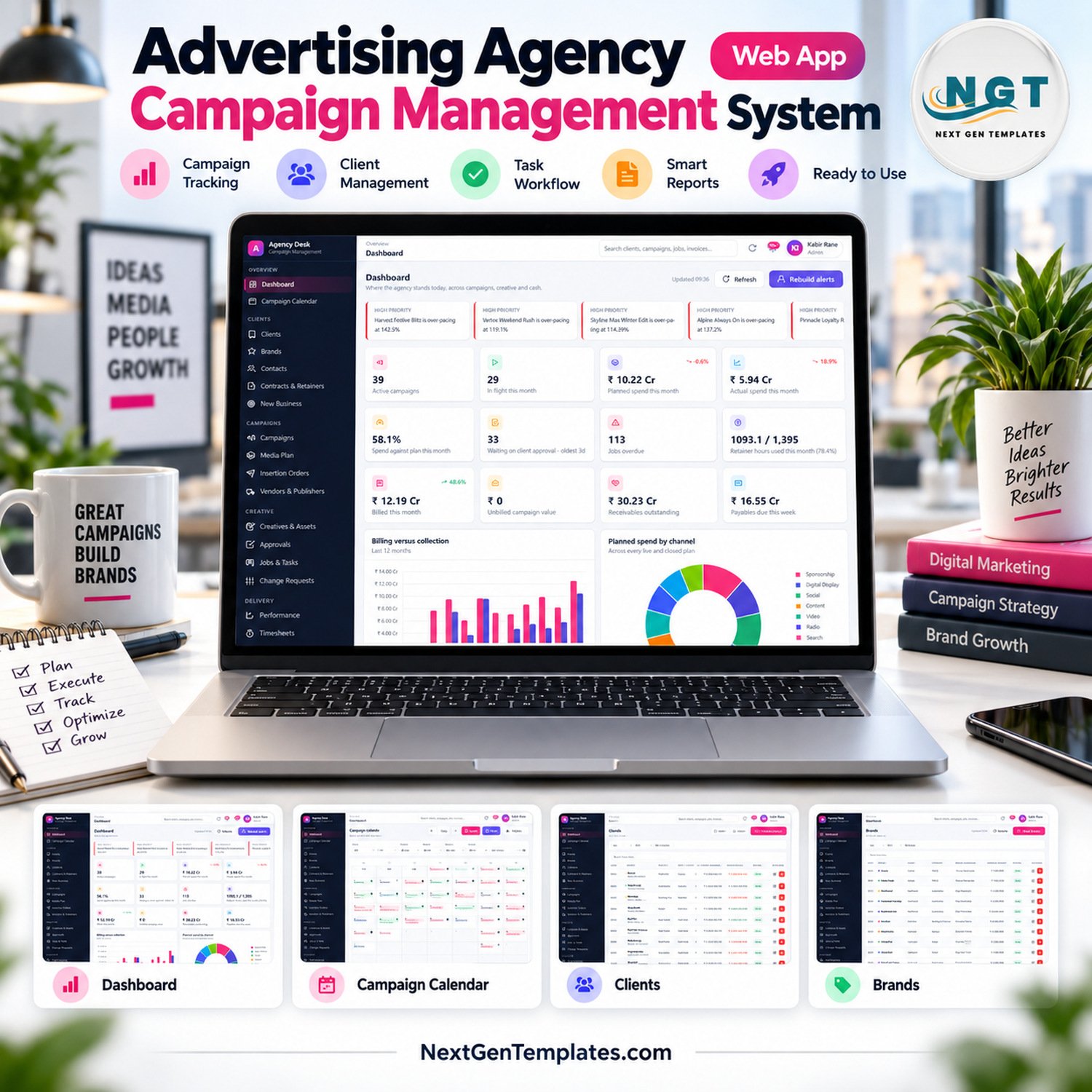
Most agencies run the same campaign across five disconnected places: the media plan in a spreadsheet, the creative approvals in email, the job list on a whiteboard, the insertion orders in a Word template, and the billing in an accounts package nobody else can open. The Advertising Agency Campaign Management System Web App puts all five in one Google Apps Script application: 32 modules, 7 role-based logins and 31 built-in reports, running entirely on your own Google account with no monthly subscription. It ships with a fully seeded demo agency — 46 clients, 85 brands, 190 campaigns, roughly 1,500 media plan lines and 250 invoices — so every screen of the advertising agency campaign management system is populated the moment you sign in. Buy once, deploy in about fifteen minutes, own it forever.
🚀 Try the Live Demo Before You Buy
Open the working system in your browser right now — no download, no sign-up, nothing to install. Sign in as any role below to see exactly what that person can and cannot reach.
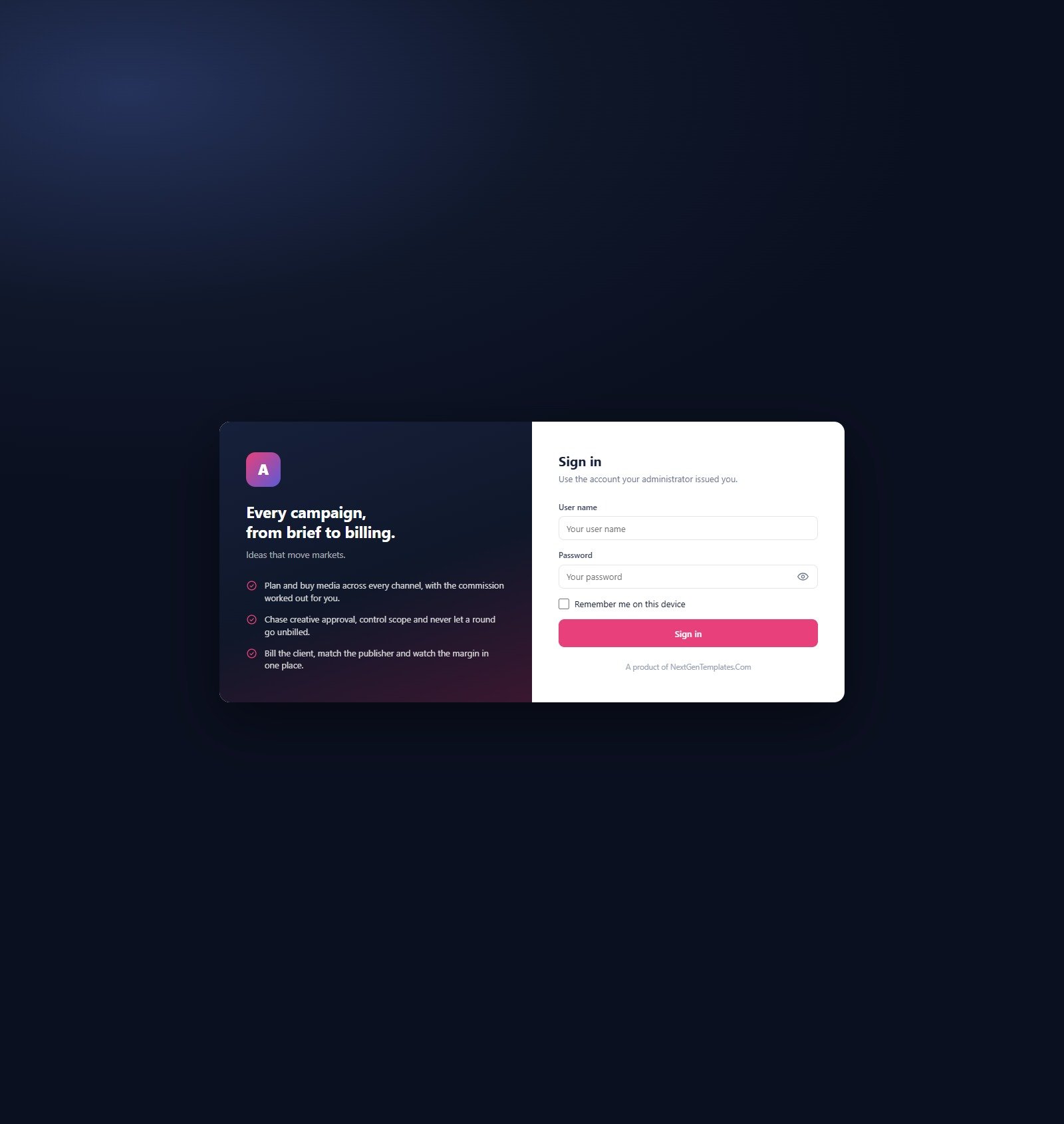
Demo sign-in details — all 7 roles
| Role | User name | Password | What this role reaches |
|---|---|---|---|
| Admin | admin | Admin@123 | Everything, plus users, settings, archive and backup |
| Account Director | director | Director@123 | Clients and commercials; approves campaigns, plans and estimates; sees cost rates |
| Account Manager | manager | Manager@123 | Day-to-day servicing; no insertion orders, no payments, no cost rates |
| Media Planner | media | Media@123 | Media plans, vendors, insertion orders and performance; no client billing |
| Creative Lead | creative | Creative@123 | Creatives, versions, jobs and the workload view; no money access anywhere |
| Traffic Coordinator | traffic | Traffic@123 | Jobs, approvals, calendar and assets; read-only on campaigns and plans |
| Finance | finance | Finance@123 | Estimates, invoices, receipts, vendor bills, payments, expenses and tax |
These credentials are public on purpose. The demo is a shared instance seeded with fictional data and it resets periodically — it is not anybody’s live agency. Your own deployment gets its own database, its own users and its own passwords, and the first thing the setup guide asks you to do is change all seven.
🔑 Key Features of the Advertising Agency Campaign Management System
- 32 modules in one application. Dashboard, Campaign Calendar, Clients, Brands, Contacts, Contracts & Retainers, New Business, Campaigns, Media Plan, Insertion Orders, Vendors & Publishers, Creatives & Assets, Approvals, Jobs & Tasks, Change Requests, Performance, Timesheets, Estimates, Invoices, Receipts, Vendor Bills, Expenses, Reports, Notifications, Users, Team, Master Lists, Import / Export, Audit Log, Settings, Help & Guide and Get More Templates.
- Seven roles with real separation. This is not a cosmetic menu filter. A Creative Lead has no money access anywhere; an Account Manager cannot issue an insertion order, release a payment or see cost rates; only Admin can manage users or delete a client, campaign or invoice outright.
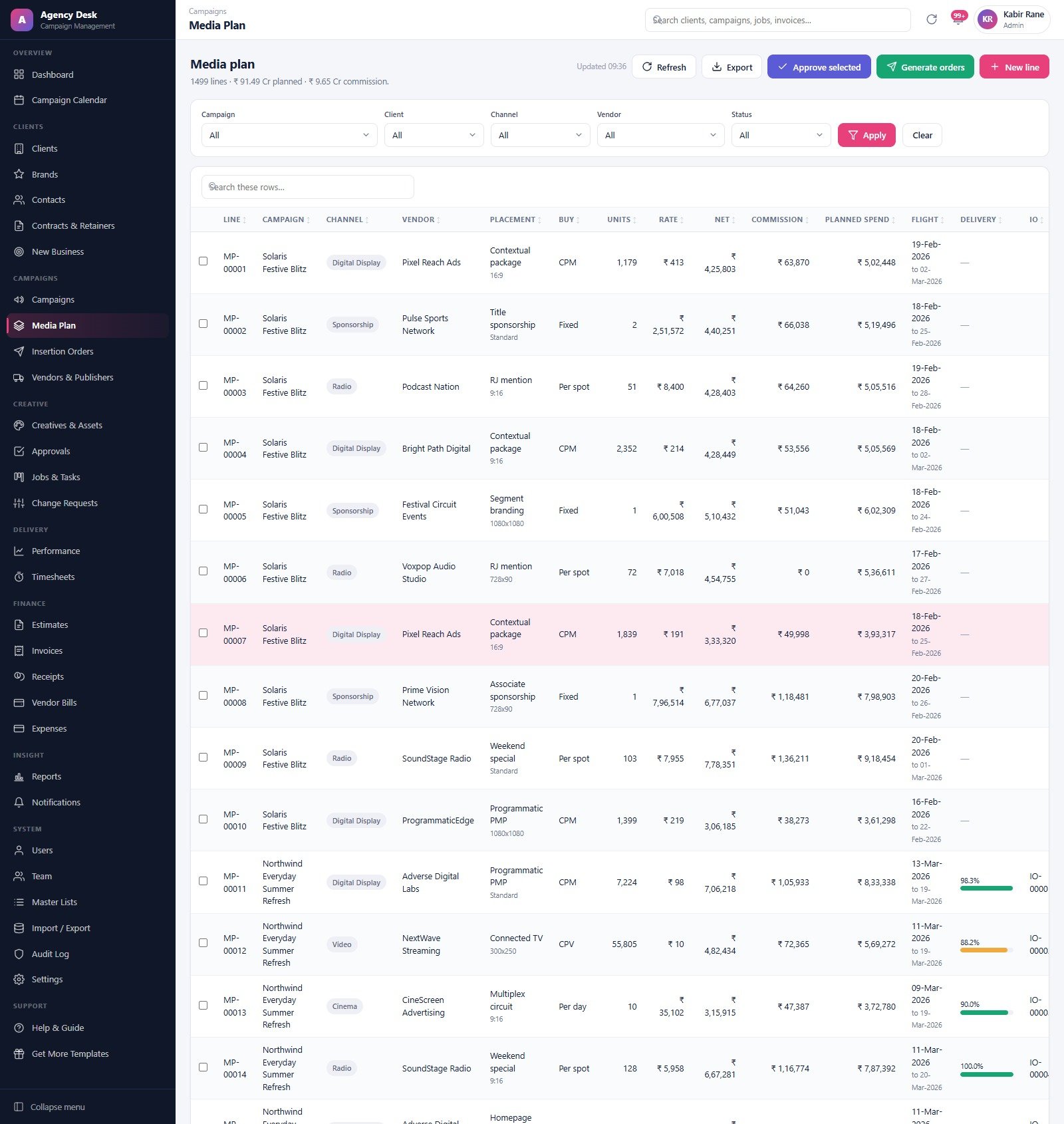
- A media plan that becomes an insertion order. Plan lines carry channel, vendor, placement, buy type, units, rate, net, commission, planned spend and flight dates. Select the approved lines, hit Generate orders, and they become numbered insertion orders — and no line can appear on two orders. This is the part of the workflow that most media plan and insertion order software charges a monthly fee for.
- Creative approvals with rounds that stay in sequence. Internal and client approvals are logged separately with real turnaround times, so “who is sitting on version 3” stops being a question you ask in a group chat.
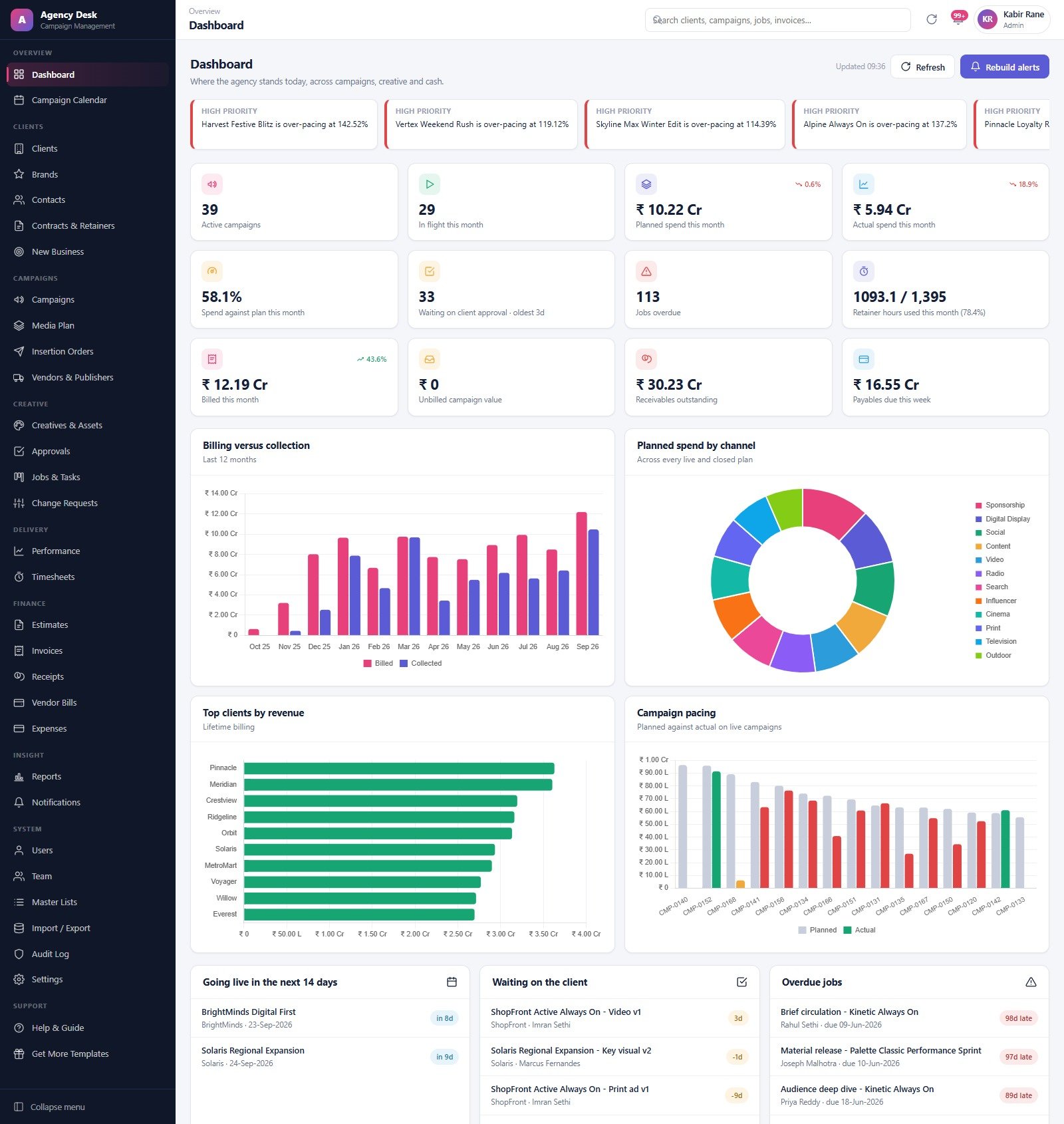
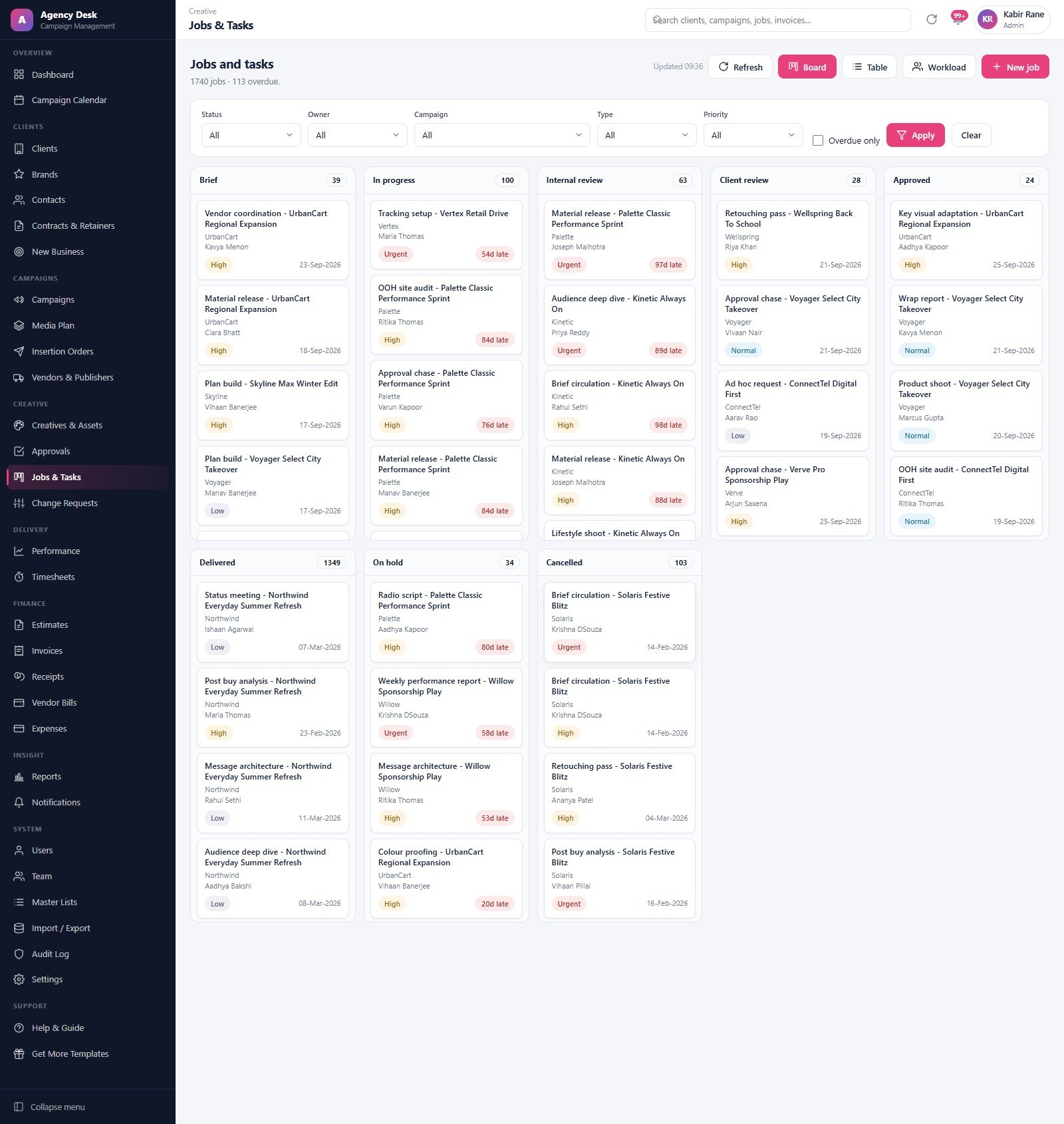
- A job board that actually balances. Jobs & Tasks offers Board, Table and Workload views across eight statuses. In the demo the columns sum to exactly 1,740 jobs with 113 overdue — the same 113 the dashboard reports.
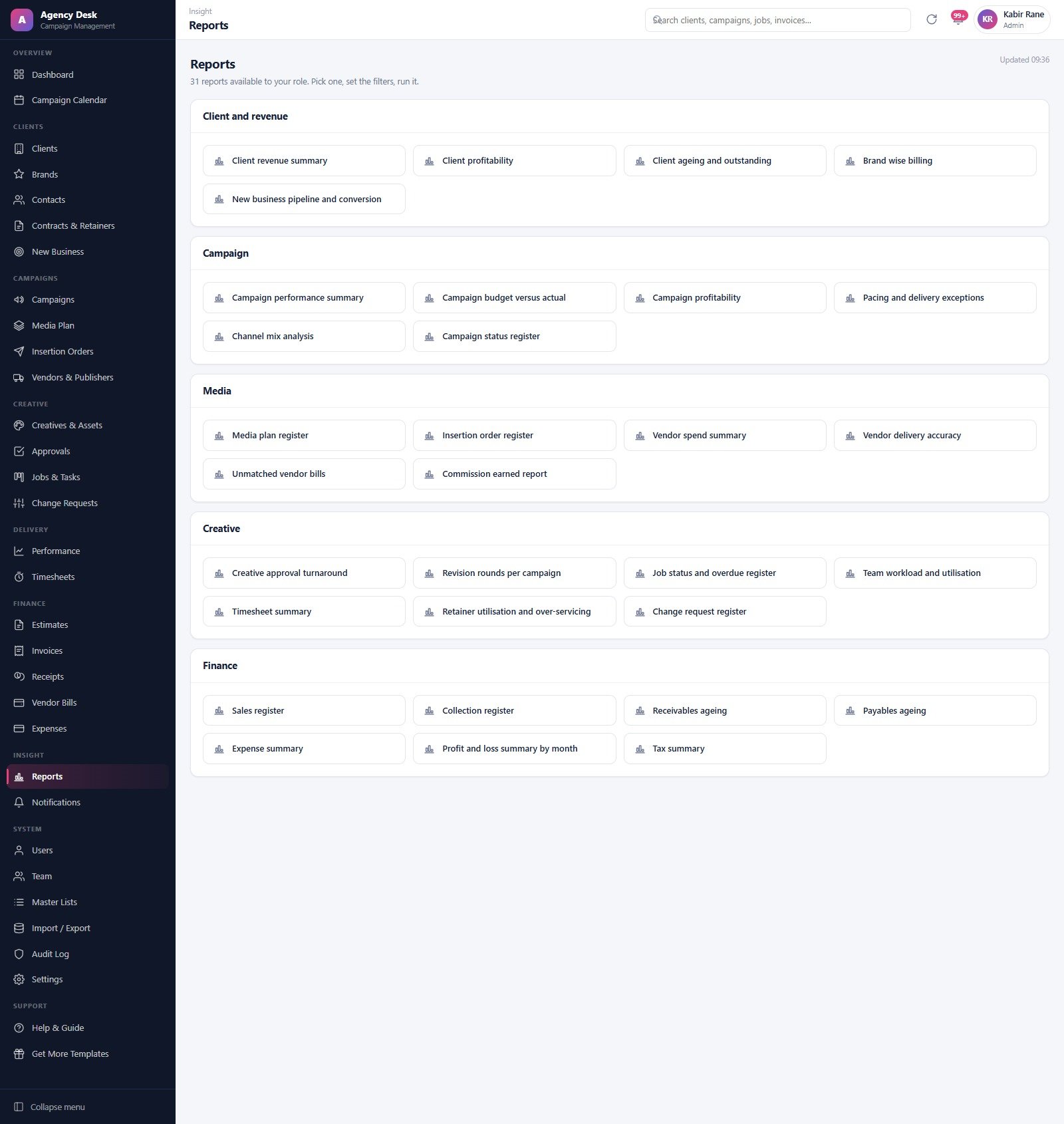
- 31 reports across five families — 5 client and revenue, 6 campaign, 6 media, 7 creative and 7 finance — including client profitability, campaign budget versus actual, pacing and delivery exceptions, vendor delivery accuracy, unmatched vendor bills, retainer utilisation and over-servicing, receivables ageing and profit and loss by month.
- Money that reconciles. Billed minus received equals outstanding, the five receivables ageing buckets add up to the outstanding figure, and every invoice’s received amount equals the sum of its receipts. We checked these against the shipped demo rather than taking the documentation’s word for it.
- Runs on your Google account. Google Apps Script front end, Google Sheets database, Google Drive for assets and backups. No server to rent, no seat licences, no monthly bill.
📦 What Is Inside the Advertising Agency Campaign Management System
Dashboard
Twelve KPI cards — active campaigns, in flight this month, planned and actual spend, spend against plan, work waiting on client approval, overdue jobs, retainer hours used, billed this month, unbilled campaign value, receivables outstanding and payables due this week — sitting under a scrolling strip of high-priority pacing alerts that name the campaigns running over plan and by how much.
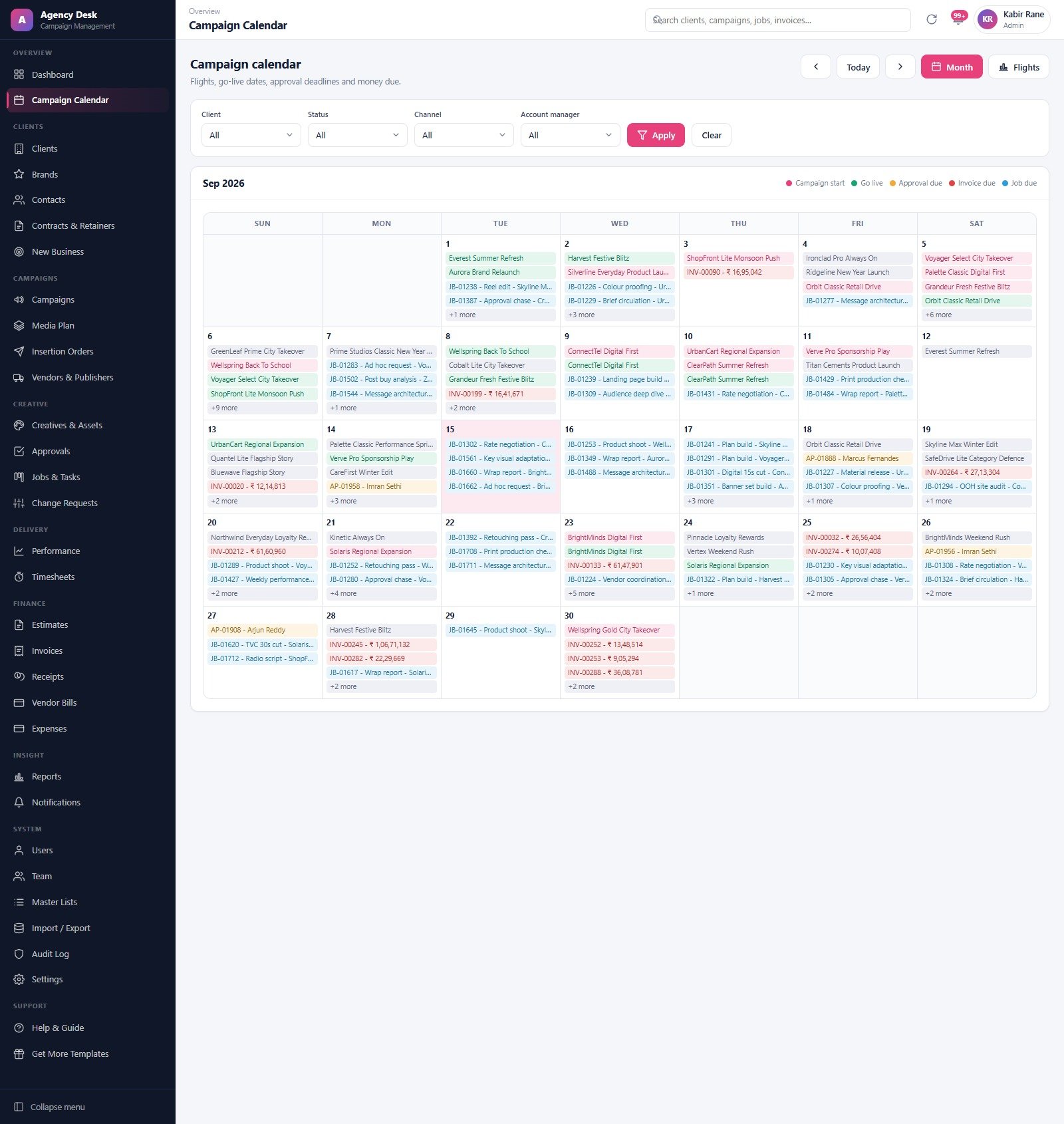
Campaign Calendar
Month and Flights views with a five-colour legend for campaign starts, go-live dates, approval deadlines, invoice due dates and job due dates, filtered by client, status, channel or account manager.
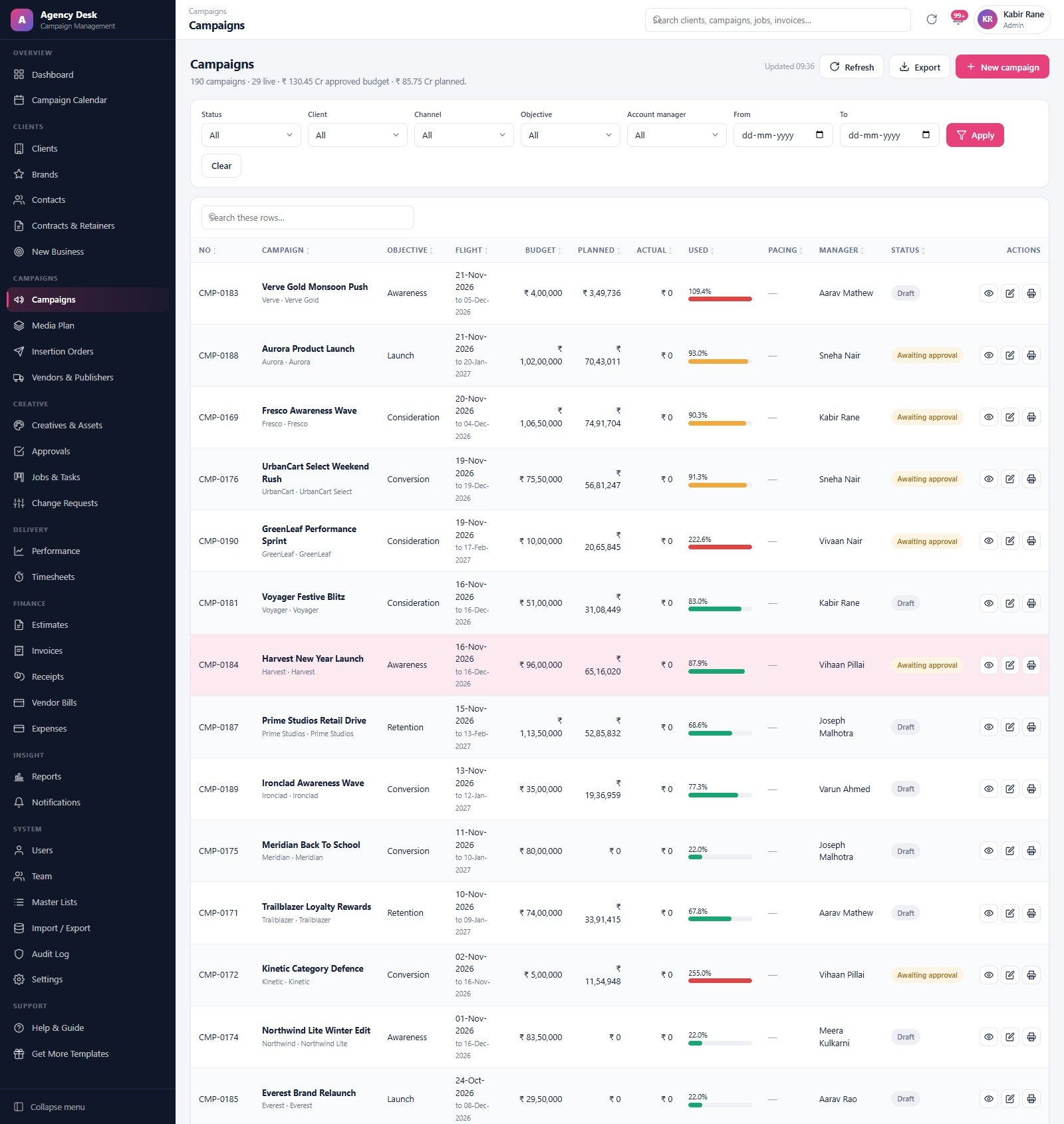
Campaigns
The spine of the system: briefs, budgets, flight windows, account manager and status, with everything else — plans, creatives, jobs, estimates and invoices — hanging off the campaign record.
Media Plan
The heaviest screen in the product, and the reason most agencies buy it. The demo carries about 1,500 lines across twelve channels and every buy type, filtered by campaign, client, channel, vendor and status, with Approve selected and Generate orders sitting in the header.
Insertion Orders
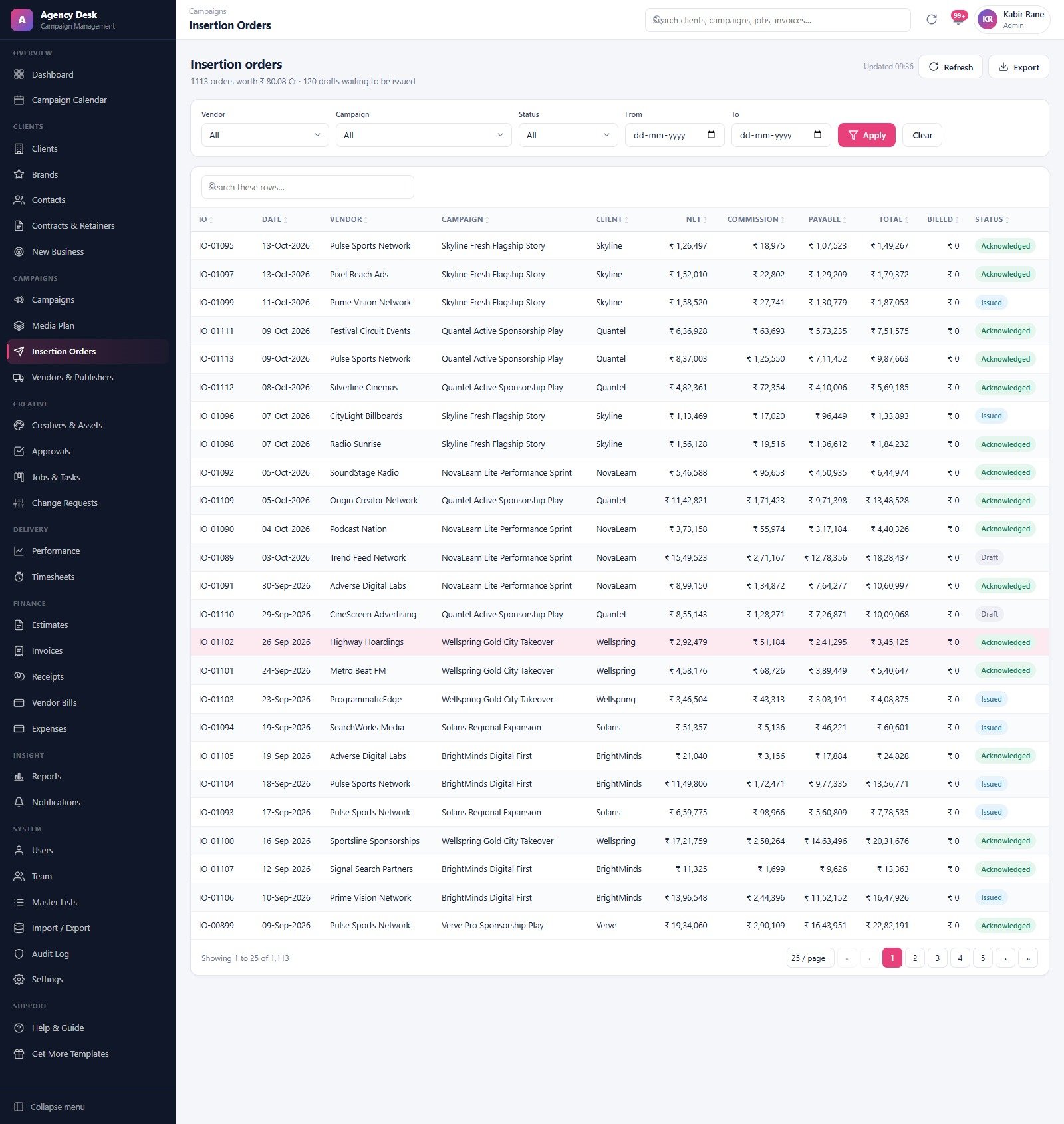
Numbered orders generated from approved plan lines, each carrying its own lines, vendor and status, with amendments and cancellations handled in the module rather than by emailing a fresh PDF.
Creatives & Assets
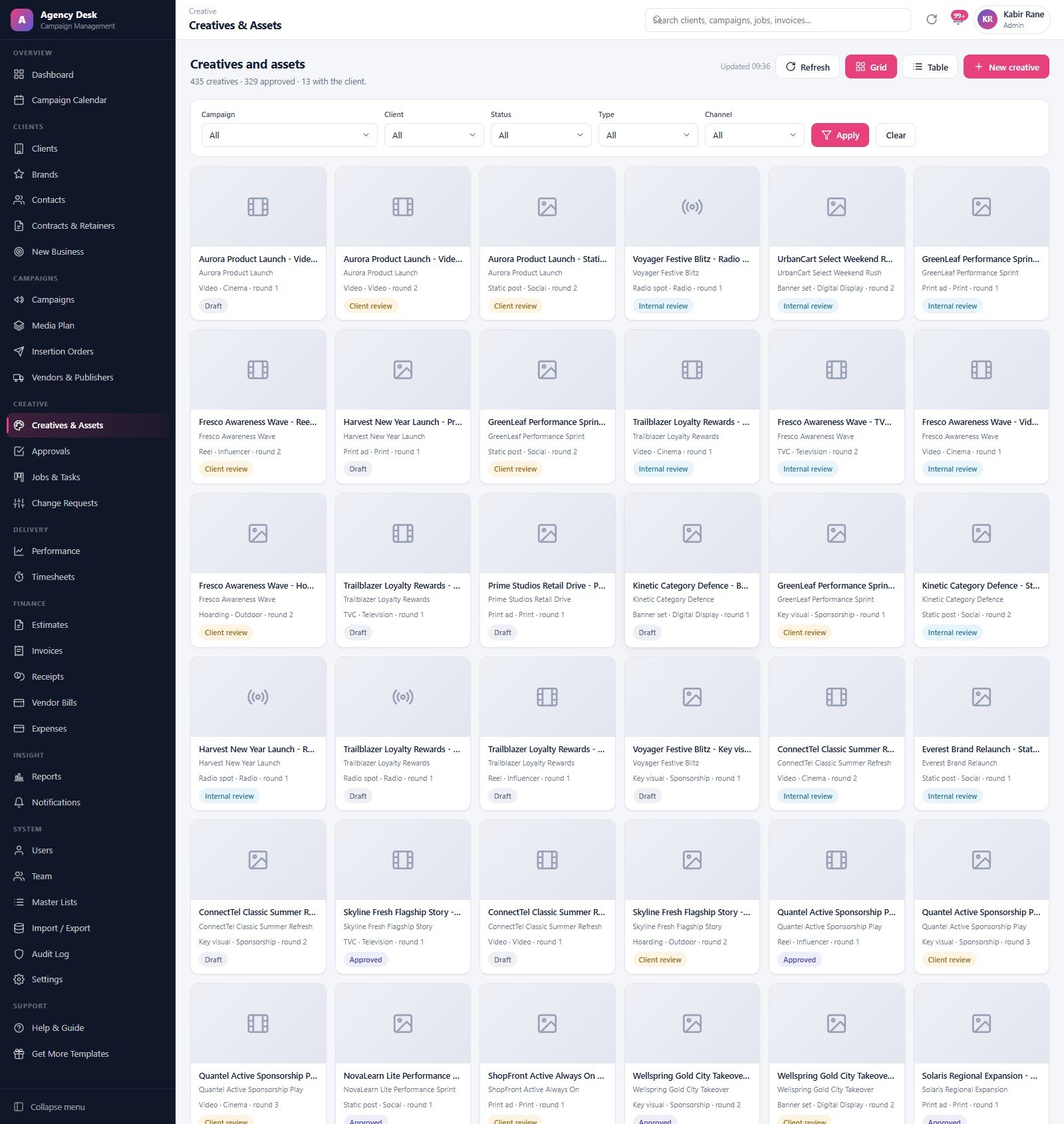
Creatives with version history and approval state, assets filed in Drive, and a clear record of which version is live against which plan line.
Jobs & Tasks
A kanban board across Brief, In progress, Internal review, Client review, Approved, Delivered, On hold and Cancelled, with owner, campaign, type and priority filters, an overdue-only toggle, and Table and Workload views for anyone who prefers a list to cards. It is the agency job and approval tracker the rest of the system feeds.
Invoices and the finance desk
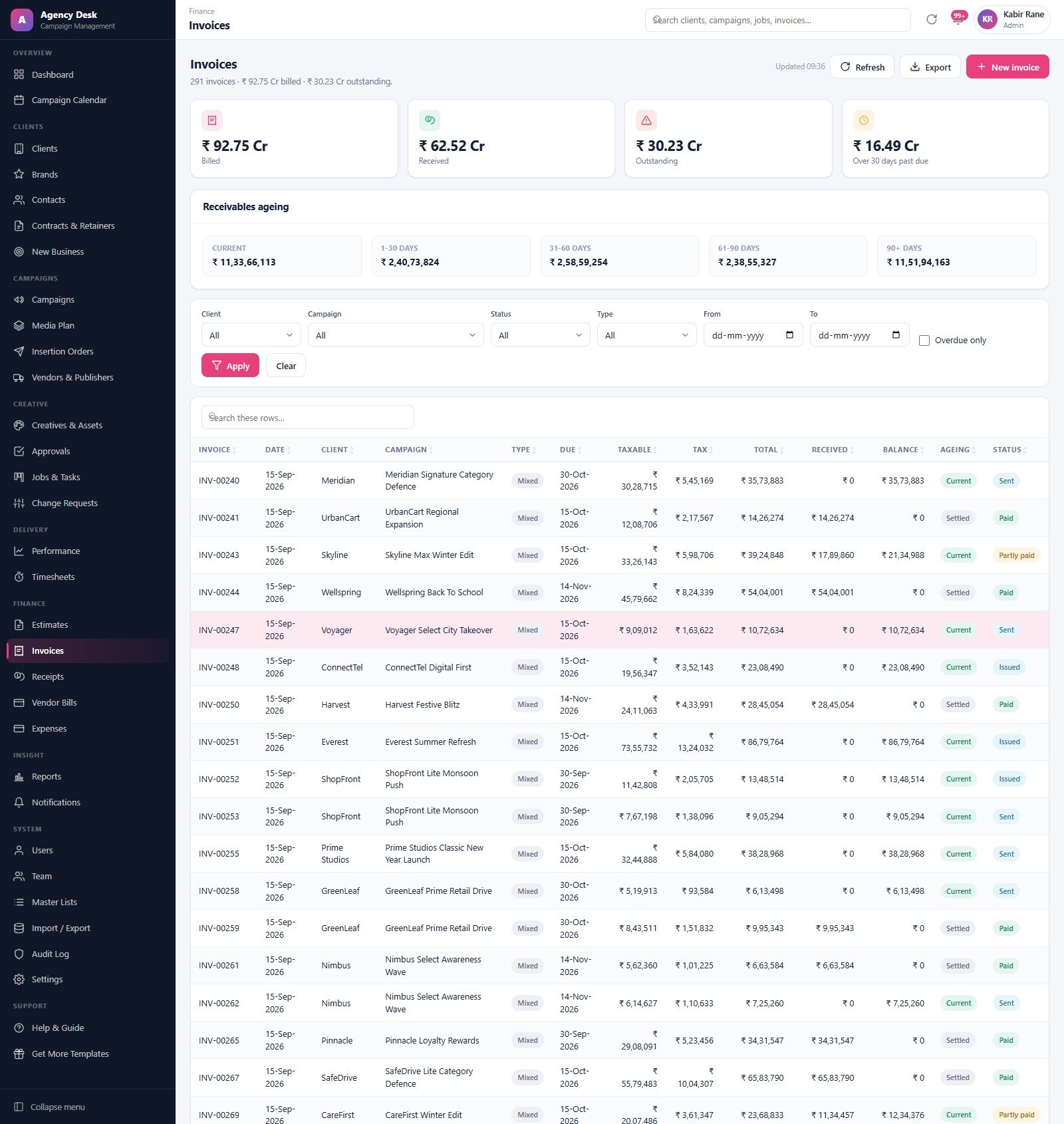
Estimates, invoices, receipts, vendor bills, vendor payments and expenses, with billed / received / outstanding / over-30-days cards and a five-bucket receivables ageing strip above the register.
Reports
Thirty-one reports grouped into Client and revenue, Campaign, Media, Creative and Finance. Pick one, set the filters, run it — and only the reports your role is allowed to see appear in the list.
System and support
Users, Team with cost and billing rates, Master Lists, Import / Export, an Audit Log, Settings for agency name, currency and tax, plus an in-app Help & Guide. The archive routine takes a full copy of the database into Drive first, and only moves closed rows once that copy has succeeded.
📊 This Web App vs. a Spreadsheet Stack vs. Paid Agency SaaS — Where This Fits
| What you need | This Web App (one-time) | Spreadsheets + email | Paid agency SaaS (per seat, monthly) |
|---|---|---|---|
| Cost for a 10-person agency | One payment, unlimited users | Free, but paid for in rework | A recurring per-seat fee every month, indefinitely |
| Role-based permissions | 7 roles, enforced server-side | Sheet-level sharing at best | Yes |
| Media plan to insertion order | Built in, one click from approved lines | Manual retyping into a Word template | Yes |
| Creative approval rounds | Internal and client rounds with turnaround times | Email threads | Yes |
| Where your data lives | Your own Google Sheet, in your Drive | Your Drive, scattered | The vendor’s cloud |
| Connects to ad platforms | No — performance is entered or imported | No | Often yes |
| Export and portability | Full Import / Export; the data is plain Sheets | Yes | Varies by plan |
| Setup time | About 15 minutes | None | Days to weeks of onboarding |
If you need live spend pulled straight out of ad platforms, buy the SaaS. If you want one owned system where the plan, the creative, the jobs and the invoice all reference the same campaign record — without a recurring bill — an advertising agency campaign management system you deploy yourself is the sensible middle.
👥 Who This Is For — and Who It Is Not For
Perfect for:
- Independent and boutique advertising agencies of roughly 5–50 people who have outgrown spreadsheets
- Full-service and creative agencies that plan media as well as make the work
- Media buying houses that need a defensible insertion order trail
- In-house brand teams running several campaigns against fixed budgets
- Agency owners who want an ad agency software setup they own outright rather than rent
- Anyone replacing a folder of spreadsheets with a single advertising agency campaign management system
Not a fit if:
- You need live spend, impressions or clicks pulled automatically from Google Ads, Meta Ads Manager, DV360 or any other platform — this system connects to no ad platform, and performance figures are typed in or imported
- You want an ad server, a DSP, an SSP or anything that actually buys or serves media
- You need accredited measurement, viewability, brand-safety or ad-fraud verification
- You want full accounting — this is not a ledger and it files no tax return
- Your agency cannot use Google Workspace or a personal Google account
⚙️ How to Use It
- Try the demo first. Sign in above as
director, then again ascreative— the difference between the two menus is the fastest way to understand how the advertising agency campaign management system separates duties. - Create a new Google Apps Script project and paste in the supplied
Code.gs. - Add an HTML file named exactly
Indexand paste in the supplied markup. - Deploy as a web app and accept the Google permission prompt — the script needs Sheets, Drive and Gmail on your own account.
- Run the one-time setup, sign in as
admin, then open Settings and enter your agency name, address, tax number and currency. The demo ships in Indian Rupees; change the currency symbol in Settings before you invoice anyone. - Open Users and change all seven seeded passwords. Then bring in your real clients, brands, contacts, vendors and team through Import / Export, or simply edit and delete the seeded records.
One thing worth knowing up front: after any later change to the code you must create a new version of the deployment, not merely save the file, or your users will keep seeing the old build.
💼 Real-World Use Cases
A 12-person creative agency. Priya runs servicing and was losing an hour a day answering “where is that creative”. She gives her traffic person the Traffic Coordinator role and her two designers the Creative Lead role. The job board becomes the standup; the Approvals module becomes the audit trail. Nobody wanders into a finance screen, because nobody can.
A media buying house with 40 active plans. Rohan’s team lives in the Media Plan grid. They filter by vendor, approve the lines the client has signed off, hit Generate orders, and the insertion order numbers come out consistent — with the delivery percentage against each line visible next to the IO number instead of in a separate post-buy spreadsheet.
An owner-operator who wants to get paid. Meera bought the advertising agency campaign management system for one module and opens Invoices once a week. The four cards tell her what she has billed, what has landed, what is outstanding and how much is over thirty days past due; the ageing strip tells her which bucket the problem sits in. She runs Receivables ageing and Client ageing and outstanding from the Reports menu and chases from that list.
❓ Frequently Asked Questions
Can I try it before buying?
Yes. The green box near the top of this page carries a live demo link and all seven role logins. It is a shared demo instance seeded with fictional data that resets periodically, so sign in, click everything, and break whatever you like.
Does the advertising agency campaign management system connect to Google Ads or Meta?
No. It connects to no ad platform, ad server, DSP or exchange, and it neither buys nor serves media. Performance figures are entered by your team or imported. If automatic spend syncing is the requirement, this is not the right product for you.
What exactly do I get in the download?
A ZIP containing Code.cs.txt (the Apps Script server code), Index.txt (the front end) and a PDF user manual. You paste the two files into your own Apps Script project and deploy. There is no installer, and nothing runs on our servers.
How does this compare with paid agency SaaS?
Paid platforms bill per seat every month and usually offer live platform integrations. This is a one-time purchase with unlimited users, where the data sits in your own Google Sheet. You trade automatic ad-platform syncing for ownership and no recurring cost.
Is my data safe, and who can see what?
The database is a Google Sheet in your own Drive, so access is governed by your Google account plus the app’s seven roles. Passwords are stored only as salted SHA-256 hashes and cannot be read back out of the spreadsheet. Like any spreadsheet-backed tool it carries no security certification — treat the sharing settings on that Sheet as the real perimeter.
Can I add users beyond the seven seeded accounts?
Yes. Users is an Admin-only module and there is no seat limit, because there is no per-seat licence. Each new account is assigned one of the seven roles.
Does it handle multiple currencies or tax?
There is a single currency symbol and a tax setting, both configured in Settings. This is campaign management software for agencies, not a multi-currency accounting system — it will not convert exchange rates or file a return.
👤 About the Author
Built and documented by the NextGenTemplates team, who have shipped more than a hundred Google Apps Script business systems and several thousand Excel, Google Sheets and Power BI templates for small businesses worldwide. Every screen of this advertising agency campaign management system was opened and checked against the shipped build before the listing was written, and the figures quoted come from the demo data you can sign into above.
🔗 Explore Related Templates
- Influencer Collaboration Management System Web App — the obvious companion if your agency also runs creator campaigns.
- Freelancer & Agency Project Management System Web App — a lighter, project-first alternative for teams that do not buy media.
- Advertising Dashboard in Google Sheets — reporting only, if you want the analysis without the workflow.
- Browse every one of our Google Apps Script Web Apps.
- Full written walkthrough: how this agency job and approval tracker works, module by module.
- New to the platform? Google’s own guide to Apps Script web apps explains what you are deploying.<


























Reviews
There are no reviews yet.