

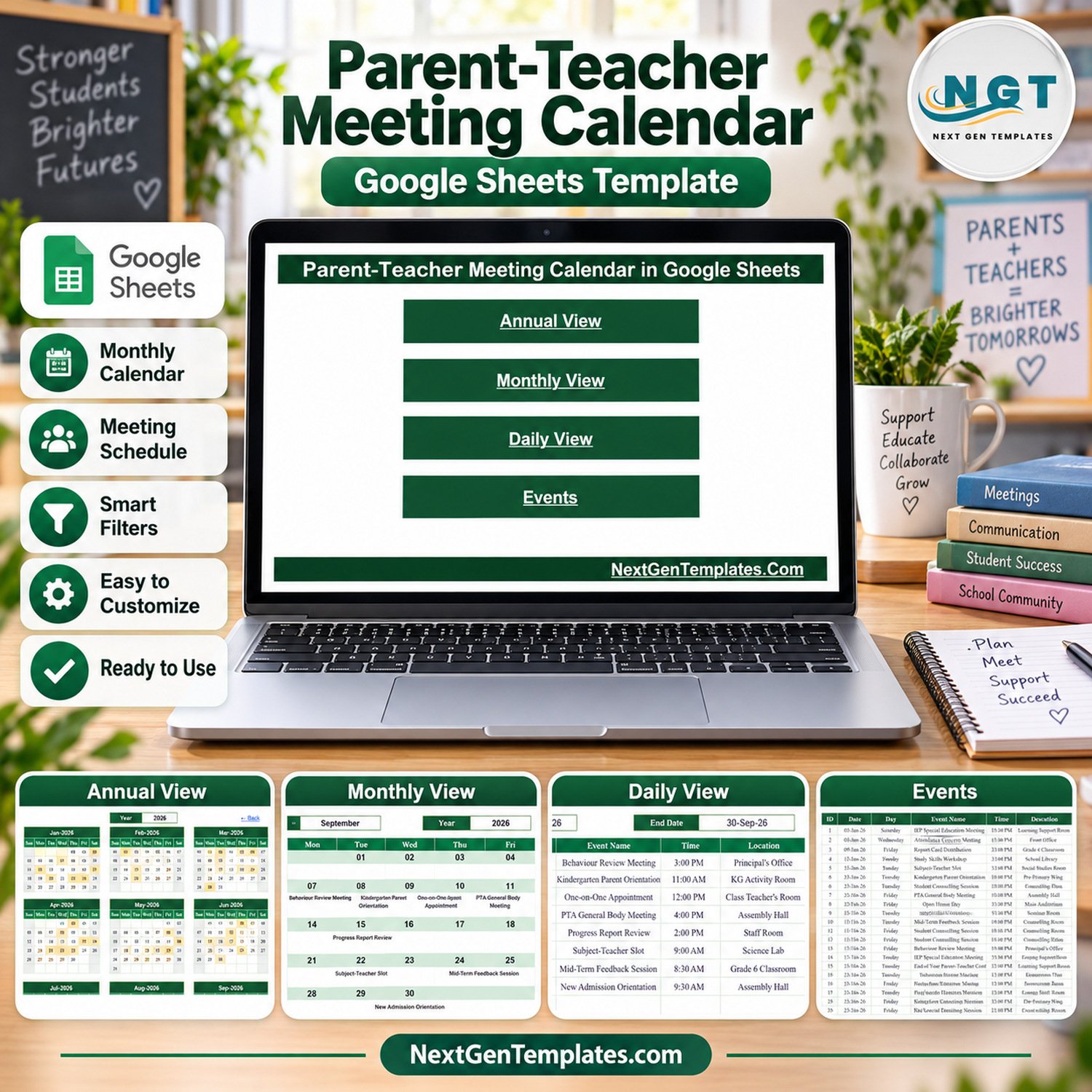

The Parent-Teacher Meeting Calendar in Google Sheets ships with 100 sample meeting records covering 03-Jan-2026 to 31-Dec-2026, spread across 16 meeting types, 29 school locations and 14 time slots. Four linked views — Annual, Monthly, Daily and Events — run off that one list, so changing a record changes every view. Setup takes under 10 minutes: open the PDF, click the copy link, and replace the demo rows with your own schedule.
🌍 Join 10,000+ customers in 180+ countries using NextGenTemplates to replace paid SaaS tools with one-time-purchase Excel, Google Sheets, Power BI and HTML templates.
✅ Instant download · One-time payment · No subscription · No per-user fees · Lifetime access
📌 Please read before you buy. This is a Google Sheets calendar template for administrative scheduling only. It does not send invitations, reminders, emails, SMS or push notifications to parents or staff, and it connects to no school management system, booking platform or calendar service — including Google Calendar. It is not a student record, report card, attendance register or assessment of any child, and it offers no educational, safeguarding, pastoral or legal advice. Every row shipped in the file is demo data.
🔑 Key Features of the Parent-Teacher Meeting Calendar
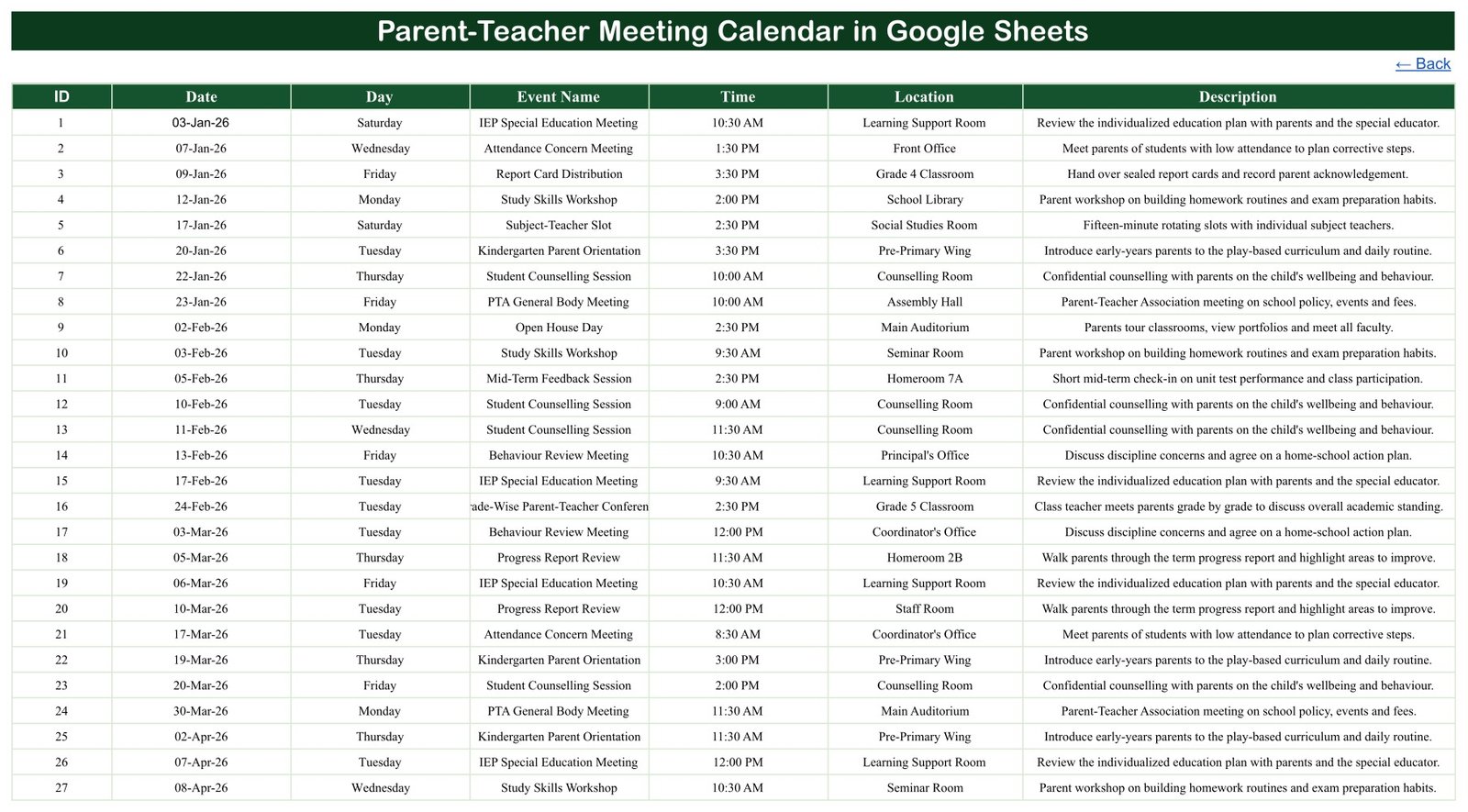
🗓️ Four linked views, one source list. The Events sheet holds all 100 records with ID, Date, Day, Event Name, Time, Location and Description. Annual View, Monthly View and Daily View all read from it, so you maintain the schedule in exactly one place and never reconcile two copies.
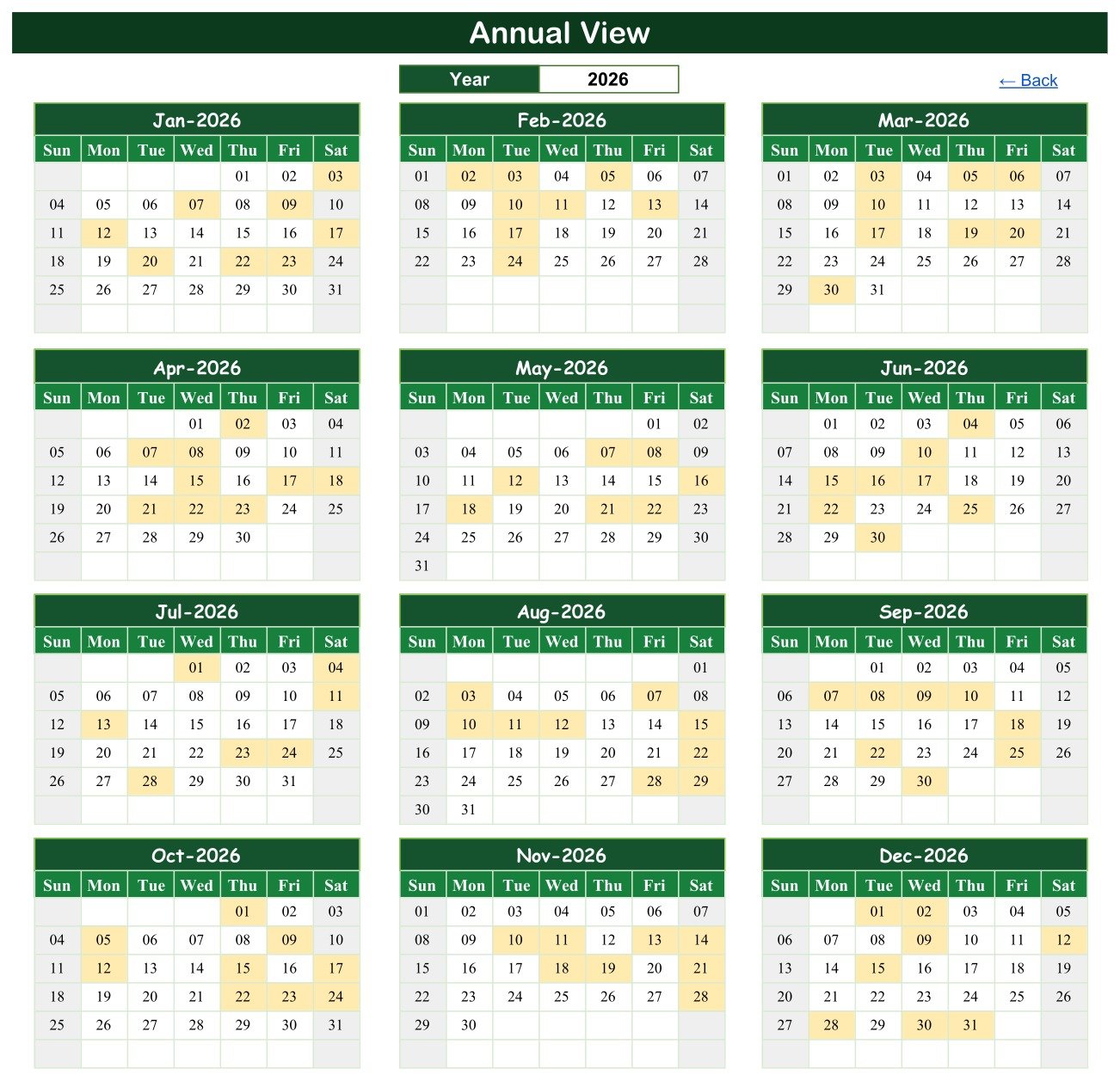
📅 Annual View with a year picker. Twelve month grids for the chosen year sit on a single screen, laid out Sunday to Saturday, with dates that carry a meeting shaded so a term’s workload is visible at a glance. Change the year cell and all twelve grids redraw.
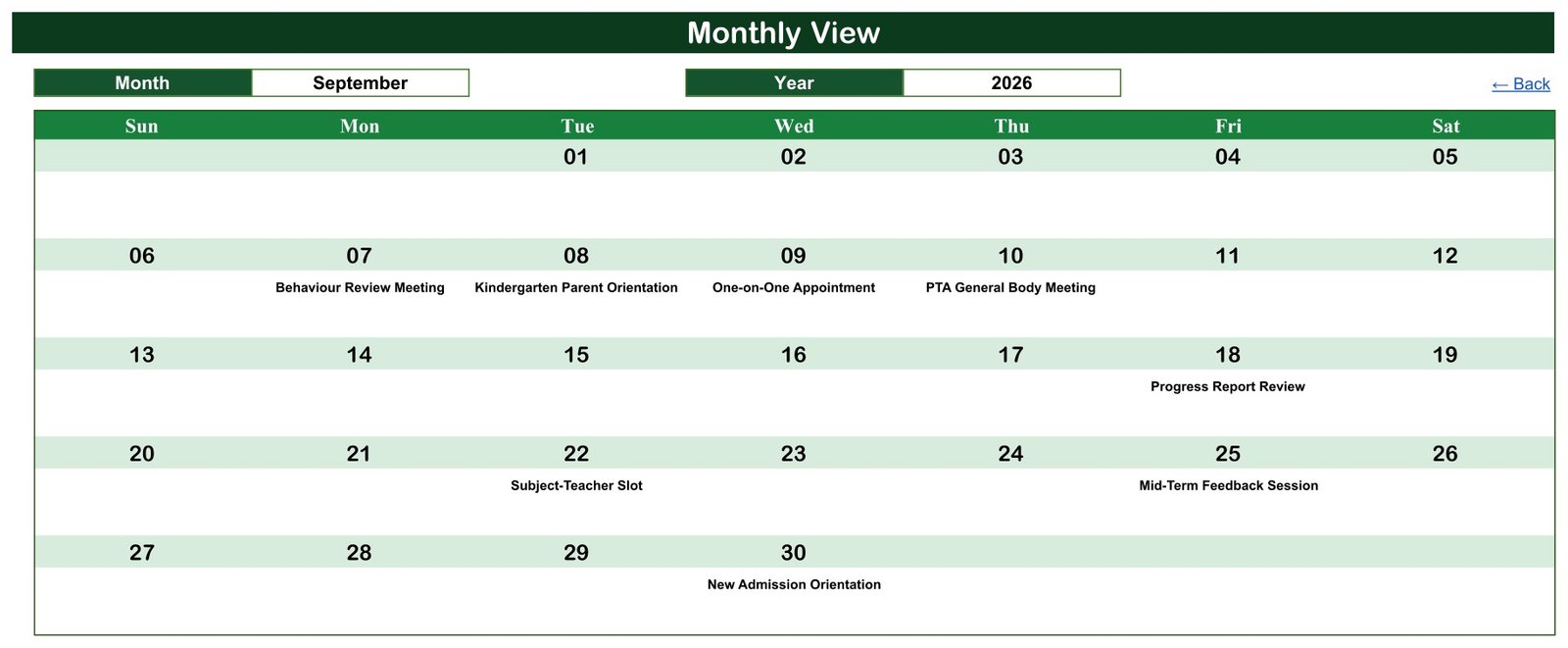
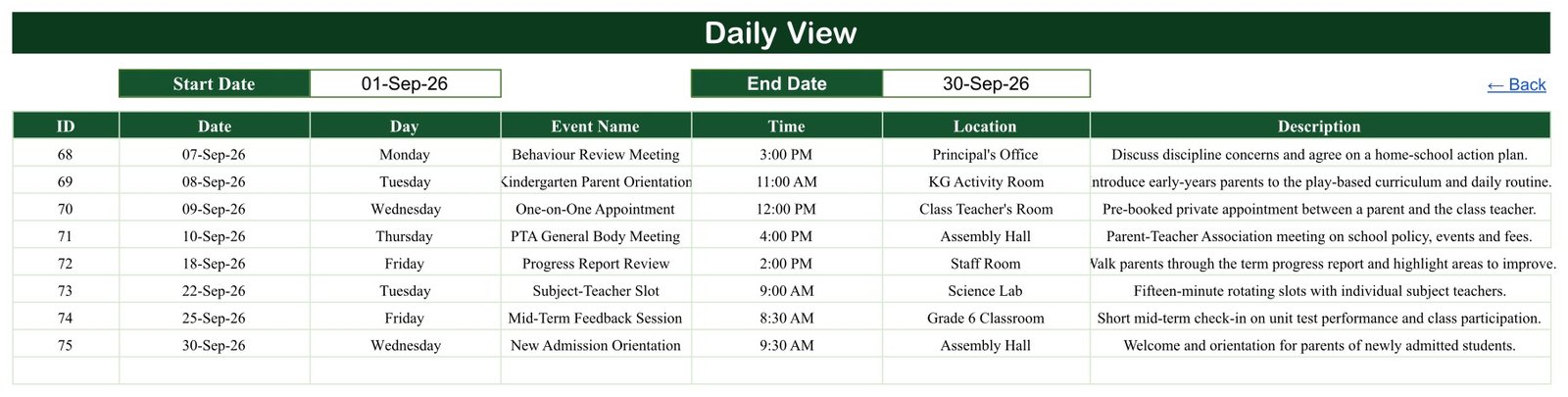
🔍 Monthly View with month and year pickers. A full 7-column month grid prints each meeting title directly under its date. Pick September 2026 in the demo file and you see Behaviour Review Meeting on the 7th, Kindergarten Parent Orientation on the 8th, One-on-One Appointment on the 9th and PTA General Body Meeting on the 10th.
📋 Daily View with a start/end date filter. Enter any two dates and the table returns every meeting in that window with its day name, time, location and a one-line description — useful for printing a week’s front-desk sheet or a single term’s list.
🏫 Realistic school vocabulary out of the box. The 16 meeting types include PTA General Body Meeting, Open House Day, Progress Report Review, Subject-Teacher Slot, IEP Special Education Meeting, Kindergarten Parent Orientation, Career Guidance Session and Grade-Wise Parent-Teacher Conference, placed across 29 locations from the Assembly Hall to the Learning Support Room.
✅ Dates that actually reconcile. All 100 demo rows were re-checked: every date is a real calendar date, every Day value matches its date, the IDs run 1 to 100 in order, and the rows are sorted ascending with 8 or 9 meetings per month. Nothing in the shipped file needs correcting before you start.
📦 What’s Inside the Parent-Teacher Meeting Calendar in Google Sheets
Page 1: Home / Navigation
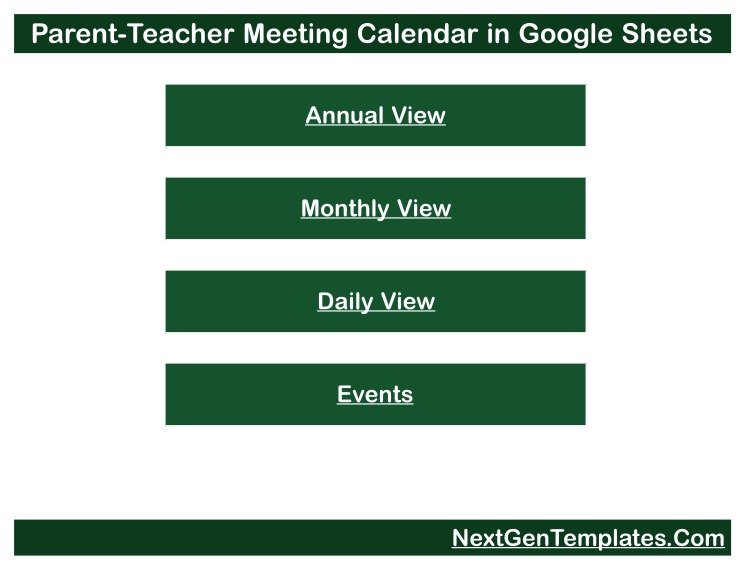
The opening sheet is a simple menu with four buttons — Annual View, Monthly View, Daily View and Events — so anyone at the front desk can move around the file without knowing the tab names.
Page 2: Annual View
Twelve month grids for the selected year, each Sunday-to-Saturday, with meeting dates shaded. A single Year cell at the top drives the whole page, and a Back link returns you to the menu.
Page 3: Monthly View
A full-width month grid with Month and Year pickers. Each meeting title is printed under its own date cell, so a month’s parent-facing commitments read like a wall planner.
Page 4: Daily View
A date-range report driven by Start Date and End Date cells. The table returns ID, Date, Day, Event Name, Time, Location and Description for every meeting between those two dates.
Page 5: Events
The master list — all 100 demo records in one scrollable table. This is the only sheet you type into; add, edit or delete rows here and the three views follow.
📊 This Calendar vs. a Microsoft Excel Calendar vs. Paid Booking SaaS — Where This Fits
| Feature | Parent-Teacher Meeting Calendar (Google Sheets) | Microsoft Excel calendar workbook | Calendly / SchoolCloud / Acuity |
|---|---|---|---|
| Cost | $4.99 one-time | $5-15 one-time | $10-30 / user / month |
| Platform | Browser, any device with Google Sheets | Desktop Excel; macros often required | Vendor web app |
| Setup time | Under 10 minutes | 15-30 minutes | 1-3 hours plus staff onboarding |
| Real-time team collaboration | ✅ Native, multi-editor | Only via OneDrive co-authoring | ✅ Yes |
| Mobile access | ✅ Google Sheets mobile app | Limited on phones | ✅ Yes |
| Customisable fields and wording | ✅ Every column and label is editable | ✅ Yes | Restricted to vendor fields |
| Share with a link | ✅ Standard Google Drive sharing | File must be sent or synced | ✅ Yes |
| Sends invitations and reminders | ❌ No — manual scheduling only | ❌ No | ✅ Yes |
| Year-1 cost at 5 users | $4.99 total | $5-15 total | $600-1,800 |
For a school office that wants one shared, editable meeting schedule without a per-seat booking subscription — and is happy to send its own invitations — this calendar sits in the sweet spot.
👥 Who This Template Is For — and Who It’s Not For
✅ This template is built for:
- School office administrators and receptionists keeping one shared meeting diary for a term or a full academic year
- Coordinators and heads of year planning PTA meetings, open house days and progress-report windows across grades
- Small independent schools, tuition centres and preschools that do not run a school management system
- Anyone who wants a printable month or date-range sheet for a staff noticeboard
❌ This template is NOT for:
- Schools that need automated invitations, reminders, SMS or parent self-booking — this file sends nothing
- Teams that need two-way sync with Google Calendar, Outlook or an MIS/SIS — there is no integration
- Anyone looking for a student record, report card, attendance register or grading tool — this is a schedule, not an assessment
- Organisations that require access logging, audit trails or SSO on sensitive records
⚙️ How to Use It
- Download the PDF after purchase and click the Google Sheets link inside it.
- Choose File > Make a copy to create your own editable copy in your Google Drive.
- Open the Events sheet and replace the 100 demo rows with your own meetings.
- Keep the Date format consistent and let the Day column follow the date you enter.
- Use the Year cell on Annual View and the Month/Year cells on Monthly View to move around the year.
- Set Start Date and End Date on Daily View to print a week, a term or a single day.
- Share the copy with colleagues from Google Drive, and decide who may view versus edit before you add any real names.
💼 Real-World Use Cases
Meera runs the front office at a 600-pupil day school. She keeps the whole academic year in the Events sheet, prints the Monthly View for the staffroom noticeboard at the start of each month, and uses the Daily View date filter to answer “what’s on next week?” without scrolling a hundred rows.
Daniel is head of year at a secondary school. Before each progress-report window he filters the Daily View to that fortnight, checks that no grade has two parent-facing events on the same afternoon, and shares the view-only link with his form tutors.
Aisha runs a 40-child preschool with no admin software. She uses the Annual View to space Kindergarten Parent Orientation and Open House Day sessions evenly through the year, then writes her own invitation emails from the list — the sheet plans the dates, she still sends the messages.
❓ Frequently Asked Questions
Does this send meeting invitations or reminders?
No. The Parent-Teacher Meeting Calendar in Google Sheets is a planning file only. It sends no email, SMS, push notification or calendar invitation, and it does not connect to Google Calendar, Outlook or any booking platform. You schedule in the sheet and contact parents yourself, however you normally do.
Are the meetings in the file real?
No. All 100 rows are demo data invented for the template — sample names of meeting types, times and rooms across 2026. Delete them or overwrite them with your own schedule. No real school, child, guardian or member of staff is referenced anywhere in the file.
Is it safe to put real parent and student names in it?
That is your decision and your responsibility. Entering real student, guardian or teacher details — especially any note about a child’s progress or behaviour — means you are handling personal data about children, and securing, retaining and sharing it lawfully is entirely down to you and your school’s policies.
Do I need Excel or any add-on to use it?
No. It runs entirely in Google Sheets in a browser, with no macros, scripts or add-ons. A free Google account is all you need. You can export to Excel or PDF from Google Sheets if you want an offline copy.
How long does setup take?
Under 10 minutes. Open the PDF, click the sheet link, choose Make a copy, then clear the Events rows and type your own. The Annual, Monthly and Daily views need no configuration — they read the Events sheet as soon as it changes.
How does this compare to a paid booking tool like Calendly or SchoolCloud?
Those handle parent self-booking and automated reminders for $10-30 per user per month. This calendar does neither. What it gives you for $4.99 once is a shared, fully editable year plan your whole office can open, edit and print — with no seats to buy.
Can I change the year to 2027 or beyond?
Yes. The demo data covers 2026, but the Year cell on Annual View and the Month/Year cells on Monthly View accept any year. Enter your own dates in the Events sheet and the views follow.
👤 About the Author
Built by PK — Microsoft Certified Professional with 15+ years of Excel, Google Sheets and Power BI experience. Founder of NextGenTemplates, reaching 300K+ subscribers across YouTube channels (@PKAnExcelExpert, @NextGenTemplates). Every template is hand-built and tested before release.
🔗 Explore Related Templates
- Class Timetable Calendar in Google Sheets — the teaching timetable that sits alongside your parent meetings.
- Teacher Substitution Calendar in Google Sheets — track cover and absence days so you don’t book a meeting with a teacher who is out.
- Exam Timetable Calendar in Google Sheets — keep assessment weeks clear of parent-facing events.
- School Bus Route Calendar in Google Sheets — transport scheduling for the same office.
- The Parent-Teacher Meeting Checklist in Excel — the meeting-day checklist, if you prefer Excel.
- School Admin Dashboard in Google Sheets — step up to reporting across the whole school office.
Browse the full Google Sheets Calendar Templates range, or the wider Google Sheets Templates library.
🎥 Visit our YouTube channel for step-by-step video tutorials
👉 YouTube.com/@NextGenTemplates
Watch the step-by-step video Demo:
📅 Last updated: September 2026
Compatibility and Requirements
- Works in Google Sheets. You need a free Google account and a web browser.
- The Monthly View and Annual View use pickers for the month and year, and you can also export a copy to Excel or PDF from Google Sheets. Google explains how to edit Microsoft Office files in Google Drive.
More Questions About This Template
Which views does the calendar include?
Four views: Annual View, Monthly View, Daily View and Events. All of them read from the Events sheet.
Where do I enter my own meetings?
Type them in the Events sheet. Each record has an ID, Date, Day, Event Name, Time, Location and Description, and the other three views follow your changes.
Can I print one week or one term?
Yes. Enter a Start Date and an End Date on the Daily View and it lists every meeting between those dates with its day, time, location and description.
Is there an Excel version of this calendar?
Yes. See the Parent-Teacher Meeting Calendar in Excel.
































Reviews
There are no reviews yet.