

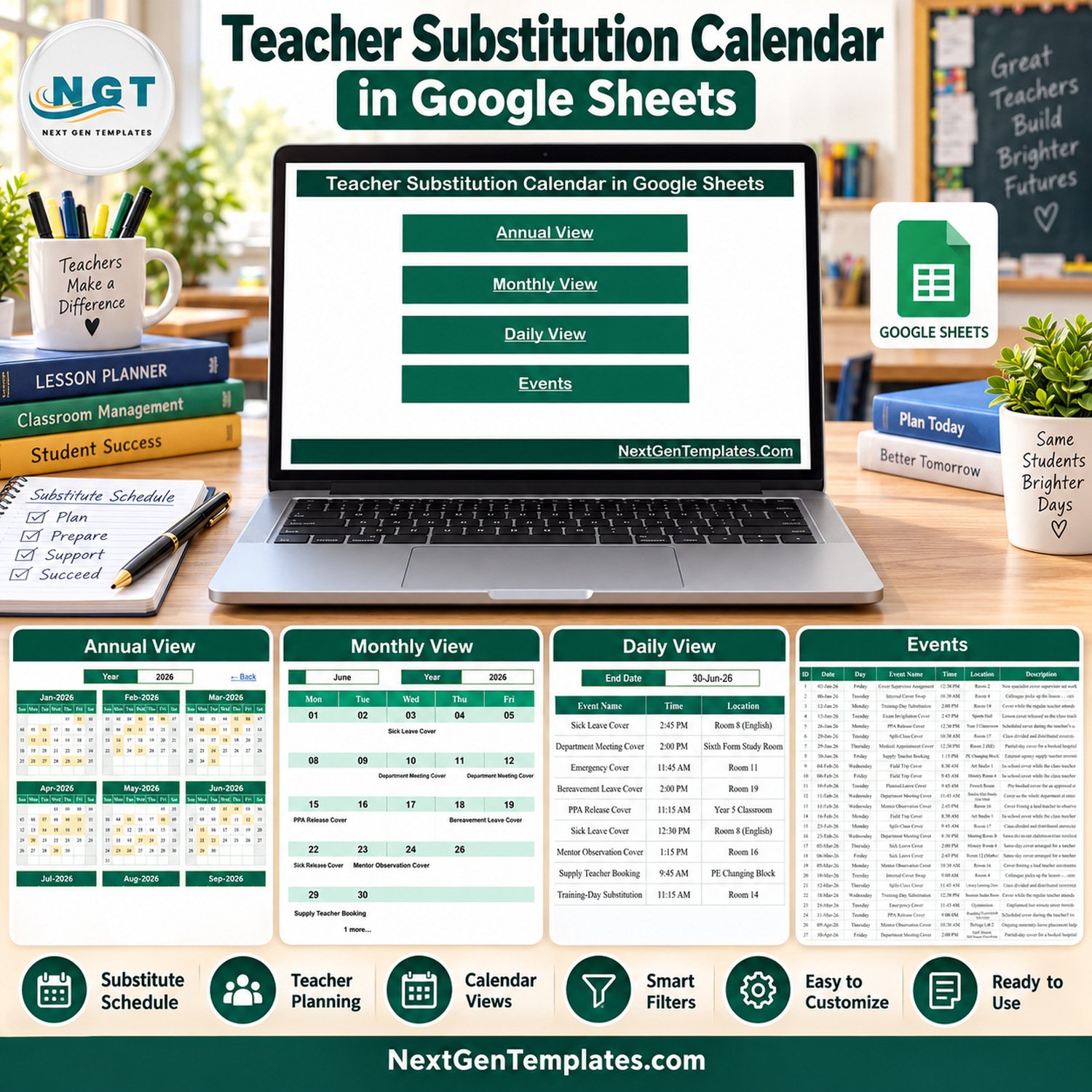

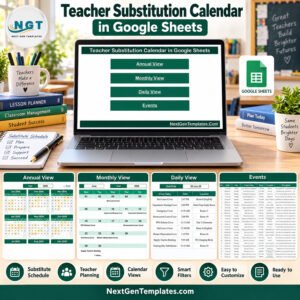
Teacher Substitution Calendar in Google Sheets is a ready-to-use school cover calendar for recording substitution events and reviewing them in annual, monthly, daily, and event-register views. It gives administrators a simple visual alternative to scattered notes when planning cover for sickness, training, meetings, examinations, field trips, PPA release, emergency cover, and other staff absences.

Teacher Substitution Calendar in Google Sheets Overview
This substitute teacher schedule template is built around one clean Events table and formula-driven calendar views. Enter the date, weekday, event type, time, location, and a short description, then use the visual pages to see where cover activity falls throughout the year. Explore more Google Sheets templates for related planning workflows.
Key Features
- Annual View: review all twelve months together and see which dates contain substitution activity.
- Monthly View: select a month and year to place events into a familiar Sunday-to-Saturday calendar grid.
- Daily View: set a start and end date to return the matching event records with time, location, and description.
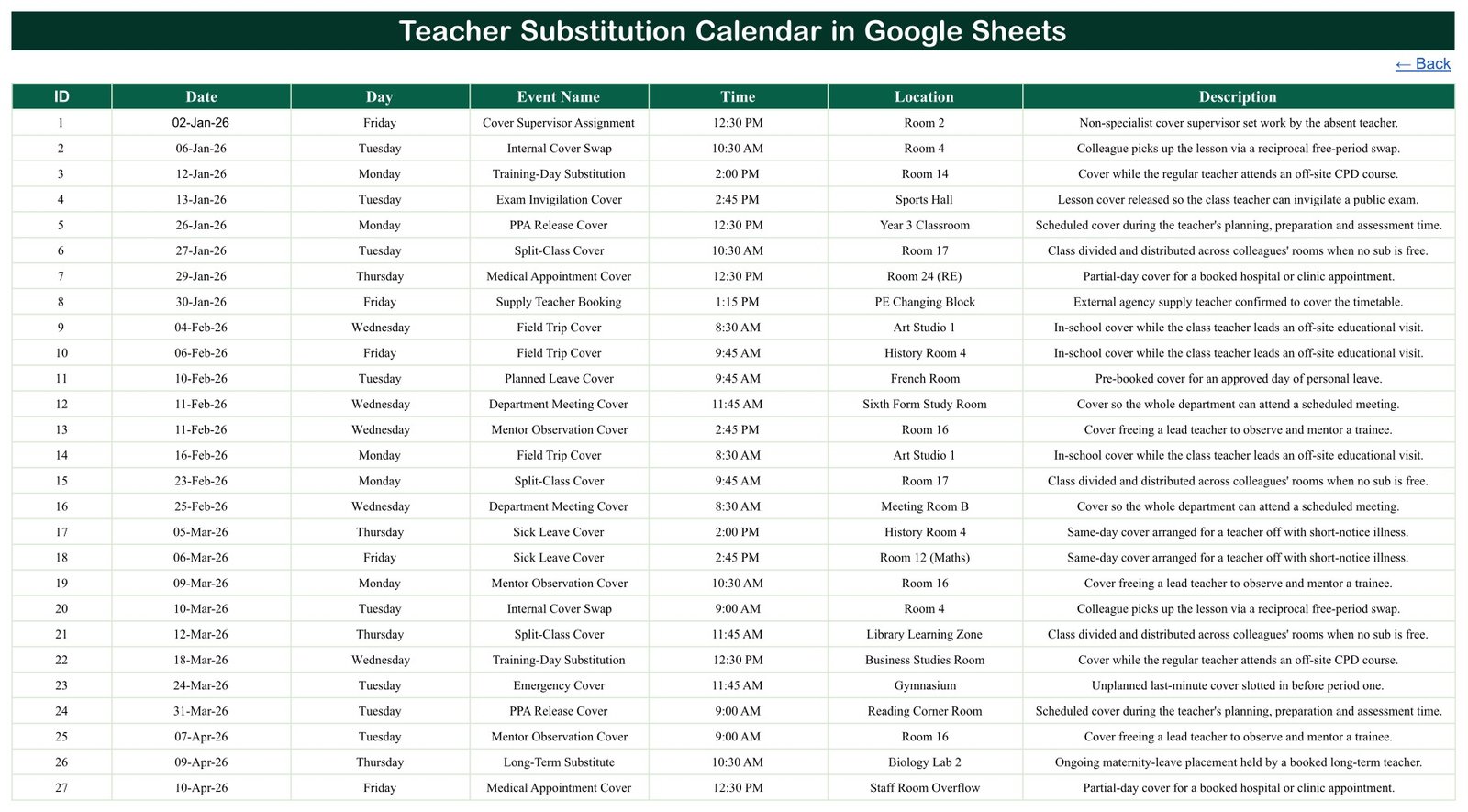
- Events register: maintain the source schedule in a straightforward seven-column table.
- School-focused sample data: includes cover supervisor assignments, internal swaps, training-day substitutions, exam invigilation cover, PPA release cover, field-trip cover, emergency cover, long-term substitution, and other realistic examples.
- Google Sheets delivery: receive a PDF containing the live Make-a-copy link to your own editable sheet.
- No macros or add-ons: work in Google Sheets using the template’s built-in structure and formulas.

What the Template Tracks
| Field | Purpose |
|---|---|
| ID | Gives every substitution entry a simple reference number |
| Date | Places the event in annual and monthly calendar views |
| Day | Shows the written weekday beside each record |
| Event Name | Identifies the type of cover or substitution activity |
| Time | Records the planned start time |
| Location | Records the room, hall, study area, or other school location |
| Description | Provides a concise administrative note about the cover requirement |
How to Use the Google Sheets Substitution Calendar
- Open the delivered PDF and use its Make-a-copy link to create your own Google Sheets file.
- Replace the sample Events rows with your school’s dates, event types, times, locations, and descriptions.
- Keep each ID unique and check that the written weekday matches the date you entered.
- Open Annual View and select the relevant year for a high-level teacher absence cover planner.
- Use Monthly View to focus on one month. On a date with multiple events, the view shows the first event and an additional-item counter.
- Use Daily View when you need the detailed rows for a chosen date range.
- Restrict sharing to approved staff and review your school’s privacy, safeguarding, and record-retention rules before entering real information.

Verified Sample Calendar
The supplied demonstration sheet contains 100 substitution records dated from 2 January to 30 December 2026. It uses 17 event types and 48 locations. All 100 written weekday values were checked against the corresponding 2026 dates with zero mismatches. Three dates contain two entries, illustrating how the detail table handles more than one cover activity on the same day.
Who This Calendar Is For
The template is suitable for school administrators, cover coordinators, department heads, timetabling teams, HR support staff, and leadership teams that need a lightweight school cover calendar. It can also help small education organisations that want a shared visual schedule without buying a dedicated workforce-management platform.
Template vs Manual Notes
| Need | Template | Manual Notes |
|---|---|---|
| Year overview | Twelve months on one page | Separate lists |
| Monthly planning | Calendar-grid view | Rewritten each month |
| Date-range detail | Filtered Daily View | Manual searching |
| Source record | Structured Events table | Inconsistent fields |
| Collaboration | Google Sheets sharing | Multiple copies |
Important Limitations
- This is an administrative calendar, not a complete staff-allocation or timetabling system.
- The source table has no teacher-name, assigned-substitute, subject, class, period, payroll, availability, qualification, or contact field. Add carefully governed fields only if your process requires them.
- It does not automatically find an available substitute, prevent clashes, send notifications, approve leave, or integrate with a school management information system.
- The Monthly View displays the first event on a shared date plus a counter such as “1 more”; use Daily View or Events for every detailed row.
- Sample records are fictional planning data. Replace them and validate your copy before operational use.
- Google account access, sharing controls, and Google service availability remain the buyer’s responsibility.
Before granting access, review Google’s official file-sharing guidance and apply your organisation’s approved sharing policy.
Frequently Asked Questions
Does this assign substitute teachers automatically?
No. It schedules cover events but does not match staff, check availability, or allocate an individual substitute.
Can I change the year?
Yes. The Annual and Monthly views include year selectors. Check your events and weekday values whenever you reuse the file for another year.
Can several cover events occur on one date?
Yes. The Events and Daily views retain each row. The Monthly View shows the first event and an additional-event counter.
Does the file include student information?
No dedicated student, parent, or staff-identification fields are present in the supplied seven-column Events table. Avoid placing sensitive personal data in free-text descriptions unless your approved process permits it.
What do I receive?
You receive a downloadable PDF containing the link to copy the editable Google Sheets substitution calendar into your own Drive.
Plan School Cover with a Clearer View
The Teacher Substitution Calendar in Google Sheets combines a structured event list with useful annual, monthly, and daily views. Use it as a practical substitute teacher schedule template and adapt the categories and locations to your school’s approved cover process.
Watch the step-by-step video Demo:
Compatibility and Requirements
- Works in Google Sheets. You need a free Google account and a web browser.
- You get a PDF with a Make-a-copy link, which saves an editable copy to your own Google Drive. Google explains how this works in Get started with Google Sheets.
More Questions About This Template
Is there an Excel version of this calendar?
Yes. See the Teacher Substitution Calendar in Excel.
Is there a version for entering substitutions as records?
Yes. The Teacher Substitution Data Entry System in Excel is a separate template for that.
Related School and Calendar Templates
- Teacher Substitution Calendar in Excel: the same cover calendar in Excel
- Teacher Substitution Data Entry System in Excel: a data entry system for substitutions
- Dynamic Holiday and Event Calendar in Google Sheets: another Google Sheets event calendar
- School Events Calendar in Excel: a calendar for school events
- Google Sheets Starter Pack: 12 Google Sheets templates in one download
Browse all Google Sheets calendars.




























Reviews
There are no reviews yet.