

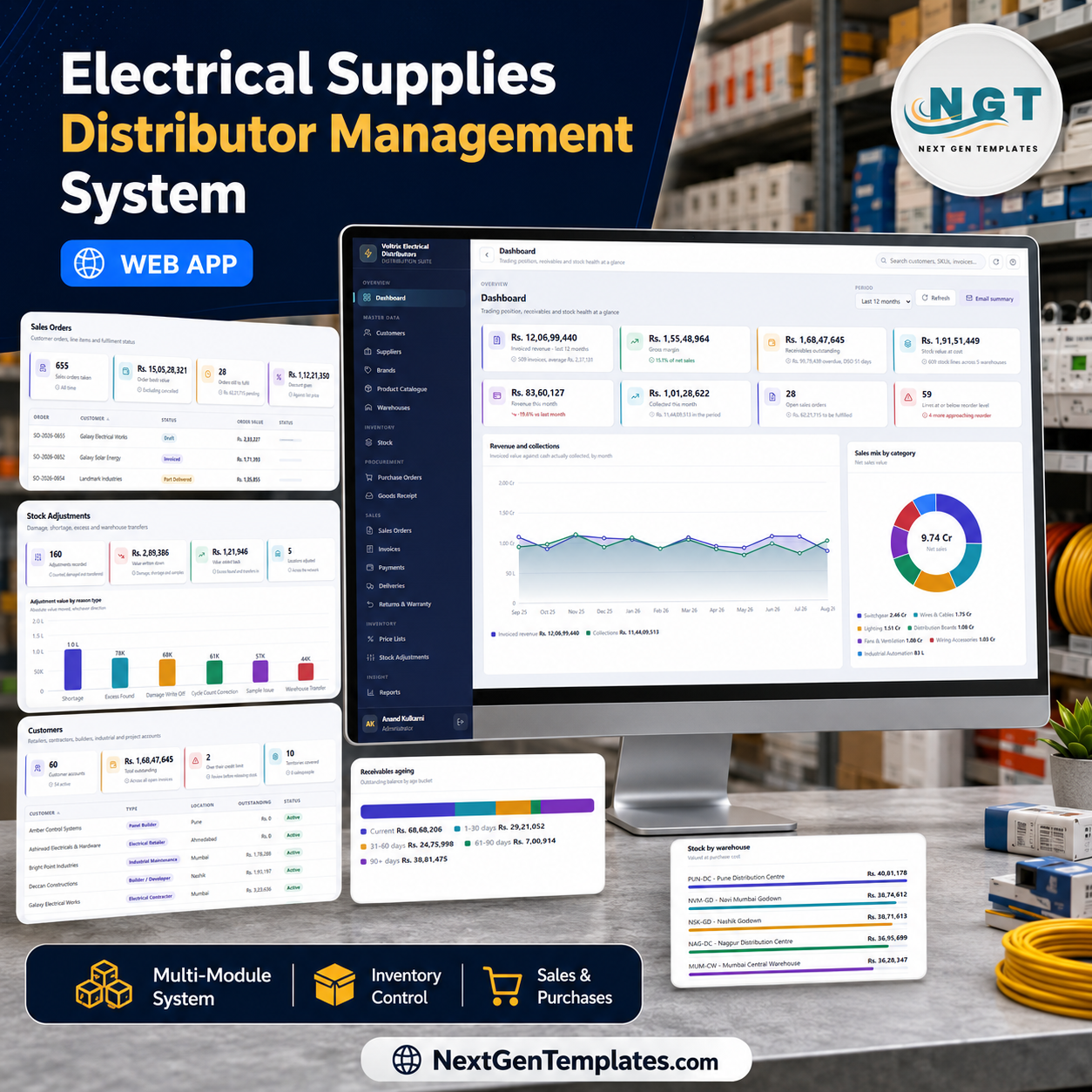

The Electrical Supplies Distributor Management System Web App is a complete Google Apps Script trading system: 24 screens, 18 built-in reports, 6 roles governed by 41 named permissions, and a Google Sheets database of 26 tables that arrives pre-seeded with about 14,000 rows of a full trading year – 203 SKUs, 60 customers, 24 suppliers, 5 warehouses, 280 purchase orders, 655 sales orders, 596 tax invoices and 887 payments. You deploy it into your own Google account in about 15 minutes and own the source.
🌍 Join 8,400+ teams in 40+ countries using NextGenTemplates to replace per-seat SaaS with one-time-purchase Excel, Google Sheets, Power BI and Apps Script systems.
✅ Instant download · One-time payment · No subscription · No per-user fees · Runs in your own Google account
🚀 Try the Live Demo Before You Buy
We have deployed this exact build in our own Google account so you can open every screen, run every report and sign in as every role – against the full seeded trading year – before you pay anything. No signup, no email, no card.
🔑 Test Login Credentials – all six roles
Sign in as admin to see all 24 screens and all 41 permissions, then sign out and come back as kavita.iyer (Viewer) or farid.shaikh (Warehouse) – the sidebar shrinks, the Save buttons disappear, and the money screens vanish entirely. That role separation is the product, and it takes about ten seconds to see.
💡 These credentials are public on purpose. They are the seeded logins of one shared demo instance that resets, not of anybody’s live business. Please do not enter real customer or supplier data into it – other visitors can see it, and it is wiped. What you get after purchase: the full source (Code.gs + Index.html) and a step-by-step deployment guide, so you build your own private instance, with your own database, in your own Google account, in under 15 minutes.
🔑 Key Features of the Electrical Supplies Distributor Management System Web App
⚡ The whole purchase-to-cash chain in one app. Purchase Orders raise on your supplier, Goods Receipt books what actually arrived (and what was rejected), Stock updates by warehouse and bin, Sales Orders allocate it, Invoices apply GST, Deliveries dispatch it against a transporter and LR number, and Payments settle it. Every document links back to the one before it, so an invoice always names the sales order it came from.
📦 Real multi-warehouse stock, not a single quantity column. The seeded book carries 609 stock lines across 5 locations – Mumbai Central Warehouse, Navi Mumbai Godown, Pune Distribution Centre, Nashik Godown and Nagpur Distribution Centre – each with on-hand, allocated, available, reorder-at, bin location, unit cost, value, a health flag and a last-counted date. 41,723 units are on hand, 3,069 of them already committed to orders.
📈 Price lists with slab discounts by customer type and brand. Six price lists (Retailer Standard, Contractor Plus, Panel Builder, Project Special, Government Rate, Solar Partner) drive 132 discount rules, each scoped to a brand and category with a minimum order value and a validity window. Average realised discount across every rule is 8.3%; Government Rate is the deepest at 11%.
💳 A receivables book that ages itself. Invoices carry taxable value, tax, total, paid, balance, due date and margin, and the ageing strip splits the Rs 1,68,47,645 outstanding into Current, 1-30, 31-60, 61-90 and 90+ day buckets. The dashboard reports DSO in days and flags customers over their credit limit before you release stock to them.
🔐 Six roles, 41 permissions, checked on the server. Administrator, Manager, Sales Executive, Warehouse, Accounts and Viewer. The permission map drives the sidebar and every server entry point – hiding a menu item is not the security boundary here, each call re-checks the permission before it does anything. Passwords are salted and SHA-256 hashed, so nobody, including you, can read an existing one back.
📊 Eighteen reports, every one date-ranged, printable and CSV-exportable. Sales Summary by Month, Sales by Customer, Brand, Category, Salesperson and Territory; Purchase Summary by Supplier; Stock Valuation by Warehouse, Low Stock / Reorder and Slow Moving & Dead Stock; Receivables Ageing, Payment Collection, Gross Margin by Brand, Gross Margin by Product, GST Summary and Customer Credit Exposure; Delivery Performance; and Returns & Warranty Analysis.
🖨 Three print sizes and a real audit trail. Invoices, purchase orders, sales orders, delivery notes, payment receipts and every report honour a 3-inch thermal roll, a 4-inch roll or A4 letterhead, with your company block, GSTIN and footer note pulled from Settings. The Audit Log attributes every sign-in, create, update, delete, export and email to a named user, module, record ID and browser.
📦 What’s Inside the Electrical Supplies Distributor Management System Web App
Sign In – one card, one gate
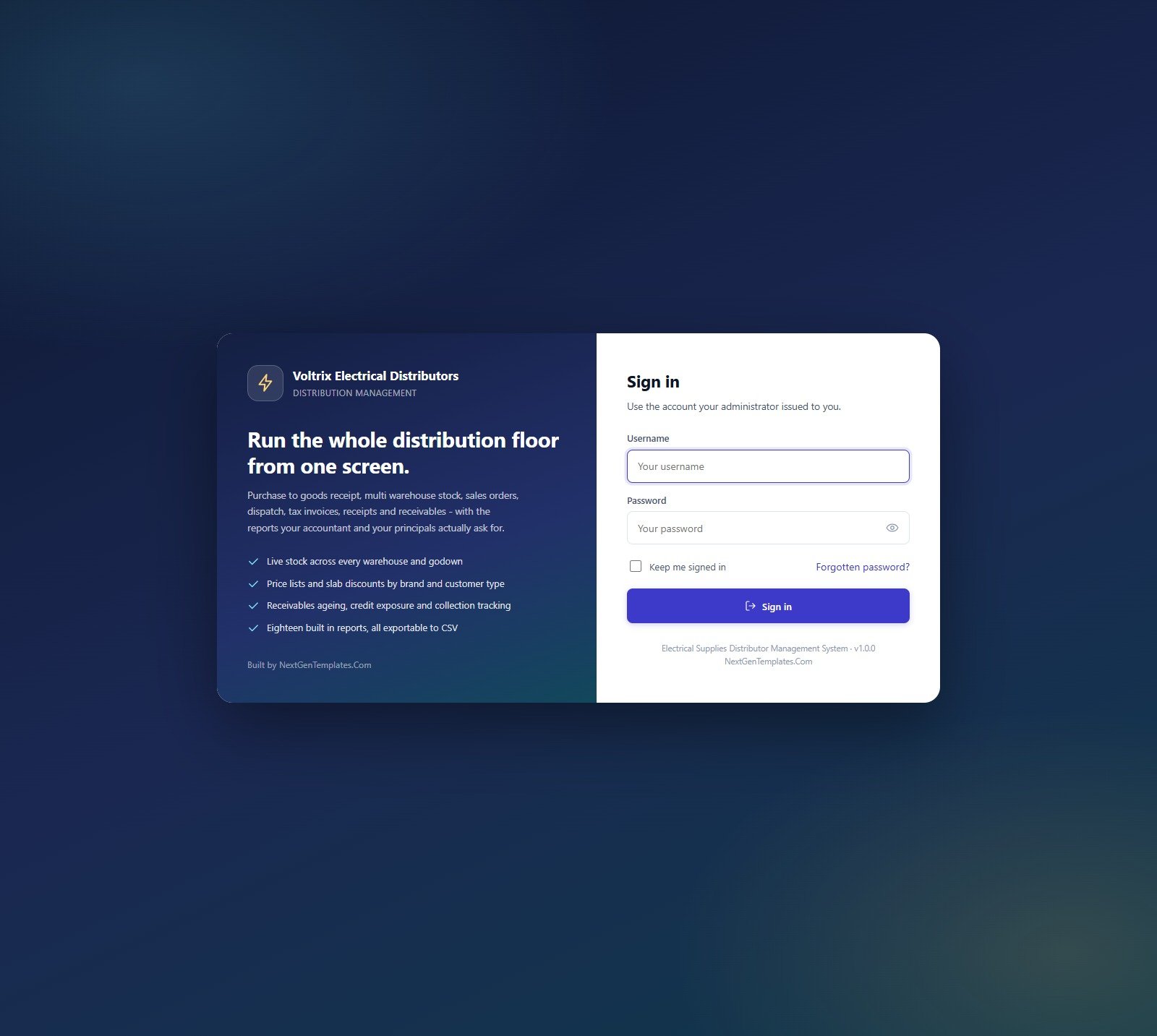
Username and password, “keep me signed in”, and a forgotten-password path. Sessions last for the number of hours you set in Settings. On a fresh install this card also carries a “First run” panel with a Build the database now button that creates the 26-sheet Google Sheets database, seeds the sample year and builds the Drive folder tree for you.
Dashboard – trading position, receivables and stock health
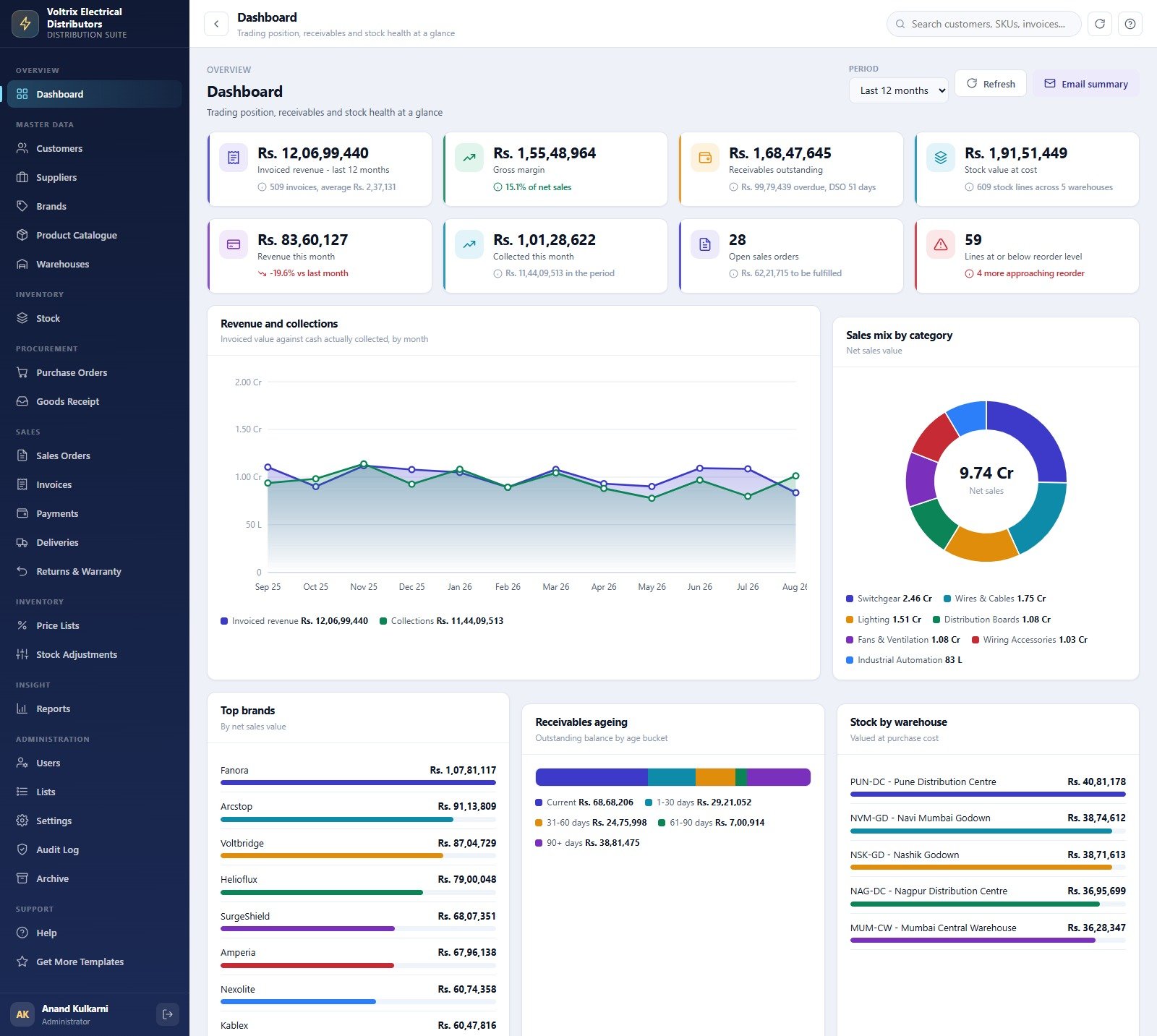
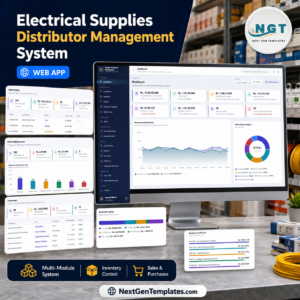
Eight KPI cards over a period selector: Invoiced revenue last 12 months (Rs 12,06,99,440 across 509 invoices, average Rs 2,37,131), Gross margin (Rs 1,55,48,964, 15.1% of net sales), Receivables outstanding (Rs 1,68,47,645 with Rs 99,79,439 overdue and DSO of 51 days), Stock value at cost (Rs 1,91,51,449 over 609 stock lines), Revenue this month, Collected this month, Open sales orders and Lines at or below reorder level. Below them: Revenue and collections by month, Sales mix by category, Top brands by net sales value, Receivables ageing by bucket and Stock by warehouse. An Email summary button mails the same picture to your inbox.
Customers – retailers, contractors, builders and project accounts
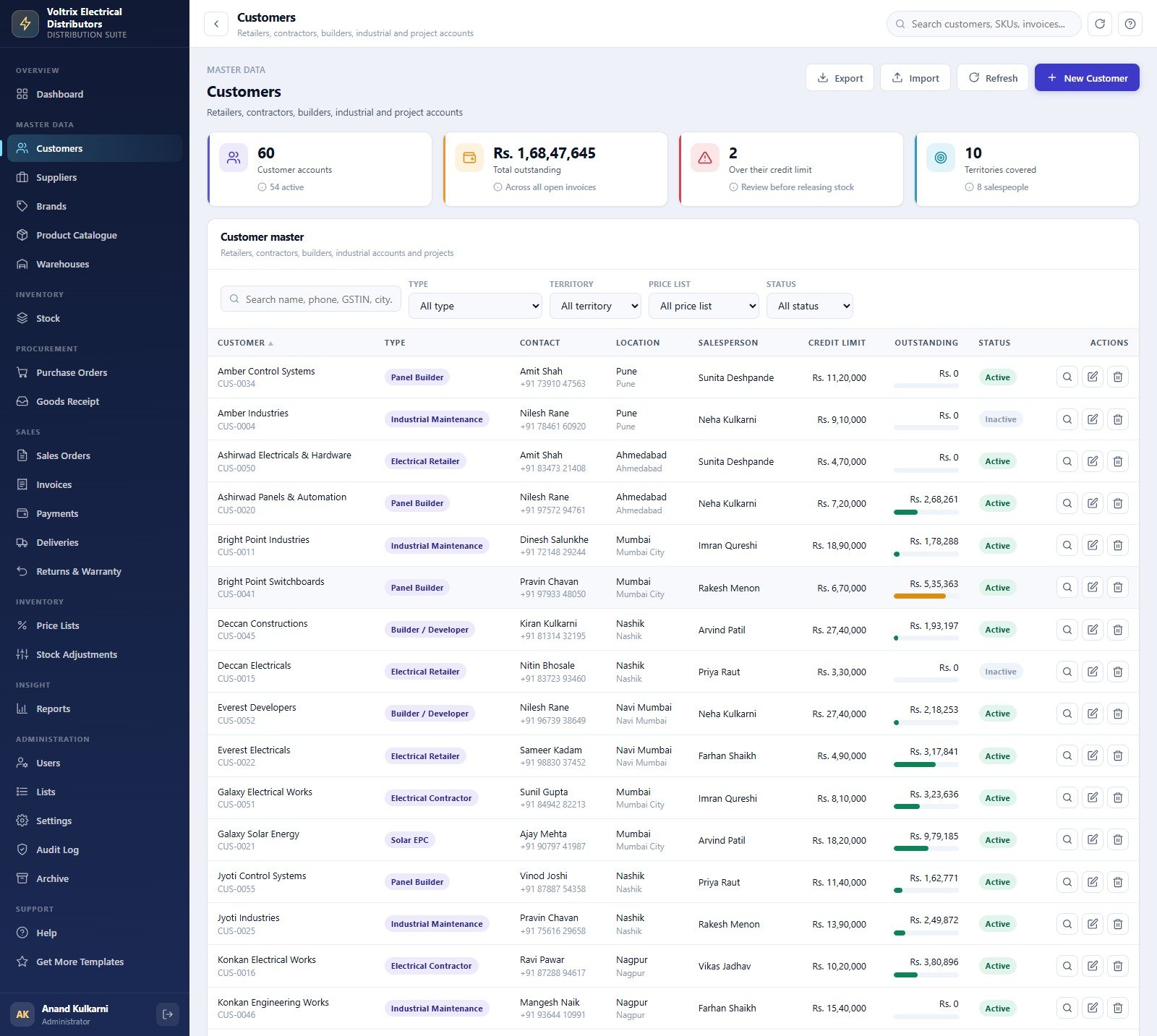
60 accounts, 54 of them active, filtered by type, territory, price list and status. Each row carries a customer code, type badge (Electrical Retailer, Electrical Contractor, Panel Builder, Builder / Developer, Industrial Maintenance, Government Project, Solar EPC), contact and phone, city, assigned salesperson, credit limit, live outstanding with a utilisation bar, and status. Import and export are both CSV.
Product Catalogue – SKUs, HSN, cost and list price
203 SKUs across 10 categories and 22 brands. Every line shows SKU and product code, description with sub-type (MCB, MCCB, RCCB, SPD, Contactor, Isolator, Changeover), brand, category, unit of measure, cost, list price with MRP, margin percentage, on-hand against its reorder point, a stock health flag and status. Catalogue stock value is Rs 1,91,51,449 at purchase cost with an average list margin of 21.8%.
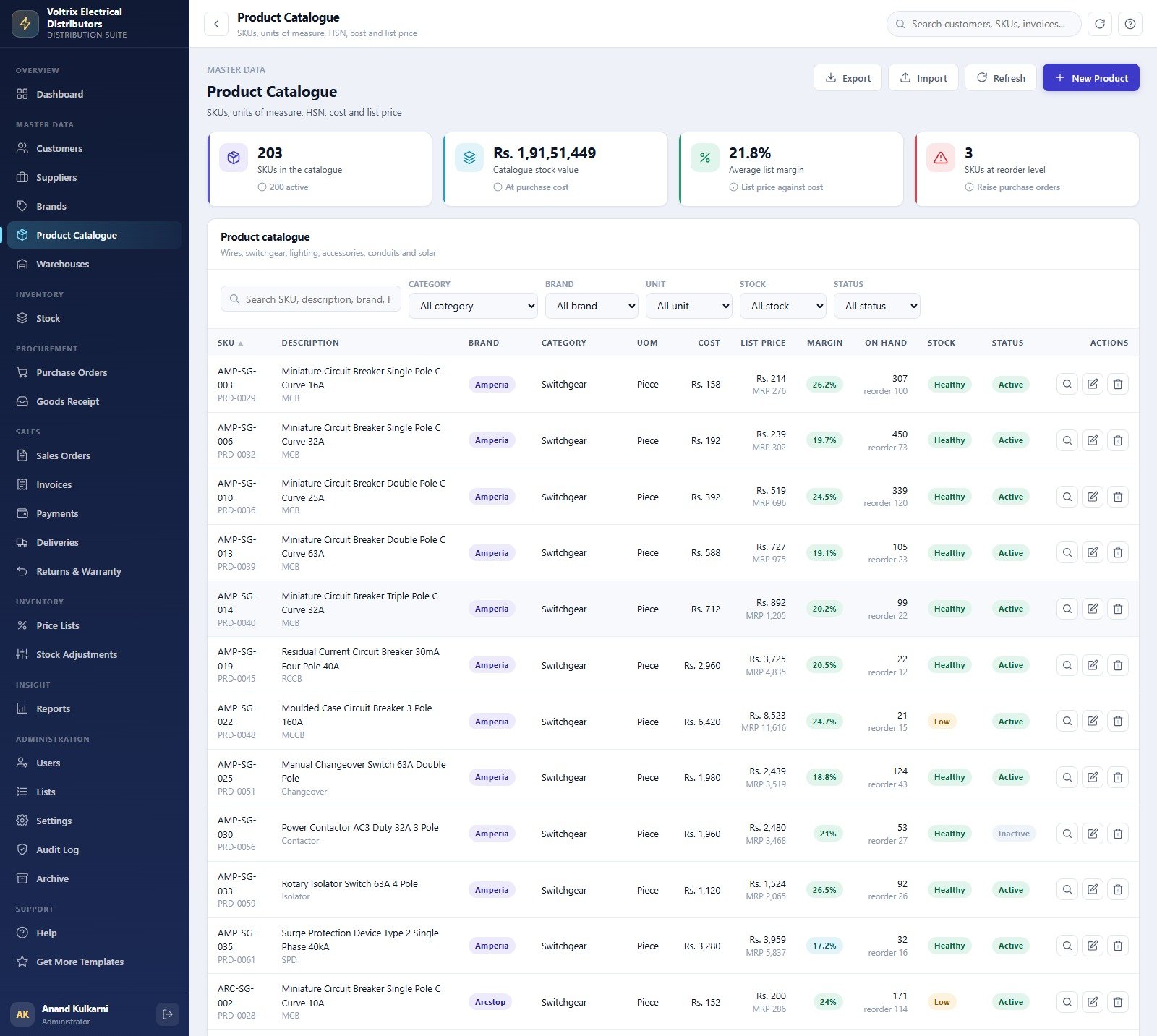
Stock – on hand, allocated and available by SKU and warehouse
The live position: on hand, allocated to orders, available to promise, reorder-at, unit cost, value, health flag and last-counted date, per SKU per warehouse, with bin references like A-11-03 and E-17-07. Filters for warehouse, category, brand and flag; a Revalue action and a Low stock alert that emails the purchase team.
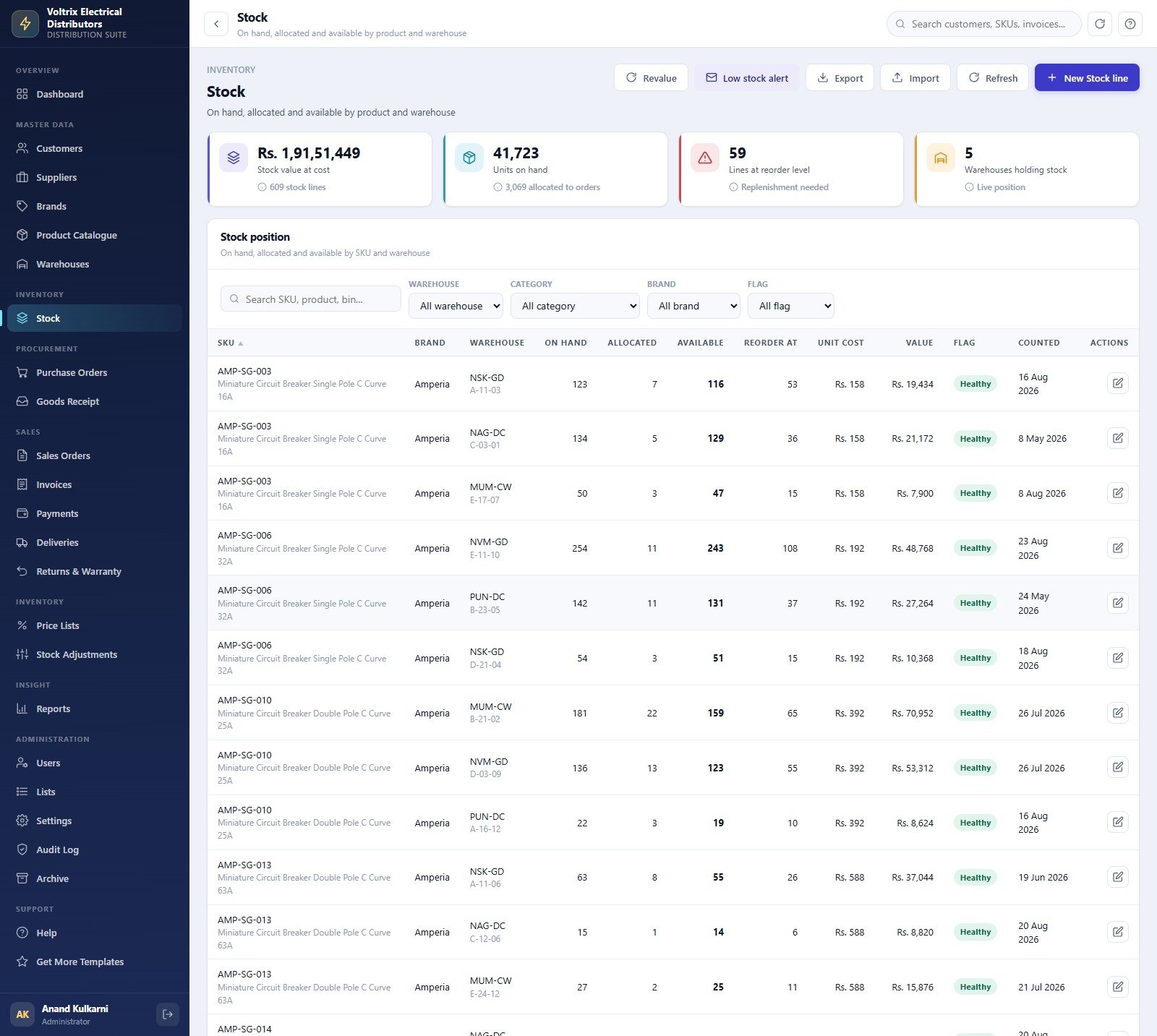
Purchase Orders – what you have placed and what has landed
280 purchase orders worth Rs 4,38,62,307 excluding cancelled, 16 still open with Rs 24,74,190 committed, across 24 suppliers. Each PO shows its number and date, supplier, deliver-to warehouse, expected date, line count, net, tax, order value and a status of Draft, Sent, Part Received, Received or Cancelled. Print or email the PO straight to the supplier.
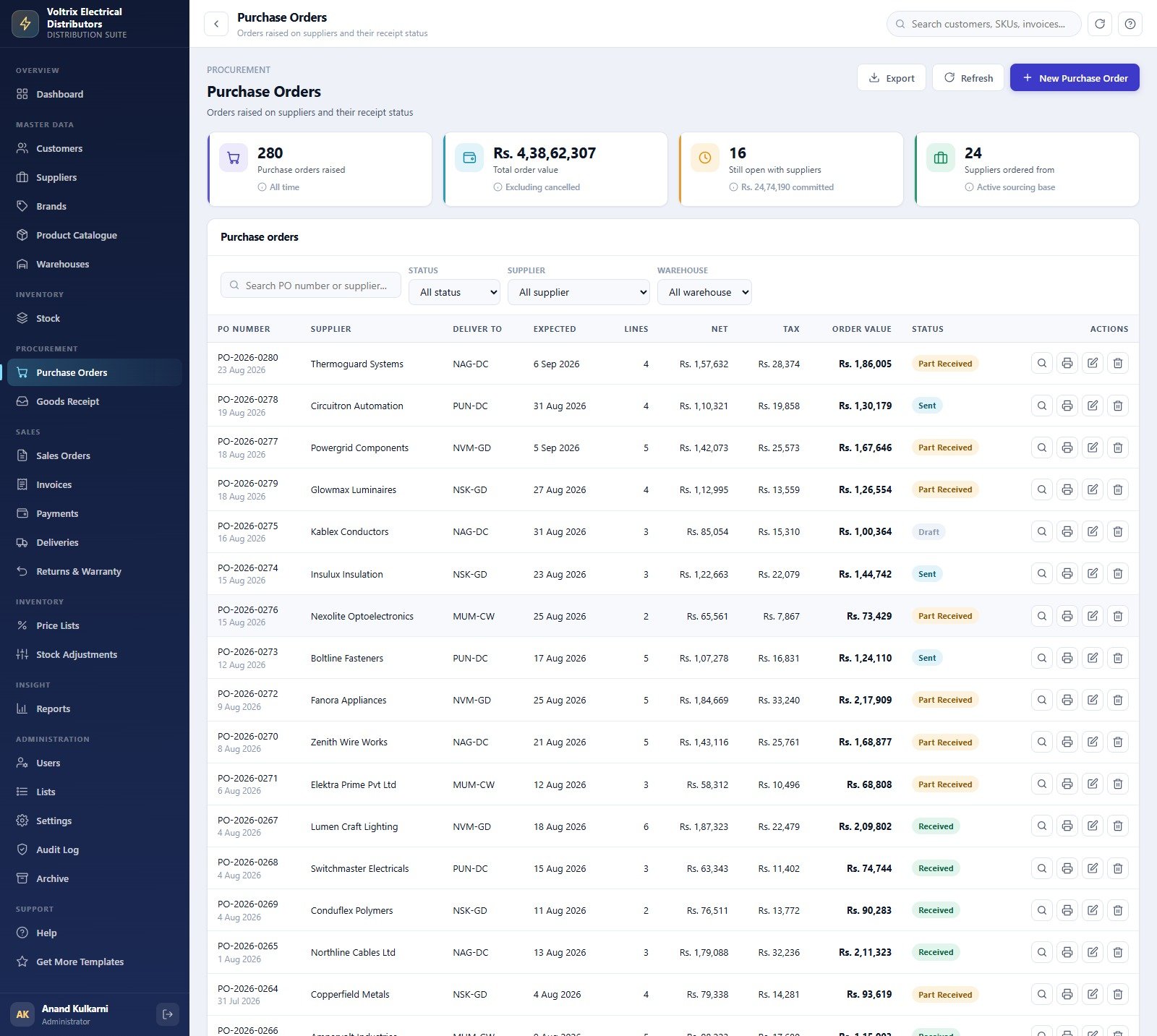
Sales Orders – the order book
655 orders taken worth Rs 15,05,28,321, 28 still to fulfil with Rs 62,21,715 pending, and Rs 1,12,21,350 of discount given against list price. Each order records customer and customer type, salesperson and territory, ship-from warehouse, promised date, line count, discount, order value and a status of Draft, Confirmed, Part Delivered, Invoiced or Cancelled.
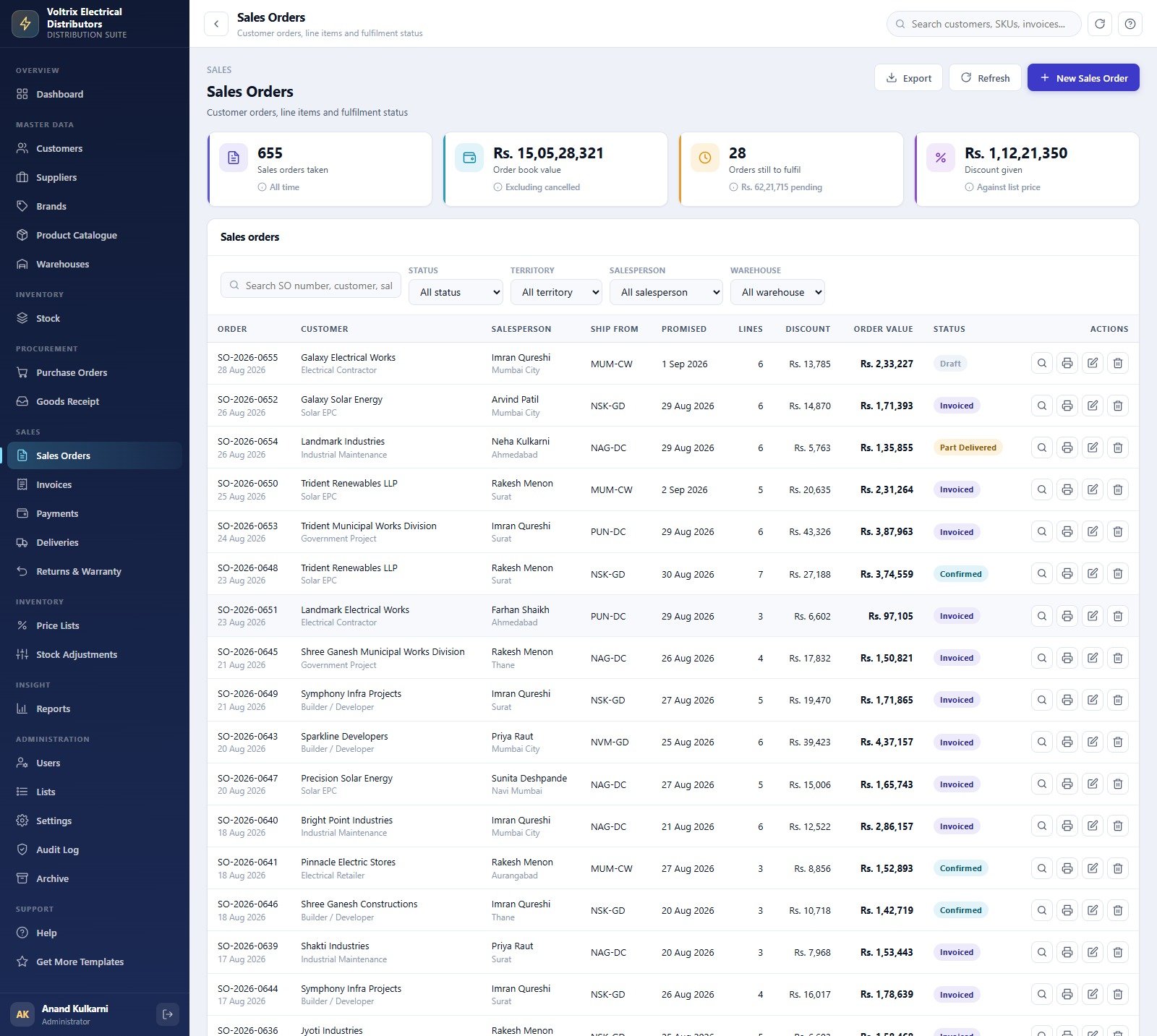
Invoices – tax invoices, GST split, payment status and ageing
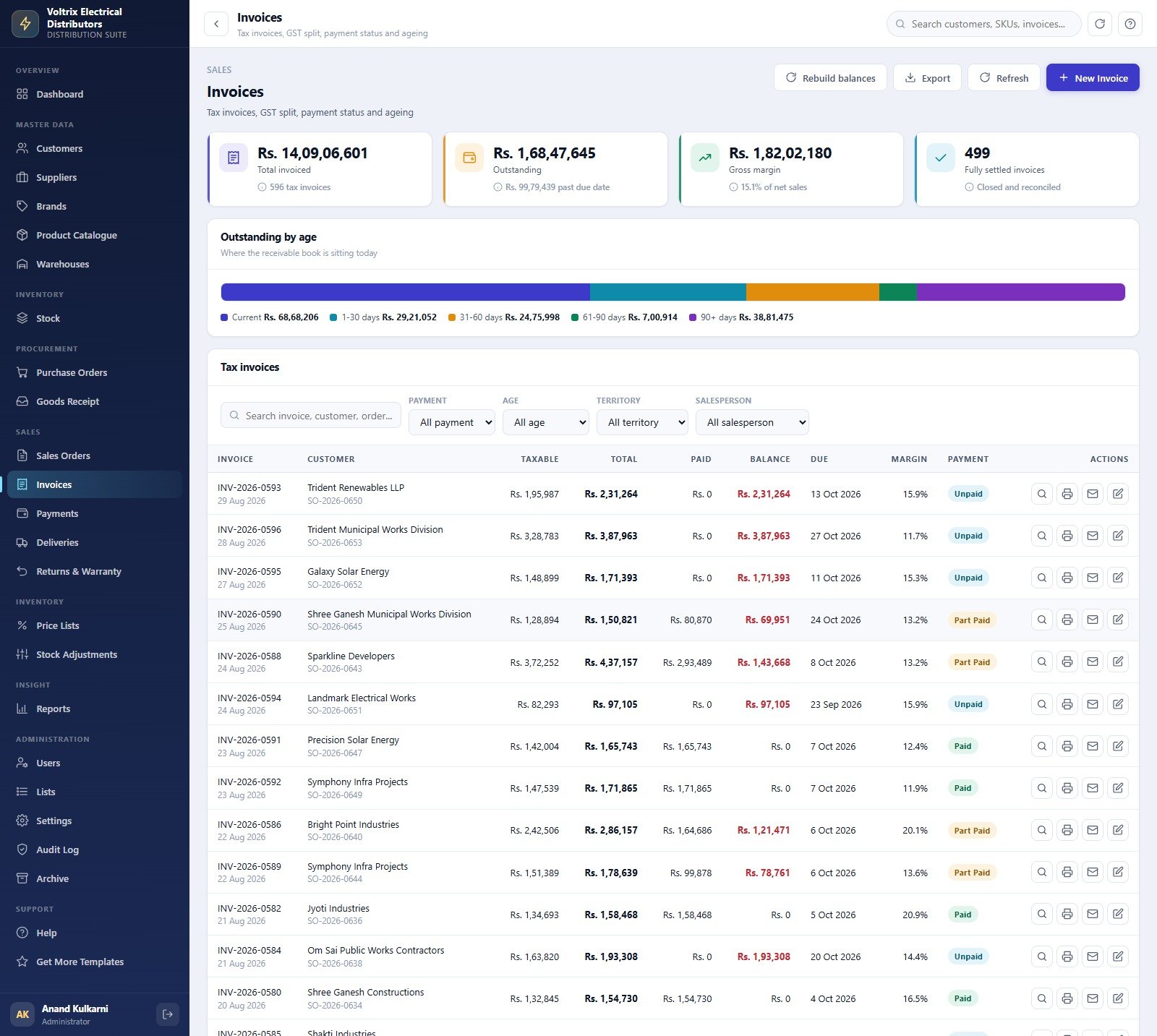
596 tax invoices totalling Rs 14,09,06,601, of which 499 are fully settled and Rs 1,68,47,645 is still outstanding with Rs 99,79,439 past its due date. The ageing strip sits at the top of the page; each invoice row carries taxable value, total, paid, balance, due date, margin percentage and a payment badge of Paid, Part Paid or Unpaid. A Rebuild balances action re-derives paid and balance from the payment ledger.
Reports – eighteen of them, date-ranged
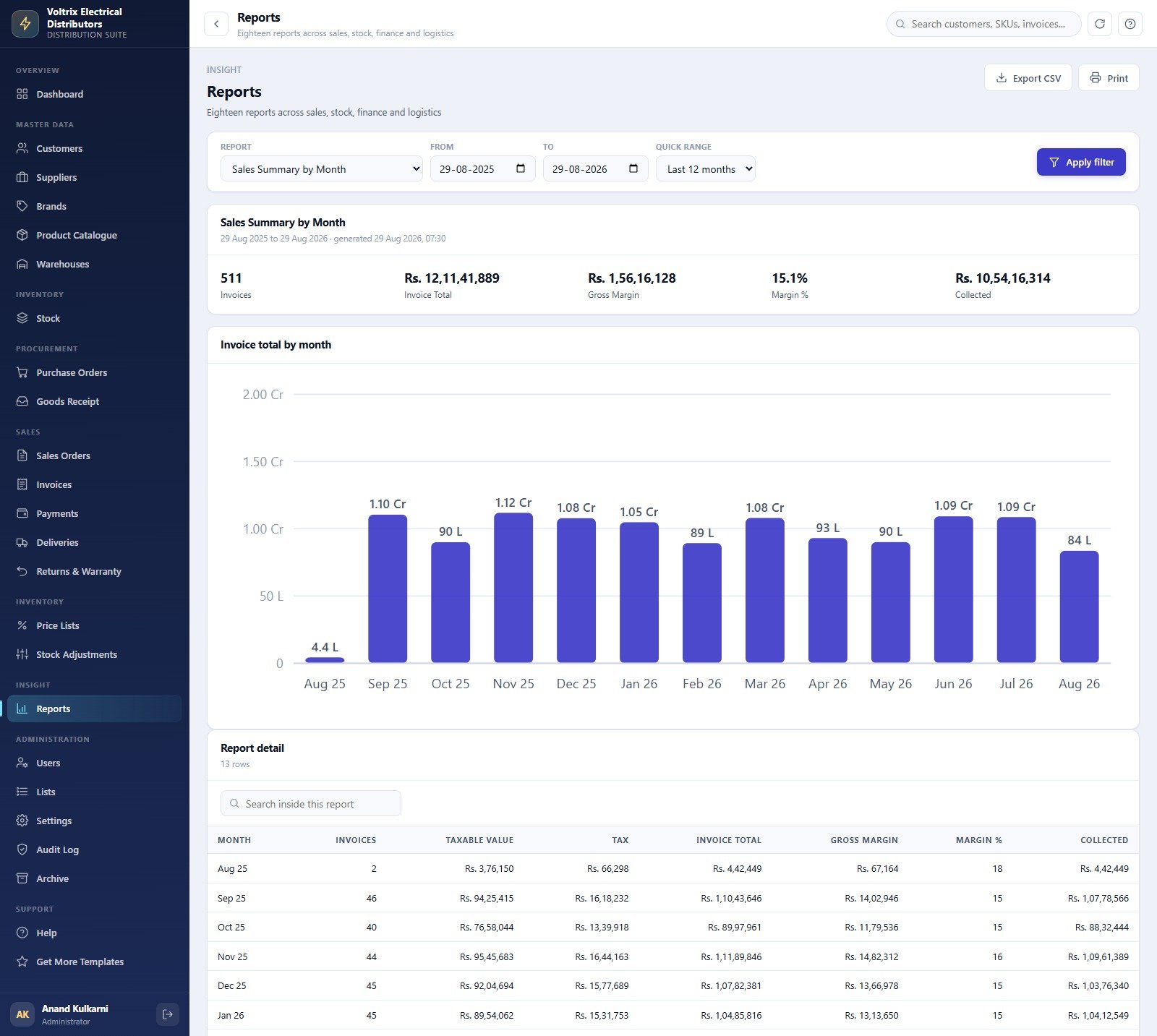
Pick a report, set From and To or use a quick range, and press Apply filter. Sales Summary by Month returns headline counters (511 invoices, Rs 12,11,41,889 invoiced, Rs 1,56,16,128 gross margin at 15.1%, Rs 10,54,16,314 collected), a monthly Invoice total by month chart and a row-level detail table you can search inside. Every report exports to CSV or prints at your chosen size.
Settings – company, regional, tax, printing, email, backup and archive
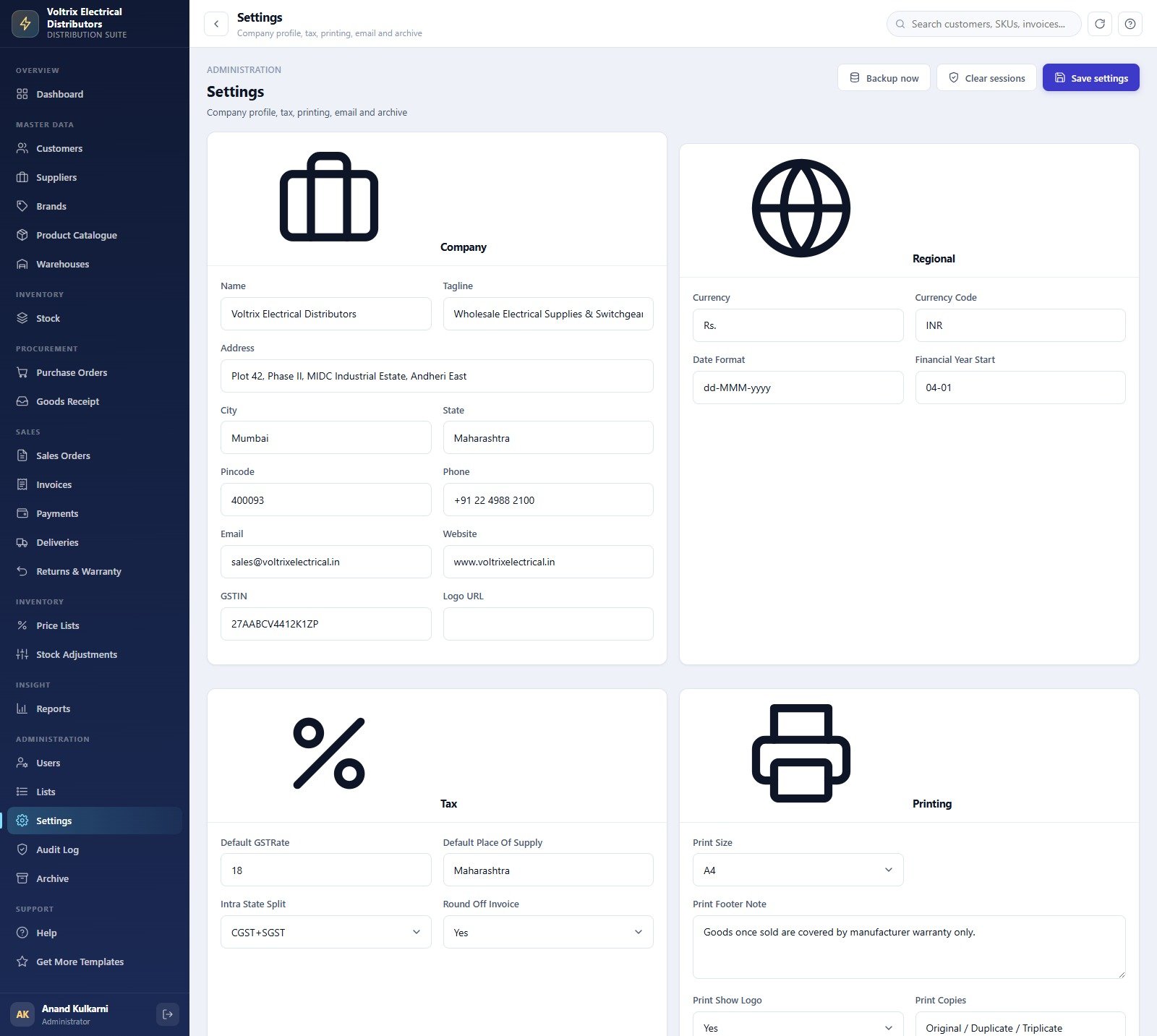
Company name, tagline, address, GSTIN and logo URL; currency symbol and code, date format and financial-year start; default GST rate, place of supply, CGST+SGST or IGST split and invoice round-off; print size, footer note, logo toggle and copy labels. Plus Backup now for an immediate full copy of the database to Drive, and Clear sessions to sign everybody out.
The remaining screens work the same way: Suppliers (24 principals with terms, lead time and a 5-point rating), Brands (22 brands with principal supplier, category focus, warranty months and default margin), Warehouses (5 locations, 89,200 sqft, in-charge and phone), Goods Receipt (256 GRNs, 74,180 units received, 0.19% rejection rate), Deliveries (569 dispatches, 13,447 cartons, 76.0% on time across 6 transporters), Returns & Warranty (110 cases with credit value by reason), Price Lists, Stock Adjustments (160 adjustments by reason type), Payments (715 receipts and 172 supplier settlements across 6 modes), Users, Lists (19 dropdown lists, 130 values, editable without touching code), Audit Log, Archive, Help and Get More Templates.
📊 Electrical Supplies Distributor Management System vs. a Spreadsheet vs. Paid Distribution SaaS
| Feature | Electrical Supplies Distributor Management System Web App | Excel / Google Sheets workbook | Zoho Inventory / TallyPrime / NetSuite |
|---|---|---|---|
| Cost | $39.99 one-time ✅ | Free, but you build and maintain it | $29-500 / month, tiered by users and orders |
| Platform | Google Apps Script web app in your own Google account ✅ | A file that has to be shared and merged | Vendor’s cloud, vendor’s terms |
| Setup time | Under 15 minutes, database self-builds ✅ | Weeks to build purchase-to-cash yourself | Days of onboarding, often paid implementation |
| Role-based access | 6 roles, 41 permissions, re-checked server-side ✅ | Sheet protection only – not a real boundary | Yes, priced per user |
| Multi-warehouse stock | 5 locations, bin refs, allocated vs available ✅ | Manual columns per location | Yes, usually on a higher plan |
| Built-in reports | 18, date-ranged, CSV and print ✅ | Whatever pivot tables you write | Extensive, some behind add-ons |
| Source code you own | Yes – Code.gs and Index.html, edit anything ✅ | Yes, but there is no app to edit | No – closed platform |
| Year-1 cost at 5 users | $39.99 total ✅ | $0 plus your build time | $1,700-$9,000+ |
| Your data lives | In your own Google Sheets and Drive ✅ | In your own file | On the vendor’s servers |
For an electrical wholesaler who wants purchase-to-cash, multi-warehouse stock and a receivables book without a per-user monthly bill, the Electrical Supplies Distributor Management System Web App sits in the sweet spot.
👥 Who This System Is For – and Who It Is Not For
✅ Built for:
- Electrical wholesalers and distributors with 2-30 staff running 1-5 warehouses or godowns
- Switchgear, wire and cable, lighting and accessories traders who sell to retailers, contractors, panel builders and project accounts on different price lists
- Distribution businesses stuck on WhatsApp plus a shared spreadsheet, who want documents that link to each other and a receivables book that ages itself
- Owners who want the source code and their data in their own Google account rather than a monthly seat licence
- Anyone who wants a working Apps Script trading system to learn from, fork or rebrand
❌ Not for:
- Businesses that need a statutory filing tool. The GST Summary report prepares figures for your accountant – it does not file any return, and there is no e-invoice (IRN) or e-way bill generation.
- Teams that need barcode scanning, a weighbridge feed, an EDI link to a principal, or a payment gateway. None of those exist here – stock moves and payments are entered by a person.
- Companies needing SSO/SAML, SOC 2 or a formal audit certification. This runs on your Google account’s security, with its own salted SHA-256 password store and audit log, and nothing more.
- Very large distributors. It is a Google Sheets database – excellent to tens of thousands of rows, and the built-in Archive screen exists precisely because Sheets has practical size limits.
- Anyone needing a customer-facing ordering portal or a native mobile app. This is one internal web app, responsive in a browser.
⚙️ How to Use the Electrical Supplies Distributor Management System Web App
- Try the live demo first. Open the green box above, sign in as
admin / Sparx#7412, then again askavita.iyer / Readonly#9935. If the screens and the role separation are what you want, buy it. - Create the project. Open script.google.com, choose New project, paste
Code.cs.txtinto Code.gs, add an HTML file named exactlyIndexand pasteIndex.txtinto it. Save. - Deploy. Deploy > New deployment > Web app, Execute as Me, Who has access Anyone. Accept the unverified-app prompt (it is your own script) and copy the web app URL.
- Build the database. Open the URL and click Build the database now on the first-run panel, or run
setup()from the editor. It works in 22 resumable stages and never double-seeds;setupStatus()shows progress. - Sign in and change the admin password. Use the seeded administrator, then Settings or Users > Reset password. Do this before anyone else gets the link.
- Make it yours. Settings > Company for name, address, GSTIN and logo; Regional for currency symbol, code and financial-year start; Tax for the default rate and split; Printing for 3-inch, 4-inch or A4 and your footer note.
- Load your own data. Delete the seeded transaction rows in the database spreadsheet (keep the headers), then use the CSV Import button on Customers, Suppliers, Brands, Product Catalogue and Stock – or edit the master tabs directly.
- Run the business. Purchase Order → Goods Receipt → Stock → Sales Order → Invoice → Delivery → Payment. Press Refresh or Alt+R when you want the latest figures; pages cache on purpose.
- Back up and archive. Settings > Backup now before any bulk import. When the database gets heavy, Archive moves closed, paid transactions dated before your cutoff into a registered copy – master data and any open order or unpaid invoice are never touched.
💼 Real-World Use Cases
Anand runs a switchgear and cable wholesaler in Mumbai with five stocking points. Before, each branch kept its own stock sheet and nobody could say what was actually available to promise. Now the Stock screen shows on-hand, allocated and available per SKU per warehouse with bin references, and the Low stock alert emails his purchase team the 59 lines at or below reorder before a contractor calls asking for them.
Meera manages sales for a distributor selling to retailers, panel builders and government projects. Each segment used to get discounts by memory and argument. Now six price lists carry 132 slab rules by brand and category with minimum order values and validity dates, and the Sales Orders screen shows exactly how much discount has been given against list – Rs 1,12,21,350 so far – instead of finding out at year end.
Vivek does the accounts for a family-run electrical trading business. He opens Invoices, sees Rs 99,79,439 past its due date split across ageing buckets, filters to the 90+ day column, prints the Receivables Ageing and Customer Credit Exposure reports for the owner, and emails payment receipts from the same screen. The two customers over their credit limit are flagged before stock leaves the godown.
❓ Frequently Asked Questions
Can I try it before buying?
Yes. A full working instance of the Electrical Supplies Distributor Management System Web App is live in the green box above, seeded with a complete trading year, and every one of the eight accounts across six roles is published there. No signup and no email are required. The credentials are public by design on a shared instance that resets, so please do not put real data into it.
What exactly do I get when I buy?
A ZIP containing Code.cs.txt (the full Apps Script backend), Index.txt (the complete front end) and a user manual PDF. You paste two files into your own Apps Script project and deploy. There is no licence key, no server to rent and no account with us to maintain.
How long does setup take?
About 15 minutes for a first-time Apps Script user. Creating the project and deploying takes five; the database build then runs itself in 22 resumable stages, creating all 26 sheets, seeding the sample year and building the Drive folder tree while you wait.
Where is my data stored, and who can see it?
In a Google Sheets database and a Drive folder tree inside your own Google account, created by your own deployment. NextGenTemplates has no access to it. Passwords are stored salted and SHA-256 hashed, so an existing password cannot be read back by anyone, including you.
Does it handle GST, e-invoicing and e-way bills?
It applies a default GST rate with a CGST+SGST or IGST split on invoices, prints your GSTIN and place of supply, and gives your accountant a GST Summary report. It does not file any statutory return, does not generate an IRN or e-invoice, and does not produce e-way bills. Treat the GST Summary as a working paper, not a filing.
How does this compare to Zoho Inventory or TallyPrime?
Those are mature commercial platforms with integrations this does not have – payment gateways, barcode hardware, e-invoicing, mobile apps. The Electrical Supplies Distributor Management System Web App costs $39.99 once instead of $29-500 a month, runs in your own Google account, and ships you the source so you can change any screen, report or document layout yourself.
Can I add a module or rename things to suit my trade?
Yes. Every dropdown in the system is data, not code – the Lists screen holds 19 lists and 130 values you can edit without touching Code.gs. Beyond that you have both source files and can change anything. NextGenTemplates also customises it or builds a new module for you on request.
How many users and how much data can it hold?
There is no user limit and no per-seat cost – create as many accounts across the six roles as you need. The database is Google Sheets, which stays responsive into the tens of thousands of rows; the seeded demo alone is about 14,000. The Archive screen exists to move closed transactions out when the active book gets heavy.
👤 About the Author
Built by PK – Microsoft Certified Professional with 15+ years of Excel, Google Sheets and Power BI experience. Founder of NextGenTemplates, reaching 300K+ subscribers across YouTube channels (@PK-AnExcelExpert, @NextGenTemplates, @NeoTechNavigators). Every template is hand-built and tested before release.
🔗 Explore Related Templates
If you supply the building trades rather than the electrical trade specifically, the Building Material Supplier Management System Web App and the Concrete Supplier Management System Web App are the same architecture aimed at builders’ merchants. The Beauty Products Distributor Management System Web App is the closest direct analogue – distribution, price lists and receivables in another category – and the Auto Parts Inventory Management System Web App covers spares distribution.
For the warehousing and last-mile side, look at the Cold Storage Management System Web App and the Courier & Parcel Delivery Management System Web App. If you only need reporting rather than a full system, the Electrical Contractor KPI Dashboard in Google Sheets covers your customers’ side of the trade, and the Purchase and GRN Data-Entry System in Excel is a lightweight goods-inward log. Browse the full Mini Web Apps catalogue or our Google Sheets Dashboards.
📖 Click here to read the Detailed Blog Post
🎥 Visit our YouTube channel for step-by-step video tutorials
👉 YouTube.com/@NextGenTemplates
📅 Last updated: September 2026
Compatibility and Requirements
- Runs as a Google Apps Script web app in your own Google account. You need a free Google account and a web browser.
- Google explains how to use Office files and Google files together in Work with Microsoft Office files in Google Drive.
- Setup takes about 15 minutes: paste the two source files into a new Apps Script project, deploy it as a web app, then build the database from the first-run panel.
































Reviews
There are no reviews yet.