

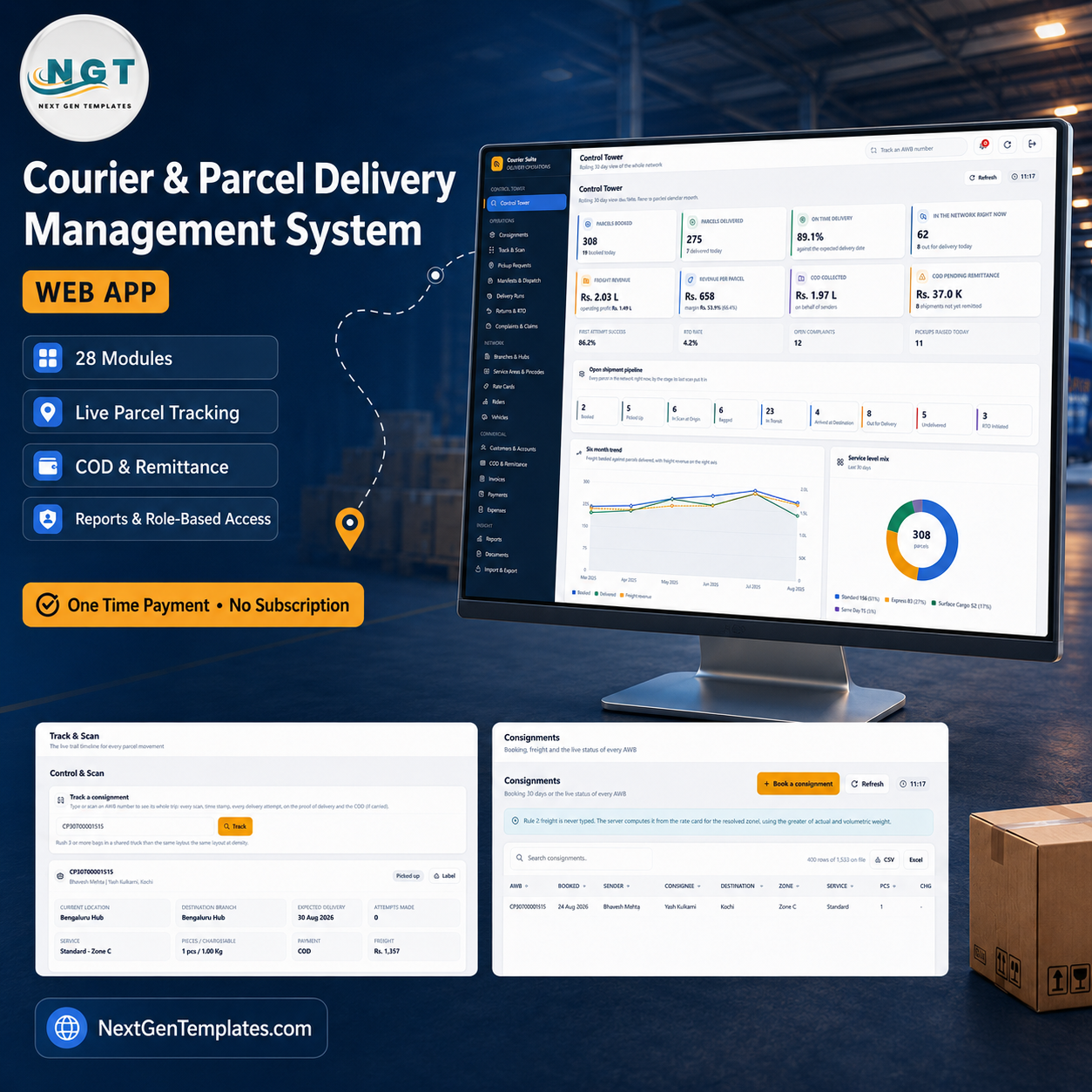


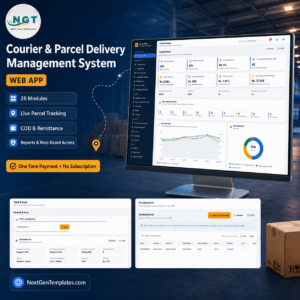
The Courier & Parcel Delivery Management System Web App is a complete counter-to-doorstep operations system that runs entirely inside your own Google account. It ships with 28 modules, 17 operating reports, 6 permission roles and 28 database sheets pre-loaded with 13,384 rows of demonstration data, so you can watch 308 booked parcels, 275 deliveries, an 89.1% on-time rate and Rs. 11.81 L of lifetime COD reconcile against each other before you enter a single record of your own. One payment, no per-seat licence, no monthly subscription, and you own the source code. A live demo with all eight seeded logins is linked below – test it before you pay.

🚀 Try the Live Demo Before You Buy
We have deployed this web app in our own Google account so you can test every page, every role, every report and the freight calculator – with real sample data – before purchasing. No signup, no email required.
🔑 Test Login Credentials
Sign in as admin to reach every module including Roles & Permissions, Settings and the Database Archive, then sign back in as hub.supervisor to see the role separation for yourself – every freight, yield, revenue and margin figure is stripped from that payload on the server, so it cannot be recovered by editing the page in a browser. All eight seeded accounts are below.
💡 These credentials are public on purpose. They are the seeded logins of a shared demonstration instance that resets – not of a customer’s deployment. What you get after purchase: the full source code (Code.gs + Index.html) plus a complete user manual and deployment guide, so you can stand up your own private instance in your own Google account in under 15 minutes.
Key Features of the Courier & Parcel Delivery Management System Web App
- A Control Tower that reconciles. Parcels booked, parcels delivered, on-time delivery, parcels in the network right now, freight revenue against operating spend, revenue per parcel, COD collected and COD pending remittance – plus first-attempt success, RTO rate, open complaints and pickups raised today. A nine-stage open shipment pipeline counts every parcel by the stage its last scan put it in, and charts cover the six month trend, service level mix, branch performance and rider load.
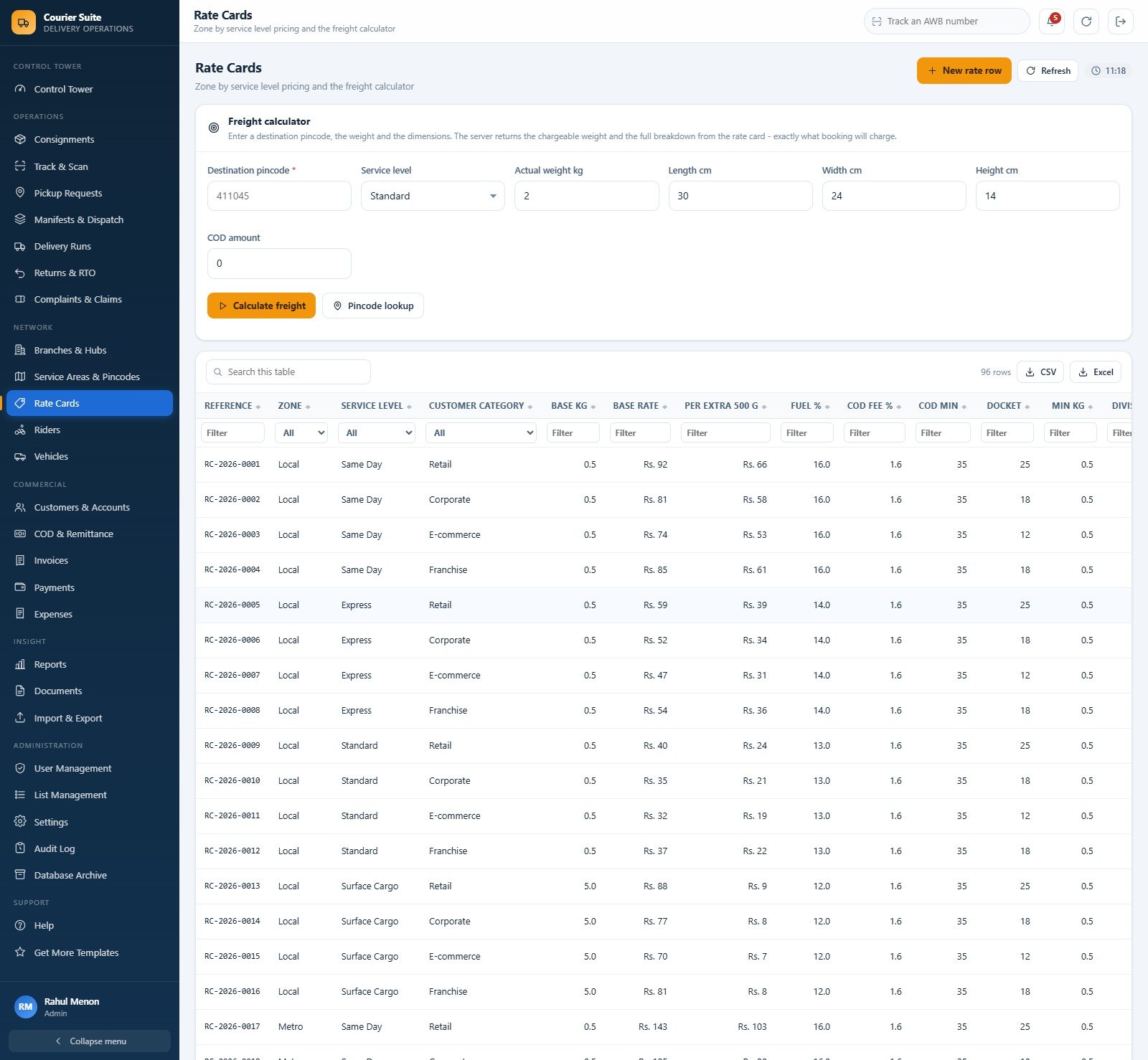
- Freight is computed, never typed. Rate Cards carries 96 zone-by-service-level rows and a freight calculator: enter a destination pincode, weight and dimensions and the server returns the chargeable weight and the full breakdown – base, fuel surcharge, docket charge, ODA charge and COD fee – exactly what booking will charge.
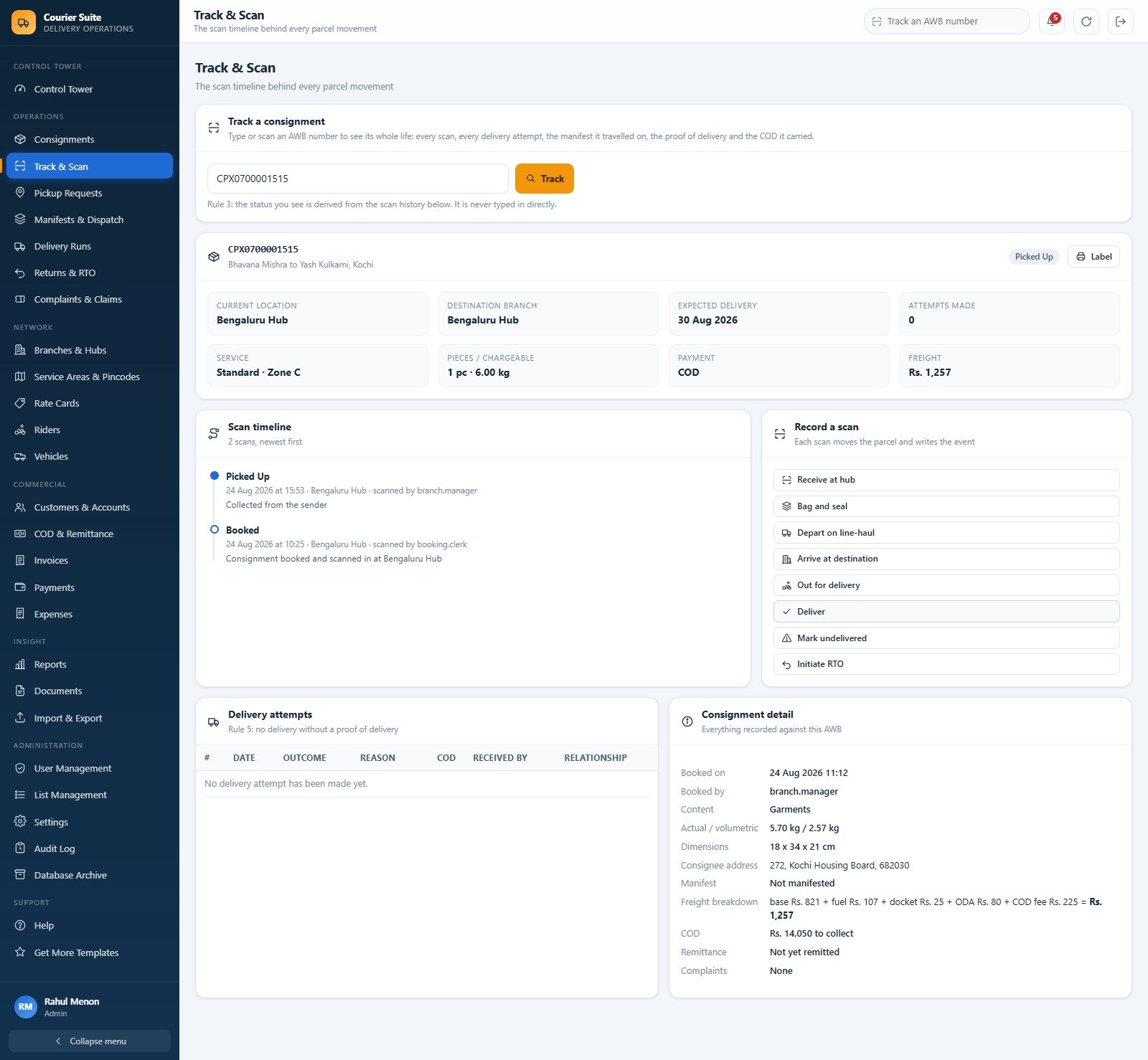
- Status is derived from scans. Track & Scan records receive at hub, bag and seal, depart on line-haul, arrive at destination, out for delivery, deliver, mark undelivered and initiate RTO. Current status and current branch come from the scan history, so a parcel cannot be marked delivered by typing.
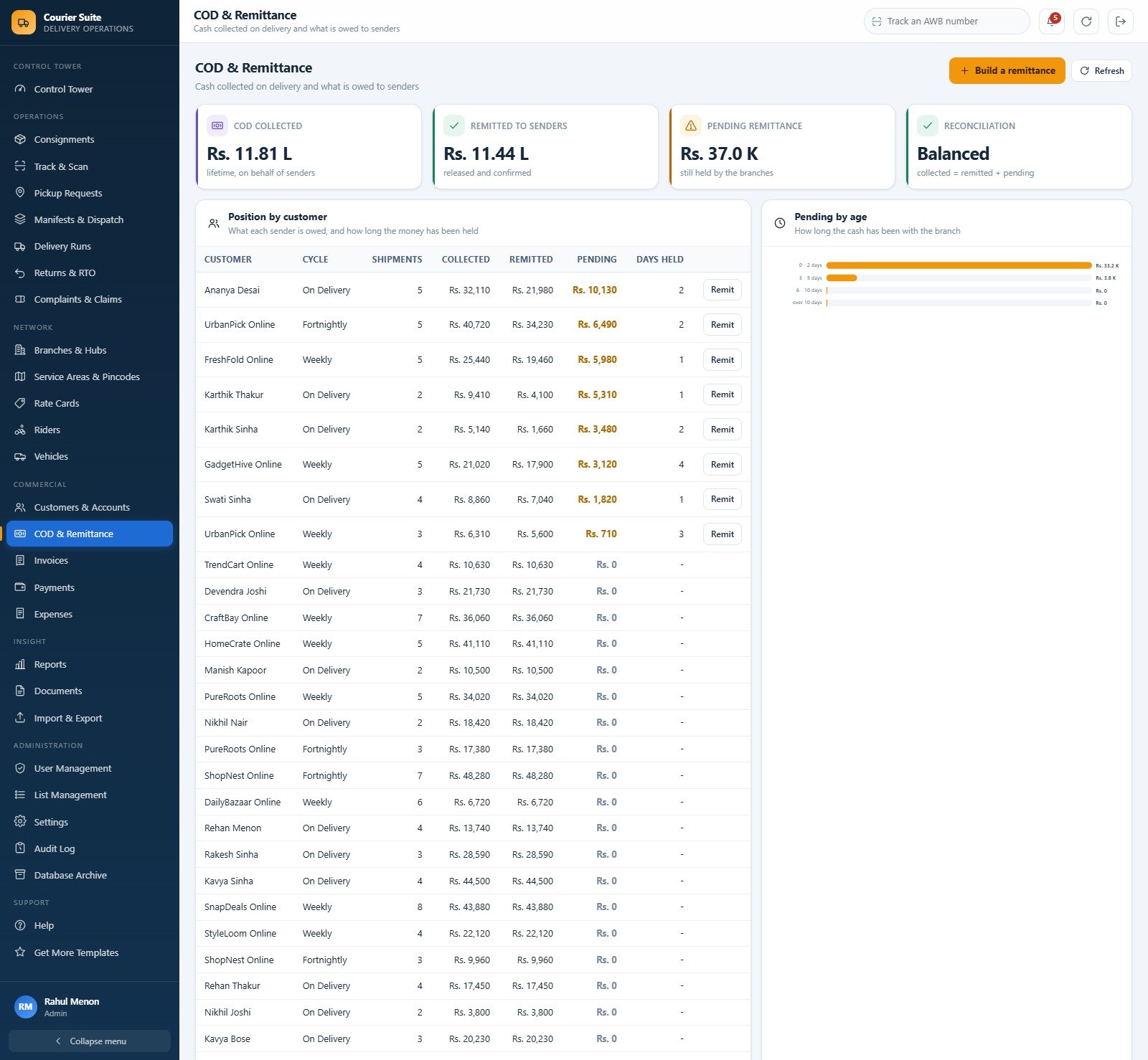
- COD money that ties out. Lifetime collected, remitted and pending, with a Reconciliation card that reads Balanced. Position by customer shows what each sender is owed and how long the cash has been held; a Pending by age chart buckets it 0-2, 3-5, 6-10 and over 10 days.
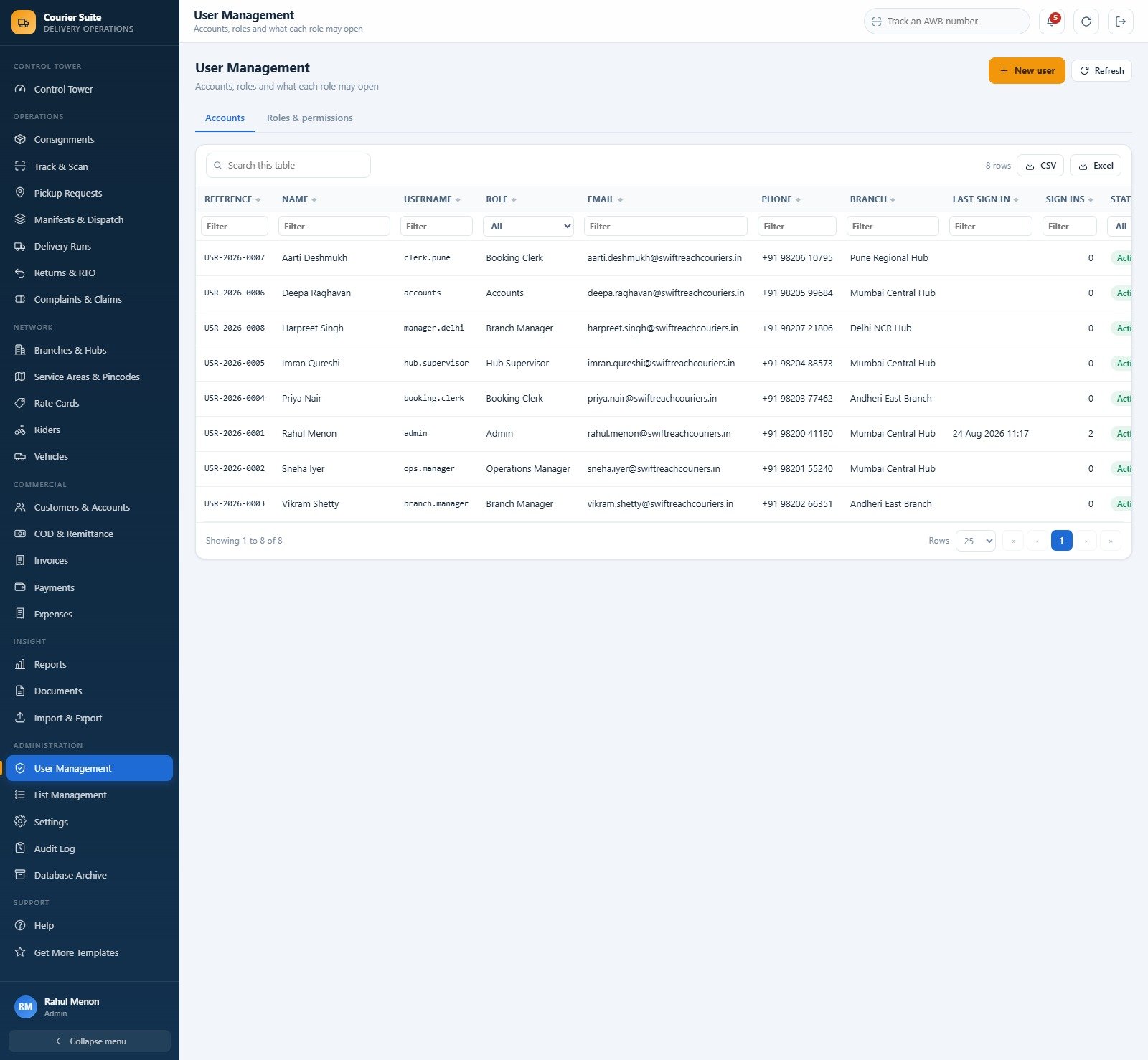
- Six roles with server-side money masking. The Hub Supervisor role has freight, yield, revenue, invoice totals and margins stripped from the payload before it leaves the server. Every permission is editable under Roles & permissions, and every change is written to the Audit Log.
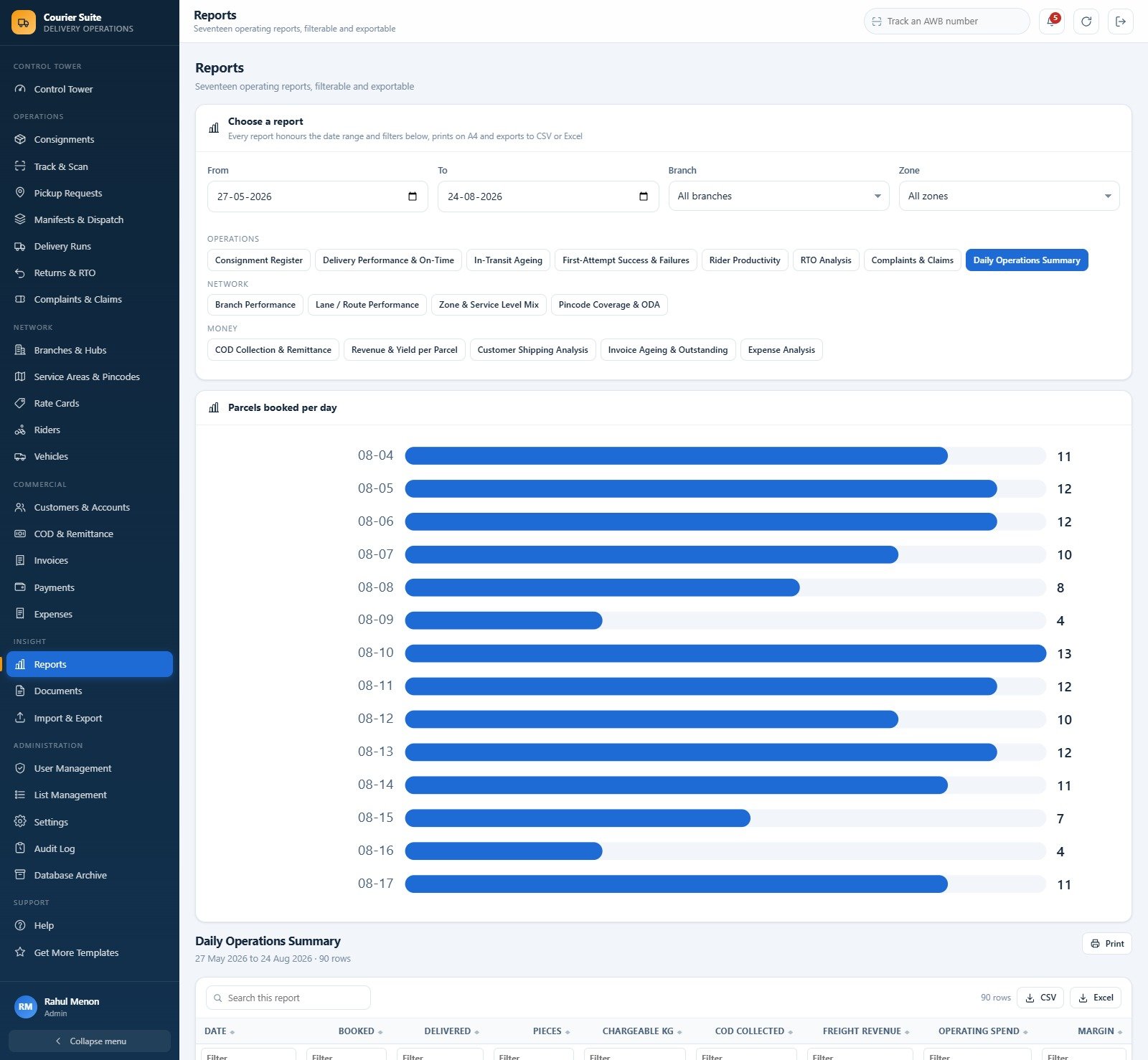
- Seventeen reports in three groups. Operations: Consignment Register, Delivery Performance & On-Time, In-Transit Ageing, First-Attempt Success & Failures, Rider Productivity, RTO Analysis, Complaints & Claims, Daily Operations Summary. Network: Branch Performance, Lane / Route Performance, Zone & Service Level Mix, Pincode Coverage & ODA. Money: COD Collection & Remittance, Revenue & Yield per Parcel, Customer Shipping Analysis, Invoice Ageing & Outstanding, Expense Analysis. Every one honours the date range and branch or zone filter, prints on A4 and exports to CSV or Excel.
- Counter-ready printing. 3 inch thermal roll, 4 inch thermal label (the default, because that is what a courier counter actually has) and A4. The consignment note, pickup slip, manifest loading sheet, proof of delivery, COD remittance advice, tax invoice, payment receipt and every report honour the setting.
- A four-step validated import wizard. Choose and download a template, paste your rows, validate, then commit only the good ones – nothing is written until validation has run. Eight modules export straight out to CSV or Excel.
- A Database Archive that keeps it fast. It copies the whole live database first and registers the copy, then removes only eligible closed consignments and their child rows. Masters and every open shipment stay exactly where they are, and departed freight rolls into a brought-forward column so lifetime figures never move.
What’s Inside the Courier & Parcel Delivery Management System Web App
Your download contains Code.cs.txt (the complete Google Apps Script back end), Index.txt (the single-page front end) and a full illustrated user manual in PDF. There is nothing else to buy and nothing to install.
Running setup once builds 28 sheets holding 13,384 demonstration rows: 12 branches, 140 service areas, 96 rate card rows, 150 customers, 34 riders, 22 vehicles, 340 pickup requests, 1,533 consignments, 6,379 tracking events, 223 manifests, 1,806 delivery attempts, 207 COD remittances, 162 invoices, 173 payments, 64 RTO records, 110 complaints, 300 expenses and 150 documents. The seed comes from a deterministic generator with a fixed constant, so the same company appears every time and every dashboard figure reconciles with every report. When you are ready for real work, Reseed Demonstration Data wipes the operating history and keeps your masters.

Courier & Parcel Delivery Management System vs. a Spreadsheet vs. Paid Courier SaaS – Where This Fits
| Point of comparison | This web app | A manual Google Sheets / Excel booking register | Paid courier SaaS (per seat, per shipment) |
|---|---|---|---|
| Cost | One payment of $39.99 | Free, plus the hours you spend maintaining it | Typically $40-$120 per user per month, often plus a per-shipment fee |
| Platform | Google Apps Script + Google Sheets, in your own Google account | A spreadsheet file | The vendor’s cloud |
| Setup time | About 15 minutes: paste two files, deploy, run setup once | Immediate, but every formula is yours to build | Days to weeks, usually with an onboarding call |
| Real-time team collaboration | Yes – one deployed web app with 6 permission roles | Shared editing, but no roles and no field-level control | Yes |
| Mobile access | Yes – responsive browser interface, no app install | Awkward on a phone | Yes, usually a native app |
| Customizable fields | Yes – List Management drives every dropdown across the product | Yes, by hand | Only what the vendor exposes |
| Share with link | Yes – one web app URL for the whole team | Yes, but everyone sees everything | Login accounts only |
| Year-1 cost at 5 users | $39.99, once | $0 plus maintenance time | $2,400-$7,200 |
| Zone rate card and freight engine | 96 rate rows, volumetric weight, fuel, docket, ODA and COD fee | Manual lookup tables you build yourself | Yes, usually with carrier rate shopping |
| Carrier API, postage purchase, GPS tracking | No – none of these | No | Yes, that is the point of paying |
| Role-level money masking | Yes – enforced on the server, not hidden in the browser | No | Sometimes, at a higher tier |
| Who owns the data and the code | You – both sit in your Google Drive | You | The vendor |
Who This Template Is For – and Who It’s Not For
It fits a regional courier or last-mile company running a handful of branches and hubs; a franchise network that books at the counter and needs branch-scoped visibility; a third-party logistics operator handling e-commerce COD volume; and anyone currently running bookings, manifests and COD remittance in three unconnected spreadsheets.
It does not fit if you need any of the following, because this product deliberately does none of them. It does not connect to any carrier API. It does not buy postage, it does not print carrier-compliant shipping labels for FedEx, UPS, DHL, India Post, Delhivery or anyone else, and it does no rate shopping across carriers. There is no real-time GPS tracking and no ingestion of carrier scan events – every status in this system is entered by your own staff, from your own scans. It is also not accounting software: it does not file GST returns, e-invoices or e-way bills (the GSTIN you enter is printed on documents, nothing more), and it handles no customs or international shipping paperwork and no dangerous-goods compliance. If your operation depends on any of that, buy a carrier integration platform instead of this.
How to Use the Courier & Parcel Delivery Management System Web App
- Try the live demo first. Open the demo above, sign in as
admin, then sign back in ashub.supervisorand watch the money disappear. Ten minutes there will tell you more than any feature list. - Deploy your own copy. Create a new Apps Script project, paste
Code.cs.txtintoCode.gs, add an HTML file named exactlyIndexand pasteIndex.txtinto it. Deploy > New deployment > Web app, Execute as: Me, Who has access: Anyone. - Run setup once. Press “Run setup now” on the sign-in card, or run
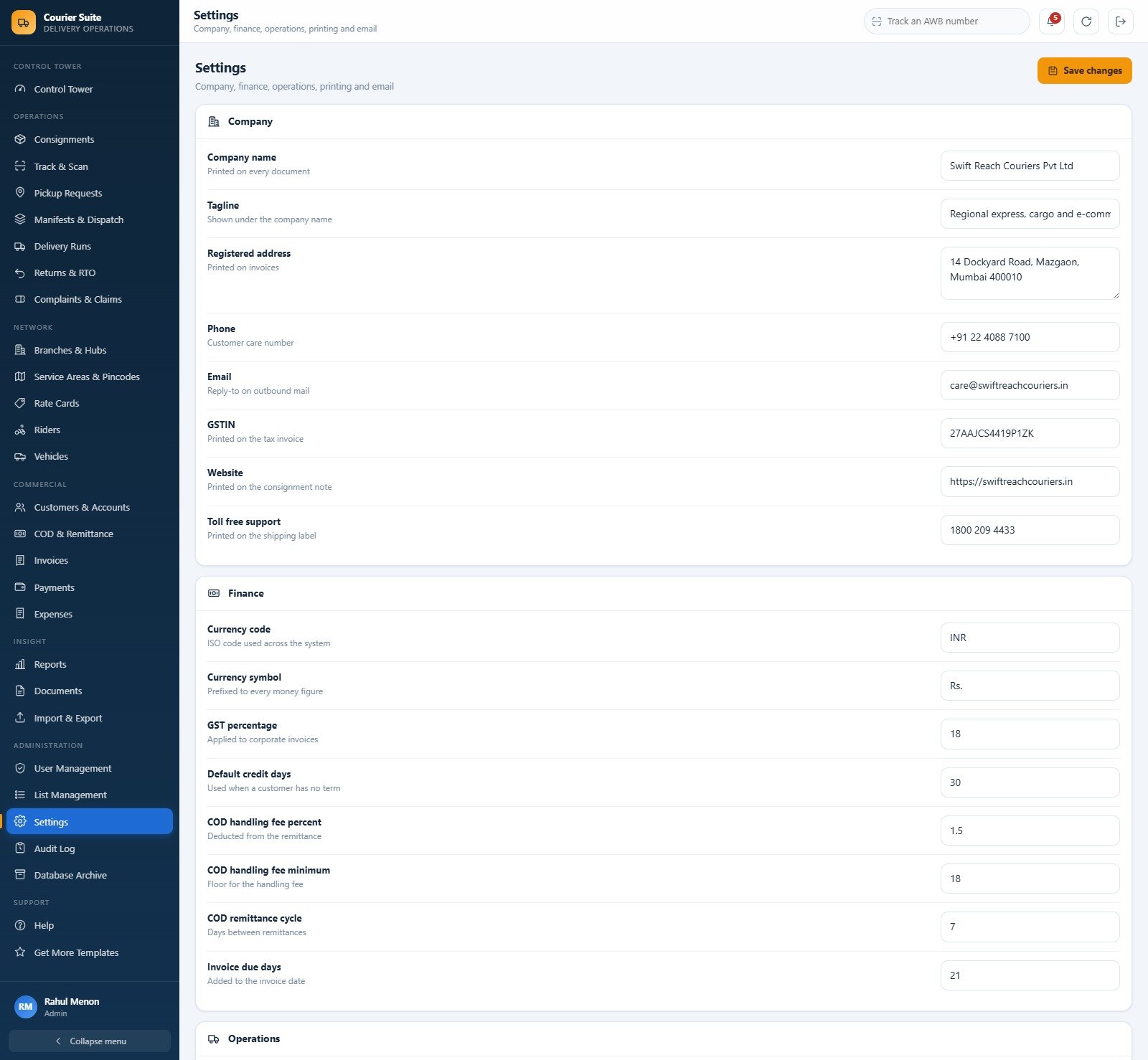
setup()from the editor. It is staged, resumable and safe to run more than once – it never duplicates a row. - Make it yours. Settings > Company for your name, address, GSTIN and toll-free number; Settings > Finance for currency code, currency symbol, GST rate, credit days, COD handling fee and remittance cycle; Settings > Printing for your default print size.
- Load your network. Branches & Hubs, Riders and Vehicles by hand; Service Areas and Rate Cards through the four-step import wizard.
- Create your users. Add real accounts in User Management, set what each role may open under Roles & permissions, then delete or deactivate the eight seeded accounts and change the admin password.
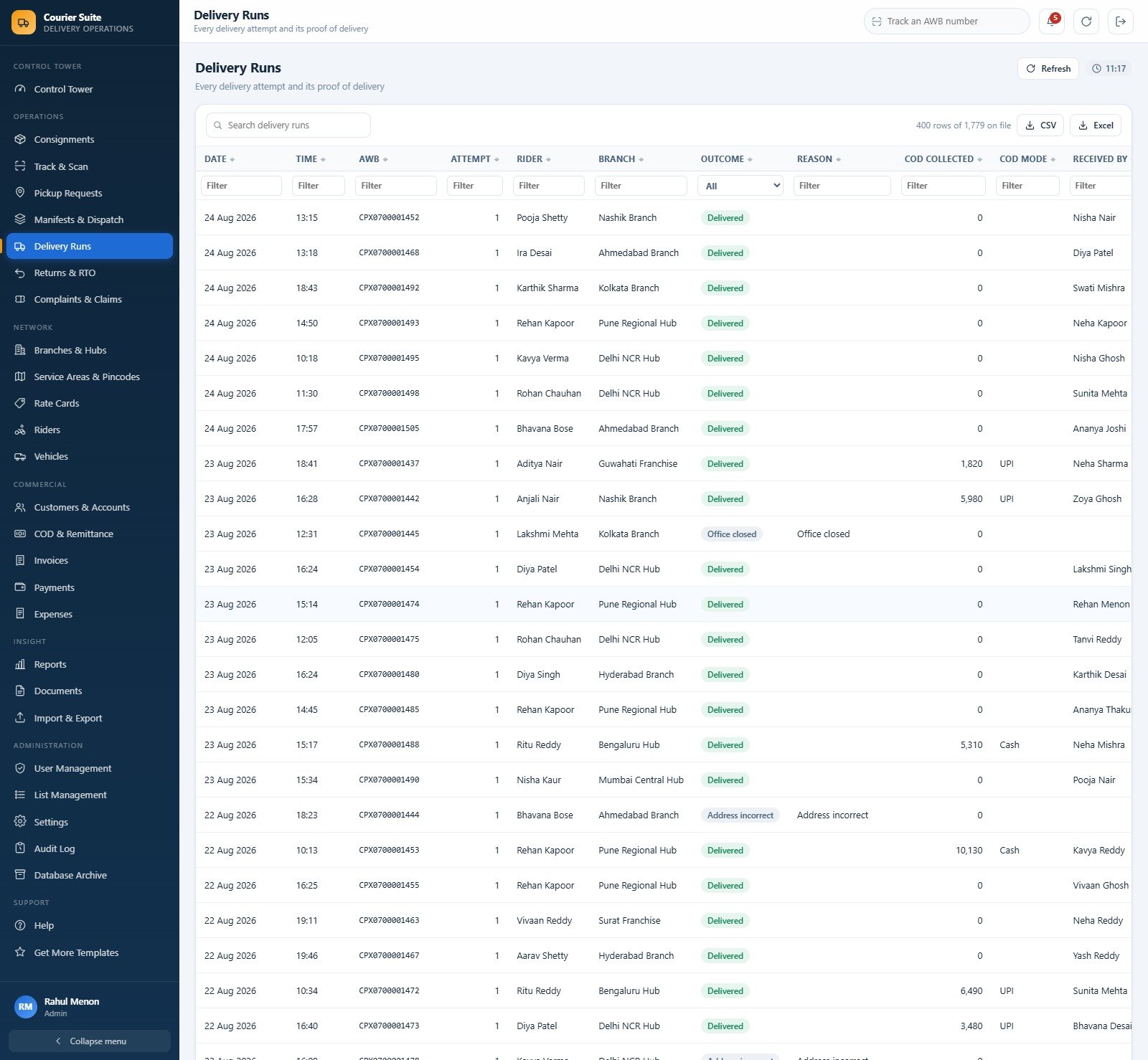
- Work the day. Pickup Requests to Consignments to Manifests & Dispatch to Delivery Runs, then COD & Remittance to settle the cash and Reports to see how it went.
Real-World Use Cases
Priya, a booking clerk at a metro counter. She raises a pickup request, assigns a rider, converts the collection straight into a consignment, and the destination pincode resolves the zone while the rate card computes the freight. She prints a 4 inch label and never types a price – which means the day’s revenue is right without anyone auditing it.
Imran, a hub supervisor on the night sort. He scans inbound, bags and seals, builds a line-haul manifest with a seal number and dispatches it. He can see every parcel, every bag and every rider, and no freight or margin figure at all – exactly what his branch owner wanted when they hired a contractor to run the sort.
Deepa, in accounts. She opens COD & Remittance, sees Rs. 37.0 K still held across eight shipments with the oldest at four days, builds the remittance advice for a weekly-cycle e-commerce sender, releases it, and watches the pending figure clear itself against collected minus remitted.
Frequently Asked Questions
Does this connect to FedEx, UPS, DHL, India Post or any other carrier?
No. There is no carrier API integration of any kind. It does not buy postage, it does not print carrier-compliant labels, it does no rate shopping, it provides no real-time GPS tracking and it pulls no carrier scan events. It runs your operation – your branches, your riders, your rate card – and every status is recorded by your own staff.
Can I try it before buying?
Yes. The live demo above is a fully seeded deployment with all eight accounts open. Test every module and every role before you spend anything.
Do I need a Google Workspace subscription?
No. A free personal Google account is enough to deploy and run it.
Can I change the currency? The demo shows Indian Rupees.
Yes. Settings > Finance holds the currency code and the currency symbol that is prefixed to every money figure, along with the GST rate, credit days and the COD handling fee. Change them once and every screen, document and report follows.
How many users can sign in?
There is no seat limit and no per-user charge. Create as many accounts as you need in User Management; the six roles are templates you can re-point at any combination of modules, action rights and money visibility.
Will Google Sheets slow down as the scan history grows?
That is what the Database Archive is for. It copies the whole database out first, registers the copy, then trims only closed consignments and their child rows – masters and open shipments are never touched.
Do I get the source code?
Yes. You get the complete Code.gs and Index.html source. Edit anything you like; it is your deployment, in your Drive, with your data.
About the Author
Built by PK – Microsoft Certified Professional with 15+ years of Excel, Google Sheets, and Power BI experience. Founder of NextGenTemplates, reaching 300K+ subscribers across YouTube channels. Every template is hand-built and tested before release.
Explore Related Templates
- Logistics Management System Web App – the freight-forwarding sibling, built around shipments, consignors and lane costing rather than parcels.
- Cold Storage Management System Web App – if you run warehousing behind the delivery network.
- Courier Service KPI Dashboard in Google Sheets – a monthly scorecard to sit above the operations system.
- Logistics Dashboard in Google Sheets and Transportation Services Dashboard in Google Sheets – analytics over the same numbers.
- Browse the full Web Apps category, or read the module-by-module walkthrough on NeoTechNavigators.
One payment. No subscription. Your Google account, your data, your code. Open the live demo, sign in as two different roles, and if it runs your counter the way you would run it, add it to your cart.
Last updated: 26 August 2026 – version 1.0.0




























Reviews
There are no reviews yet.