

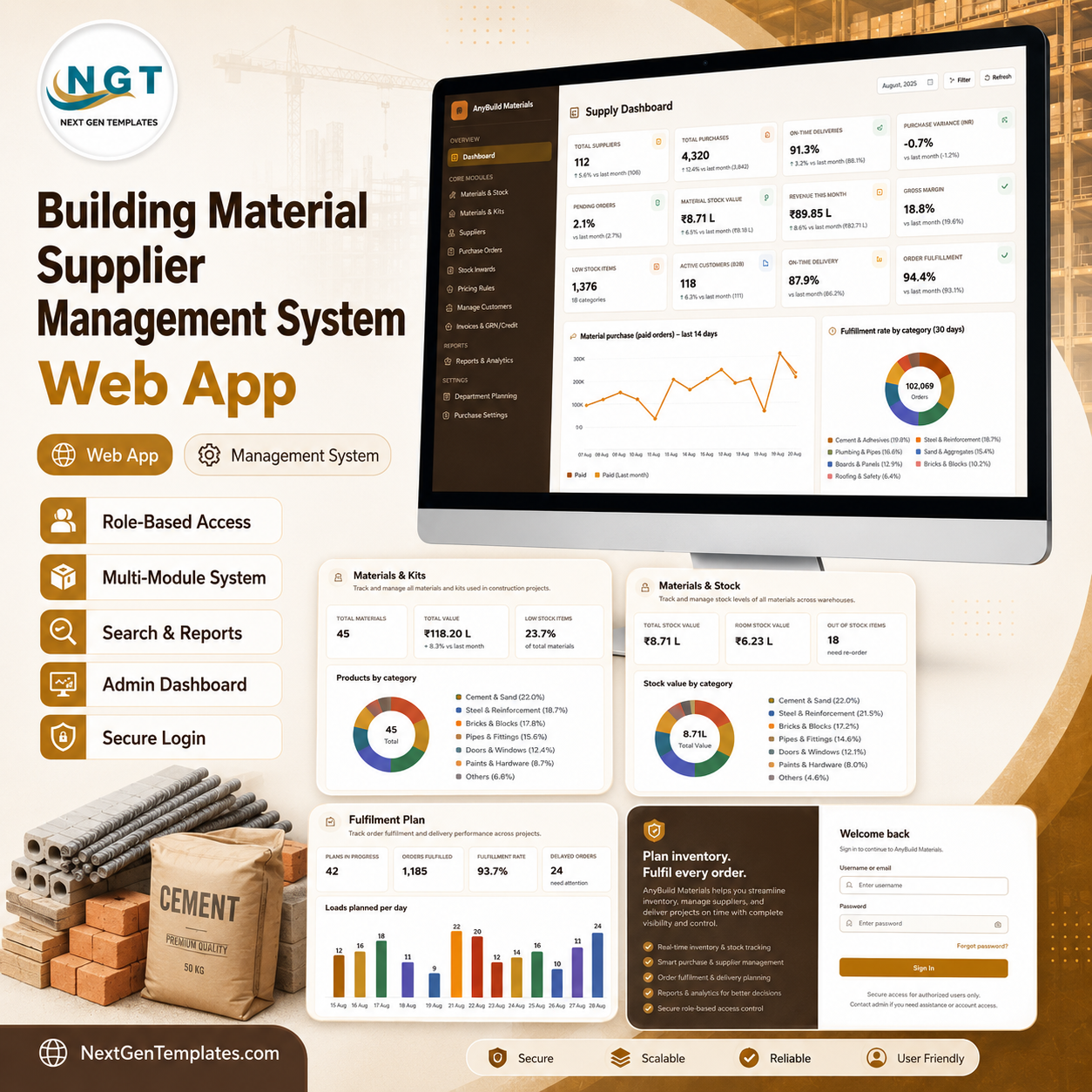
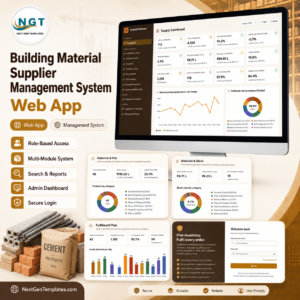
The Building Material Supplier Management System Web App is a complete, multi-user supply operations system for a building material supplier, trader or yard – cement, steel, bricks, blocks, aggregates, plumbing, boards, tiles, roofing and safety supplies. It runs as a Google Apps Script web app on your own Google account, stores everything in your own Google Sheets database, and gives six different roles their own sign-in and their own menu.
It is not a spreadsheet with buttons. It is a working system: a daily pick schedule generated from confirmed orders, kits that cost themselves from live material prices, an MRP run that turns net shortfall straight into purchase orders, actual landed cost per SKU, dispatch rounds, receiving inspections, a full audit log and eighteen exportable reports.
Try the Live Demo Before You Buy
A fully seeded copy of this exact system is deployed and open. Sign in as any role below and click through the real screens – the dashboard, the pick plan, purchasing, dispatch and the reports are all populated.
Demo Sign-in Details
| Role | Username | Password |
|---|---|---|
| Admin | admin | Admin@123 |
| Operations Manager | manager | Manager@123 |
| Warehouse Coordinator | warehouse | Warehouse@123 |
| Procurement Manager | procurement | Procure@123 |
| Sales Executive | sales | Sales@123 |
| Auditor | auditor | Auditor@123 |
These credentials are public on purpose. The demo is a shared, seeded instance that is periodically reset – it is not anyone’s live data. Your own copy is deployed under your Google account with your own passwords, which you change on first sign-in.
Key Features
- Six roles, six menus. Admin, Operations Manager, Warehouse Coordinator, Procurement Manager, Sales Executive and Auditor each sign in to a different navigation. Admin can override any non-admin user’s visible and permitted menus from User Management > Menu Management, and the override is enforced in the backend as well as the sidebar.
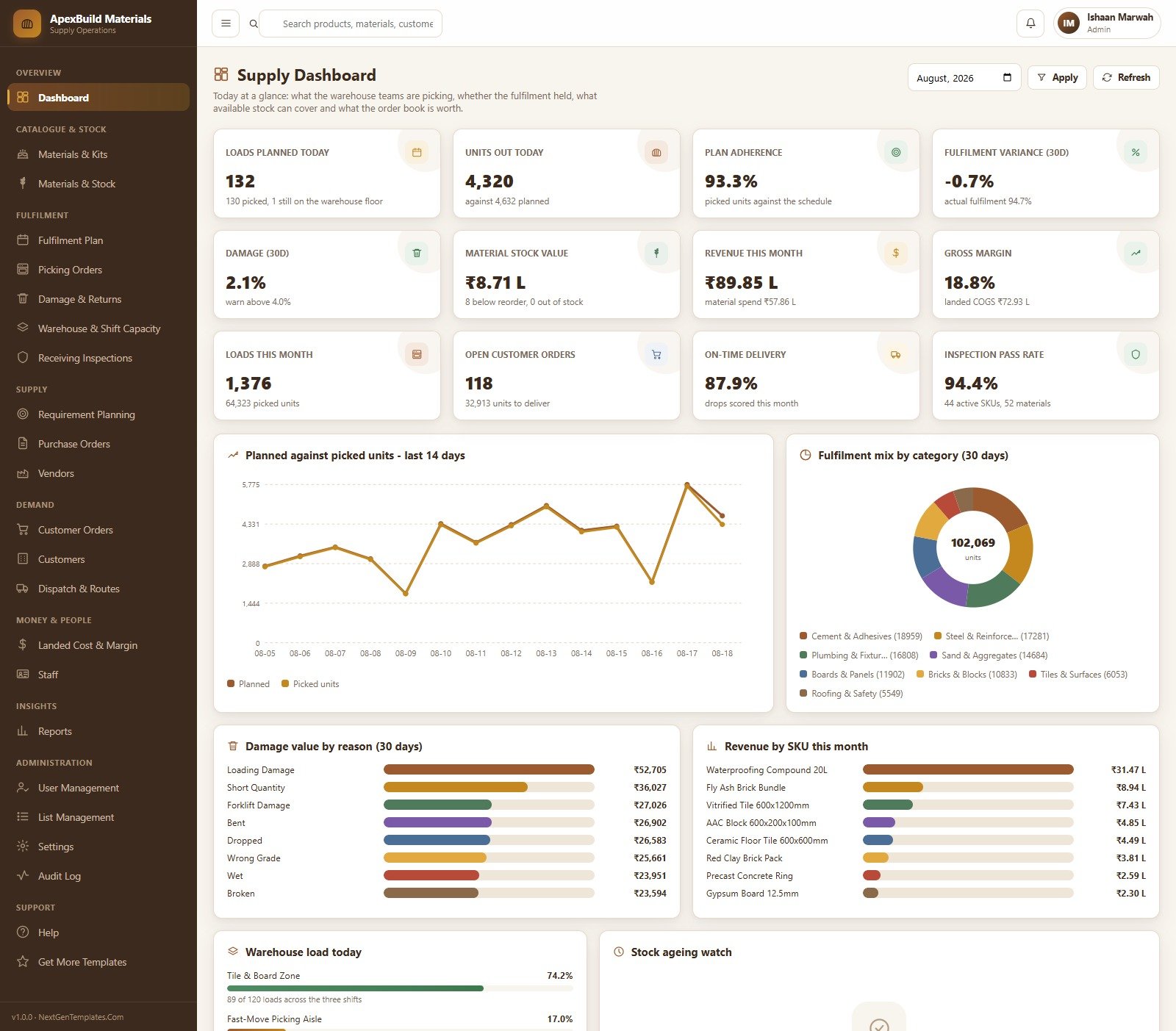
- A supply dashboard that answers the morning questions. Loads planned today, units out today, plan adherence, fulfilment variance, damage rate, material stock value, revenue this month, gross margin, loads this month, open customer orders, on-time delivery and inspection pass rate – plus planned-against-picked over 14 days, fulfilment mix by category, damage value by reason, revenue by SKU, warehouse load and a stock ageing watch.
- Kits that cost themselves. Every sellable SKU has a kit of purchased materials. Change a material price and re-cost the whole catalogue in one click. Standard unit cost includes kit material cost, direct yard labour and warehouse overhead recovery.
- A daily pick schedule you did not have to type. Fulfilment Plan generates the pick schedule from confirmed orders, standing orders and a slice of the demand forecast, checks it against line capacity, and releases it to the floor as picking orders.
- Fulfilment, variance and damage are calculated, never typed. Close a load with the actual count and the system derives good units, rejects, fulfilment percentage, variance and unit cost per load.
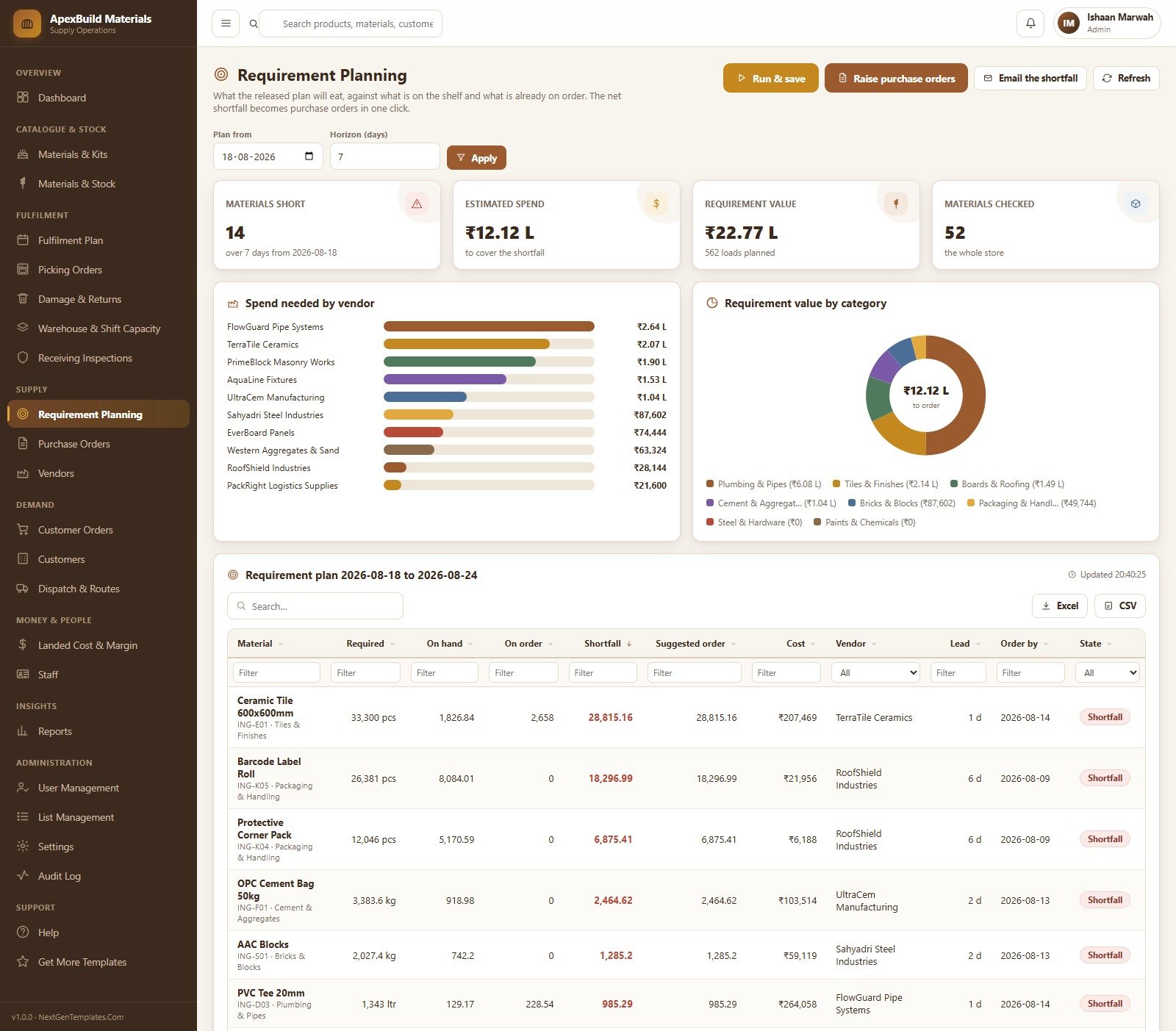
- One-click MRP. Requirement Planning nets the released plan against on-hand stock and open purchase orders, shows the shortfall per material with lead time and an order-by date, and raises the purchase orders in one action – or emails the shortfall.
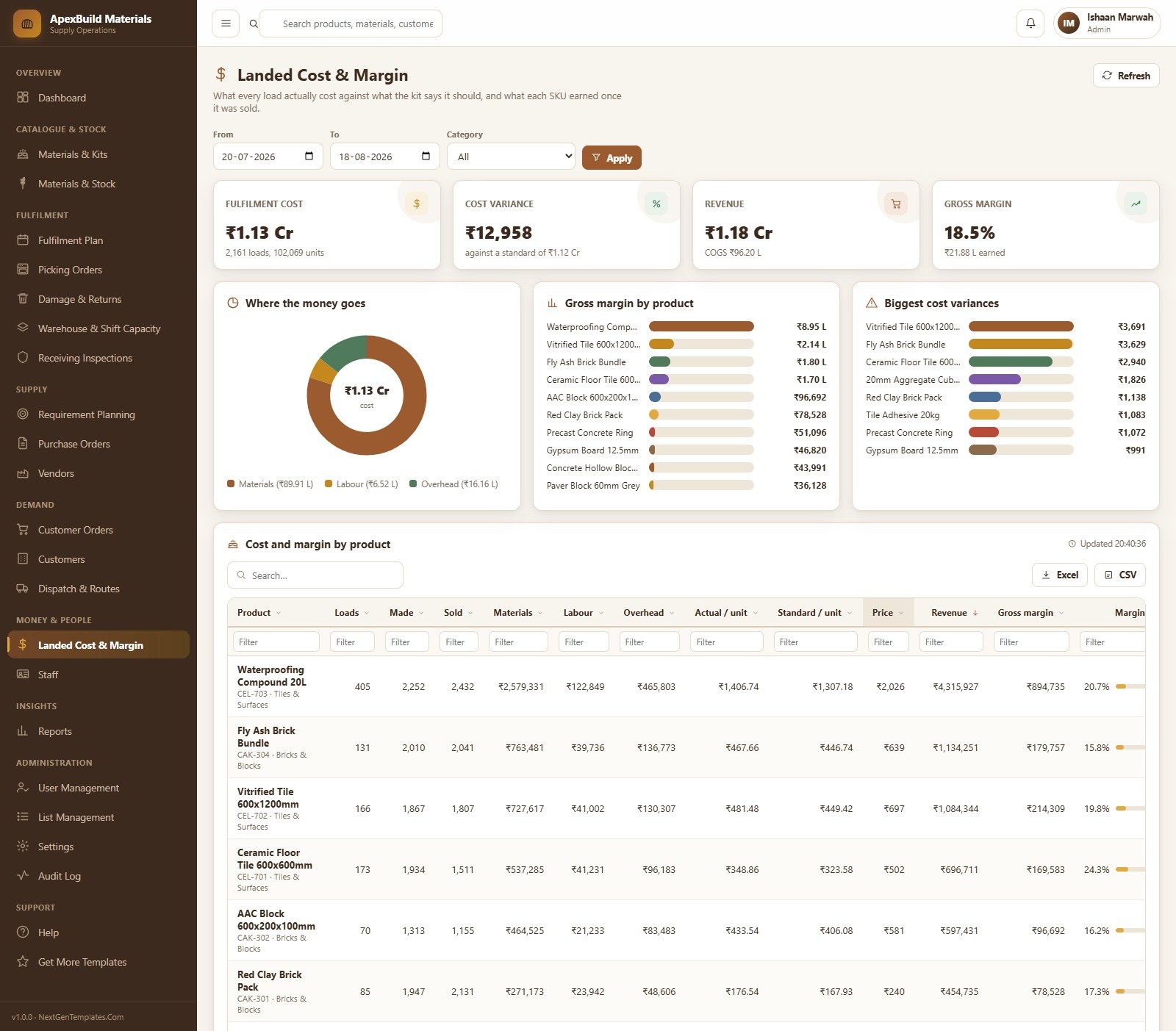
- Real landed cost and margin. Actual landed unit cost is computed per SKU per month from completed picking orders, and COGS uses dispatched units times that actual weighted cost. Standard cost is used only when a period has no completed pick for the SKU.
- Eighteen exportable reports. Every one filters by date, charts itself, prints and exports to Excel or CSV.
- Runs on your own Google account. No subscription, no per-seat licence, no third-party hosting. Your data stays in your Google Sheets.
- Readable source included. Code.gs and the Index HTML file ship in full, so the system is yours to extend.
Every Module in the System
Dashboard; Materials & Kits; Materials & Stock; Fulfilment Plan; Picking Orders; Damage & Returns; Warehouse & Shift Capacity; Receiving Inspections; Requirement Planning; Purchase Orders and Goods Receipts; Vendors; Customer Orders; Customers; Dispatch & Routes; Landed Cost & Margin; Staff; Reports; User Management and Menu Management; List Management; Settings; Audit Log; Help; and Get More Templates.
A Walk Through the Screens
Sign In
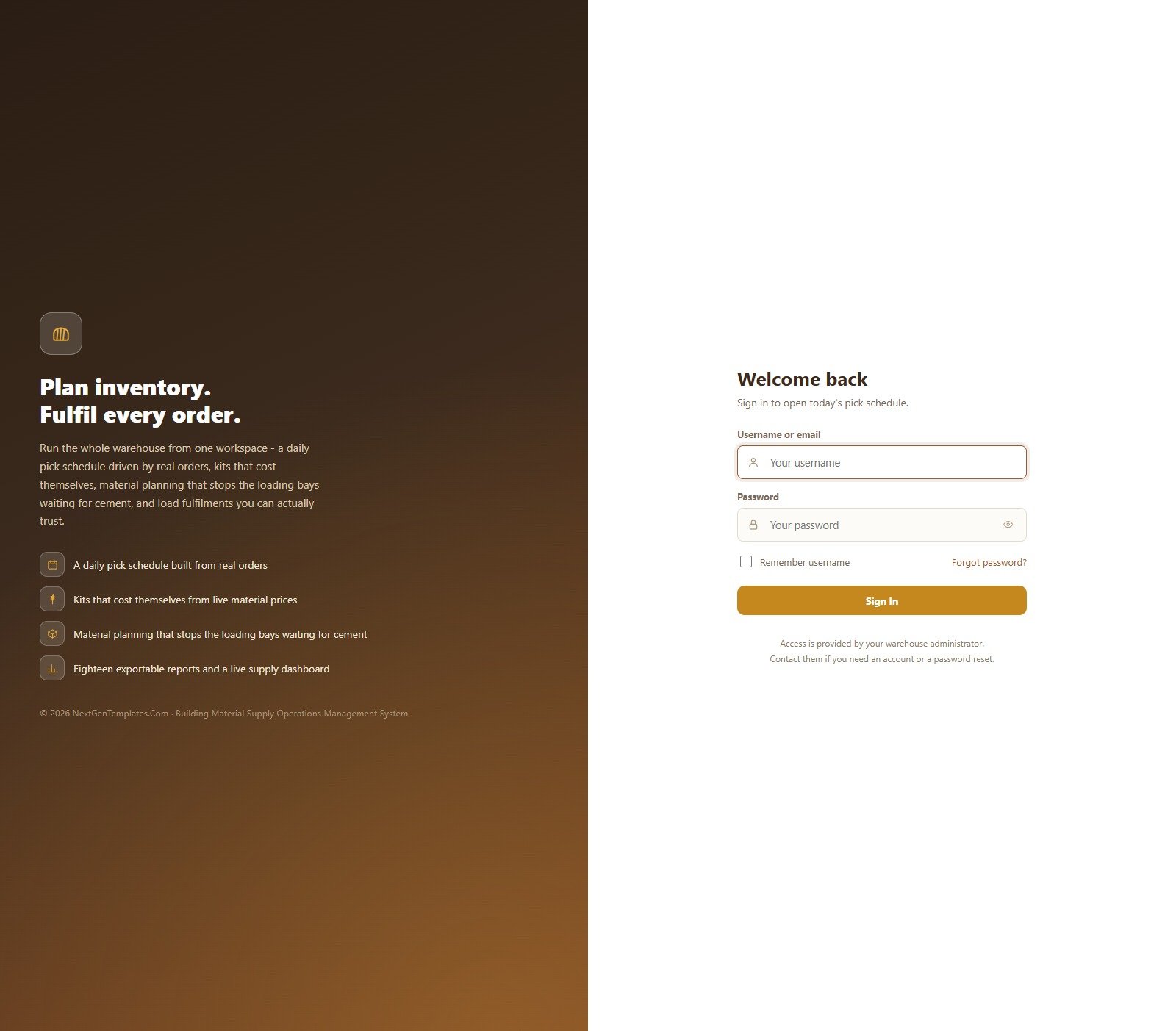
A branded sign-in card with username, password, show-password and remember-username. Access is issued by the administrator, and a first-run panel appears while the database is still empty so setup can be completed without opening the script editor.
Supply Dashboard
Twelve KPI cards with a month picker, then Planned against picked units over the last 14 days, Fulfilment mix by category as a donut, Damage value by reason, Revenue by SKU this month, Warehouse load today by zone and a stock ageing watch.
Materials & Kits
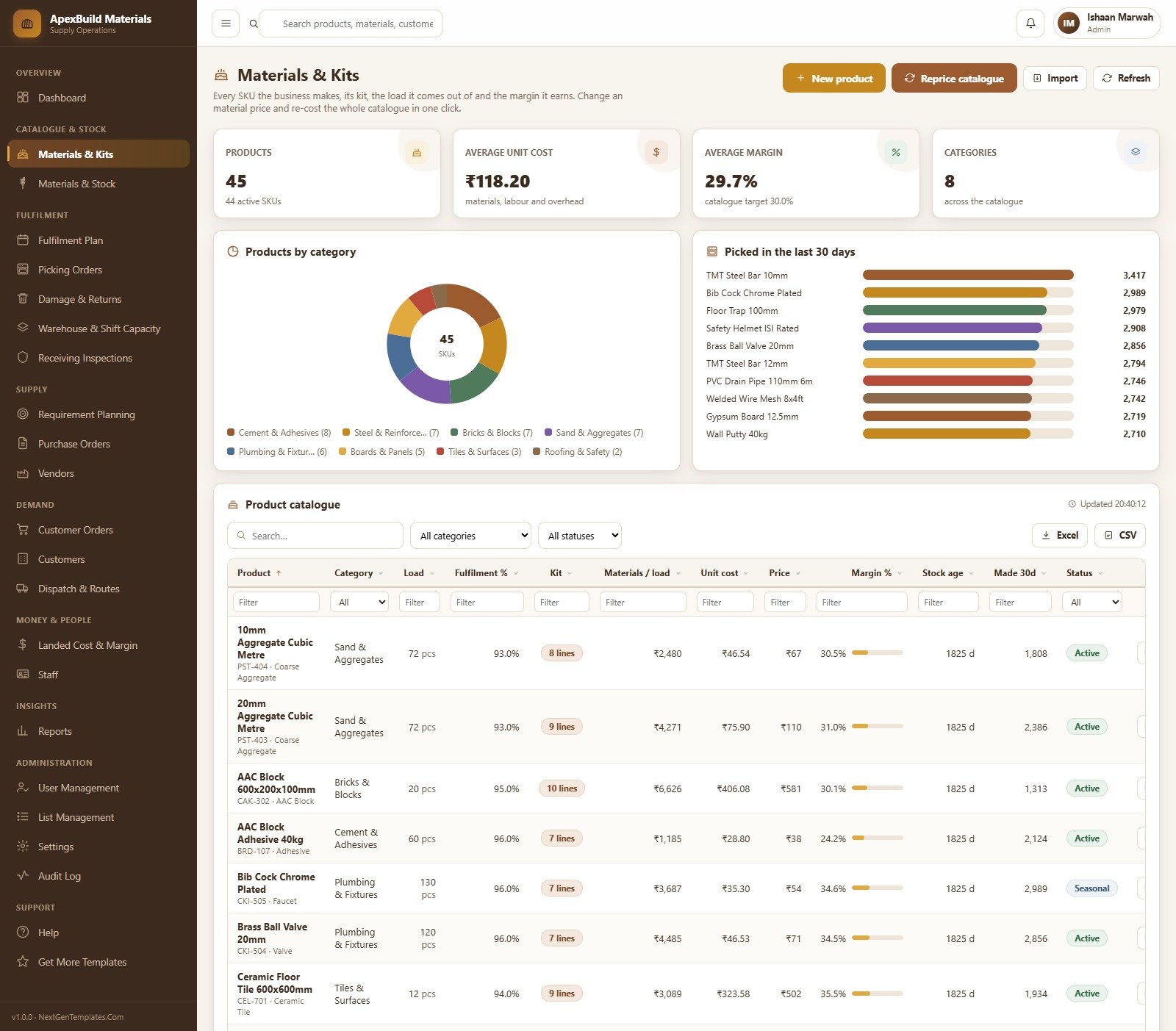
Products, average unit cost, average margin against the catalogue target and category count, with Products by category and Picked in the last 30 days. The catalogue table carries load size, fulfilment percentage, kit line count, materials per load, unit cost, price, margin percentage, stock age, made in 30 days and status – all filterable, with Excel and CSV export and a Reprice catalogue action.
Materials & Stock
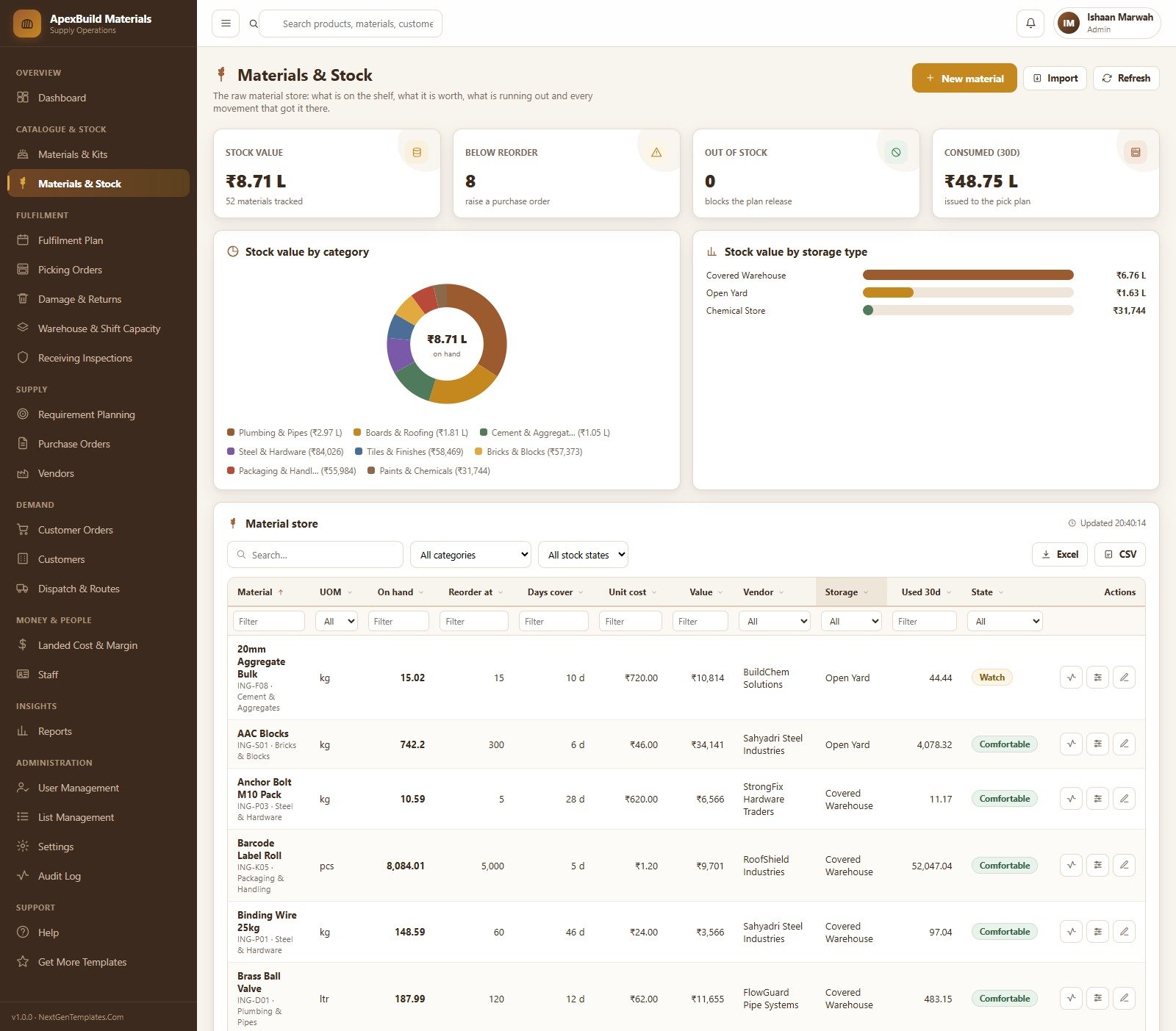
The raw material store: stock value, materials below reorder, out of stock and consumed in 30 days, with stock value by category and by storage type. The material store table shows unit of measure, on hand, reorder point, days cover, unit cost, value, vendor, storage location, used in 30 days and a comfort state per line.
Fulfilment Plan
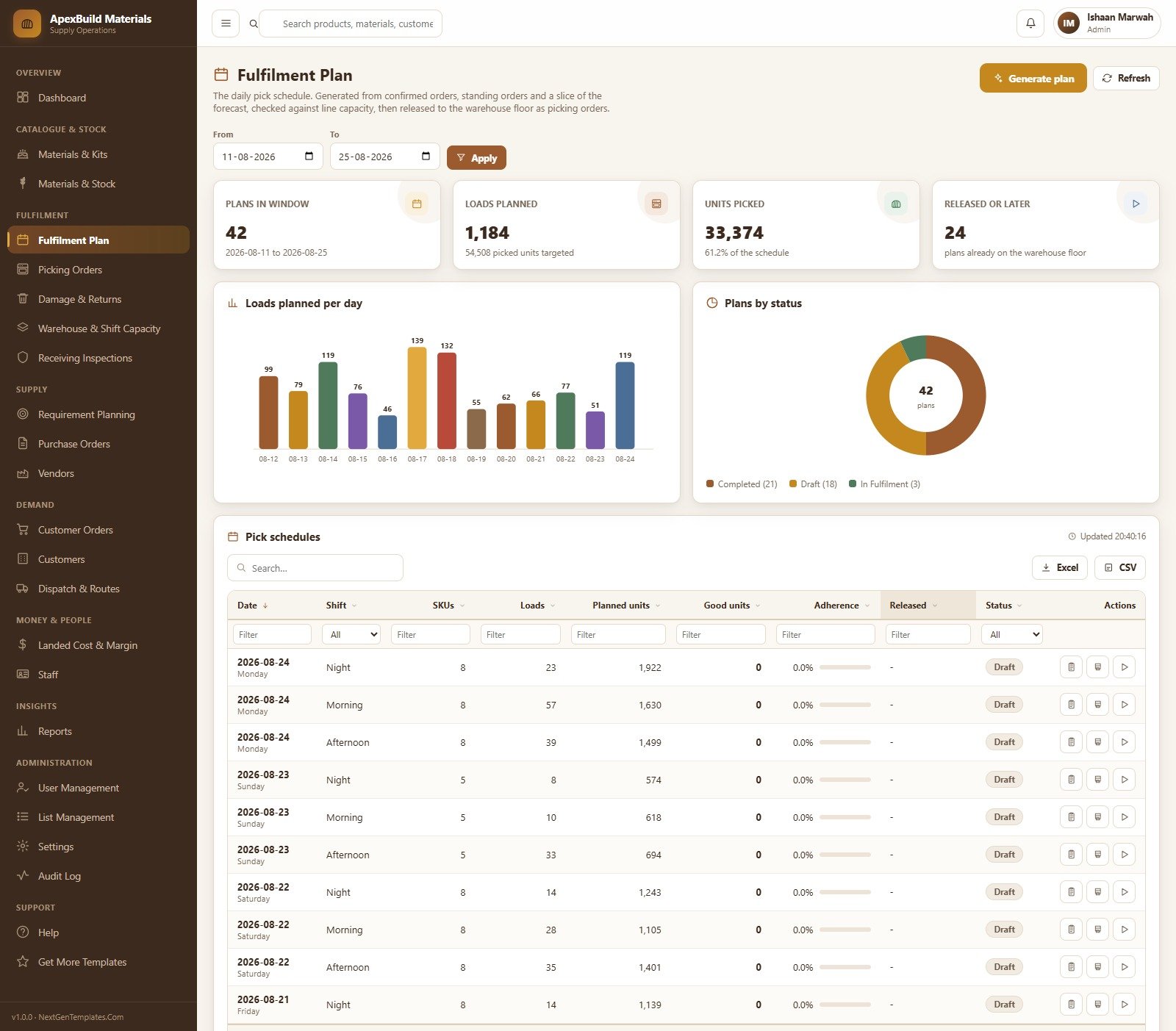
Plans in a date window, loads planned, units picked against the schedule and how many plans are already released. Loads planned per day as a bar chart and plans by status as a donut, over a pick schedule table by date, shift, SKUs, loads, planned units, good units, adherence and release state.
Picking Orders
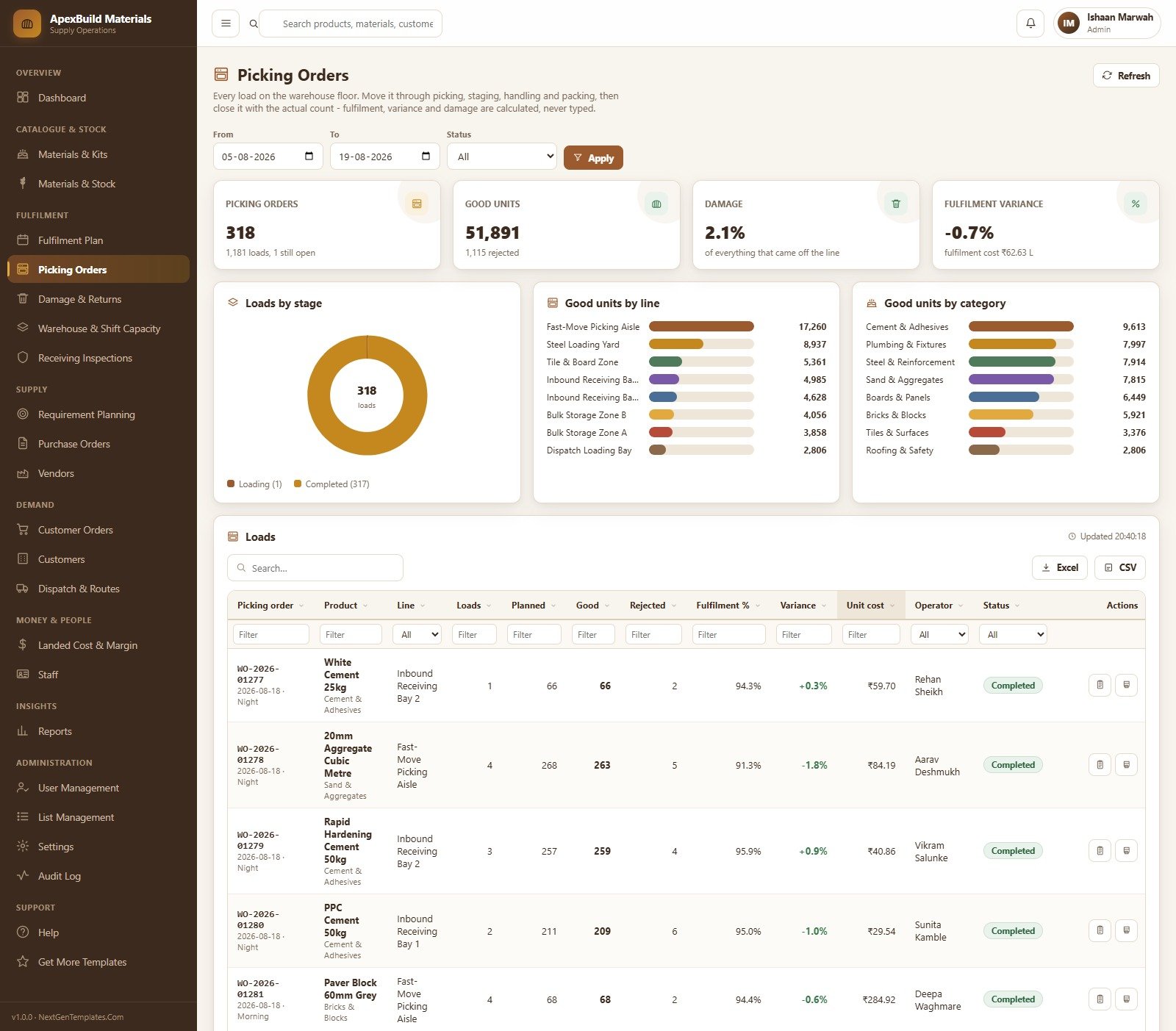
Every load on the floor, moved through picking, staging, handling and packing then closed with the actual count. Loads by stage, good units by line and good units by category sit above a load table with planned, good, rejected, fulfilment percentage, signed variance, unit cost and operator.
Requirement Planning
Materials short over the horizon, estimated spend to cover the shortfall, requirement value and materials checked. Spend needed by vendor and requirement value by category, then a line-by-line plan with required, on hand, on order, shortfall, suggested order quantity, cost, vendor, lead days and an order-by date.
Purchase Orders
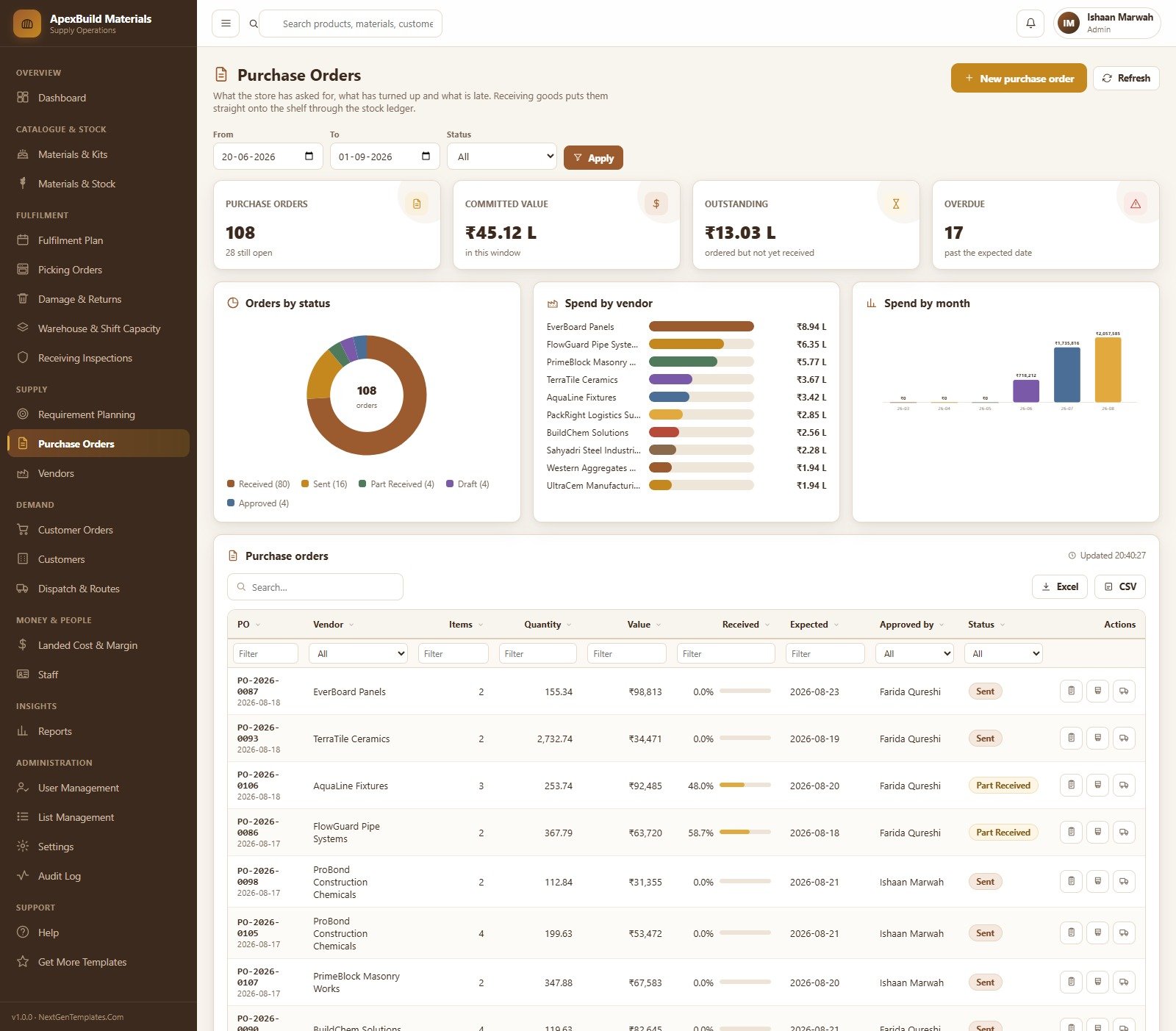
Purchase order count with open, committed value, outstanding value and overdue count. Orders by status, spend by vendor and spend by month, over a PO table with items, quantity, value, received percentage, expected date, approver and status. Receiving a goods receipt puts stock on the shelf through the stock ledger.
Customer Orders
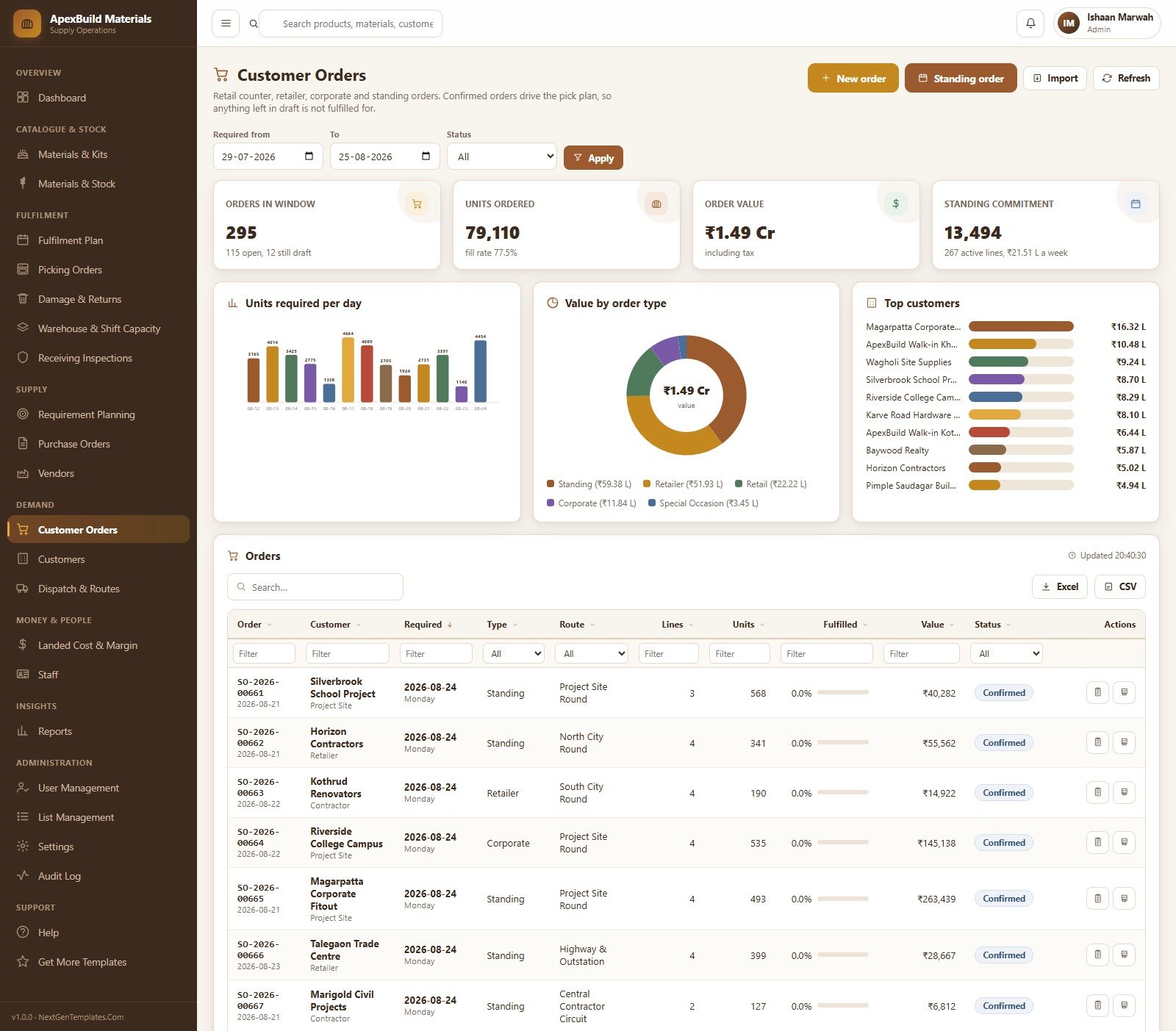
Retail counter, retailer, corporate and standing orders in one window, with orders in window, units ordered, order value and standing commitment. Units required per day, value by order type and top customers, over an order table with route, lines, units, fulfilled percentage, value and status. Anything left in draft is deliberately not fulfilled for.
Dispatch & Routes
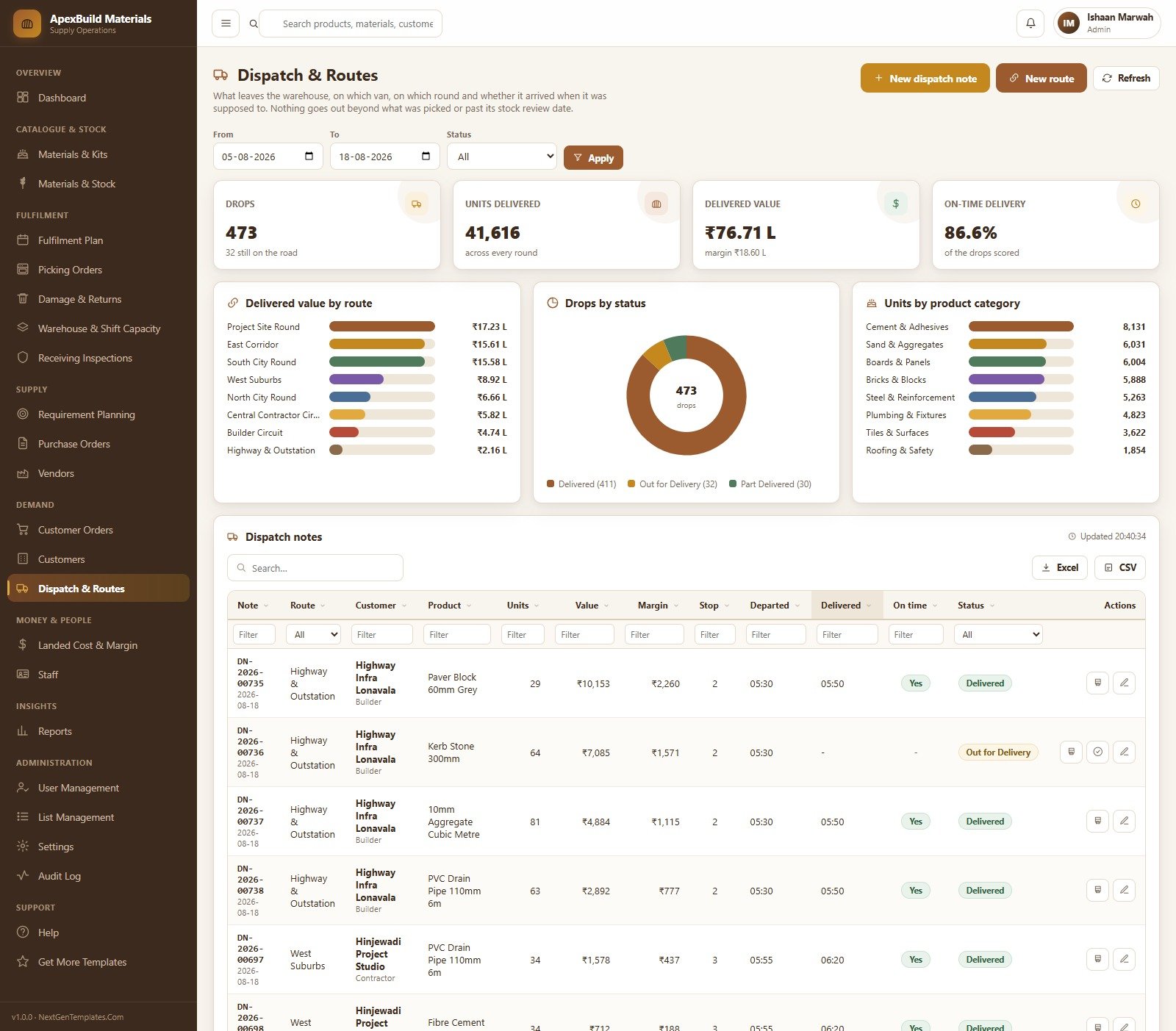
Drops, units delivered, delivered value and on-time delivery percentage, with delivered value by route, drops by status and units by product category. The dispatch note table records route, customer, product, units, value, margin, stop number, departure and delivery times, and an on-time flag. Nothing goes out beyond what was picked or past its stock review date.
Landed Cost & Margin
Fulfilment cost, cost variance against standard, revenue and gross margin, with a Where the money goes split across materials, labour and overhead, gross margin by product and the biggest cost variances. The detail table gives loads, made, sold, materials, labour, overhead, actual per unit, standard per unit, price, revenue, gross margin and margin percentage for every SKU.
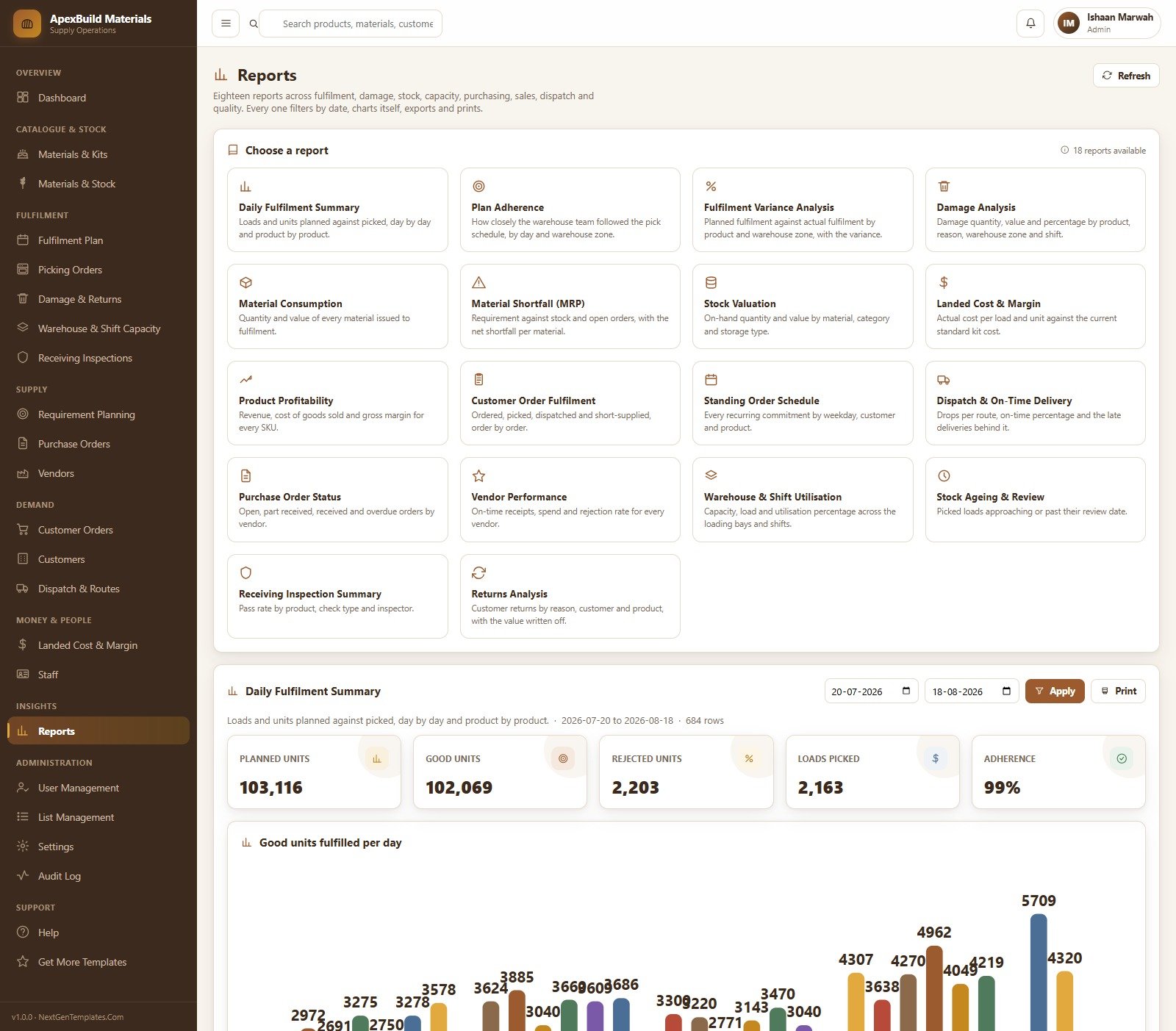
Reports
Eighteen reports: Daily Fulfilment Summary, Plan Adherence, Fulfilment Variance Analysis, Damage Analysis, Material Consumption, Material Shortfall (MRP), Stock Valuation, Landed Cost & Margin, Product Profitability, Customer Order Fulfilment, Standing Order Schedule, Dispatch & On-Time Delivery, Purchase Order Status, Vendor Performance, Warehouse & Shift Utilisation, Stock Ageing & Review, Receiving Inspection Summary and Returns Analysis. Each one takes a date range, draws its own chart, prints and exports.
Who It Is For
- Building material suppliers, traders and yards running a counter plus project-site deliveries
- Cement, steel, brick, block and aggregate distributors with standing orders and route deliveries
- Tile, plumbing, board and roofing wholesalers who need kit costing and margin per SKU
- Operations and warehouse managers who plan a pick schedule by shift and zone
- Procurement teams who want a shortfall list that becomes purchase orders
- Owners who want one place for stock, orders, dispatch, cost and margin without a monthly SaaS bill
How to Use It
- Open the live demo first. Sign in as Admin, then sign out and sign in as Auditor or Sales Executive – the difference in what each role can see is the fastest way to understand the system.
- Download the ZIP and open the deployment guide inside it.
- Create a new standalone Apps Script project, paste Code.gs and an HTML file named exactly Index, and save.
- Run setup once, either from the first-run panel in the web app or from the function list in the editor, and approve the permission prompt. Setup is staged and safe to run again.
- Deploy as a web app, executing as you, with access set the way your team needs it.
- Sign in with the default admin account and change every default password immediately.
- Replace the sample lists, materials, products, vendors and customers with your own from List Management and the master screens, then start with the Fulfilment Plan.
What You Get
| Item | Included |
|---|---|
| Full Apps Script source (Code.gs) | Yes – readable and editable |
| Full front-end source (Index HTML) | Yes |
| Illustrated user manual (PDF and Word) | Yes |
| Deployment guide and default logins | Yes |
| Seeded demo database | 33 sheets, about 14,420 rows |
| Number of roles | 6, with editable menu permissions |
| Number of reports | 18, all exportable |
| Print sizes | 3 inch, 4 inch and A4 (A4 default) |
| Archive and backup workflow | Yes – preview, copy, register, then trim |
| Monthly subscription | None – it runs on your Google account |
| Lifetime updates and email support | Yes |
Frequently Asked Questions
Can I try it before buying?
Yes. The live demo above is this exact system with a seeded database, and every role’s credentials are listed. Sign in, click through and decide before you spend anything.
Is this accounting, tax or statutory compliance software?
No. It is an operations system for stock, fulfilment, purchasing, sales and dispatch. It does not file returns, produce statutory accounts, calculate tax liability, or certify anything for a regulator or auditor. Values it shows are calculated from the data you enter.
Where does my data live?
In a Google Sheets database inside your own Google Drive, created when you run setup. Nothing is sent to us and there is no external server involved.
Do I need to know how to code?
No. Deployment is copy, paste, run setup and deploy – the guide walks through it step by step. Coding knowledge only matters if you want to change the system yourself, which the included source makes possible.
How many users can sign in?
As many as you create in User Management. The six accounts that ship are starting points, not a limit, and each user’s menu can be tailored individually.
Can I change the currency, the categories, the routes and the shifts?
Yes. Currency and other defaults live in Settings, and categories, storage types, routes, shifts, damage reasons and check types are all editable from List Management.
Will my changes go live automatically?
No. Apps Script does not update an existing deployment when you edit the code. After changing Code.gs or Index you must deploy a new version, which the manual explains.
What happens when the database gets large?
The admin archive workflow previews eligible closed rows, takes a full spreadsheet copy, registers the archive and only then trims old transaction rows. Master data and anything still open stays put, and archives can be reconnected read-only.
Start With the Demo
Open the live demo, sign in as the Warehouse Coordinator, and look at how little that role can reach compared with Admin. That separation – plus a pick schedule you never typed and a shortfall list that turns into purchase orders – is what you are buying. Then download the ZIP, deploy it on your own Google account, and make it yours.

























Reviews
There are no reviews yet.