

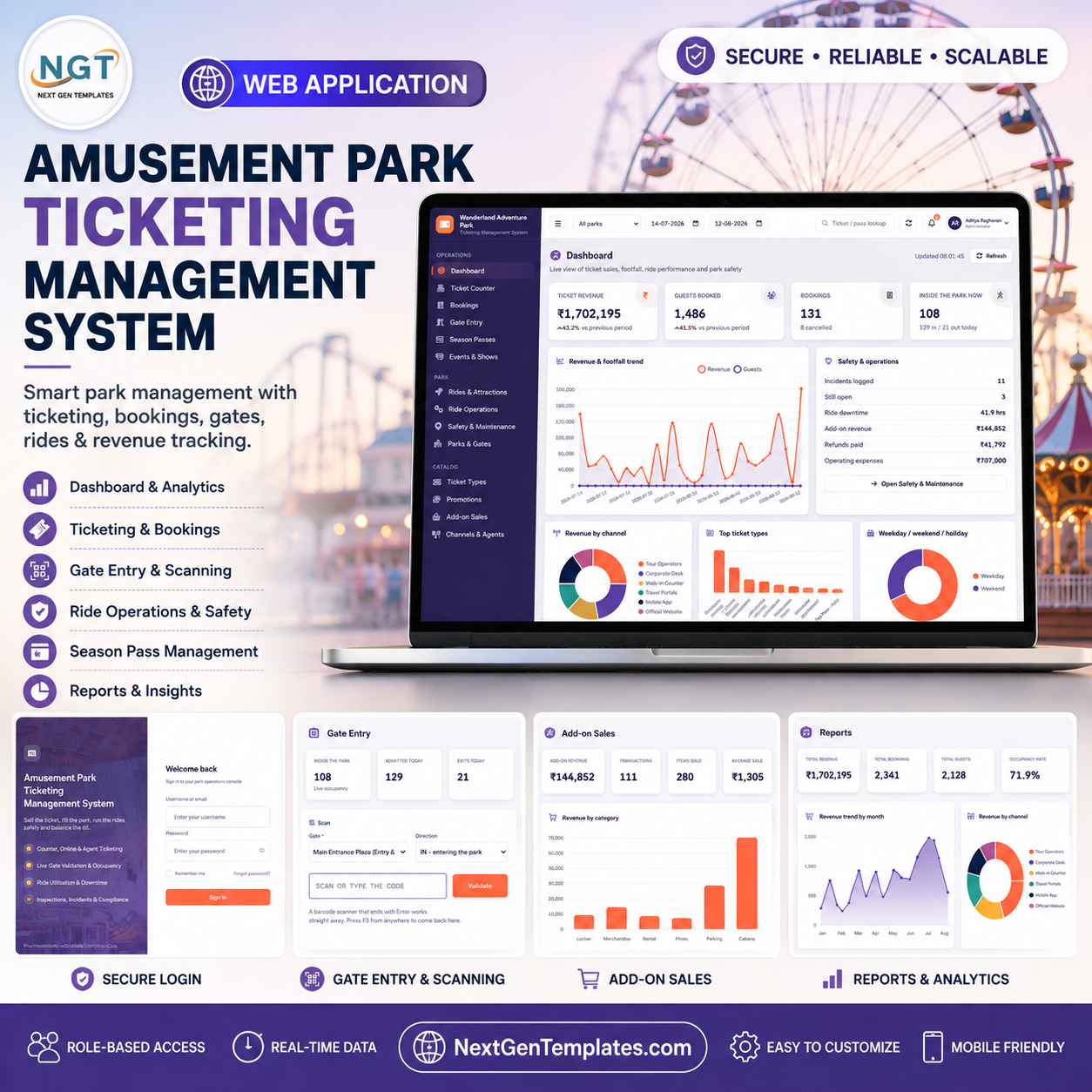
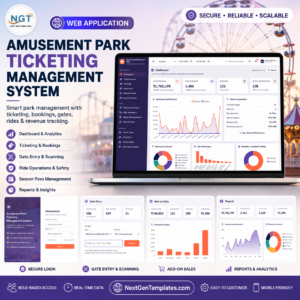
The Amusement Park Ticketing Management System Web App runs a park’s whole selling-and-admitting day from one browser tab: 22 screens built on Google Sheets and Google Apps Script, with 5 roles enforced on the server, not just hidden in the menu. The seeded demo database builds 34 sheets and roughly 13,000 rows – 3 parks, 8 gates, 26 ticket types, 28 rides, 320 bookings, 4,279 tickets, 5,567 gate scans and 64 season passes – so every card, chart and report is populated the moment you sign in. You get the complete source code, a printable user manual and a deployment guide. Try the live demo below before you spend anything. No signup, no email, no card. Amusement Park Ticketing Management System Web App
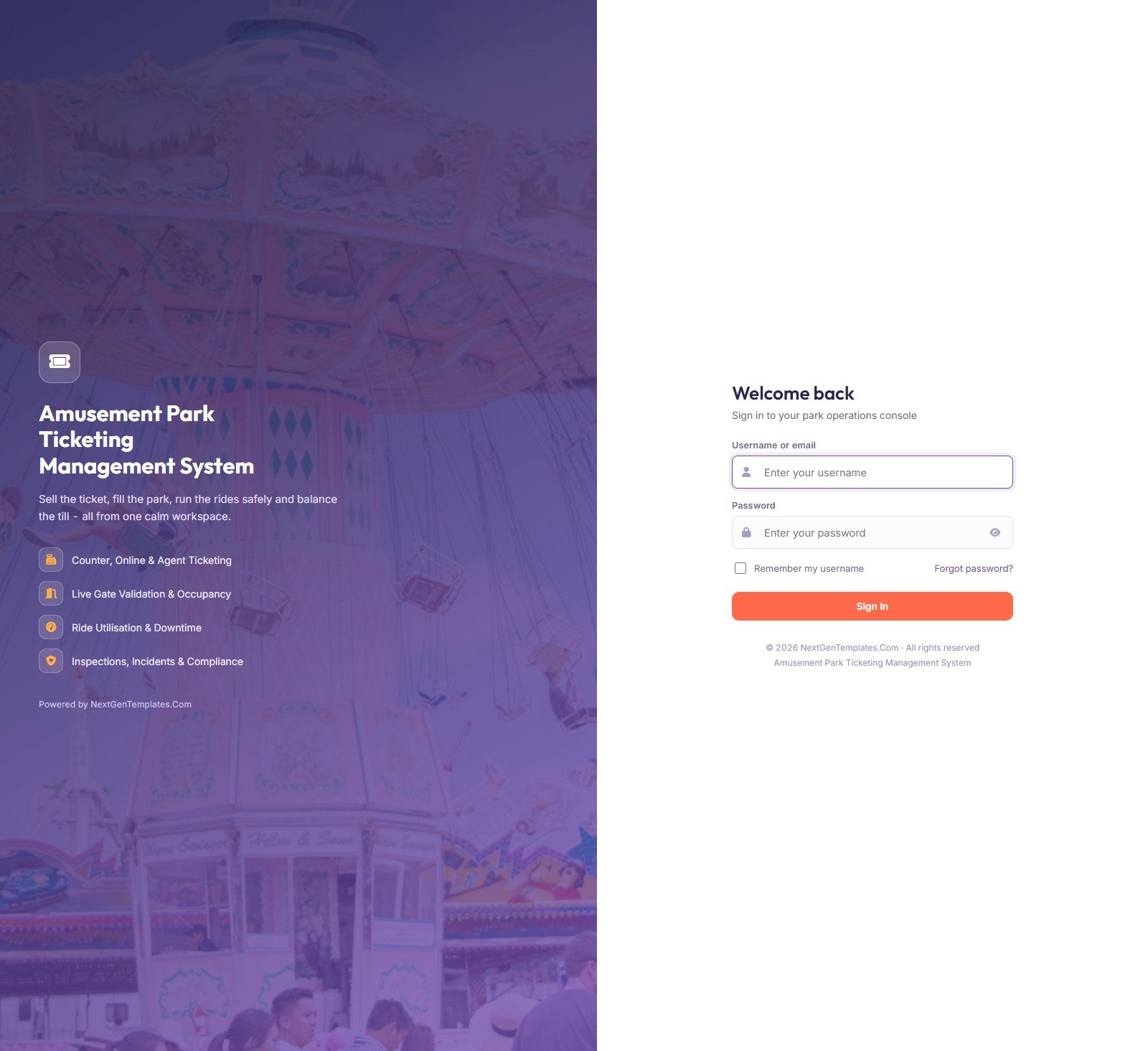
1. Sign In
A split login screen: the park’s branding on the left, a single username-and-password form on the right. The screen never reveals whether the username or the password was wrong, and never shows default credentials. Accounts lock after five consecutive failed attempts, and an Administrator unlocks them from User Management.
🚀 Try the Live Demo Before You Buy
We have deployed this web app in our own Google account so you can test every page, every role, every gate scan and every report – with real sample data – before purchasing. No signup, no email required.
🔑 Test Login Credentials
Sign in as admin to reach every module including Settings and User Management, or as gate to see how tightly a turnstile operator is locked down – that contrast is the whole point of the permission map. Try counter to sell a ticket and accounts to run the money reports.
💡 These credentials are public on purpose – they are the seeded logins of a shared demo instance that resets, not of anybody’s live park. What you get after purchase: the full source code (Code.gs + Index.html) plus a step-by-step deployment guide so you can deploy your own private instance in your own Google account in under 15 minutes.
Key Features of the Amusement Park Ticketing Management System Web App
- Server-side pricing. The Ticket Counter never trusts the browser. It prices the basket on the server against a weekday / weekend / holiday matrix, applies the promo code, adds tax and checks remaining capacity before it will take a payment.
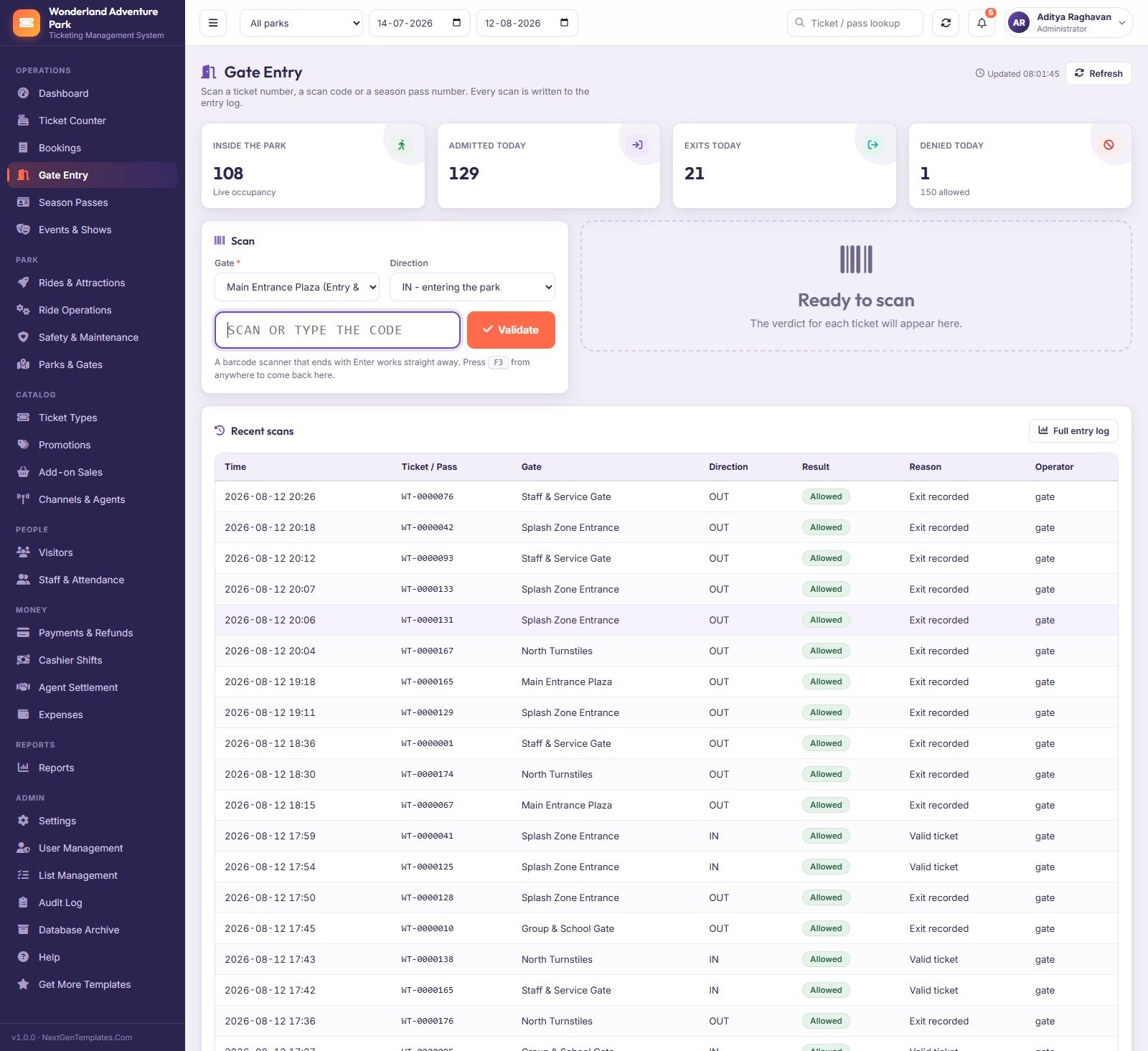
- Real gate validation. Scanning returns Allowed or Denied plus the reason, writes the scan to the entry log and moves live occupancy. In the demo window, 129 admitted, 21 exited, 1 denied.
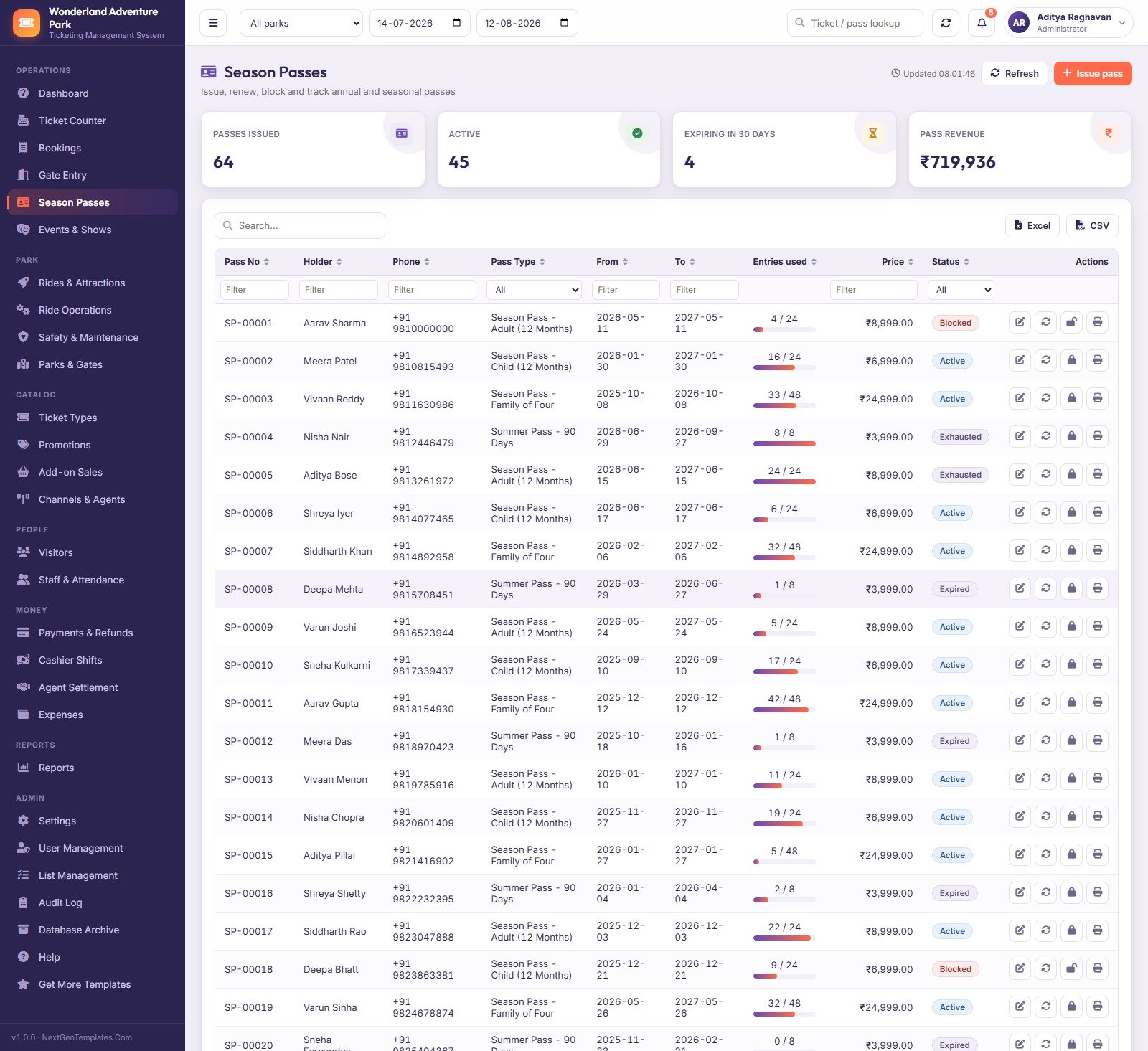
- Entry allowances that count down. Season and summer passes carry 8, 24 or 48 entries; the pass row shows 16 / 24 used and flips to Exhausted on its own.
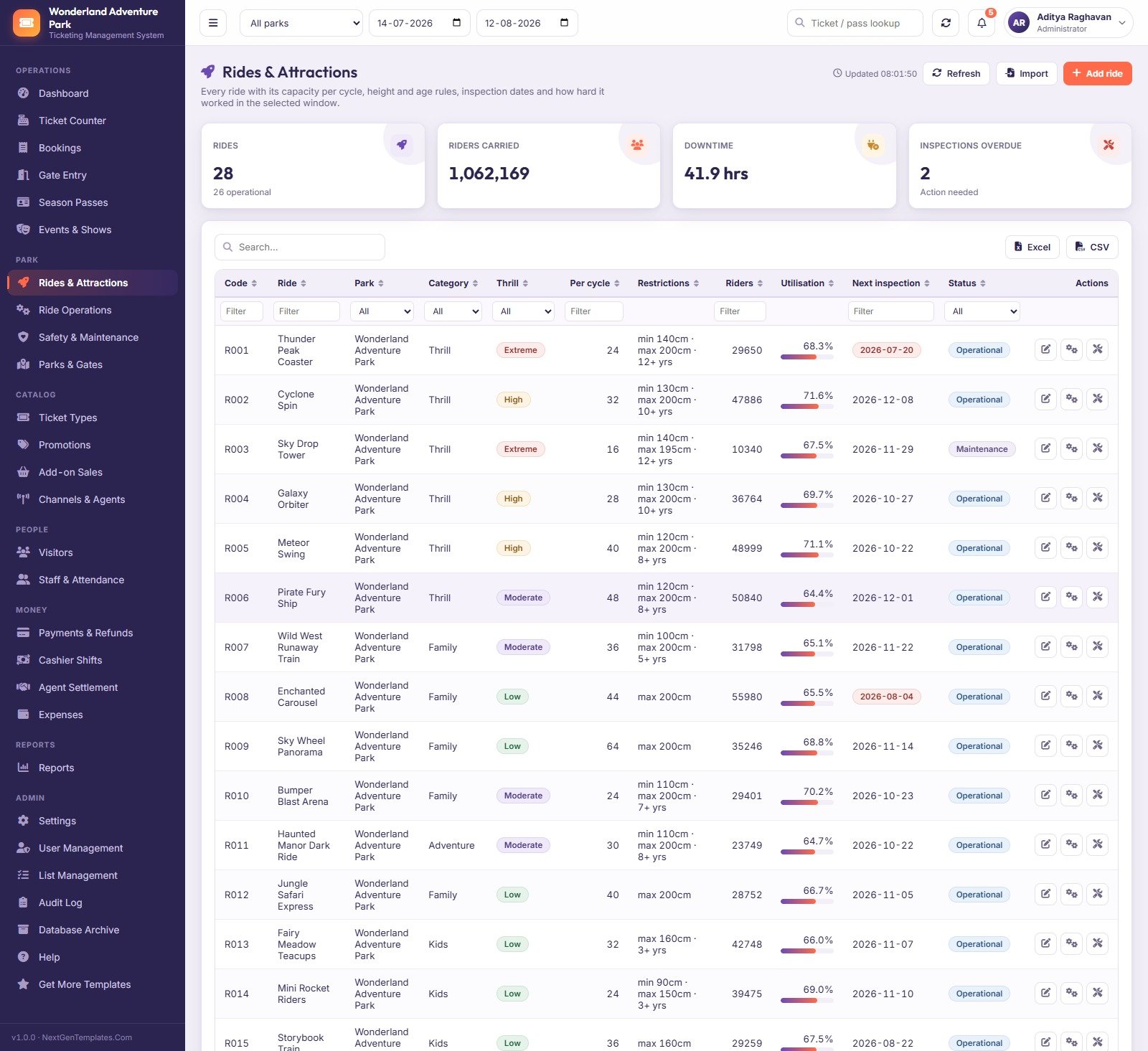
- Ride safety is first-class. Rides carry height and age rules, capacity per cycle and a next-inspection date that turns red when overdue; maintenance, statutory inspections and guest incidents each have their own register.
- Honest cash reconciliation. A shift recomputes its takings from the payments actually recorded on that counter, then shows the variance against the counted drawer – the demo shows 13 shifts short by a net 600.
- Agent commission that settles. Channels carry a commission percentage and a settlement cycle; the Agent Settlement screen rolls a month per agent and marks it paid.
- Everything is logged. Every create, update, delete, approval and sign-in lands in the Audit Log with the user, module, record and a plain-English detail line.
- No code needed to change behaviour. Ten Settings tabs and a List Management screen hold 51 settings and 198 dropdown values, so currency, tax, capacity mode, print sizes, theme and session timeout are all edits, not rewrites. Amusement Park Ticketing Management System Web App
What’s Inside the Amusement Park Ticketing Management System Web App
2. Dashboard
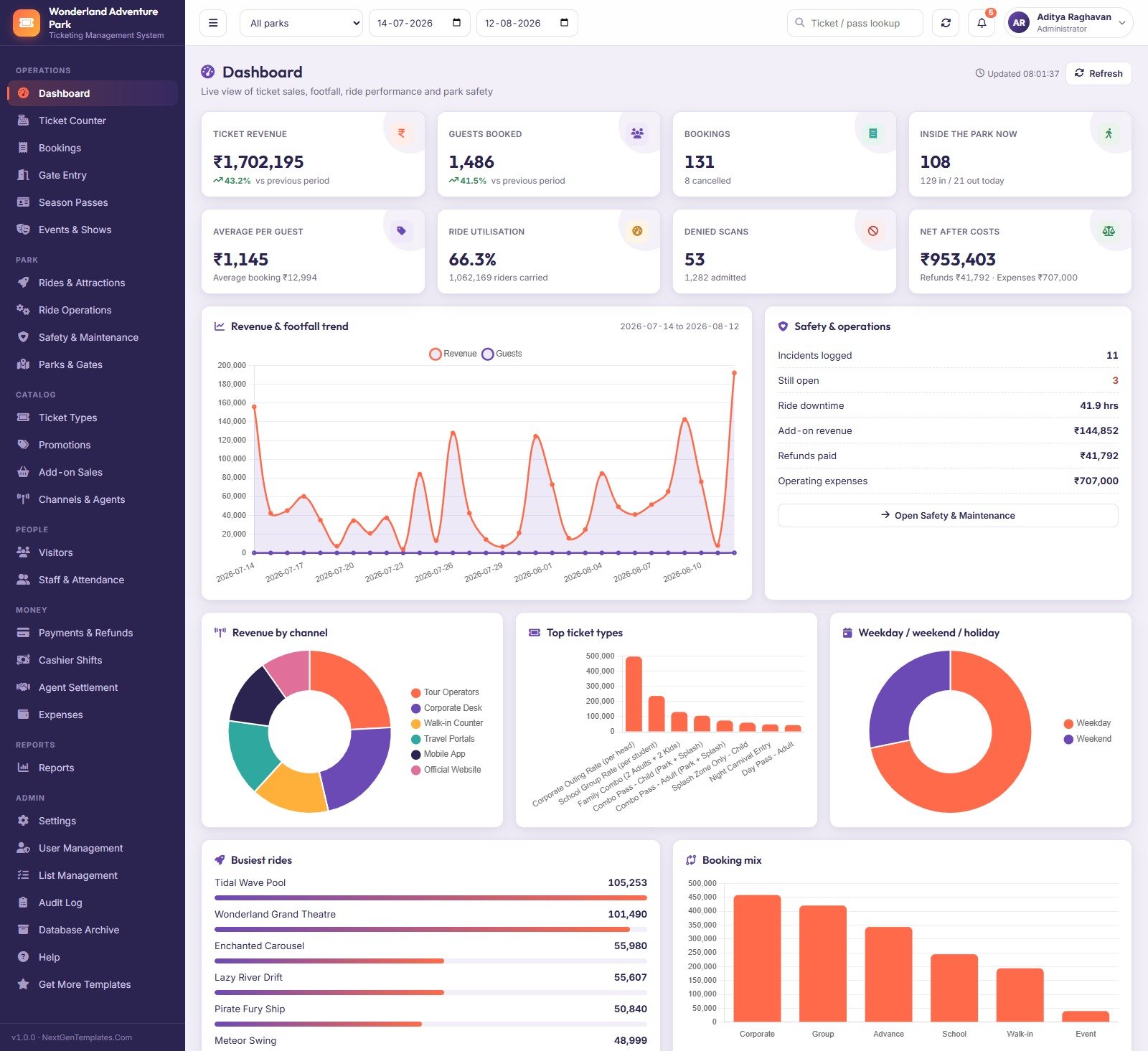
Eight KPI cards over the selected park and date range – ticket revenue, guests booked, bookings, live occupancy, average per guest, ride utilisation, denied scans and net after costs – above a revenue-and-footfall trend, revenue by channel, top ticket types, weekday versus weekend mix, busiest rides and booking mix. A Safety and operations panel sits alongside with incidents logged, still open, ride downtime hours and refunds paid. Amusement Park Ticketing Management System Web App
3. Ticket Counter
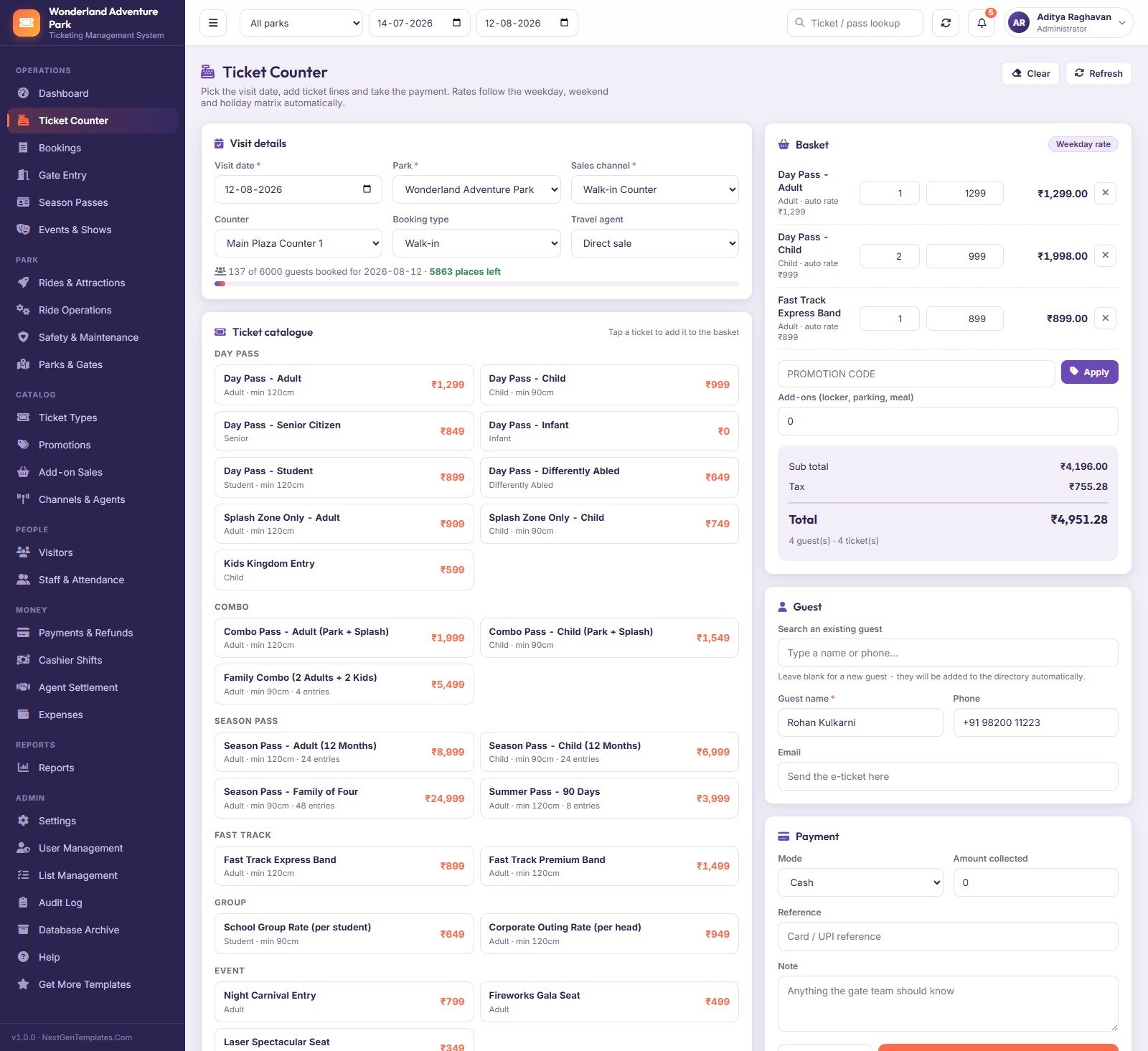
The selling screen. Pick the visit date, park, sales channel, counter and booking type, tap tickets out of a catalogue grouped into Day Pass, Combo, Season Pass, Fast Track, Group and Event, then take the payment. A capacity strip reads 137 of 6000 guests booked – 5863 places left, and the basket shows sub total, tax and total with the rate band it used. Amusement Park Ticketing Management System Web App
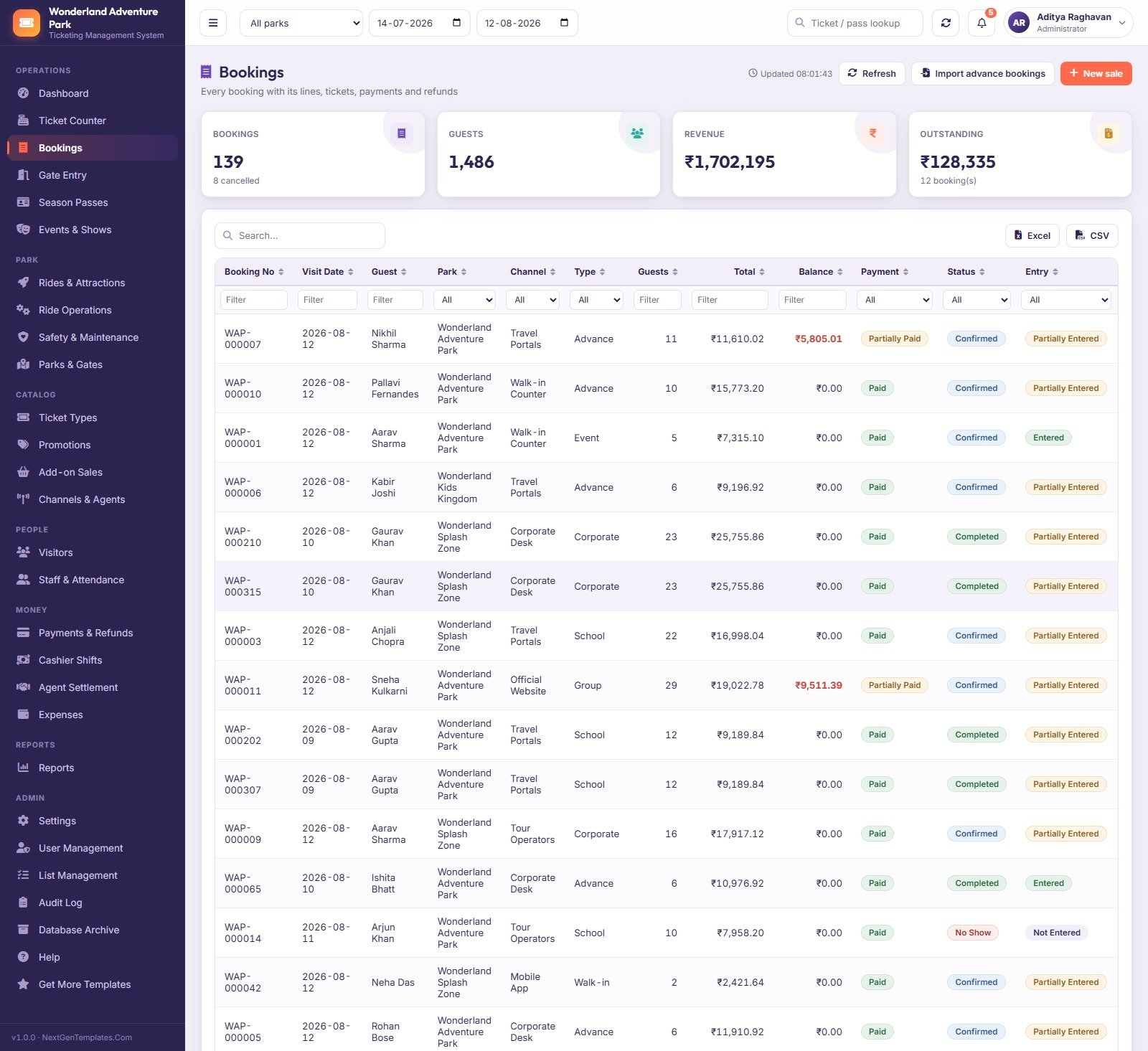
4. Bookings
Every booking with its lines, issued tickets, payments, refunds and gate history. Filter by channel, type, payment state, booking status and entry state; cancel with a reason; import advance bookings; export to Excel or CSV. Outstanding balances are called out in red so nothing walks in unpaid by accident.
5. Gate Entry
Built for a turnstile. Choose the gate and direction, scan or type the code, and the verdict panel answers immediately. A barcode scanner that ends with Enter works straight away, and F3 jumps back to the scanner from anywhere in the app. Recent scans list time, ticket, gate, direction, result, reason and operator.
6. Season Passes
Issue, renew, block, unblock and print passes. Each row carries the holder, pass type, validity window, an entries-used progress bar and a status of Active, Blocked, Exhausted or Expired. The header tracks passes issued, active, expiring in 30 days and pass revenue.
7. Rides & Attractions
Every ride with its code, park, category, thrill level, riders per cycle, minimum and maximum height, age limit, riders carried, utilisation, next inspection date and operational status. Overdue inspection dates render in red, and rides under maintenance are flagged so the counter stops promising them.
8. Safety & Maintenance
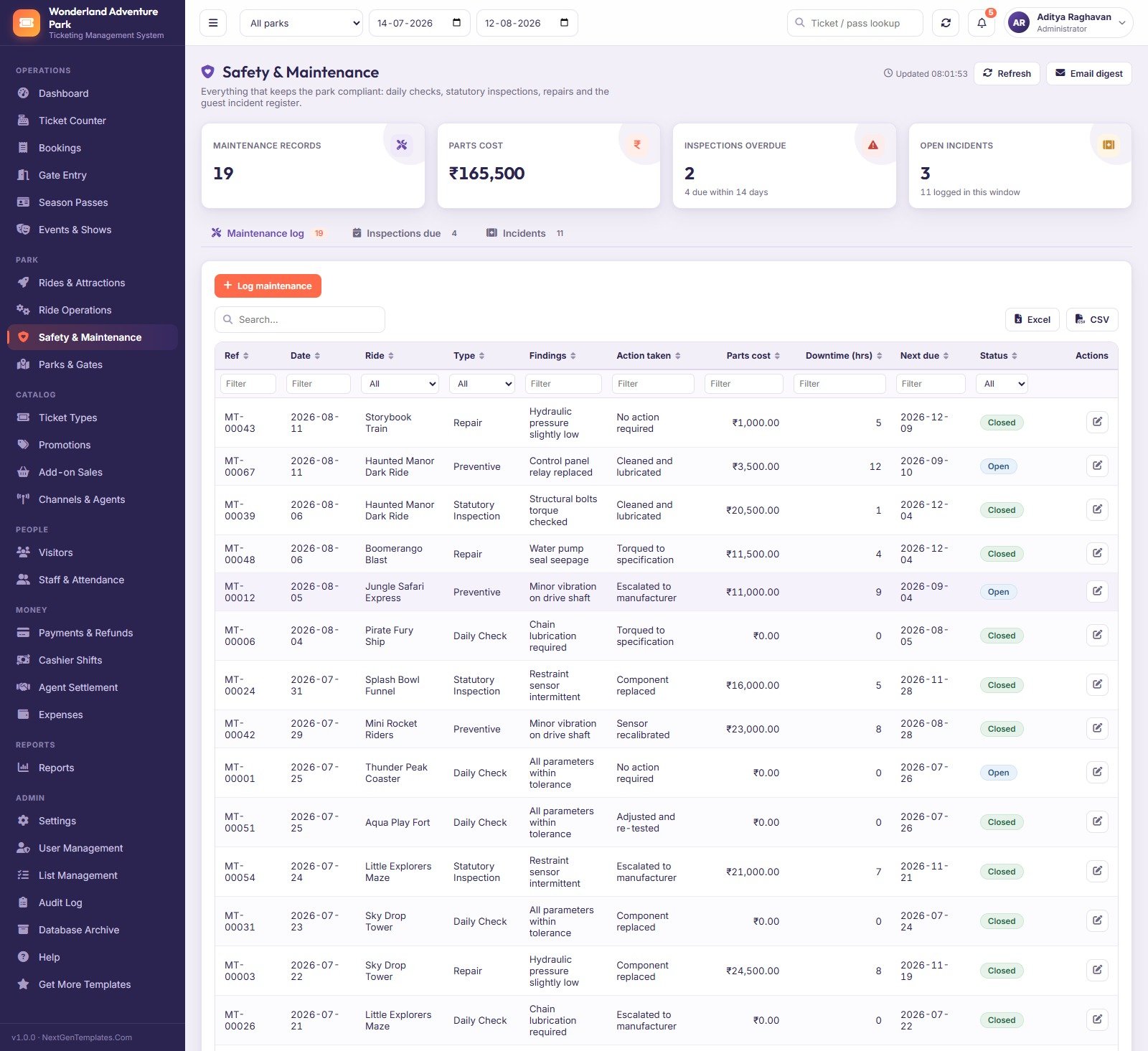
Three registers behind one screen: the maintenance log with findings, action taken, parts cost and downtime hours; inspections due; and the guest incident register. The header counts maintenance records, parts cost, overdue inspections and open incidents, and an Email digest button sends the summary out.
9. Reports
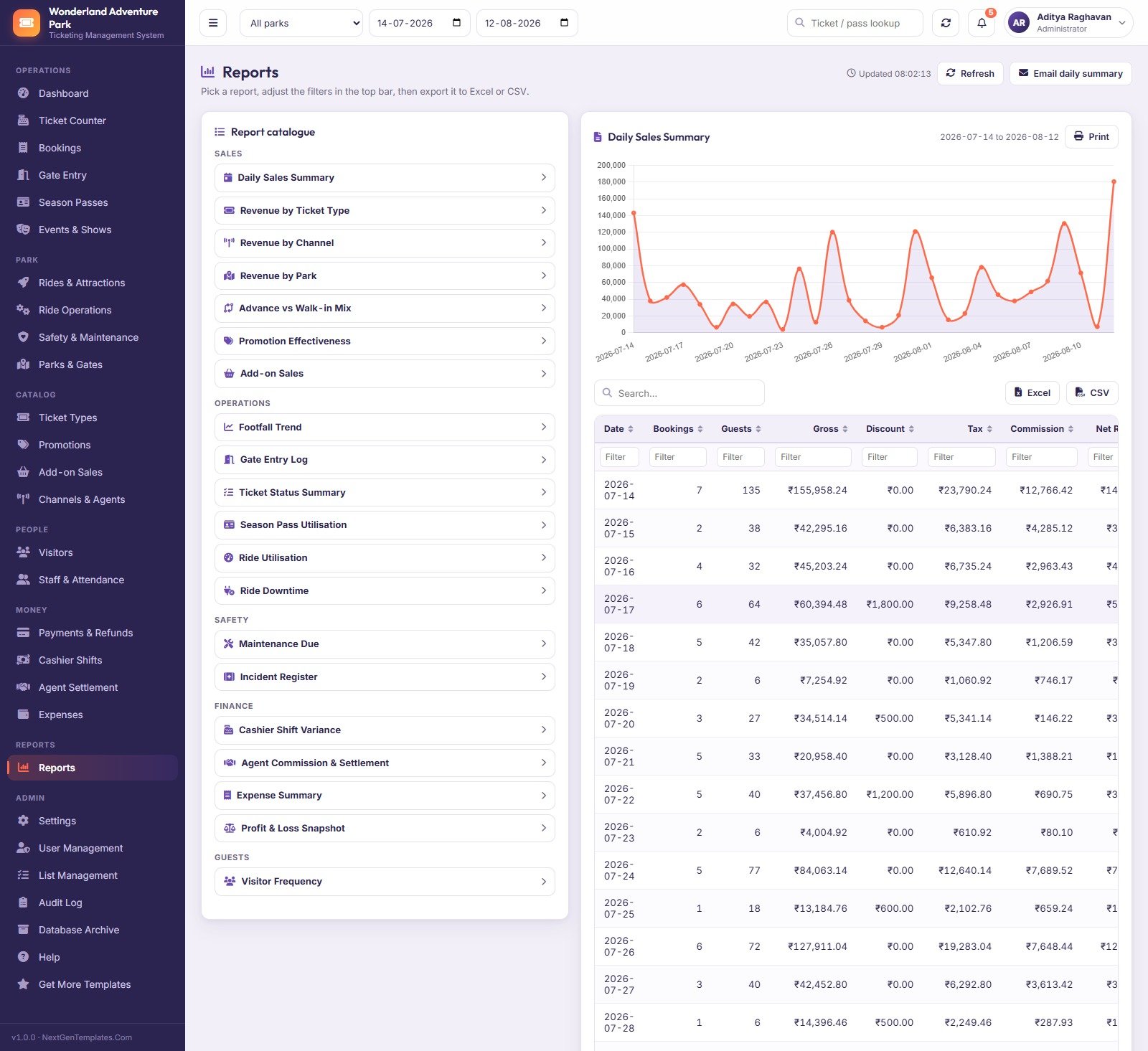
Twenty reports in a catalogue down the left, results and a chart on the right, all obeying the park and date range in the top bar. Sales covers daily summary, revenue by ticket type, channel and park, advance versus walk-in mix, promotion effectiveness and add-on sales. Operations, Safety, Finance and Guests carry the rest. Every one prints or exports.
10. Settings
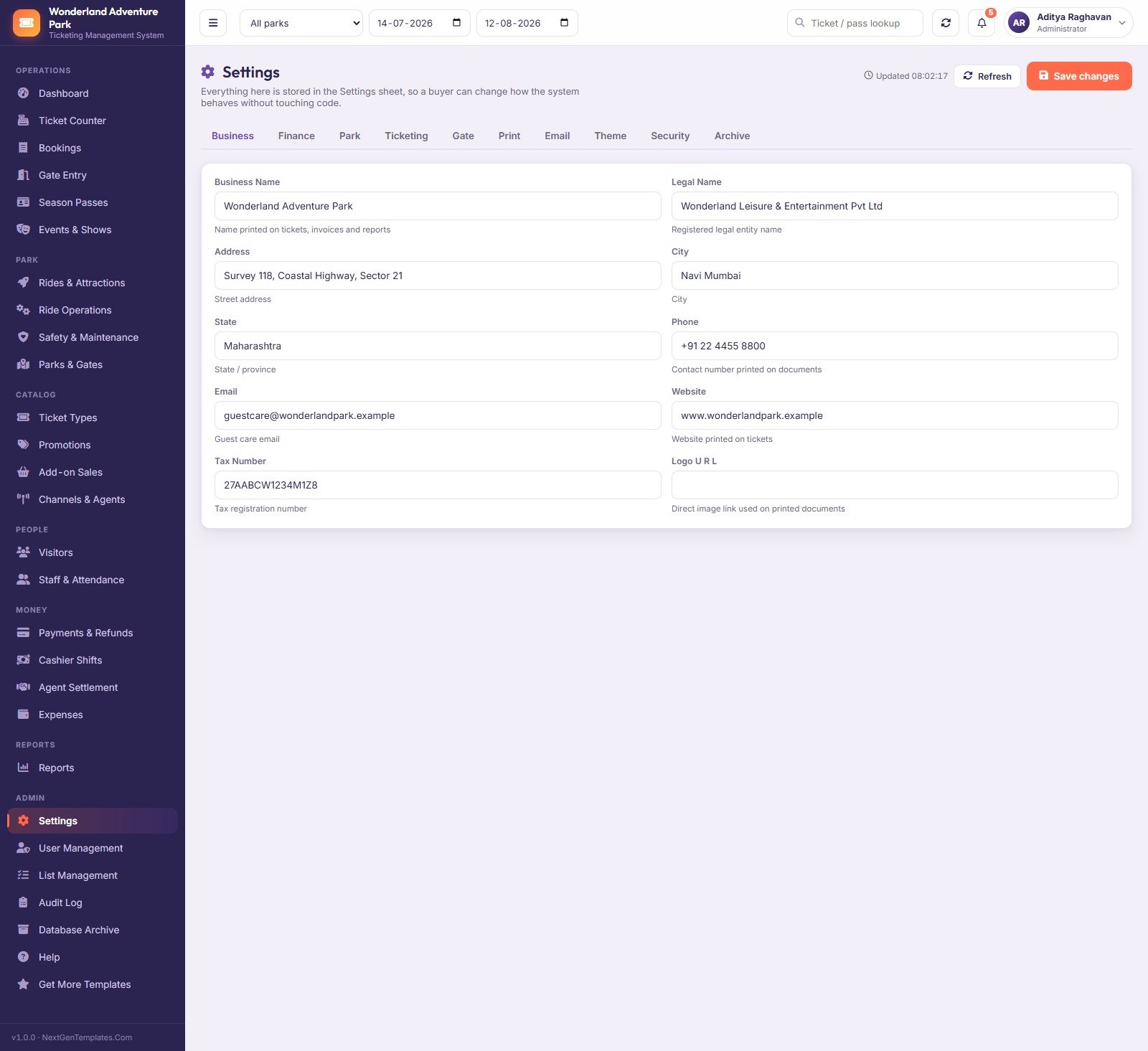
Ten tabs – Business, Finance, Park, Ticketing, Gate, Print, Email, Theme, Security and Archive – holding 51 stored settings. Business profile, currency, tax rate, capacity mode, ticket print sizes, session timeout and the failed-login lockout all live here, in the Settings sheet, so a buyer changes behaviour without touching code.
The other twelve screens
Events & Shows schedules parades, stunt shows, fireworks and festivals with their own seat capacity and fill percentage. Ride Operations logs one row per ride per shift – cycles run, riders carried, fast-track riders and downtime with a reason. Parks & Gates holds the physical structure: parks with daily capacity, gates, themed zones and selling counters. Ticket Types is the pricing matrix itself. Promotions stores percent or flat codes with a minimum spend, a cap, a validity window, a channel restriction and a usage limit the server enforces. Add-on Sales covers lockers, parking, meals, merchandise, photos, rentals and cabanas. Channels & Agents sets commission and settlement cycles. Visitors is the guest directory with visit count, lifetime spend and tags such as VIP, Frequent and Lapsed. Staff & Attendance holds the team plus a month grid you mark in one save. Payments & Refunds splits into receipts, outstanding balances and refunds awaiting approval. User Management creates accounts and tunes the permission map per role. Database Archive copies the whole database to Drive first, then moves only closed transactions past your cutoff date – master data always stays put. Amusement Park Ticketing Management System Web App
Web App vs. a Google Sheets Tracker vs. Paid Ticketing SaaS – Where This Fits
| This Web App | A Google Sheets tracker | Paid ticketing SaaS | |
|---|---|---|---|
| Cost | One payment, yours to keep | Free to cheap | Per-ticket fee or monthly seat pricing |
| Platform | Google Apps Script web app over Google Sheets | Google Sheets | Vendor cloud |
| Setup time | About 15 minutes, guided | Minutes | Days to weeks, often with onboarding |
| Real-time team collaboration | Yes – concurrent users, per-role menus | Yes, but everyone sees everything | Yes |
| Mobile access | Yes – responsive browser app | Sheets app, awkward for selling | Yes, usually a native app |
| Customizable fields | Yes – Settings plus 198 editable list values, and the source code | Yes | Only what the vendor exposes |
| Share with link | Yes – your own /exec URL | Yes | Vendor-hosted URL |
| Year-1 cost at 5 users | The purchase price, once | Effectively nothing | Commonly four figures plus per-ticket commission |
| Gate scanning with a verdict | Yes, with reason codes and an entry log | No | Yes |
| Cash drawer variance | Yes – recomputed from real payments | Manual | Usually yes |
| Who owns the data | You – it is a spreadsheet in your Drive | You | The vendor |
Who This Template Is For – and Who It’s Not For
It fits small and mid-size amusement parks, water parks, kids’ play zones, adventure and trampoline parks, zoos and aquariums, museums and heritage sites, fairs and carnivals – anywhere you sell timed or dated admission, scan people through a gate, run attractions on a rota and reconcile a cash drawer at the end of the day. It also fits an operator who is currently running all of that on a pile of spreadsheets and wants one console with roles. Amusement Park Ticketing Management System Web App
It is not for you if you need certified payment processing inside the app – this records how a payment was taken, it does not take the card. It is not a turnstile hardware integration: it validates codes you scan into it, but it does not drive a physical barrier out of the box. It does not issue government-mandated e-invoices, does not perform statutory ride certification, and makes no safety, insurance or regulatory compliance claim. It also will not suit a park selling millions of tickets a month – Google Sheets is a fine database for a few hundred thousand rows, not tens of millions. If any of those are dealbreakers, buy something else; we would rather say so here than in your inbox. Amusement Park Ticketing Management System Web App
How to Use the Amusement Park Ticketing Management System Web App
- Try the demo first. Open the live demo above and sign in as
gate, then asadmin. Ten seconds of that contrast tells you whether the permission model is what you want. - Deploy your own copy. Unzip the download, create a Google Sheet, open Extensions > Apps Script, paste Code.cs.txt into Code.gs and Index.txt into an HTML file named exactly
Index. Save, reload the sheet. - Build the database. Use the Park Ticketing menu > Setup / Repair Database. It creates 34 sheets and seeds the demo rows in stages, so a free Gmail account’s 6-minute script limit cannot break it – it saves its place and carries on.
- Publish the web app. Deploy > New deployment > Web app, Execute as Me, access Anyone, and accept the permission prompt. Open the URL and sign in as admin.
- Make it yours. Settings for the business profile, currency, tax and capacity mode; Parks & Gates for your real parks, gates, zones and counters; Ticket Types for your price matrix.
- Change every password in User Management, then clear the seeded transactions before you sell a real ticket. Reseed Demo Data is there if you want the sample rows back for training.
Real-World Use Cases
Meera runs a three-gate water park. Weekend rates are 300 higher than weekday and her counters kept charging the wrong one. The rate matrix now decides for them, and the Advance vs Walk-in Mix report told her that corporate desk bookings were 23% of guests but 40% of unpaid balances – so she moved that channel to prepaid.
Karan is a ticket officer on a school-group morning. Twenty-two students on one booking, one scan code per head. He sells the group at the school rate, the capacity strip stops him overselling the day, and the gate team admits the students one at a time while the booking’s entry status moves from Not Entered to Partially Entered to Entered.
Vivek closes the month for a small park group. He does not touch operational records – his role will not let him – but he approves the refund queue, exports the Cashier Shift Variance report to find the 13 short drawers, rolls up agent commission for the month and pays it, then pulls the Profit & Loss Snapshot with expenses already netted off.
Frequently Asked Questions
Can I try it before buying?
Yes. The live demo above is a real deployment with the full seeded database. Sign in with any of the five accounts and use it exactly as a buyer would. The demo resets periodically, so treat anything you type there as temporary.
Do I need to know how to code?
No. Deployment is copy, paste, save and deploy – about 15 minutes with the included guide. Day-to-day changes such as currency, tax, print sizes, dropdown values and role permissions are all screens, not code. The source is included if you or a developer want to go further.
Does it take card payments?
No. It records the payment mode, amount and reference – cash, card, UPI, wallet, net banking – so the drawer reconciles. It is not a payment gateway and it is not PCI-certified. Keep using your existing card terminal or gateway alongside it.
Will it make my park compliant with ride safety regulations?
No. It is a record-keeping tool. It stores inspection dates, maintenance findings, downtime and incidents so you can see them in one place, but it performs no certification, issues no statutory approval, and satisfies no specific safety standard on your behalf. Your inspection regime remains your responsibility. Amusement Park Ticketing Management System Web App
How many users and how much data can it handle?
It ships with 5 seeded users and 5 roles and you can add more. The demo database is about 13,000 rows across 34 sheets and stays responsive; the Database Archive screen exists precisely so you can move closed transactions out to a dated copy in Drive as volume grows. For a small-to-mid park this is comfortable – for a national chain selling millions of tickets, it is not the right tool.
Can I rebrand it and change the colours?
Yes. Settings > Business sets the name, address, contact details and logo URL printed on tickets and reports; Settings > Theme changes the look. Because you own the source, deeper restyling is possible too – and we will restyle it for you if you would rather not. Amusement Park Ticketing Management System Web App
What exactly is in the download?
A ZIP containing Code.cs.txt (the full Apps Script backend), Index.txt (the entire front end) and the printed user manual as a PDF. No licence key, no phone-home, no expiry.
About the Author
Built by PK – Microsoft Certified Professional with 15+ years of Excel, Google Sheets, and Power BI experience. Founder of NextGenTemplates, reaching 300K+ subscribers across YouTube channels. Every template is hand-built and tested before release. Amusement Park Ticketing Management System Web App
Explore Related Templates
- Adventure Sports Booking Management System Web App – the closest sibling: slot-based activity booking, waivers and instructor rosters instead of gates and rides.
- Airport Transfer Management System Web App – useful if you run or contract guest shuttles to the park.
- Cafeteria and Canteen Management System Web App – for the food courts that sit behind the gate.
- Banquet Hall Management System Web App – for the party and corporate-event side of a leisure venue.
- Browse every system in the Web Apps category. Amusement Park Ticketing Management System Web App
Ready to run the gate from one screen? Launch the live demo, sign in as gate and then as admin, and see the role separation for yourself. If it fits, the download gives you the whole system – source code, manual and deployment guide – to deploy privately in your own Google account today. Questions or customisation: [email protected]. Amusement Park Ticketing Management System Web App
Last updated: 17 August 2026.































Reviews
There are no reviews yet.