

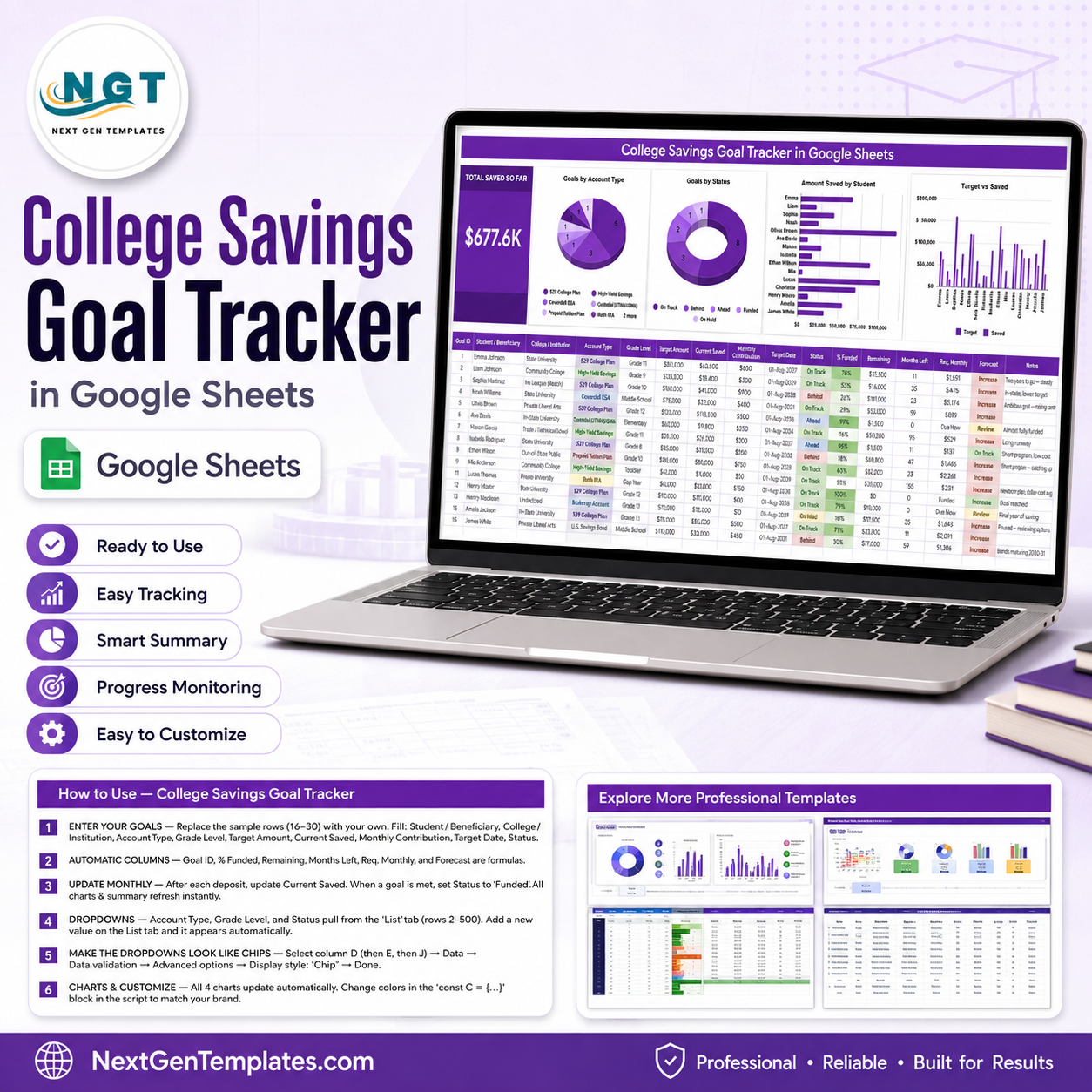
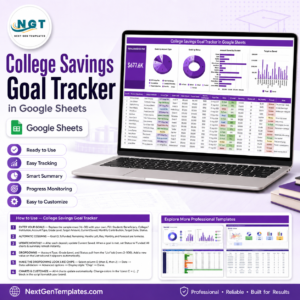
The College Savings Goal Tracker in Google Sheets tracks a college fund per child across 16 columns, of which 6 calculate themselves, and drives 4 charts plus one headline card from a single tab. The sample file carries 15 goals and shows $677.6K saved so far. Setup takes under 10 minutes: replace sample rows 16 to 30 with your own children, and every card, chart, percentage and forecast updates as you type.
🌍 Join 8,400+ teams in 40+ countries using NextGenTemplates to replace paid SaaS tools with one-time-purchase Excel, Google Sheets, Power BI, and HTML templates.
✅ Instant download · One-time payment · No subscription · No per-user fees · Lifetime access
🔑 Key Features of the College Savings Goal Tracker
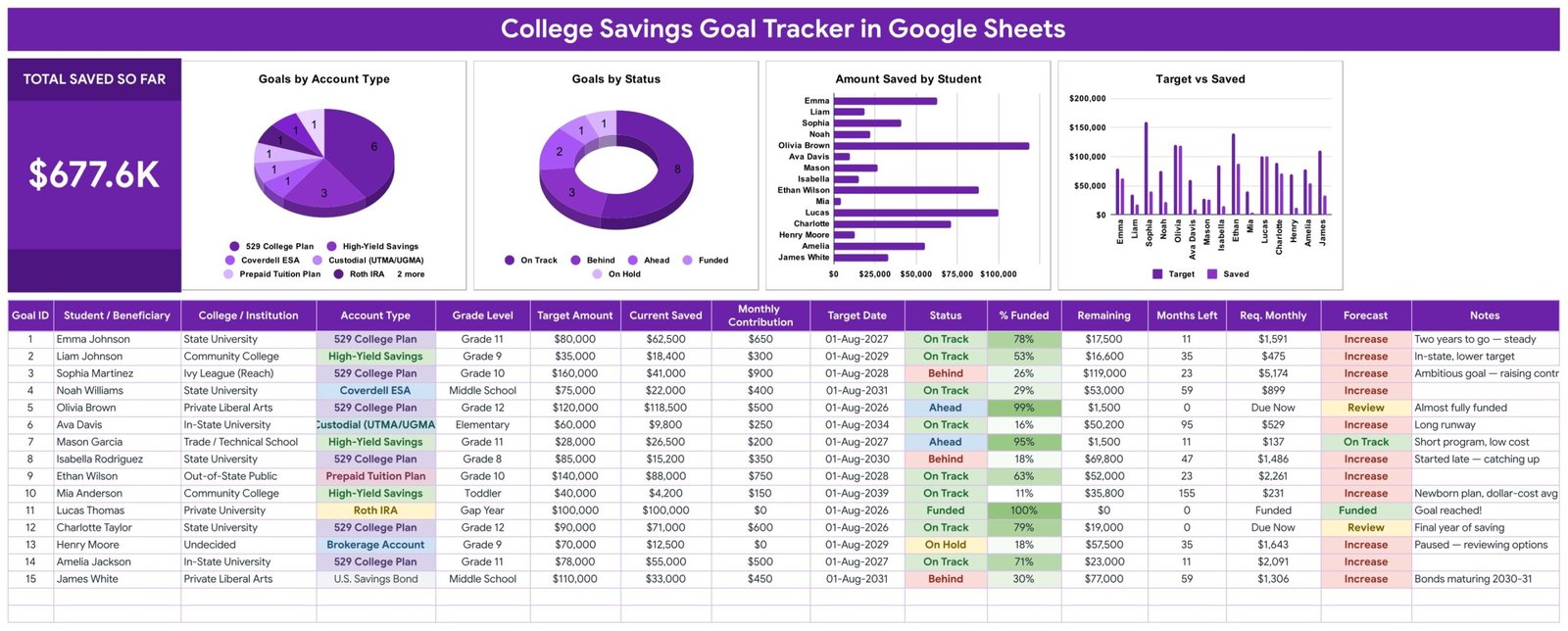
💰 One headline card. The Total Saved So Far card sums the Current Saved column for every beneficiary in the table. In the sample data it reads $677.6K across 15 goals, and it re-adds the moment you log a deposit.
🧮 Six columns you never type. Goal ID, % Funded, Remaining, Months Left, Req. Monthly and Forecast are formulas. You enter nine facts per child — Student / Beneficiary, College / Institution, Account Type, Grade Level, Target Amount, Current Saved, Monthly Contribution, Target Date and Status — and the tracker works out the rest.
📅 Required monthly savings, calculated. Req. Monthly divides what is still Remaining by the Months Left until the Target Date. In the sample, Sophia Martinez needs $5,174 a month to reach a $160,000 Ivy League target by August 2028, while Mason Garcia needs only $137 to finish a trade-school goal that is already 95% funded.
🚦 Forecast tells you the truth. The Forecast column compares your current Monthly Contribution against Req. Monthly and prints On Track, Increase, Review or Funded. It is the column that turns a spreadsheet into a decision.
🏦 Eight account types out of the box. 529 College Plan, Coverdell ESA, Custodial (UTMA/UGMA), Prepaid Tuition Plan, Roth IRA, High-Yield Savings, Brokerage Account and U.S. Savings Bond — colour-coded in the Account Type column and split out in the pie chart.
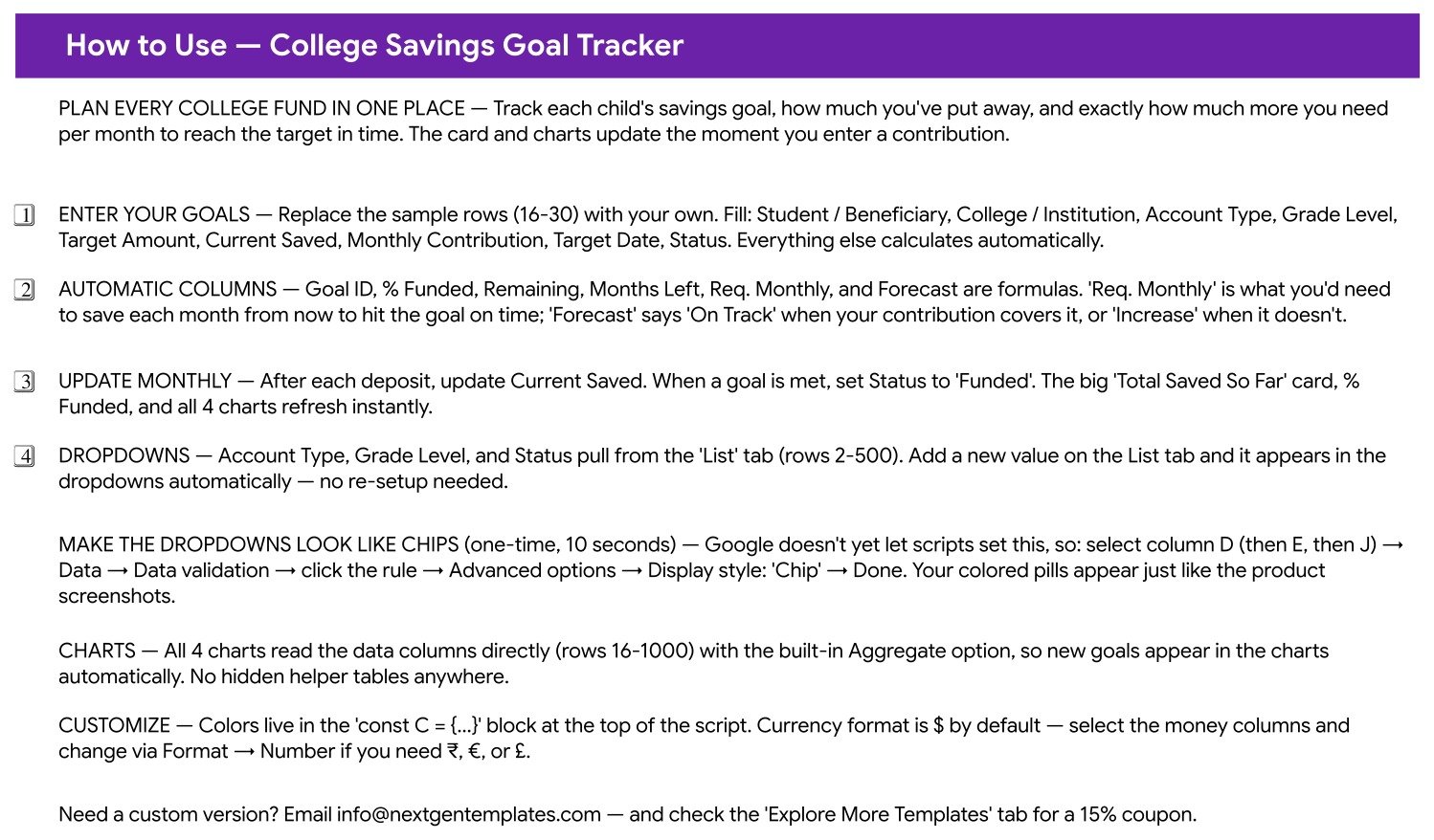
🔽 Dropdowns that grow themselves. Account Type, Grade Level and Status read the List tab from row 2 to row 500. Add a value there and it appears in the dropdown immediately — no re-setup, no named ranges to edit.
📈 Charts bound to the data, not to helper tables. All 4 charts read the goal columns directly for rows 16 to 1000 using the built-in Aggregate option. There are no hidden pivot sheets anywhere in the file, so a new goal on row 31 shows up in every chart on its own.
📦 What’s Inside the College Savings Goal Tracker
Three sheets ship in the file: the one-page tracker, a How to Use guide, and an Explore More Templates page, plus a hidden-in-plain-sight List tab that feeds the dropdowns.
Page 1: College Savings Goal Tracker
The working page. It carries the Total Saved So Far card, four charts — Goals by Account Type, Goals by Status, Amount Saved by Student, and Target vs Saved — and the 16-column goal table underneath with 15 sample beneficiaries. Status values run On Track, Behind, Ahead, Funded and On Hold, and the % Funded, Status and Forecast columns are conditionally coloured so problems stand out at a glance.
Page 2: How to Use
A four-step setup guide written into the file itself: enter your goals, understand the automatic columns, update Current Saved monthly, and extend the List tab dropdowns. It also explains the one-time 10-second step that turns the dropdowns into coloured chips, and where the colour palette lives if you want to rebrand the tracker.
Page 3: Explore More Templates
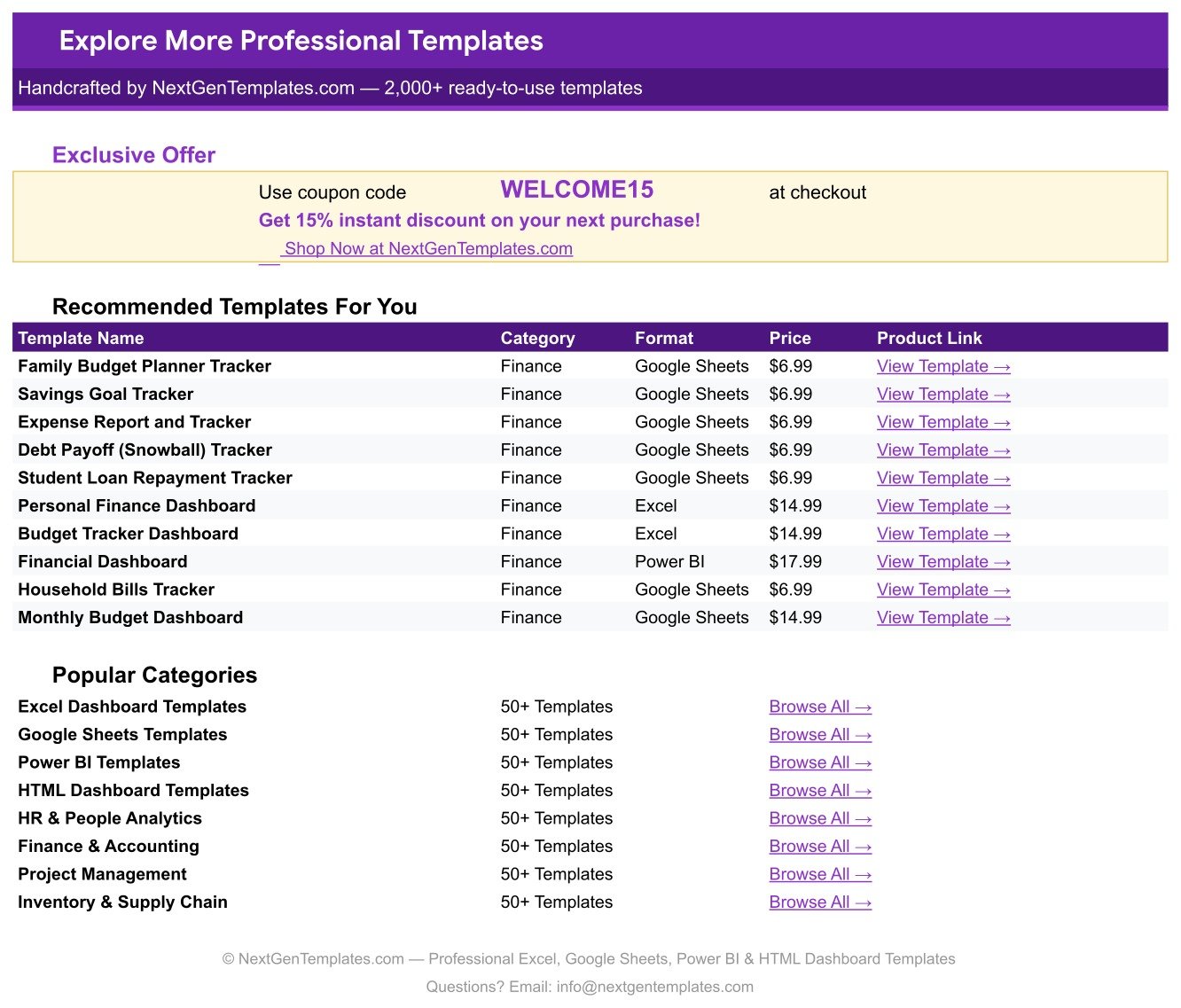
A curated list of ten related finance templates with prices and direct product links, the popular category shortcuts, and a WELCOME15 coupon worth 15% off your next purchase at NextGenTemplates.com.
📊 College Savings Goal Tracker vs. a Microsoft Excel Workbook vs. Paid Savings Apps — Where This Fits
| Feature | College Savings Goal Tracker in Google Sheets | Microsoft Excel workbook | Monarch Money / Empower / YNAB |
|---|---|---|---|
| Cost | $6.99 one-time ✅ | $8.25 / user / month for Microsoft 365 | $8.99-$14.99 / month |
| Platform | Google Sheets, browser or mobile app ✅ | Desktop Excel, file per person | Vendor web app |
| Setup time | Under 10 minutes ✅ | Hours if you build the formulas yourself | 30-60 minutes plus bank linking |
| Real-time collaboration with a partner | Yes, both edit at once ✅ | Only via OneDrive co-authoring | Extra seat or shared login |
| Mobile access | Free Google Sheets app ✅ | Excel mobile, subscription required | Yes |
| Per-child goal with its own target date | Yes, one row per beneficiary ✅ | Manual to build | Rarely modelled per child |
| 529 / ESA / UTMA account-type breakdown | Built in, 8 account types ✅ | Manual | Aggregated, not goal-level |
| Customisable fields and colours | Every column and colour is yours ✅ | Yes | No |
| Year-1 cost at 5 users | $6.99 total ✅ | $495 | $540-$900 |
For families that want a clear, shareable college-fund plan without handing a budgeting app their bank logins, the College Savings Goal Tracker sits in the sweet spot.
👥 Who This Template Is For — and Who It’s Not For
✅ This template is built for:
- Parents saving for one to ten children across 529 plans, ESAs, custodial accounts or plain high-yield savings
- Grandparents and guardians who contribute to a fund and want to see progress without asking anyone for a statement
- Couples who want a single shared sheet instead of two versions of the same spreadsheet
- Financial coaches and fee-only planners who need a simple client-facing college-funding worksheet
❌ This template is NOT for:
- Anyone wanting automatic bank or brokerage syncing — balances are typed in, usually once a month
- Investment return modelling with market growth assumptions, rebalancing or tax-lot tracking
- Advisory firms needing audit trails, permissions and compliance archiving across hundreds of clients
⚙️ How to Use the College Savings Goal Tracker
- Open the PDF in your download and click the Make a Copy link to create your own Google Sheets copy.
- Replace sample rows 16 to 30 with your own children, colleges and target amounts.
- Fill the nine input columns: Student, College, Account Type, Grade Level, Target Amount, Current Saved, Monthly Contribution, Target Date and Status.
- Add your own account types, grade levels or statuses on the List tab and they appear in the dropdowns.
- Update Current Saved after each deposit; the card, % Funded and all 4 charts refresh instantly.
- Read the Forecast column each month and raise the Monthly Contribution wherever it says Increase.
- Set Status to Funded once a goal is reached, so the Goals by Status chart stays honest.
💼 Real-World Use Cases
Priya and Dev have two children, eight years apart. Their older daughter has a $120,000 private-college goal that is 99% funded, while the toddler’s 529 sits at 11%. The Target vs Saved chart shows the gap instantly, so they redirect the older child’s monthly $500 to the younger one the month the first goal flips to Funded.
Marcus is a grandparent funding a Coverdell ESA. He does not manage the family budget, so he keeps a view-only link to the tracker and checks the Amount Saved by Student chart twice a year to decide whether his annual gift needs to go up.
Elena coaches families on education funding. She copies the tracker for each household, fills in the target date and current balance, and uses the Req. Monthly column as the single number the conversation is about — no software licence, no client onboarding.
❓ Frequently Asked Questions
What does the College Savings Goal Tracker actually calculate?
The College Savings Goal Tracker calculates six values per child: Goal ID, % Funded, Remaining, Months Left, Req. Monthly and Forecast. Req. Monthly is the amount you must save each month from today to reach the Target Amount by the Target Date.
Which college savings account types are supported?
Eight are included in the dropdown: 529 College Plan, Coverdell ESA, Custodial UTMA/UGMA, Prepaid Tuition Plan, Roth IRA, High-Yield Savings, Brokerage Account and U.S. Savings Bond. You can add more on the List tab and the College Savings Goal Tracker picks them up automatically.
How long does setup take?
Under 10 minutes. Copy the sheet from the link in the PDF, delete the 15 sample rows, and type your own goals. There are no named ranges, pivot tables or scripts to configure in the College Savings Goal Tracker.
How does this compare to Monarch Money or Empower?
Those apps aggregate accounts but rarely model a per-child target date and required monthly contribution. The College Savings Goal Tracker costs $6.99 once instead of $8.99 to $14.99 a month, and no bank credentials ever leave your Google account.
Will the charts update when I add more children?
Yes. Every chart in the College Savings Goal Tracker reads rows 16 to 1000 of the data columns with the built-in Aggregate option, so a goal added on row 31 appears in all four charts with no range editing.
Can I change the currency from dollars?
Yes. Select the money columns and use Format then Number to switch to rupees, euros or pounds. Every formula in the College Savings Goal Tracker is currency-agnostic.
Can my partner edit it at the same time?
Yes. Share the file from Google Drive and both of you can edit simultaneously on desktop or the free mobile app, with no extra seat fee.
👤 About the Author
Built by PK — Microsoft Certified Professional with 15+ years of Excel, Google Sheets, and Power BI experience. Founder of NextGenTemplates, reaching 300K+ subscribers across YouTube channels (@PK-AnExcelExpert, @NextGenTemplates, @NeoTechNavigators). Every template is hand-built and tested before release.
🔗 Explore Related Templates
College is one line in a bigger plan. The Retirement Savings Tracker in Google Sheets runs the same goal-and-forecast logic for your own retirement, and the Student Loan Repayment Tracker in Google Sheets picks up on the day the tuition bills stop and the repayments start.
For the household layer, pair this with the Annual Family Budget Tracker in Google Sheets to find the monthly contribution in the first place, or the Kids Allowance and Chores Money Tracker to teach the children saving alongside you. Browse the full Google Sheets Dashboards and Trackers collection for more.
📖 Click here to read the Detailed Blog Post
🎥 Visit our YouTube channel for step-by-step video tutorials
👉 YouTube.com/@NextGenTemplates
Watch the step-by-step video Demo:
📅 Last updated: August 2026





























Reviews
There are no reviews yet.