

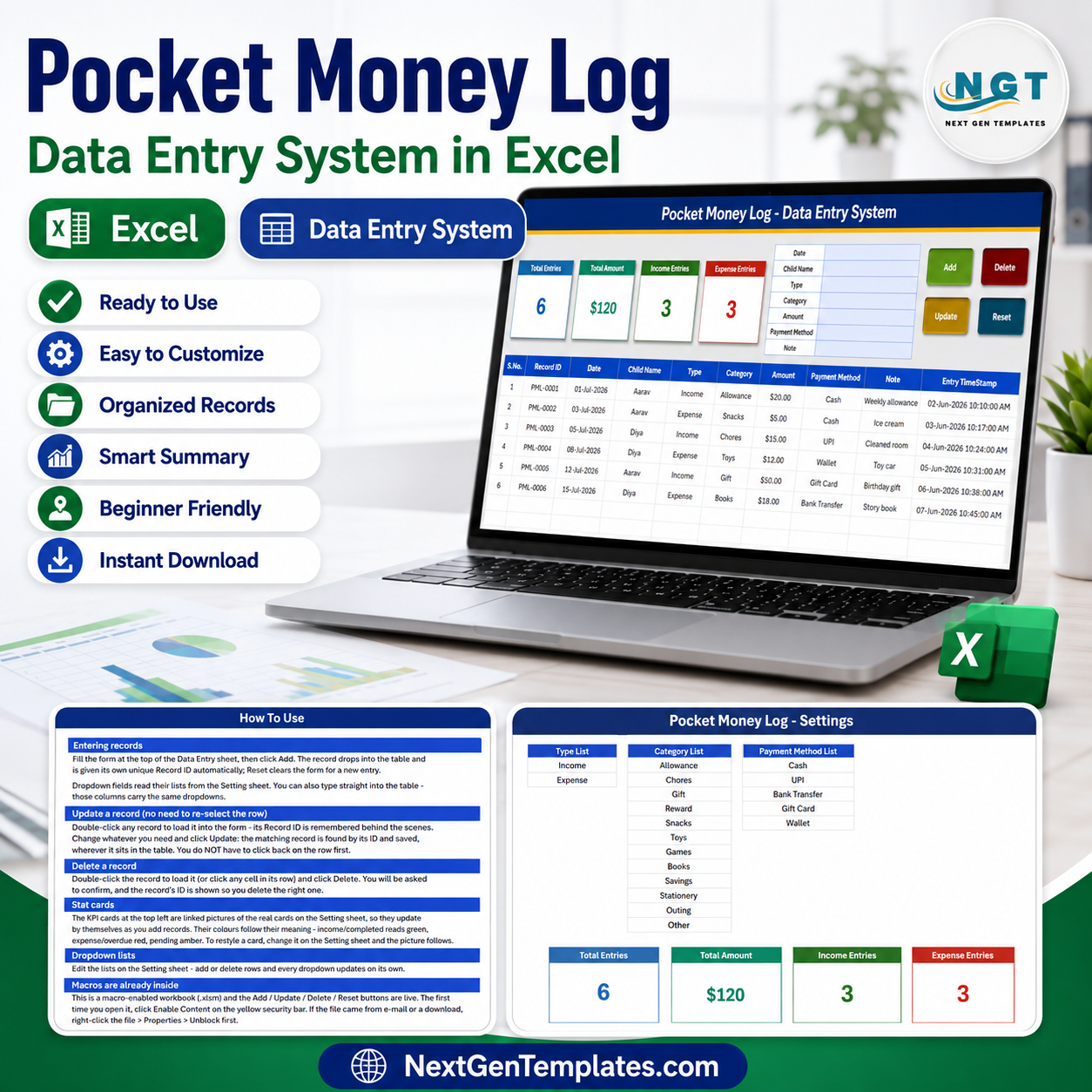
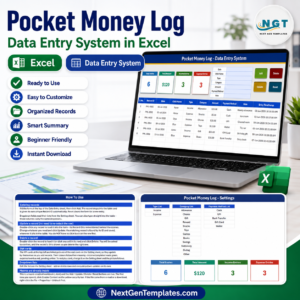
The Pocket Money Log Data Entry System in Excel captures 6 fields per record — Date, Person, Given, Spent, Purpose and Balance — across 4 sheets, driven by 4 one-click VBA buttons and 3 live KPI cards. Setup takes under 5 minutes: import one VBA module, save the file as .xlsm, and start logging. Every entry is numbered and time-stamped automatically.
🌍 Join 8,400+ teams in 40+ countries using NextGenTemplates to replace paid SaaS tools with one-time-purchase Excel, Google Sheets, Power BI and HTML templates.
✅ Instant download · One-time payment · No subscription · No per-user fees · Lifetime access
🔑 Key Features of the Pocket Money Log Data Entry System
🔹 Four VBA macros do all the work. Add writes the form to the next empty row, Update edits the selected record in place, Delete removes it after a confirmation prompt, and Reset clears the form. You never type into the records table directly, so column formats and formulas stay intact.
🔹 Three live KPI cards. Total Given, Total Spent and Balance sit beside the form and recalculate the instant a record is saved. The same three cards are duplicated on the Setting sheet so you can Copy → Paste Special → Linked Picture them anywhere in the workbook.
🔹 A Purpose dropdown you control. Spending categories such as Snacks, Stationery, Travel, Games, Gifts and Savings live on the Setting sheet and feed the form through a named range. Add a category there and it appears in the dropdown immediately — no formula editing.
🔹 Auto S.No and Entry TimeStamp. Row numbering runs on a formula that skips blanks, and every saved record carries the date and time it was entered. That gives you an audit trail of who was given what and when, which matters when two children share one file.
🔹 Currency-formatted money columns. Given, Spent and Balance are formatted as $ currency with a clean hair-grid table, so totals read correctly the moment data lands. Change the symbol once in the column format to switch to ₹, £ or €.
🔹 Fully offline. No account, no bank linking, no debit card, no KYC and no internet connection needed. The file lives on your computer and the data never leaves it — a meaningful difference when the money being tracked belongs to a child.
📦 What’s Inside the Pocket Money Log Data Entry System
Sheet 1: Data Entry Dashboard
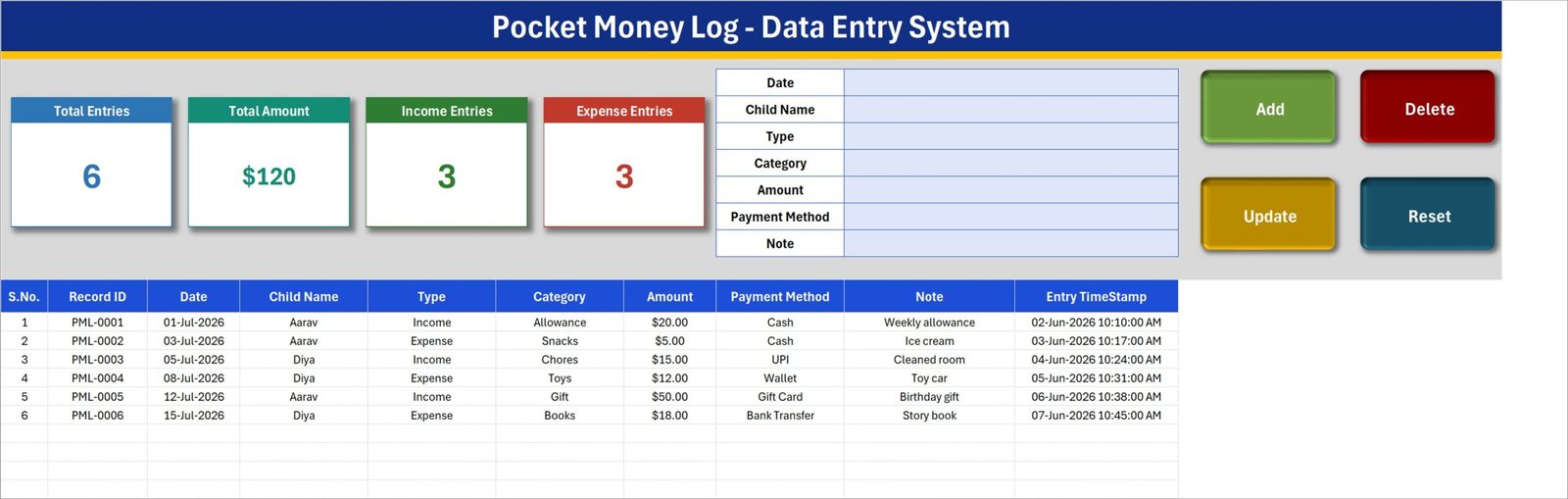
The main working screen. A gray dashboard panel holds the entry form — Date, Person, Given, Spent, Purpose and Balance — next to the three KPI cards for Total Given, Total Spent and Balance. Four coloured button cells sit in a 2×2 block below the form: Add (green), Delete (red), Update (gold) and Reset (dark blue). The records table starts at row 15 with S.No, all six fields and an Entry TimeStamp column.
Sheet 2: Setting
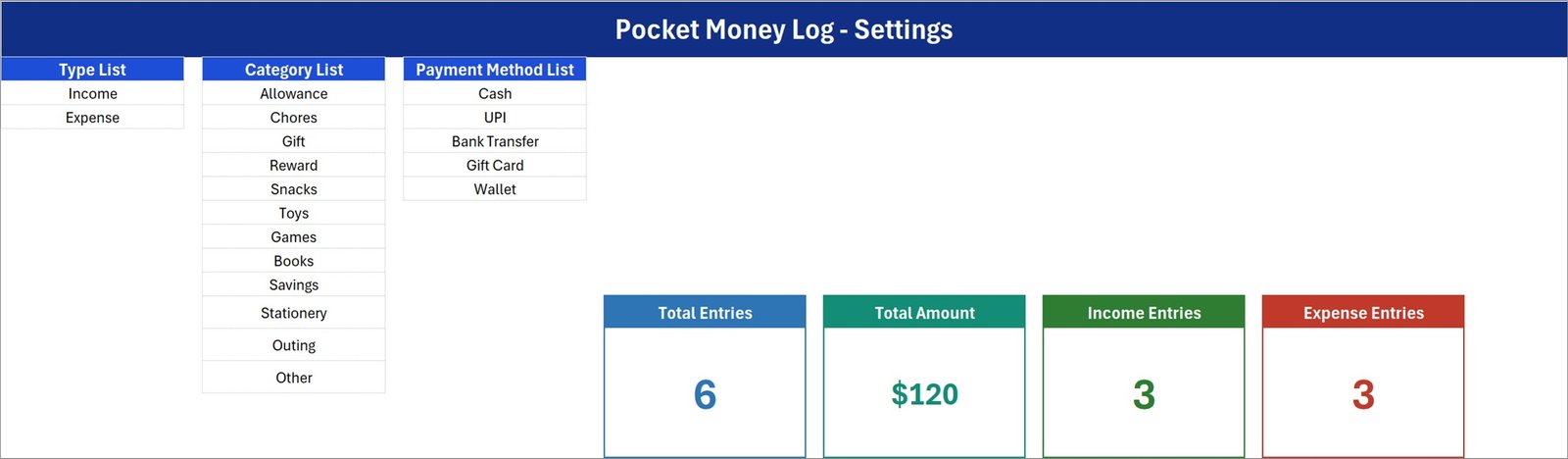
Holds the dropdown source list for Purpose plus a duplicate copy of the three KPI cards. This is the only sheet you edit when you want new spending categories — type them into the list and the form dropdown picks them up through its named range. The duplicated cards exist so you can link them as a picture into a summary sheet or a printed report.
Sheet 3: Instructions
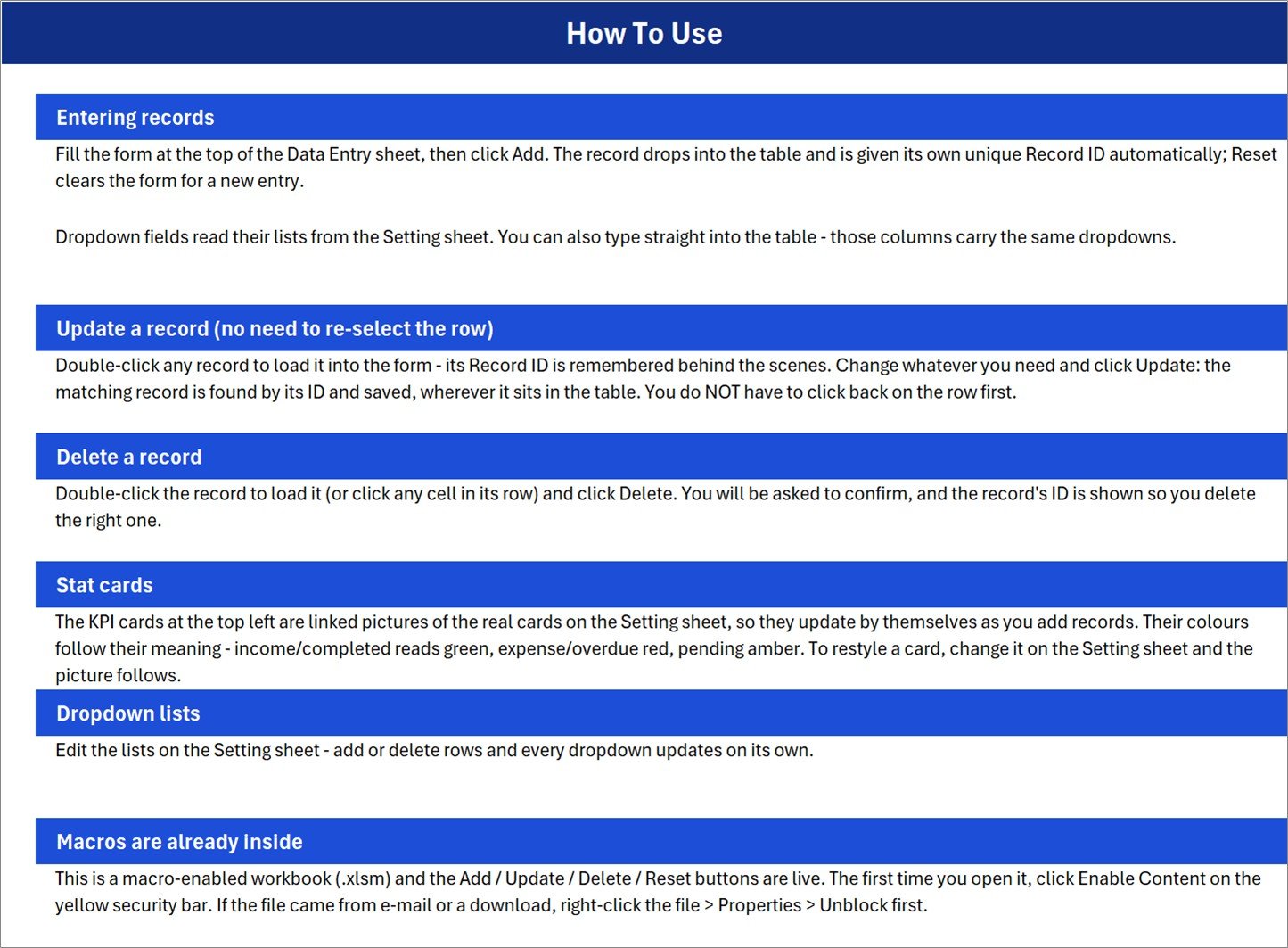
A short setup page covering the VBA import, the Save As .xlsm step, how to assign each of the four macros to its button shape, and how to extend the Purpose list. The workbook also ships with a fourth sheet, Get More Templates, linking back to the wider NextGenTemplates catalog.
📊 Pocket Money Log in Excel vs. Google Sheets vs. Greenlight / GoHenry — Where This Fits
| Feature | Pocket Money Log (Excel) | Google Sheets allowance tracker | Greenlight / GoHenry |
|---|---|---|---|
| Cost | $5.99 one-time ✅ | Free to $9.99 one-time | $5.99 to $14.98 / month |
| Platform | Microsoft Excel, offline | Browser, Google account required | Mobile app plus a physical debit card |
| Setup time | Under 5 minutes ✅ | 5 to 10 minutes | 2 to 5 days (KYC plus card delivery) |
| One-click Add / Update / Delete | ✅ VBA buttons | Manual, or write Apps Script | ✅ |
| Works with no internet | ✅ | ❌ | ❌ |
| Bank account or card required | ❌ None ✅ | ❌ None | ✅ Required |
| Custom spending categories | ✅ Unlimited, via Setting sheet | ✅ Unlimited | Limited to app presets |
| Where the data lives | ✅ Your own computer | Google servers | Fintech company servers |
| Year-1 cost, family with 3 children | $5.99 ✅ | $0 to $9.99 | $71 to $180 |
For parents and students who want a private, offline record of money given against money spent — without handing a child’s spending history to a fintech app — the Pocket Money Log Data Entry System in Excel sits in the sweet spot.
👥 Who This Template Is For — and Who It’s Not For
✅ This template is built for:
- Parents tracking weekly or monthly allowance for one to five children in a single file
- College and hostel students logging money received from home against what they actually spent
- Hostel wardens, guardians and boarding-school staff keeping a per-resident money record
- Anyone who wants a plain Given / Spent ledger with a running balance and no monthly fee
❌ This template is NOT for:
- Families who want a real debit card, spending limits and automatic bank feeds — Greenlight or GoHenry does that, this does not
- Two people editing the same log at the same time on different devices — use a Google Sheets allowance tracker instead
- Full household budgeting with envelopes, categories and forecasts — the Daily Expense Tracker Data Entry System is the better fit
- Mac users on Excel for Mac where VBA button shapes behave inconsistently — the formulas work, the macros may need adjusting
⚙️ How to Use the Pocket Money Log Data Entry System
- Download and unzip the file, then open the workbook in Microsoft Excel 2016 or later.
- Press Alt + F11, right-click the project, choose Import File and select the included .bas module.
- Save As → Excel Macro-Enabled Workbook (.xlsm). Macros will not persist in .xlsx.
- Right-click each button shape on the Data Entry sheet and assign its matching macro: Add, Update, Delete, Reset.
- Open the Setting sheet and replace the sample Purpose values with your own spending categories.
- Fill the form, click Add, and watch Total Given, Total Spent and Balance update in the KPI cards.
💼 Real-World Use Cases
Meera runs a household in Pune with two school-age children. Every Sunday she gives each child a fixed allowance and logs it as a Given entry. When they report what they bought, she adds a Spent row with the Purpose set to Snacks, Stationery or Games. At month end the three KPI cards tell her exactly how much left the house and how much is still unspent — a conversation she used to have from memory.
Arjun is a second-year engineering student living in a hostel. His parents transfer a monthly amount and expect a rough account of it. He logs each transfer under Given and each expense under Spent, then screenshots the KPI cards at month end. It took him one evening to set up and it replaced the notes app he kept abandoning.
Mr. Fernandes manages a 40-bed boarding hostel. Parents deposit pocket money with the office and he releases it in instalments. One workbook per term, one row per transaction, Person set to the student’s name — and the Entry TimeStamp column means he can answer any parent query about a specific date without digging through a paper register.
❓ Frequently Asked Questions
What does the Pocket Money Log Data Entry System in Excel track?
The Pocket Money Log Data Entry System in Excel tracks 6 fields per record: Date, Person, Given, Spent, Purpose and Balance. Three KPI cards summarise Total Given, Total Spent and Balance, and every saved row carries an automatic S.No and Entry TimeStamp.
Do I need to know VBA to use this template?
No. The Pocket Money Log Data Entry System ships with a ready-written .bas module and an Instructions sheet. You import the module once, save the file as .xlsm, and assign four macros to four buttons. No code is written or edited by you at any point.
How does this compare to Greenlight or GoHenry?
Greenlight and GoHenry issue a real debit card and charge $5.99 to $14.98 every month. The Pocket Money Log Data Entry System in Excel costs $5.99 once, works offline, needs no bank account, and keeps the record on your own computer. It logs money; it does not move money.
How long does setup take?
Under 5 minutes. Import the VBA module, save as .xlsm, assign the four macros, and edit the Purpose list on the Setting sheet. The sample records already in the Pocket Money Log Data Entry System show the KPI cards working before you enter anything of your own.
Can I track more than one child in the same file?
Yes. The Person field separates records, so one workbook can hold every child in the household. Filter the records table by Person for an individual view, or read the KPI cards for the combined household total across all people in the Pocket Money Log.
Which Excel versions does it work with?
The Pocket Money Log Data Entry System in Excel is built for Excel 2016, 2019, 2021 and Microsoft 365 on Windows. Excel for Mac runs the formulas correctly but handles VBA button shapes inconsistently, and Excel Online does not run macros at all.
👤 About the Author
Built by PK — Microsoft Certified Professional with 15+ years of Excel, Google Sheets and Power BI experience. Founder of NextGenTemplates, reaching 300K+ subscribers across YouTube channels (@PK-AnExcelExpert, @NextGenTemplates, @NeoTechNavigators). Every template is hand-built and tested before release.
🔗 Explore Related Templates
Browse more one-click Excel VBA Tools and ready-made Excel Financial Tools. A few that pair well with this system:
- Daily Expense Tracker Data Entry System in Excel – the household-wide sibling with the same form-and-KPI layout.
- Bank Account Balance Tracker in Google Sheets – for the account the allowance comes out of.
- Week Money Challenge Tracker in Google Sheets – turns saving into a game for older children.
Also available as: Kids Allowance and Chores Money Tracker in Google Sheets — the browser-based version if you need shared access from a phone.
💎 Want the full set? Grab the VBA Management Systems Mega Pack and save versus buying tools one by one.
📖 Click here to read the Detailed Blog Post
🎥 Visit our YouTube channel for step-by-step video tutorials
👉 YouTube.com/@NextGenTemplates














Reviews
There are no reviews yet.