

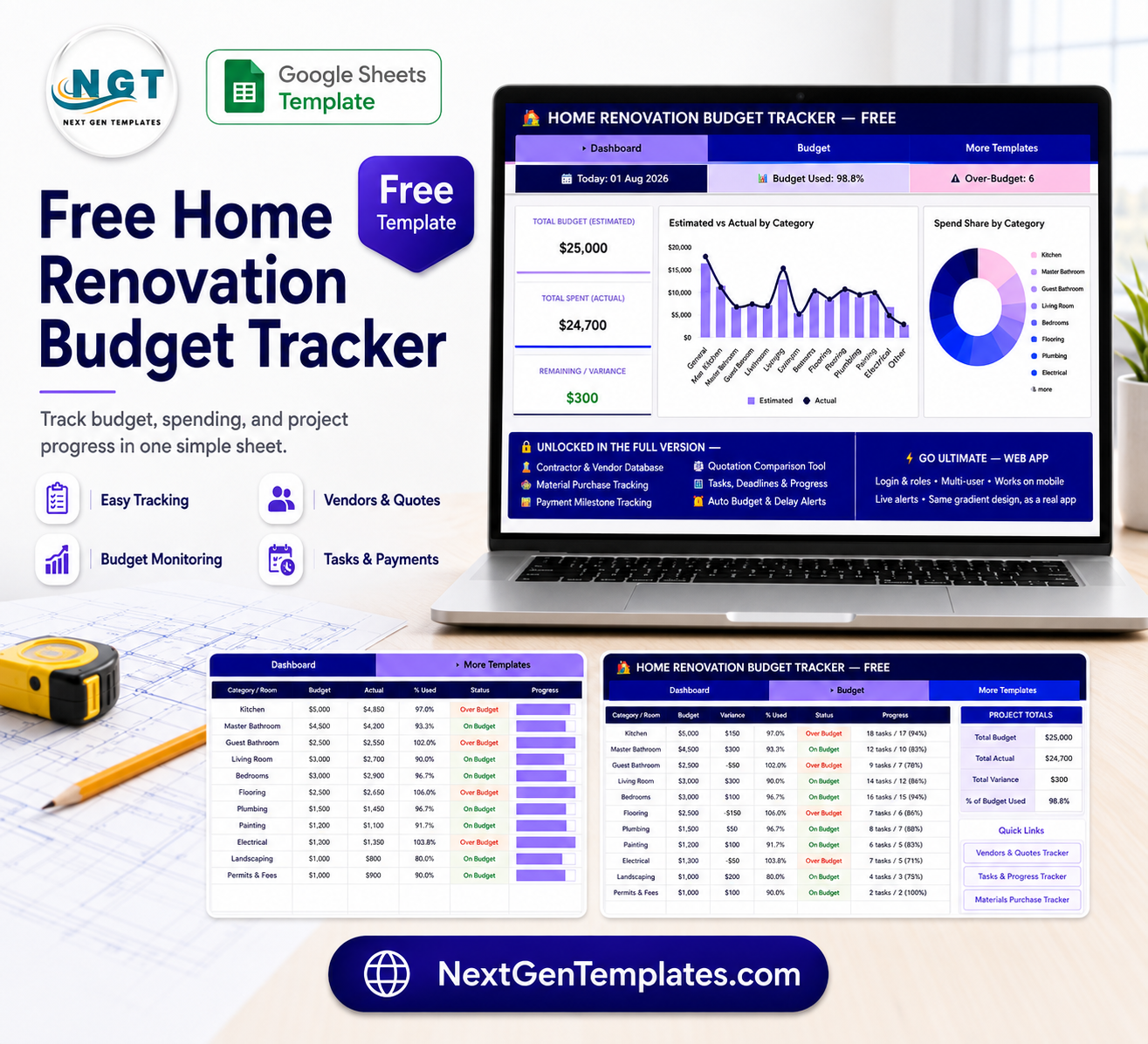
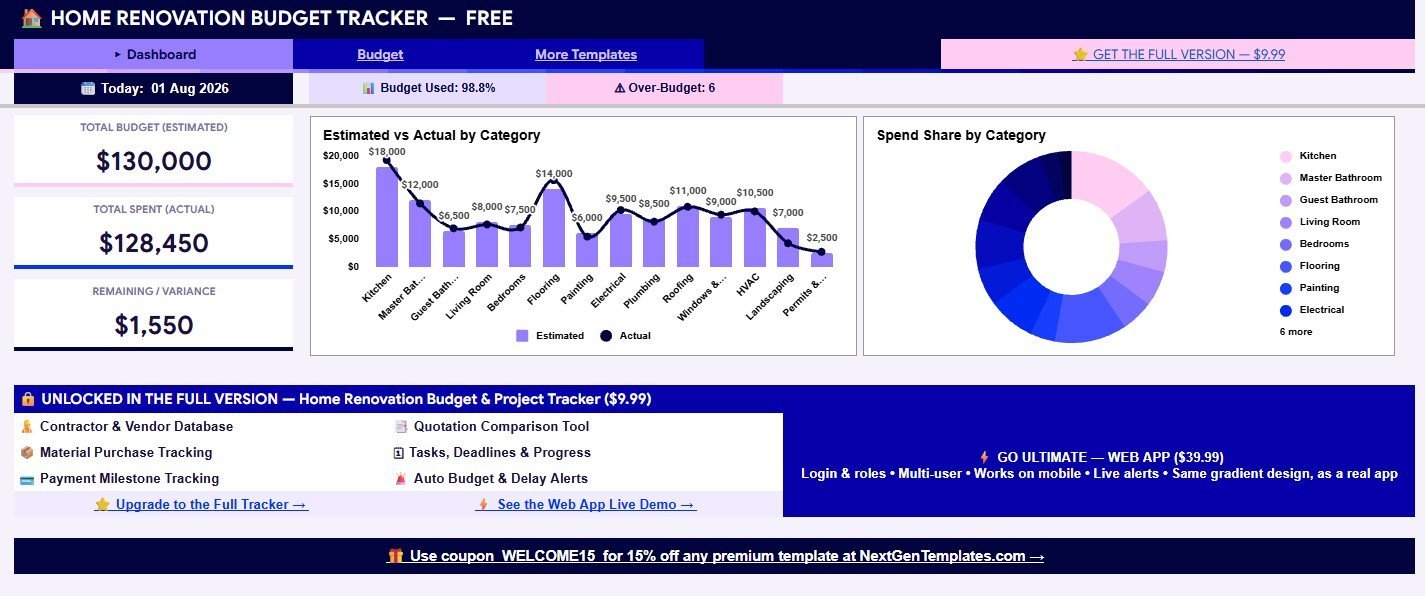

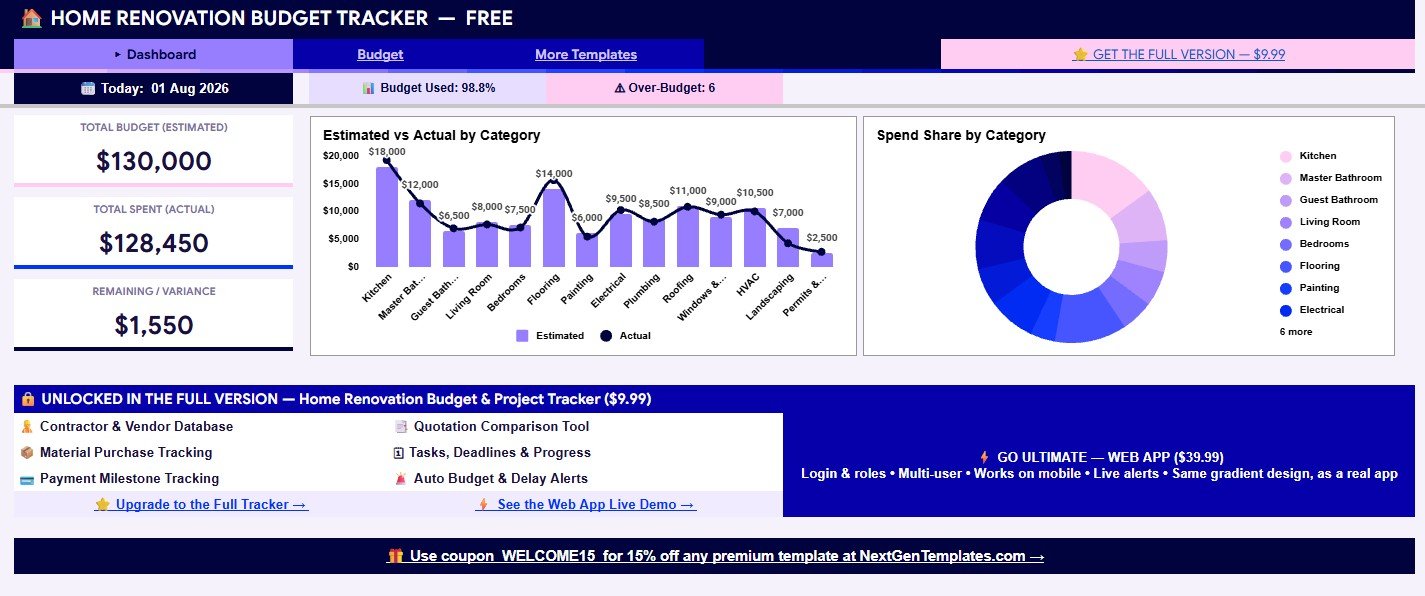
Free Home Renovation Budget Tracker in Google Sheets gives homeowners a no-cost way to review a sample $130,000 renovation budget with $128,450 actual spend, 98.8% budget used, $1,550 remaining, and 6 over-budget categories visible from the first dashboard screen. Built by PK for the NextGenTemplates audience of 300K+ subscribers, this free starter version gives you a practical budget review file before you decide whether the full renovation project tracker is needed. The risk reversal is simple: start with the free budget tracker, learn the layout, and upgrade only when you want vendor, quotes, material, task, payment, and alert tracking in the paid version.
Key Features of Free Home Renovation Budget Tracker in Google Sheets
- Budget dashboard: Review total estimated budget, actual spend, remaining variance, budget used percentage, and over-budget count in one place.
- Category comparison: Compare estimated vs actual cost by room or renovation category.
- Spend share chart: See which rooms or work categories are taking the largest share of the project budget.
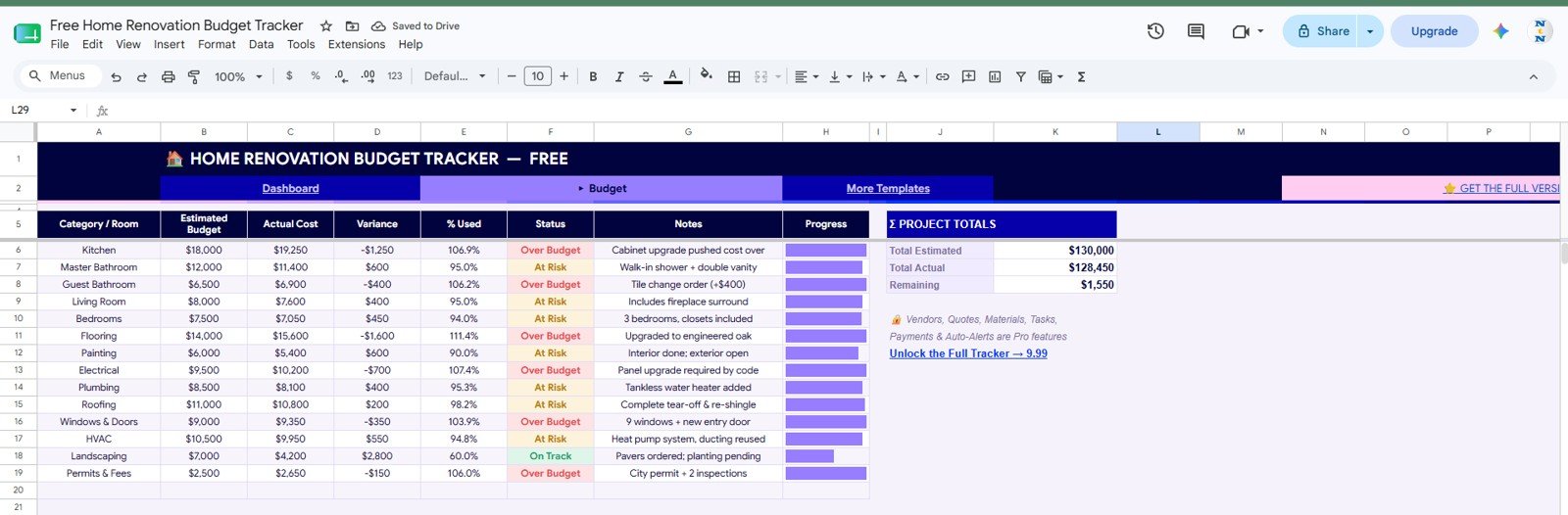
- Status labels: Identify categories marked Over Budget, At Risk, or On Track.
- Progress bars: Scan budget use visually without reading every number.
- Notes column: Record useful context such as cabinet cost increases, tile change orders, plumbing updates, or permit fees.
- Google Sheets format: Copy, edit, and share the tracker in Google Drive.
- Free starter workflow: Use the budget view first, then move to the paid full tracker when you need contractor, quote, task, material, and payment control.
What’s Inside the Free Home Renovation Budget Tracker in Google Sheets
1. Dashboard Sheet
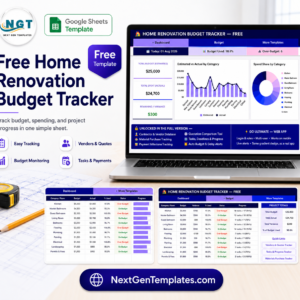
The Dashboard sheet is the quick budget summary page. It displays the date, total budget estimate, actual spend, remaining variance, budget used percentage, and count of over-budget categories. The sample view shows a $130,000 estimated budget, $128,450 actual spend, and 98.8% budget used, making it easy to understand how close the renovation is to its limit.
The dashboard also includes an estimated vs actual category chart and a spend share donut chart. These visuals help users spot whether kitchen, bathrooms, flooring, plumbing, roofing, HVAC, landscaping, permits, or other categories are creating the most budget pressure.
2. Budget Sheet
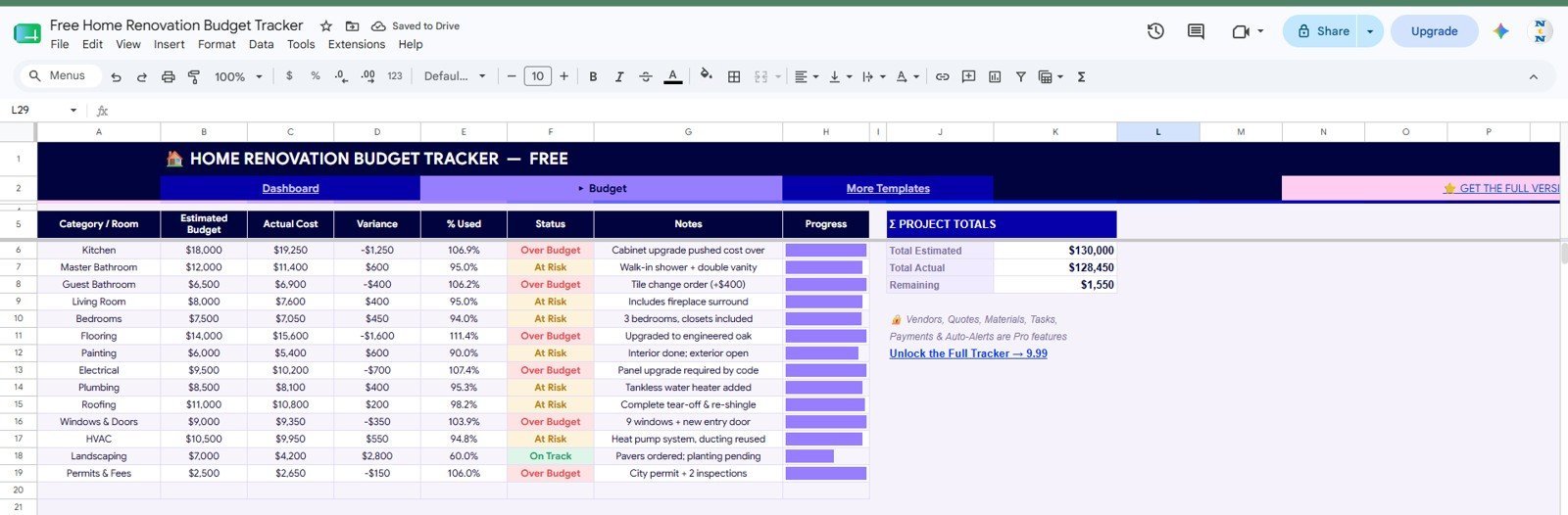
The Budget sheet is the working tracker. Each row records the category or room, estimated budget, actual cost, variance, percentage used, status, notes, and progress. In the screenshot, categories such as Kitchen, Guest Bathroom, Flooring, Electrical, and Permits & Fees are marked Over Budget, while others are At Risk or On Track.
This sheet is useful during weekly renovation reviews because it combines the budget number, the actual spend, and the reason behind the variance. Notes such as cabinet upgrades, tile change orders, panel upgrades, tankless water heater additions, and inspection fees make the tracker more useful than a simple two-column budget list.
Free Home Renovation Budget Tracker in Google Sheets vs. Microsoft Excel vs. Paid CRM/SaaS – Where This Fits
| Feature | This free Google Sheets tracker | Microsoft Excel tracker | Paid project SaaS |
|---|---|---|---|
| Cost | $0 starter template | Template cost plus Excel access | Recurring subscription or setup fee |
| Platform | Google Sheets in browser or app | Excel desktop or web | Vendor-hosted platform |
| Setup time | Copy the file and replace sample rows | Open workbook and adjust fields | Create account, users, and workflows |
| Real-time team collaboration | Native Google Drive sharing | Requires Microsoft cloud sharing | Usually plan based |
| Mobile access | Google Sheets mobile app | Excel mobile app | Usually included |
| Customizable fields | Editable spreadsheet rows and labels | Editable workbook structure | Limited by vendor settings |
| Share with link | Yes, with Drive permissions | Yes, with Microsoft sharing | Usually account based |
| Year-1 cost at 5 users | $0 for the template | Template plus license costs | Can become much higher |
| Vendor, quote, task, and payment tracking | Available in the paid full version | Requires another workbook or custom build | Often available in paid plans |
Who This Template Is For – and Who It’s Not For
This free tracker is a good fit for homeowners planning a remodel, DIY renovators setting an initial budget, landlords preparing a repair plan, and small project teams that want a clear budget view before committing to a bigger project management system.
It is not the best fit if you need vendor records, quote comparison, material purchase tracking, task deadlines, payment milestones, automatic budget alerts, multi-user roles, or a mobile web app experience. For that, use the Home Renovation Budget and Project Tracker in Google Sheets or the Home Renovation Project Management Web App.
How to Use the Free Home Renovation Budget Tracker in Google Sheets
- Open the Google Sheets copy link or guide once the download file is added to this draft.
- Replace the sample room and category names with your renovation categories.
- Enter estimated budget amounts before work begins.
- Update actual costs as invoices, quotes, and purchases are confirmed.
- Review variance, percent used, status, notes, and progress before approving new spending.
Real-World Use Cases
Maya, homeowner: uses the tracker before a kitchen and bathroom remodel to see whether flooring and fixture decisions are pushing the project too close to the original budget.
Carlos, contractor: shares a simplified budget view with a client so both sides can discuss change orders using the same numbers.
Priya, property investor: tracks a light renovation budget against expected resale margin before deciding whether to upgrade to the full tracker.
Frequently Asked Questions
What is included in the free tracker?
It includes a dashboard-style budget summary and a Budget sheet with estimated budget, actual cost, variance, percent used, status, notes, and progress by category.
Is this template really free?
Yes. The draft is configured with a $0 sale price. The regular price is listed as $18.99 for merchandising and comparison.
Does it include vendor and payment tracking?
No. Those features are shown as part of the paid full version. This free version focuses on budget tracking only.
Can I customize the categories?
Yes. After copying the Google Sheet, you can rename categories such as Kitchen, Flooring, HVAC, Landscaping, and Permits to match your project.
Can multiple people use it?
Yes. Since it runs in Google Sheets, you can share it through Google Drive permissions.
What should I use if I need alerts and project tasks?
Use the paid full tracker or web app if you need contractor records, quotes, materials, tasks, payments, deadline alerts, or role-based access.
About the Author
Built by PK – Microsoft Certified Professional with 15+ years of Excel, Google Sheets, and Power BI experience. Founder of NextGenTemplates, reaching 300K+ subscribers across YouTube channels. Every template is hand-built and tested before release.
Explore Related Templates
- Home Renovation Budget and Project Tracker in Google Sheets
- Home Renovation Project Management Web App
- Architecture and Design Dashboard in Google Sheets
- Real Estate Property Tracker in Google Sheets
- Browse more Google Sheets templates and Google Sheets tracker templates.
Start with the Free Home Renovation Budget Tracker in Google Sheets, then upgrade when your renovation needs vendor, quote, material, task, payment, and alert tracking.
Last updated: August 1, 2026.
Compatibility and Requirements
- Works in Google Sheets with a free Google account and a web browser. Nothing to install.
- It also opens in the Google Sheets mobile app. Make a copy to your own Google Drive and edit it there. Google explains the basics in How to use Google Sheets.

















Reviews
There are no reviews yet.