

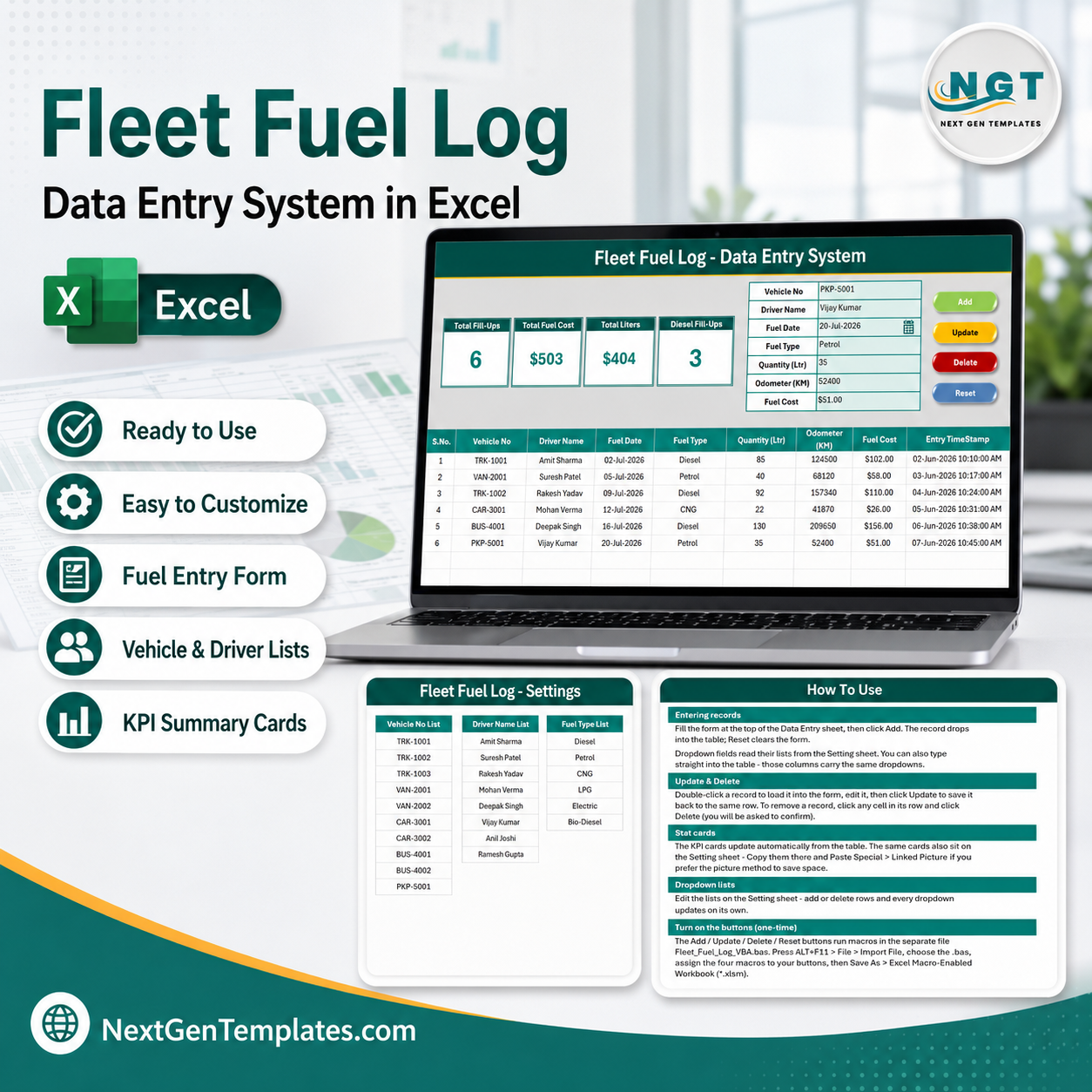

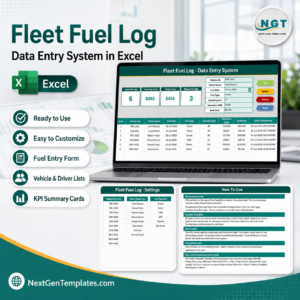
The Fleet Fuel Log Data Entry System in Excel records 7 fields per fill-up — Vehicle No, Driver Name, Fuel Date, Fuel Type, Quantity (Ltr), Odometer (KM) and Fuel Cost — and feeds 4 live KPI cards: Total Fill-Ups, Total Fuel Cost, Total Liters and Diesel Fill-Ups. Four VBA macros run the workflow (Add, Update, Delete, Reset), 3 editable dropdowns keep entries consistent, and 6 sample fill-ups are pre-loaded so you can watch the cards move before you type anything. Setup takes under 10 minutes.
🌍 Join 8,400+ teams in 40+ countries using NextGenTemplates to replace paid SaaS tools with one-time-purchase Excel, Google Sheets, Power BI and HTML templates.
✅ Instant download · One-time payment · No subscription · No per-user fees · Lifetime access
🔑 Key Features of the Fleet Fuel Log Data Entry System
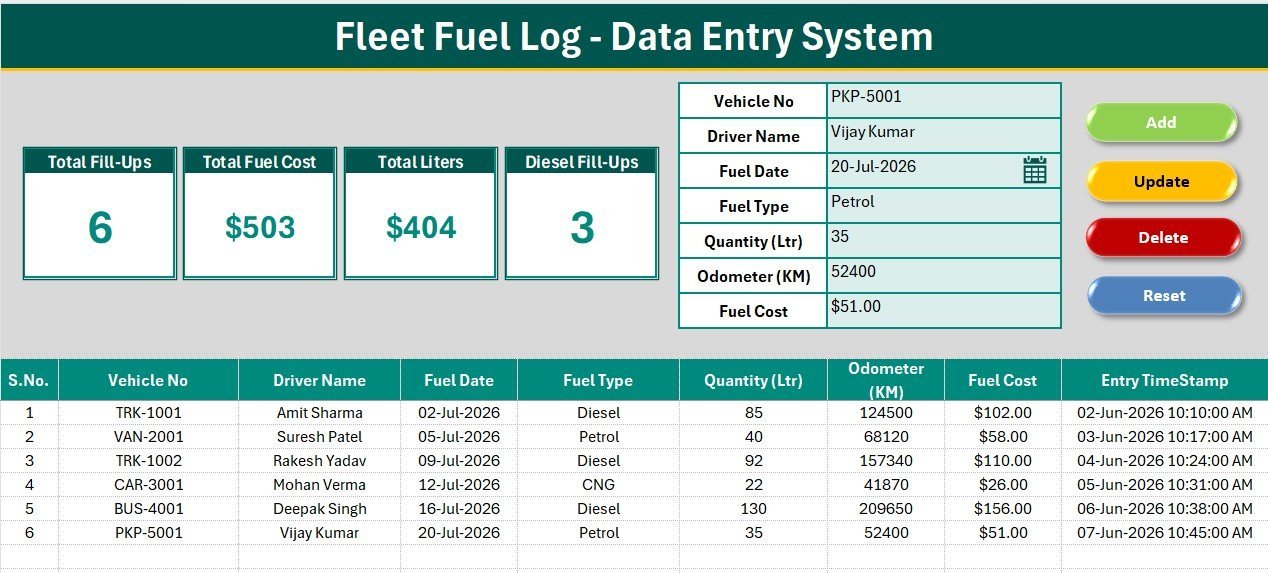
- ⛽ 7-field fuel entry form — Every fill-up is captured as Vehicle No, Driver Name, Fuel Date, Fuel Type, Quantity (Ltr), Odometer (KM) and Fuel Cost. The odometer column is deliberate: it lets you derive mileage, cost per kilometre and litres per 100 km later without restructuring the log.
- 📊 4 live KPI cards — Total Fill-Ups, Total Fuel Cost, Total Liters and Diesel Fill-Ups recalculate the instant a row is written. The cards run on COUNTA, SUM and COUNTIF formulas pointed at the records table, so there is nothing to refresh and no pivot to rebuild.
- 🖱️ Four one-click VBA macros — Add_Record writes the form to the next empty row, Update_Record edits the selected row in place, Delete_Record removes it after a confirmation prompt, and Reset_Form clears the form. All four ship as a separate .bas module you import once.
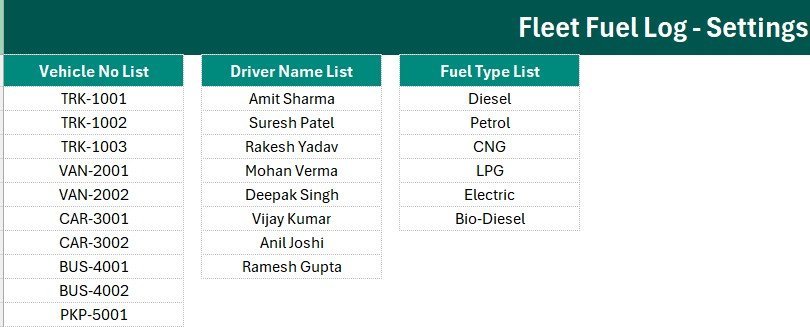
- 🔽 3 editable dropdowns — 10 vehicle numbers (TRK, VAN, CAR, BUS and PKP series), 8 driver names and 6 fuel types (Diesel, Petrol, CNG, LPG, Electric and Bio-Diesel) live on the Setting sheet. Replace them with your own registration numbers and the dropdowns expand automatically.
- 🕒 Auto S.No and Entry TimeStamp — Serial numbers renumber themselves as rows are added or deleted, and every saved fill-up gets a date-time stamp, which is what makes the log defensible during a fuel-card audit.
- 📁 4 ready worksheets — Data Entry, Setting, Instructions and Get More Templates. The KPI cards are duplicated on the Setting sheet so you can copy them as a Linked Picture into a report or an email.
- 🎨 Teal theme in Aptos Narrow — Dark heading bar, gold divider, grey dashboard panel and a hair-grid records table. Change the theme fill once and the whole sheet follows your brand.
- 🔒 Works fully offline — No telematics account, no API key, no per-vehicle licence. The file sits on your drive and the data never leaves your machine.
📦 What’s Inside the Fleet Fuel Log Data Entry System
Sheet 1: Data Entry
The working sheet. The grey panel at the top holds the 4 KPI cards (Total Fill-Ups, Total Fuel Cost, Total Liters, Diesel Fill-Ups) and the 7-field form with its three dropdowns; the Add, Delete, Update and Reset button cells sit in a 2×2 block beside it. Below that, the records table starts at row 15 with auto S.No, currency-formatted Fuel Cost and an Entry TimeStamp column.
Sheet 2: Setting
The control sheet. It holds the three dropdown source lists — Vehicle No, Driver Name and Fuel Type — as named ranges wired to the form’s data validation, plus a duplicate set of the four KPI cards for reporting. Add a new truck or a new fuel type here and it appears in the form immediately.
Sheet 3: Instructions
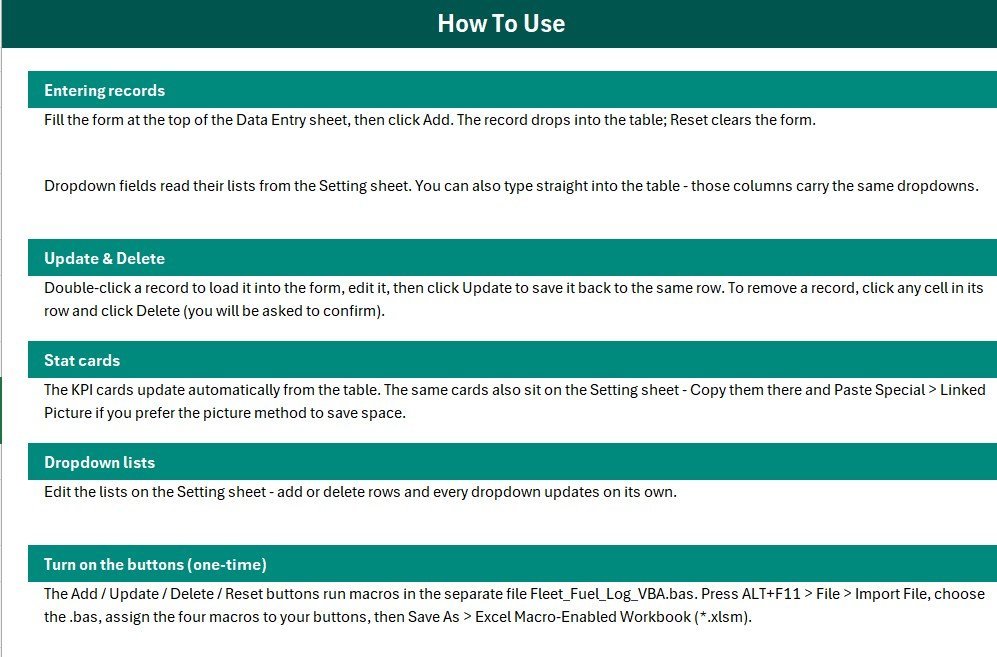
The one-time activation guide: import the VBA module, draw four buttons over the coloured Add/Delete/Update/Reset cells, assign the macros, and save the file as .xlsm. It also covers how to extend the dropdown lists and how to copy the KPI cards as a Linked Picture.
Sheet 4: Get More Templates
Direct links into the wider NextGenTemplates catalogue — Logistics Templates, Excel Dashboard Templates and the VBA tool range — for when the fuel log becomes one part of a bigger fleet stack.
📊 Fleet Fuel Log (Excel) vs. Google Sheets Fuel Tracker vs. Fleetio / Samsara — Where This Fits
| Feature | Fleet Fuel Log (Excel) | Google Sheets fuel tracker | Fleetio / Samsara |
|---|---|---|---|
| Cost | $5.99 one-time | $6.99 one-time | $4-$40 per vehicle / month |
| Platform | Microsoft Excel, offline | Browser, Google account required | Cloud only, account required |
| Setup time | Under 10 minutes ✅ | Under 10 minutes ✅ | Days to weeks (vehicle onboarding) |
| One-click entry form with macros | Yes — 4 VBA macros ✅ | Apps Script sidebar | Yes, via mobile app |
| Real-time team collaboration | Shared drive / co-authoring | Yes, native ✅ | Yes ✅ |
| Mobile fuel-card capture | No | Browser only | Yes ✅ |
| Data stays on your machine | Yes ✅ | No — stored in Google Drive | No — vendor cloud |
| Editable fields and dropdowns | Fully editable ✅ | Fully editable ✅ | Fixed schema, paid tiers to extend |
| Year-1 cost, 10 vehicles | $5.99 total | $6.99 total | $480-$4,800 |
For fleets that want a clean, auditable fuel log without paying per vehicle per month for telematics they don’t use, the Fleet Fuel Log Data Entry System in Excel sits in the sweet spot.
👥 Who This Template Is For — and Who It’s Not For
✅ This template is built for:
- Transport and logistics owners running 5-50 vehicles who currently track diesel in a notebook or a loose spreadsheet
- Fleet supervisors and site admins who need a fuel log that stands up to a fuel-card or GST audit
- School bus, ambulance, delivery van and taxi operators who reimburse drivers against pump slips
- Accountants and office staff who prefer typing into a form over typing into a grid
❌ This template is NOT for:
- Fleets that need live GPS, geofencing or telematics-fed litre readings — that is a Samsara or Fleetio job, not a workbook
- Drivers who need to log fill-ups from a phone at the pump; this is a desktop Excel file
- Mac users on Excel for Mac with macros disabled by policy, since the Add/Update/Delete buttons rely on VBA
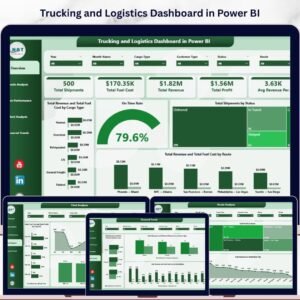
- Teams wanting a full analytics dashboard out of the box — pair it with the Trucking and Logistics Dashboard in Power BI for that
⚙️ How to Use the Fleet Fuel Log Data Entry System
- Open the workbook, press ALT+F11, then File → Import File and select the included VBA module.
- Draw four Form-Control buttons over the coloured Add, Delete, Update and Reset cells and assign Add_Record, Delete_Record, Update_Record and Reset_Form.
- Save As → Excel Macro-Enabled Workbook (.xlsm) so the macros persist.
- Open the Setting sheet and replace the sample vehicle numbers, driver names and fuel types with your own.
- Delete the 6 sample rows from the records table once you are ready to go live.
- Fill the form for each pump slip — vehicle, driver, date, fuel type, litres, odometer, cost — and click Add.
- Read Total Fuel Cost and Total Liters straight off the KPI cards, or copy the Setting-sheet cards as a Linked Picture into your monthly report.
💼 Real-World Use Cases
Ravi runs a 14-truck haulage business in Kanpur. Every pump slip used to end up in a shoebox. He now enters each fill-up in the Fleet Fuel Log Data Entry System, and because the odometer reading sits next to the litres, he can spot the two trucks whose consumption jumped 18% before the month closes — without paying $40 per vehicle per month for telematics.
Meera is the office administrator at a school with 9 buses. She logs diesel against each bus number and driver, then copies the KPI cards into the monthly transport report for the trustees. The Entry TimeStamp column settles any argument about when a slip was submitted.
Farhan manages a 22-vehicle delivery fleet split across diesel, CNG and two new electric vans. The Fuel Type dropdown lets him log all three in one table, and the Diesel Fill-Ups card tells him at a glance how much of the fleet has actually shifted off diesel this quarter.
❓ Frequently Asked Questions
What fields does the Fleet Fuel Log Data Entry System capture?
The Fleet Fuel Log Data Entry System in Excel captures 7 fields per fill-up: Vehicle No, Driver Name, Fuel Date, Fuel Type, Quantity in litres, Odometer reading in kilometres and Fuel Cost. Three of these are dropdowns, and every saved row also gets an automatic serial number and entry time stamp.
Do I need to know VBA to use it?
No. The Fleet Fuel Log Data Entry System ships with the VBA already written in a .bas module. You import it once through ALT+F11, assign the four macros to the button cells, and save as .xlsm. The Instructions sheet walks through all three steps with no coding required.
How long does setup take?
Under 10 minutes. Importing the VBA module and assigning the four macros takes about five minutes, and swapping the sample vehicle numbers, driver names and fuel types on the Setting sheet takes another few. The 6 sample rows let you verify the KPI cards work before you delete them.
Can I calculate mileage or cost per kilometre from this log?
Yes. Because the Fleet Fuel Log Data Entry System records the odometer reading alongside litres and cost, you can add a column that subtracts the previous odometer reading for the same vehicle to get distance, then divide by litres for mileage or by cost for cost per kilometre.
How does this compare to Fleetio or Samsara?
Fleetio and Samsara charge roughly $4 to $40 per vehicle per month and add GPS, maintenance scheduling and driver apps. The Fleet Fuel Log Data Entry System is a $5.99 one-time Excel file that does the fuel-logging part offline. For a 10-vehicle fleet that is $5.99 against $480 or more in year one.
Is there a Google Sheets version?
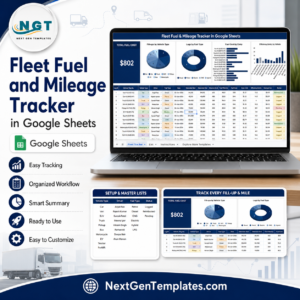
Yes — the Fleet Fuel and Mileage Tracker in Google Sheets covers the same ground in a browser with native multi-user editing, if your drivers or supervisors need to enter data from different locations.
👤 About the Author
Built by PK — Microsoft Certified Professional with 15+ years of Excel, Google Sheets and Power BI experience. Founder of NextGenTemplates, reaching 300K+ subscribers across YouTube channels (@PK-AnExcelExpert, @NextGenTemplates, @NeoTechNavigators). Every template is hand-built and tested before release.
🔗 Explore Related Templates
- Fleet Fuel and Mileage Tracker in Google Sheets — the browser-based sibling, with charts on mileage and cost per km.
- Vehicle Reservation Tracker in Excel — book and allocate vehicles before they ever reach the pump.
- Vehicle Movement Register Management System Web App — a multi-user gate-in/gate-out register when a workbook is no longer enough.
- Trucking and Logistics Dashboard in Power BI — turn your accumulated fuel log into fleet-level analytics.
💎 Save 30% — get all 8 fleet and logistics templates in the Logistics Manager Toolkit →
📖 Click here to read the Detailed Blog Post
🎥 Visit our YouTube channel for step-by-step video tutorials
👉 YouTube.com/@NextGenTemplates
📅 Last updated: July 2026
Watch the demo video:
Compatibility and Requirements
- Runs in Excel desktop on Windows with macros enabled. It does not run in Excel for the web, Google Sheets or mobile.
- The Add, Update, Delete and Reset buttons are VBA macros, so save the file as .xlsm. Microsoft explains the setting in Enable or disable macros in Microsoft 365 files.
- The file works fully offline. No telematics account or API key is needed.














Reviews
There are no reviews yet.