Complete Wedding Budget Tracker Dashboard in Google Sheets gives couples, families, and wedding planners 6 sheet tabs, 4 headline cards, 12+ analysis views, and a searchable item lookup for every wedding cost. A single wedding budget can easily grow past 100 line items once venue, catering, decor, photography, outfits, deposits, and final balances are tracked. NextGenTemplates has helped thousands of template users replace scattered spreadsheets with one-time-purchase dashboards, and this tracker keeps your wedding budget inside your own Google Drive with no monthly subscription or per-user fee.
This ready-to-use Google Sheets dashboard helps you compare estimated vs actual cost, monitor vendor spend, check payment status, and review priority-level spending from one organized workbook.
Key Features of Complete Wedding Budget Tracker Dashboard in Google Sheets
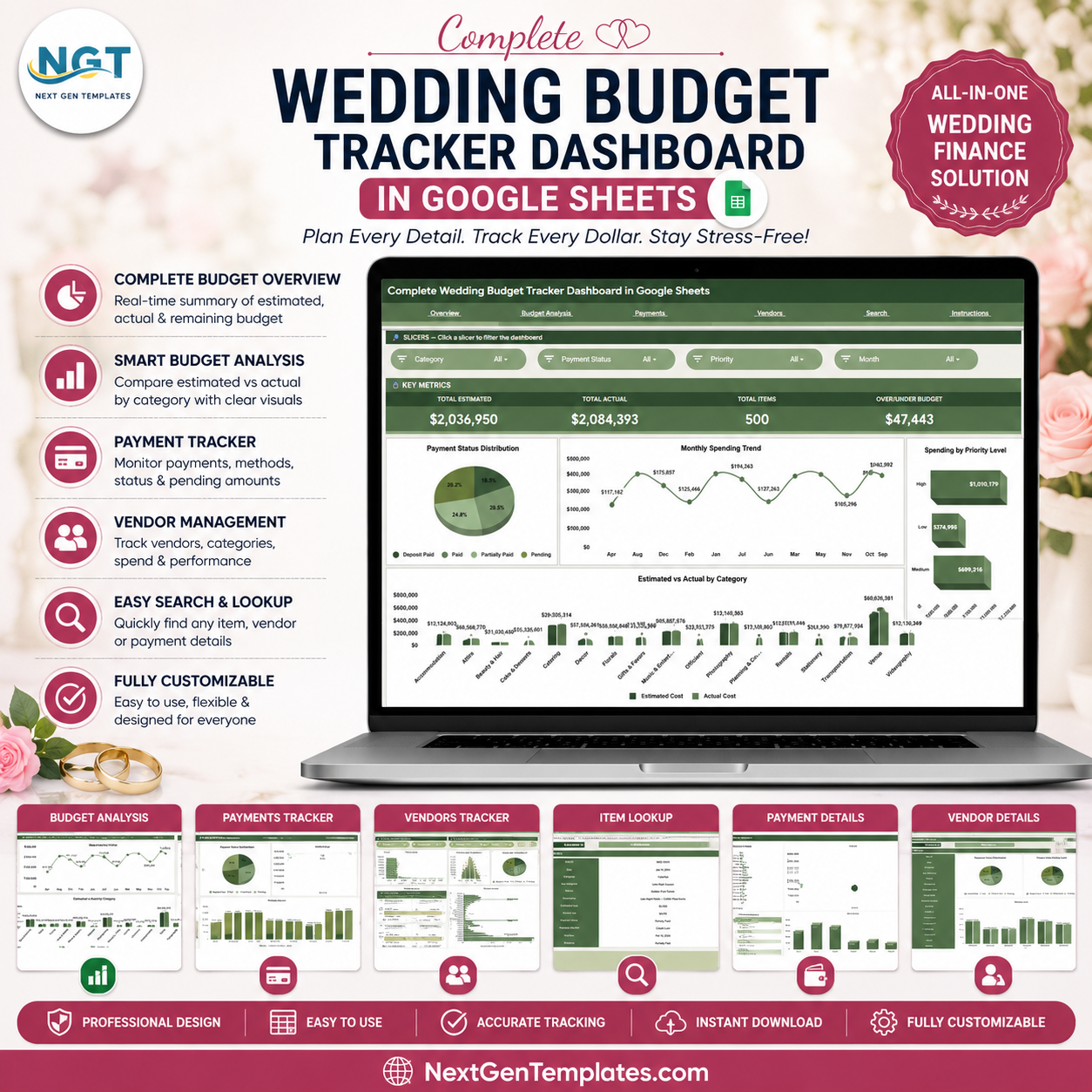
- 6 focused sheet tabs: Overview, Budget Analysis, Payments, Vendors, Search Sheet, and Data Sheet.
- 4 high-level KPI cards: Total Estimated, Total Actual, Total Items, and Over/Under Budget.
- Interactive slicers: Filter the dashboard quickly and review a narrowed view without rebuilding charts.
- Estimated vs actual tracking: Compare planned and real wedding costs by category and month.
- Payment monitoring: Review payment status and payment method distribution at a glance.
- Vendor spend analysis: See which vendors and categories are driving the largest spend.
- Search Sheet lookup: Select an Item ID and instantly view date, category, vendor, costs, status, method, due date, and priority.
What’s Inside the Complete Wedding Budget Tracker Dashboard in Google Sheets
1 – Overview Page
The Overview page shows Total Estimated, Total Actual, Total Items, and Over/Under Budget at the top. It includes Payment Status Distribution by Status, Monthly Spending Trend by Month, Spending by Priority Level, and Estimated and Actual Cost by Category.
Payment Status Distribution by Status: This chart separates paid, pending, and other payment statuses so you can see budget follow-through quickly. It helps identify whether the plan is under control or too many items still need payment action.
Monthly Spending Trend by Month: This chart shows when wedding costs are landing across the timeline. Use it to spot expensive months and prepare for vendor deposits or final payments.
Spending by Priority Level: This view groups actual spend by priority so must-have items can be compared with nice-to-have items. It is useful when trimming costs without losing the items that matter most.
Estimated and Actual Cost by Category: This comparison highlights which categories are over or under plan. It is the fastest way to catch category-level budget drift.
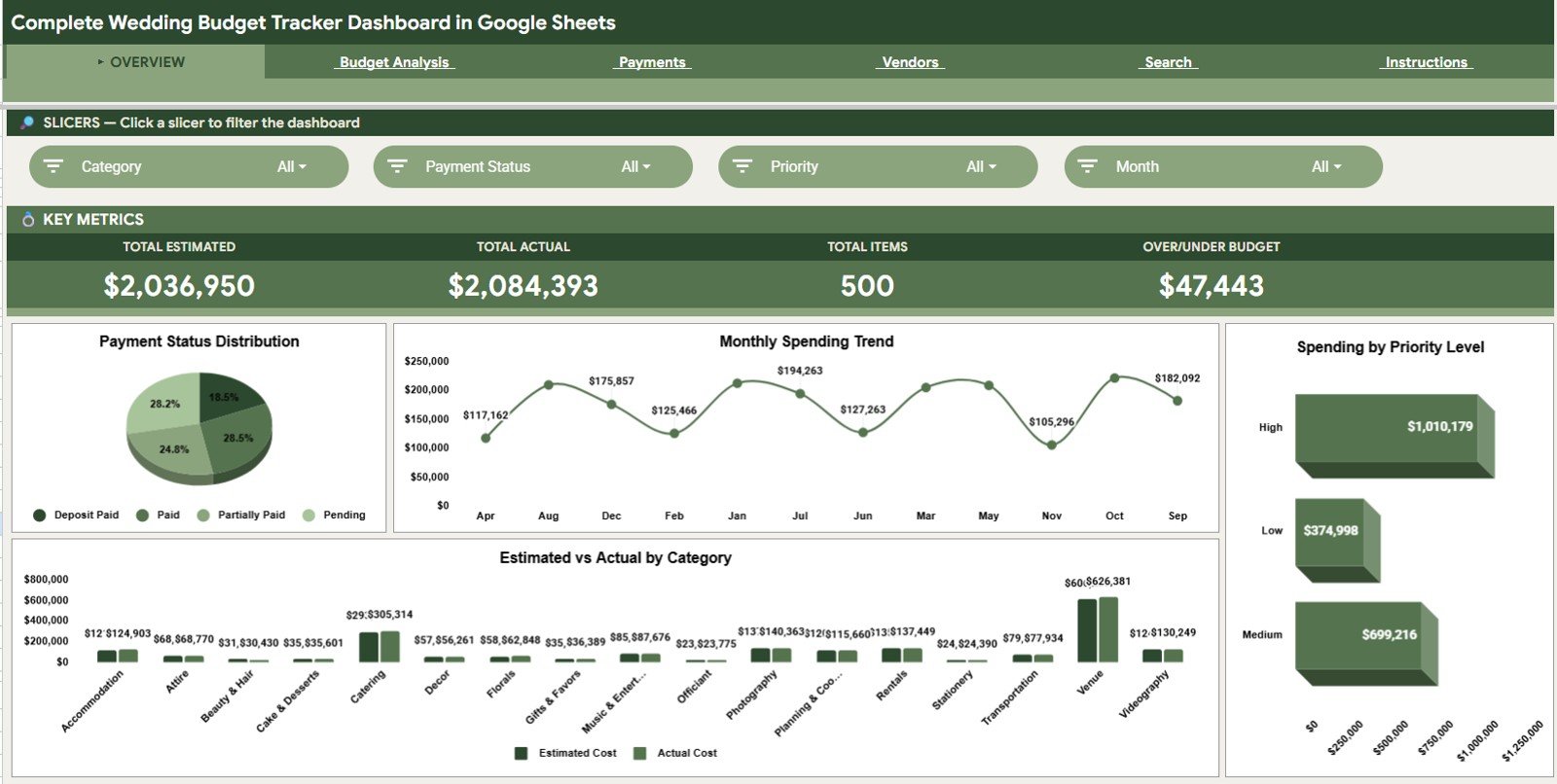
Complete Wedding Budget Tracker Dashboard in Google Sheets
2 – Budget Analysis
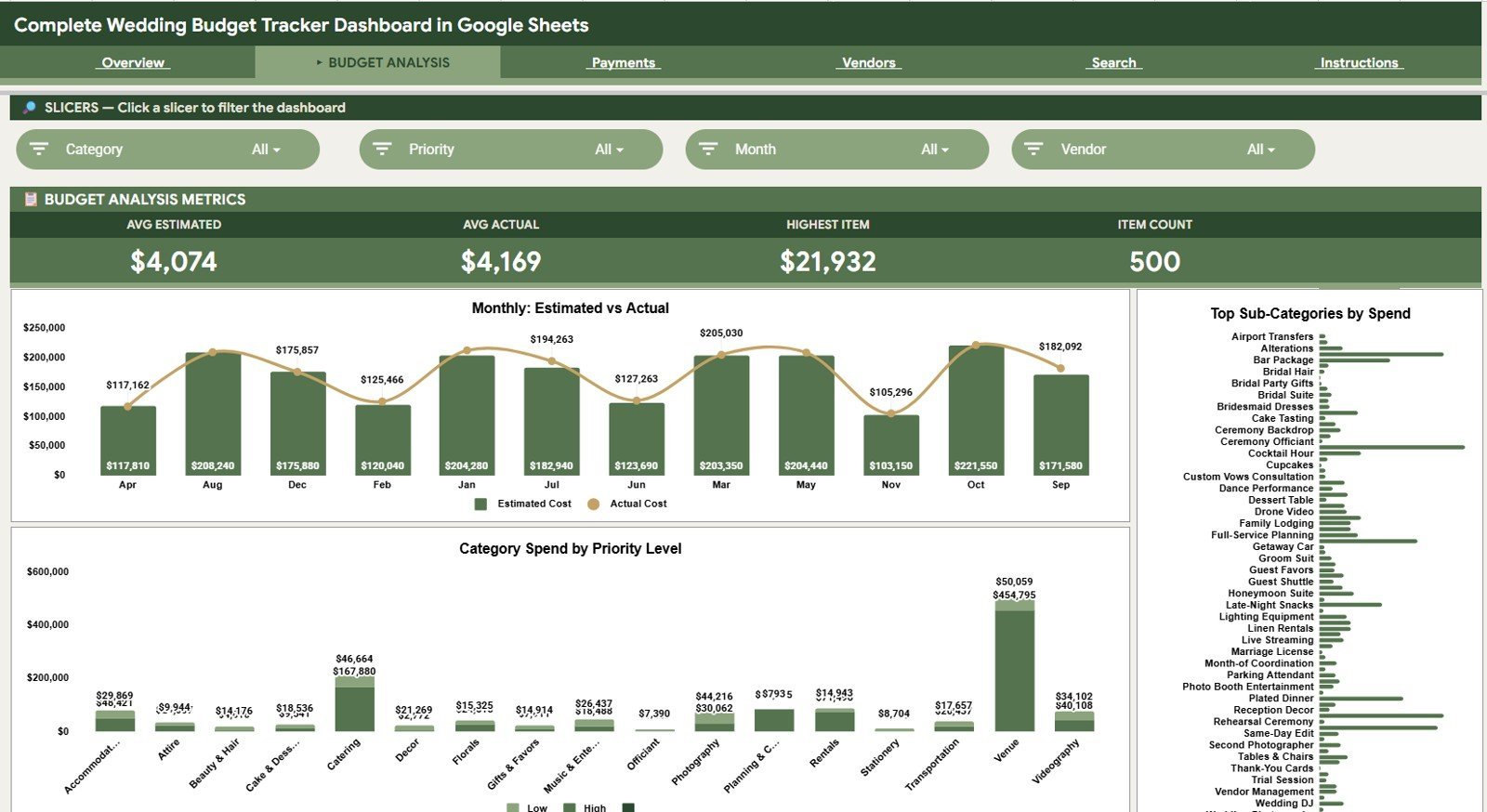
The Budget Analysis tab includes Estimated Cost and Actual Cost by Month, Spend by Sub-Category, and Category Spend by Priority Level. These charts help compare the planned budget with real expenses, identify detailed sub-category pressure points, and understand whether high-priority wedding areas are receiving the right share of spending.
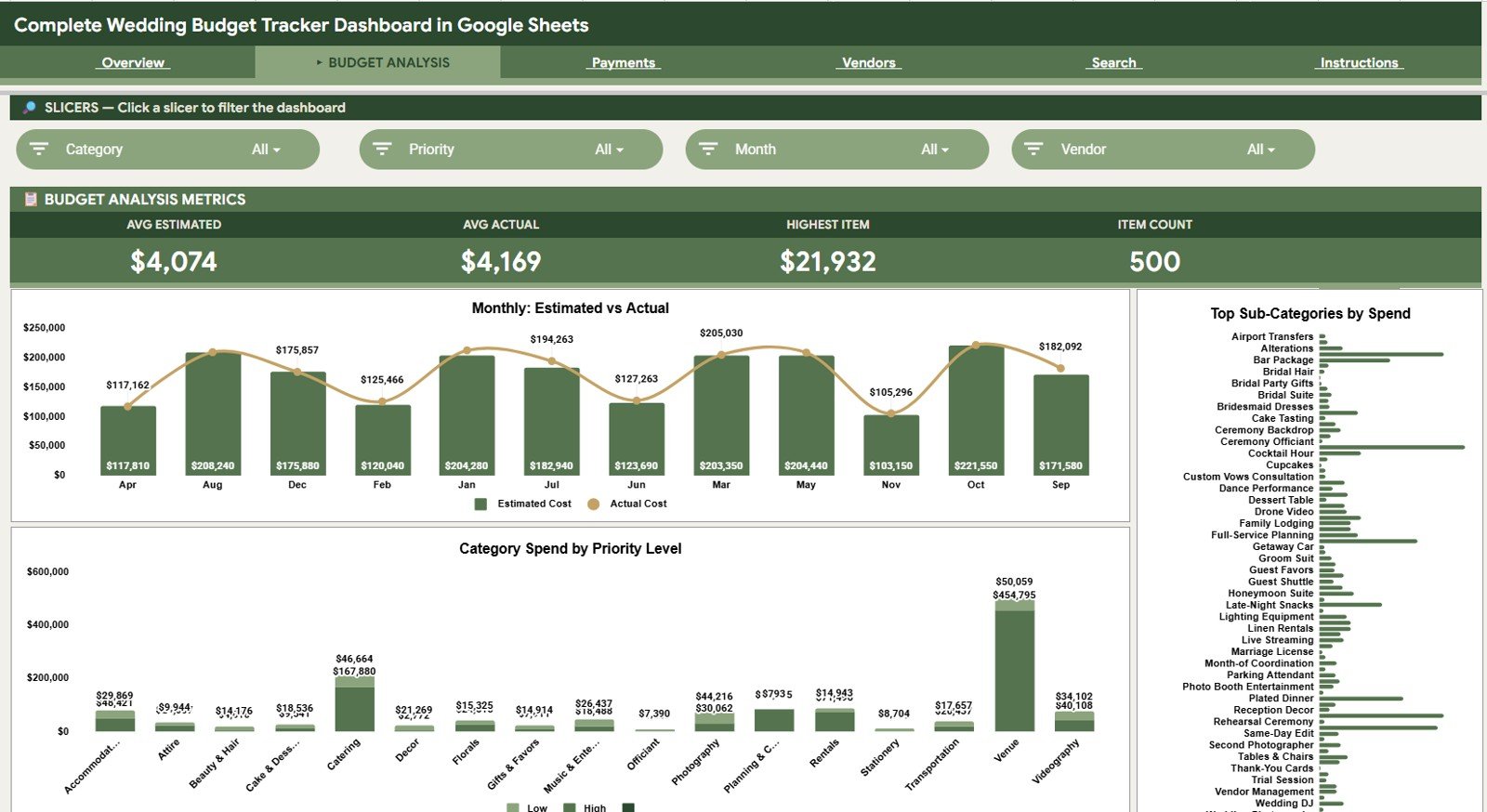
Budget Analysis
3 – Payments
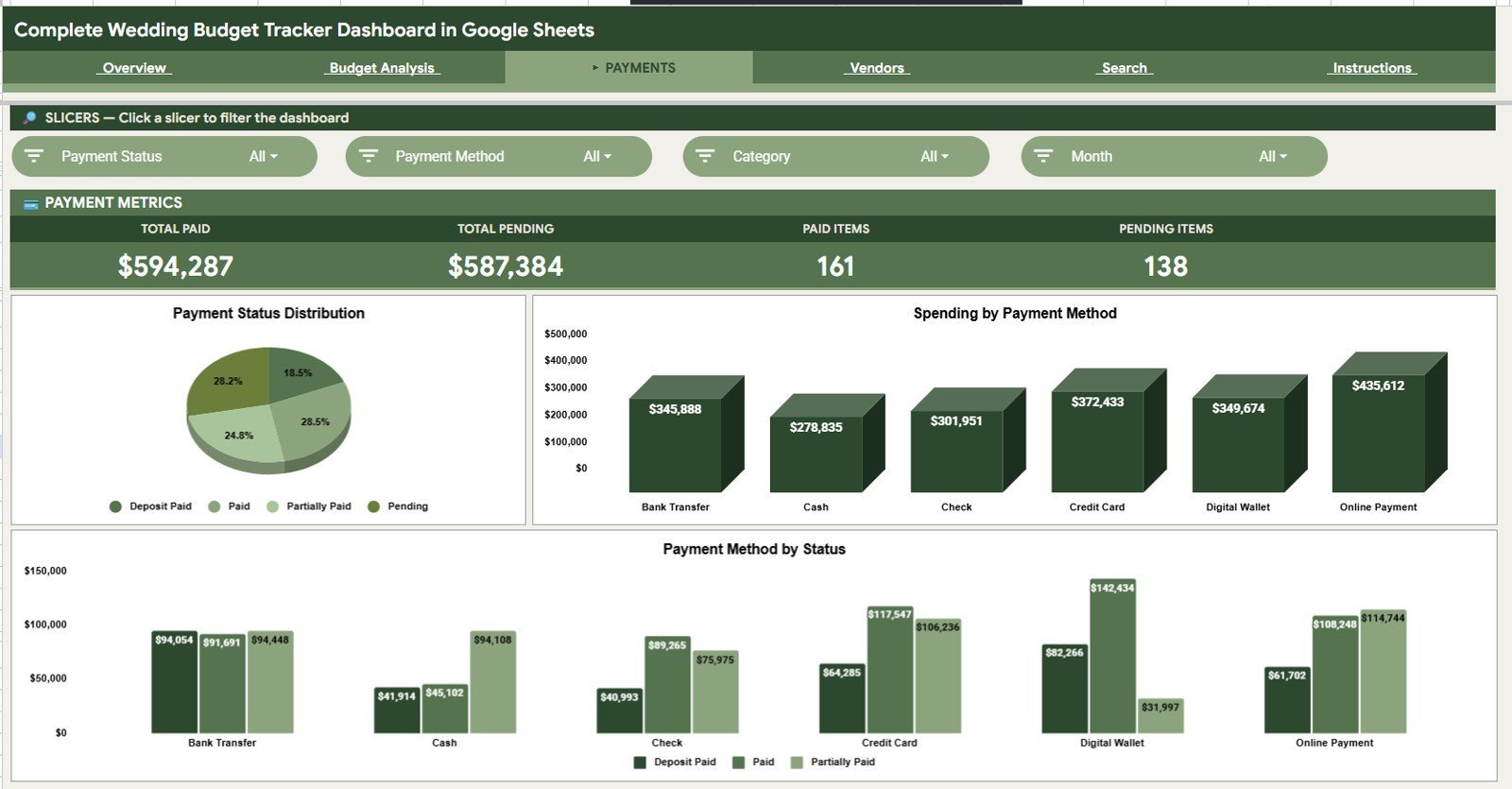
The Payments tab includes Payment Status Distribution by Status, Spending by Payment Method, and Payment Amount by Payment Method and Status. It helps you see how much has been paid, which methods are being used, and where pending amounts still need attention.
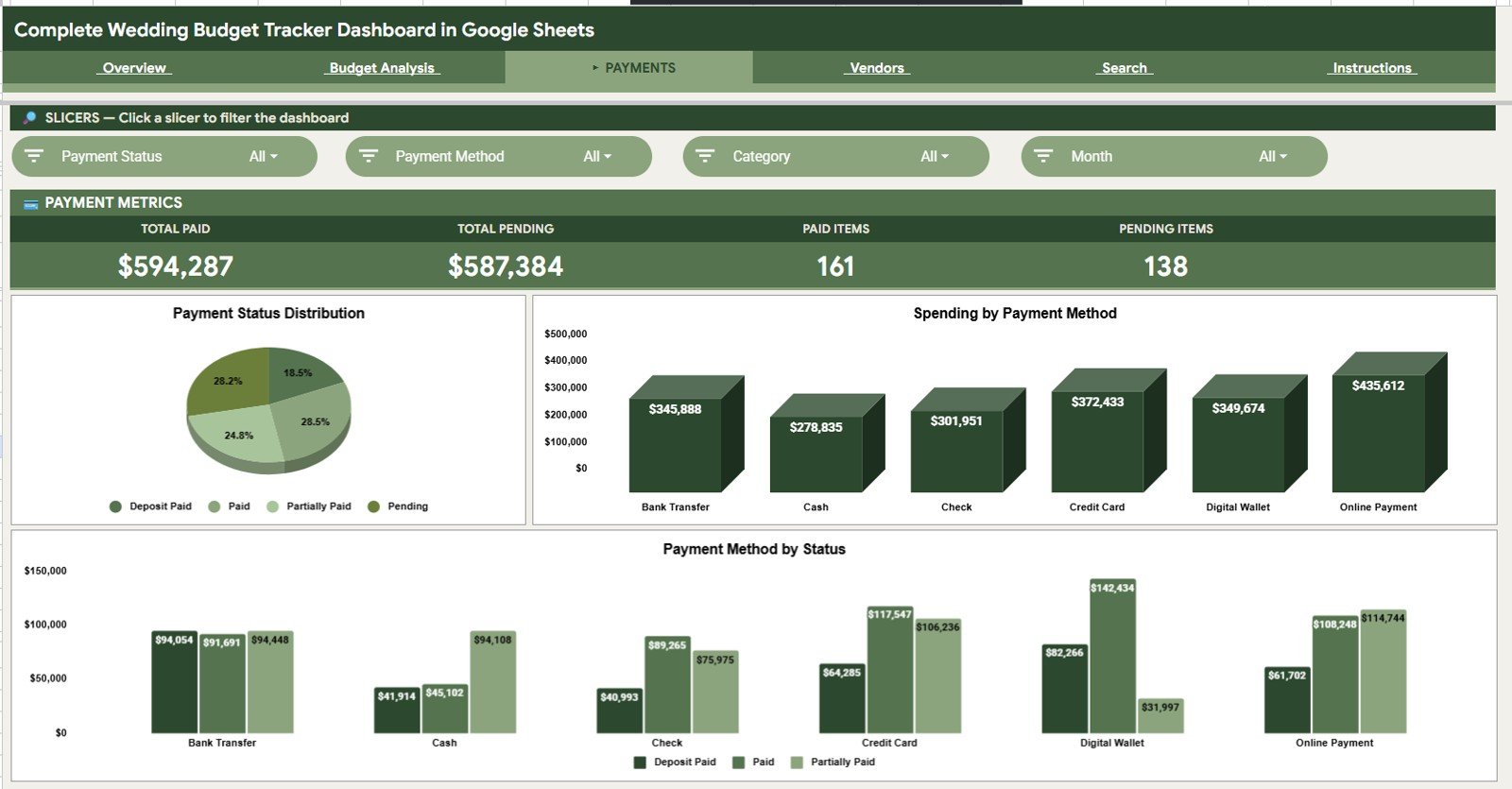
Payments
4 – Vendors
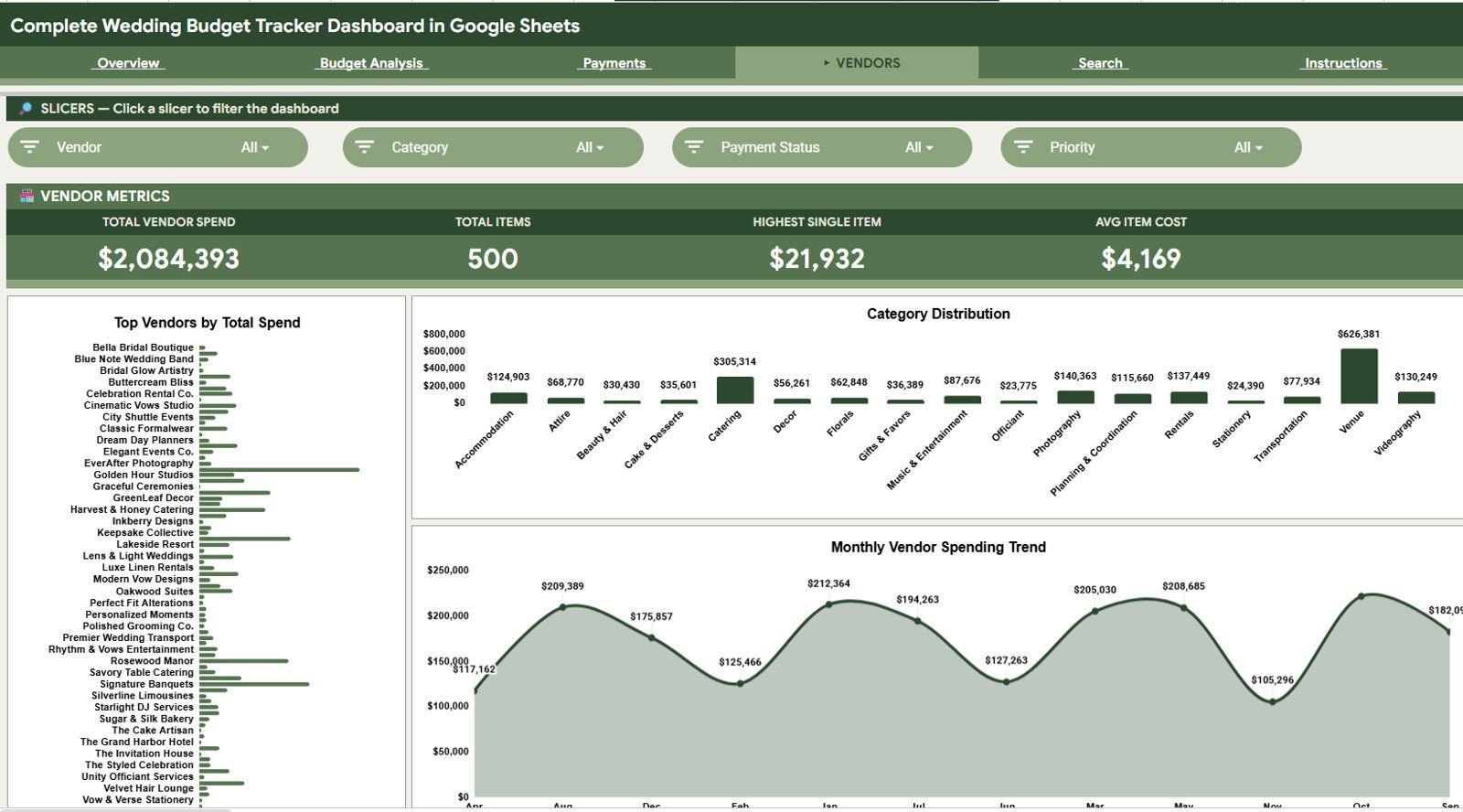
The Vendors tab includes Total Spend by Vendor, Vendor Spend by Category, and Vendor Spending by Month. It gives couples and planners a clear vendor-level view, especially helpful when checking deposits, comparing vendors, or reviewing where the largest commitments sit.
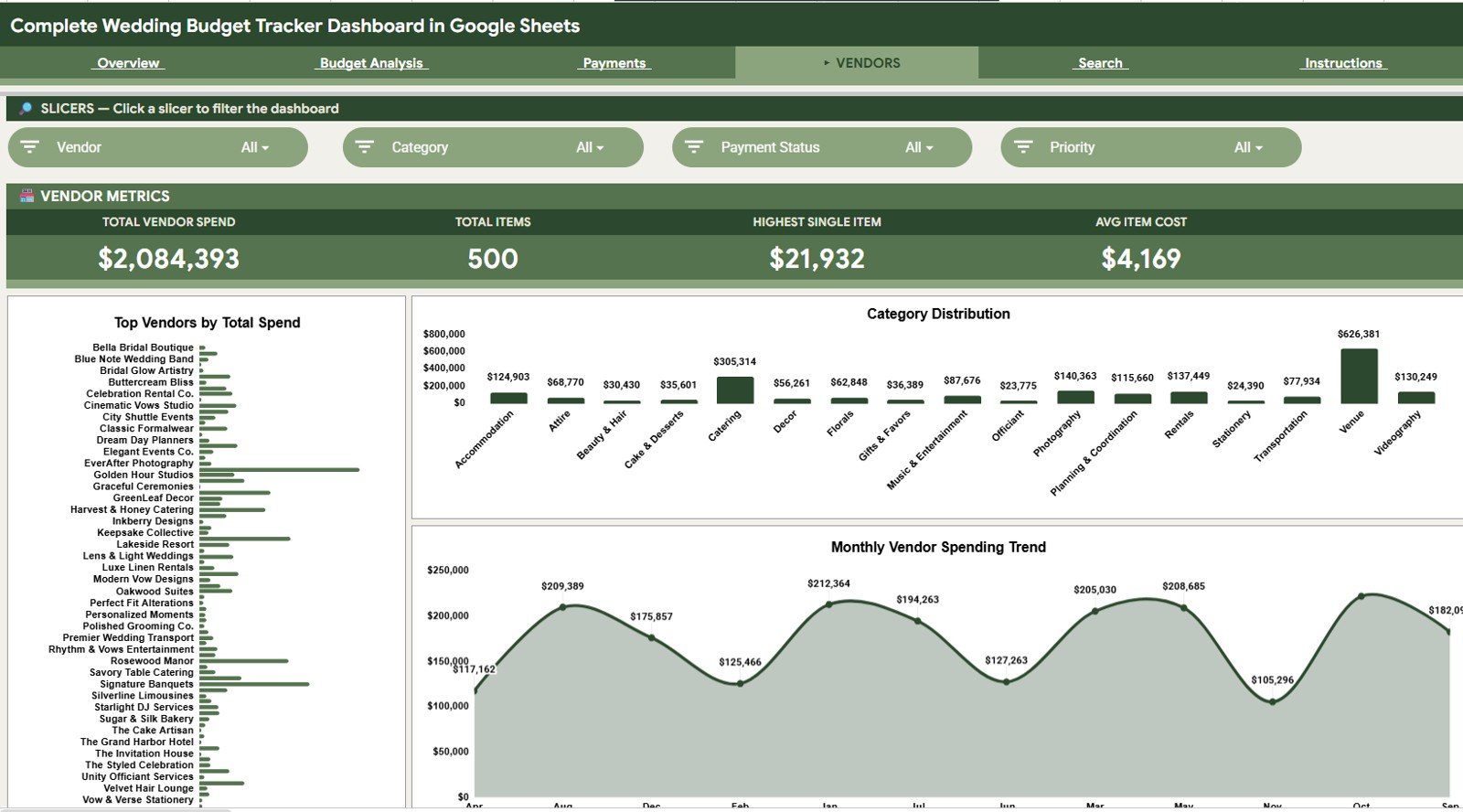
Vendors
5 – Search Sheet
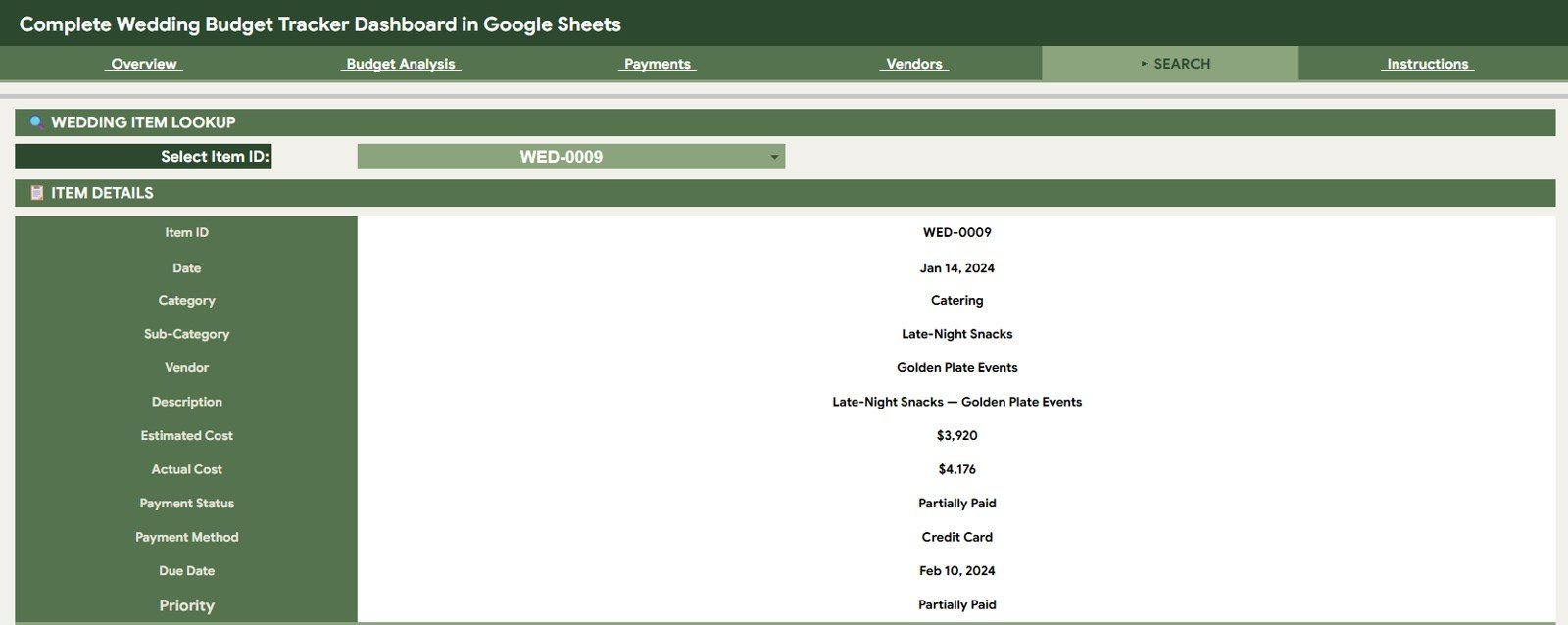
The Search Sheet helps users look up a specific wedding item by selecting the Item ID. It displays the matching Item ID, Date, Category, Sub-Category, Vendor, Description, Estimated Cost, Actual Cost, Payment Status, Payment Method, Due Date, and Priority.
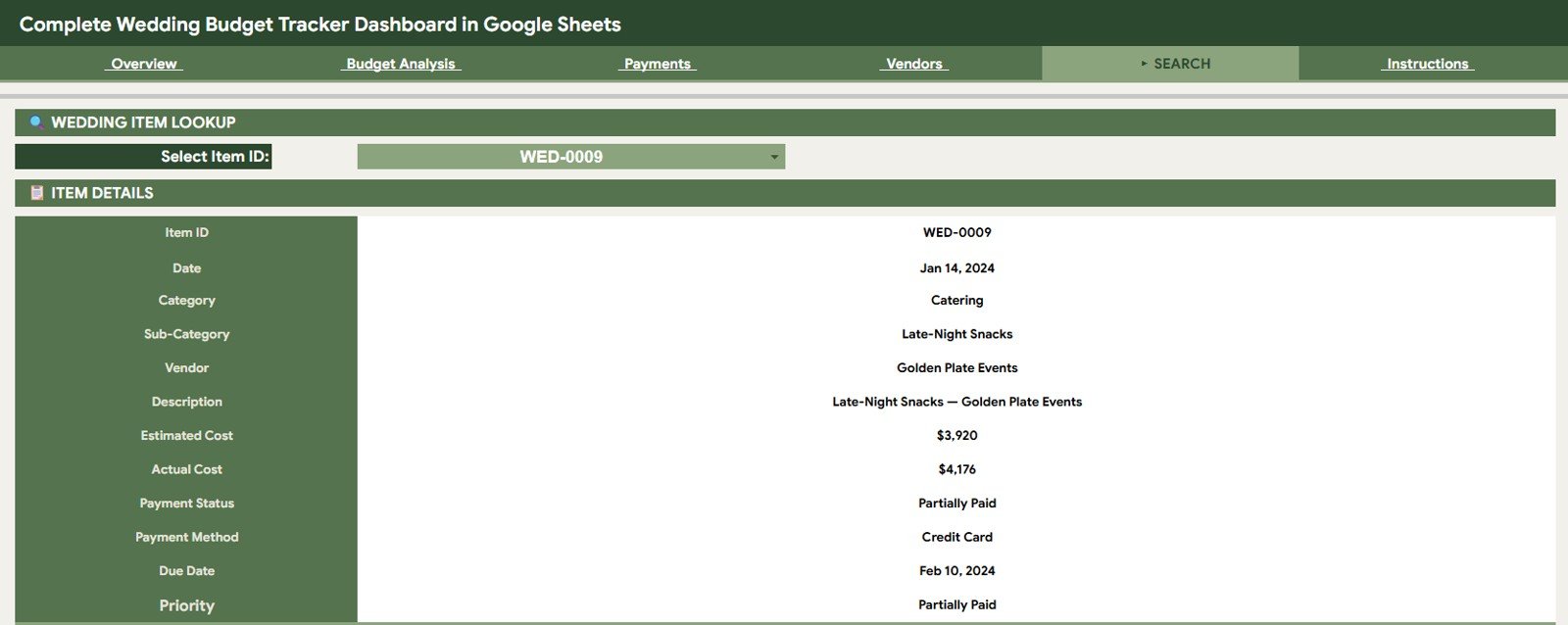
Search Sheet tab
6 – Data Sheet Tab
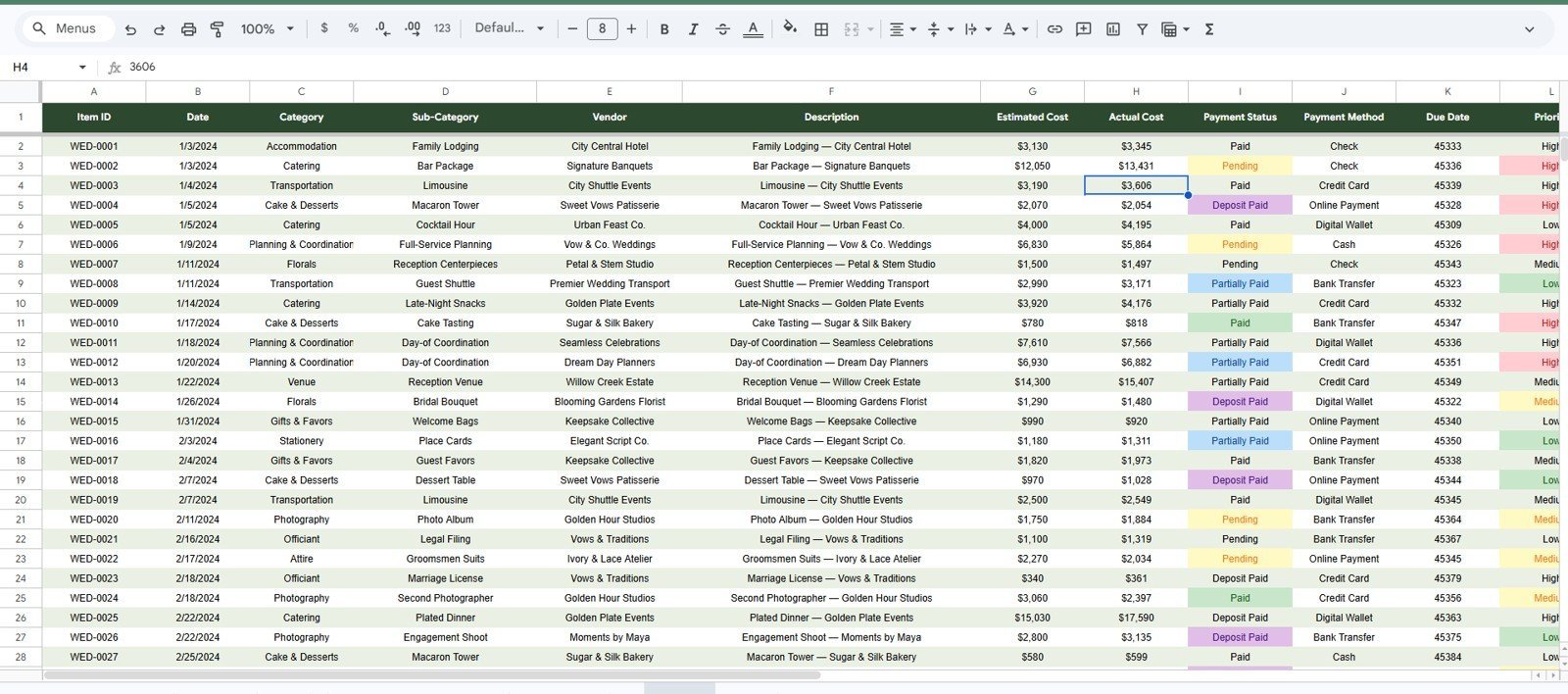
The Data Sheet is where you add wedding budget records in the same format as the sample data. Replace the sample rows with your own categories, vendors, costs, payment status, payment method, due dates, and priority levels, and the dashboard pages update from that structured table.
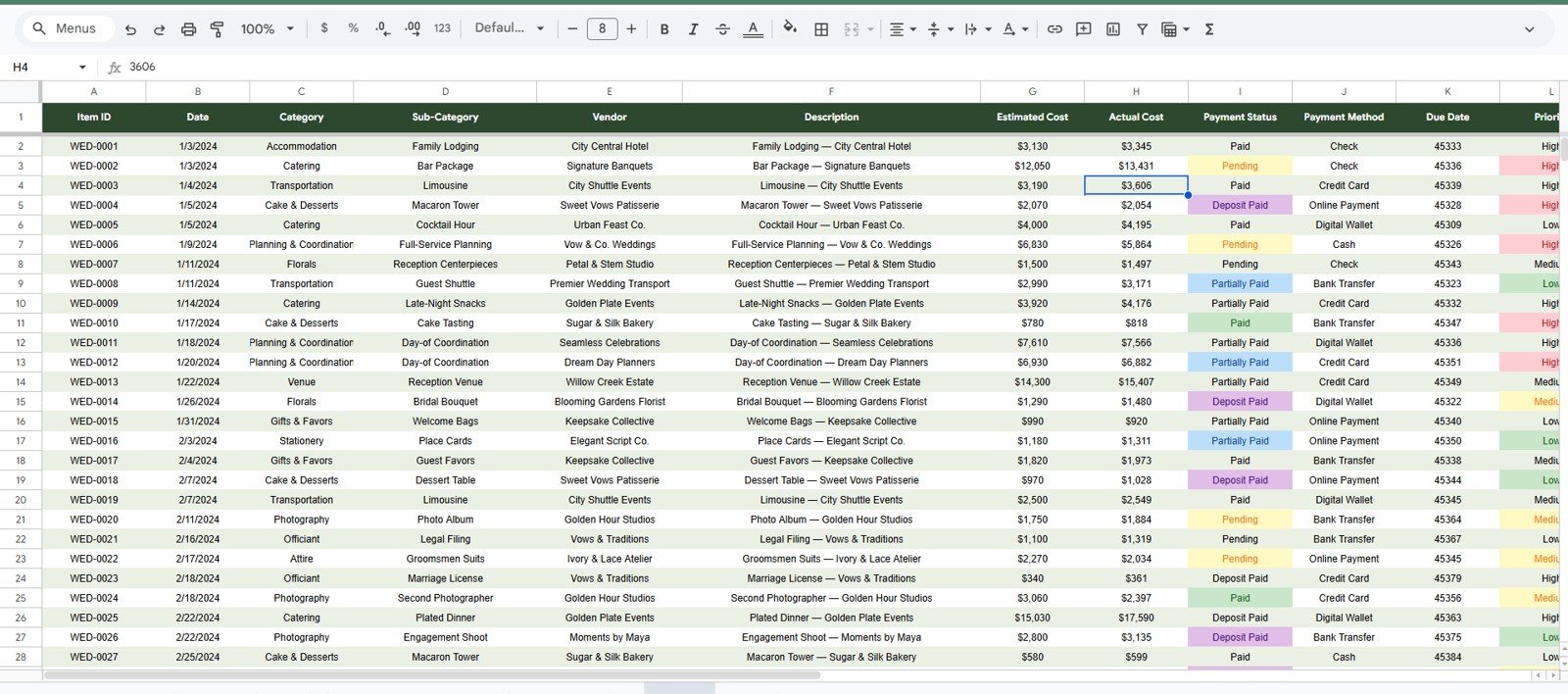
Data Sheet tab
Complete Wedding Budget Tracker Dashboard in Google Sheets vs. Excel Dashboard vs. Paid CRM/SaaS – Where This Fits
| Feature | This Google Sheets template | Excel dashboard | Paid wedding SaaS |
|---|---|---|---|
| Cost | $9.99 one-time sale price | One-time file cost | Subscription or marketplace upsells |
| Platform | Google Sheets in your Drive | Microsoft Excel | Vendor-hosted web app |
| Setup time | Copy the Sheet and replace sample data | Download and edit file | Account setup and onboarding |
| Real-time collaboration | Built into Google Sheets | Requires cloud sharing setup | Usually included |
| Customizable fields | Editable rows and labels | Editable workbook | Often limited by vendor workflow |
| Year-1 cost at 5 users | $9.99 total for the template | Template cost plus Excel access | Often much higher over time |
Who This Template Is For – and Who It’s Not For
This template is for engaged couples, wedding planners, families helping fund a wedding, and event coordinators who want a shareable Google Sheets budget tracker. It is not a guest list manager, RSVP system, seating chart builder, vendor booking marketplace, or payment processor.
How to Use the Complete Wedding Budget Tracker Dashboard in Google Sheets
- Open the included Google Sheets copy guide after purchase.
- Create your own copy in Google Drive.
- Go to the Data Sheet tab and replace the sample rows with your wedding budget records.
- Review the Overview page for total estimated, total actual, item count, and over/under budget.
- Use the Budget Analysis, Payments, and Vendors tabs for deeper review.
- Use the Search Sheet when you need to pull one item by Item ID.
Real-World Use Cases
A couple managing family contributions: Track venue, catering, outfits, decor, and photography in one shared Google Sheet so both families see the same current totals.
A wedding planner handling multiple vendors: Use the Vendors and Payments tabs before client calls to review who is paid, what is pending, and where budget pressure is building.
A destination wedding team: Update actual costs from a phone during vendor meetings and keep monthly spending visible as deposits and balances become due.
Frequently Asked Questions
What does this wedding budget dashboard track?
It tracks estimated cost, actual cost, item count, over/under budget, payment status, monthly spend, priority-level spend, category spend, vendor spend, payment method, due date, and item-level details.
Do I need paid software?
No. The template runs in Google Sheets, which is available with a Google account.
Can I share it with my partner or planner?
Yes. Because it is a Google Sheets template, you can share it with view or edit access using Google Drive sharing.
Can I customize the categories and vendors?
Yes. Replace the sample Data Sheet entries with your own categories, sub-categories, vendors, methods, and priority values.
Is this a full wedding planning system?
No. It focuses on budget tracking and analysis. Use a separate planning tool if you need RSVP, seating, invitations, or vendor booking workflows.
About the Author
Built by PK – Microsoft Certified Professional with 15+ years of Excel, Google Sheets, and Power BI experience. Founder of NextGenTemplates, reaching 300K+ subscribers across YouTube channels. Every template is hand-built and tested before release.
Explore Related Templates
Compare this tracker with Wedding Budget Dashboard in Google Sheets, Event Management Analysis Dashboard in HTML, and Photography Studios Dashboard in Power BI. You can also browse more Google Sheets dashboard templates and the full Google Sheets templates catalog.
Watch the step-by-step video Demo:
Download the Complete Wedding Budget Tracker Dashboard in Google Sheets to organize wedding costs, vendors, payment status, and budget variance in one shared workbook.
Last updated: July 25, 2026