

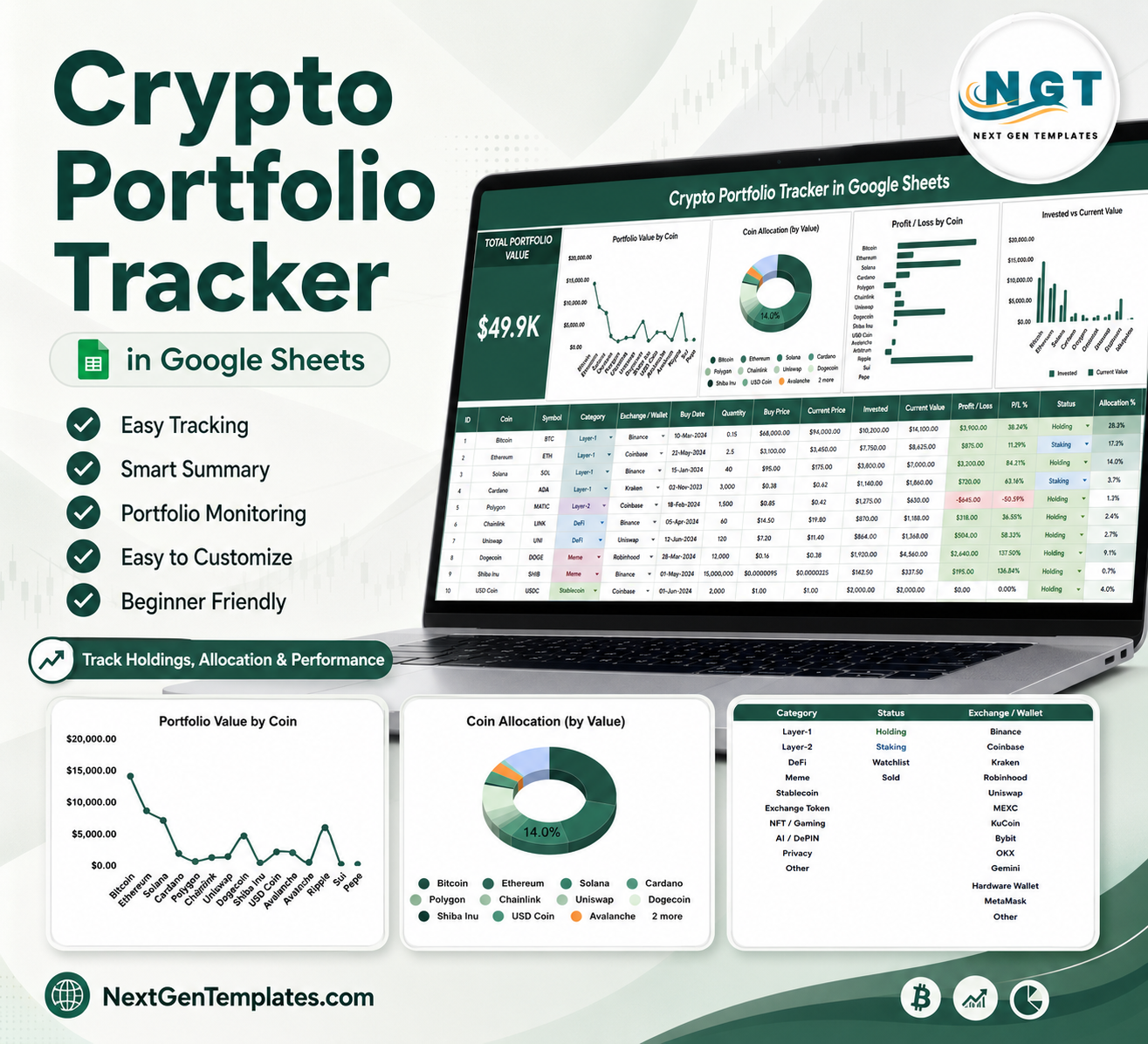

Crypto Portfolio Tracker in Google Sheets gives crypto investors a 2-sheet, chart-ready workbook for tracking total portfolio value, coin allocation, invested value, current value, and profit/loss without paying for another monthly app. Crypto markets move 24 hours a day, 7 days a week, so a manual tracker is useful when you want your own auditable snapshot outside an exchange dashboard. Built for the NextGenTemplates library trusted by 10,000+ professionals, this one-time $6.99 template uses editable Google Sheets pages, slicers, and setup lists. You can review the sample structure before entering live data, and no exchange login is required.
Key Features of Crypto Portfolio Tracker in Google Sheets
- Overview Page: See total portfolio value and five chart views in one Google Sheets dashboard-style page.
- Total Portfolio Value card: Review the headline value before drilling into individual coins.
- Portfolio Value by Coin: Compare each coin contribution to total portfolio value so concentration is easy to see.
- Coin Allocation by Value: Understand how much of the portfolio sits in each coin based on current value.
- Profit / Loss by Coin: Spot which coins are adding gains and which positions need closer review.
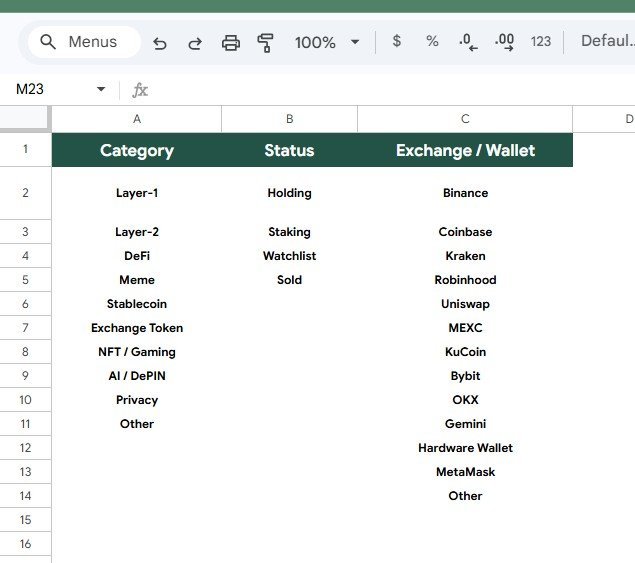
- Menu Sheet setup: Maintain portfolio category, holding status, exchange, and wallet options from one setup area.
- Google Sheets access: Work in your own Drive copy from browser or mobile with standard Google Sheets sharing.
What’s Inside the Crypto Portfolio Tracker in Google Sheets
1 – Overview Page
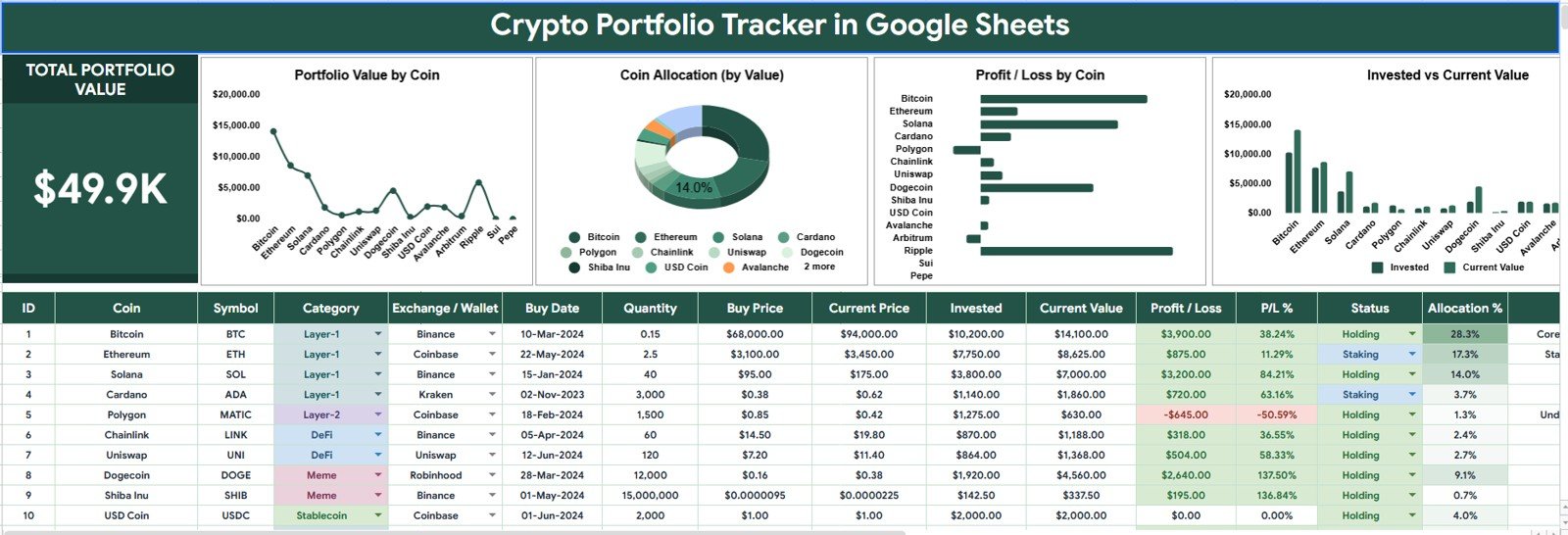
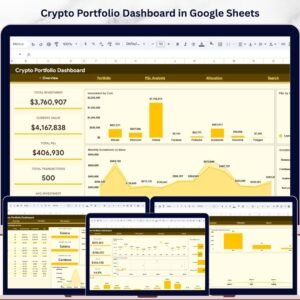
The Overview Page is the main tracker dashboard. At the top, the Total Portfolio Value card gives an immediate high-level number, while slicers help you filter the dashboard quickly by fields such as coin, category, exchange, wallet, and holding status.
Portfolio Value by Coin: This chart shows how much value each coin contributes to the portfolio. It helps you identify whether your portfolio depends heavily on Bitcoin, Ethereum, stablecoins, or smaller altcoins.
Coin Allocation by Value: This allocation chart turns current value into a distribution view. It is useful for checking diversification and finding coins that have grown too large or too small relative to your plan.
Profit / Loss by Coin: This chart compares gains and losses by coin. It gives a faster way to review performance than scanning transaction rows or exchange exports.
Invested Value by Coin: This view shows how much capital has been invested into each coin. Comparing it with current value helps explain where returns or drawdowns are coming from.
Current Value by Coin: This chart focuses on present value by asset. It helps investors prioritize review of the positions with the greatest financial impact.
Crypto Portfolio Tracker in Google Sheets
2 – Menu Sheet
The Menu Sheet keeps the dropdown values organized so data entry stays consistent. Clean setup lists are important in a crypto tracker because exchange names, wallet labels, coin categories, and holding statuses can quickly become messy when they are typed differently each time.
Portfolio Category by Menu Option: This section lets you standardize crypto categories such as Layer 1, Layer 2, DeFi, stablecoin, meme coin, or custom groups.
Holding Status by Menu Option: Use this list to keep status labels consistent, such as active, watchlist, exited, long-term hold, or short-term trade.
Exchange / Wallet by Menu Option: This area helps you manage exchange and wallet labels so dashboard filters remain reliable across centralized exchanges, hot wallets, cold wallets, and other storage locations.
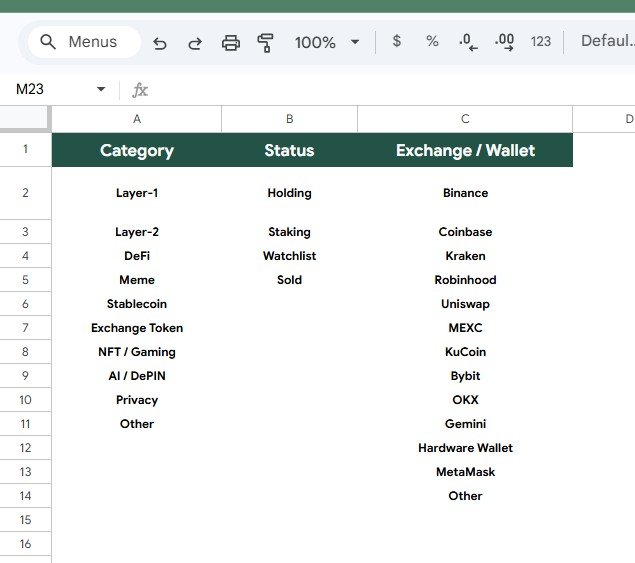
Menu Sheet
Crypto Portfolio Tracker in Google Sheets vs. Microsoft Excel Tracker vs. Paid Crypto Portfolio SaaS – Where This Fits
| Feature | This Google Sheets Tracker | Microsoft Excel Tracker | Paid Crypto Portfolio SaaS |
|---|---|---|---|
| Cost | $6.99 one-time sale price | Template cost or manual workbook build | Often recurring subscription |
| Platform | Google Sheets in Drive | Excel desktop or web | Vendor-hosted web app |
| Setup time | Copy template, edit menu lists, enter records | Open workbook or build formulas | Create account, configure exchanges, import data |
| Real-time team collaboration | Google Sheets sharing | Depends on OneDrive workflow | Depends on account plan |
| Mobile access | Google Sheets app or browser | Excel mobile app | Usually included |
| Customizable fields | Edit menu lists, labels, and sheet data | Editable if workbook is unlocked | Often limited by provider schema |
| Share with link | Yes, with Google Drive permissions | Yes, if shared through Microsoft 365 | Usually account based |
| Year-1 cost at 5 users | $6.99 before any Google Workspace costs | Template plus any Microsoft licensing | Can become recurring per user or per portfolio |
| Coin allocation charts | Included | Must be built or customized | Usually included but less editable |
| Menu setup lists | Included for category, status, exchange, and wallet | Manual setup required | Hidden in app settings |
Who This Template Is For – and Who It’s Not For
This tracker is for individual crypto investors, finance students, household portfolio managers, advisors, and spreadsheet users who want a clear manual view of coin value, allocation, invested value, current value, and profit/loss. It works well when you prefer owning the spreadsheet logic and keeping portfolio records in your own Google Drive copy.
It is not the best fit if you need live exchange API sync, automated tax filing, real-time price feeds, custody reporting, institutional compliance controls, or on-chain wallet monitoring. In those cases, use a specialist platform alongside this tracker.
How to Use the Crypto Portfolio Tracker in Google Sheets
- Open the PDF guide included with your purchase and click the Google Sheets copy link.
- Create your own editable copy in Google Drive.
- Review the Menu Sheet and update category, holding status, exchange, and wallet options.
- Enter or paste your crypto portfolio records in the tracker data area.
- Use the Overview Page slicers to filter by coin, category, exchange, wallet, or status.
- Review total portfolio value, allocation, current value, invested value, and profit/loss by coin.
Real-World Use Cases
Aarav, a retail investor: reviews coin allocation every weekend to make sure one asset has not grown beyond his target range.
Maya, a finance coach: uses the tracker with clients who want a simple way to explain crypto exposure without connecting exchange accounts.
Daniel, a long-term holder: separates cold-wallet holdings from exchange positions using the menu options and dashboard filters.
Frequently Asked Questions
Does this template work in Google Sheets?
Yes. The tracker is designed for Google Sheets and is intended to be copied into your own Google Drive account.
Does it connect directly to crypto exchanges?
No. This is a manual spreadsheet tracker. You enter or paste your portfolio records, which keeps the file simple and avoids requiring exchange login access.
Can I customize coin categories and wallet names?
Yes. The Menu Sheet lets you edit portfolio category, holding status, exchange, and wallet options.
What charts are included on the Overview Page?
The Overview Page includes Portfolio Value by Coin, Coin Allocation by Value, Profit / Loss by Coin, Invested Value by Coin, and Current Value by Coin.
Can I share the tracker with someone else?
Yes. Since it runs in Google Sheets, you can share your copied file using Google Drive permissions.
Is this a tax reporting tool?
No. It can help organize portfolio information, but it is not a tax filing or tax calculation product. Confirm reporting needs with a qualified tax professional.
About the Author
Built by PK – Microsoft Certified Professional with 15+ years of Excel, Google Sheets, and Power BI experience. Founder of NextGenTemplates, reaching 300K+ subscribers across YouTube channels. Every template is hand-built and tested before release.
Explore Related Templates
You may also like Crypto Portfolio Dashboard in Google Sheets, Investment Tracker in Google Sheets, Personal Finance Net Worth Tracker in Google Sheets, and Dividend Income Tracker in Google Sheets. Browse more Google Sheets tracker templates and Google Sheets financial tools.
Watch the step-by-step video Demo:
Download the Crypto Portfolio Tracker in Google Sheets and start reviewing portfolio value, allocation, invested value, current value, and profit/loss in one editable spreadsheet.
Last updated: July 21, 2026.
Compatibility and Requirements
- Works in Google Sheets. You need a free Google account and a web browser.
- The Menu Sheet lists drive the category, holding status, exchange and wallet options. Google explains dropdowns in Create an in-cell dropdown list.
More Questions About This Template
Which sheets are included?
Two sheets: the Overview Page and the Menu Sheet. The Overview Page holds the Total Portfolio Value card, the slicers and five charts. The Menu Sheet holds the setup lists.
Which fields can I filter by?
The slicers on the Overview Page filter by coin, category, exchange, wallet and holding status.
How do I see whether one coin is too large a share of my portfolio?
Open the Coin Allocation by Value chart. It shows each coin as a share of current portfolio value. Portfolio Value by Coin gives the same comparison in bars.
Can I compare what I invested with what a coin is worth now?
Yes. Invested Value by Coin and Current Value by Coin sit side by side on the Overview Page, and Profit / Loss by Coin shows the difference for each coin.
Is there a dashboard version or a stock version?
Yes. See the Crypto Portfolio Dashboard in Google Sheets and the Stock Portfolio Tracker in Google Sheets.






















Reviews
There are no reviews yet.