



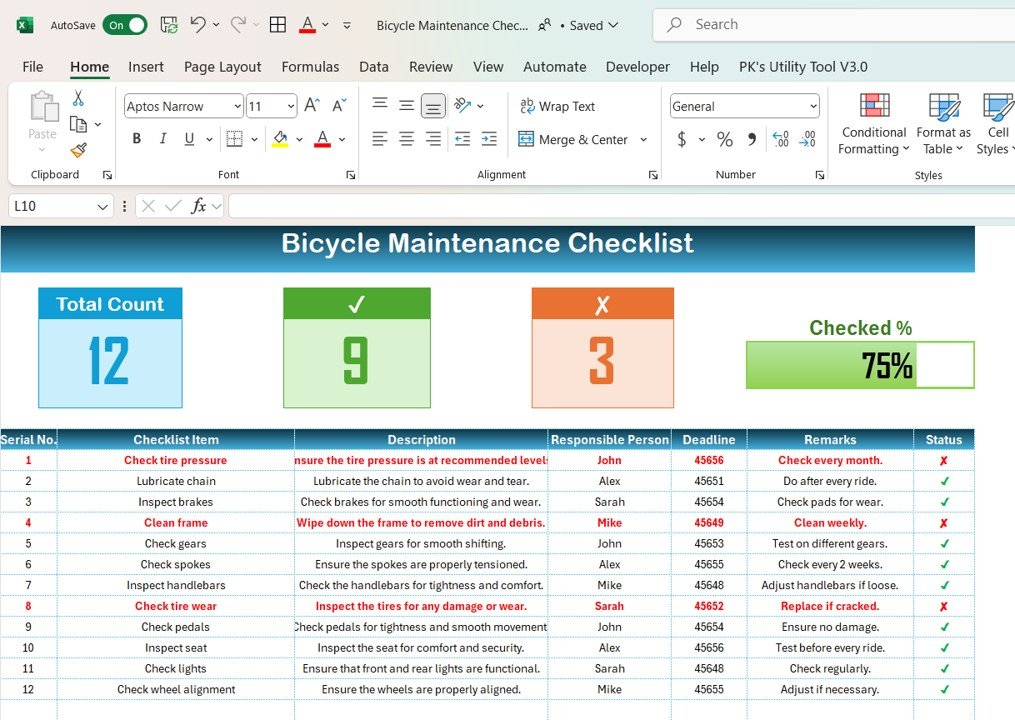
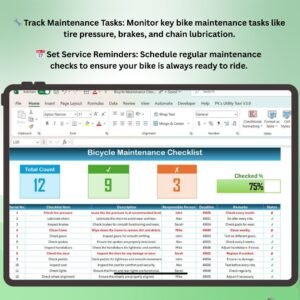
The Bicycle Maintenance Checklist in Excel is a comprehensive tool designed to help bicycle owners, repair shops, and bike enthusiasts track and maintain the condition of their bikes. This user-friendly checklist helps ensure that all aspects of your bicycle are properly serviced, from tire pressure to brake adjustments, to keep your bike in top condition for riding.
With customizable fields and an easy-to-navigate interface, this Excel checklist allows you to track routine maintenance tasks, set reminders for future servicing, and ensure that you never miss a crucial bike maintenance task. Whether you’re an individual rider or a professional repair shop, this checklist is the perfect tool for maintaining your bicycle and optimizing its performance.
Key Features of the Bicycle Maintenance Checklist in Excel
🔧 Comprehensive Maintenance Tasks
Track key maintenance tasks such as tire pressure, brake checks, chain lubrication, and gear adjustments. This checklist ensures that you cover all essential maintenance points to keep your bike performing at its best.
📅 Routine & Scheduled Maintenance
Create a schedule for regular bike maintenance, with reminders for when each task should be done (weekly, monthly, or quarterly). Never forget when your bike needs servicing again!
📝 Track Maintenance History
Keep a log of all the maintenance tasks completed on your bike. Track what was done, when it was done, and who did it, ensuring that you have a complete maintenance history for future reference.
📊 Customizable Checklist & Tasks
Customize the checklist according to your bike’s specific needs or the type of riding you do. Add tasks for specific parts, adjust dates for service intervals, and personalize the checklist to suit your requirements.
🔄 Preventive Maintenance Tracking
Track and prioritize preventive maintenance to avoid costly repairs. By keeping an eye on small issues early, you can prevent bigger, more expensive problems in the future.
🖥️ Easy-to-Use Excel Template
This Excel template is simple to use, making it perfect for both beginners and experienced riders. No complex setup is required—just fill in your bike’s details and start tracking.
Why You’ll Love the Bicycle Maintenance Checklist in Excel
✅ Optimize Bicycle Performance
Regular maintenance ensures that your bike is always ready for the road. This checklist helps you stay proactive with maintenance and avoid unexpected breakdowns during rides.
✅ Extend Your Bike’s Lifespan
By tracking routine checks and maintenance, you can extend the life of your bicycle. Keep your bike in top condition and avoid unnecessary wear and tear.
✅ Stay Organized & Efficient
Keep all maintenance details in one place, making it easy to track and manage your bike’s servicing history. Stay organized and ensure you’re always prepared for your next ride.
✅ Preventive Maintenance Made Easy
By tracking key tasks and scheduling regular checkups, you can stay ahead of potential issues and avoid costly repairs. The checklist helps you focus on important tasks that keep your bike running smoothly.
✅ Fully Customizable & User-Friendly
The checklist is flexible, allowing you to tailor it according to your bike’s specific needs. Whether you own a road bike, mountain bike, or hybrid, this checklist can be adjusted to suit your bike’s requirements.
What’s Inside the Bicycle Maintenance Checklist Template in Excel?
- Complete Maintenance Tasks: Track tire pressure, brake checks, gear adjustments, chain lubrication, and more.
- Scheduled Maintenance Reminders: Set reminders for regular checkups and service intervals.
- Maintenance History Log: Track the date and details of each completed maintenance task.
- Customizable Fields: Modify the checklist to suit the type of bike and specific maintenance needs.
- Preventive Maintenance Tracking: Keep track of preventative tasks to avoid larger issues in the future.
How to Use the Bicycle Maintenance Checklist in Excel
1️⃣ Download the Template: Get instant access to the Bicycle Maintenance Checklist in Excel.
2️⃣ Input Your Bike Details: Enter details such as bike type, components, and maintenance schedule.
3️⃣ Track & Complete Tasks: Check off maintenance tasks as they are completed, and set reminders for future tasks.
4️⃣ Review Maintenance History: Keep a log of all tasks completed on your bike and track its service history.
5️⃣ Optimize Bike Performance: Use the checklist to ensure your bike is always in top shape, ready for the next ride.
Who Can Benefit from the Bicycle Maintenance Checklist in Excel?
🔹 Individual Bike Owners
🔹 Bike Repair Shops
🔹 Professional Cyclists & Enthusiasts
🔹 Bicycle Rental Companies
🔹 Bike Mechanics & Technicians
🔹 Anyone Interested in Bike Maintenance & Repair
Ensure that your bike stays in peak condition with the Bicycle Maintenance Checklist in Excel. Stay organized, track important tasks, and keep your bike ready for the road!
Click here to read the Detailed blog post
Visit our YouTube channel to learn step-by-step video tutorials
Youtube.com/@PKAnExcelExpert
Compatibility and Requirements
- Works in Microsoft Excel desktop (Excel 2016 or later, or Microsoft 365).
- New to Excel? Microsoft’s Excel for Windows training covers the basics.
Frequently Asked Questions
Which maintenance tasks are on the checklist?
Tire pressure, brake checks, chain lubrication and gear adjustments, plus preventive maintenance tasks.
Can I keep a service history?
Yes. The maintenance history log records what was done, when it was done and who did it.
Does it work for road, mountain and hybrid bikes?
Yes. You can add tasks for specific parts and change service intervals to suit your bike.
Who is it for?
Individual riders, bike repair shops, rental companies and mechanics who want one place to plan and record bike servicing.
Related Maintenance Checklists
- Bicycle Maintenance Checklist in Google Sheets: the same checklist in Google Sheets
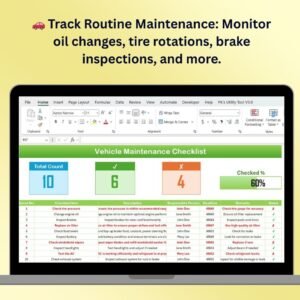
- Vehicle Maintenance Checklist in Excel: a maintenance checklist for cars and vans
- Vehicle Maintenance Checklist in Google Sheets: vehicle maintenance in Google Sheets
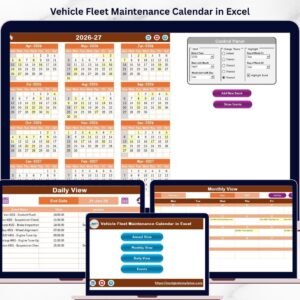
- Vehicle Fleet Maintenance Calendar in Excel: plan fleet servicing by date
- Checklist & SOP Pack: 12 checklist templates in one pack
Browse all Excel checklists or the Google Sheets checklists.






























Reviews
There are no reviews yet.