

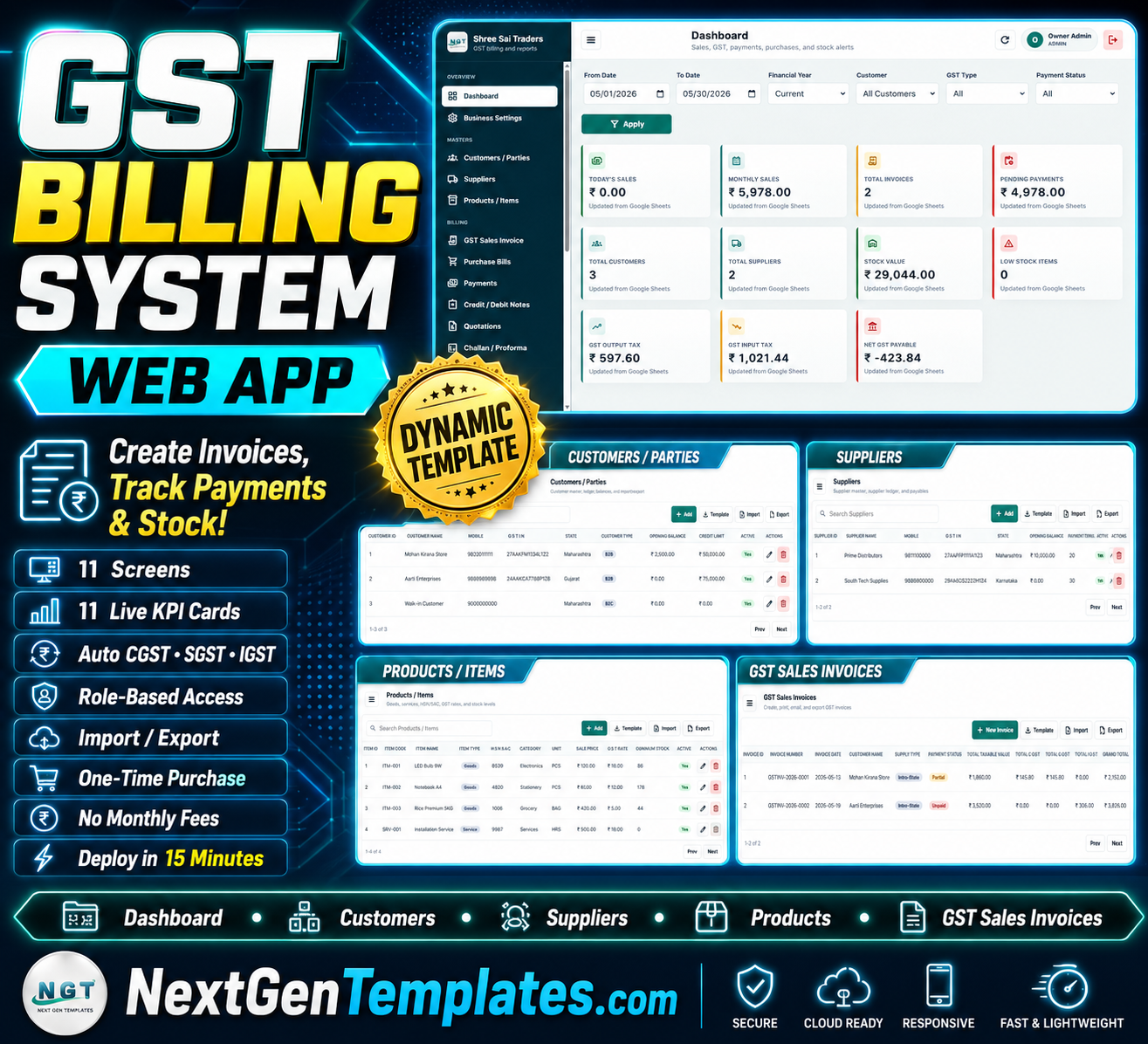

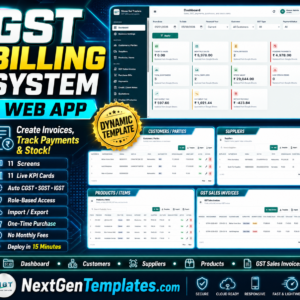
The GST Billing System Web App runs 11 connected screens, 11 live dashboard KPI cards, and automatic CGST/SGST/IGST tax logic on top of Google Sheets and Apps Script. It deploys to your own Google account in under 15 minutes — no server, no monthly subscription, and no per-invoice fees.
🌍 Join 8,400+ teams in 40+ countries using NextGenTemplates to replace paid SaaS tools with one-time-purchase Excel, Google Sheets, Power BI, and HTML templates.
✅ Instant download · One-time payment · No subscription · No per-user fees · Lifetime access
Need our team’s help to deploy it? Email us at [email protected]. There will be an additional cost of 50 USD.
🔑 Key Features of the GST Billing System Web App
🔐 Secure role-based login — every user signs in with a username and password, so business data stays protected and access is controlled. Owners, accountants, and billing staff each open the system through a browser on any device.
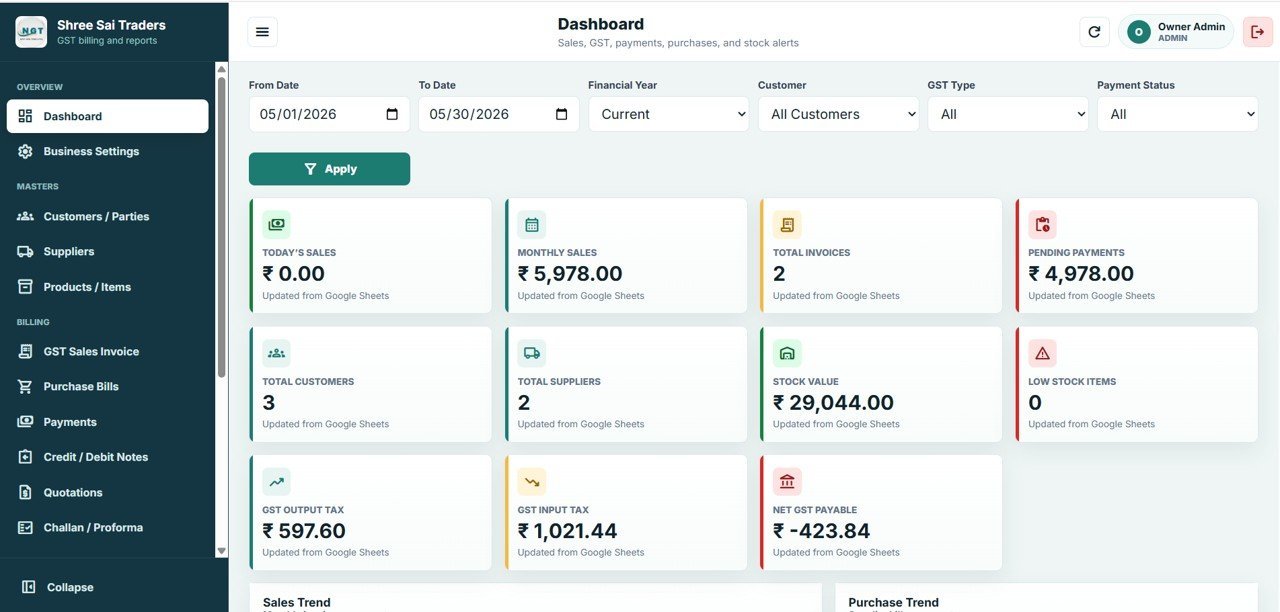
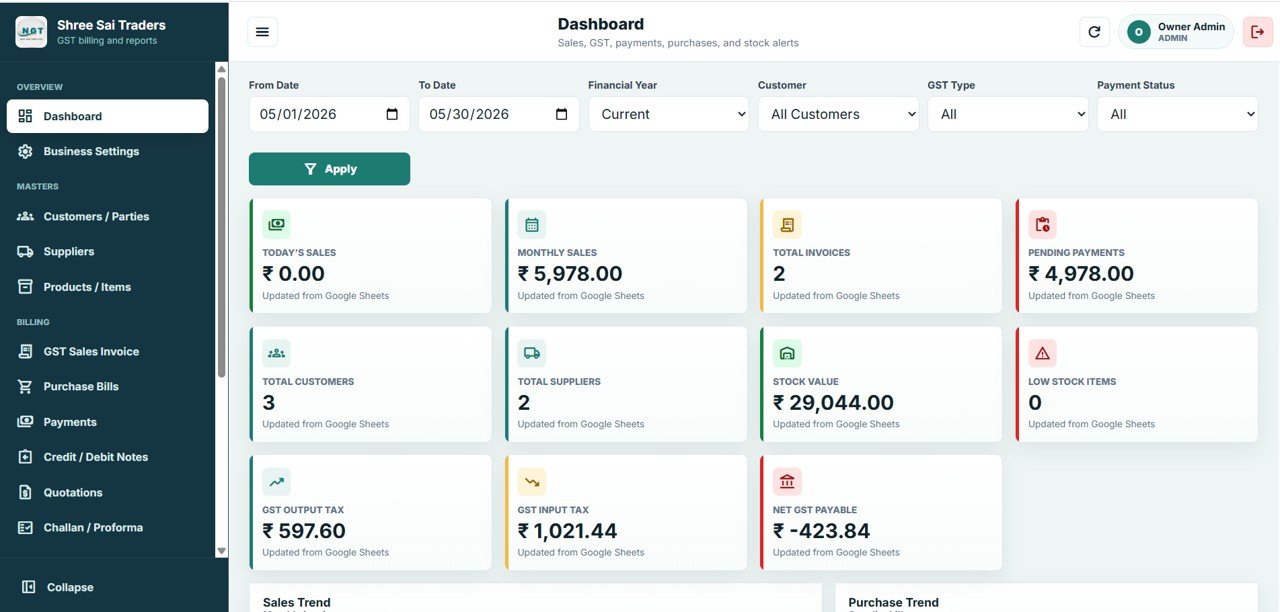
📊 Dashboard with 11 live KPI cards — Today’s Sales, Monthly Sales, Total Invoices, Pending Payments, Total Customers, Total Suppliers, Stock Value, Low Stock Items, GST Output Tax, GST Input Tax, and Net GST Payable update as data is entered, with Sales by Month and Purchase by Month charts.
🧾 Automatic GST calculation — the GST Billing System Web App applies CGST and SGST for intra-state supply and IGST for inter-state supply automatically on every sales invoice and purchase bill, so tax totals are always correct.
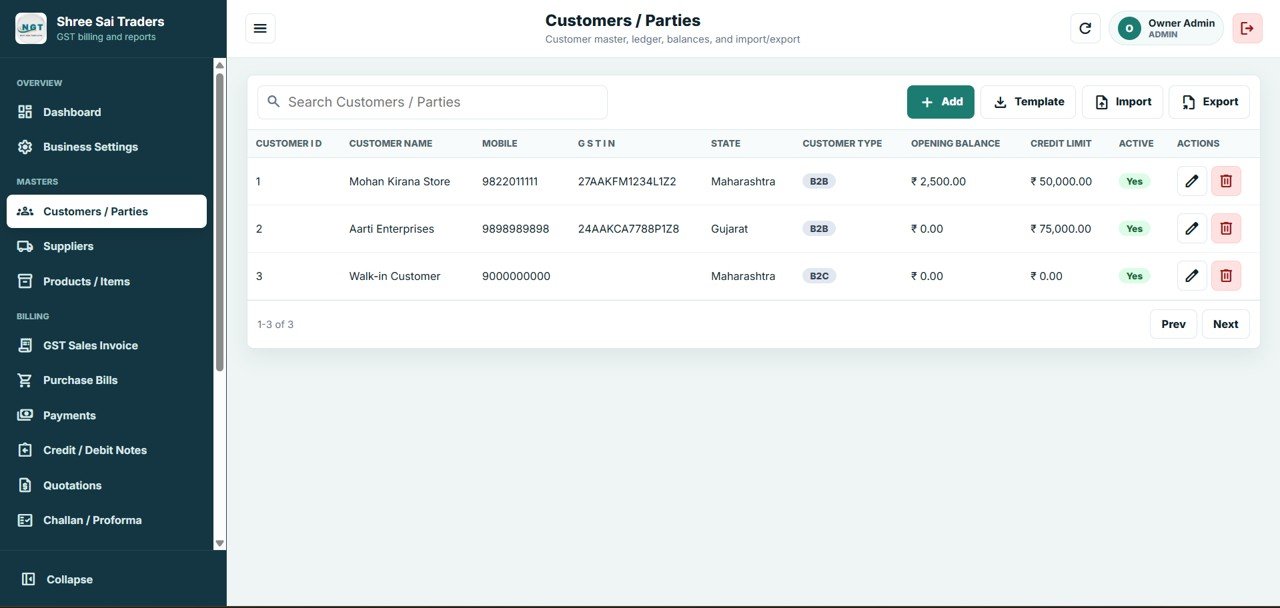
👥 GSTIN-ready customer and supplier masters — store GSTIN, State, B2B or B2C type, opening balance, credit limit, and payment terms, with add, search, import, and export on every master page.
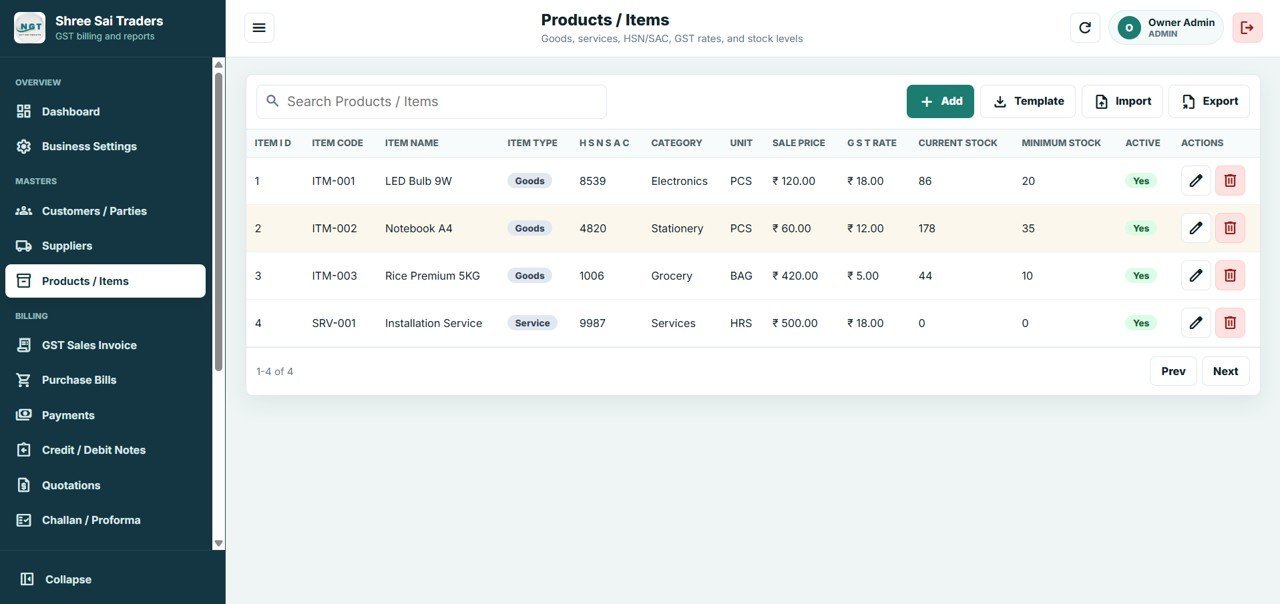
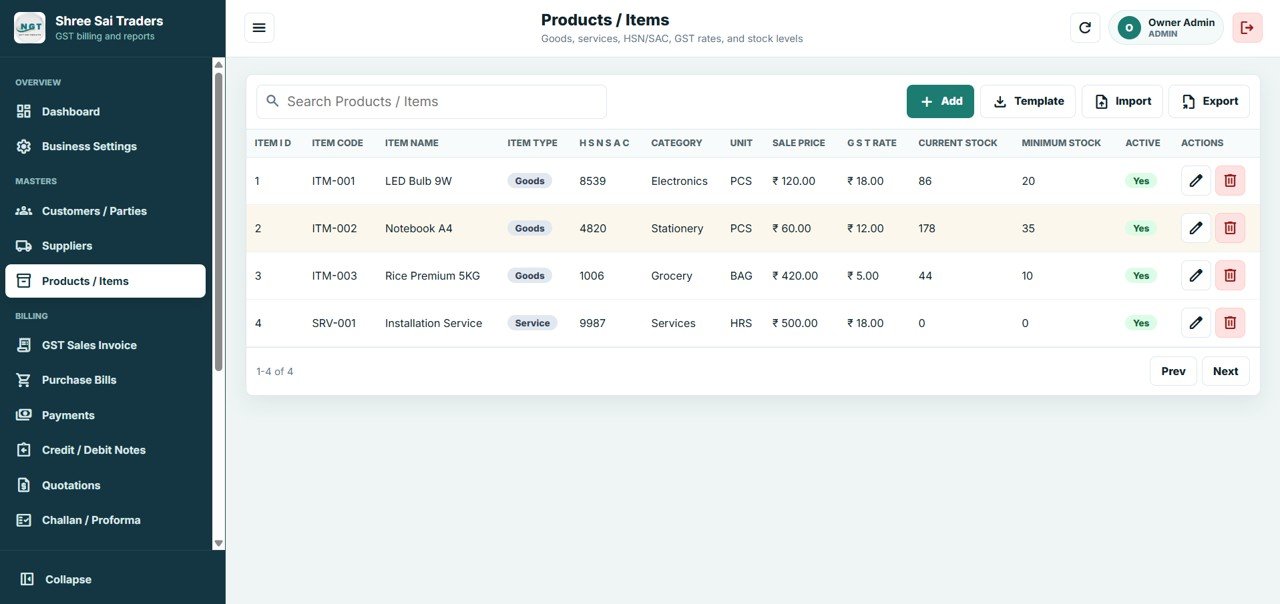
📦 HSN/SAC product and service catalog — track item code, item type (goods or service), HSN/SAC code, category, unit, sale price, GST rate, current stock, and minimum stock for low-stock alerts.
💳 Input Tax Credit, payments, and adjustments — Purchase Bills capture input GST and update stock inward, Payments/Receipts keep the Pending Payments figure accurate, and Credit/Debit Notes handle returns and GST adjustments.
📦 What’s Inside the GST Billing System Web App
This Google Sheets Apps Script web app ships with 11 interactive screens covering the full billing lifecycle — from secure login through GST invoicing, purchases, payments, and document conversion.
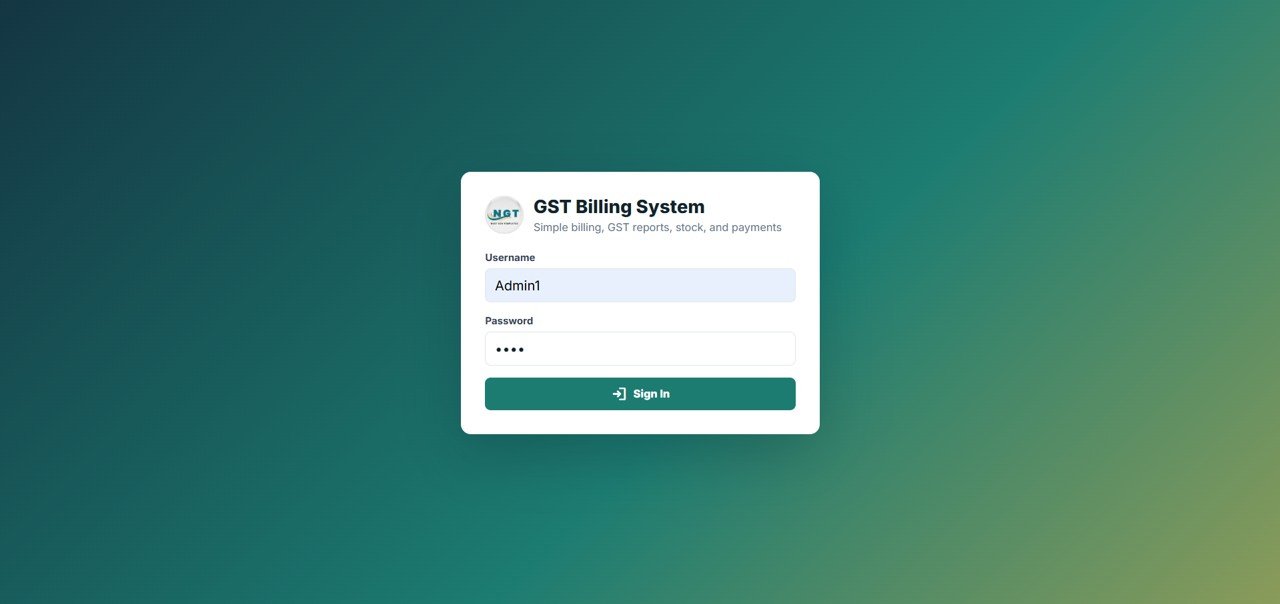
1. Login Screen
The system opens with a secure login screen where the user signs in with a username and password. This protects sensitive business data and supports controlled, role-based access so each team member only reaches the screens they are allowed to use.
🚀 Try the Live Demo Before You Buy
We have deployed this web app in our own Google account so you can test every page, every role — with real sample data — before purchasing. No signup, no email required.
🔑 Test Login Credentials
Sign in as Admin1 to manage masters, invoices, purchases, payments, and GST settings, or as User1 to create invoices, record payments, and view the dashboard.
💡 What you get after purchase: The full source code (Code.gs + Index.html) plus a step-by-step deployment guide so you can deploy your own private instance in your own Google account in under 15 minutes.
2. Dashboard
The main dashboard opens with filters for date range, financial year, customer, GST type, and payment status. It shows 11 summary cards (Today’s Sales, Monthly Sales, Total Invoices, Pending Payments, Total Customers, Total Suppliers, Stock Value, Low Stock Items, GST Output Tax, GST Input Tax, Net GST Payable) plus Sales by Month and Purchase by Month charts.
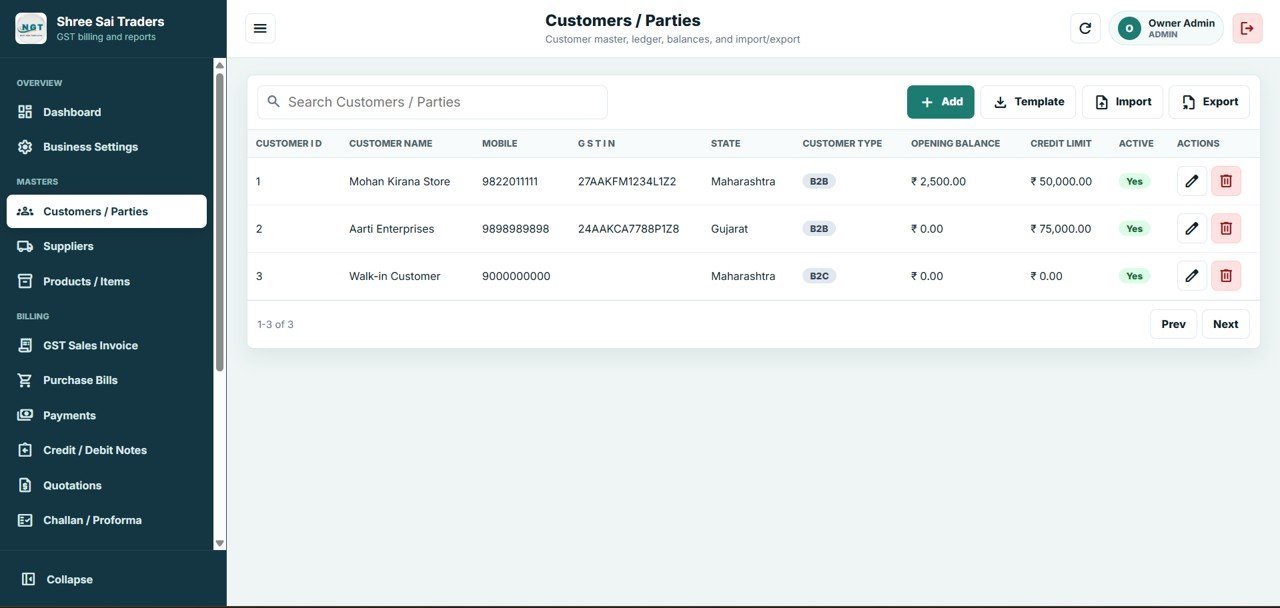
3. Customers / Parties
This is the customer master. Manage Customer Name and Mobile, GSTIN and State, Customer Type (B2B or B2C), Opening Balance and Credit Limit, with add, search, import, and export of customers.
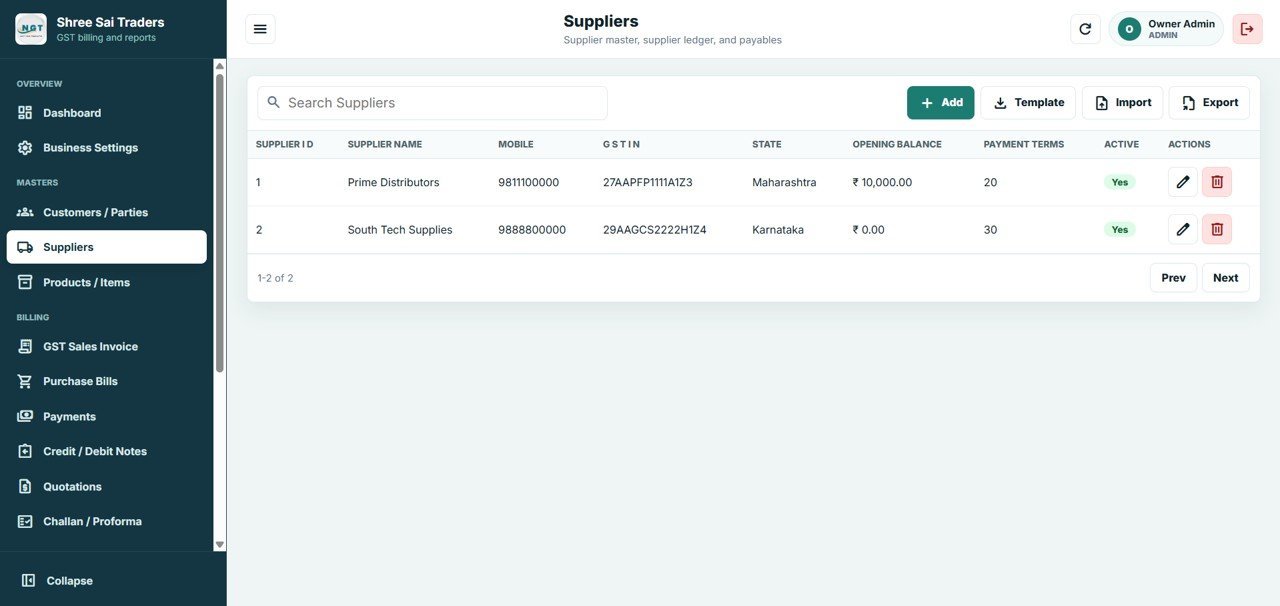
4. Suppliers
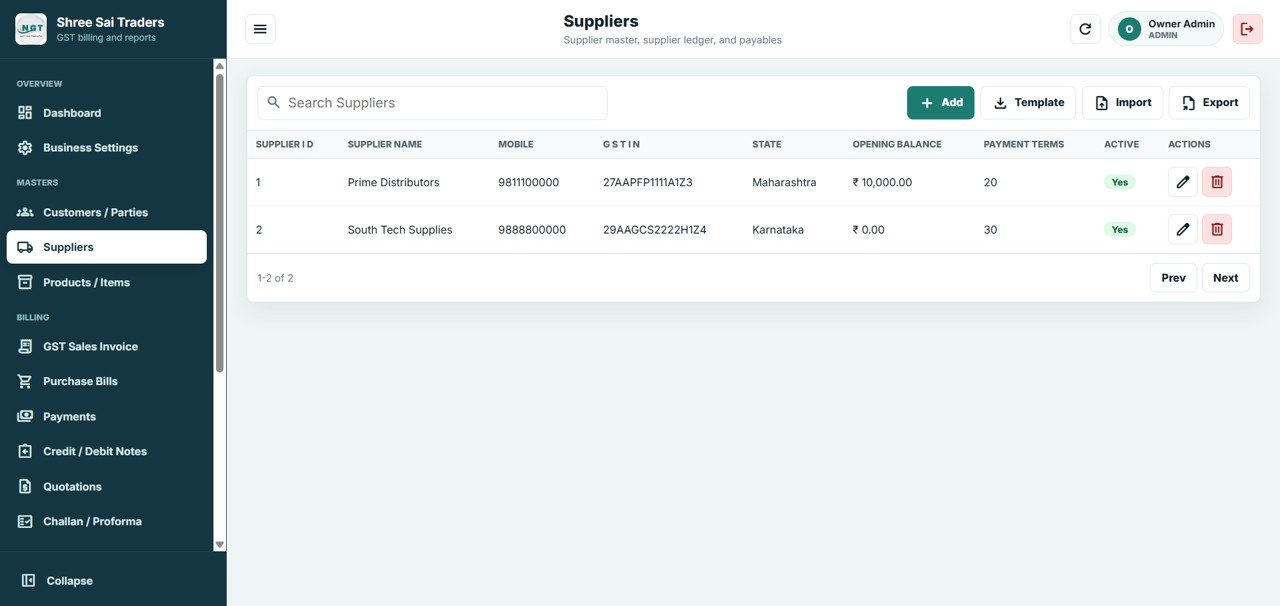
This is the supplier master. Manage Supplier Name and Mobile, GSTIN and State, Opening Balance, and Payment Terms, with add, search, import, and export of suppliers.
5. Products / Items
This is the product and item catalog for goods and services. Manage Item Code and Name, Item Type (Goods or Service), HSN/SAC Code and Category, Unit and Sale Price, GST Rate, and Current Stock with Minimum Stock for low-stock alerts.
6. GST Sales Invoices
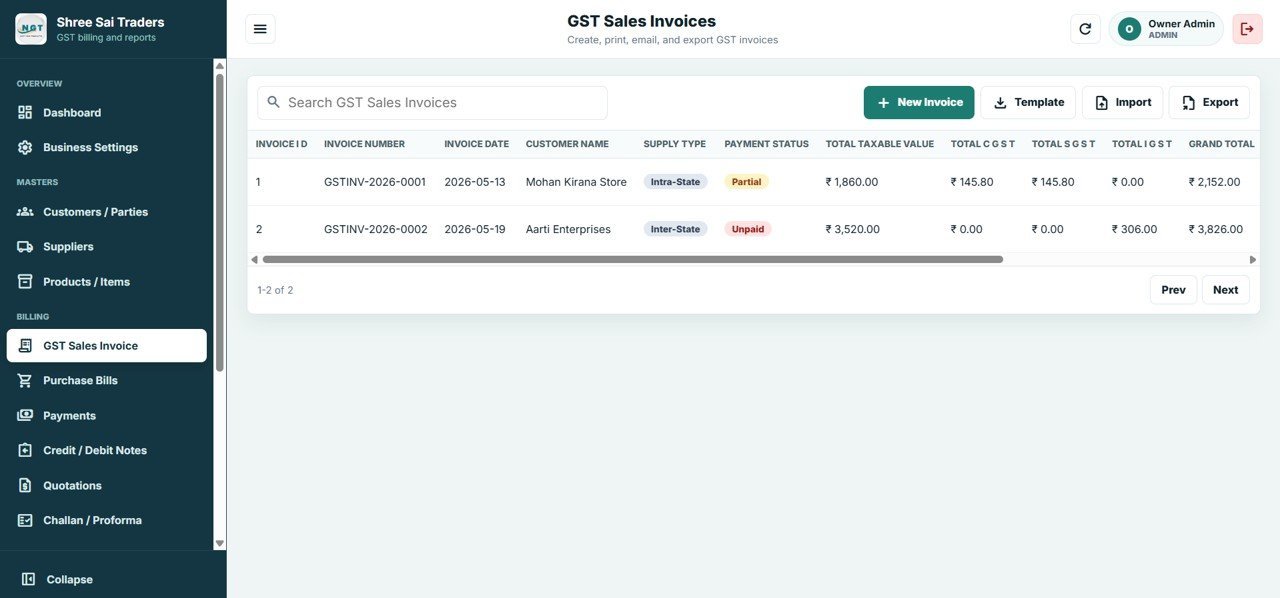
Create, print, email, and export GST sales invoices. The list shows Invoice Number and Date, Customer Name, Supply Type (Intra-State or Inter-State), Payment Status, Total Taxable Value, Total CGST, Total SGST, Total IGST, and Grand Total — with CGST and SGST applied automatically for intra-state sales and IGST for inter-state sales.
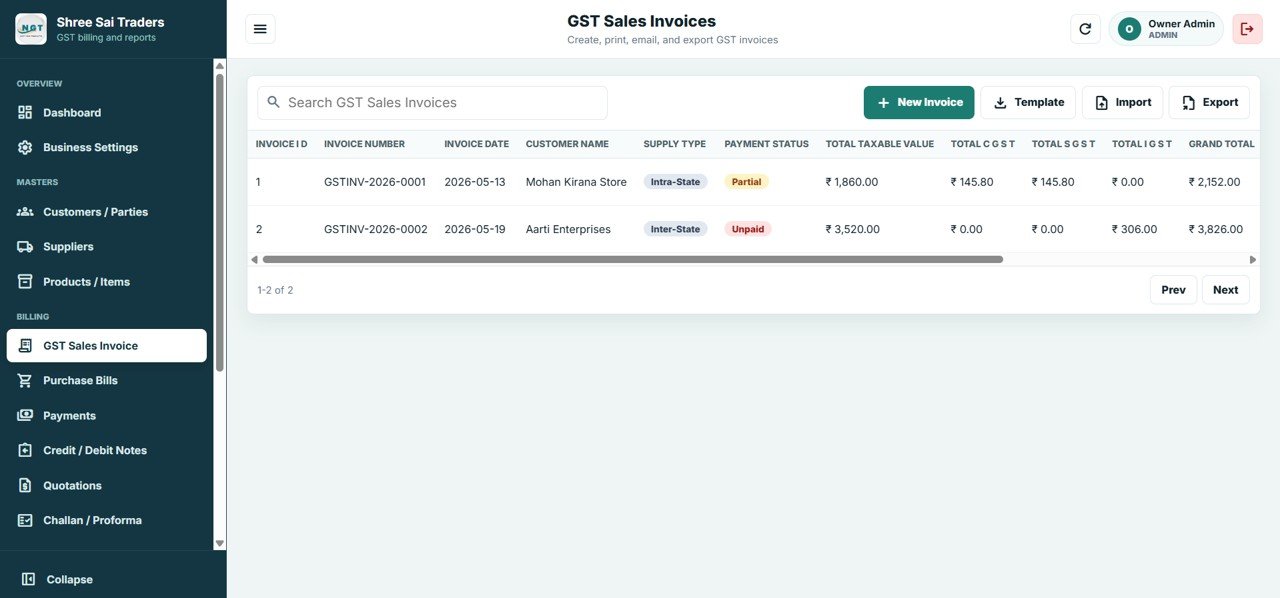
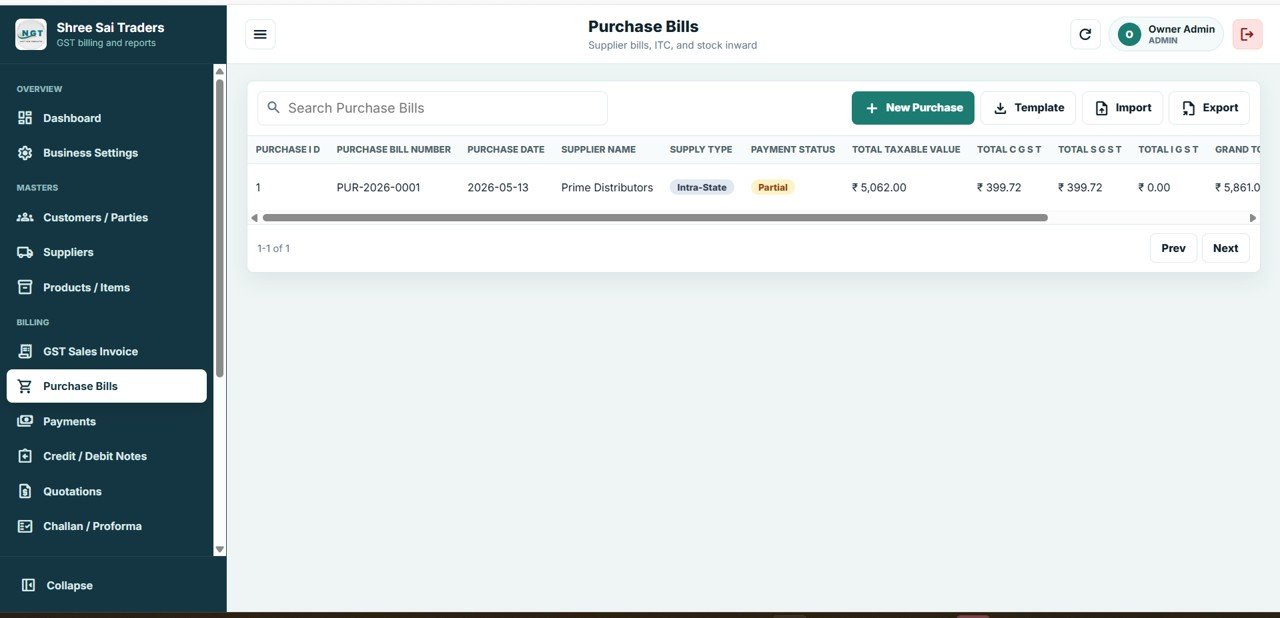
7. Purchase Bills
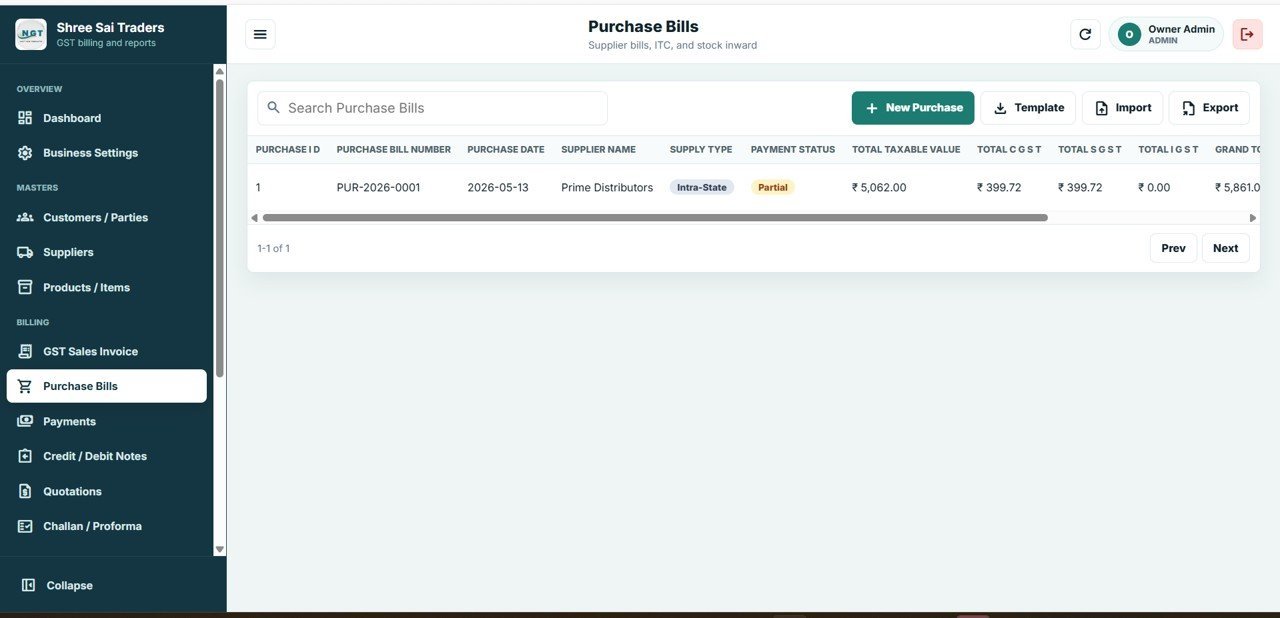
This page records supplier bills, input tax credit, and stock inward. It captures input GST, updates stock automatically, and feeds the net GST calculation. Manage Purchase Bill Number and Date, Supplier Name, Supply Type, Payment Status, Total Taxable Value, CGST, SGST, IGST, and Grand Total.
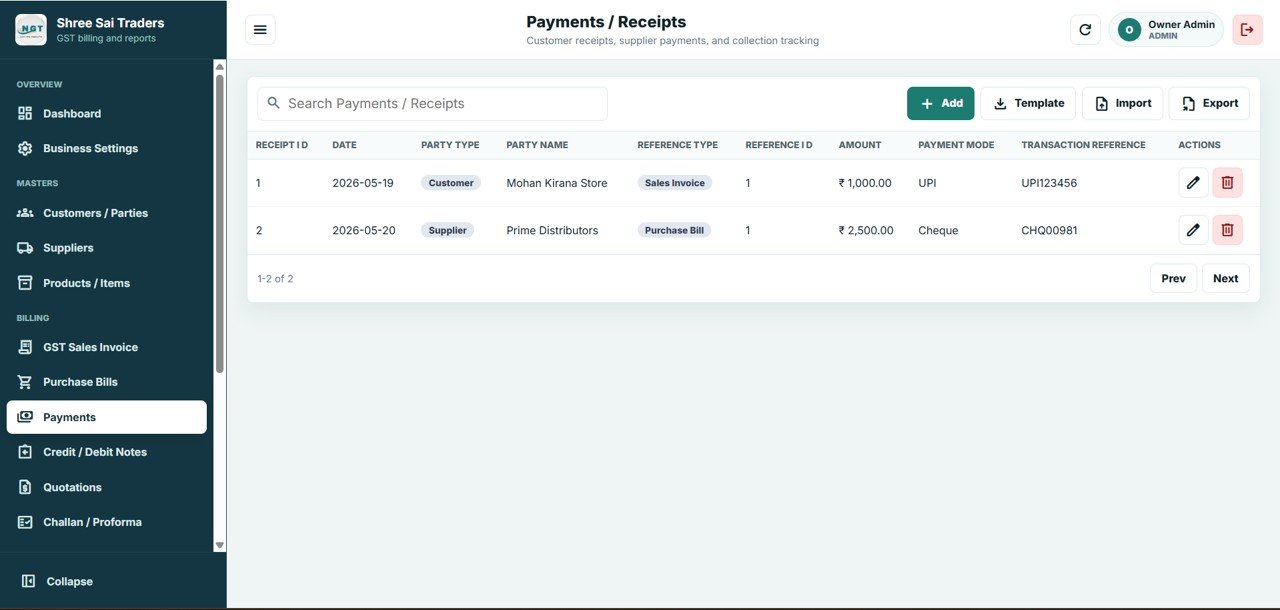
8. Payments / Receipts
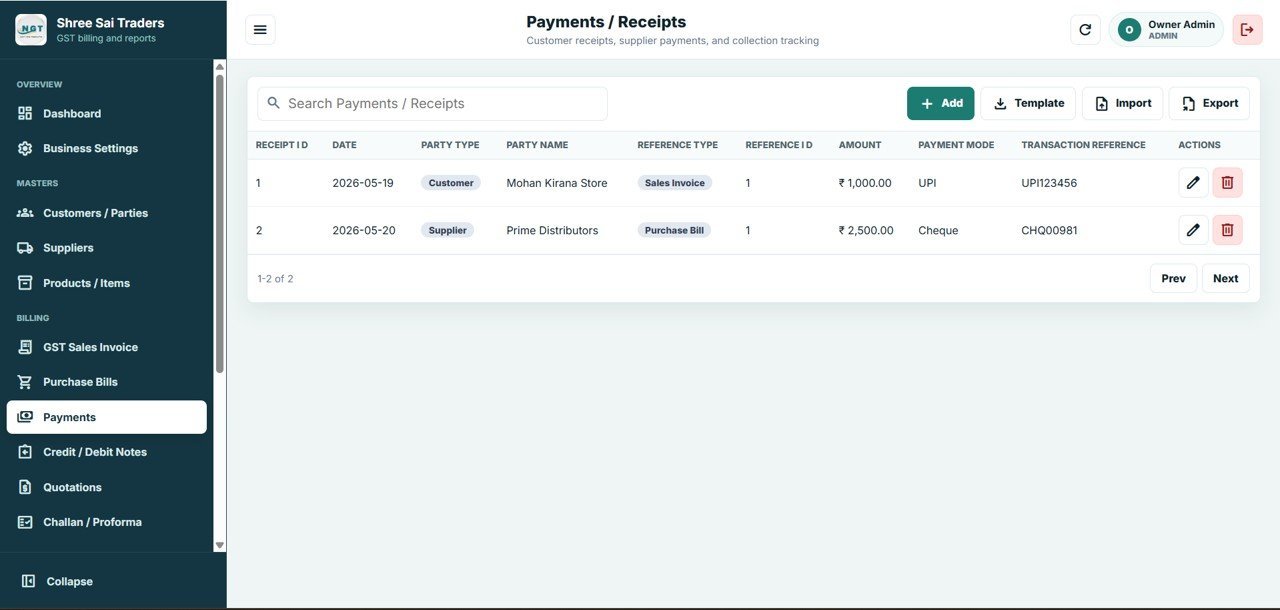
Track customer receipts and supplier payments here, keeping the dashboard Pending Payments figure accurate. Record Date and Amount, Party Type (Customer or Supplier) and Name, Reference Type (Sales Invoice or Purchase Bill), Payment Mode (UPI, Cheque, Cash, and more), and Transaction Reference.
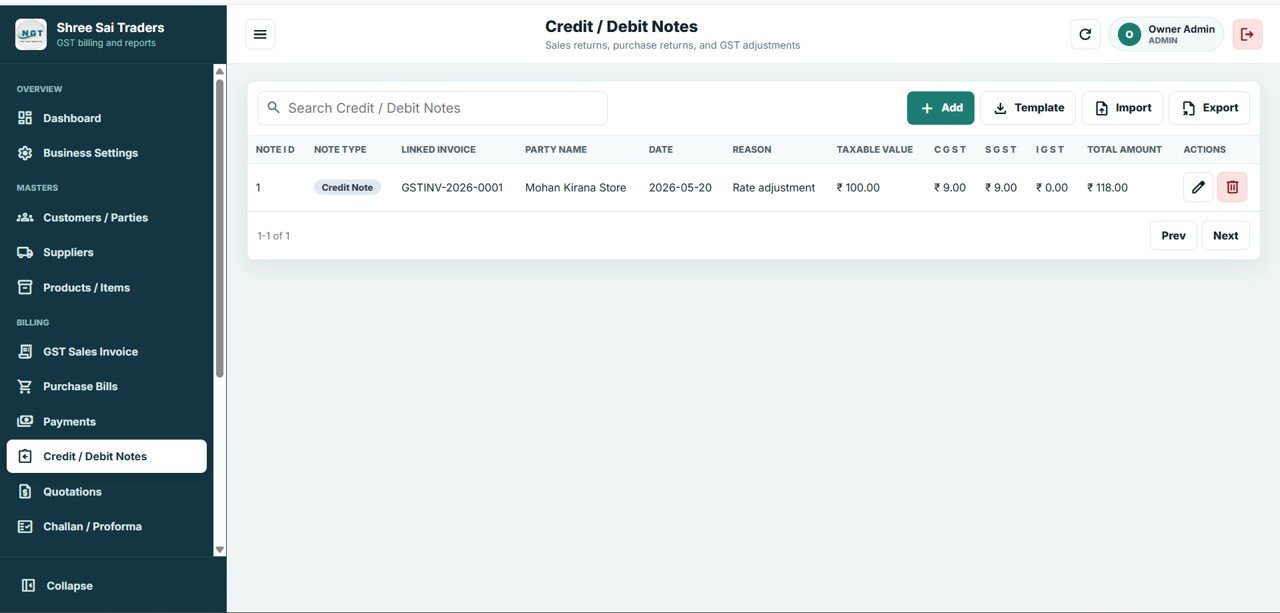
9. Credit / Debit Notes
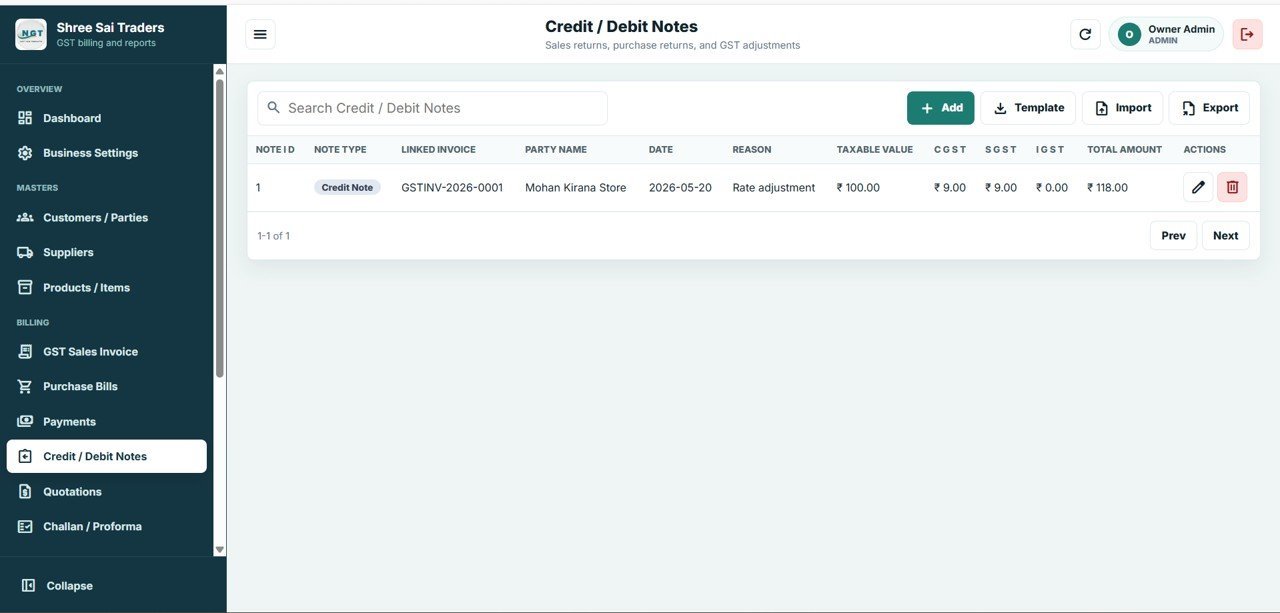
Handle credit and debit notes for sales returns, purchase returns, and GST adjustments so tax records stay accurate. Manage Note Type (Credit or Debit), Linked Invoice and Party Name, Date and Reason, Taxable Value, CGST, SGST, IGST, and Total Amount.
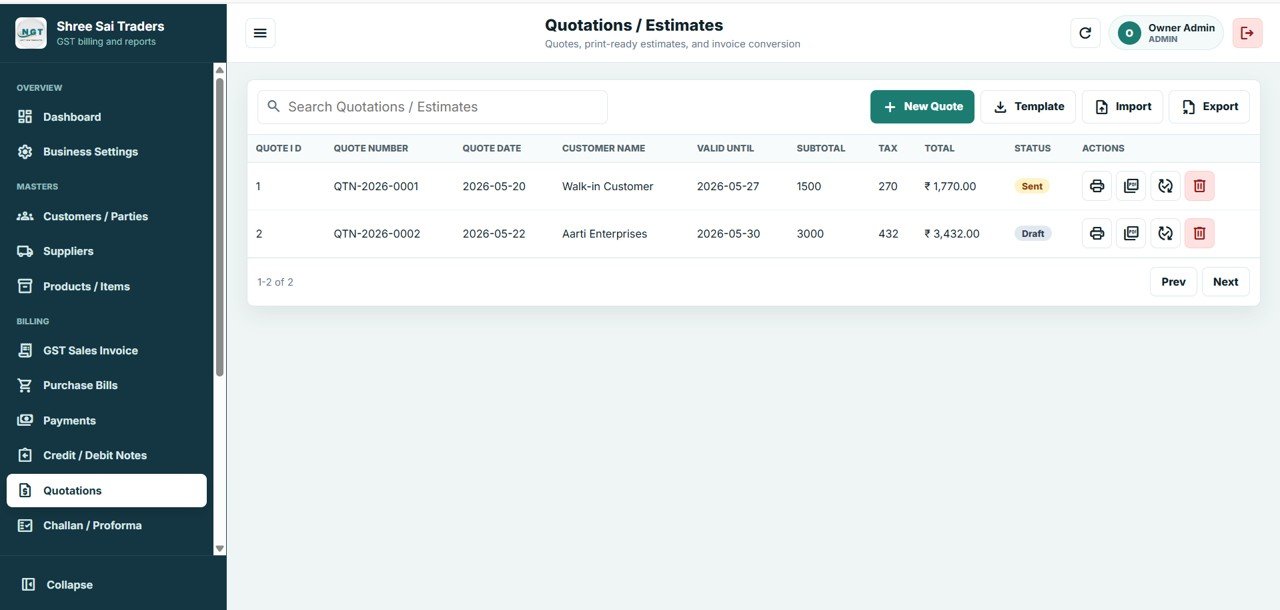
10. Quotations / Estimates
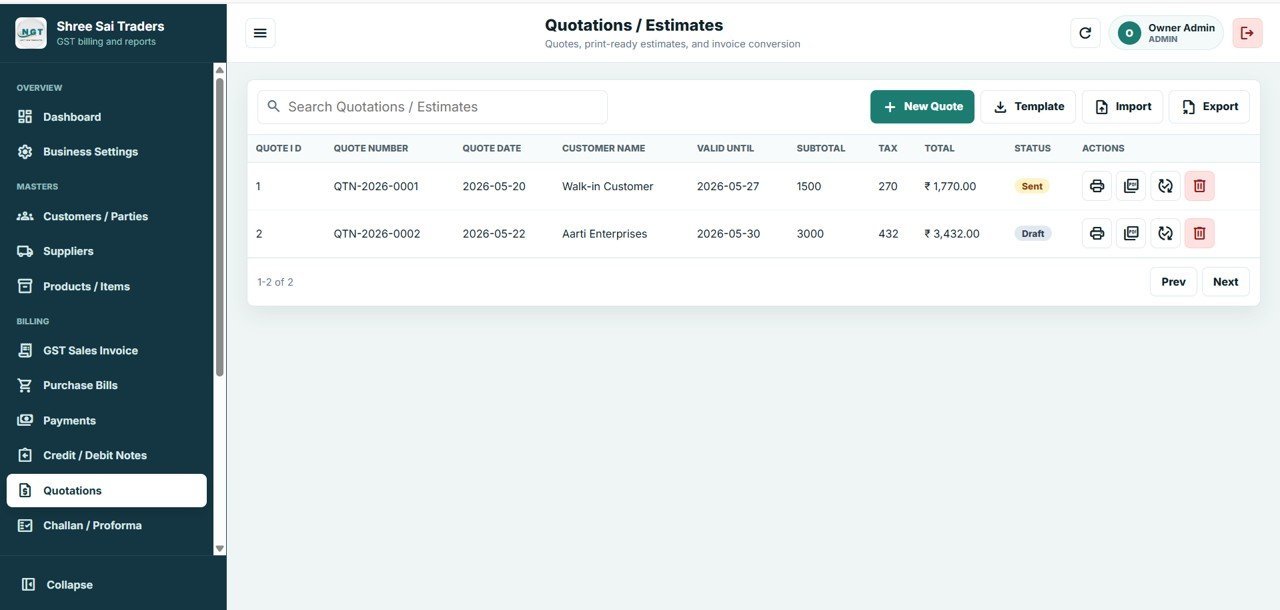
Create print-ready quotations and estimates and convert them into invoices. Manage Quote Number and Date, Customer Name, Valid Until date, Subtotal, Tax and Total, and Status (Draft or Sent) with one-click conversion to a GST invoice.
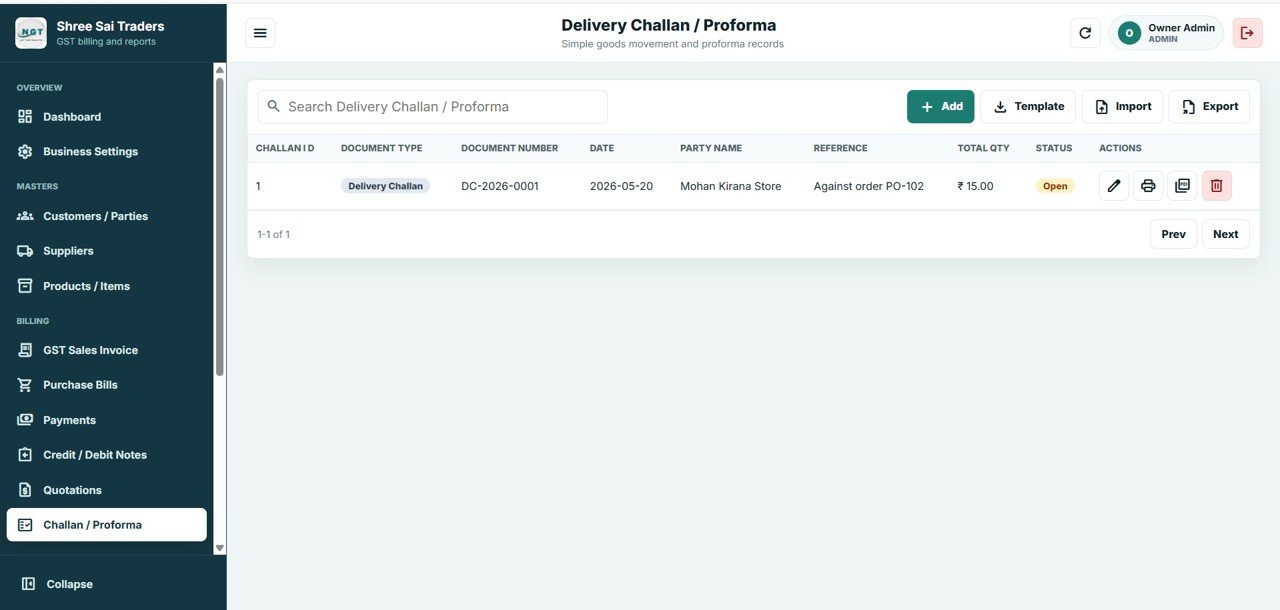
11. Delivery Challan / Proforma
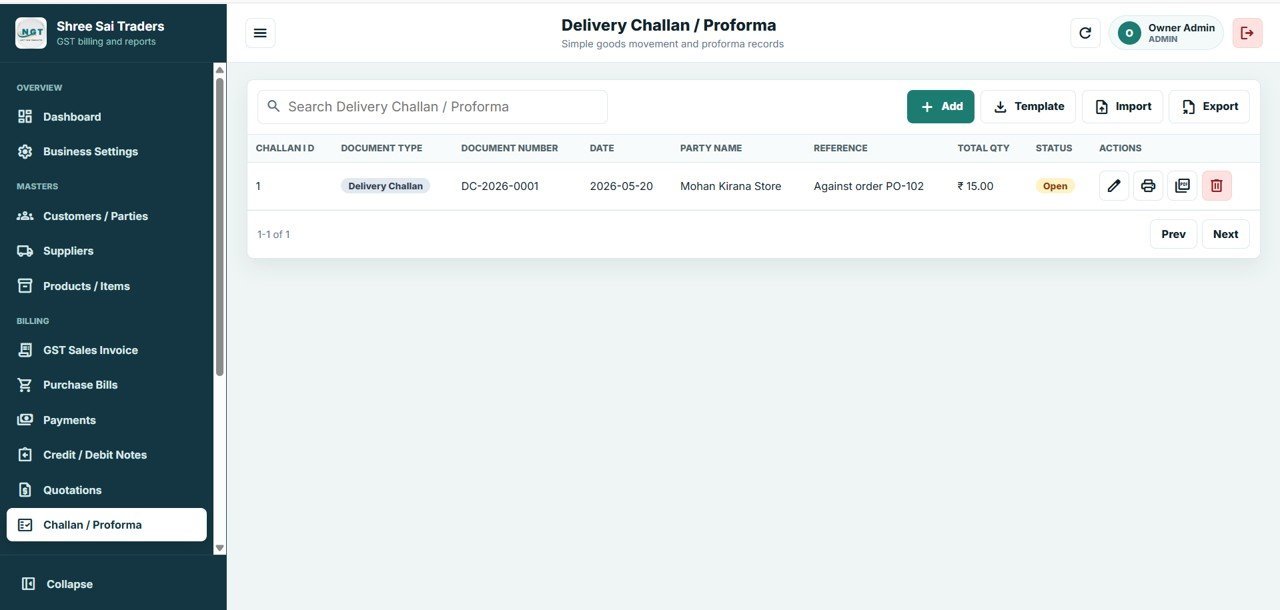
Manage delivery challans and proforma documents for goods movement and advance billing before the final tax invoice. Track Document Type (Delivery Challan or Proforma), Document Number and Date, Party Name and Reference, Total Quantity and Value, and Status with conversion to a final GST invoice.
📊 GST Billing System Web App vs. Excel GST Spreadsheet vs. Paid GST SaaS — Where This Fits
| Feature | GST Billing System Web App (This Template) | Excel GST Billing Spreadsheet | Zoho Books / TallyPrime / Vyapar |
|---|---|---|---|
| Cost | $39.99 one-time | $0–$25 one-time | $10–$50 / user / month |
| Platform | Google Sheets web app (any browser, any device) | Microsoft Excel (desktop only) | Proprietary cloud SaaS |
| Setup time | Under 15 minutes | 1–2 hours | 1–3 days onboarding |
| Real-time multi-user access | ✅ Yes (role-based login) | ❌ Single-user file | ✅ Yes |
| Auto CGST / SGST / IGST | ✅ Built in | ❌ Manual formulas | ✅ Yes |
| Mobile access | ✅ Any browser, any device | ❌ Limited | ✅ Yes |
| Input Tax Credit tracking | ✅ Built in | ❌ Manual | ✅ Usually higher-tier plan |
| Year-1 cost (single business, 2 users) | $39.99 total | ~$25 total | $240–$1,200+ |
| You own the data | ✅ Lives in your Google Sheet | ✅ Yes | ❌ Vendor-hosted |
For small businesses, traders, and accountants who want real GST billing and invoicing without paying $10–$50 per user every month, the GST Billing System Web App sits in the sweet spot — collaboration of a SaaS, ownership of a spreadsheet.
👥 Who This Template Is For — and Who It’s Not For
✅ This template is built for:
- Small business owners, traders, and retailers in India who need GST-compliant invoices without a monthly subscription
- Accountants and tax consultants managing billing for multiple small clients from one place
- Service providers and freelancers who issue GST invoices with HSN/SAC codes and need quotations and challans
- Shops and distributors that want sales, purchases, stock, and payments linked in a single Google Sheet
❌ This template is NOT for:
- Large enterprises needing direct GSTN e-invoice (IRN) and e-way bill API integration out of the box
- Businesses that require offline billing — this Apps Script web app needs internet to log in
- Teams wanting automated GSTR-1/GSTR-3B return filing directly from the tool (it tracks the figures; filing is separate)
⚙️ How to Use the GST Billing System Web App
- Open the download — unzip to find Code.gs, Index.html, and the step-by-step deployment guide.
- Create a Google Sheet, open Extensions → Apps Script, paste Code.gs, and add Index.html as a new HTML file.
- Deploy as a web app — click Deploy → New deployment, choose Web app, set access, and copy the deployment URL.
- Log in with the seed credentials in the guide and change the password immediately.
- Add masters — enter Customers, Suppliers, and Products/Items with GSTIN and HSN/SAC details.
- Start billing — raise GST sales invoices, record purchase bills, log payments, and check the dashboard daily.
💼 Real-World Use Cases
Rajesh runs a hardware shop in Pune. He raises GST invoices with HSN codes from a tablet at the counter, the system auto-applies CGST and SGST for local sales, and he watches Net GST Payable on the dashboard so there are no surprises at return time.
Meena is a tax consultant handling 12 small clients. She keeps one GST Billing System Web App per client, tracks input tax credit from purchase bills, and exports invoice and payment data to hand her GSTR figures to each client in minutes.
Arjun runs a small electronics distribution business. He issues quotations, converts the accepted ones into delivery challans and then GST invoices, and uses Payments/Receipts to keep the Pending Payments KPI accurate across dozens of dealers.
❓ Frequently Asked Questions
How does the GST Billing System Web App calculate CGST, SGST, and IGST?
The GST Billing System Web App applies CGST and SGST automatically for intra-state supply and IGST for inter-state supply, based on the supply type you select on each invoice or purchase bill. Tax totals and the Net GST Payable card update without any manual formulas.
How long does it take to deploy this Google Sheets GST billing web app?
Setup takes under 15 minutes using the included PDF guide. You create a Google Sheet, paste Code.gs and Index.html into Apps Script, deploy as a web app, and log in. No coding knowledge is required — the guide walks through every click.
How does the GST Billing System Web App compare to Zoho Books, TallyPrime, or Vyapar?
The GST Billing System Web App is a one-time $39.99 purchase with no monthly fees, while Zoho Books, TallyPrime, and Vyapar typically charge $10–$50 per user per month. You trade direct GSTN API filing for full data ownership and a far lower cost of operation.
Can I track input tax credit and stock in the same template?
Yes. The Purchase Bills page captures input GST and updates stock inward automatically, the Products/Items page tracks current stock with low-stock alerts, and the dashboard shows Stock Value, GST Input Tax, GST Output Tax, and Net GST Payable together.
Where is my billing data stored?
All customers, suppliers, products, invoices, purchases, payments, and notes are stored in your own Google Sheet inside your Google Drive. NextGenTemplates never sees the data, and you can export to Excel, CSV, or PDF at any time.
Can multiple users use the GST Billing System Web App at the same time?
Yes. The GST Billing System Web App uses Google’s real-time backend, so owners, accountants, and billing staff can be logged in concurrently. Role-based login controls which screens each user can open and edit.
👤 About the Author
Built by PK — Microsoft Certified Professional with 15+ years of Excel, Google Sheets, and Power BI experience. Founder of NextGenTemplates, reaching 300K+ subscribers across YouTube channels (@PK-AnExcelExpert, @NextGenTemplates, @NeoTechNavigators). Every template is hand-built and tested before release.
🔗 Explore Related Templates
- Web-based: Advanced Inventory Management System — the same role-based web app architecture for multi-warehouse stock control.
- GST Billing Software V1.0 — the Excel/VBA version for desktop-only billing. Also available as an Excel tool.
- Receipt Template in Google Sheets — a lightweight receipt companion for quick acknowledgements.
- Tax Deadline and GST Filing Calendar in Excel — never miss a GST return or payment due date.
- Browse all Mini Web Apps and Google Sheets Dashboards on NextGenTemplates.
📖 Click here to read the Detailed Blog Post
🎥 Visit our YouTube channel for step-by-step video tutorials
👉 YouTube.com/@NextGenTemplates
Watch the step-by-step video demo:
Watch the step-by-step deployment process video for web app:
Compatibility and Requirements
- Runs as a Google Apps Script web app on top of Google Sheets. You need a free Google account and a web browser.
- Deployment uses the included Code.gs and Index.html files and the step-by-step guide. Google explains the basics in Get started with Google Sheets.
- The web app needs an internet connection to log in.































Reviews
There are no reviews yet.