

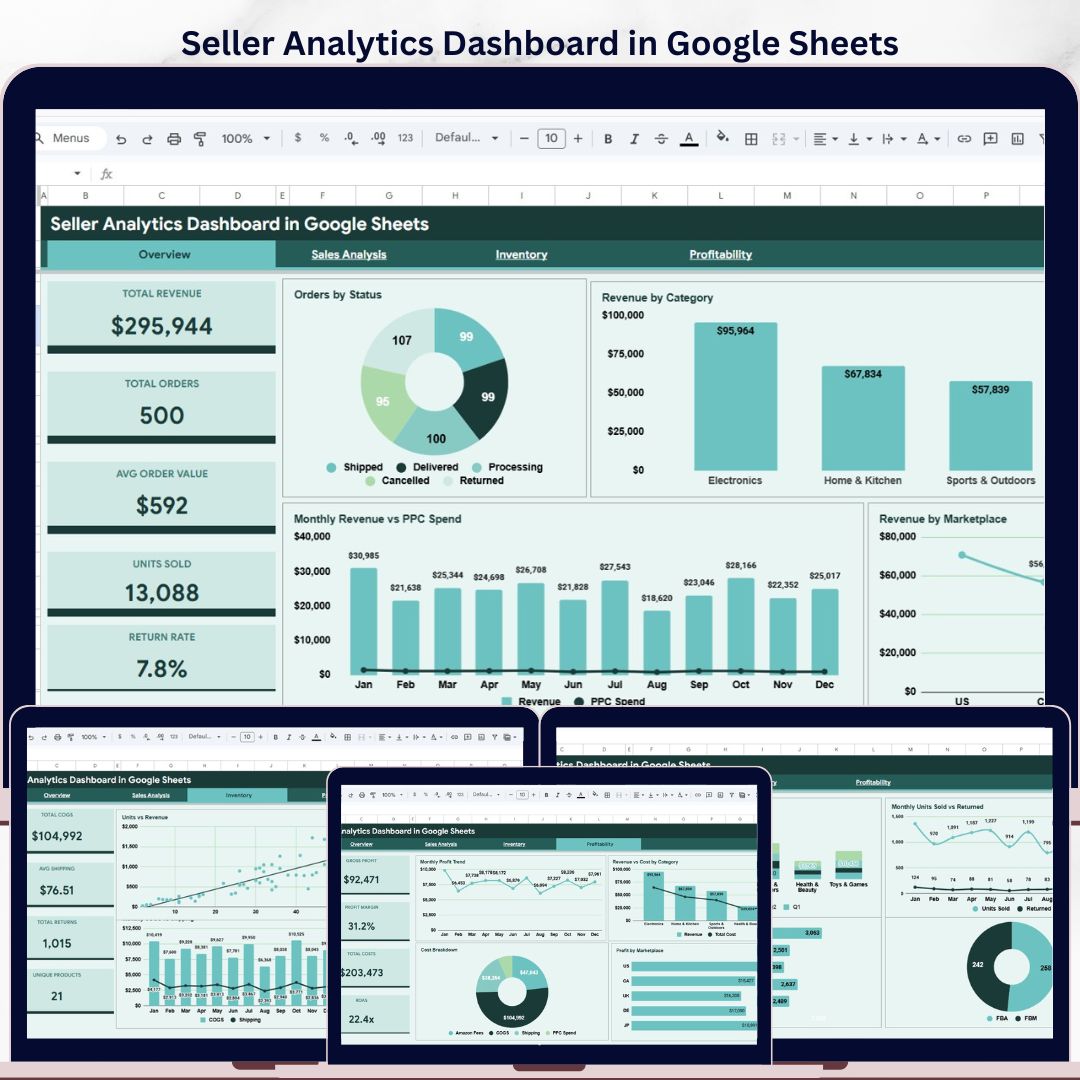
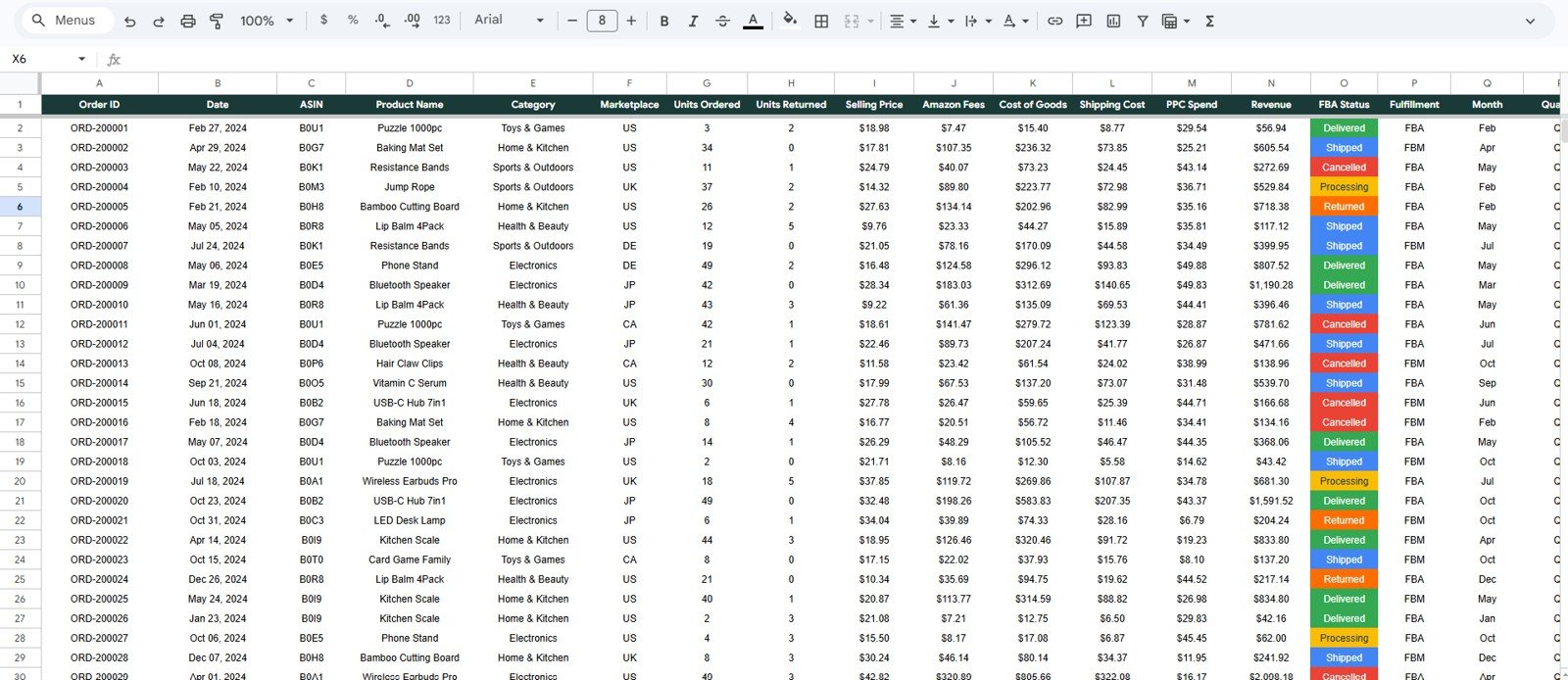

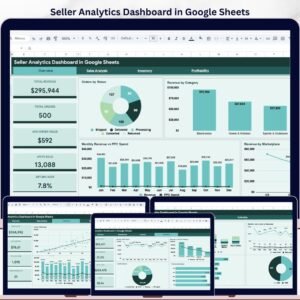
Seller Analytics Dashboard in Google Sheets gives marketplace sellers a clean way to track revenue, orders, units, returns, PPC spend, inventory costs, shipping, and profit in one editable Google Sheets template. Built for sellers who want fast answers without paying monthly software fees, this dashboard includes 5 headline KPI cards, 4 analysis pages, 16 chart views, and a structured Data Sheet tab you can update with your own seller data.
Use it for Amazon, Etsy, Shopify, Walmart Marketplace, eBay, or multi-channel seller reporting. The template is designed for repeat weekly and monthly review, with slicers that help you filter marketplace, category, status, fulfillment type, and time period quickly. Join 10,000+ customers across 180+ countries who use NextGenTemplates dashboards to simplify reporting, improve visibility, and make better business decisions faster.
Key Features of Seller Analytics Dashboard in Google Sheets
- Editable Google Sheets dashboard for seller revenue, orders, returns, inventory, and profitability tracking.
- Overview page with KPI cards for Total Revenue, Total Orders, Avg Order Value, Units Sold, and Return Rate.
- Multiple dashboard pages for overview, sales analysis, inventory review, profitability tracking, and raw data entry.
- Interactive slicers to filter charts quickly by marketplace, product category, order status, fulfillment model, and date period.
- Built-in chart sections for revenue trends, PPC spend comparison, marketplace performance, FBA vs FBM, COGS, shipping, returns, and profit.
- Structured Data Sheet tab so you can paste or replace records in the same format.
- No subscription required. This is a one-time purchase Google Sheets dashboard template.
- Works well for solo sellers, ecommerce teams, Amazon FBA operators, Etsy shop owners, and marketplace analysts.
What’s Inside the Seller Analytics Dashboard in Google Sheets
The workbook is organized into multiple tabs so you can move from a high-level seller summary into deeper sales, inventory, and profit analysis without building formulas or charts from scratch.
1. Overview Page
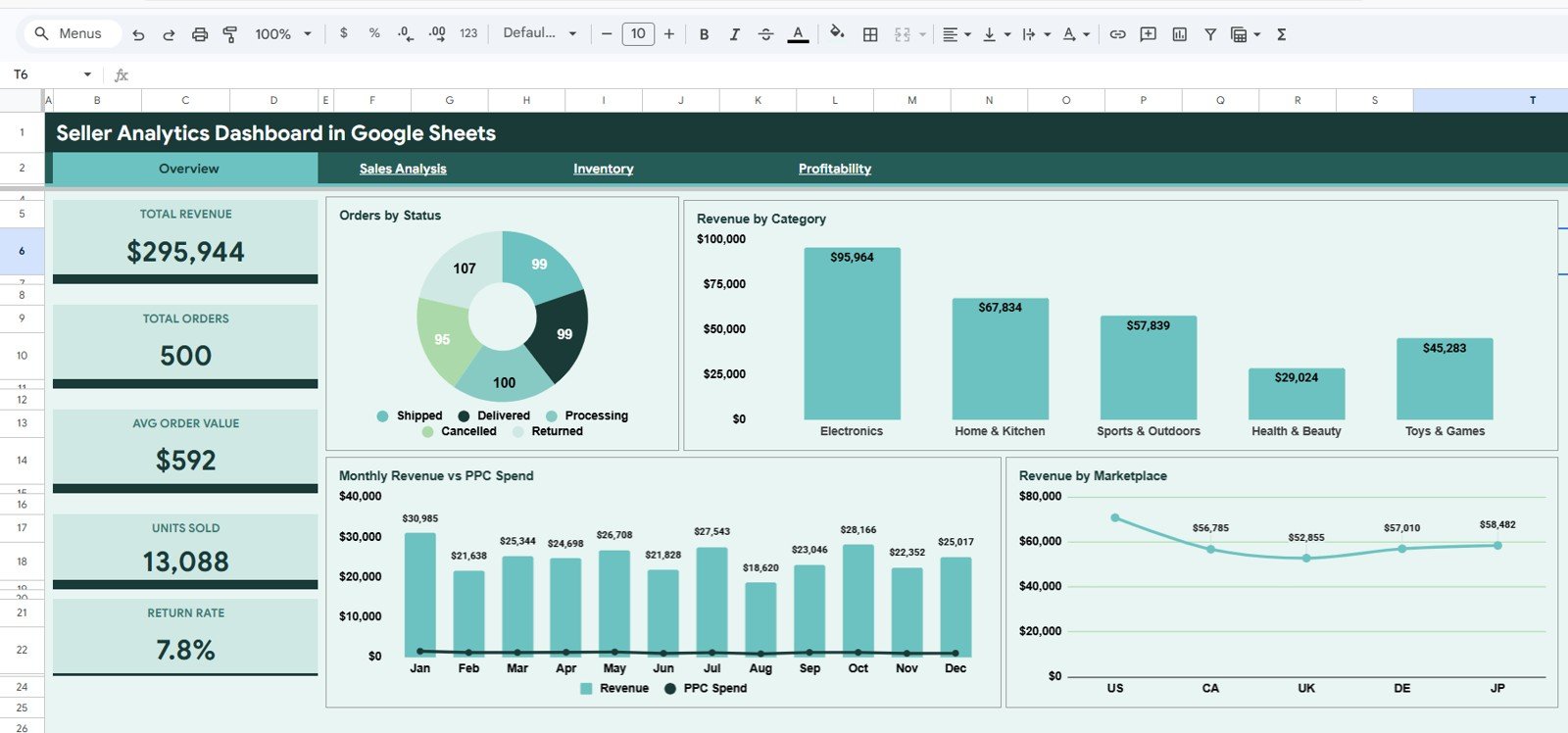
The Overview page gives you the most important seller performance indicators at the top of the sheet. The KPI cards show Total Revenue, Total Orders, Avg Order Value, Units Sold, and Return Rate, making it easy to scan business health before going into the detailed charts.
The page also includes slicers so you can filter the dashboard quickly and compare performance by segment.
Orders by Status. This chart shows how orders are distributed across statuses such as completed, pending, returned, or cancelled.
Use it to identify fulfillment issues, operational delays, or unusual return patterns before they affect profitability.
Revenue by Category. This chart compares seller revenue across product categories.
Use it to see which product groups are contributing the most sales and which categories may need pricing, listing, or promotion changes.
Monthly Revenue vs PPC Spend. This chart compares monthly revenue with advertising spend.
Use it to understand whether ad investment is supporting profitable growth or whether PPC costs are rising faster than revenue.
Revenue by Marketplace. This chart breaks down revenue by marketplace or selling channel.
Use it to compare Amazon, Etsy, Shopify, eBay, Walmart, or other channels and prioritize the platforms that are driving the strongest results.
2. Sales Analysis
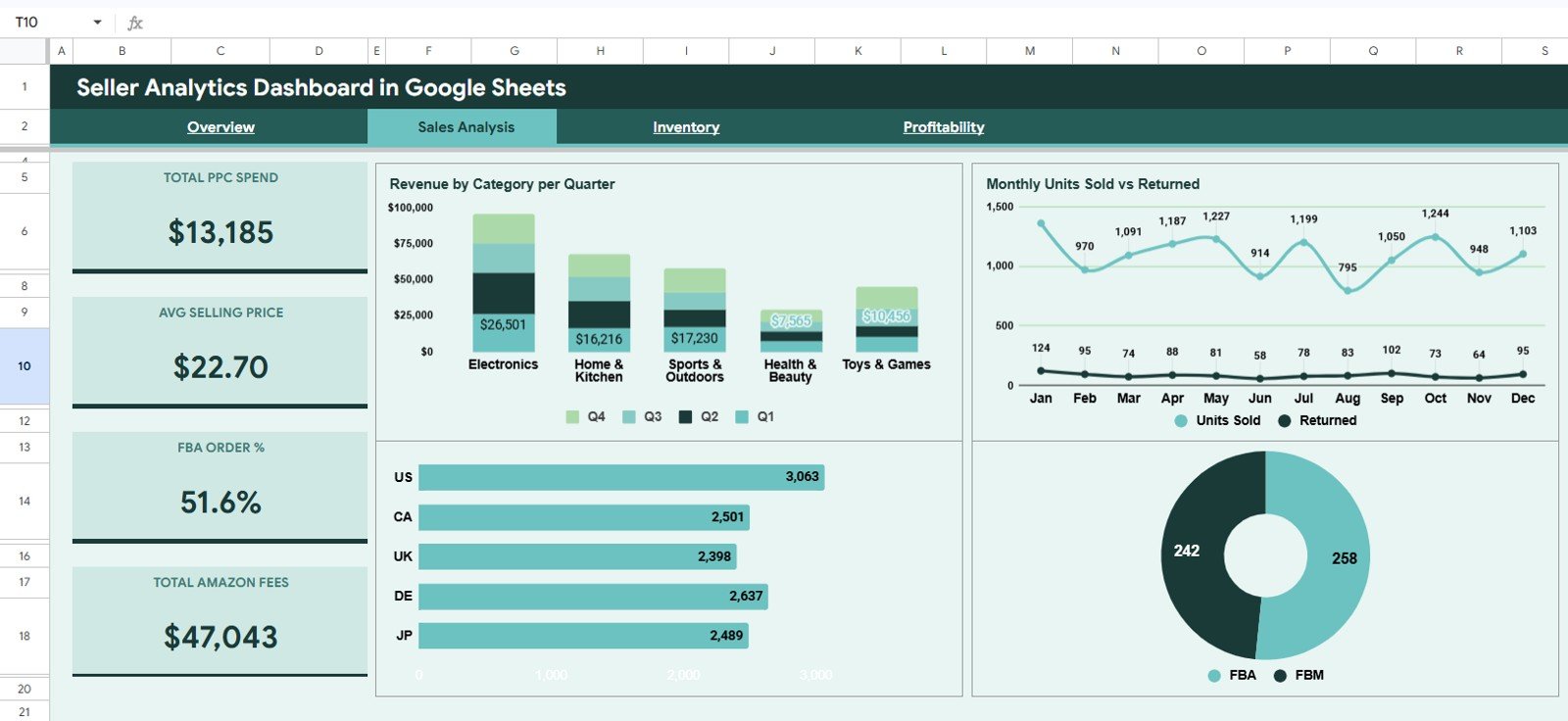
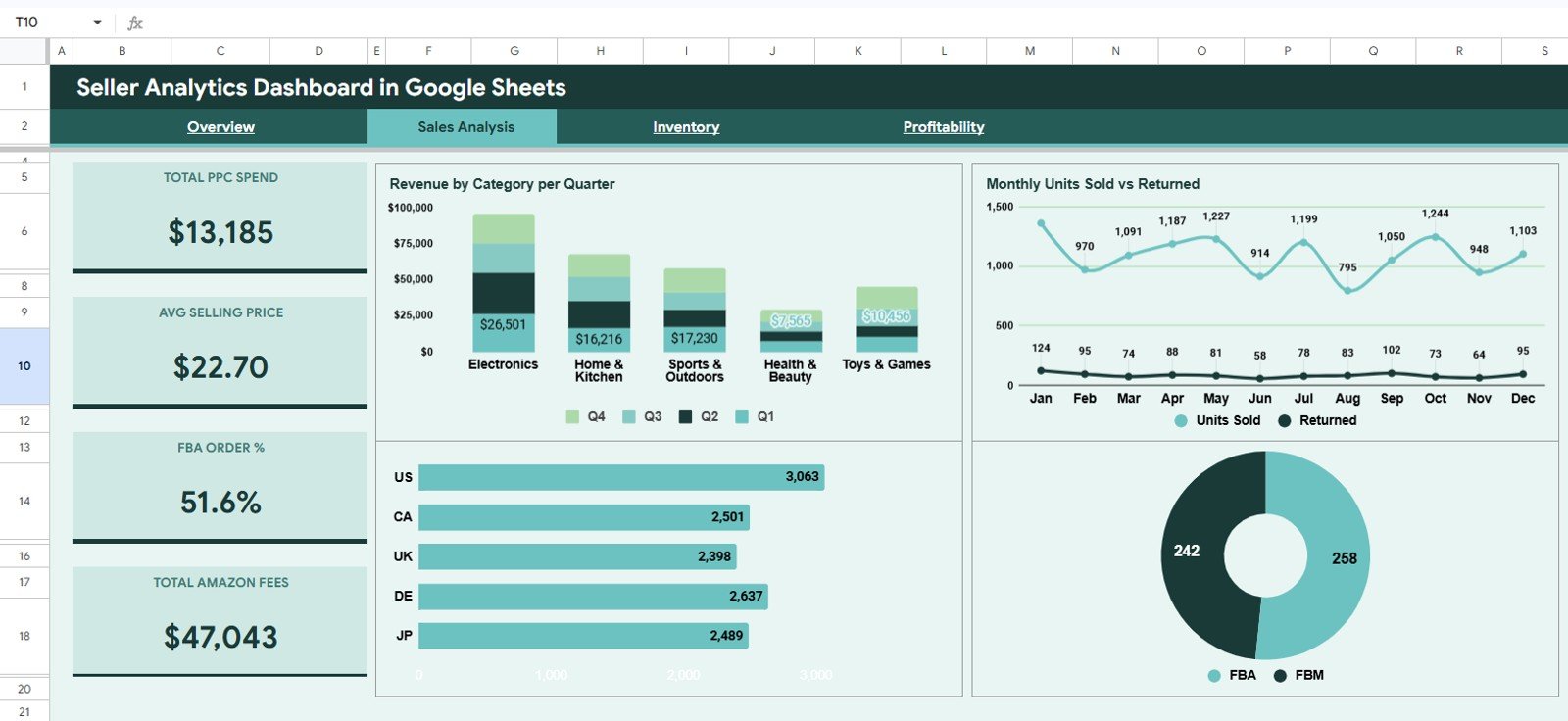
The Sales Analysis tab focuses on revenue, units sold, returns, marketplace contribution, and fulfillment model performance.
Revenue by Category per Quarter. This chart shows how each category performs across quarters.
Use it to spot seasonal demand, category growth, and product groups that need more focus.
Monthly Units Sold vs Returned. This chart compares monthly sold units against returned units.
Use it to detect return spikes and understand whether sales volume is creating quality, listing, or customer satisfaction issues.
Units Sold by Marketplace. This chart shows where your sold units are coming from by marketplace.
Use it to compare demand across channels and identify where inventory planning should be strongest.
FBA vs FBM. This chart compares fulfillment models for seller performance analysis.
Use it to understand whether fulfilled-by-platform or merchant-fulfilled orders are driving better volume and operating results.
3. Inventory
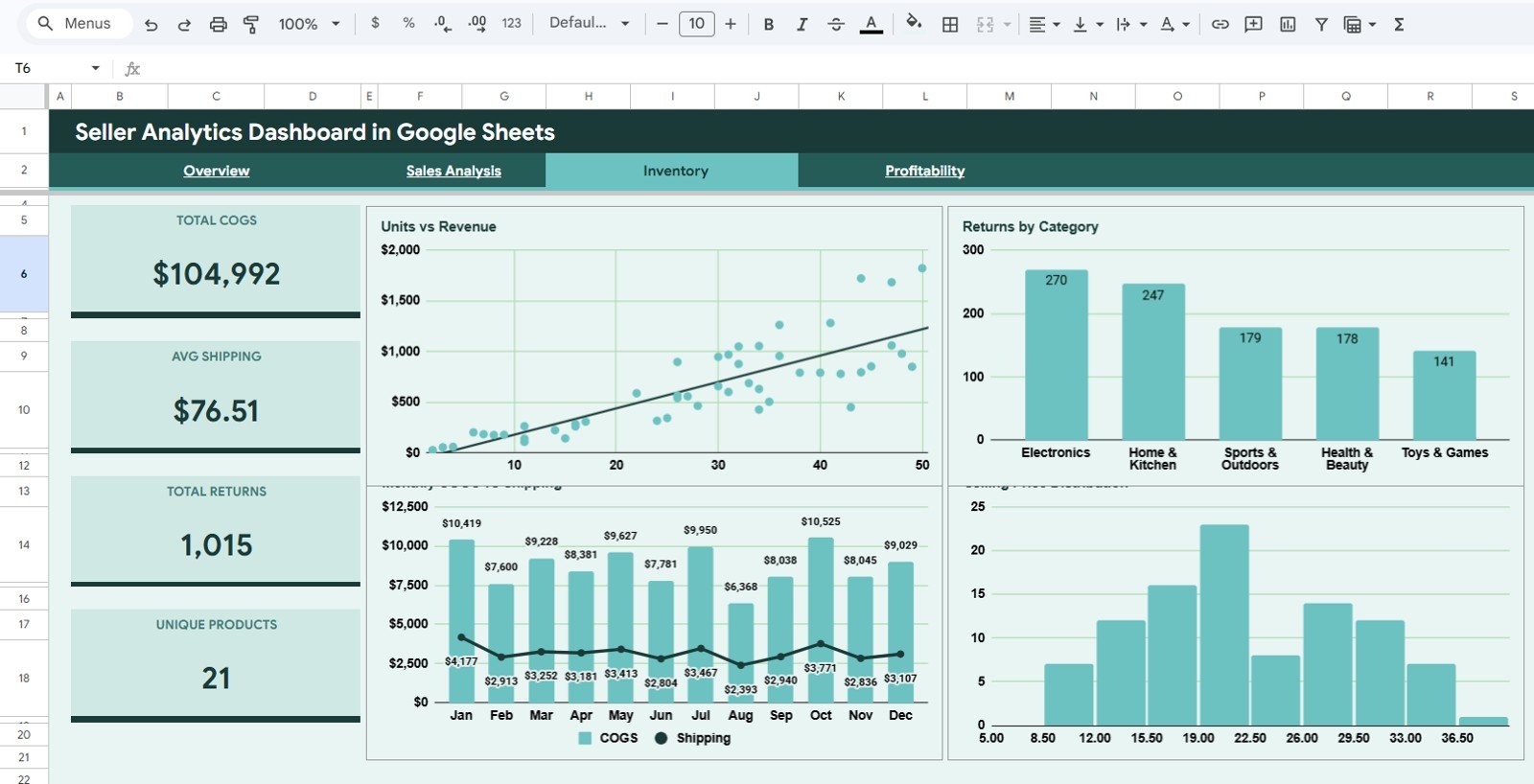
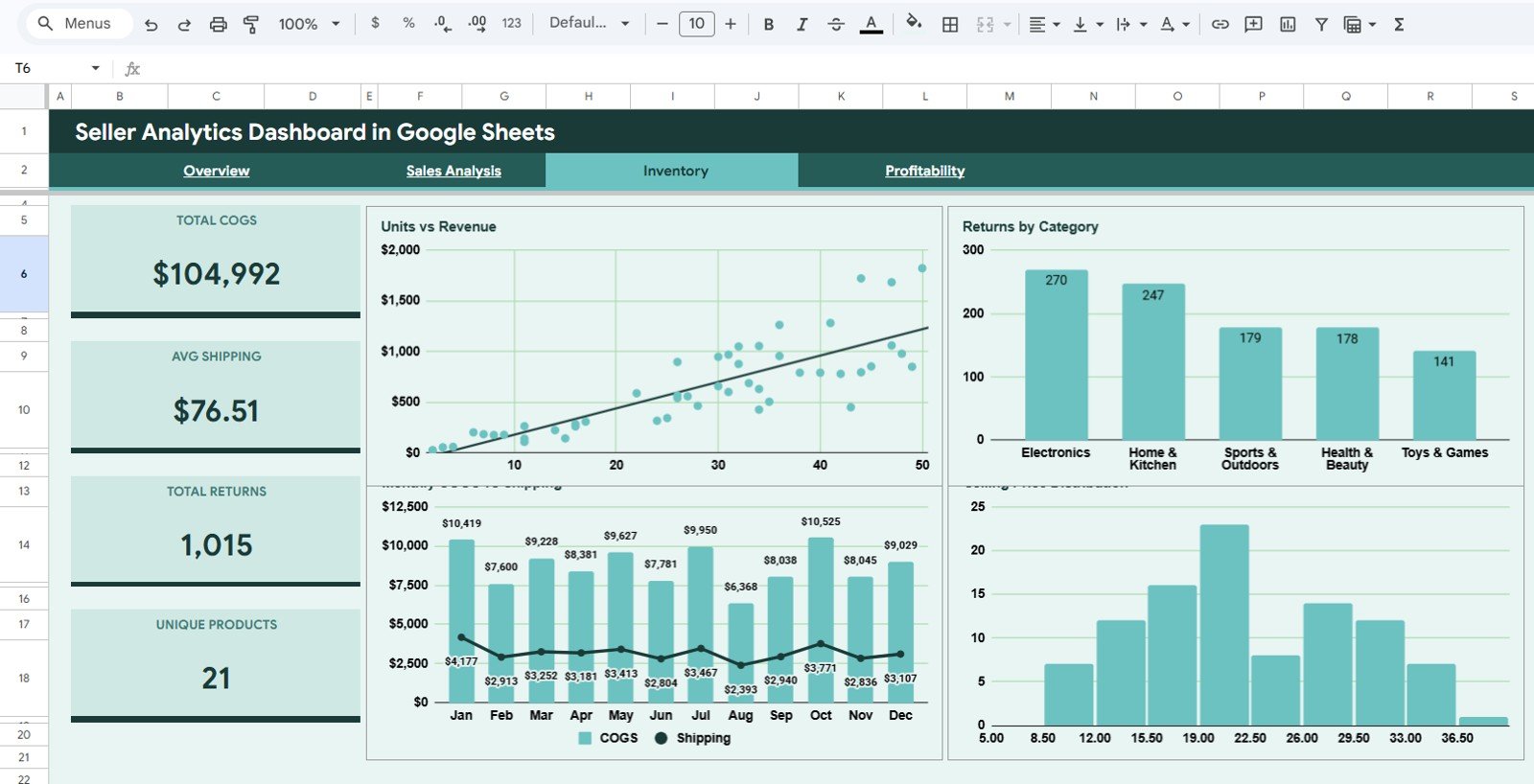
The Inventory tab helps sellers connect units, revenue, returns, cost of goods sold, shipping costs, and pricing patterns.
Units vs Revenue. This chart compares sold quantity with revenue contribution.
Use it to understand whether high-volume products are also producing meaningful revenue.
Returns by Category. This chart shows which categories generate the most returns.
Use it to locate product groups that may need better descriptions, quality checks, packaging changes, or revised customer expectations.
Monthly COGS vs Shipping. This chart compares cost of goods sold with shipping expense by month.
Use it to see cost pressure over time and understand whether logistics costs are reducing margin.
Selling Price Distribution. This chart shows how products are distributed across price ranges.
Use it to evaluate pricing mix, low-ticket dependency, and opportunities for premium bundles or higher-value offers.
4. Profitability
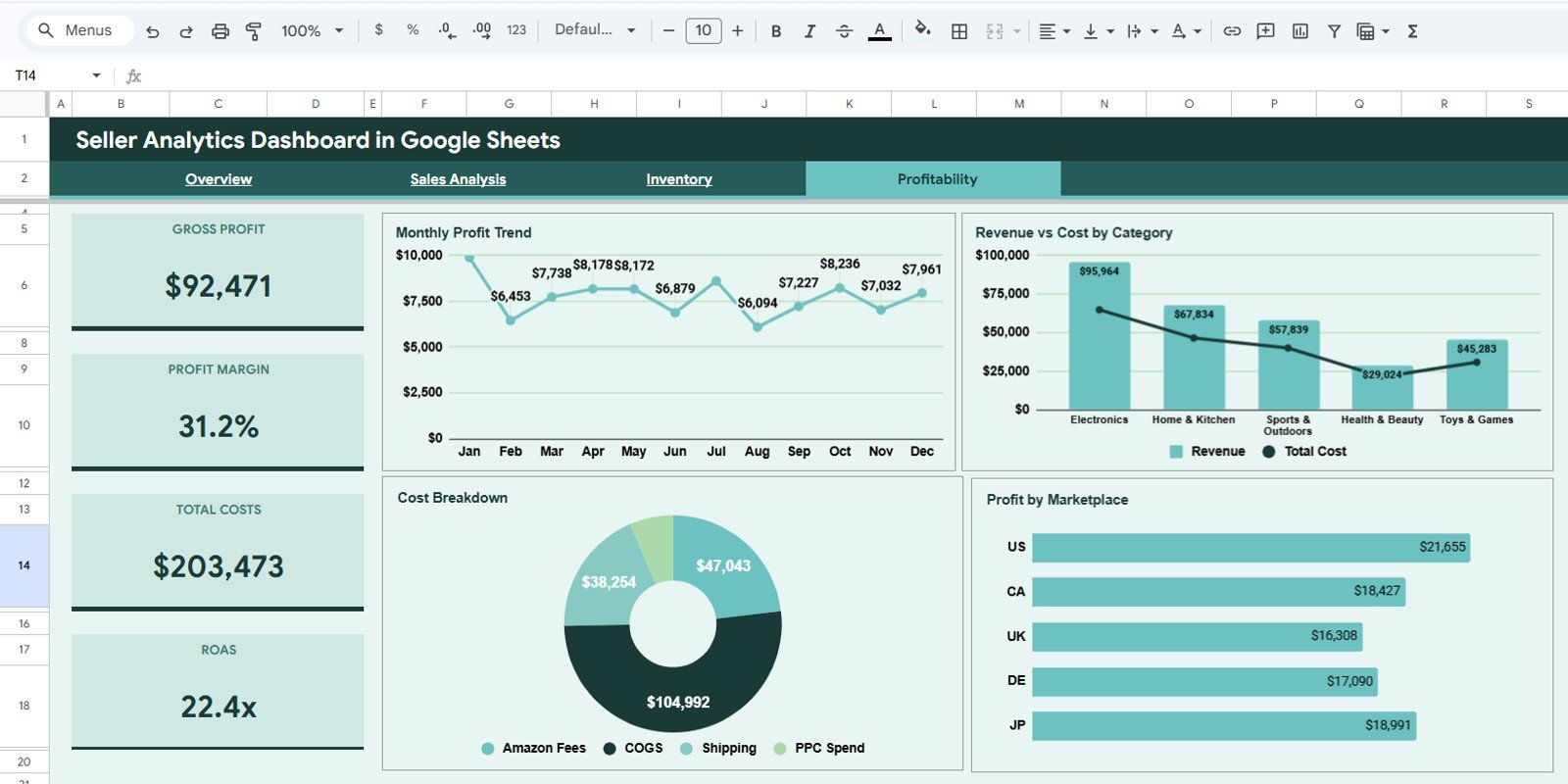
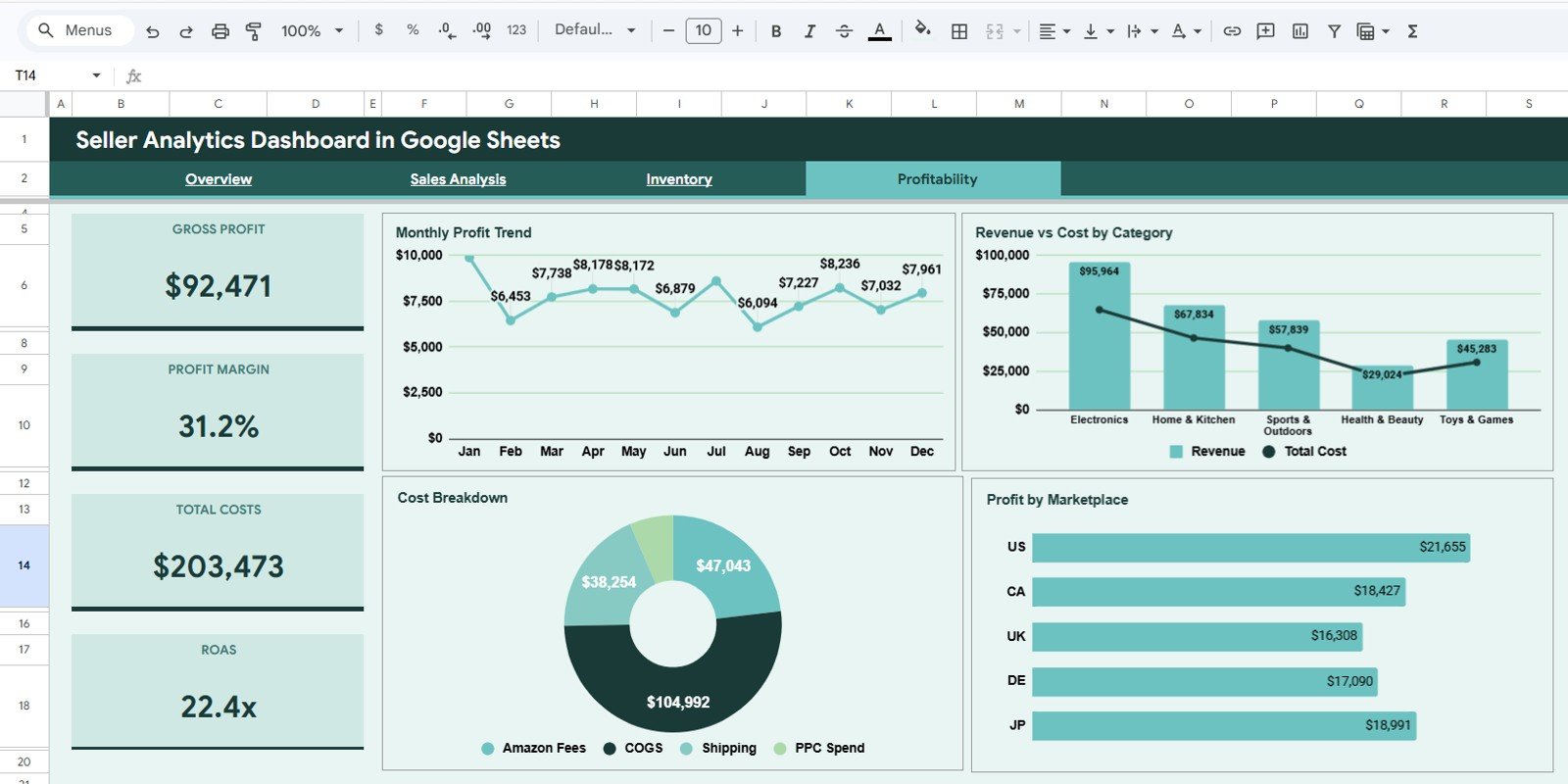
The Profitability tab turns seller activity into margin and cost visibility.
Monthly Profit Trend. This chart shows how profit changes month by month.
Use it to see whether revenue growth is creating real profit or being absorbed by costs, returns, and advertising spend.
Revenue vs Cost by Category. This chart compares revenue and total cost across product categories.
Use it to identify categories that look strong in sales but weak in profitability.
Cost Breakdown. This chart separates major cost components such as COGS, shipping, fees, and advertising.
Use it to see which expense areas deserve the most attention when improving margins.
Profit by Marketplace. This chart compares profit across selling channels.
Use it to focus on marketplaces that produce stronger net results instead of only higher revenue.
5. Data Sheet Tab
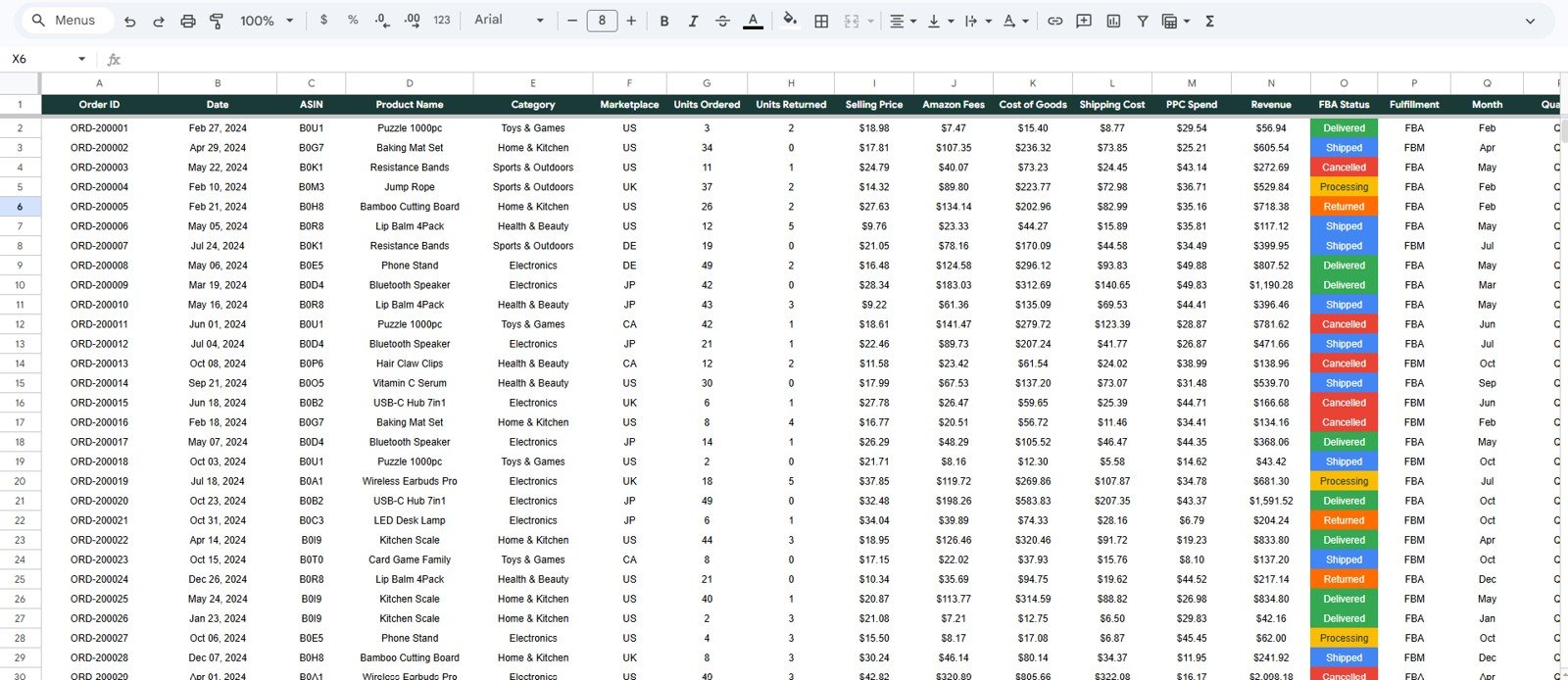
The Data Sheet tab is where you add your seller records in the same format used by the dashboard. Keep the column structure consistent, paste your new rows, refresh the dashboard views if needed, and use the slicers to analyze the updated results.
Seller Analytics Dashboard in Google Sheets vs. Microsoft Excel Dashboard vs. Paid Ecommerce SaaS – Where This Fits
| Option | Best For | Main Benefit | Consideration |
|---|---|---|---|
| Seller Analytics Dashboard in Google Sheets | Small teams, marketplace sellers, and operators who want a shareable dashboard | Cloud-based, editable, affordable, and easy to share | Requires clean data entry or pasted seller exports |
| Microsoft Excel Dashboard | Users who prefer desktop files, Power Query, or local workbooks | Strong spreadsheet control and offline access | Less convenient for browser-based collaboration |
| Paid Ecommerce SaaS | Teams that need automated integrations and advanced seller operations | Connectors, alerts, and automated syncing | Monthly cost can be high for smaller sellers |
This template is the practical middle ground. It is more structured than a blank spreadsheet and more affordable than monthly ecommerce analytics software.
Who This Template Is For – and Who It’s Not For
This Google Sheets seller dashboard is ideal for ecommerce sellers who track marketplace activity, advertising spend, product category performance, fulfillment models, inventory movement, costs, and profit. It is especially useful for Amazon FBA sellers, Etsy shop owners, Shopify sellers, eBay sellers, Walmart Marketplace sellers, digital product sellers, and small ecommerce teams.
It is not the right fit if you need a live API connection, automated marketplace syncing, or a custom enterprise data warehouse. For those workflows, use dedicated ecommerce analytics software or request a custom consulting build.
How to Use the Seller Analytics Dashboard in Google Sheets
- Open the PDF guide included with your purchase and click the Google Sheets copy link.
- Create your own editable copy in Google Drive.
- Go to the Data Sheet tab and replace the sample rows with your seller data.
- Keep the same column structure so the formulas, charts, and slicers continue working.
- Use the Overview page for executive review, then open Sales Analysis, Inventory, and Profitability for deeper investigation.
- Apply slicers to filter by marketplace, category, order status, fulfillment type, or date period.
- Review the dashboard weekly or monthly to spot trends, returns, margin pressure, and channel performance.
Real-World Use Cases
- Monthly marketplace performance review for Amazon, Etsy, Shopify, eBay, or Walmart sellers.
- Weekly revenue and return tracking for ecommerce operators.
- PPC spend review to compare advertising investment against monthly revenue.
- Inventory and category analysis to identify high-return or low-margin product groups.
- Profitability review by marketplace to focus effort on the channels that create the strongest net result.
- Simple reporting pack for virtual assistants, ecommerce analysts, founders, and small teams.
Frequently Asked Questions
Is this a Google Sheets template?
Yes. This product is designed for Google Sheets. You receive a guide with the copy link so you can create your own editable version in Google Drive.
Does it work for Amazon sellers?
Yes. It works well for Amazon sellers, especially if you track marketplace, fulfillment type, PPC spend, returns, cost, revenue, and profit.
Can I use it for Etsy, Shopify, eBay, or Walmart Marketplace?
Yes. The dashboard is marketplace-friendly and can be used for any seller data that follows the Data Sheet structure.
Does it include sample data?
Yes. The template includes a structured data format so you can understand how to enter or paste your own seller records.
Do I need advanced spreadsheet skills?
No. The dashboard is already built. You only need to copy the file, update the Data Sheet, and use the dashboard tabs and slicers.
About the Author
NextGenTemplates creates practical business dashboards, spreadsheet templates, and reporting tools for founders, analysts, teams, and operators. Our templates are built to reduce manual reporting time and help users make decisions with cleaner data views.
Explore Related Templates
If you want more seller and ecommerce reporting tools, explore the Google Sheets templates and Google Sheets dashboard templates collections.
- Amazon FBA Seller Dashboard in Google Sheets
- Etsy Seller Analytics Dashboard in Google Sheets
- Ecommerce Conversion Rate KPI Dashboard in Google Sheets
- Digital Marketing Campaign Dashboard in Google Sheets
Get the Seller Analytics Dashboard in Google Sheets today and turn seller data into clearer revenue, inventory, return, and profit insights.
Last updated: May 20, 2026.
Compatibility and Requirements
- Runs in Google Sheets with a free Google account and a web browser.
- You make your own editable copy from the Google Sheets link in the PDF guide that comes with your purchase.
- New to Google Sheets? Google covers the basics in How to use Google Sheets.































Reviews
There are no reviews yet.