



Key Features of Content Marketing KPI Scorecard
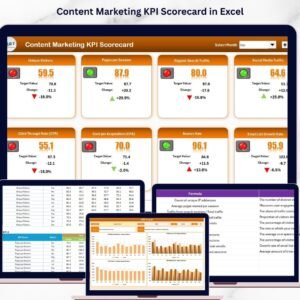
The Content Marketing KPI Scorecard is a powerful, ready-to-use digital template designed to help marketing professionals track, analyze, and optimize their content marketing performance with ease. Crafted for clarity and efficiency, this scorecard offers a comprehensive overview of your key performance indicators (KPIs) in one streamlined interface.
With four essential worksheets, this scorecard covers every aspect of KPI monitoring:
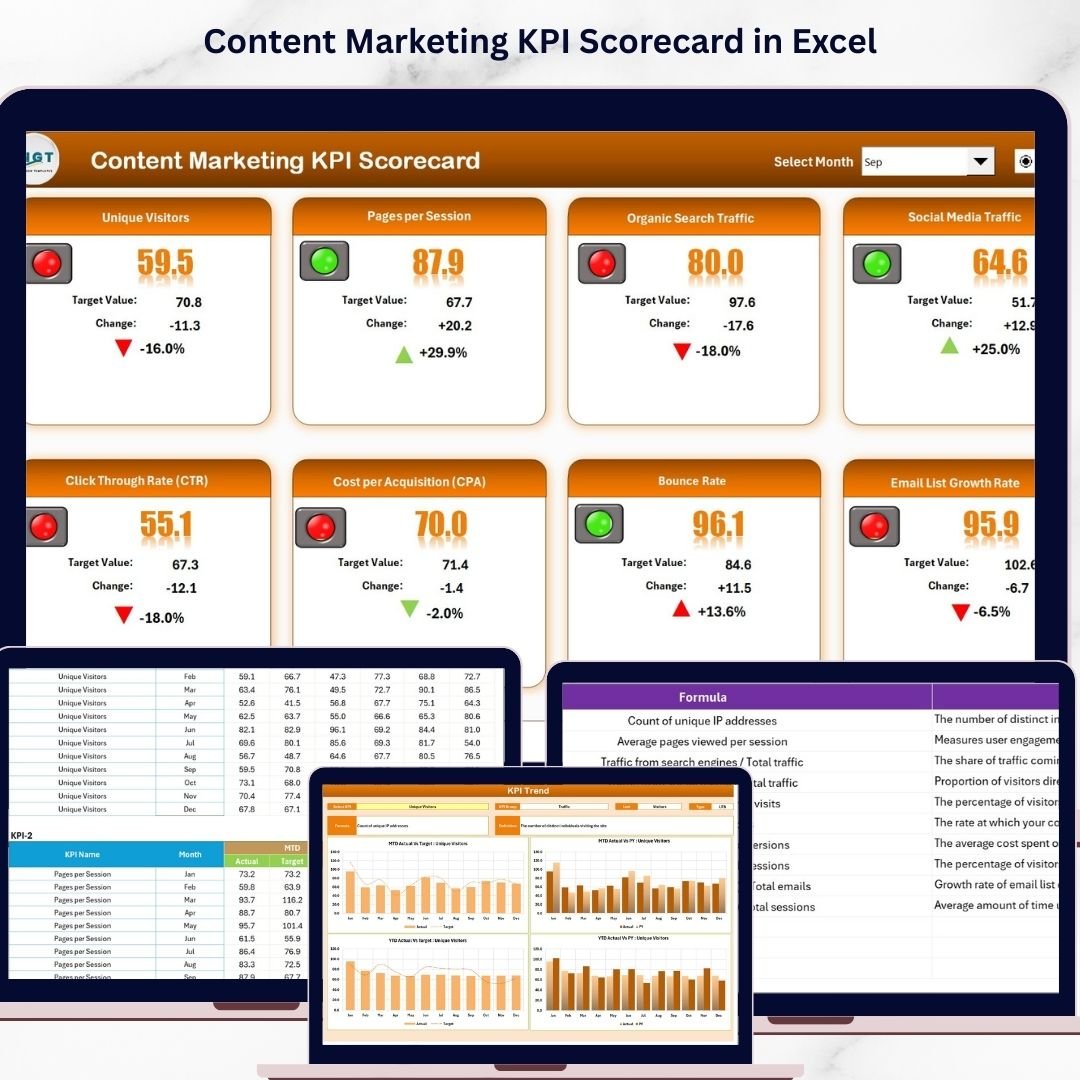
- 📊 Scorecard Sheet: The main dashboard allows you to select the time period (Month, Month-to-Date, or Year-to-Date) via dropdown menus. Instantly compare actual results against set targets and visualize performance with intuitive color-coded indicators. This sheet provides a complete KPI overview to quickly identify trends and performance gaps.
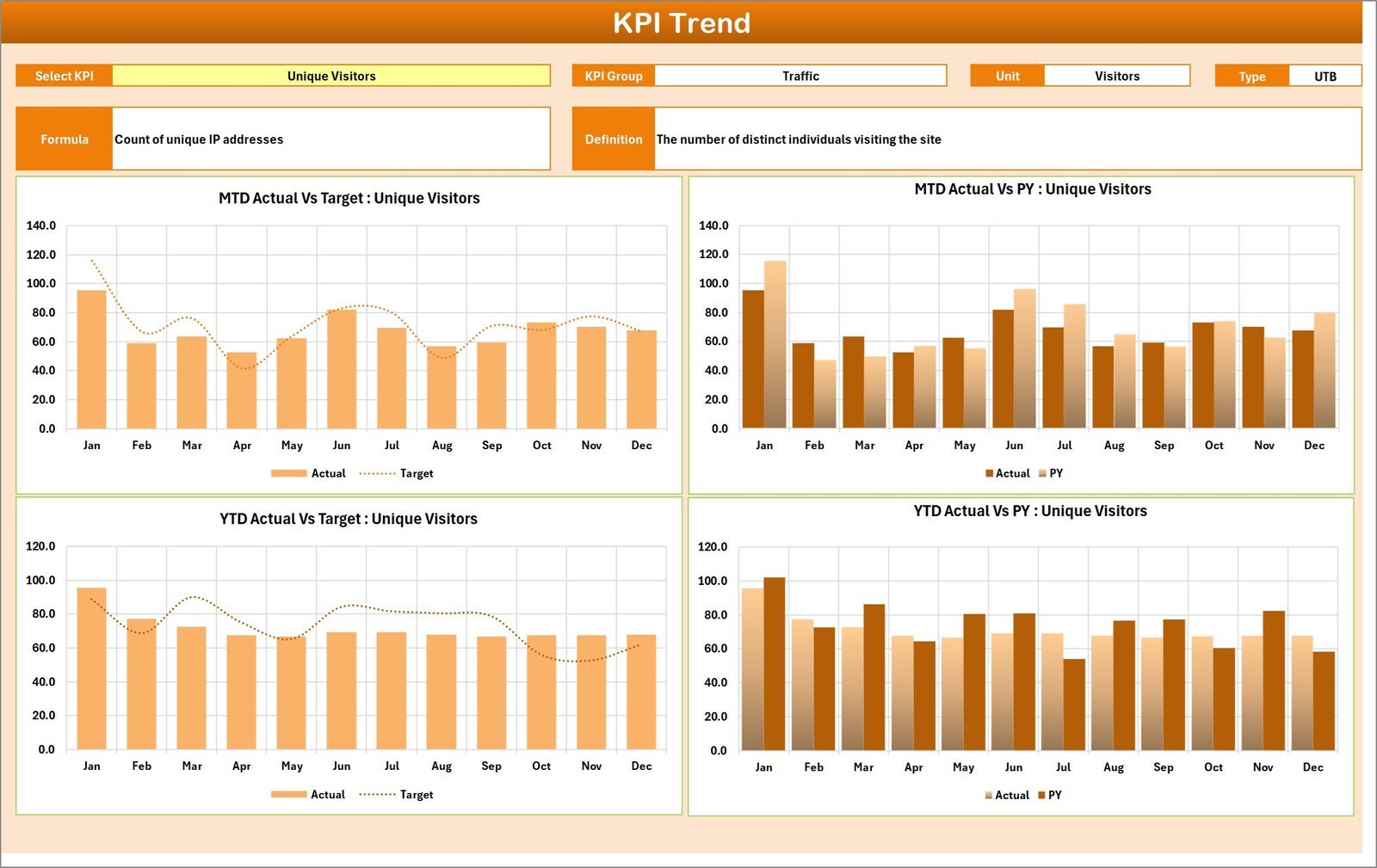
- 📈 KPI Trend Sheet: Analyze the trajectory of individual KPIs over time. Select any KPI from the dropdown to view its group, unit, type (whether lower or upper values are better), formula, and detailed definition. MTD and YTD trends for Actual, Target, and Previous Year values are displayed in dynamic charts for quick insights.
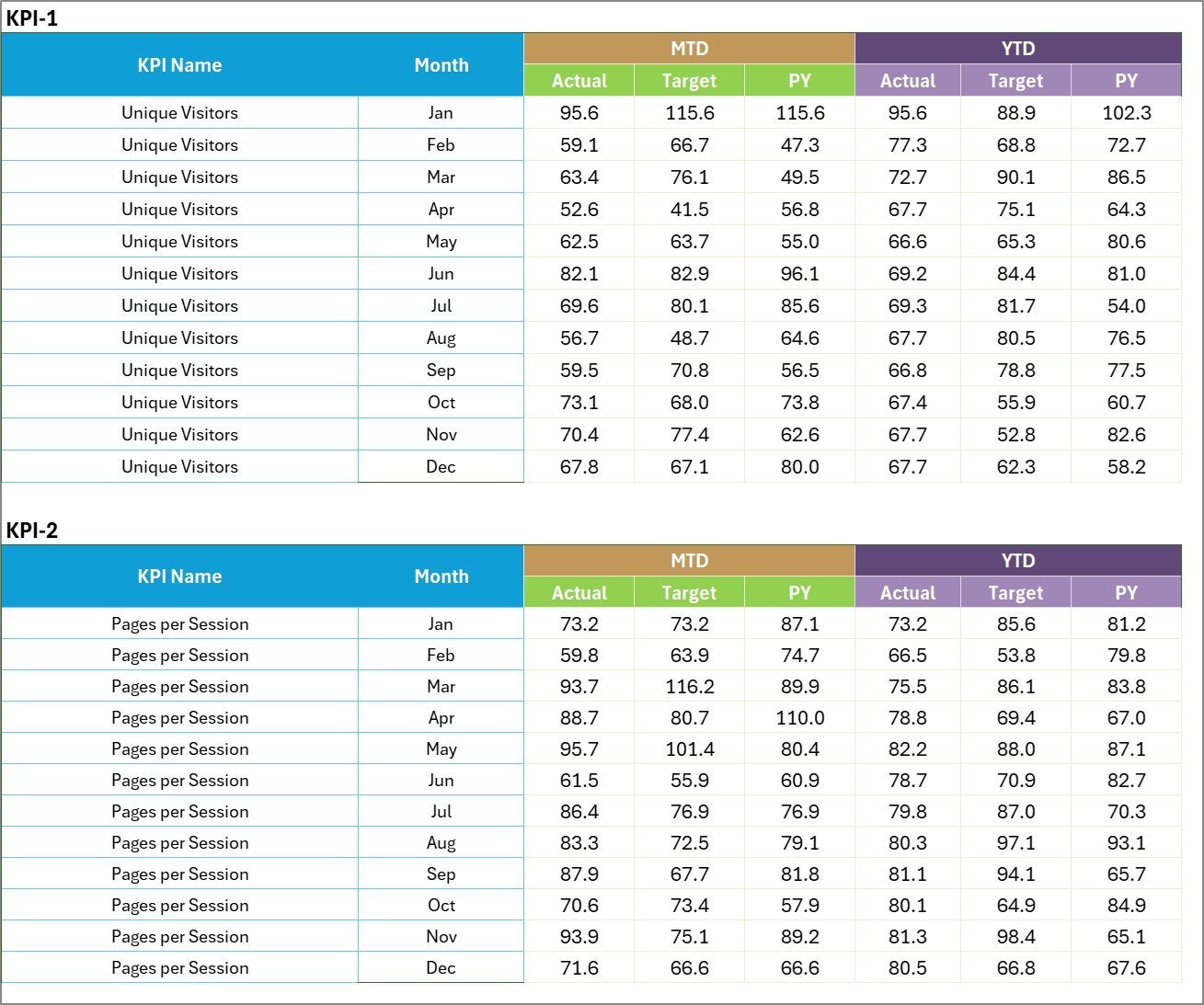
- 📝 Input Data Sheet: This is where you record all your KPI data, including actual values, targets, and other vital metrics. The flexible design allows easy updating, ensuring your scorecard always reflects the most recent results.
- 📚 KPI Definition Sheet: Define or customize your KPIs by entering the KPI name, group, unit, formula, and a comprehensive definition. This sheet ensures clarity and uniform understanding across teams.
What’s Inside the Content Marketing KPI Scorecard
This digital product includes a meticulously crafted Excel template with four interconnected worksheets that work together to deliver a seamless KPI tracking experience. Each worksheet is designed to address specific aspects of content marketing performance measurement and management.
Central to the template is the Scorecard Sheet, which consolidates performance data and visual cues for instant interpretation. The KPI Trend Sheet empowers users to monitor the progression of their KPIs with rich contextual information and charts. The Input Data Sheet facilitates straightforward data entry, while the KPI Definition Sheet allows customization and clarity in KPI metrics.
All sheets are user-friendly, with dropdown menus, conditional formatting, and visual charts that make data analysis accessible to professionals at any level.
How to Use the Content Marketing KPI Scorecard
Getting started with the Content Marketing KPI Scorecard is simple and efficient:
- 🖱️ Select Your Time Frame: Use dropdown menus on the Scorecard Sheet to choose between monthly, MTD, or YTD analysis.
- ✍️ Input Your Data: Enter actual performance numbers, targets, and other relevant data into the Input Data Sheet.
- 🔍 Analyze Trends: Use the KPI Trend Sheet to select specific KPIs and review their historical performance with trend charts and detailed KPI information.
- 🛠️ Customize KPIs: Update the KPI Definition Sheet to add new KPIs or adjust existing ones with definitions, formulas, and units that suit your unique business needs.
- 📈 Monitor & Optimize: Regularly review the Scorecard Sheet to identify areas for improvement, celebrate successes, and make data-driven decisions to boost your content marketing strategy.
Who Can Benefit from This Content Marketing KPI Scorecard
This scorecard is an essential tool for a wide range of professionals and teams focused on content marketing success:
- 🎯 Marketing Managers: Gain a clear, real-time overview of campaign effectiveness and ROI.
- 📊 Content Strategists: Track content performance metrics to refine strategy and deliver better results.
- 💡 Business Owners: Understand how content marketing efforts contribute to overall business goals.
- 👥 Marketing Analysts: Leverage detailed KPI data and visualizations to perform deep-dive analyses.
- 🚀 Digital Agencies: Provide clients with transparent, professional reporting on content marketing KPIs.
Whether you are a solo marketer or part of a larger team, this scorecard will streamline your KPI tracking process, helping you stay focused on what truly drives growth.
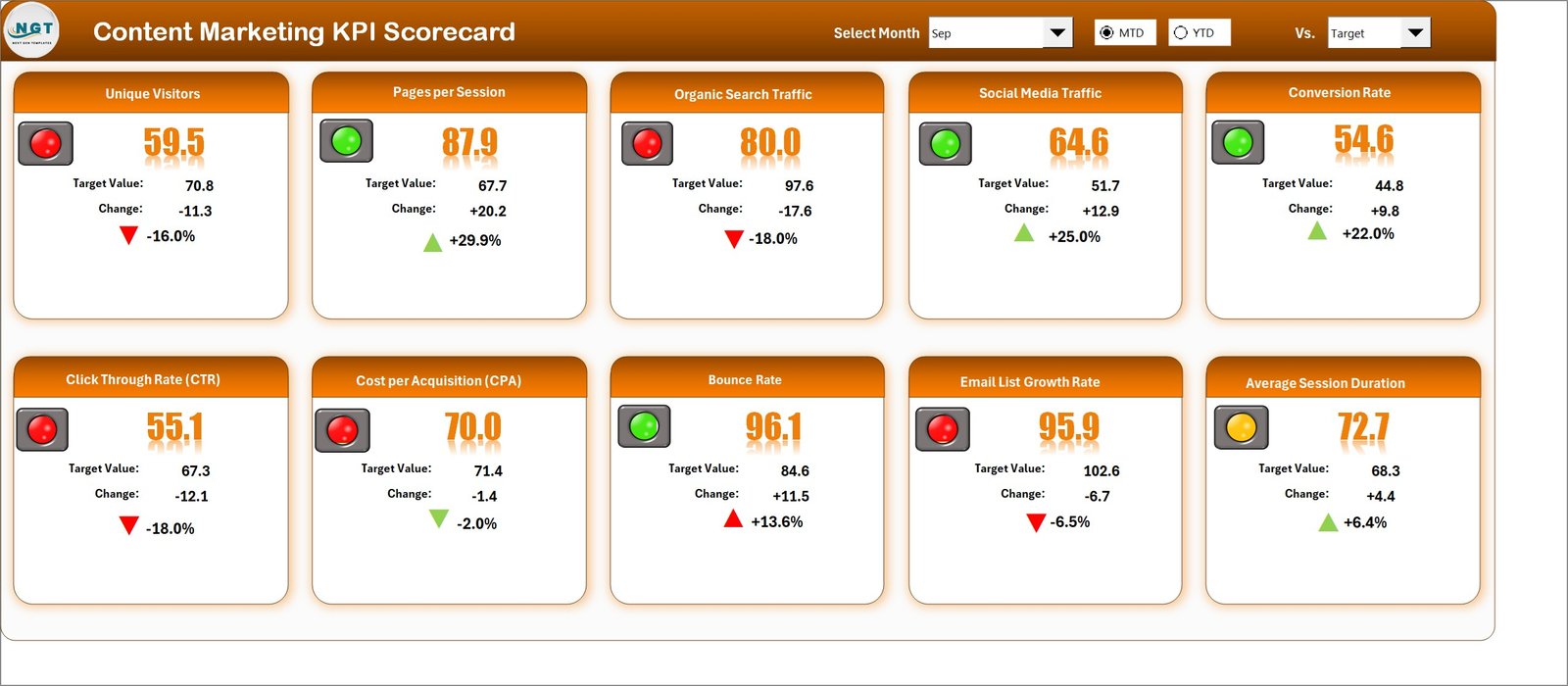
Content Marketing KPI Scorecard

KPI Trend Sheet
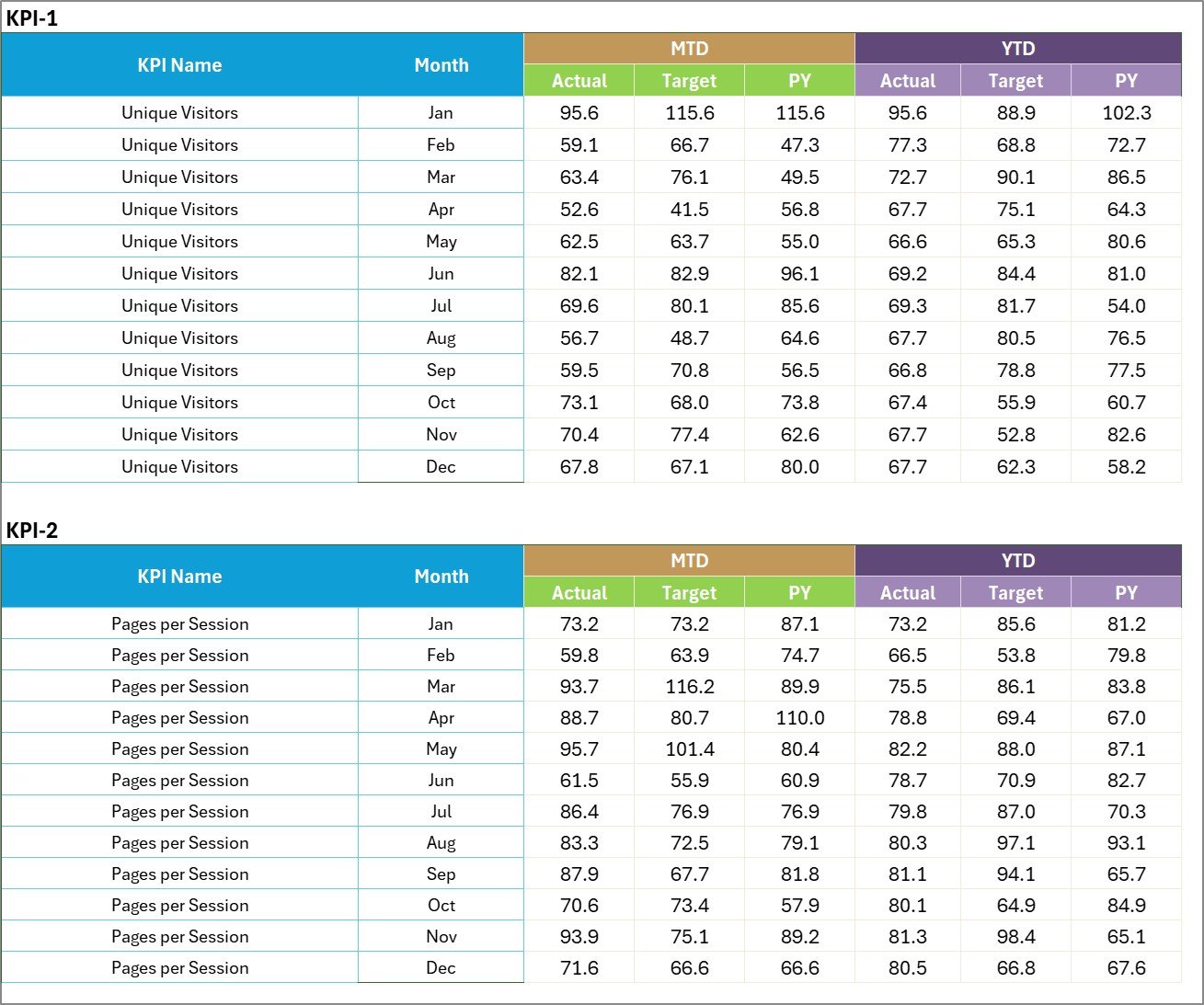
Input Data Sheet

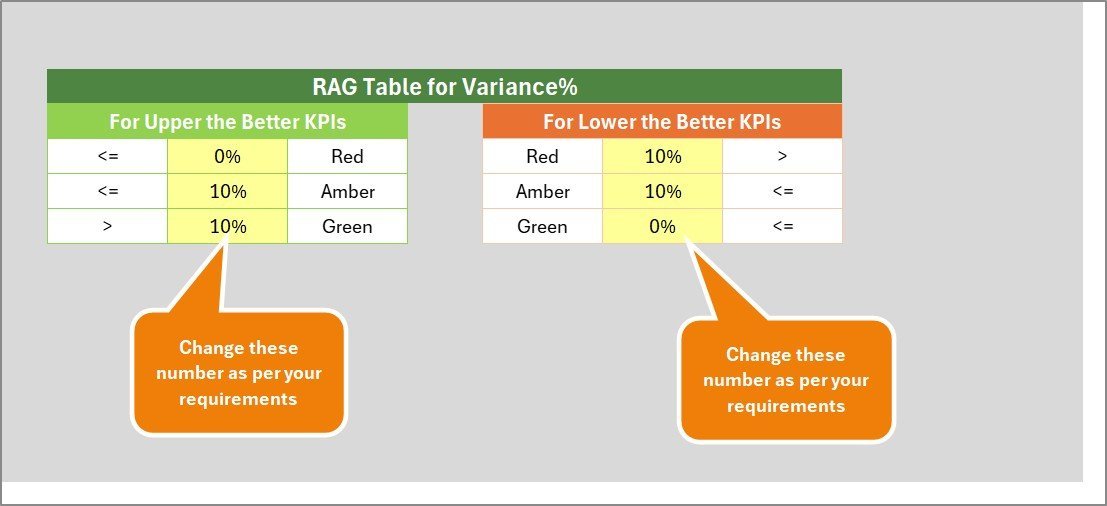
KPI Definition sheet tab
Click here to read the Detailed blog post.
Visit our YouTube channel to learn step-by-step video tutorials.
Compatibility and Requirements
- Works in Microsoft Excel desktop (Excel 2016 or later, or Microsoft 365).
- The time period and KPI selectors are drop-down lists. Microsoft’s guide to creating a drop-down list explains how they work.
Frequently Asked Questions
Which sheets are in the Content Performance KPI Scorecard?
Four sheets: Scorecard, KPI Trend, Input Data and KPI Definition. They are linked, so numbers you enter on the Input Data sheet flow to the Scorecard and KPI Trend sheets.
How do I switch between Month, MTD and YTD?
Use the drop-down menus on the Scorecard sheet. The actual and target values and the color-coded indicators update for the period you pick.
Can I add my own content KPIs?
Yes. Enter the KPI name, group, unit, formula and definition on the KPI Definition sheet, then add its numbers on the Input Data sheet.
What does the KPI Trend sheet show?
Pick a KPI from the drop-down to see its group, unit, type (lower or upper is better), formula and definition, with MTD and YTD charts for actual, target and previous year values.
Related Content Marketing Templates
- Content Marketing KPI Dashboard in Excel: a dashboard view of content KPIs.
- SEO Content Performance KPI Dashboard in Excel: KPIs for search traffic to your content.
- Content Marketing KPI Dashboard in Google Sheets: for teams that work in Google Sheets.
- Content Marketing KPI Dashboard in Power BI: the same topic in Power BI.
- KPI Scorecard Mega Pack: 12 Excel and Google Sheets KPI scorecards.
Browse all Excel KPI dashboards or the Excel sales and marketing templates.


















Reviews
There are no reviews yet.