



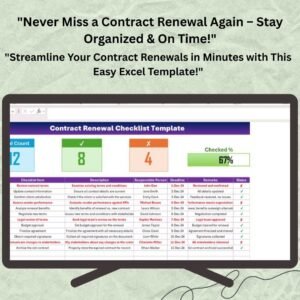
The Contract Renewal Checklist Template in Excel is a powerful tool designed to streamline the process of managing contract renewals and ensure that your organization never misses an important deadline. This Excel-based template is perfect for contract managers, procurement officers, and legal teams looking to stay organized and compliant when managing contracts.
With this customizable checklist, you can easily track the progress of all contract renewal tasks, set deadlines, assign responsibilities, and monitor completion statuses. The intuitive interface and real-time tracking ensure that you always stay on top of your contract renewal obligations.
Key Features of the Contract Renewal Checklist Template in Excel

📋 Comprehensive Task Tracking
The template allows you to track all the tasks involved in the contract renewal process, from review to approval and signing. Each task is easily categorized with due dates, responsibilities, and completion statuses.
🔄 Customizable Inputs
Easily customize the template to suit the specific needs of your organization. Add tasks, set deadlines, and assign responsible team members to ensure the process runs smoothly.
📈 Real-Time Progress Monitoring
Track the progress of each renewal task in real-time. The template features built-in progress bars and tracking systems to give you a clear view of where each contract stands.
📅 Deadlines & Due Date Management
Stay ahead of important dates with the ability to input contract start and end dates, renewal deadlines, and set reminders to ensure timely renewals.
🔍 Task Priority & Status Indicators
The template includes status indicators for tasks (e.g., Not Started, In Progress, Completed) and visual cues for priority tasks, helping you prioritize work effectively.
⚡ Simple & User-Friendly Interface
The template is designed to be easy to navigate, with clear instructions and visually appealing layouts that allow you to focus on important tasks.
Why You’ll Love the Contract Renewal Checklist Template in Excel
✅ Simplified Contract Management
Keep your contract renewal process organized and streamlined with a comprehensive checklist that covers all the essential steps.
✅ Improved Efficiency
Automate task tracking and improve efficiency with real-time updates and status indicators.
✅ Stay On Schedule
Ensure that you never miss a renewal deadline again with built-in deadline tracking and reminder systems.
✅ Customizable & Scalable
The template is fully customizable to fit your business needs, whether you’re tracking a handful of contracts or hundreds.
✅ Easy for Teams to Use
With a simple, user-friendly interface, the checklist makes it easy for team members to update and track their tasks, ensuring everyone is on the same page.
What’s Inside the Contract Renewal Checklist Template?
- Task Overview: A clear summary of all contract renewal tasks, responsible individuals, and due dates.
- Task Tracking Sheets: Detailed sections for tracking each task, including comments and completion status.
- Reminder System: Set up automatic reminders to alert team members about upcoming renewal deadlines.
- Progress Bar: Visual progress bars to show how far along the contract renewal process is.
- Deadline Management: Manage start and end dates of contracts, as well as specific renewal deadlines.
How to Use the Contract Renewal Checklist Template in Excel
1️⃣ Download the Template: Get access to your customizable Excel template after purchase.
2️⃣ Add Your Contracts: Enter the details for each contract, including deadlines and tasks.
3️⃣ Assign Responsibilities: Designate team members to each task and set up reminders.
4️⃣ Track Progress: Use the progress bars to monitor the status of each task in real-time.
Who Can Benefit from the Contract Renewal Checklist Template in Excel?
🔹 Contract Managers
🔹 Procurement Officers
🔹 Legal Teams
🔹 Compliance Teams
🔹 Small & Medium Businesses (SMBs)
🔹 Large Enterprises
Ensure your organization stays organized and compliant with this efficient, easy-to-use contract renewal checklist.
Click here to read the Detailed blog post
Visit our YouTube channel to learn step-by-step video tutorials
Youtube.com/@PKAnExcelExpert
Compatibility and Requirements
- Works in Microsoft Excel desktop (Excel 2016 or later, or Microsoft 365).
- New to Excel? Microsoft’s Excel for Windows training covers the basics.
Frequently Asked Questions
What does the checklist track?
Each renewal task from review to approval and signing, with its due date, the person responsible and its status.
Which statuses can a task have?
Not Started, In Progress or Completed.
Can I record contract dates?
Yes. Enter each contract’s start and end dates and its renewal deadline.
How do I see overall progress?
Progress bars show how far along the renewal process is.
Is there a Google Sheets version?
Yes. The Contract Renewal Checklist in Google Sheets covers the same job in Google Sheets.
Related Contract Templates
- Contract Renewal Checklist in Google Sheets: the same checklist in Google Sheets
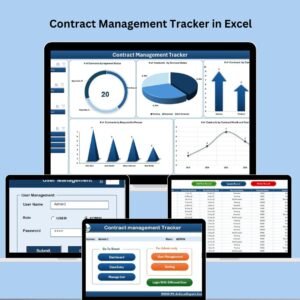
- Contract Management Tracker in Excel: track every contract in one Excel tracker
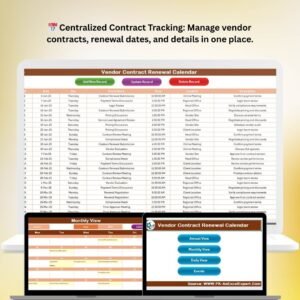
- Vendor Contract Renewal Calendar in Excel: see vendor renewal dates on a calendar
- Contract Management Checklist in Excel: a contract management checklist in Excel
- Checklist & SOP Pack: 12 checklist templates for Excel and Google Sheets
Browse all Excel checklists.

























Reviews
There are no reviews yet.