



An Emergency Response Plan Checklist is an essential tool for ensuring that your organization is well-prepared for any crisis. This Excel-based checklist helps teams stay organized, assign responsibilities, and monitor the completion of critical emergency preparedness tasks. It enhances accountability, ensures compliance with safety regulations, and provides a structured approach to crisis management.
This template is fully customizable, making it suitable for businesses, schools, healthcare facilities, and other organizations looking to enhance their emergency response readiness.
Key Features of the Emergency Response Plan Checklist
Our Emergency Response Plan Checklist in Excel is structured into two main sections to provide a streamlined and efficient approach to emergency preparedness.
1. Emergency Response Plan Checklist Sheet

This is the primary worksheet where emergency tasks are listed, assigned, and tracked. It consists of the following sections:
Top Section Overview
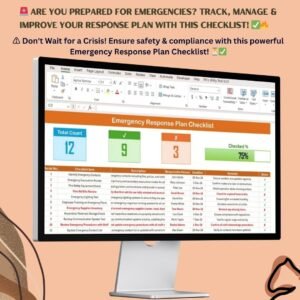
The top section provides a quick snapshot of progress, helping users monitor their preparedness at a glance:
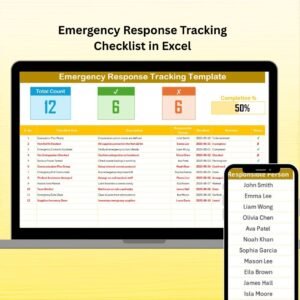
- Total Count – Displays the total number of checklist items.
- Checked Count – Shows the number of completed emergency preparedness tasks.
- Crossed Count – Highlights pending or incomplete tasks.
- Progress Bar – A visual indicator of task completion percentage.
These elements provide an instant overview of your emergency preparedness status, making it easier to take timely actions.
Checklist Table Details
The checklist table includes structured columns for tracking all emergency-related tasks efficiently:
- Serial Number – Unique identification for each emergency task.
- Checklist Item – Description of the emergency preparedness task.
- Task Description – Brief details on the task’s objective.
- Responsible Person – The assigned individual in charge of completing the task.
- Deadline – The target date for completing each task.
- Remarks – Additional notes, comments, or instructions regarding the task.
- Status – A visual indication (✔ for completed tasks, ✘ for pending tasks).
The structured format of this table ensures that no critical emergency task is overlooked.
2. List Sheet Tab
The List Sheet Tab serves as a supporting sheet that stores a unique list of responsible persons. This feature enables an easy drop-down selection in the main checklist, ensuring accuracy, consistency, and time-saving task assignment.
Using a predefined list of responsible persons eliminates errors and improves efficiency in managing emergency response duties.
Why Use This Emergency Response Plan Checklist?
The Emergency Response Plan Checklist in Excel is an indispensable tool for improving crisis management and workplace safety. Here’s why:
✔ Ensures Compliance – Helps organizations meet regulatory requirements for emergency preparedness.
✔ Improves Accountability – Clearly assigns responsibilities, ensuring that emergency tasks are not overlooked.
✔ Facilitates Quick Response – A structured plan ensures a faster and more effective response during emergencies.
✔ Enhances Safety and Preparedness – Covers all key aspects, including evacuation procedures, emergency contact updates, safety drills, and disaster recovery plans.
✔ Customizable & Scalable – Adapt the checklist to match your organization’s needs, whether for small businesses or large enterprises.
How to Use the Emergency Response Plan Checklist?
This easy-to-use template follows a step-by-step process:
1️⃣ Identify Critical Emergency Tasks – List all the necessary emergency preparedness actions.
2️⃣ Assign Responsibilities – Use the drop-down menu to allocate each task to the appropriate team member.
3️⃣ Set Deadlines & Track Progress – Monitor each task’s completion using the progress indicators and checklist table.
4️⃣ Review & Update Regularly – Keep the checklist up to date to ensure continued readiness.
Who Can Benefit from This Template?
The Emergency Response Plan Checklist in Excel is designed for organizations of all sizes that prioritize safety, including:
🏢 Businesses & Corporations – Ensure smooth emergency preparedness planning.
🏥 Hospitals & Healthcare Centers – Strengthen crisis management strategies for medical emergencies.
🏫 Schools & Universities – Enhance student and staff safety measures.
🏭 Manufacturing & Industrial Units – Minimize risks and streamline emergency response efforts.
🏠 Facility & Property Managers – Keep buildings and workplaces compliant with safety regulations.
Click hare to read the Detailed blog post
Visit our YouTube channel to learn step-by-step video tutorials
Compatibility and Requirements
- Works in Microsoft Excel desktop (Excel 2016 or later, or Microsoft 365).
- You pick each responsible person from a dropdown that reads the names on the List sheet. Microsoft explains dropdowns in Create a drop-down list.
Frequently Asked Questions
What does the checklist table track?
Each row has a serial number, checklist item, task description, responsible person, deadline, remarks and a status mark (a tick for completed tasks, a cross for pending ones).
How do I assign a task to someone?
Add the names to the List sheet. Then choose the responsible person for each task from the dropdown on the checklist sheet.
How can I see how much is done?
The top of the checklist sheet shows the total count, checked count and crossed count, plus a progress bar for the percentage of tasks completed.
Can I change the tasks to fit my organization?
Yes. The template is customizable, so you can edit the checklist items, descriptions, deadlines and remarks for your own site, school, clinic or workplace.
Is there a Google Sheets version?
Yes. See the Emergency Response Plan Checklist in Google Sheets.
Related Emergency Response Templates
- Emergency Response Plan Checklist in Google Sheets: the same checklist for Google Sheets
- Emergency Response Planner Checklist in Excel: another planning checklist in Excel
- Emergency Response Tracking Checklist in Excel: a checklist for tracking response tasks
- Emergency Response Documentation Checklist in Excel: a checklist for emergency records
- Checklist & SOP Pack: 12 checklist templates for Excel and Google Sheets in one download
Browse all Excel checklist templates.



























Reviews
There are no reviews yet.