


In the fast-evolving automotive industry, data-driven decisions are no longer optional—they’re essential. The Automotive Dashboard in Power BI is a professional, ready-to-use analytical tool designed to help organizations monitor, analyze, and optimize vehicle performance and operational efficiency.
From tracking fleet utilization and maintenance costs to monitoring regional fuel efficiency, this Power BI dashboard gives you a 360° view of your automotive operations. Built with clean data models, interactive visuals, and intuitive navigation, it empowers managers, executives, and analysts to make faster, smarter, and more strategic decisions.
Instead of relying on static reports or spreadsheets, this dashboard automates data analysis and visualization—turning complex automotive data into actionable insights at your fingertips.
⚙️ Key Features of the Automotive Dashboard in Power BI
📊 Five Analytical Pages – Complete Operational Visibility
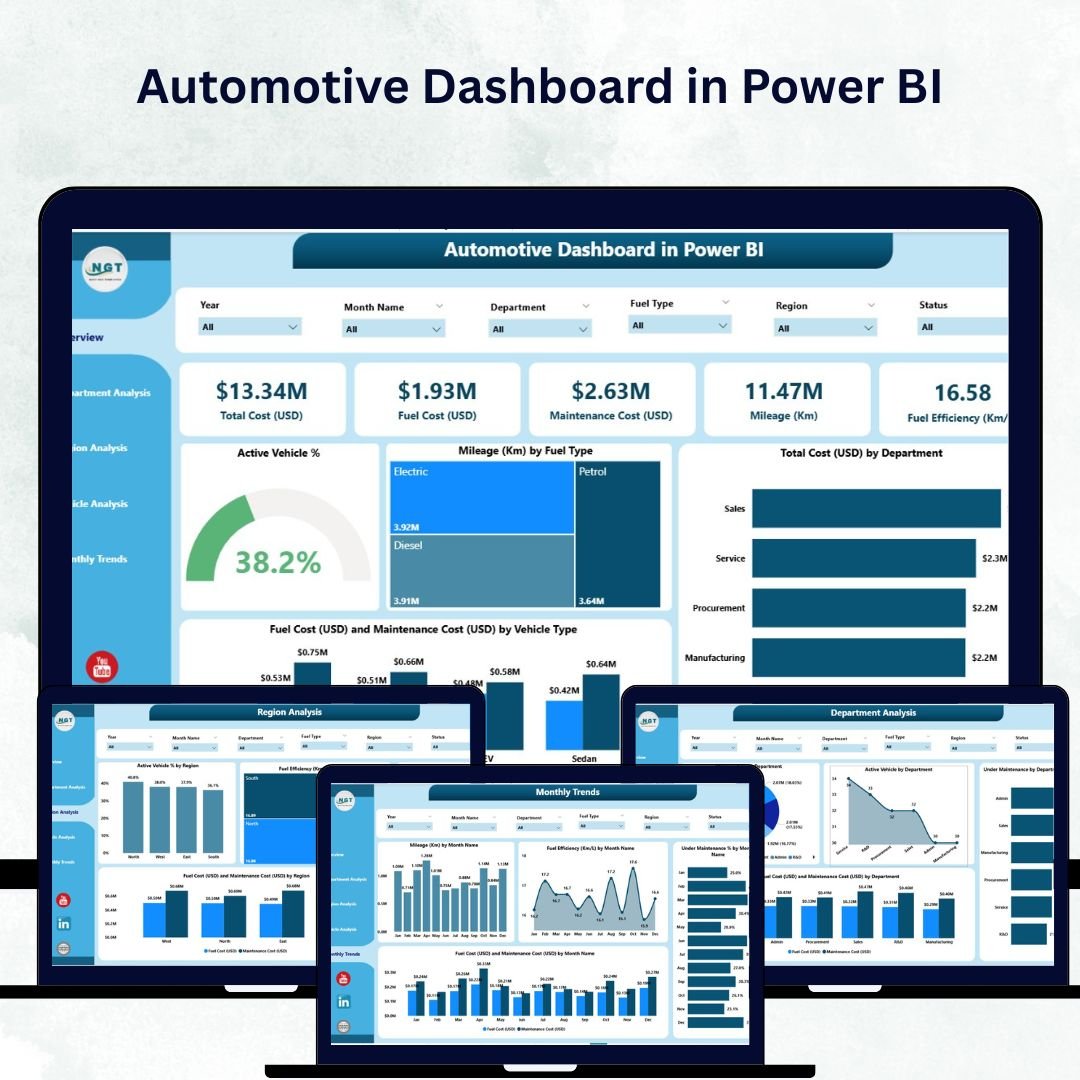
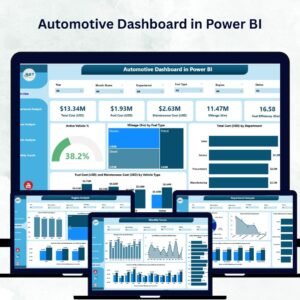
This dashboard includes Overview, Department Analysis, Region Analysis, Vehicle Analysis, and Monthly Trends pages—each designed for targeted insights and visual storytelling.
🔍 Overview Page – The Command Center
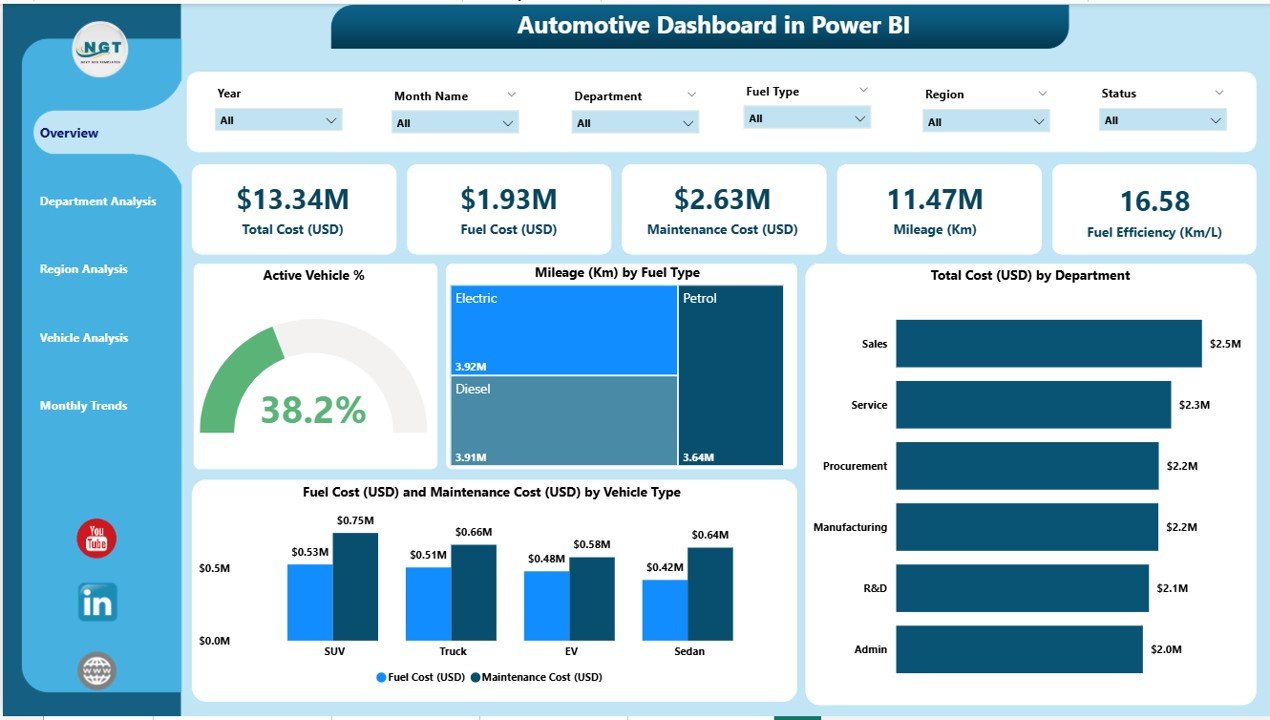
Your high-level snapshot of key metrics:
5 KPI Cards: Total Active Vehicles, Total Mileage, Fuel Cost, Maintenance Cost, and Operational Cost.
Interactive Filters: View data by Department, Region, or Vehicle Type.
Charts Include:
Active Vehicle %
Mileage (Km) by Fuel Type
Total Cost (USD) by Department
Fuel & Maintenance Cost by Vehicle Type
This page instantly summarizes performance for leadership teams and management reviews.
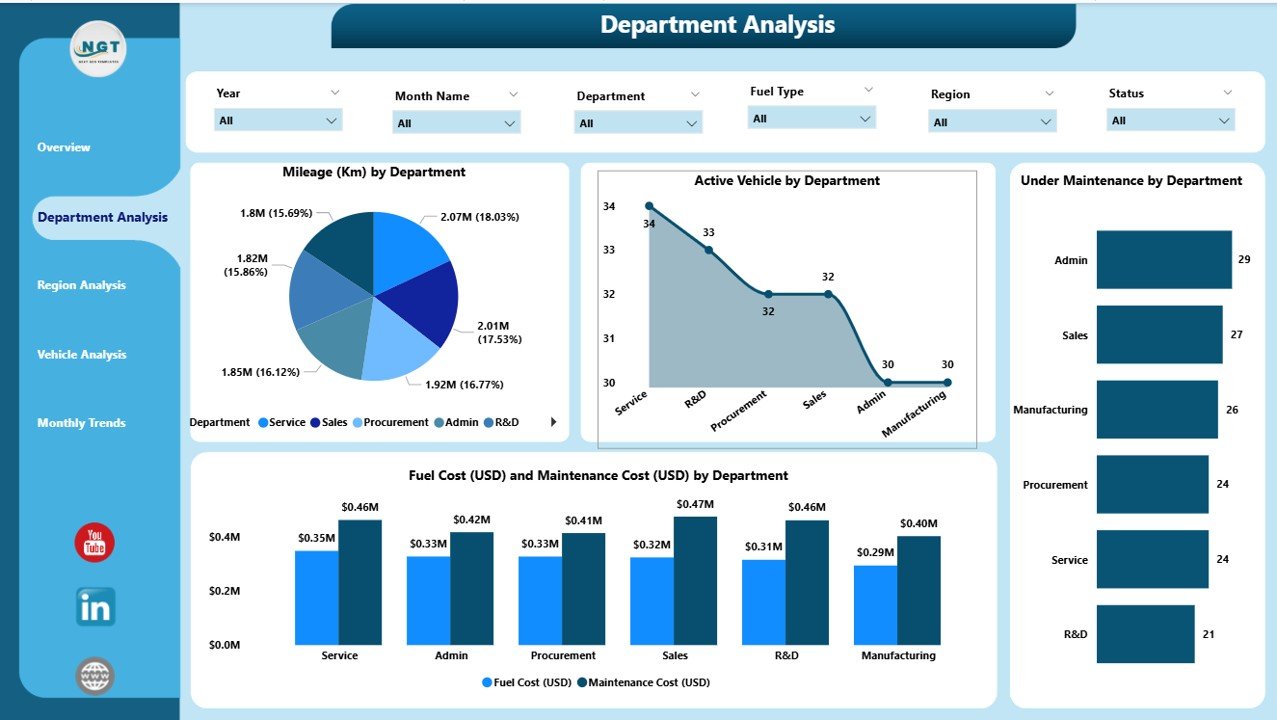
🏢 Department Analysis Page – Track Departmental Efficiency
Analyze cost and performance at the department level:
Mileage (Km) by Department
Active Vehicles & Under Maintenance %
Fuel & Maintenance Cost (USD) by Department
Identify over-budget teams and optimize departmental efficiency with precision.
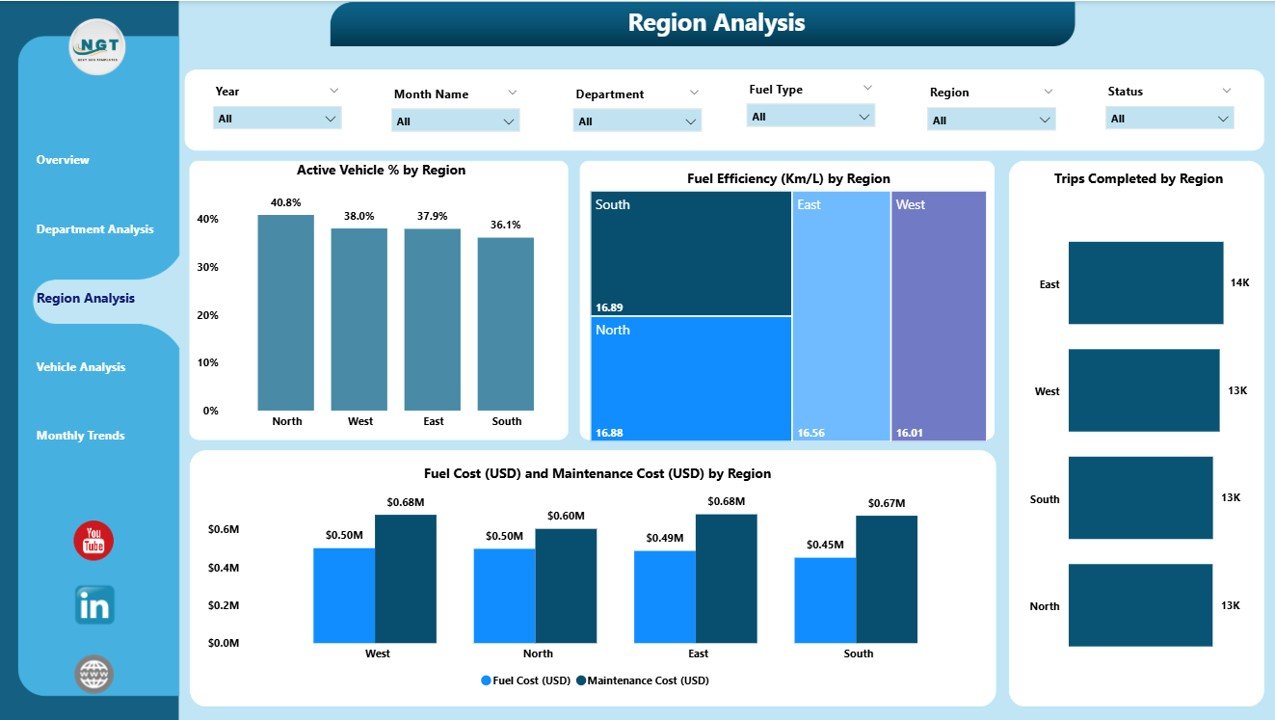
🌍 Region Analysis Page – Compare Regional Performance
Understand performance variations across regions:
Active Vehicle % by Region
Fuel Efficiency (Km/L) by Region
Trips Completed by Region
Fuel & Maintenance Cost (USD) by Region
Perfect for benchmarking and resource allocation decisions.
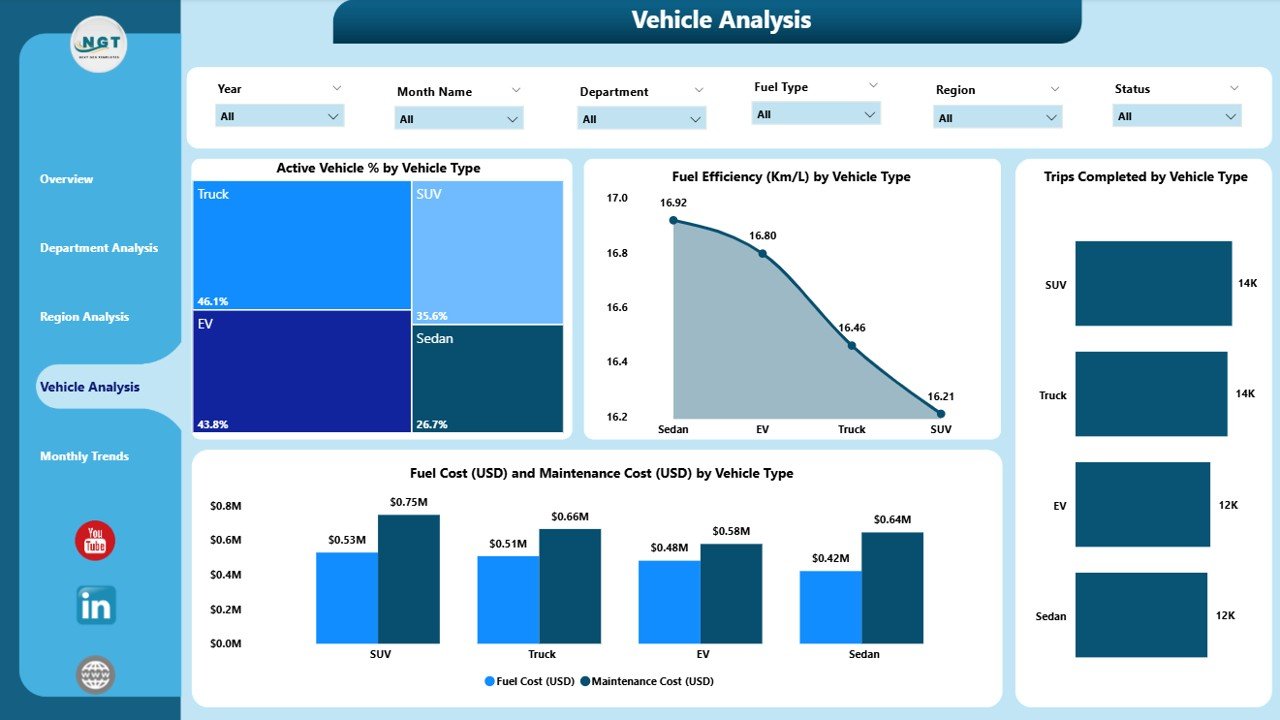
🚗 Vehicle Analysis Page – Evaluate Asset Utilization
Dive into performance by vehicle category:
Active Vehicle % by Vehicle Type
Fuel Efficiency (Km/L) by Vehicle Type
Trips Completed by Vehicle Type
Fuel & Maintenance Cost (USD) by Vehicle Type
Quickly identify underperforming vehicles and optimize fleet renewal or rotation plans.
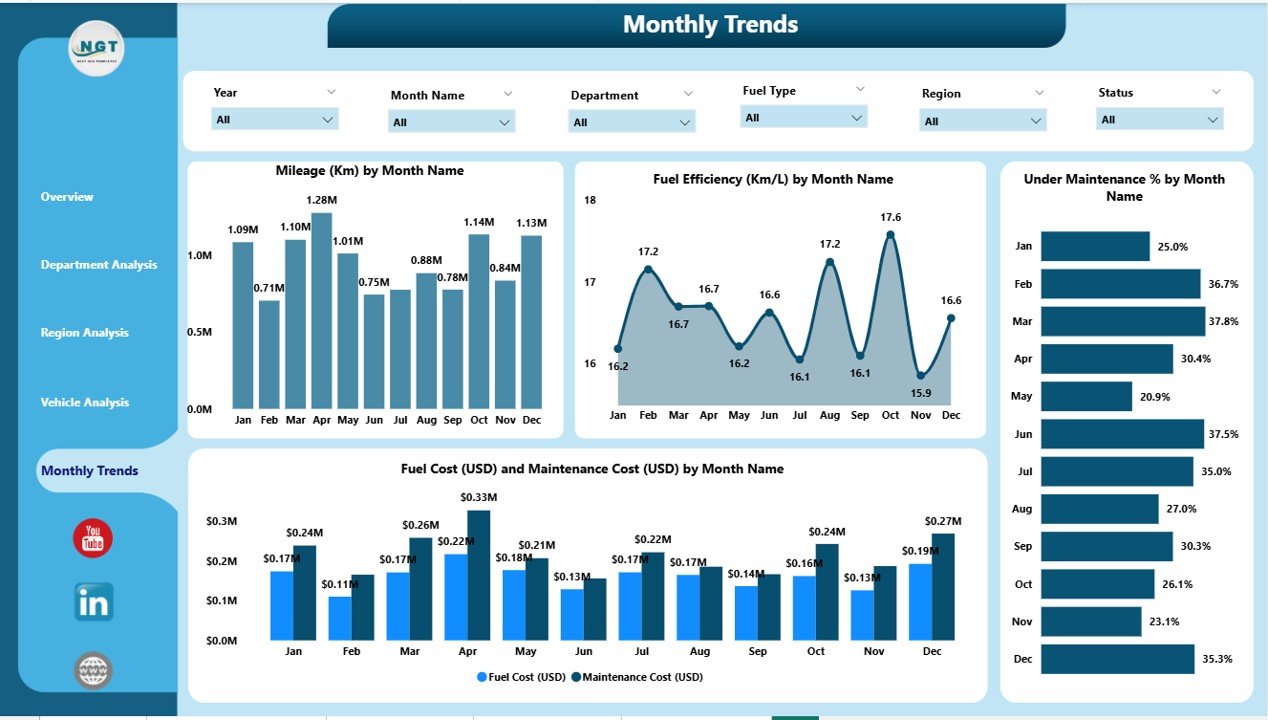
📅 Monthly Trends Page – Monitor Performance Over Time
Discover patterns, seasonality, and cost fluctuations:
Mileage (Km) by Month
Fuel Efficiency (Km/L) by Month
Under Maintenance % by Month
Fuel & Maintenance Cost (USD) by Month
Ideal for monthly reviews and forecasting sessions.
📊 What’s Inside the Automotive Dashboard in Power BI
1️⃣ Overview Page: A real-time snapshot of KPIs and costs.
2️⃣ Department Analysis Page: Budget and performance insights by department.
3️⃣ Region Analysis Page: Compare metrics across geographies.
4️⃣ Vehicle Analysis Page: Assess utilization and cost per vehicle type.
5️⃣ Monthly Trends Page: Visualize long-term trends for smarter forecasting.
Each page uses slicers, DAX formulas, and modern visuals—ensuring accuracy and interactivity.
🧭 How to Use the Automotive Dashboard in Power BI
✅ Step 1: Connect your Excel or SQL data source (mileage, fuel, maintenance, etc.).
✅ Step 2: Open the .pbix file in Power BI Desktop.
✅ Step 3: Refresh your data to see updated results instantly.
✅ Step 4: Use slicers to filter by Department, Region, or Vehicle Type.
✅ Step 5: Analyze visuals, KPIs, and trends to make data-backed decisions.
In minutes, you’ll have a live, interactive performance dashboard ready to present to management.
👥 Who Can Benefit from This Dashboard
🚛 Fleet Managers: Monitor vehicle usage, downtime, and fuel consumption.
🏭 Logistics Companies: Track operational costs and optimize routes.
🏢 Corporate Travel Teams: Manage internal fleet performance.
🏗️ Automotive Manufacturers: Analyze model-level performance and maintenance costs.
🏢 Government Transport Departments: Ensure compliance and budget control.
🌟 Advantages of the Automotive Dashboard in Power BI
✅ Centralized Vehicle Data: Bring all performance metrics into one dashboard.
✅ Real-Time Visibility: Track costs and performance as data updates automatically.
✅ Predictive Maintenance: Use trends to prevent breakdowns before they occur.
✅ Enhanced Cost Control: Identify high-cost regions or vehicles and act fast.
✅ Operational Transparency: Compare departments and regions with complete accountability.
✅ Scalable Design: Handle small or large fleets effortlessly.
✅ Automation: Schedule refreshes to eliminate manual reporting.
🔗 Click here to read the Detailed Blog Post
🎥 Visit our YouTube channel for step-by-step tutorials
🔗 YouTube.com/@PKAnExcelExpert
Watch the step-by-step video tutorial:
Compatibility and Requirements
- Open the .pbix file in Power BI Desktop, which is free to download from Microsoft.
- Microsoft’s guide Get Power BI Desktop shows how to install it.
Frequently Asked Questions
Which pages are in the dashboard?
Five: Overview, Department Analysis, Region Analysis, Vehicle Analysis and Monthly Trends.
Which KPI cards are on the Overview page?
Total Active Vehicles, Total Mileage, Fuel Cost, Maintenance Cost and Operational Cost.
What can I filter by?
Slicers filter the data by department, region and vehicle type.
Which data sources can I connect?
Connect an Excel or SQL source with your mileage, fuel and maintenance data, then refresh the report.
Related Automotive and Fleet Templates
- Automotive Dashboard in Excel: the same dashboard in Excel
- Automotive Dashboard in Google Sheets: the automotive dashboard in Google Sheets
- Automotive Report in Excel: a printable automotive report in Excel
- Fleet Management Dashboard in Power BI: a fleet management dashboard in Power BI
- Logistics and Transportation Hub: logistics and transport templates in one bundle
Browse all Power BI dashboards or the Power BI KPI dashboards.






Reviews
There are no reviews yet.