

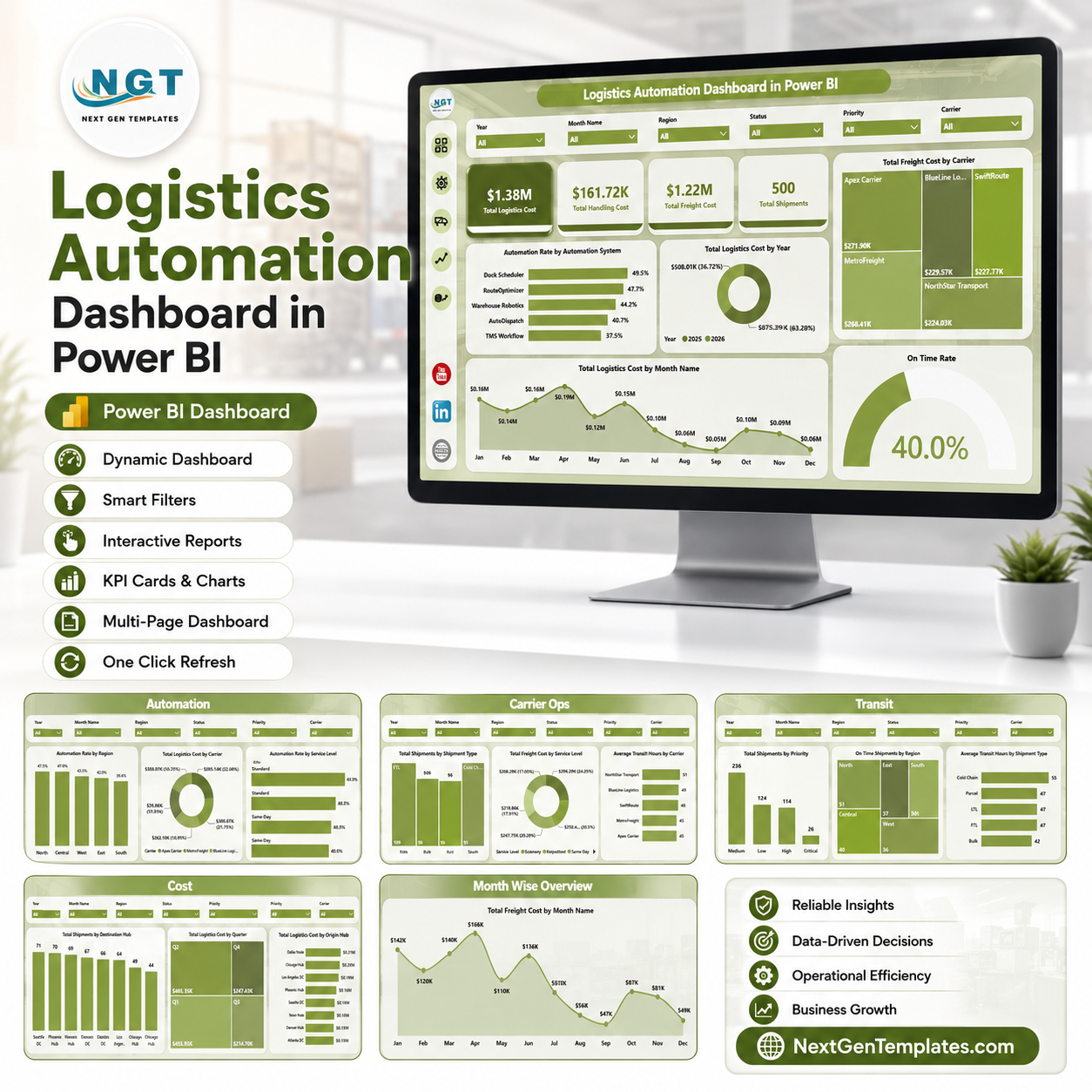
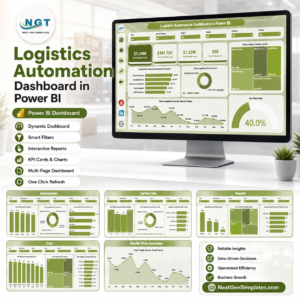
Logistics Automation Dashboard in Power BI gives logistics, carrier operations, warehouse, transportation, and supply chain teams a ready PBIX report with 5 Power BI pages, 5 high-level KPI cards, 20 analysis visuals, and interactive slicers. Instead of rebuilding shipment, freight, handling, automation, and transit reports manually, you can open the file in Power BI Desktop, connect or replace your data, and refresh the model. Built by PK and trusted by 300K+ learners across YouTube channels, this one-time dashboard template helps teams review logistics automation performance without starting from a blank report.
Key Features of Logistics Automation Dashboard in Power BI
- 5 Power BI report pages: Overview, Automation, Carrier Ops, Transit, and Cost.
- Executive KPI cards: Total Logistics Cost, Total Handling Cost, Total Freight Cost, Total Shipments, and On Time Rate.
- Automation performance views: Review automation rate by automation system, region, and service level.
- Carrier cost analysis: Compare freight cost by carrier and service level to understand cost concentration.
- Transit reliability tracking: Analyze on-time shipments by region, shipment type, priority, and shipment volume.
- Cost review pages: Track logistics cost by month, quarter, year, origin hub, and destination hub.
- Interactive slicers: Filter the report by logistics dimensions and move quickly from overview to detailed analysis.
- Editable PBIX file: Customize visuals, fields, measures, labels, colors, pages, and model logic in Power BI Desktop.
What’s Inside the Logistics Automation Dashboard in Power BI
1 – Overview Page
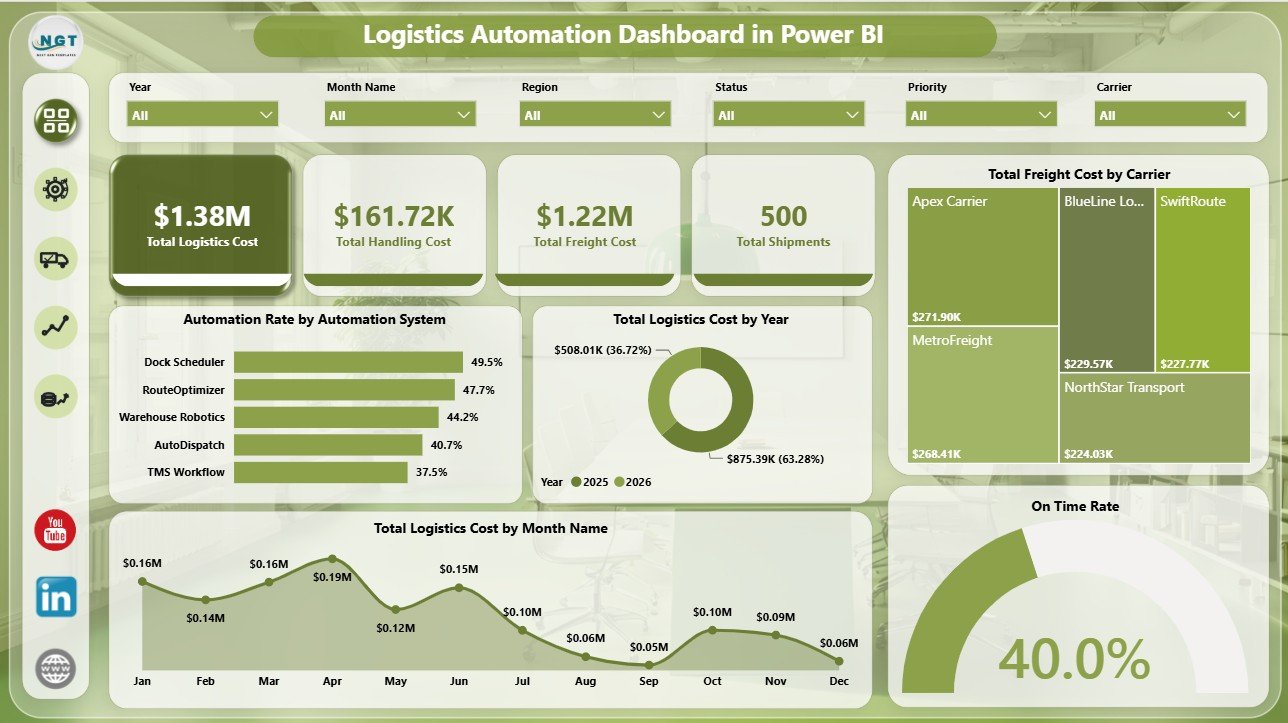
The Overview Page gives decision makers a fast view of logistics cost, shipment volume, and service reliability. The cards show Total Logistics Cost, Total Handling Cost, Total Freight Cost, Total Shipments, and On Time Rate, so teams can understand the operating picture before drilling into the charts.
Automation Rate by Automation System: This chart compares automation adoption across different systems. It helps teams see which tools are supporting automated logistics workflows and where manual effort may still be high.
Total Logistics Cost by Year: This annual view shows how logistics spend changes over time. It supports budget reviews, long-term cost planning, and year-over-year performance checks.
Total Freight Cost by Carrier: This carrier view shows where freight spend is concentrated. It helps logistics and procurement teams identify carriers that may need performance review or rate negotiation.
Total Logistics Cost by Month Name: This monthly trend makes seasonal cost pressure easier to spot. It helps managers compare month-to-month movement after route, carrier, or automation changes.
On Time Rate by Total Shipments: This visual connects service reliability with shipment volume. It helps teams understand whether higher shipment counts are affecting on-time performance.
Logistics Automation Dashboard in Power BI
2 – Automation
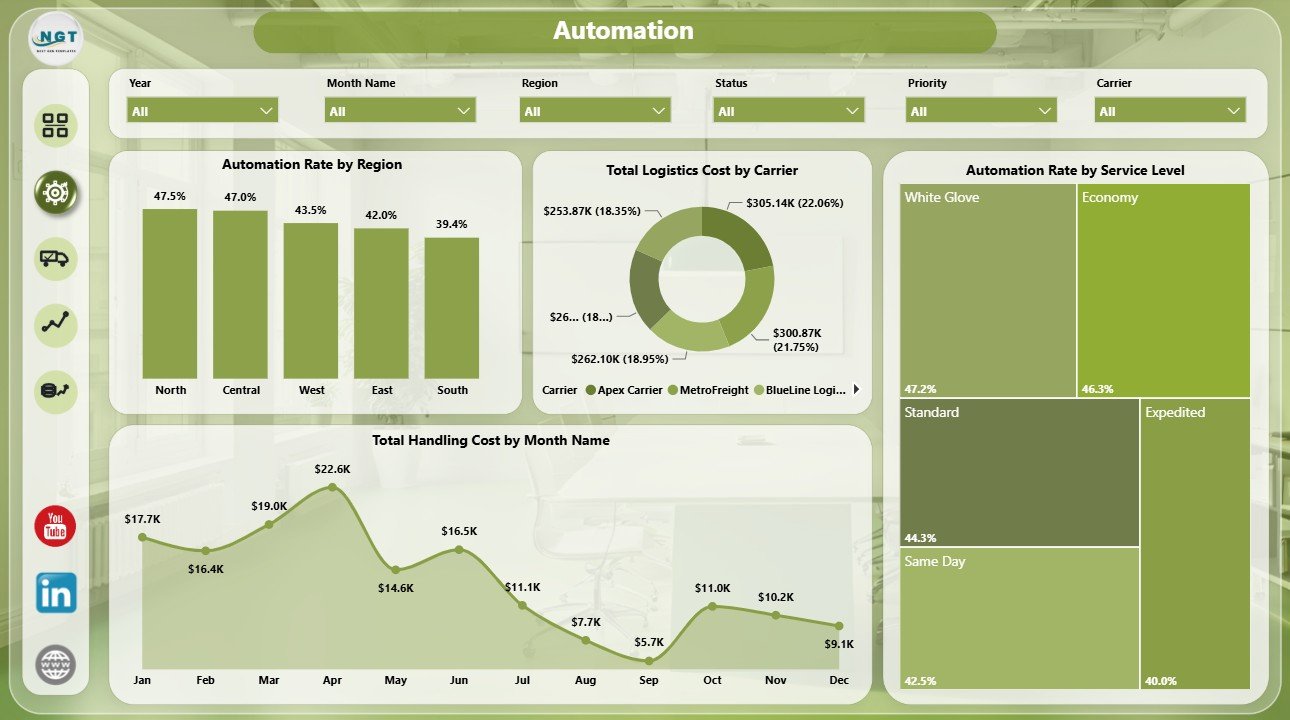
The Automation page focuses on automation adoption, service-level automation, handling cost, and carrier cost. It is useful for teams reviewing whether automation systems are reducing manual workload and helping logistics costs stay controlled.
Automation Rate by Region: This chart compares automation performance across regions. It highlights locations where automation adoption is strong and regions that may need process improvement.
Total Logistics Cost by Carrier: This view compares logistics cost by carrier. It helps teams connect carrier usage with total cost impact.
Automation Rate by Service Level: This chart shows automation by service tier. It helps managers see whether priority, express, standard, or scheduled shipments are being processed consistently.
Total Handling Cost by Month Name: This monthly view tracks handling cost movement over time. It helps teams check whether automation is reducing or stabilizing handling expense.
Automation
3 – Carrier Ops
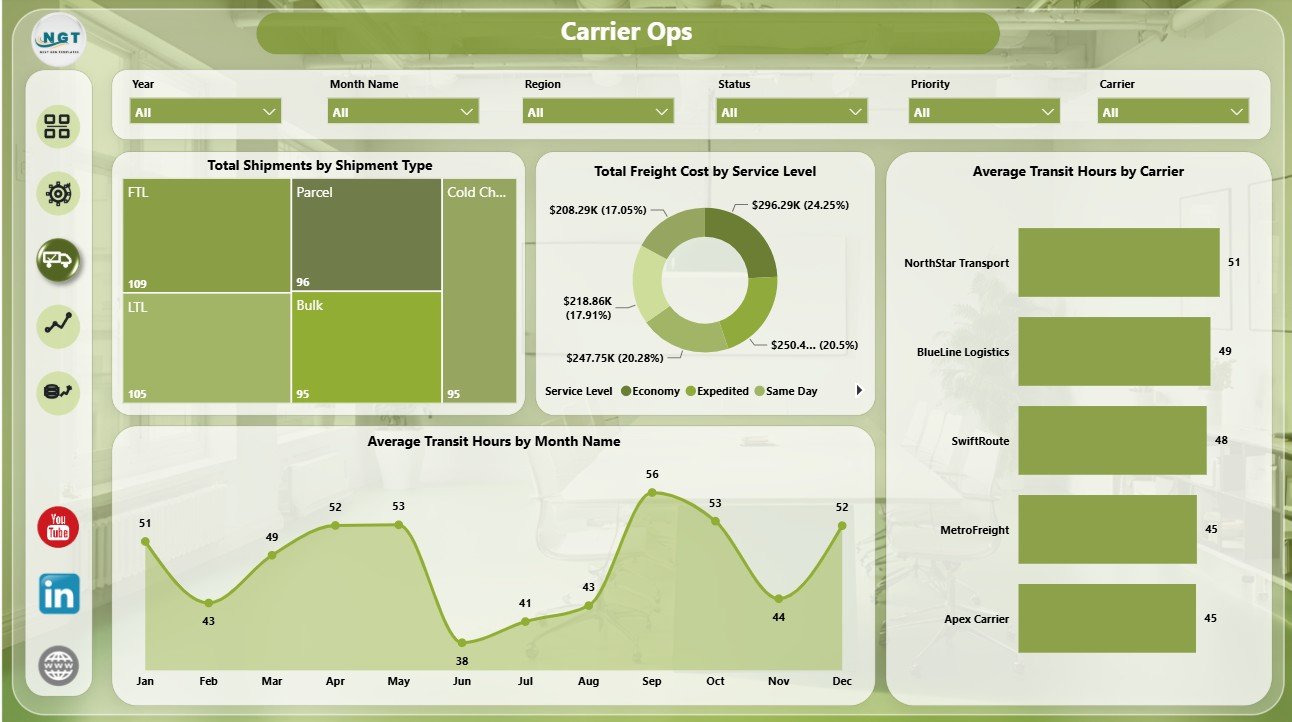
The Carrier Ops page supports carrier, service-level, shipment type, and transit-time review. It gives operations leaders a focused way to compare freight cost and transit speed across the carrier network.
Total Shipments by Shipment Type: This chart shows shipment volume by type. It helps teams understand the mix of parcel, pallet, container, bulk, or other shipment categories.
Total Freight Cost by Service Level: This visual compares freight cost across service tiers. It helps managers understand how premium or urgent service levels affect total freight spend.
Average Transit Hours by Carrier: This chart compares carrier speed. It helps teams identify faster carriers and carriers that may require review.
Average Transit Hours by Month Name: This trend shows monthly transit-time movement. It helps teams see whether service speed is improving, stable, or worsening over time.
Carrier Ops
4 – Transit
The Transit page is built for shipment reliability and regional service review. It helps teams connect on-time shipments, priority mix, shipment type, transit hours, and regional freight cost.
Total Shipments by Priority: This chart shows workload by priority level. It helps teams understand how urgent and standard shipments are distributed.
On Time Shipments by Region: This view compares on-time output by region. It helps managers identify locations where service reliability is strongest or weakest.
Average Transit Hours by Shipment Type: This chart compares transit time across shipment categories. It helps teams see which shipment types take longer and where process changes may help.
Total Freight Cost by Region: This visual compares regional freight cost. It helps managers connect cost pressure with service geography.
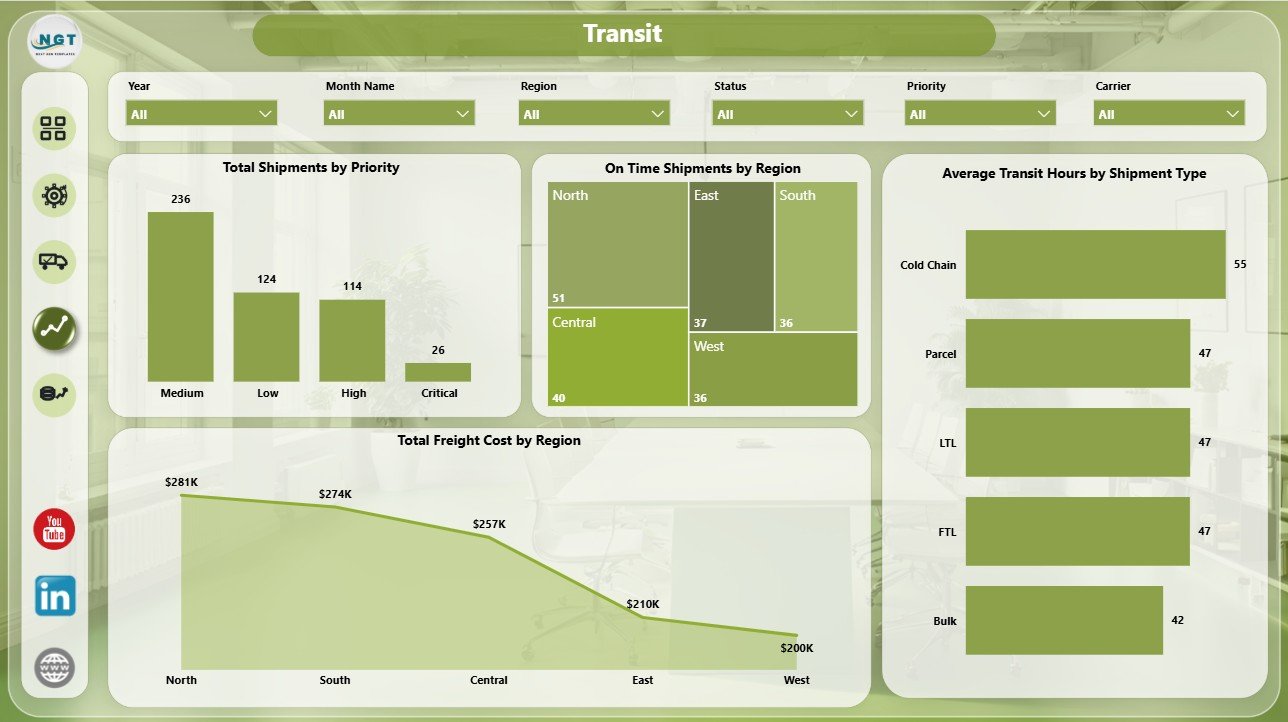
Transit
5 – Cost
The Cost page gives finance, logistics, and supply chain teams a deeper view of logistics cost by hub and time period. It is useful for monthly reviews, quarterly planning, hub comparison, and freight cost control.
Total Shipments by Destination Hub: This chart shows where shipment volume is landing. It helps teams identify high-volume destination hubs and demand patterns.
Total Logistics Cost by Quarter: This quarterly trend supports budget and management reviews. It helps leaders see whether costs are increasing or decreasing across quarters.
Total Logistics Cost by Origin Hub: This chart compares logistics cost by origin hub. It helps teams identify expensive hubs and investigate operational drivers.
Total Freight Cost by Month Name: This monthly freight trend supports cost tracking and carrier spend review. It helps teams understand whether freight expense is seasonal or steadily changing.
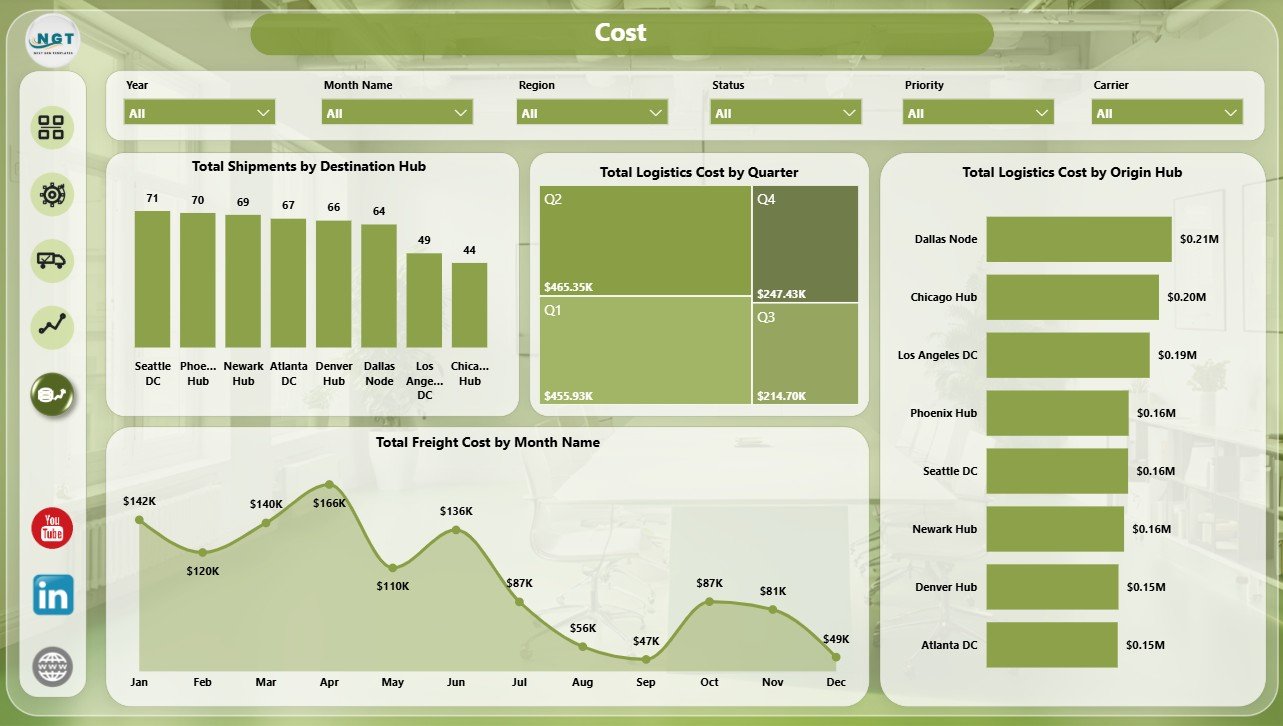
Cost
Logistics Automation Dashboard in Power BI vs. Tableau vs. Paid Logistics SaaS – Where This Fits
| Feature | This Power BI dashboard | Tableau or Qlik alternative | Paid logistics SaaS |
|---|---|---|---|
| Cost | $17.99 one-time | License plus build time | Monthly or annual subscription |
| Platform | Power BI Desktop / Power BI Service | Tableau, Qlik, or another BI tool | Vendor-hosted system |
| Setup time | Open PBIX, connect or replace data, refresh | Build or adapt dashboards | Implementation and onboarding |
| Real-time team collaboration | Available through Power BI Service when published | Available with cloud plans | Usually included |
| Mobile access | Power BI mobile after publishing | Plan dependent | Usually included |
| Customizable fields | Editable model, visuals, pages, and slicers | Editable with BI skills | Depends on vendor permissions |
| Share with link | Available through Power BI Service | Available with cloud publishing | Login controlled |
| Year-1 cost at 5 users | $17.99 plus any Microsoft licensing | License and implementation dependent | Often hundreds or thousands |
| Logistics automation analytics | 5 ready-made pages for cost, automation, carrier ops, transit, and hubs | Must be built or purchased | Depends on module and plan |
Who This Template Is For – and Who It’s Not For
This template is for logistics managers, supply chain analysts, transportation teams, carrier operations teams, 3PL reporting teams, warehouse leaders, and consultants who need repeatable Power BI reporting for logistics cost, handling cost, freight cost, shipments, automation rate, on-time rate, transit hours, carriers, hubs, regions, service levels, and priority.
It is not a live transport management system, route optimizer, dispatch platform, GPS tracker, barcode scanning app, carrier API integration, or warehouse execution system. Use it as a reporting layer after your logistics data is available in a structured format.
How to Use the Logistics Automation Dashboard in Power BI
- Download and unzip the template package.
- Open the PBIX file in Power BI Desktop.
- Review the sample fields, visuals, slicers, and report pages.
- Replace the sample data or connect the model to your own logistics source.
- Refresh the report and validate cards, totals, rates, and charts.
- Use slicers to filter by carrier, region, service level, month, year, shipment type, priority, origin hub, destination hub, or automation system.
Real-World Use Cases
Ravi, logistics operations manager: Ravi reviews Total Logistics Cost, Total Freight Cost, Total Shipments, and On Time Rate before weekly carrier meetings.
Meera, supply chain analyst: Meera uses the Automation and Cost pages to compare automation rate by region, handling cost by month, logistics cost by quarter, and origin hub spend.
Daniel, 3PL reporting consultant: Daniel adapts the PBIX file for client reporting and uses carrier, service-level, transit, and hub visuals to explain operational performance.
Frequently Asked Questions
What software do I need?
You need Power BI Desktop to open and edit the PBIX file. You can publish to Power BI Service if your Microsoft account and licensing allow it.
How many pages are included?
The report includes 5 pages: Overview, Automation, Carrier Ops, Transit, and Cost.
Can I connect my own logistics data?
Yes. You can replace the sample data or connect the PBIX file to your own source, then refresh the report.
Can I customize the report?
Yes. You can edit visuals, slicers, pages, measures, labels, fields, colors, and the data model in Power BI Desktop.
Does this replace logistics software?
No. It is a reporting dashboard template, not a live dispatch, routing, tracking, or transport management system.
Can I use it for carrier review meetings?
Yes. The Carrier Ops and Transit pages are useful for reviewing freight cost, service level, transit hours, shipment type, and regional reliability.
About the Author
Built by PK – Microsoft Certified Professional with 15+ years of Excel, Google Sheets, and Power BI experience. Founder of NextGenTemplates, reaching 300K+ subscribers across YouTube channels. Every template is hand-built and tested before release.
Explore Related Templates
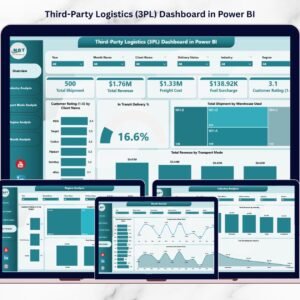
Explore more Power BI dashboard templates. Related options include Logistics Automation Dashboard in Excel, Last-mile Delivery Dashboard in Power BI, Third-Party Logistics (3PL) Dashboard in Power BI, and Trucking and Logistics Dashboard in Power BI.
Ready to analyze logistics automation in Power BI? Download the Logistics Automation Dashboard in Power BI, connect your logistics data, refresh the report, and start reviewing automation, cost, carrier, transit, and hub performance today.
Last updated: July 4, 2026

















Reviews
There are no reviews yet.