



In today’s digital-first business environment, tracking and optimizing advertising campaigns is essential for maximizing ROI and ensuring budget efficiency. Marketers often struggle with fragmented data across platforms like Google Ads, Facebook, LinkedIn, and YouTube, making it hard to get a clear picture of performance. That’s why we created the Digital Advertising KPI Dashboard in Google Sheets—a ready-to-use, interactive tool that consolidates all your KPIs in one place for effortless monitoring and analysis.
This dashboard is designed for digital marketers, advertising agencies, business owners, and analysts who want a reliable, cost-effective solution to measure campaign performance without investing in expensive software. With real-time updates, trend analysis, and conditional formatting, it allows you to see where your ads are performing well and where improvements are needed.
🔑 Key Features of Digital Advertising KPI Dashboard
📊 Dashboard Sheet Tab
Select any month from a dropdown menu (cell D3), and the entire dashboard updates automatically.
View Month-to-Date (MTD) and Year-to-Date (YTD) performance with comparisons against Targets and Previous Year (PY) values.
Conditional formatting (up/down arrows) highlights whether KPIs are improving or underperforming.
Clear visual indicators make campaign performance easy to understand at a glance.
📈 KPI Trend Sheet Tab
Choose a KPI from a dropdown (cell C3) for a deep dive.
See its Group, Unit, Type (Lower the Better / Upper the Better), Formula, and Definition.
Track trends over time to spot patterns and optimize campaigns strategically.
📑 Actual Number Sheet Tab
Input actual monthly and yearly results.
Auto-calculations ensure the dashboard and charts always reflect the most recent performance.
Centralized data entry reduces errors and increases reliability.
🎯 Target Sheet Tab
Define MTD and YTD targets for each KPI.
Benchmark performance to see if campaigns are meeting business objectives.
📊 Previous Year Number Sheet Tab
Store historical campaign results for better comparison.
Track year-over-year growth and efficiency.
📋 KPI Definition Sheet Tab
Keep a master list of all KPIs with Names, Groups, Units, Formulas, and Definitions.
Mark each KPI as UTB (Upper the Better) or LTB (Lower the Better) for accurate performance evaluation.
📦 What’s Inside the Dashboard
✅ 6 Structured Tabs – Dashboard, KPI Trend, Actual Numbers, Target, Previous Year, KPI Definition
✅ Real-Time Insights – Instantly see campaign performance with dynamic updates
✅ Conditional Formatting – Visual indicators for quick decision-making
✅ Targets vs Actuals – Clear gap analysis for MTD and YTD metrics
✅ Year-over-Year Comparisons – Identify growth or decline across campaigns
👥 Who Can Benefit from This Dashboard?
📌 Digital Marketers – Monitor campaign performance across platforms
📌 Ad Agencies – Provide transparent KPI reporting to clients
📌 Business Owners – Track advertising ROI without expensive tools
📌 Marketing Analysts – Analyze trends and optimize future campaigns
📋 Best Practices for Using the Dashboard
🔄 Update Data Regularly – Enter monthly actuals for accurate MTD/YTD tracking
🎯 Set Realistic Targets – Align KPI goals with your budget and business objectives
📊 Monitor Trends – Use the KPI Trend tab to identify recurring performance issues
🚀 Prioritize High-Impact KPIs – Focus on metrics like CTR, Conversion Rate, and Cost per Acquisition
🤝 Share Insights – Present dashboard visuals in team meetings or client reports for transparency
✅ Advantages of Digital Advertising KPI Dashboard
Comprehensive Overview – All key KPIs in one place
Platform-Agnostic – Works with Google Ads, Facebook, LinkedIn, YouTube, and more
Clear Visual Indicators – Quickly see what’s working and what needs improvement
Scalable – Suitable for small businesses to large agencies
Cost-Effective – Built in Google Sheets with no software fees
🔗 Click here to read the Detailed blog post
Watch the step-by-step video Demo:
🔗 Visit our YouTube channel to learn step-by-step video tutorials
Compatibility and Requirements
- Works in Google Sheets. You need a free Google account and a web browser.
- You pick the month and the KPI from dropdowns on the Dashboard and KPI Trend sheets. Google explains dropdowns in Create an in-cell dropdown list.
Frequently Asked Questions
Which sheets are included?
Six sheets: Dashboard, KPI Trend, Actual Numbers, Target, Previous Year Number and KPI Definition.
How do I update the dashboard?
Enter your actual monthly and yearly results in the Actual Numbers sheet and your MTD and YTD goals in the Target sheet. Then select a month in cell D3 of the Dashboard sheet and everything updates.
Can I compare this year with last year?
Yes. Store last year’s results in the Previous Year Number sheet and the Dashboard shows them next to your actuals and targets. Up and down arrows from conditional formatting show whether each KPI is improving.
How do I look at one KPI in detail?
Open the KPI Trend sheet and choose the KPI from the dropdown in cell C3. It shows the group, unit, type (Lower the Better or Upper the Better), formula and definition.
Does it work with data from Google Ads, Facebook, LinkedIn and YouTube?
Yes. The dashboard does not depend on one ad platform. You type in the results from whichever platforms you run campaigns on.
Is there an Excel or Power BI version?
Yes. See the Digital Advertising KPI Dashboard in Excel and the Digital Advertising KPI Dashboard in Power BI.
Related Digital Advertising and Marketing Templates
- Digital Advertising KPI Dashboard in Excel: the same advertising KPIs in Excel
- Digital Advertising KPI Dashboard in Power BI: the Power BI edition
- Digital Advertising Calendar in Google Sheets: plan your ad activity by date
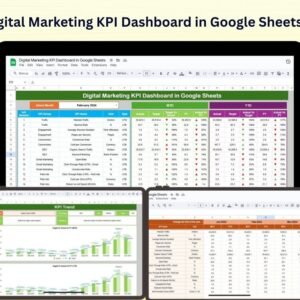
- Digital Marketing KPI Dashboard in Google Sheets: a wider marketing KPI view
- Marketing and Social Media Analytics Kit: 7 marketing templates in one download
Browse all Google Sheets KPI dashboards.





Reviews
There are no reviews yet.