



Effectively managing contracts is no longer a luxury—it’s a necessity. Whether you’re running a small business, part of a legal or procurement team, or managing vendor relationships, you know how critical it is to keep every contract detail organized. Introducing the Contract Management Tracker in Google Sheets—your all-in-one solution to stay on top of deadlines, approvals, and renewals without the hassle of expensive software. 💼📊Contract Management Tracker
✨ Key Features of Contract Management Tracker in Google Sheets
This dynamic and professional template brings simplicity and automation together in one sleek sheet:
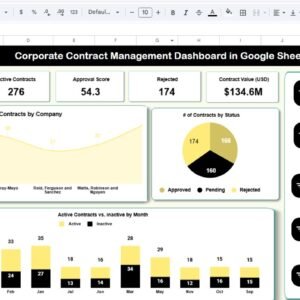
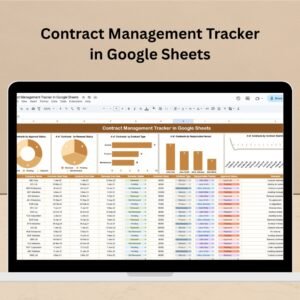
✅ One Unified Dashboard: Manage all contracts from a single sheet that combines both data input and visual summaries.
📈 Auto-Generated Charts: Get real-time insights with charts showing contract counts by status, type, start date, responsible person, and more.
🔄 Live Updates: Any data entry instantly refreshes your dashboard for the latest overview.
🛡️ Approval & Renewal Tracking: Track who has approved what, when a contract is due for renewal, and what’s pending—all in one place.
📝 Flexible Data Fields: Includes Company Name, Start & End Dates, Contract Type, Value, Responsible Person, and more.
📂 What’s Inside the Contract Management Tracker?
Inside this Google Sheet, you’ll find a powerful yet simple structure:
🔧 Tracker Sheet Tab (Only One Tab – No Confusion!)
Data Table: Enter all contract details including ID, contract party, start date, end date, renewal date, value, type, and more.
Charts Included:
Contracts by Approval Status
Contracts by Renewal Status
Contracts by Contract Type
Contracts by Responsible Person
Contracts by Start Date
Every chart updates in real-time as soon as data is changed—no manual intervention needed.
📌 How to Use the Contract Management Tracker
Getting started is quick and easy:
Make a Copy of the sheet into your Google Drive.
Start entering data for your existing contracts into the data section.
The charts will auto-update, giving you real-time insight into contract statuses.
Share with your team to allow collaborative tracking with controlled access.
Optional Add-ons: Use Google Apps Script to automate email alerts or reminders before renewals.
No complex setup. No coding. Just clarity and efficiency. 🙌
👥 Who Can Benefit from This Tracker?
This tool is a must-have for:
Business Owners & Entrepreneurs looking to stay on top of agreements 📃
Procurement and Legal Teams managing high volumes of contracts 🧾
HR & Admin Staff handling employment contracts and NDAs 💼
Freelancers & Agencies dealing with multiple client agreements 💬
Finance Departments tracking contractual liabilities and values 💸
Anyone who handles contracts regularly will save hours of time, reduce errors, and improve compliance using this sheet.
✅ Click here to read the Detailed blog post
Watch the step-by-step video Demo:
📺 Visit our YouTube channel to learn step-by-step video tutorials
Youtube.com/@NeotechNavigators
Compatibility and Requirements
- Works in Google Sheets with a free Google account and a web browser.
- Make a copy of the sheet into your own Google Drive before you start.
- Google explains how charts work in Sheets in Add & edit a chart or graph.
Frequently Asked Questions
How many tabs does the Contract Management Tracker have?
One. The data table and all the charts sit on a single tracker sheet.
What contract details can I record?
You can enter the contract ID, contract party, company name, start date, end date, renewal date, value, contract type and responsible person.
Which charts are included?
Charts show contracts by approval status, renewal status, contract type, responsible person and start date. They update as soon as the data changes.
Can it send renewal reminders?
Not on its own. The template suggests adding Google Apps Script yourself if you want email alerts before renewals.
Related Contract Management Templates
- Contract Management Tracker in Excel: the same tracker for Excel users
- Contract Management Dashboard in Excel: a fuller dashboard for contract analysis
- Contract Management Dashboard in Power BI: contract reporting in Power BI
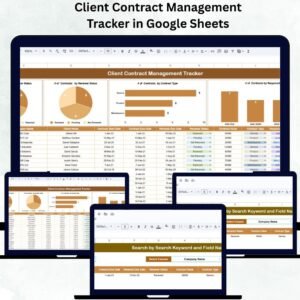
- Client Contract Management Tracker in Google Sheets: focused on client agreements
- Vendor Contract Renewal Calendar in Google Sheets: plan renewal dates on a calendar
Browse all Google Sheets trackers or the Google Sheets dashboards.

Reviews
There are no reviews yet.