



Creating a professional client proposal takes more than just a compelling pitch. It requires accuracy, organization, and attention to every detail—because even a small oversight can cost you the deal. That’s where the Client Proposal Documentation Checklist in Excel becomes your secret weapon.
This ready-to-use Excel template helps you stay on top of every requirement when preparing client proposals, ensuring your team never forgets a critical document, deadline, or task. Whether you’re in sales, marketing, consulting, or freelancing, this tool keeps your workflow streamlined and efficient.
🧩 What’s Included in the Template?
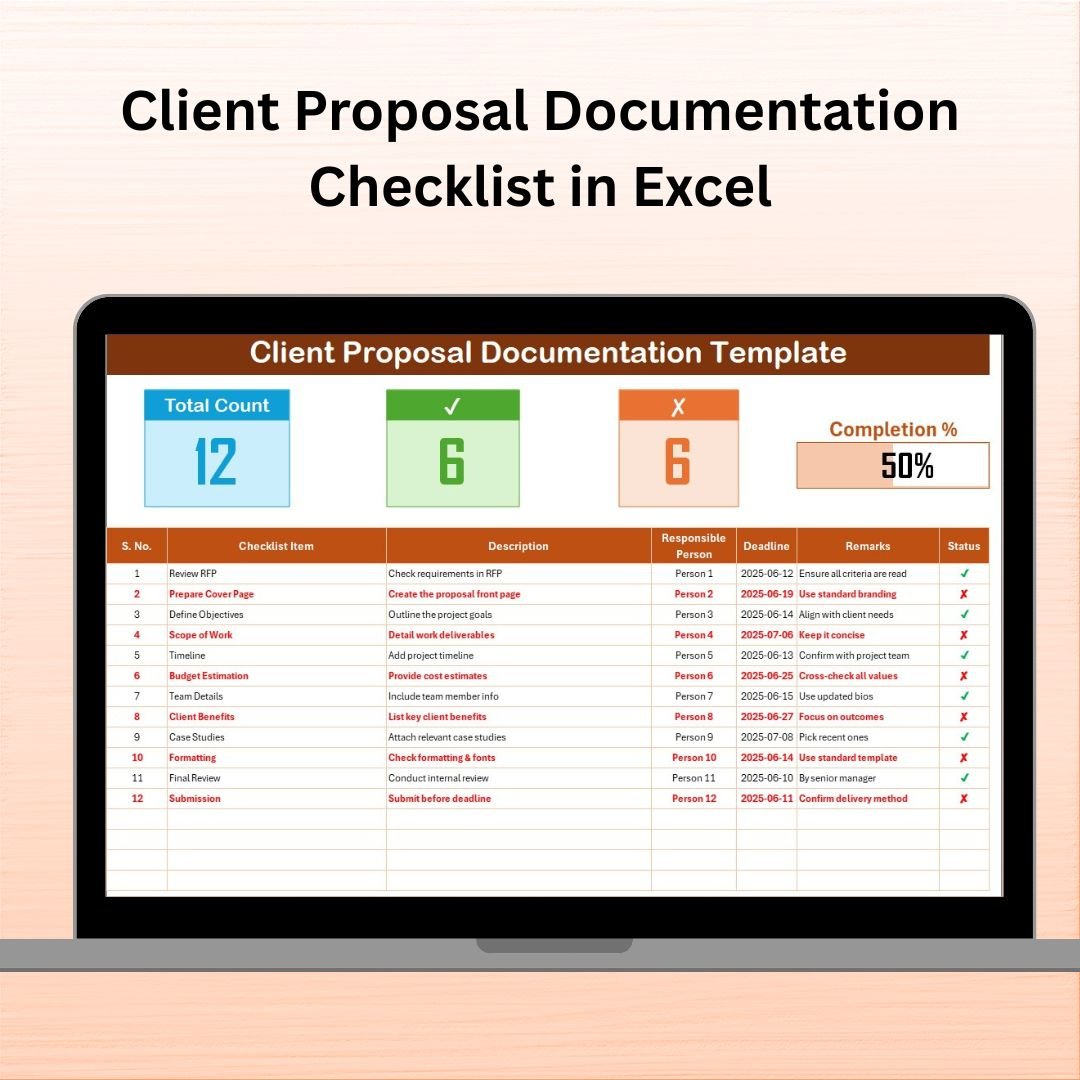
The checklist consists of 2 intelligent sheets designed to organize and track your entire proposal preparation process:
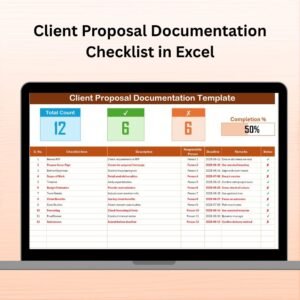
1️⃣ Client Proposal Documentation Checklist Sheet

This is the main working area where you:
Enter and manage checklist items
Assign responsibilities using drop-down menus
Track deadlines, remarks, and status
Top Section Overview:
Total Count – Total checklist items
Checked Count – Items marked ✔ as completed
Crossed Count – Items marked ✘ as not required or skipped
Progress Bar – Visual percentage tracker based on completion
2️⃣ List Sheet Tab
Used for data validation, this tab:
Stores a clean list of responsible persons
Powers the dropdowns in the checklist sheet
Ensures consistency and reduces typing errors
✅ Key Features
🔄 Live Progress Tracking – Automatic counts and a progress bar update as tasks are checked off
📌 Drop-down Menus – Assign tasks to team members without manual entry
✔️ Status Marking – Mark tasks as completed (✔) or not applicable (✘)
📊 Visual Dashboard – Get an instant view of project progress
🛠️ Fully Customizable – Add/remove checklist items, assign new people, change deadlines
🧑🤝🧑 Team Accountability – Everyone knows who’s responsible for what
📁 Single Source of Truth – All proposal tasks in one place
✨ Why Use a Proposal Checklist?
If you’ve ever forgotten to attach a key document or missed a deadline, you understand the importance of a checklist. This Excel-based solution helps you:
Stay organized and reduce oversight
Ensure task ownership is clear
Save time by automating repetitive tracking
Present your proposals professionally and completely
🚀 How to Use It
Step 1: Open the Excel file
Step 2: Enter checklist items with deadlines and responsible persons
Step 3: Use ✔ for completed and ✘ for skipped tasks
Step 4: Monitor progress bar and counts in real time
Step 5: Archive completed checklists for future reference
👥 Who Can Use This Template?
🧑💼 Sales Professionals – For product or service proposals
📈 Marketing Teams – For campaign or pitch proposals
💼 Consultants & Freelancers – For scope of work proposals
📊 Business Development Teams – To maintain consistency
🧑🏫 Agencies – To create professional, standardized documents
🛠️ Pro Tips for Maximizing Efficiency
🔹 Use color coding (✔ = Green, ✘ = Red, Pending = Yellow)
🔹 Highlight overdue tasks with conditional formatting
🔹 Lock columns or rows to prevent accidental edits
🔹 Backup weekly for multiple proposals
🔹 Use with Google Calendar or Teams for automated reminders
📦 Bonus Customization Options
You can easily add extra fields to suit your needs:
Proposal Type (New/Retainer)
Priority Level
Approval Needed (Yes/No)
Submission Method (Email/Portal)
📎 Tools, You Can Combine It With
🗂️ Google Drive / OneDrive – Store final proposal files
📅 Google Calendar – Set alerts for deadlines
💬 Slack or Teams – Collaborate in real time
🖊️ DocuSign – Add digital signature tracking
📺 Learn More: YouTube Channel – Watch step-by-step tutorials
🔗 Click here to read the Detailed blog post
Watch the step-by-step video tutorial:
Compatibility and Requirements
- Works in Microsoft Excel desktop (Excel 2016 or later, or Microsoft 365).
- The responsible-person dropdowns are built with data validation. Microsoft explains the feature in Create a drop-down list.
Frequently Asked Questions
How many sheets does the checklist have?
Two sheets: the Client Proposal Documentation Checklist sheet, where you manage the items, and a List sheet that stores the names used in the dropdowns.
How do I assign a task to someone?
Add the person’s name to the List sheet. Then pick the name from the responsible-person dropdown on the checklist row.
How is progress calculated?
The top of the checklist shows Total Count, Checked Count and Crossed Count. The progress bar updates as you mark items with a tick (completed) or a cross (not required or skipped).
Can I add my own checklist items or fields?
Yes. You can add or remove items, change deadlines and add people. You can also add columns such as proposal type, priority level, approval needed or submission method.
Is there a version for reviewing a proposal before it goes out?
Yes. See the Client Proposal Review Checklist in Excel.
Related Client Proposal Templates
- Client Proposal Review Checklist in Excel: a checklist for reviewing a proposal before it is sent
- Client Proposal Checklist Template in Excel: another checklist layout for proposal tasks
- Client Proposal Tracking Checklist in Excel: follow proposals as they move along
- Client Follow-Up Checklist in Google Sheets: follow-up tasks in Google Sheets
- Checklist & SOP Pack: 12 checklist templates in Excel and Google Sheets
Browse all Excel checklist templates.
























Reviews
There are no reviews yet.