



Managing AI-related procurement, IT rollouts, and vendor timelines doesn’t have to be chaotic. The Technology Procurement AI Implementation Calendar in Excel is a ready-to-use, interactive calendar system that helps you plan, track, and execute every milestone of your AI implementation journey—all from the comfort of Excel.
Whether you’re coordinating with vendors, setting internal deadlines, or managing procurement schedules, this tool gives you a centralized view of activities and ensures your team stays aligned and on time.
🧩 What’s Inside the Excel Calendar Tool?
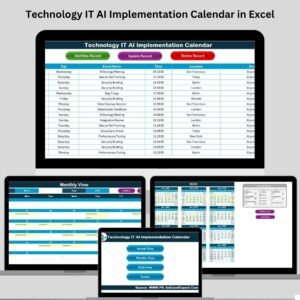
This dynamic Excel-based system includes five powerful worksheet tabs, all connected and automated to support smooth tracking:
🏠 Home Sheet Tab

Acts as your navigation dashboard with clickable buttons for:
Annual View
Monthly View
Daily View
Events Sheet
📆 Annual View
Plan your entire year with a single glance. Includes:
Year selector
Month and week start customization
5 pre-set calendar color themes
Highlight weekends or important dates
Add/View events using easy-to-use forms
🗓 Monthly View
Focus on specific months and visualize daily events.
Add new event via form
Display one event per day (alerts if more exist)
View all events for a date with a click
📅 Daily View
Zoom into day-level event details:
Select any date range
Click Refresh to update list
Manage your calendar like a digital planner
📋 Events Sheet (Master Database)
The beating heart of the calendar.
Stores:
Auto-generated event ID
Date, time, event name
Location, short description
Buttons to Add, Update, and Delete events
🚀 Why This Excel Calendar Stands Out
📊 Macro to Micro Planning
Switch seamlessly between annual, monthly, and daily views without creating separate files.
🛠️ Automated Event Management
Add, edit, or delete events using intuitive forms—no complex formulas or scrolling needed.
🎨 Fully Customizable Themes
Match your brand or project category with built-in color themes. Great for stakeholder reporting.
🔁 Reusable & Scalable
Use the same file year after year. Excel handles thousands of events, making it perfect for large organizations.
💡 Built for Tech-Driven Teams
Ideal for procurement officers, IT managers, and digital project leads implementing AI solutions.
✅ Best Use Cases
AI Implementation Planning
Vendor Evaluation Meetings
Internal Deployment Scheduling
IT Procurement Rollout Calendar
Daily Operational Task Mapping
👥 Who Should Use This Tool?
Procurement Managers
IT and AI Project Leads
Technology Vendors
Startup CTOs
Digital Transformation Consultants
Corporate Strategy Planners
🌟 Real-World Scenario
Imagine launching AI-powered procurement automation software:
June 10 – Vendor demo
June 15 – Feasibility review
July 1 – Kick-off with internal team
July 15 – System test
August 5 – Final go-live
With this calendar, every detail is organized, visually tracked, and instantly accessible to your entire team.
📌 How to Use
Open the Excel file—no add-ins required
Navigate using the Home tab
Add new events using buttons
Filter and track using Annual, Monthly, or Daily views
Use the Events tab as your project’s master database
🎁 Bonus Advantages
✅ No coding required – Excel VBA is already built-in
✅ Customizable form fields
✅ Supports thousands of entries
✅ Built-in highlight controls
✅ Professional design for reports and team reviews
📺 Need Help?
Watch our step-by-step tutorial:
👉 youtube.com/@PKAnExcelExpert
Watch the step-by-step video tutorial:
Compatibility and Requirements
- Works in Microsoft Excel desktop (Excel 2016 or later, or Microsoft 365).
- The Add, Update and Delete event buttons run on Excel VBA, so macros must be enabled. The template does not run in Excel for the web, Google Sheets or mobile apps. Microsoft explains the setting in Enable or disable macros in Microsoft 365 files.
Frequently Asked Questions
Which sheets are included?
Five worksheet tabs: Home, Annual View, Monthly View, Daily View and Events.
Where do I store my events?
On the Events sheet. It holds an auto-generated event ID, the date, time, event name, location and a short description, with buttons to add, update and delete events.
Can I change how the annual calendar looks?
Yes. The Annual View lets you pick the year, the starting month and the week start day. It has 5 color themes and an option to highlight weekends or important dates.
What happens when a day has more than one event?
The Monthly View shows one event per day and alerts you when more exist. Click the date to see all events for that day.
Is there a version for another procurement topic?
Yes. See the Procurement AI Implementation Calendar in Excel and the Technology Procurement Customer Experience Calendar in Excel.
Related Calendar Templates
- Procurement AI Implementation Calendar in Excel: the same AI rollout calendar for general procurement teams
- Technology Procurement Customer Experience Calendar in Excel: a calendar for customer experience work in technology procurement
- Technology Procurement Remote Work Calendar in Excel: a calendar for remote work planning in technology procurement
- Technology IT AI Implementation Calendar in Excel: an AI rollout calendar for IT teams
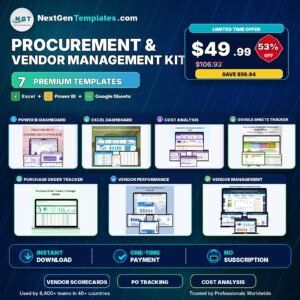
- Procurement and Vendor Management Kit: 7 templates for procurement and vendor work in one download
Browse all Excel calendar templates.
































Reviews
There are no reviews yet.