


Expanding your business is a big milestone—but it doesn’t have to feel overwhelming. Whether you’re preparing to open a new branch, launch a product line, or enter a new market, staying organized is key. That’s where the Business Expansion Evaluation Checklist in Excel comes in. 📈🗂️
This ready-to-use, easy-to-customize Excel template helps you plan and evaluate every critical step of your business expansion journey. From assigning responsibilities to setting deadlines and tracking progress in real-time, this checklist ensures you don’t miss a thing.
✨ Key Features of the Business Expansion Evaluation Checklist
🧭 Two Smartly Designed Worksheets

Business Expansion Evaluation Checklist
Your main working sheet with progress tracking, task details, and checkboxes
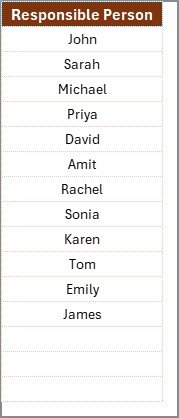
List Sheet
Manages dropdown values for assigning team members for better consistency
📊 Visual Dashboard for Instant Progress Tracking
At the top of your checklist sheet, you’ll find:
✅ Total Checklist Items
✔️ Checked Count
❌ Crossed Count
📉 Progress Bar (% Completed)
This built-in dashboard gives you instant feedback on how far you’ve progressed—no manual tracking needed!
📝 Interactive Checklist Table
Your task-tracking table includes:
Serial Number
Checklist Item
Description
Responsible Person (with dropdown selection)
Deadline
Remarks
Status (✔ or ✘ for completed/incomplete)
It’s structured, clean, and ready for input right away.
🔥 Why You’ll Love This Template
✅ Stay Organized
Centralize all your expansion tasks and plans in one place.
✅ Improve Accountability
Assign clear responsibilities and deadlines for each task.
✅ Track Progress Visually
Real-time progress updates with a built-in completion bar.
✅ Save Time
No need to build your own checklist from scratch—it’s plug and play!
✅ No Technical Expertise Needed
If you can use Excel, you can use this template!
✅ Fully Editable
Customize checklist items, color codes, people lists, or even add more columns.
🚀 How to Use the Checklist in 5 Easy Steps
Open the Excel File
Go to the Checklist Sheet and review the dashboard and table layout
Enter Your Expansion Tasks, set responsible persons, and assign deadlines
Use ✔ or ✘ in the Status Column to mark progress
Watch the Progress Bar Update Automatically as you complete tasks!
🧠 What You Can Track with This Template
📊 Market research status
🏢 Location feasibility
💸 Budget finalization
👥 Team recruitment & onboarding
📝 Legal clearances
📈 Marketing & launch plan readiness
🧾 Risk assessments
And much more tailored to your unique goals!
💡 Pro Tips for Best Results
🗓️ Update statuses weekly to stay aligned
🖊️ Use short, action-based checklist items for clarity
🎨 Add conditional formatting to highlight deadlines or statuses
👥 Update the team list regularly for dropdown accuracy
🔁 Review and reuse the template for future expansion projects
🔗 Click here to read the Detailed blog post
📺 Visit our YouTube channel to learn step-by-step video tutorials




























Reviews
There are no reviews yet.