



The Sales and Marketing Cybersecurity KPI Dashboard in Excel is an essential tool for businesses and organizations looking to monitor the effectiveness of their cybersecurity measures in the sales and marketing departments. This Excel-based dashboard helps track key performance indicators (KPIs) that directly impact the security of marketing campaigns, customer data, and overall digital operations.
With the rise of digital marketing efforts, protecting sensitive data and ensuring secure online transactions are more important than ever. This dashboard provides real-time insights into the cybersecurity performance of sales and marketing activities, helping you safeguard customer information, improve risk management, and optimize security processes.
Key Features of the Sales and Marketing Cybersecurity KPI Dashboard in Excel
🔒 Cybersecurity Monitoring
Track critical cybersecurity metrics, including the number of security breaches, threats detected, and security incidents. Stay on top of potential vulnerabilities in your marketing systems and customer data channels.
📈 Sales & Marketing Data Security Metrics
Monitor the security of marketing campaigns and customer data through KPIs such as data encryption effectiveness, security compliance, and the success of anti-phishing efforts. Ensure that your sales and marketing teams follow best practices for data security.
📊 Risk Assessment & Threat Detection
Evaluate the level of risk associated with different marketing channels and sales processes. Track the number of detected threats, their severity, and response actions to reduce the risk of data breaches or security failures.
⚙️ Security Compliance & Performance Tracking
Ensure compliance with industry standards and regulations such as GDPR, CCPA, and other data protection laws. Track security performance and how well your sales and marketing teams adhere to these regulations.
📅 Time-Based Performance Analysis
Assess the cybersecurity performance of your sales and marketing activities over time. Monitor trends and patterns to identify high-risk periods and optimize your security protocols accordingly.
🔑 Customizable KPIs
Customize the dashboard to track KPIs that are most relevant to your organization’s security goals. Whether it’s phishing detection, firewall effectiveness, or incident response time, you can adjust the dashboard to fit your unique security needs.
Why You’ll Love the Sales and Marketing Cybersecurity KPI Dashboard in Excel
✅ Track Cybersecurity in Real-Time
Monitor real-time cybersecurity data to ensure the safety of your sales and marketing operations. Stay ahead of potential threats with timely insights and updates.
✅ Ensure Data Security Compliance
Track how well your organization is complying with data protection laws and regulations. Ensure that marketing campaigns and sales activities are secure and compliant with GDPR, CCPA, and other privacy regulations.
✅ Improve Incident Response
Track cybersecurity incidents and evaluate how quickly and effectively your team responds. Ensure that your sales and marketing departments are prepared to handle and resolve any security threats.
✅ Optimize Marketing Security Efforts
By identifying trends in security threats, your sales and marketing teams can optimize their security protocols to prevent data breaches, optimize campaign security, and protect customer information.
✅ Customizable to Your Security Needs
Adjust the dashboard to track specific KPIs and security metrics that align with your sales and marketing goals. Customize the dashboard to reflect your industry’s unique needs and security requirements.
What’s Inside the Sales and Marketing Cybersecurity KPI Dashboard in Excel?
Cybersecurity Monitoring: Track threats, incidents, and security breaches in real time.
Sales & Marketing Data Security Metrics: Monitor the security of customer data and marketing activities.
Risk Assessment & Threat Detection: Track and evaluate the level of threat and risk across different sales and marketing channels.
Security Compliance Tracking: Ensure compliance with data protection regulations such as GDPR and CCPA.
Time-Based Performance Tracking: Monitor security performance over time to identify trends.
Customizable KPIs: Adjust and personalize the dashboard to meet your unique security and marketing needs.
How to Use the Sales and Marketing Cybersecurity KPI Dashboard in Excel
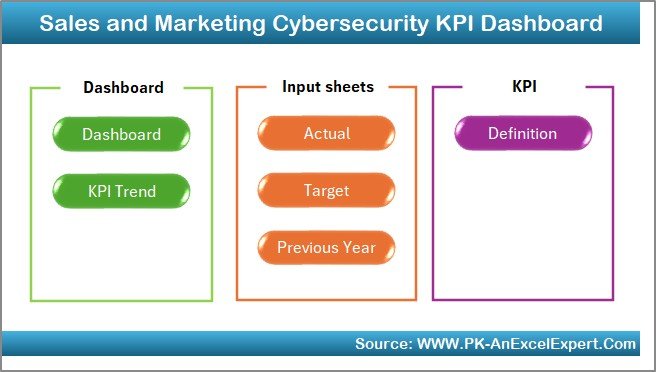
1️⃣ Download the Template: Instantly access the Sales and Marketing Cybersecurity KPI Dashboard in Excel.
2️⃣ Integrate Your Data: Input your cybersecurity data, including incident reports, security metrics, and compliance status.
3️⃣ Track KPIs & Performance: Monitor critical metrics such as data breaches, threats, and security compliance.
4️⃣ Analyze Data & Insights: Use time-based performance analysis to evaluate security performance and identify areas for improvement.
5️⃣ Optimize Cybersecurity Efforts: Use the insights to improve your marketing security measures, mitigate risks, and safeguard customer data.
Who Can Benefit from the Sales and Marketing Cybersecurity KPI Dashboard in Excel?
🔹 Marketing Teams & Managers
🔹 Sales & Customer Data Teams
🔹 IT & Cybersecurity Departments
🔹 Risk & Compliance Managers
🔹 Business Owners & Executives
🔹 Small & Medium Enterprises (SMBs)
🔹 Large Enterprises with Digital Marketing Campaigns
Ensure your sales and marketing operations are secure and compliant with the Sales and Marketing Cybersecurity KPI Dashboard in Excel. Track cybersecurity performance, monitor threats, and optimize your digital marketing strategies with this powerful tool.
Click here to read the Detailed blog post
Visit our YouTube channel to learn step-by-step video tutorials
Youtube.com/@PKAnExcelExpert
Watch the step-by-step video Demo:
Compatibility and Requirements
- Works in Microsoft Excel desktop (Excel 2016 or later, or Microsoft 365).
- Microsoft explains how Excel charts work in Create a chart from start to finish.
Frequently Asked Questions
Which cybersecurity KPIs does the dashboard track?
Security breaches, threats detected, security incidents, data encryption effectiveness, security compliance and the success of anti-phishing efforts.
Can it track compliance with data protection rules?
Yes. It tracks how well sales and marketing teams follow regulations such as GDPR and CCPA.
Can I see results over time?
Yes. Time-based analysis shows trends and high-risk periods.
Can I add my own KPIs?
Yes. You can track the KPIs that fit your security goals, such as phishing detection, firewall effectiveness or incident response time.
What data do I enter?
Incident reports, security metrics and compliance status.
Related Cybersecurity Templates
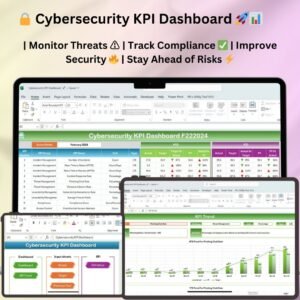
- Cybersecurity KPI Dashboard in Excel: company-wide security KPIs
- Cybersecurity Risk Assessment KPI Dashboard in Excel: focuses on security risk
- Cybersecurity Incident KPI Dashboard in Excel: tracks security incidents
- Cybersecurity KPI Dashboard in Power BI: security KPIs in Power BI
- IT and Cybersecurity Operations Bundle: 8 Excel and Power BI IT templates in one bundle
Browse all Excel KPI dashboards or the Excel sales and marketing templates.

































Reviews
There are no reviews yet.