



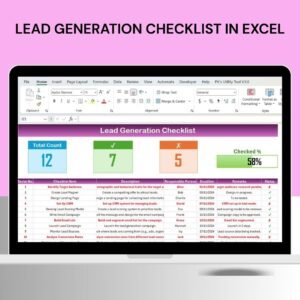
The Lead Generation Checklist in Excel is an essential tool for businesses looking to streamline and optimize their lead generation process. Whether you’re a marketer, business owner, or sales professional, this checklist provides a structured approach to track potential leads and ensure no important steps are missed in the lead generation journey.
This Excel-based checklist is designed to help you manage each phase of lead generation, from prospecting to follow-ups, ensuring that you reach out to the right leads at the right time. It allows you to organize, prioritize, and convert leads into long-term customers more efficiently. With customizable fields, this checklist can be tailored to fit your specific needs, whether you’re handling B2B or B2C leads.
Key Features of the Lead Generation Checklist in Excel
📋 Lead Tracking & Organization
Easily input and track lead details such as contact information, lead source, and lead status. Organize your leads effectively to manage follow-ups and communication.
📅 Follow-Up Reminders & Deadlines
Set reminders and deadlines for follow-up actions. Stay on track with your outreach efforts and ensure timely communication with potential leads.
🔄 Lead Qualification Criteria
Define and track key qualification criteria, such as budget, timeline, and decision-making authority, to ensure that your efforts are focused on high-quality leads that are most likely to convert.
📈 Lead Source Tracking
Identify where your leads are coming from (social media, website, referrals, etc.). Track the effectiveness of each lead source and optimize your marketing efforts accordingly.
📝 Detailed Notes & Communication History
Keep a record of all interactions with each lead. Document phone calls, emails, meetings, and any other relevant details that will help improve communication and conversion rates.
⚙️ Customizable Fields & Layout
Customize the checklist to fit your business’s specific lead generation process. Add fields for additional information or adjust lead qualification criteria based on your needs.
Why You’ll Love the Lead Generation Checklist in Excel

✅ Stay Organized & Efficient
Track and organize your leads in one central location. Keep your outreach efforts streamlined and efficient without losing track of any potential customer.
✅ Ensure Timely Follow-Ups
Set automated reminders for follow-up actions and deadlines to ensure that you never miss an opportunity to engage with a lead.
✅ Focus on Quality Leads
Use lead qualification criteria to focus your time and resources on high-potential leads, improving your conversion rates and maximizing ROI.
✅ Measure & Optimize Your Lead Generation Efforts
Track where your leads are coming from, allowing you to evaluate the effectiveness of different channels and optimize your marketing strategies.
✅ Customizable & Scalable
This checklist can be tailored to fit any lead generation process, whether you’re working on a small scale or managing a large sales pipeline.
What’s Inside the Lead Generation Checklist in Excel?
Lead Tracking & Organization: Keep track of lead details such as contact info, status, and qualification criteria.
Follow-Up Reminders: Set reminders for follow-up actions and deadlines.
Lead Qualification Criteria: Track the key factors that make a lead qualified.
Lead Source Tracking: Monitor where leads are coming from and evaluate source effectiveness.
Notes & Communication History: Record all interactions with leads.
Customizable Layout: Tailor the checklist to fit your specific lead generation process.
How to Use the Lead Generation Checklist in Excel
1️⃣ Download the Template: Instantly access the Lead Generation Checklist in Excel.
2️⃣ Input Lead Information: Add details such as contact information, source, and qualification status.
3️⃣ Set Follow-Up Reminders: Use the reminder feature to stay on top of follow-up actions.
4️⃣ Track Lead Source Effectiveness: Monitor the performance of each lead source to optimize your marketing efforts.
5️⃣ Document Communication & Next Steps: Keep detailed notes on all lead interactions to ensure smooth communication.
Who Can Benefit from the Lead Generation Checklist in Excel?
🔹 Sales Teams & Sales Representatives
🔹 Marketing Teams & Digital Marketers
🔹 Business Owners & Entrepreneurs
🔹 B2B & B2C Companies
🔹 Lead Generation Specialists & Consultants
🔹 Customer Relationship Managers (CRM)
🔹 Small & Medium Businesses (SMBs)
Organize, track, and convert leads into loyal customers with the Lead Generation Checklist in Excel. Stay on top of every step of your lead generation process and maximize your success.
Click here to read the Detailed blog post
Visit our YouTube channel to learn step-by-step video tutorials
Youtube.com/@PKAnExcelExpert
Compatibility and Requirements
- Works in Microsoft Excel desktop (Excel 2016 or later, or Microsoft 365).
- New to Excel? Microsoft’s Excel for Windows training covers the basics.
Frequently Asked Questions
What lead details can I record?
Contact information, lead source, lead status and qualification details, plus notes on calls, emails and meetings.
How do I qualify leads?
Track qualification criteria such as budget, timeline and decision-making authority for each lead.
Can I see which lead sources work best?
Yes. Record where each lead came from, such as social media, your website or referrals, and compare the results.
Can I change the columns?
Yes. You can add fields and adjust the layout to fit your own lead generation process.
Is there a Google Sheets version?
Yes. See the Lead Generation Checklist in Google Sheets.
Related Lead Templates
- Lead Generation Checklist in Google Sheets: the same checklist in Google Sheets
- Lead Tracker Data Entry System in Excel: enter leads through a data entry form
- Sales Lead Submission Tracker in Excel: track submitted sales leads
- Lead Nurturing KPI Dashboard in Excel: measure lead nurturing KPIs
- Marketing Manager Toolkit: 9 marketing templates in one download
Browse all Excel checklists or the Excel sales and marketing templates.































Reviews
There are no reviews yet.