



The Quality Control To-Do List Checklist in Excel is a practical and effective tool designed for quality assurance teams, project managers, and operations teams to ensure that every step of the quality control process is completed efficiently. This Excel-based checklist helps streamline the quality inspection process by allowing you to track tasks, identify issues, and maintain high-quality standards throughout the production or service process.
From manufacturing processes to service quality evaluations, this checklist provides a structured framework to ensure that all critical checks are completed and documented. The customizable nature of the checklist allows for easy adjustments to meet the unique needs of different industries and processes.
Key Features of the Quality Control To-Do List Checklist in Excel
📋 Task Tracking & Management
Track essential quality control tasks, such as inspections, testing, and compliance checks. Organize these tasks into a clear, easy-to-follow checklist to ensure that every quality control step is completed.
📝 Inspection Criteria & Notes Section
Record inspection criteria for each task and include notes on the outcome of each test or check. This ensures that all information is documented and accessible for review and future reference.
🔍 Issue Identification & Resolution Tracking
Identify and track issues that arise during the quality control process. Use the issue resolution feature to monitor the steps taken to resolve any problems and ensure that corrective actions are implemented.
⏱ Time-Based Tracking
Monitor the time spent on each quality control task and track deadlines. Use time-based analysis to identify bottlenecks in the quality control process and improve efficiency.
⚙️ Customizable & Scalable
Customize the checklist to meet the specific needs of your industry or process. Whether you’re working in manufacturing, food safety, or software development, you can adjust the checklist to match your quality control requirements.
📊 Data Visualization & Reporting
Generate simple reports and track quality control performance over time. Visualize trends in quality checks, identify recurring issues, and use the data to implement improvements.
Why You’ll Love the Quality Control To-Do List Checklist in Excel

✅ Stay Organized & Efficient
Easily track and manage your quality control tasks, ensuring that each step is completed on time and to standard.
✅ Improve Task Accountability
Assign tasks to team members, set deadlines, and ensure accountability throughout the quality control process. Monitor task completion to maintain a high standard of work.
✅ Enhance Quality Standards
Document inspection results and issues to identify areas for improvement, ensuring that your products or services meet the highest standards.
✅ Increase Operational Efficiency
Track quality control tasks over time and identify areas where processes can be optimized, leading to faster inspection cycles and improved production quality.
✅ Data-Driven Decisions
Generate reports and analyze data trends to make informed decisions about quality control processes and improvements.
What’s Inside the Quality Control To-Do List Checklist in Excel?
Task Tracking & Management: Monitor quality control tasks and deadlines.
Inspection Criteria & Notes Section: Record inspection details and outcomes.
Issue Identification & Resolution: Track issues and resolution steps.
Time-Based Tracking: Monitor time spent on quality control tasks.
Data Visualization & Reporting: Analyze trends and generate reports.
Customizable Features: Adjust the checklist for your specific quality control needs.
How to Use the Quality Control To-Do List Checklist in Excel
1️⃣ Download the Template: Get access to the Quality Control To-Do List Checklist in Excel instantly.
2️⃣ Input Your Tasks: List all quality control tasks, inspections, and checks that need to be completed.
3️⃣ Track Task Progress: Monitor the status of each task and ensure all are completed within deadlines.
4️⃣ Record Issues & Solutions: Use the issue section to document problems and track the steps taken to resolve them.
5️⃣ Generate Reports & Insights: Use the checklist to generate performance reports and identify improvement opportunities.
Who Can Benefit from the Quality Control To-Do List Checklist in Excel?
🔹 Quality Assurance Teams
🔹 Operations Managers
🔹 Project Managers
🔹 Manufacturing Companies
🔹 Food Safety and Production Teams
🔹 Service Providers
🔹 Businesses Looking to Improve Product/Service Quality
Ensure that your quality control process is seamless and efficient with the Quality Control To-Do List Checklist in Excel. Track every step, manage issues, and maintain high-quality standards to drive business success.
Click here to read the Detailed blog post
Visit our YouTube channel to learn step-by-step video tutorials
Youtube.com/@PKAnExcelExpert
Compatibility and Requirements
- Works in Microsoft Excel desktop (Excel 2016 or later, or Microsoft 365).
- Tasks, inspection notes and issues are all kept in one workbook, so there is nothing else to install.
- New to Excel? Microsoft’s Excel for Windows training covers the basics.
Frequently Asked Questions
Which quality control tasks can I list?
Any check your process needs, such as inspections, testing and compliance checks, each with its own criteria and notes.
Can I record problems found during inspection?
Yes. The issue section logs each problem and the steps taken to resolve it, so corrective actions are tracked.
Can I track deadlines and time spent?
Yes. Time-based tracking records time spent on each task and its deadline, which helps find bottlenecks.
Does it work outside manufacturing?
Yes. It can be adjusted for food safety, service quality or software development checks as well as manufacturing.
Related Quality Control Templates
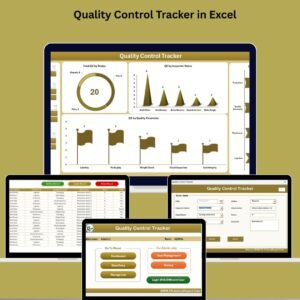
- Quality Control Tracker in Excel: log inspections and defects in detail
- Quality Control Tracker in Google Sheets: the online tracker for shared teams
- Quality Control Review Checklist in Excel: a review step for finished work
- Quality Assurance Report in Excel: summarize QA results for managers
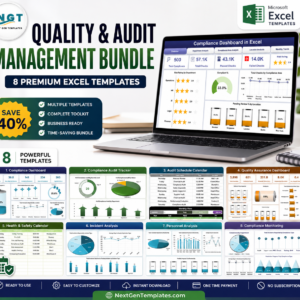
- Quality & Audit Management Bundle: 8 quality and audit templates in one download
Browse all Excel quality control templates or the Excel checklists.
































Reviews
There are no reviews yet.