



The Quality Control Tracking Checklist in Excel is an essential tool for businesses, manufacturers, and quality assurance teams looking to streamline their quality control processes. Whether you’re in product manufacturing, service delivery, or any other industry where quality is crucial, this Excel-based checklist helps you systematically track quality metrics, maintain consistent standards, and ensure that all products and services meet the required quality criteria.
This tool is designed to monitor quality checks at every stage of production or service delivery, track compliance, and document inspection results. With an intuitive layout, customizable features, and real-time tracking capabilities, this checklist simplifies quality control management, enabling businesses to enhance operational efficiency, reduce defects, and deliver high-quality products to customers.
Key Features of the Quality Control Tracking Checklist in Excel
📋 Quality Control Checklist
Document all essential quality checks, from initial inspection to final approval. Track parameters such as product specifications, defect rates, and compliance with standards at every stage.
📝 Inspection Result Tracking
Record the outcome of each quality inspection, including pass/fail statuses and any corrective actions taken. Ensure that all defects are identified and addressed promptly.
⚙️ Defect & Issue Tracking
Identify and track any defects or issues found during inspections. Keep a detailed log of defects, assign responsibilities, and monitor corrective actions to ensure issues are resolved.
📅 Time-Based Monitoring
Track the timing of each quality check to ensure inspections are conducted at the right intervals. Monitor the frequency and timing of issues to identify trends and areas for improvement.
🔑 Compliance Tracking & Reporting
Ensure that all products or services comply with regulatory standards. Generate reports to analyze compliance levels and track any deviations from required specifications.
⚙️ Customizable & Scalable
The checklist is highly customizable to suit your specific quality control needs. Add or modify fields based on your industry, product types, or service standards to ensure it meets your business requirements.
Why You’ll Love the Quality Control Tracking Checklist in Excel

✅ Simplifies Quality Control Management
Easily document and track quality inspections, ensuring consistency and quality in every step of your production or service process.
✅ Ensures Compliance
Track compliance with industry standards, regulations, and internal quality benchmarks to avoid issues and prevent delays.
✅ Track & Address Defects Efficiently
Identify defects early in the process and implement corrective actions to minimize waste, improve quality, and reduce costs.
✅ Improve Operational Efficiency
By maintaining clear and structured records of inspections, you’ll be able to streamline your quality control process and enhance overall productivity.
✅ Customizable to Fit Your Business Needs
The tracker can be adjusted to fit any industry, whether manufacturing, service, or retail, allowing for a tailor-made solution to track quality control metrics.
What’s Inside the Quality Control Tracking Checklist in Excel?
Quality Control Checklist: Document all key quality checks and inspection parameters.
Inspection Result Tracking: Record pass/fail statuses and corrective actions for each inspection.
Defect & Issue Tracking: Keep a log of defects and issues discovered during quality checks.
Time-Based Monitoring: Track inspection frequency and defect rates over time.
Compliance Tracking & Reporting: Monitor compliance with standards and regulations, and generate reports.
Customizable Features: Modify the checklist to suit your business and industry needs.
How to Use the Quality Control Tracking Checklist in Excel
1️⃣ Download the Template: Get the Quality Control Tracking Checklist in Excel instantly.
2️⃣ Input Quality Check Parameters: Add the quality criteria and inspection points relevant to your business.
3️⃣ Track Inspection Results: Record the outcome of each inspection, including pass/fail results.
4️⃣ Monitor Defects & Issues: Track defects and assign corrective actions to resolve them quickly.
5️⃣ Generate Reports & Analyze Data: Use the checklist to generate reports on compliance, defect trends, and quality control performance.
Who Can Benefit from the Quality Control Tracking Checklist in Excel?
🔹 Quality Assurance & Control Teams
🔹 Manufacturing & Production Companies
🔹 Service Providers
🔹 Compliance & Regulatory Officers
🔹 Business Owners & Managers
🔹 Small & Medium Enterprises (SMBs)
🔹 Large Corporations with Multiple Production Lines
Ensure that your products and services meet the highest quality standards with the Quality Control Tracking Checklist in Excel. Streamline quality checks, track defects, and improve operational efficiency.
Click here to read the Detailed blog post
Visit our YouTube channel to learn step-by-step video tutorials
Youtube.com/@PKAnExcelExpert
Compatibility and Requirements
- Works in Microsoft Excel desktop (Excel 2016 or later, or Microsoft 365).
- The checklist is customizable, so you can add or change fields for your industry. Microsoft explains conditional formatting if you want to color-code pass and fail results.
Frequently Asked Questions
What does the checklist track?
It tracks quality checks and inspection parameters, pass/fail results with corrective actions, defects and issues, inspection timing and compliance with standards.
Can I track defects and who fixes them?
Yes. The Defect and Issue Tracking section is a log of defects found during inspections, where you can assign responsibilities and follow the corrective actions.
Can I change the checklist for my industry?
Yes. You can add or modify fields to match your products, services or quality standards.
Does it produce compliance reports?
Yes. Compliance Tracking and Reporting lets you generate reports on compliance levels and deviations from required specifications.
Is there a Google Sheets version of a quality control checklist?
Yes. See the Quality Control Checklist in Google Sheets. For a tracker format, there is also the Quality Control Tracker in Excel.
Related Quality Control Templates
- Quality Control Checklist Template in Excel: a general quality control checklist
- Quality Control Monitoring Checklist in Excel: a checklist focused on monitoring
- Quality Control Review Checklist in Excel: a checklist for reviewing quality checks
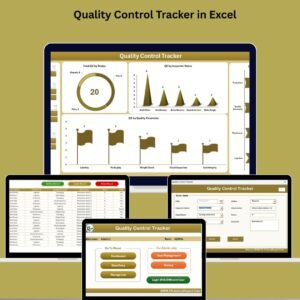
- Quality Control Tracker in Excel: a tracker format for quality control
- Quality Control Checklist in Google Sheets: the Google Sheets edition
Browse all Excel checklist templates or the Quality Control templates.





























Reviews
There are no reviews yet.