



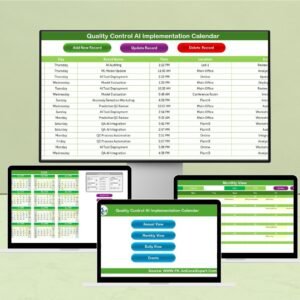
The Operations AI Implementation Calendar in Excel is an indispensable tool for businesses integrating AI solutions into their operations. This calendar helps project managers, operations teams, and AI specialists track and manage the entire AI implementation process, from planning and development to deployment and optimization. It ensures that each step of the AI project is completed on time and that resources are allocated efficiently, providing a clear roadmap for a smooth AI integration.
This Excel-based calendar provides an organized way to manage deadlines, key milestones, tasks, and responsible parties, ensuring that your AI projects are completed with precision and meet the business goals set by your organization. With its customizable structure, the calendar can adapt to different AI implementation strategies, making it an essential tool for any AI-driven business transformation.
Key Features of the Operations AI Implementation Calendar in Excel
📅 Comprehensive Project Timeline
Track each phase of the AI implementation process, from project initiation to AI deployment and post-deployment review. The calendar helps you monitor deadlines, progress, and dependencies, ensuring every task is completed on time.
🛠 Task Assignment & Resource Allocation
Assign specific tasks to team members and allocate resources effectively. Monitor task completion and make adjustments as necessary to keep the AI implementation process on track.
📈 Milestone Tracking
Track important milestones throughout the AI implementation process, including data collection, model training, system testing, and integration. Celebrate achievements and ensure that deadlines are met.
🔄 Customizable Task Categories
Customize the calendar to include specific tasks and phases relevant to your AI project. Add or modify phases like model evaluation, scalability tests, and system training to fit your unique project needs.
🗂 Documentation & Notes Section
Keep track of essential project documents, such as AI model specifications, data sources, and system requirements. Add notes for future reference, ensuring a comprehensive record of the entire AI implementation journey.
📈 Progress Monitoring & Reporting
Use the calendar to visualize project progress and make data-driven decisions about resource allocation and timeline adjustments. Generate reports to assess how well the implementation is progressing against planned milestones.
Why You’ll Love the Operations AI Implementation Calendar in Excel

✅ Organize Complex AI Projects
Simplify the management of complex AI implementations with a structured calendar that covers every phase of the project lifecycle.
✅ Improve Team Collaboration
Facilitate collaboration by assigning tasks, setting deadlines, and tracking progress. Keep the entire team aligned and on schedule throughout the AI implementation process.
✅ Ensure Timely Project Completion
By tracking milestones and deadlines, the calendar helps you avoid delays, ensuring that your AI project stays on track and meets organizational goals.
✅ Flexible & Customizable
Tailor the calendar to fit the unique needs of your AI project. Add specific tasks, deadlines, and milestones to match the goals and scope of your implementation.
✅ Centralized Project Documentation
Keep all key project details in one place, ensuring that everyone involved in the AI implementation has access to the necessary information and documents.
What’s Inside the Operations AI Implementation Calendar in Excel?
Comprehensive Project Timeline: Track all project phases and deadlines.
Task Assignment & Resource Allocation: Assign responsibilities and allocate resources.
Milestone Tracking: Track key milestones like data collection, model testing, and integration.
Customizable Categories: Tailor the calendar to fit your AI project’s unique needs.
Documentation & Notes: Keep track of essential project documents and notes.
Progress Monitoring: Monitor project progress and generate reports for team analysis.
How to Use the Operations AI Implementation Calendar in Excel
1️⃣ Download the Template: Get instant access to the Operations AI Implementation Calendar in Excel.
2️⃣ Customize the Calendar: Add specific tasks, phases, and milestones based on your AI project needs.
3️⃣ Assign Tasks & Resources: Assign responsibilities to team members and allocate necessary resources.
4️⃣ Track Progress: Monitor the progress of tasks and milestones over time, adjusting as needed.
5️⃣ Generate Reports: Use the calendar’s built-in features to track project performance and make data-driven adjustments.
Who Can Benefit from the Operations AI Implementation Calendar in Excel?
🔹 AI Project Managers
🔹 Operations Teams & Business Analysts
🔹 AI Developers & Engineers
🔹 IT Teams & System Integrators
🔹 Technology Companies & Startups
🔹 Enterprises Implementing AI Solutions
🔹 Consulting Firms Specializing in AI Integration
Ensure the success of your AI implementation projects with the Operations AI Implementation Calendar in Excel. Track every phase, task, and milestone efficiently to achieve your business goals and optimize your AI integration.
Click here to read the Detailed blog post
Visit our YouTube channel to learn step-by-step video tutorials
Youtube.com/@PKAnExcelExpert
Compatibility and Requirements
- Works in Microsoft Excel desktop (Excel 2016 or later, or Microsoft 365).
- New to Excel? Microsoft’s Excel for Windows training covers the basics.
Frequently Asked Questions
Which phases of an AI project can I plan?
You can plan every phase from project initiation through data collection, model training, system testing, integration, deployment and post-deployment review.
Can I assign tasks to team members?
Yes. Assign each task to a team member, allocate resources and track when each task is complete.
Can I add my own phases?
Yes. You can add or change phases such as model evaluation, scalability tests and system training to fit your project.
Is there space for project notes?
Yes. A documentation and notes section holds details such as model specifications, data sources and system requirements.
Are there versions for other departments?
Yes. There are AI implementation calendars for other teams, such as the IT AI Implementation Calendar in Excel.
Related AI Implementation Templates
- IT AI Implementation Calendar in Excel: plan AI rollouts in IT
- Sales AI Implementation Calendar in Excel: plan AI rollouts in sales
- HR AI Implementation Calendar in Excel: plan AI rollouts in HR
- AI & Machine Learning KPI Dashboard in Excel: measure AI results once live
- Calendar & Planner Pack: 12 calendar and planner templates in one download
Browse all Excel calendars or the Excel operations templates.

































Reviews
There are no reviews yet.