



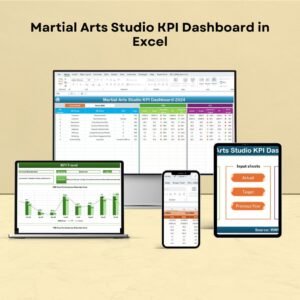
The Martial Arts Studio KPI Dashboard in Excel is a powerful tool designed to help martial arts instructors, studio owners, and managers track and analyze key performance indicators (KPIs) related to their martial arts business. This comprehensive Excel-based dashboard provides valuable insights into metrics such as class attendance, student retention, revenue generation, and instructor performance, enabling you to optimize your operations and improve the overall experience for students.
By using this dashboard, you can track the performance of each class, monitor student progress, and assess the efficiency of your marketing and sales strategies. With the ability to visualize data and identify trends, this dashboard helps martial arts studios stay on top of their goals and make data-driven decisions that contribute to long-term success.

Key Features of the Martial Arts Studio KPI Dashboard in Excel
📊 Class Attendance & Performance Monitoring
Track the attendance of each class and evaluate student participation over time. Identify high-performing classes and areas for improvement, allowing you to tailor your offerings accordingly.
📈 Student Retention & Progress Tracking
Monitor student retention rates and track individual progress throughout their martial arts journey. Analyze dropout rates and take necessary steps to retain students by offering personalized support and engagement.
💸 Revenue & Sales Performance
Track the financial performance of your studio by monitoring membership sales, class fees, and other revenue streams. Evaluate the effectiveness of your pricing strategy and identify new opportunities for revenue generation.
📅 Instructor Performance Analysis
Assess the performance of each instructor based on class ratings, student feedback, and attendance rates. Use this data to ensure high-quality instruction and consider instructor training or performance reviews when necessary.
⚙️ Customizable KPIs & Metrics
Customize the dashboard to include the KPIs that are most important to your martial arts business. Add new metrics, adjust data sources, or modify visuals to reflect your specific goals and objectives.
📈 Visual Data Analysis & Reporting
Easily analyze key metrics through dynamic charts and graphs. Use real-time data to make informed decisions, track trends, and optimize class scheduling, instructor performance, and student engagement.
Why You’ll Love the Martial Arts Studio KPI Dashboard in Excel
✅ Optimize Class & Instructor Performance
Track and evaluate class attendance and instructor performance to improve student outcomes and class quality. This helps to boost student satisfaction and retention.
✅ Boost Revenue & Financial Performance
Monitor revenue streams and optimize pricing strategies for memberships, class packages, and private lessons. Identify areas where you can increase profitability.
✅ Enhance Student Retention
By monitoring student progress and retention, you can implement engagement strategies to reduce drop-offs and ensure long-term student commitment.
✅ Make Data-Driven Decisions
With visual charts and performance tracking, make informed decisions about your marketing strategies, class offerings, and instructor performance to drive business growth.
✅ Scalable & Customizable
The dashboard is fully customizable to meet the needs of any martial arts studio, regardless of size. Whether you run a small local studio or a larger chain, the dashboard adapts to your needs.
What’s Inside the Martial Arts Studio KPI Dashboard in Excel?
Class Attendance Tracking: Monitor attendance rates for each class and evaluate student participation.
Student Retention & Progress Tracking: Track student retention rates and individual progress.
Revenue & Sales Monitoring: Track membership sales, class fees, and overall revenue generation.
Instructor Performance Analysis: Assess instructor performance based on student feedback and class performance.
Customizable KPIs & Metrics: Modify KPIs to suit your specific business goals.
Visual Data Reporting: Analyze trends and performance with dynamic charts and graphs.
How to Use the Martial Arts Studio KPI Dashboard in Excel
1️⃣ Download the Template: Instantly access the Martial Arts Studio KPI Dashboard in Excel.
2️⃣ Input Your Studio Data: Enter class attendance, student retention data, and financial figures.
3️⃣ Track Key Metrics: Monitor KPIs such as student retention, class performance, and instructor feedback.
4️⃣ Analyze & Adjust: Use the dashboard’s visual reporting tools to track trends and make adjustments as needed.
5️⃣ Optimize Studio Operations: Implement insights gained from the dashboard to improve your class offerings, instructor training, and financial strategy.
Who Can Benefit from the Martial Arts Studio KPI Dashboard in Excel?
🔹 Martial Arts Studio Owners & Managers
🔹 Instructors & Trainers
🔹 Business Analysts for Martial Arts Studios
🔹 Marketing & Sales Teams in Martial Arts
🔹 Small & Medium Martial Arts Studios
🔹 Large Martial Arts Academies or Chains
Ensure your martial arts studio runs efficiently and thrives with the Martial Arts Studio KPI Dashboard in Excel. Track performance, optimize operations, and drive growth with this powerful tool.
Click here to read the Detailed blog post
Visit our YouTube channel to learn step-by-step video tutorials
Youtube.com/@PKAnExcelExpert
Compatibility and Requirements
- Works in Microsoft Excel desktop (Excel 2016 or later, or Microsoft 365).
- Microsoft’s guide Create a chart from start to finish explains the Excel feature this file is built on.
Frequently Asked Questions
Which KPIs does the Martial Arts Studio KPI Dashboard track?
Class attendance, student retention and progress, revenue from memberships and class fees, and instructor performance.
How is instructor performance measured?
By class ratings, student feedback and attendance rates for each instructor’s classes.
What data do I enter?
Class attendance, student retention data and financial figures. The charts and KPIs are built from that data.
Can I add my own KPIs?
Yes. You can add new metrics, change data sources or adjust the visuals to match your studio’s goals.
Related Martial Arts and Fitness Templates
- Martial Arts Studio KPI Dashboard in Power BI: the same KPI dashboard in Power BI
- Martial Arts Studio KPI Dashboard in Google Sheets: the same KPI dashboard in Google Sheets
- Fitness Studio KPI Dashboard in Excel: KPIs for fitness studios in Excel
- Fitness Studios Dashboard in Excel: a fitness studio dashboard in Excel
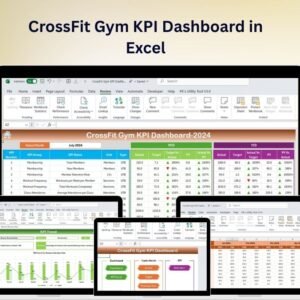
- CrossFit Gym KPI Dashboard in Excel: KPIs for CrossFit gyms in Excel
Browse all Excel KPI dashboards.















Reviews
There are no reviews yet.