

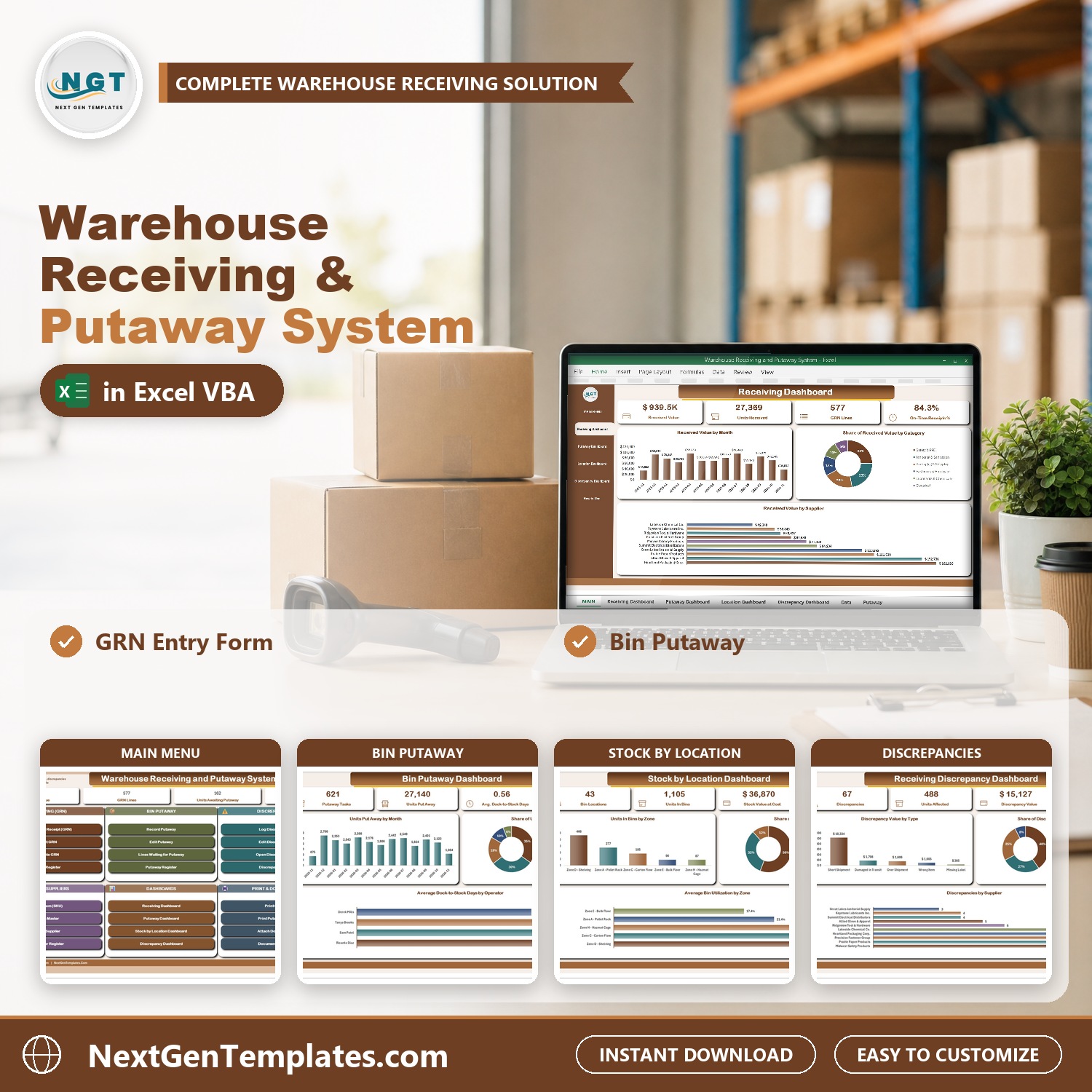
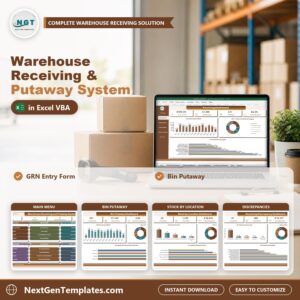
The Warehouse Receiving and Putaway System in Excel VBA runs the whole receiving dock in one macro-enabled Excel file. Each truck is received on a Goods Receipt Note (GRN) with ordered, received and rejected quantities, every line is put away into a bin, short, over and damaged shipments go into a discrepancy log, and stock by bin location and four dashboards build themselves.
Sample data for an Indianapolis distribution center ships with 209 GRNs, 577 GRN lines, 43 bins and 10 suppliers, so every chart is populated when you open it. Replace it with your own and the whole system follows. It is a simple warehouse management system Excel workbook for the warehouse receiving process: a receiving log template, a GRN form and a putaway process in one file, with no cloud and no per-user fee. If trucks are still booked in on paper, this is the step up.
Watch the Warehouse Receiving and Putaway System V1.0 in Excel VBA walkthrough
🌍 Join 10,000+ customers in 180+ countries using NextGenTemplates to replace paid SaaS tools with one-time-purchase Excel, Google Sheets, Power BI and HTML templates.
✅ Instant download · One-time payment · No subscription · No per-user fees · Lifetime access
🎁 Try it free for 7 days before you buy: every form, register and dashboard works in the free trial, so you can test it on your own PC first.
Please note: this system needs Microsoft Excel 2016 or later for Windows with macros enabled. It does not work on Mac, in Excel for the web or in Google Sheets. It does not read barcodes or connect to an ERP. It is a single-user desktop workbook and your data stays on your own PC.
🔑 Key Features of the Warehouse Receiving and Putaway System
📌 A GRN form built for the dock. Pick the supplier, PO number, PO due date, BOL, carrier and dock door, then add SKU lines to the basket with ordered, received and rejected quantities. Unit cost comes from the item master. It uses drop-down lists and a pop-up calendar and refuses a blank required field.
📌 Bin putaway. Record each move by GRN line, bin and quantity. The system checks the home bin and the overflow bin and works out dock-to-stock days.
📌 Lines waiting for putaway. One list of every GRN line still on the dock, with the pending units, so nothing is forgotten.
📌 Discrepancy log. Short shipment, over shipment, damaged in transit, wrong item and missing label, each with the action taken, status, credit received and days open.
📌 Stock by bin location. Capacity, units in the bin, utilization % and a bin status of Empty, Low, In Use or Full for every bin.
📌 Item master and supplier register. Home bin, reorder point, stock on hand and stock status per SKU, plus on-time % and discrepancy count per supplier.
📌 Four dashboards with slicers. Receiving, Bin Putaway, Stock by Location and Discrepancy dashboards filter by year, receipt type, dock door, zone, bin type, bin status and action taken.
📌 Print GRNs and putaway lists. Goods Received Note and Putaway List on A4, 4 inch or 3 inch thermal paper.
📌 Documents on every record. Attach a packing slip, bill of lading or damage photo to a GRN, discrepancy or supplier and open it from the Document Library.
📦 What’s Inside the Warehouse Receiving and Putaway System
Sixteen pages, laid out in the order you actually work in them.
MAIN menu
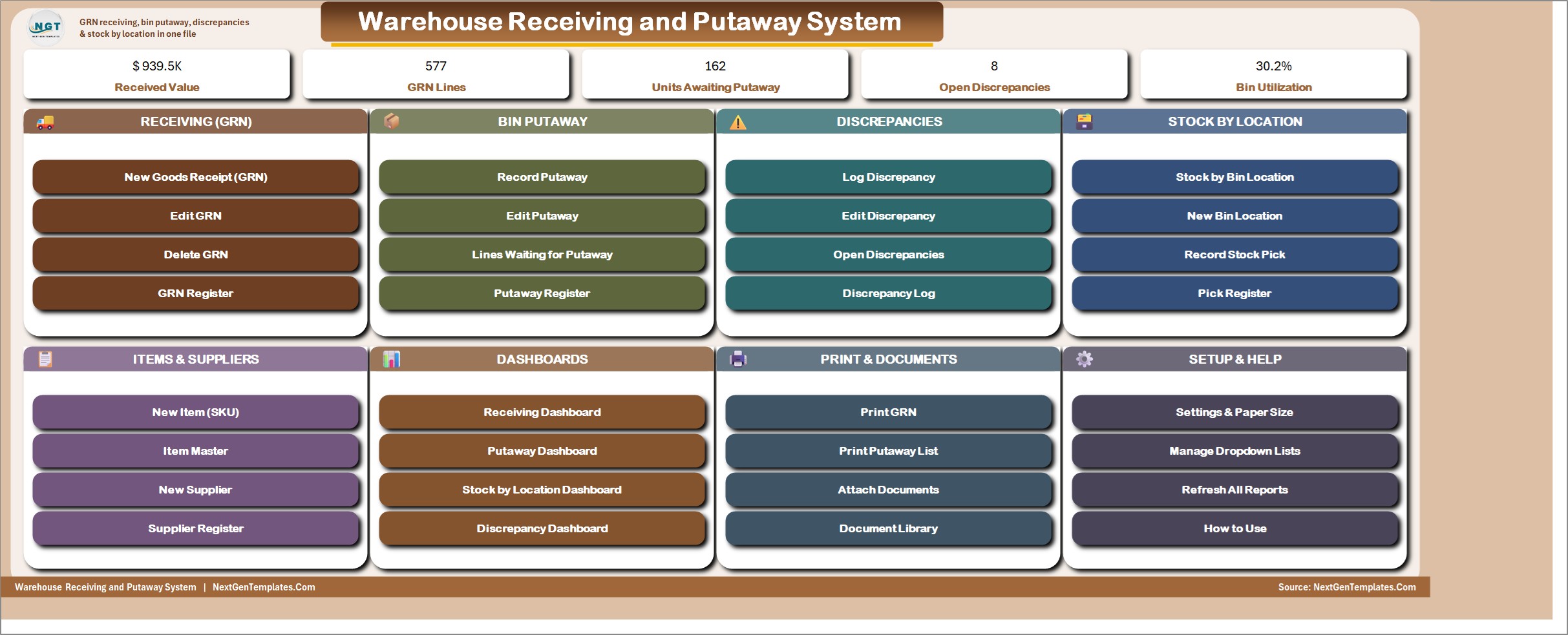
Five live KPI chips (Received Value, GRN Lines, Units Awaiting Putaway, Open Discrepancies and Bin Utilization) sit above colour-coded cards for Receiving (GRN), Bin Putaway, Discrepancies, Stock by Location, Items and Suppliers, Dashboards, Print and Documents, and Setup and Help.
Receiving Dashboard
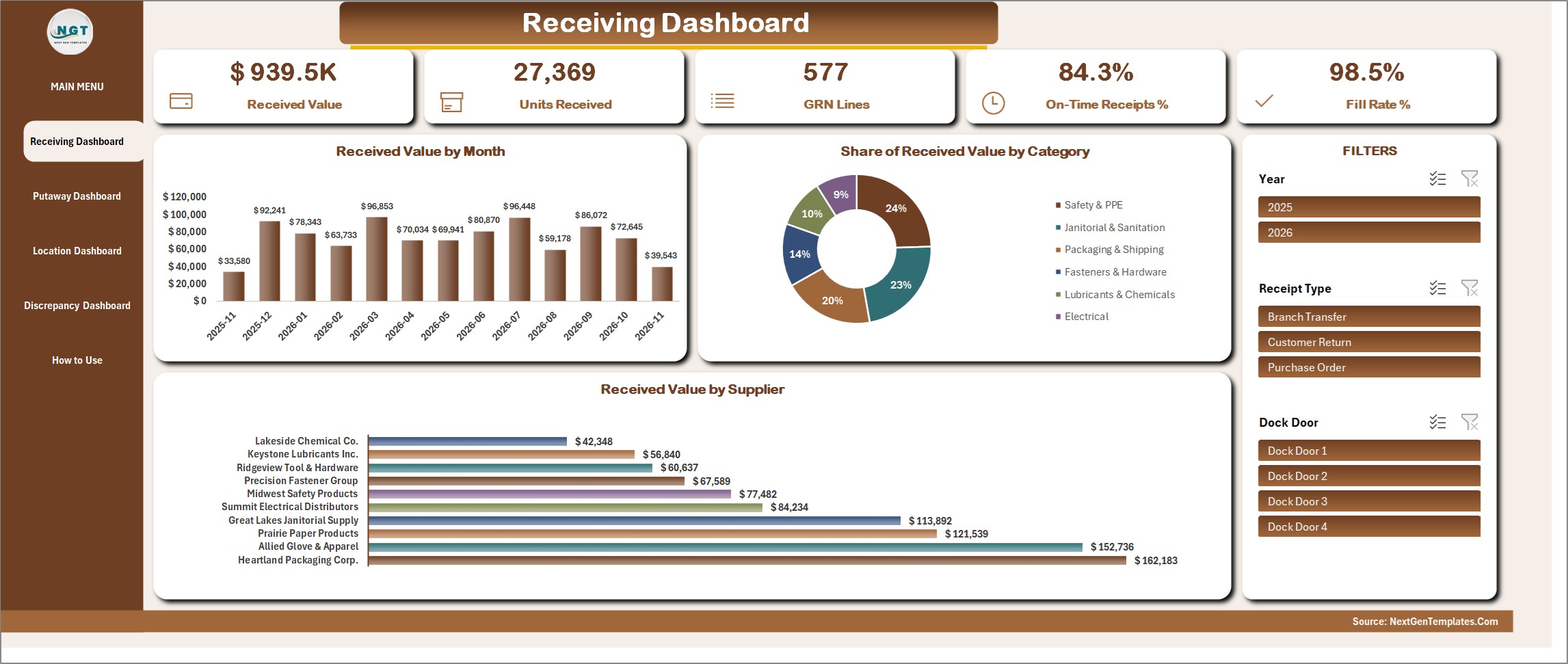
Received Value, Units Received, GRN Lines, On-Time Receipts % and Fill Rate %, with Received Value by Month, Share of Received Value by Category and Received Value by Supplier. Slicers for Year, Receipt Type and Dock Door drive every figure.
Bin Putaway Dashboard
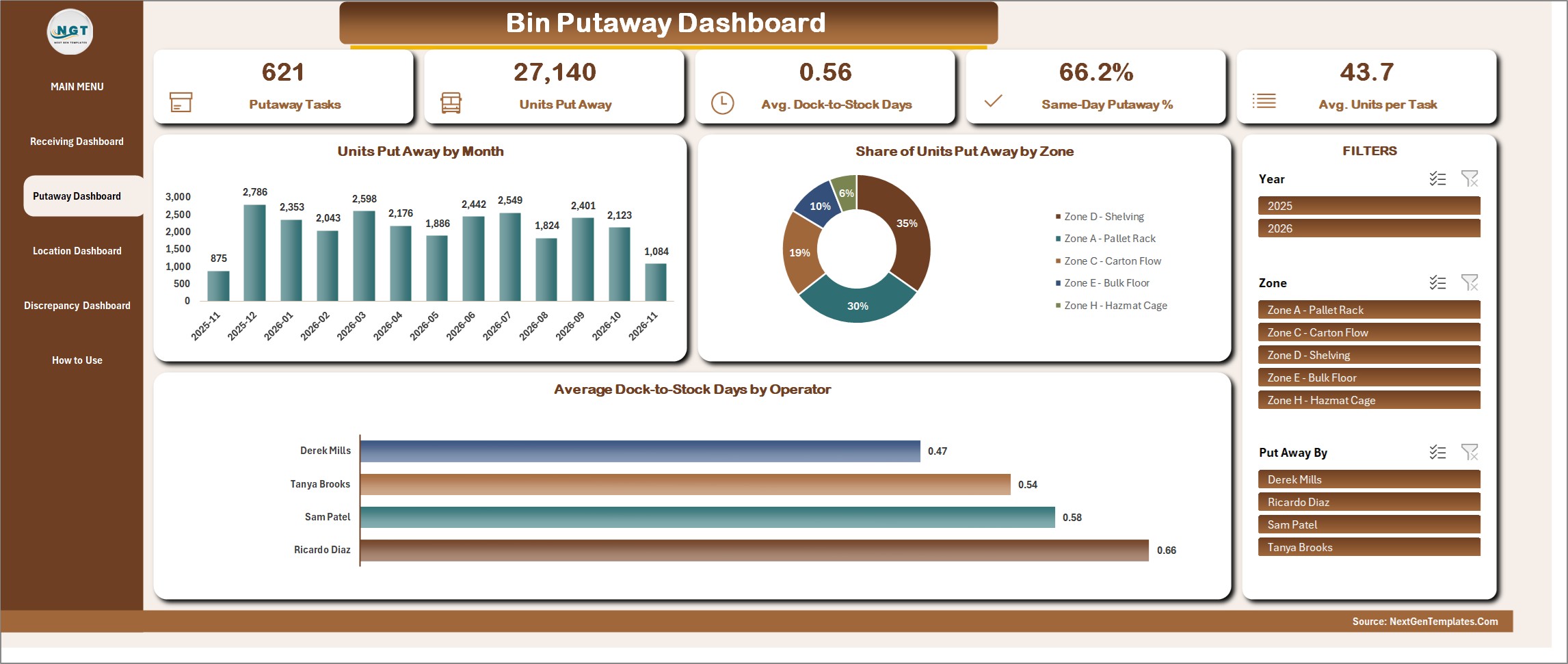
Putaway Tasks, Units Put Away, Average Dock-to-Stock Days, Same-Day Putaway % and Average Units per Task, with Units Put Away by Month, Share of Units Put Away by Zone and Average Dock-to-Stock Days by Operator. Filter by Year, Zone and Put Away By.
Stock by Location Dashboard
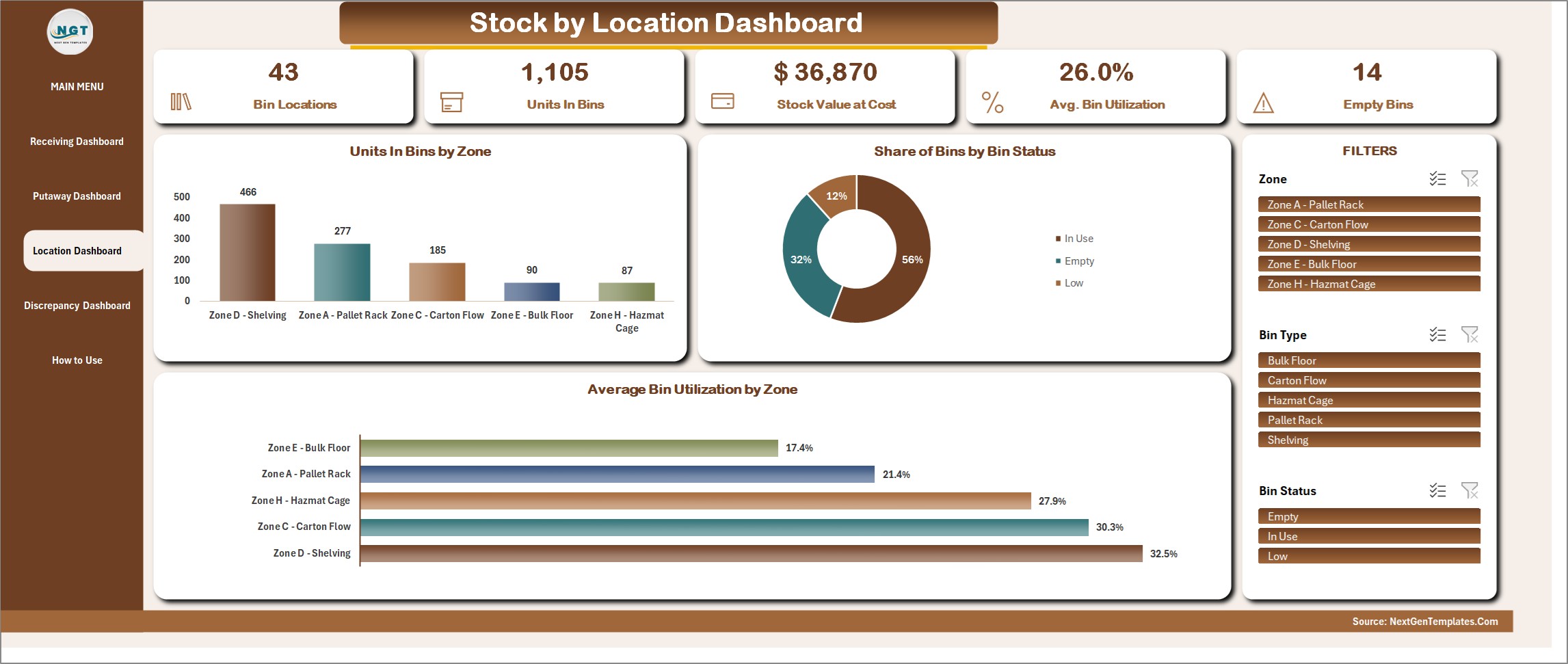
Bin Locations, Units in Bins, Stock Value at Cost, Average Bin Utilization and Empty Bins, with Units in Bins by Zone, Share of Bins by Bin Status and Average Bin Utilization by Zone. Filter by Zone, Bin Type and Bin Status.
Receiving Discrepancy Dashboard
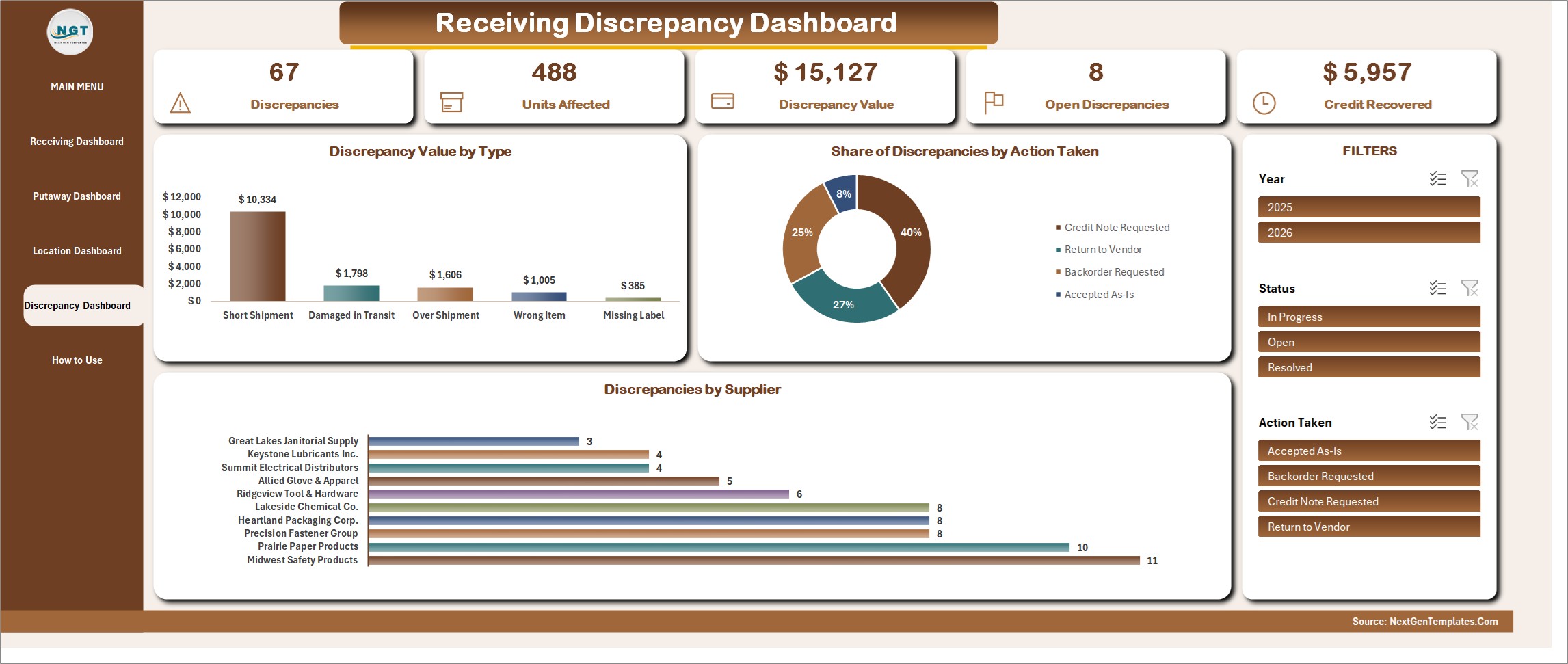
Discrepancies, Units Affected, Discrepancy Value, Open Discrepancies and Credit Recovered, with Discrepancy Value by Type, Share of Discrepancies by Action Taken and Discrepancies by Supplier. Filter by Year, Status and Action Taken.
How to Use
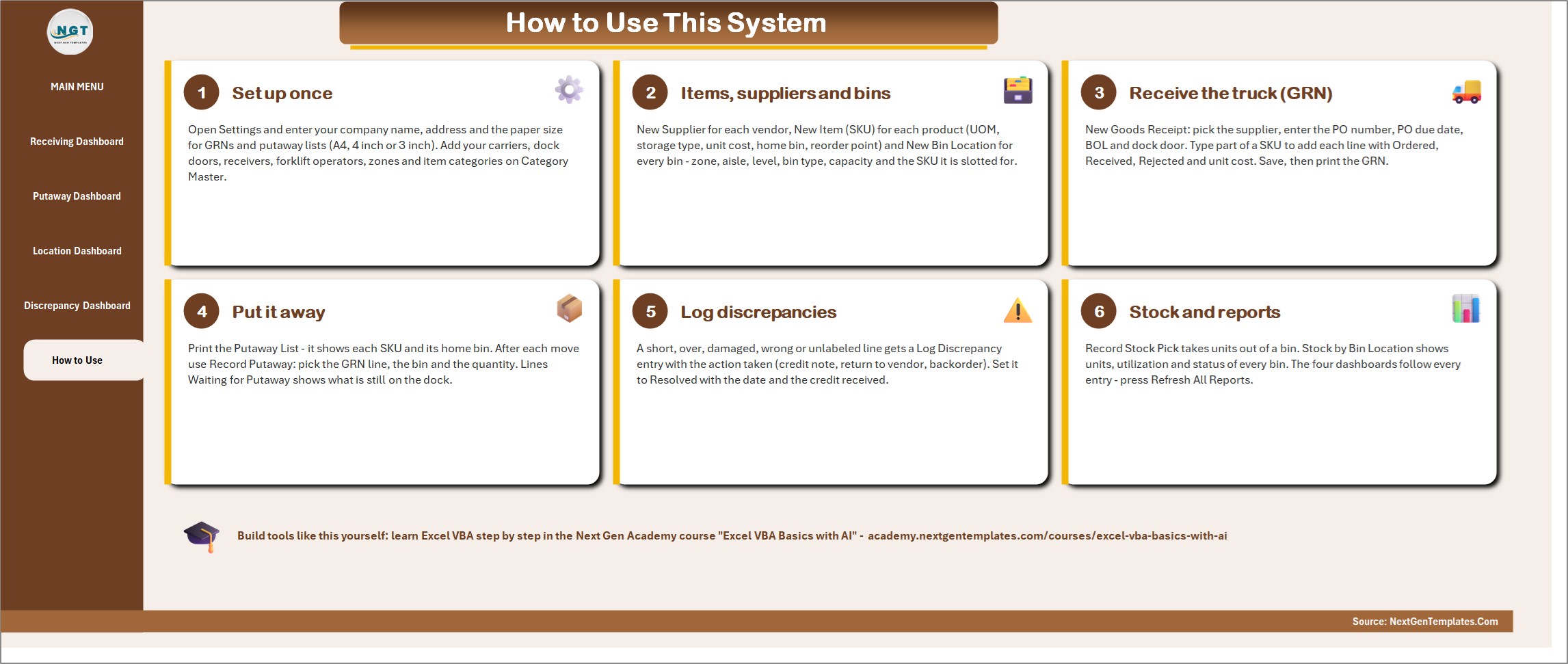
Six numbered steps on one page: set up once, add items, suppliers and bins, receive the truck on a GRN, put it away, log discrepancies, and read stock and reports.
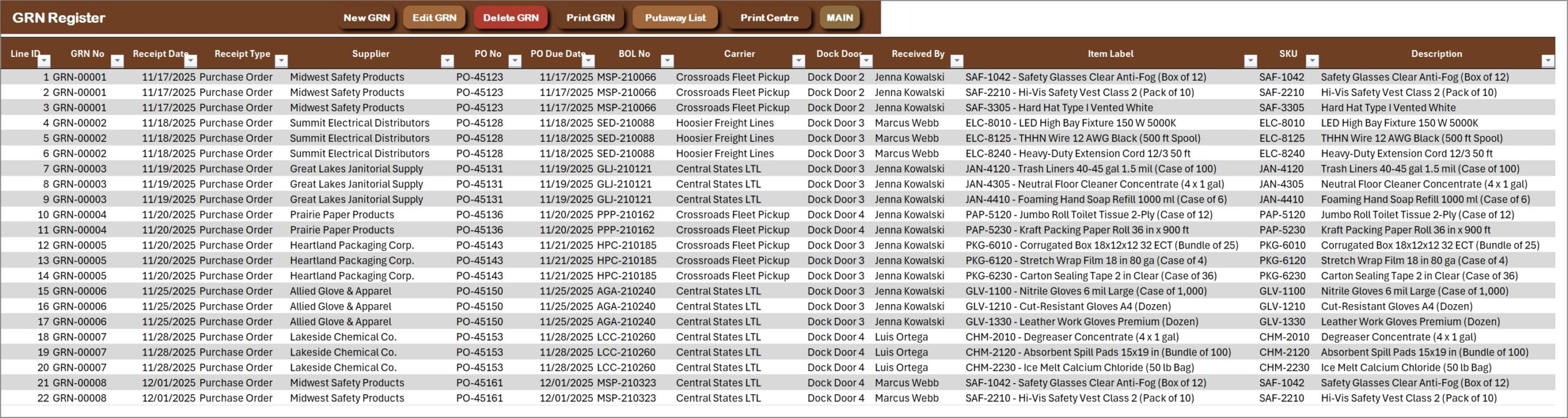
GRN Register
One row per GRN line with the GRN number, supplier, PO number, PO due date, BOL, carrier, dock door, receiver, SKU, ordered, received and rejected quantities, unit cost, receipt check, days late and putaway status. New GRN, Edit GRN, Delete GRN, Print GRN, Putaway List and Print Centre sit on the action bar.
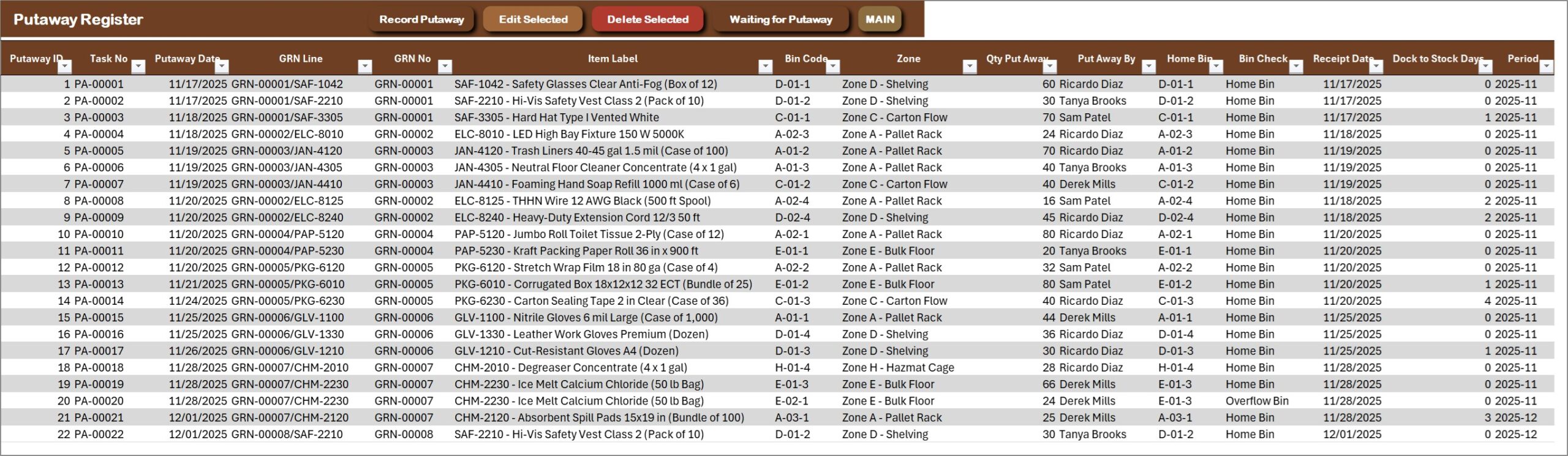
Putaway Register
Every bin move with the task number, GRN line, bin, zone, quantity, operator, home or overflow bin check and dock-to-stock days. Record Putaway, Edit Selected, Delete Selected and Waiting for Putaway sit on the action bar.
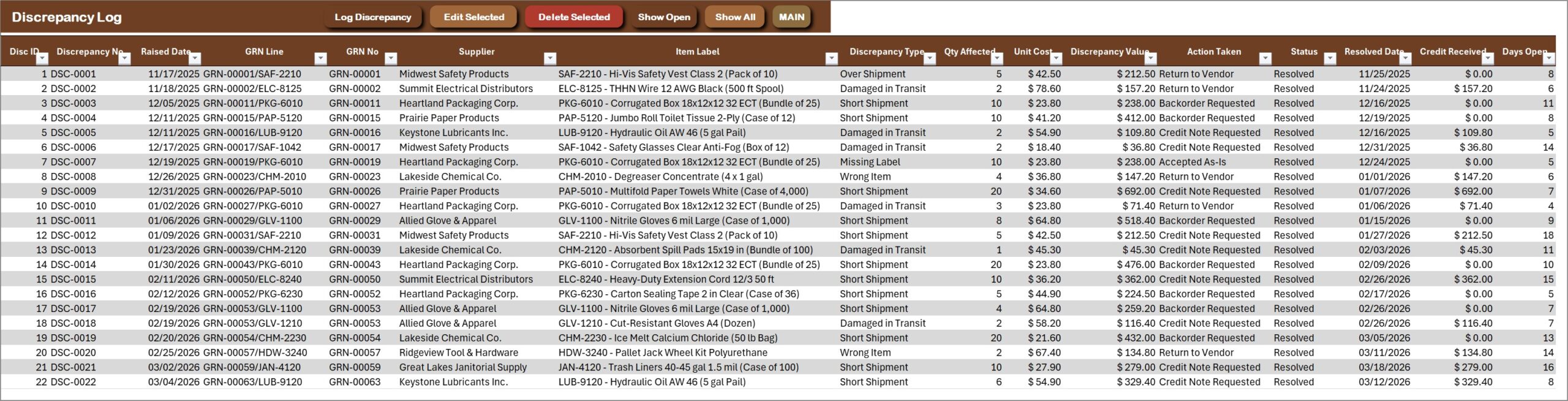
Discrepancy Log
Short shipment, over shipment, damaged in transit, wrong item and missing label, each with quantity affected, value, action taken, status, resolved date, credit received and days open. Show Open and Show All sit on the action bar.
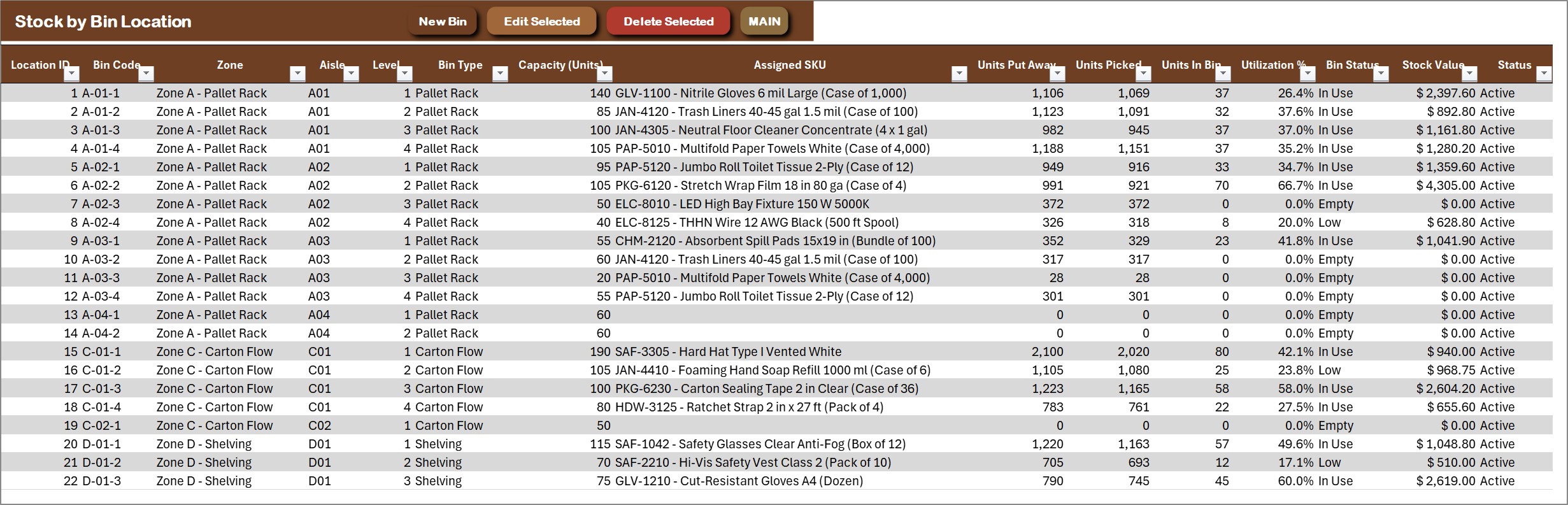
Stock by Bin Location
Each bin with zone, aisle, level, bin type, capacity, assigned SKU, units put in, units picked, units in bin, utilization % and a bin status of Empty, Low, In Use or Full.
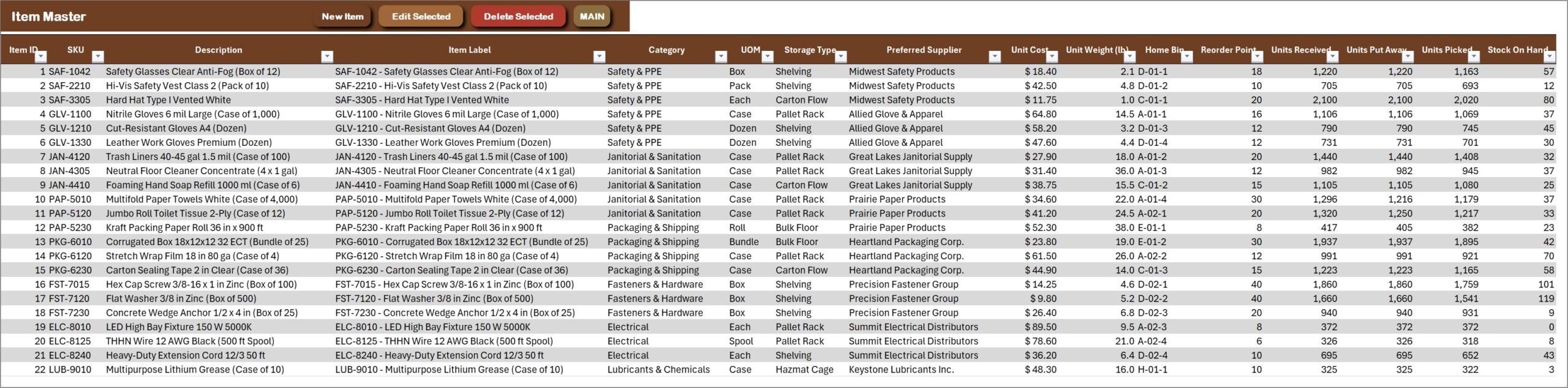
Item Master
Each SKU with description, category, unit of measure, storage type, preferred supplier, unit cost, home bin, reorder point, stock on hand and a stock status.
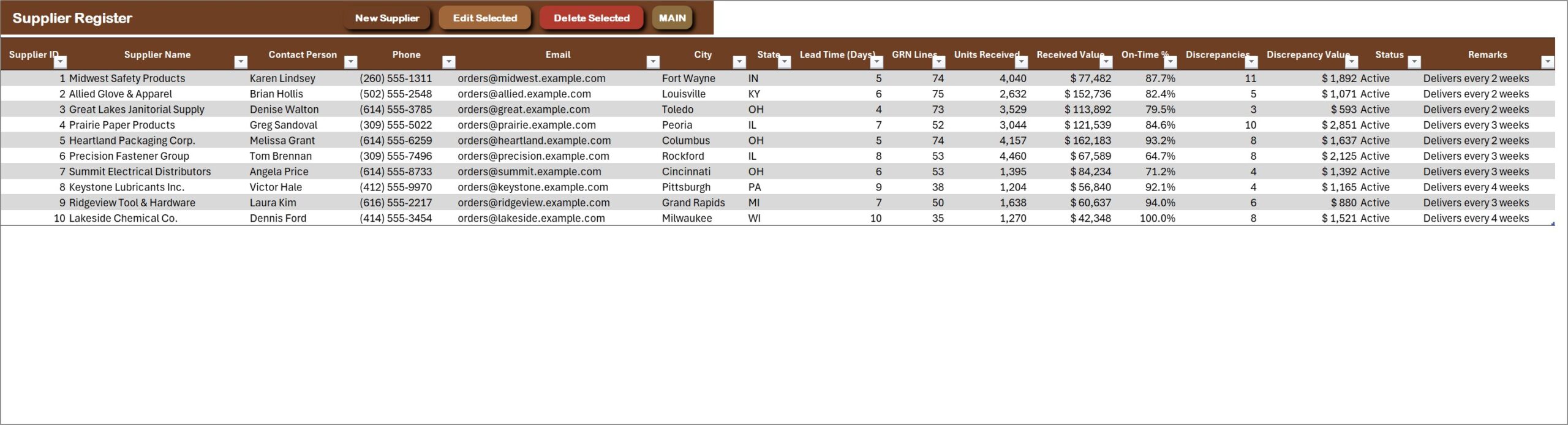
Supplier Register
Suppliers with contact, lead time, GRNs received, units received, received value, on-time % and discrepancy count.
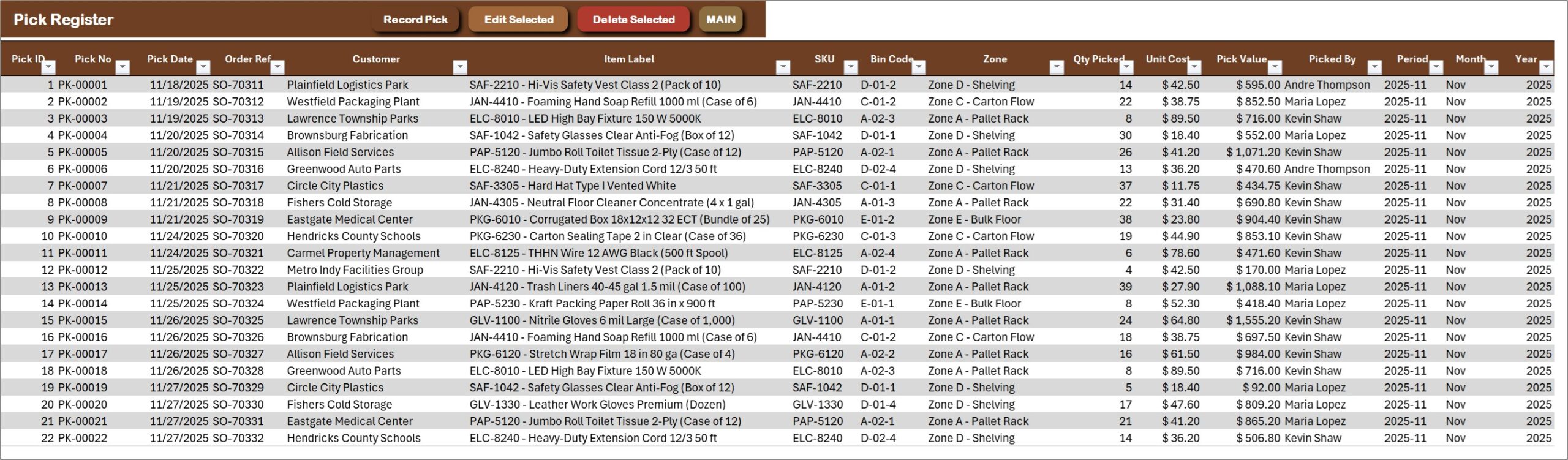
Pick Register
Stock picked out of bins against an order, with the pick number, SKU, bin, zone, quantity, unit cost and value, and who picked it.
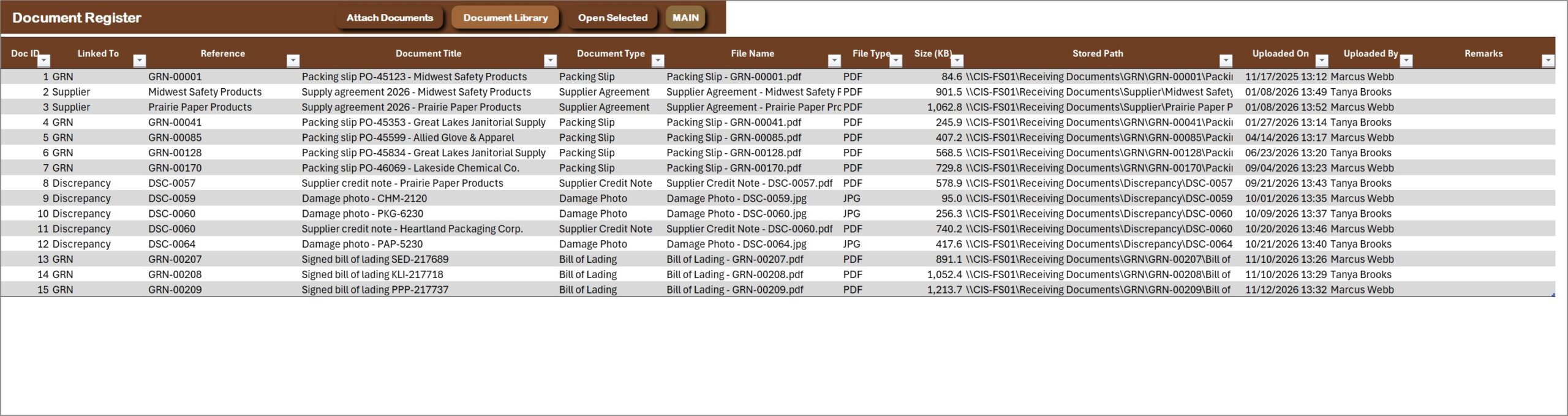
Document Register
Packing slips, bills of lading and damage photos linked to the GRN, discrepancy or supplier they belong to, with file type and size. Open Selected opens any of them in one click.
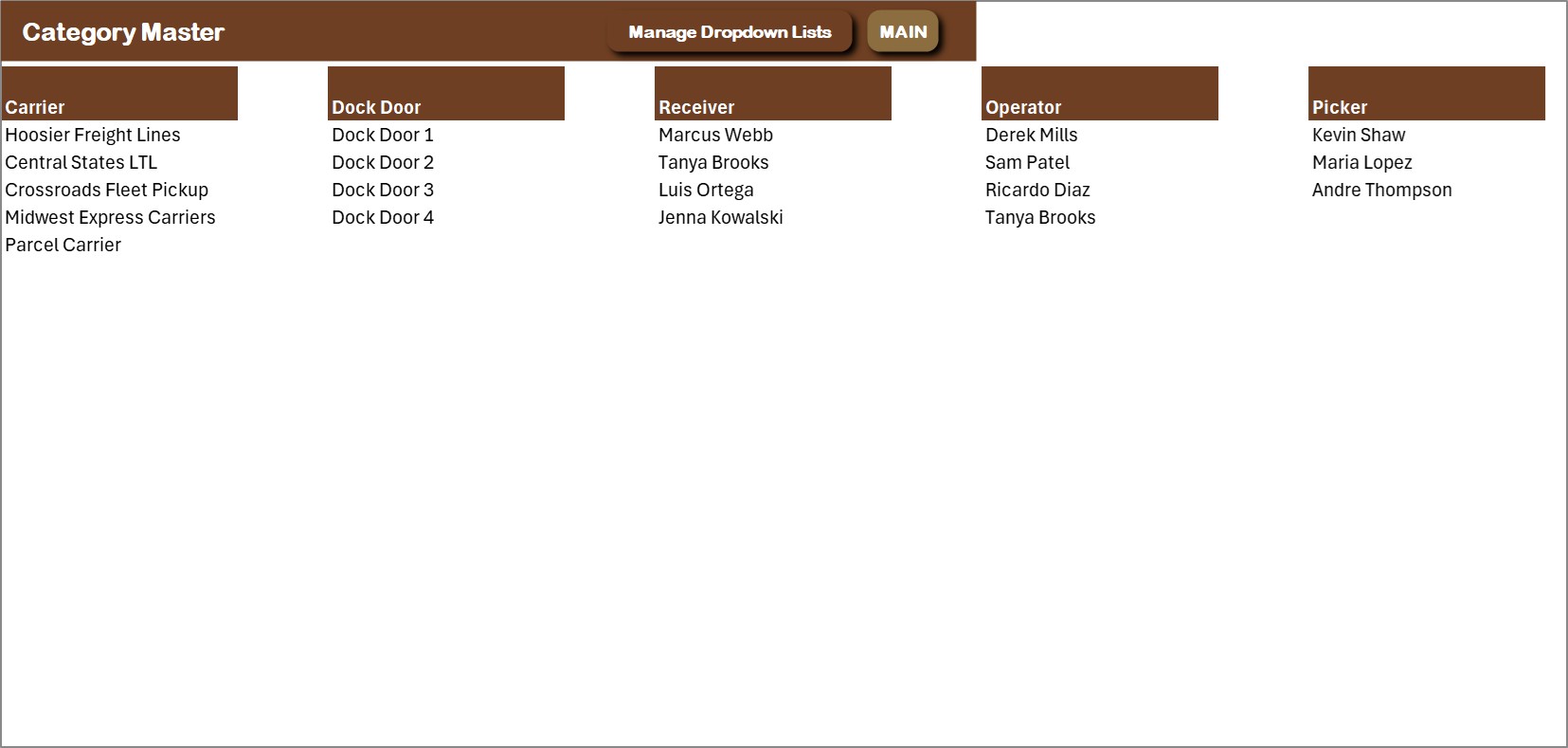
Category Master
Carriers, dock doors, receivers, operators and pickers in one place. Extend them here or from the Manage Dropdown Lists form and every drop-down follows.
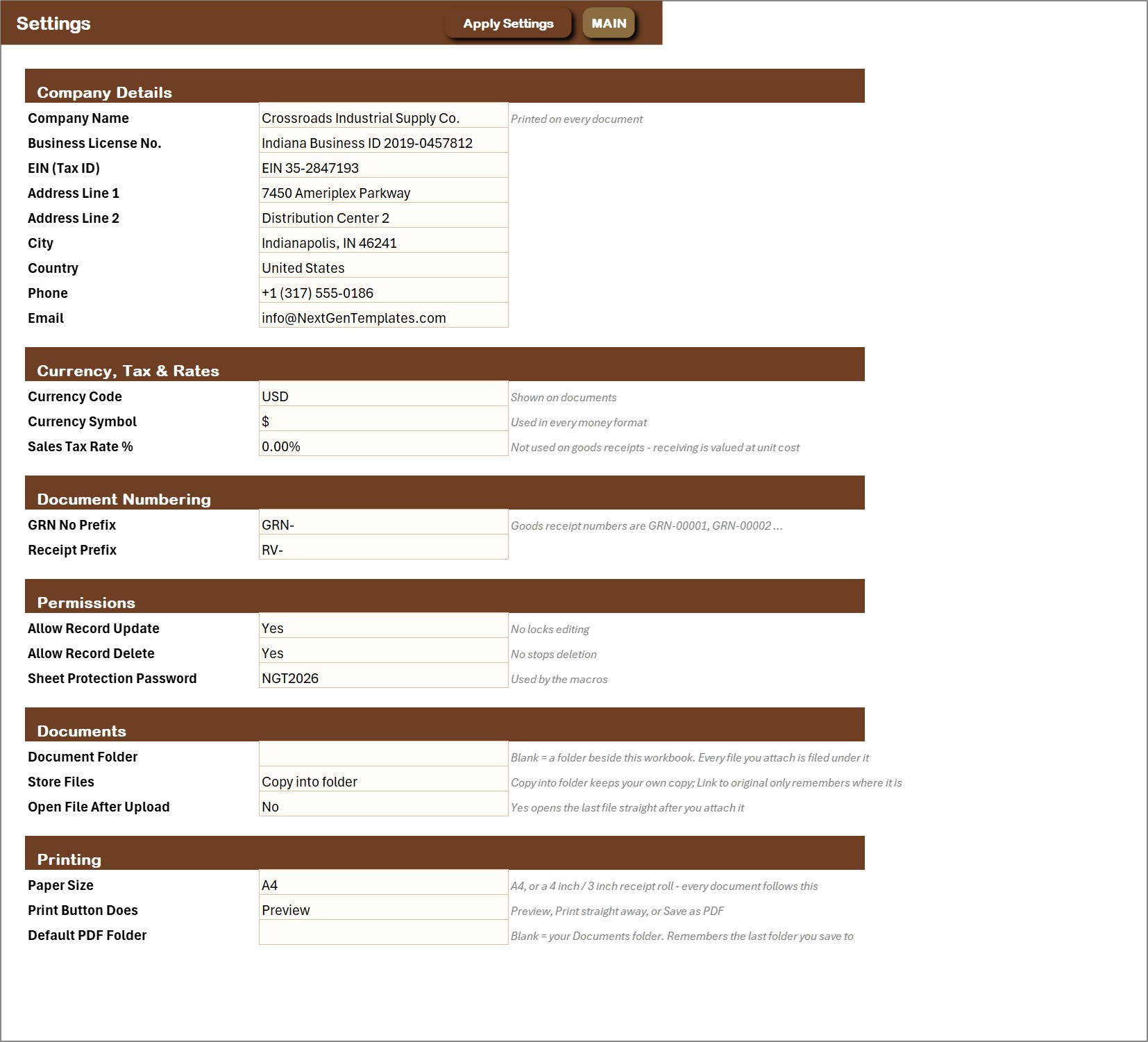
Settings
Company name and address, currency and tax, document numbering, permissions, the document folder and the paper size for printing.
👥 Who Is It For?
Warehouses, distribution centers, 3PL receiving docks, wholesalers, stores with a back room and manufacturing stores that want GRN receiving, bin putaway and discrepancy control in one Excel file. It suits Windows Excel users who want a form and a button, not a database. It does not read barcodes or connect to an ERP.
🛠️ How to Use
- Download the ZIP, save the workbook to a normal folder and open it with macros enabled.
- Open Settings and enter your company details, currency and paper size, then extend the lists on Category Master.
- Add your items, suppliers and bin locations.
- Choose New Goods Receipt (GRN) when a truck arrives, then Record Putaway for each move into a bin.
- Log any short, over or damaged shipment, press Refresh All Reports and read the dashboards.
📊 Warehouse Receiving in Excel vs. a Paper Log vs. Warehouse Software
| Feature | This Excel VBA system | Paper or plain Excel log | Cloud warehouse software |
|---|---|---|---|
| Cost | $29 one-time ✅ | Free to $20 one-time | Monthly subscription |
| Platform | Microsoft Excel for Windows (macros) | Paper or Excel | Cloud or installed software |
| GRN form with a basket of SKU lines | Yes ✅ | Manual | Yes ✅ |
| Bin putaway with home and overflow bins | Yes ✅ | Manual | Yes ✅ |
| Short, over and damaged discrepancy log | Yes ✅ | Build it yourself | Yes ✅ |
| Stock by bin location with utilization | Yes ✅ | No | Yes ✅ |
| Dashboards | 4 dashboards with slicers ✅ | No | Yes ✅ |
| A4 and thermal GRN printing | A4, 4 inch or 3 inch ✅ | No | Yes ✅ |
| Barcode scanning and ERP connection | No | No | Often ✅ |
| Works offline, data stays on your PC | Yes ✅ | Yes | No |
For a small or mid-size receiving dock that wants GRNs, putaway and discrepancies in one file, this system covers the daily work. It does not scan barcodes or connect to an ERP.
🎁 Try Before You Buy: 7-Day Free Trial
Download the free trial of the Warehouse Receiving and Putaway System in Excel VBA and use the complete system for 7 days. Every form, register, dashboard, printable document and setting works exactly as in the full version, so you can test it with your own records before you decide.
How the free trial works
- Click Get the 7-Day Free Trial below, enter your email and download the ZIP from the email we send you. Unzip it.
- Open it in Microsoft Excel for Windows (the desktop app, not Excel Online or Mac) and click Enable Content on the yellow bar. If there is no yellow bar, right-click the file, choose Properties, tick Unblock and open it again.
- Your 7 days start the first time the file opens with macros on. A banner on the MAIN page shows how many days are left.
- After 7 days the trial locks and shows a Buy Full Version button. Buy the full version to keep working with no time limit.
| Free Trial | Full Version | |
|---|---|---|
| Every feature, form and dashboard | Yes | Yes |
| Time limit | 7 days | None, lifetime use |
| Trial banner | Yes | No |
| PDF user manual | No, full version only | Included |
| Editable (unlocked) VBA code | No, locked | Yes |
Enter your email and we send the download link straight to your inbox.
The trial runs once per computer: downloading it again does not restart the 7 days. Records you enter during the trial can be copied into the full version.
❓ Frequently Asked Questions
What is the Warehouse Receiving and Putaway System in Excel VBA?
It is one macro-enabled Excel file that runs a receiving dock: goods receipt notes with a basket of SKU lines, bin putaway, a discrepancy log for short, over and damaged shipments, stock by bin location and four dashboards. Records go in through forms and the dashboards update themselves.
How do I receive a truck?
Choose New Goods Receipt (GRN), pick the supplier and enter the PO number, BOL, carrier and dock door. Add each SKU with the ordered, received and rejected quantity and save. The GRN is saved under one number and you can print it straight away.
How does bin putaway work?
Lines Waiting for Putaway lists every GRN line still on the dock. Choose Record Putaway, pick the GRN line, the bin and the quantity. The system checks the home bin and the overflow bin and records the dock-to-stock days.
How are short, over and damaged shipments handled?
Log Discrepancy records the type (short shipment, over shipment, damaged in transit, wrong item or missing label), the quantity, the action taken and the status. Credit received and days open are tracked, and the Discrepancy Dashboard shows the value by type and supplier.
Can I see stock by bin location?
Yes. Stock by Bin Location shows the capacity, units in the bin, utilization % and a status of Empty, Low, In Use or Full for every bin, and the Stock by Location Dashboard summarizes it by zone.
Can I print GRNs and putaway lists?
Yes. Print GRN and Print Putaway List work on A4, 4 inch or 3 inch thermal paper. Choose the paper size once on the Settings sheet.
Which Excel do I need?
Microsoft Excel 2016 or later for Windows with macros enabled. It does not work on Mac, in Excel for the web or in Google Sheets, because the entry forms are VBA UserForms.
Does it scan barcodes or connect to an ERP?
No. It does not read barcodes or connect to an ERP or any outside service. It is a single-user desktop workbook and your data stays on your own PC. You can attach packing slips and damage photos to a record from the Document Library.
Can I try it before I buy?
Yes. A 7-day free trial is available from the product page. It is a separate file with every form, register and dashboard working, and it stops working after 7 days.
Is sample data included?
Yes. The file ships with a year of sample data for an Indianapolis distribution center: 209 GRNs, 577 GRN lines, 43 bins and 10 suppliers, plus an illustrated PDF user manual, so every dashboard is populated when you open it.
🛒 Get the Warehouse Receiving and Putaway System
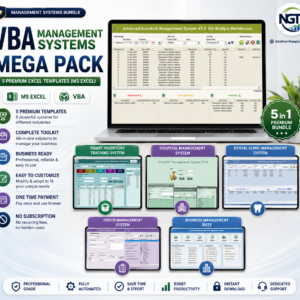
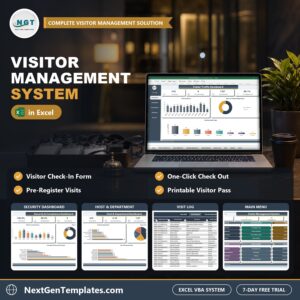
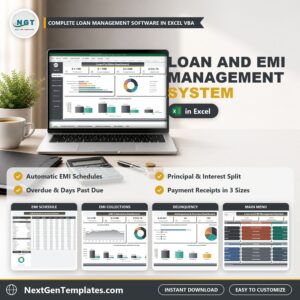
Download the Warehouse Receiving and Putaway System V1.0 in Excel VBA and stop booking trucks in on paper. For a related VBA system, see the Visitor Management System in Excel VBA or the Warranty Claim Management System in Excel VBA, or browse the VBA Management Systems Mega Pack.





Reviews
There are no reviews yet.