

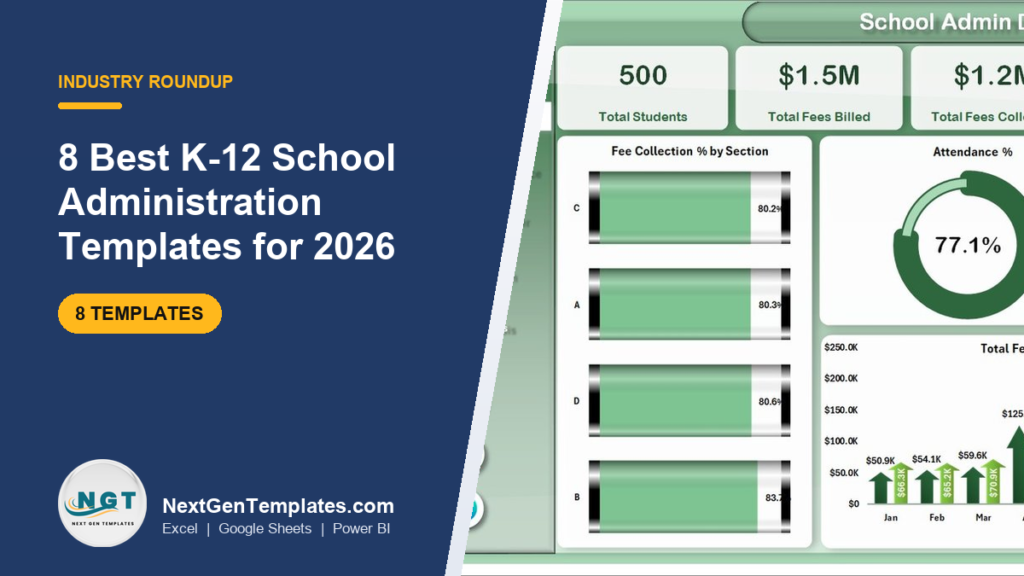
The best school management Excel template for most K-12 administrators in 2026 is the School Admin Dashboard in Excel ($17.99): five pages cover enrollment, attendance, academic performance, fee collection and class analysis from one data sheet. If you need to run admissions, staff and records day to day, choose the School Management System Web App ($39.99).
Last updated: September 2026
Key takeaways
- Our top pick is the School Admin Dashboard in Excel ($17.99) — 16 pre-built charts across Overview, Academic Performance, Attendance Tracker, Fee Collection and Class Analysis pages.
- For daily operations, the School Management System Web App ($39.99) adds admissions, documents, classes, staff and role-based logins for Admin, Principal, Teacher and Accountant.
- The cheapest pick is the Student Attendance Data Entry System in Excel at $5.99; the Education & School Management Bundle gives 8 templates for $34.99 (68% off).
- All eight templates cost $5.99 to $39.99 once, against school ERP and SIS tools that commonly charge around $3–$10 per student per year.
- The list covers Excel, Google Sheets, Power BI and a Google Apps Script web app, so a school on Microsoft 365 and one on Google Workspace both have a native option.
K-12 school administration templates compared
| Template | Format | Best For | Price |
|---|---|---|---|
| School Admin Dashboard (Best overall) | Excel | Whole-school enrollment, attendance, fees and results | $17.99 |
| School Management System Web App | Web App (Google Sheets backend) | Running admissions, records and staff day to day | $39.99 |
| Student Enrollment KPI Dashboard | Excel | Admissions funnel, retention and dropout tracking | $14.99 |
| Primary Schools KPI Dashboard | Excel | Elementary schools reviewing MTD/YTD targets | $14.99 |
| Secondary Schools KPI Dashboard | Power BI | Middle and high schools, boards comparing schools | $11.99 |
| Student Enrollment KPI Dashboard | Google Sheets | Shared admissions reporting by link | $9.99 |
| School Transportation Services Dashboard | Excel | Bus routes, fleet cost and driver safety | $17.99 |
| Student Attendance Data Entry System | Excel (VBA) | Teachers marking daily attendance offline | $5.99 |
| Education & School Management Bundle (Best value) | Excel + Google Sheets | 8 templates: attendance, fees, assignments, events | $34.99 |
K-12 school administration teams share one operational pain: the numbers a principal needs every week live in different places. The front office keeps admissions in one file, class teachers mark attendance in registers, the accountant tracks fees in another workbook, and the transport coordinator has route sheets of their own. When the board asks for the attendance rate by grade or the fees still outstanding, somebody spends a day stitching spreadsheets together.
The paid fix is a school ERP or student information system such as PowerSchool, Fedena, Classter or Teachmint. They are capable platforms, but they usually bill per student, every year — commonly somewhere around $3 to $10 per student per year depending on vendor, modules and contract (check each vendor’s current quote). For a 500-student school that is roughly $1,500 to $5,000 a year, before onboarding. A school management Excel template you buy once for $5.99–$39.99 will not replace a parent portal or a state-reporting module, but it covers the tracking and reporting most small and mid-sized schools actually do.
How we picked these
We searched the NextGenTemplates catalog of several thousand published templates for products built for schools, students and education administration, then kept only those that model real K-12 work: admissions, enrollment, attendance, fees, academic results, staff and transport. Generic dashboards relabelled “education” were left out, as were tools for colleges, language schools, driving schools and student-exchange programs, which have different buyers. Colleges and universities are covered in our separate roundup of the best university dashboard templates.
We also left out an employee overtime dashboard and a preschool-only Power BI file that the original shortlist carried, because neither fits a K-12 administrator’s job. Every remaining pick has a live product page, a one-time price and a documented list of what is inside. Ranking weighs breadth of coverage first, then fit for a specific job, then price.
The 8 best school management Excel templates and K-12 tools for 2026
1. School Admin Dashboard in Excel — best overall
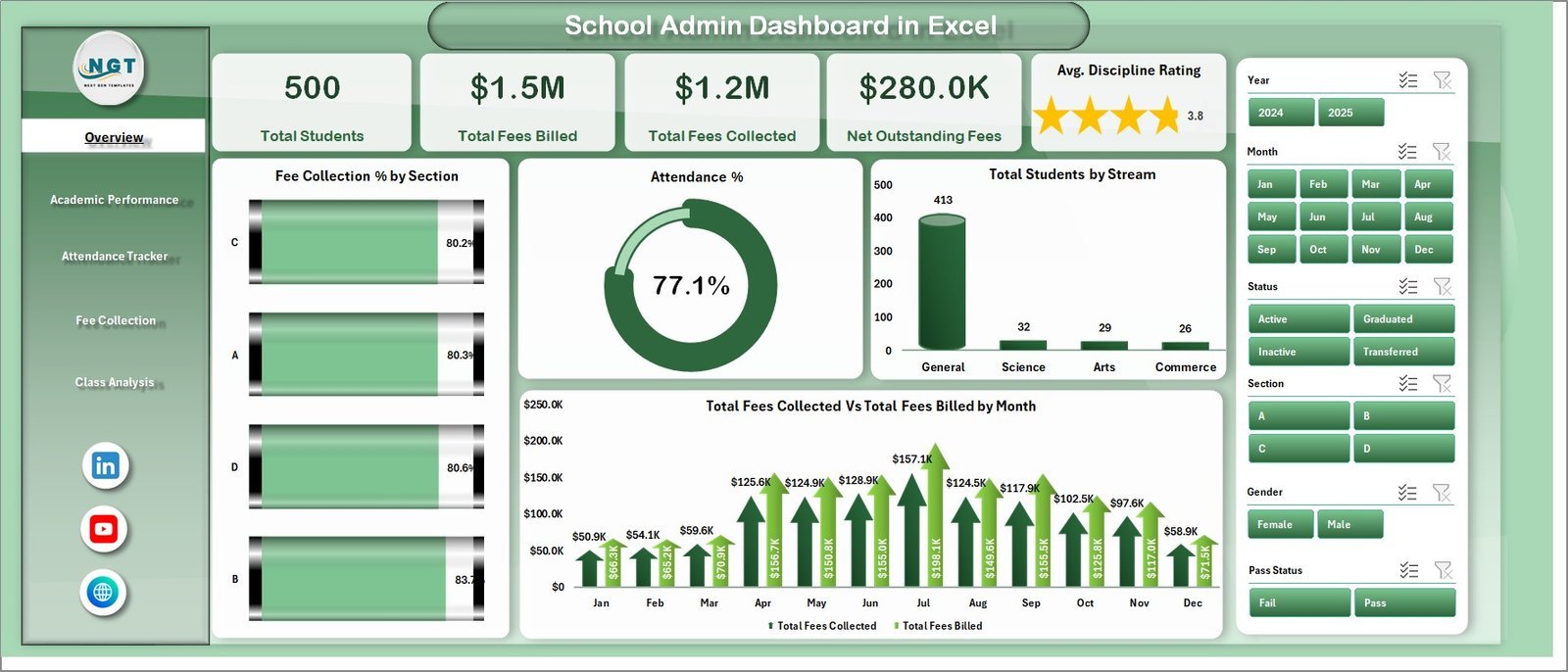
This is the school management Excel template we would hand to a new principal first, because it answers the five questions every school leader is asked: how many students, how are they performing, are they attending, have fees been paid, and which classes need attention. One data sheet feeds five dashboard pages through pivot tables and slicers.
Who it is for: principals, school administrators, bursars and academic coordinators at single-campus K-12 schools who already work in Microsoft Excel.
What is inside:
- Five pages: Overview, Academic Performance, Attendance Tracker, Fee Collection and Class Analysis, plus a Data Sheet and a Support Sheet of pivot tables
- Five KPI cards: Total Students, Total Fees Billed, Total Fees Collected, Net Outstanding Fees and Avg. Discipline Rating
- 16 pre-built charts, including Attendance % by Section and by Month, and Avg. Marks % by Stream and Section
- Fee Collection % vs Net Outstanding Fees by status, and Total Fees Collected by Month
- Slicers for section, stream, grade level, status and month; no add-ins or internet connection needed
Concrete uses: find the section whose fee collection rate has slipped below the rest before term ends; compare attendance by month to see whether the post-holiday dip is recovering; show the board average marks by stream in one screen; and list which grade levels carry most of the outstanding fees. If your team prefers Power BI, the same design is available as the School Admin Dashboard in Power BI, also $17.99.
Price: $17.99 — buy the School Admin Dashboard in Excel.
Best for: one-file, whole-school reporting on enrollment, attendance, results and fees.
2. School Management System Web App — best for running daily operations

Pick #1 reports on the school; this one helps you run it. It is a web app built on Google Apps Script with a Google Sheets backend: six connected modules hold admissions, student documents, classes and sections, staff and teacher profiles, with a dashboard on top. It is not an Excel file, and we say so plainly, but it is the most complete school management tool in the catalog.
Who it is for: small private schools, academies and tuition-heavy K-12 institutions that want the front office, teachers and accountant working in one system.
What is inside:
- Role-based login for four roles — Admin, Principal, Teacher and Accountant — each seeing only their screens
- 12 live KPIs, including Total Students, New Admissions This Month, Today’s Attendance %, Pending Fee Amount, Upcoming Exams, Payroll Due and Transport Students
- Student Admission & Master register with admission number, class, section, roll number, parent contact and transport flag
- Student Documents tracker for birth certificate, ID proof and transfer certificate, with Pending/Uploaded status and a Verified By name
- Filters for academic year, class, section and date range; data stays in your own Google Drive
Concrete uses: see missing transfer certificates before an inspection; check today’s attendance percentage without walking the corridors; keep class capacity and room numbers in one place during admissions season; and give the accountant the pending fee total without sharing student documents. You deploy your own private copy — Google’s Apps Script documentation explains how web-app deployment works — and a live demo is on the product page.
Price: $39.99 — get the School Management System Web App.
Best for: schools that need a working admissions and records system, not just a report.
3. Student Enrollment KPI Dashboard in Excel — best for admissions teams
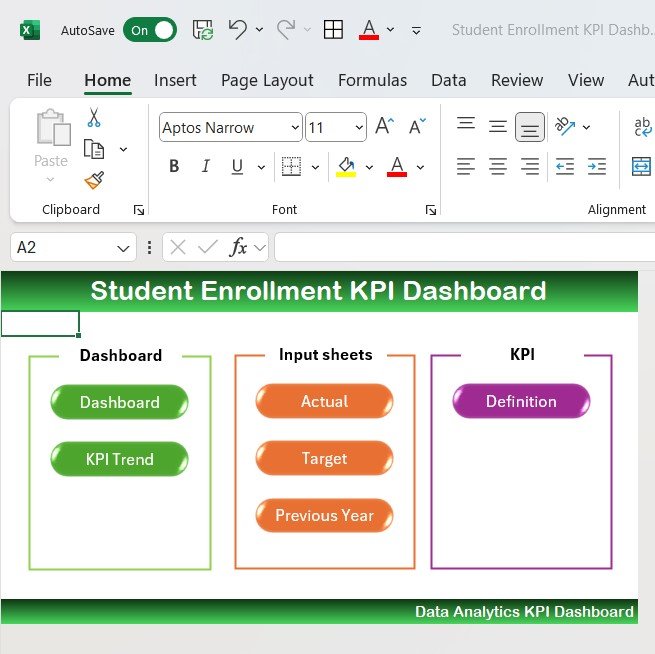
Enrollment is revenue for most private schools, so admissions deserves its own dashboard. This workbook tracks the funnel from application to acceptance to enrollment, then follows students into retention and dropout, with the financial side — tuition and scholarships — alongside.
Who it is for: admissions officers, registrars and school business managers planning intake targets.
What is inside:
- Application, acceptance and enrollment counts by program, department and other categories
- Applicant demographics: gender, age, location and academic background
- Retention and dropout rates to test whether support programs work
- Admissions-process efficiency from submission to final enrollment
- Tuition fee and scholarship tracking tied to enrollment
Concrete uses: calculate your yield — enrolled students divided by accepted students — for each grade; see where applications stall in the process; check whether scholarships are going to the grades that need seats filled; and forecast next year’s intake from this year’s funnel.
Price: $14.99 — buy the Student Enrollment KPI Dashboard in Excel.
Best for: schools whose budget depends on hitting an enrollment target.
Not sure which to buy? For whole-school reporting, the School Admin Dashboard in Excel is $17.99. For daily admissions, records and staff, the School Management System Web App is $39.99. Want attendance, fees and assignments covered at once? The Education & School Management Bundle is $34.99 for 8 templates.
4. Primary Schools KPI Dashboard in Excel — best for elementary schools
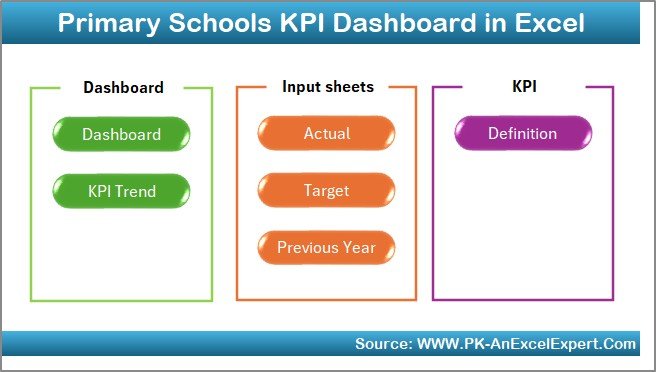
This is a KPI scorecard rather than a transaction dashboard. You enter monthly actuals, targets and last year’s figures for each KPI, choose a month from a dropdown, and the dashboard compares month-to-date and year-to-date performance with up and down arrows.
Who it is for: elementary principals, academic coordinators and management committees who review the school against a plan every month.
What is inside:
- Seven worksheets: Summary navigation, Dashboard, Trend, Actual Numbers input, Target, Previous Year and KPI Definition
- MTD and YTD actual vs target vs previous year for every KPI
- Pre-loaded KPI categories: academic, attendance, teacher, behaviour, resources and facilities
- A definition sheet documenting each KPI’s formula, unit and type
Concrete uses: set a monthly attendance target and see the YTD gap; compare this October with last October instead of guessing about seasonality; run a 15-minute monthly review with the leadership team from one screen; and give trustees the same scorecard format every month.
Price: $14.99 — buy the Primary Schools KPI Dashboard in Excel.
Best for: target-driven elementary schools that report monthly to a board or trust.
5. Secondary Schools KPI Dashboard in Power BI — best for middle and high schools
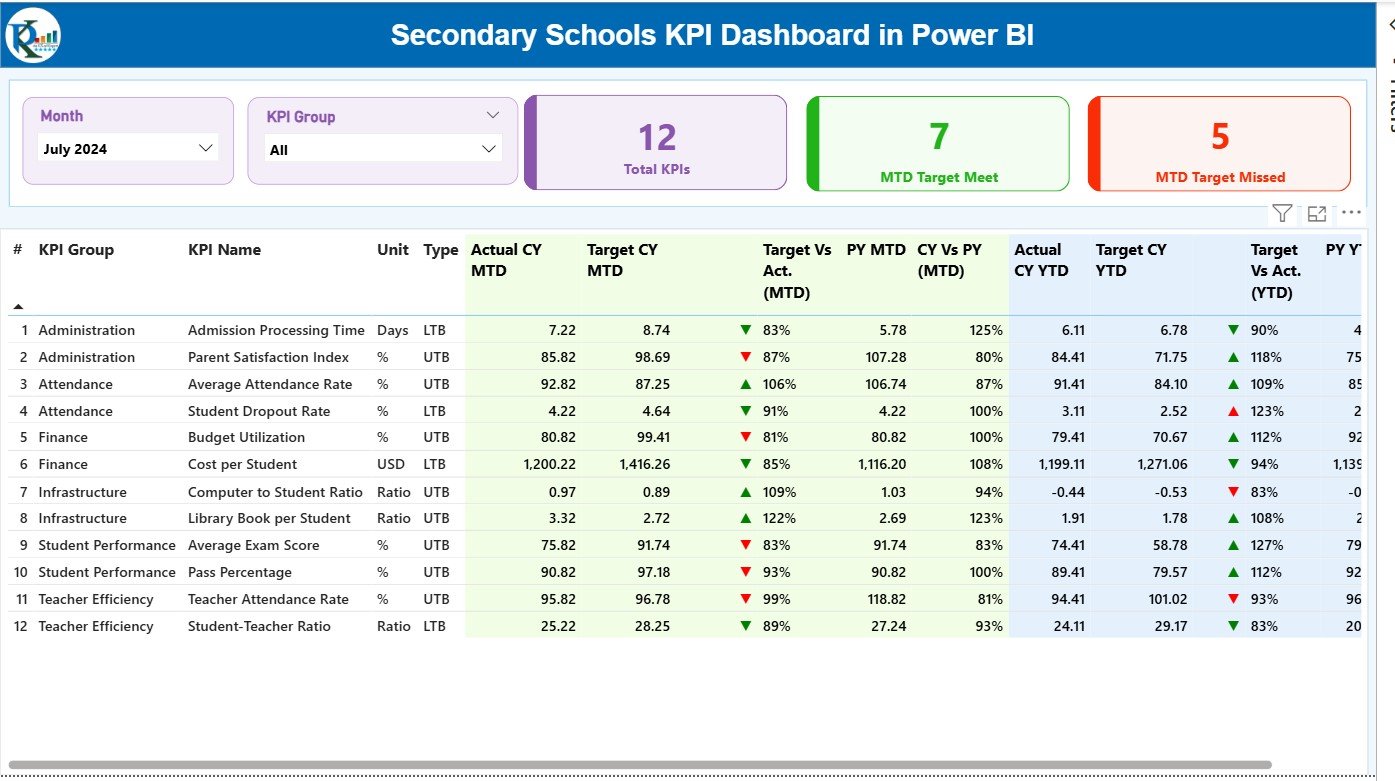
The secondary-school counterpart of pick #4, built for Power BI. It reads actuals, targets and KPI definitions from an Excel source and presents them in three interactive pages, so a school that already reports in Microsoft 365 gets a ready-made KPI structure.
Who it is for: middle and high school principals, heads of department, and education boards that compare several schools on one standard.
What is inside:
- Three pages: Summary, KPI Trend and a drill-through KPI Definition page
- Counts of KPIs meeting and missing their MTD targets, with green and red indicators
- Example KPIs such as Average Exam Score %, Pass Rate %, Teacher Attendance %, Homework Submission %, Fee Collection Rate % and Operational Cost per Student
- Month and KPI Group slicers across academic, teacher, student, financial and administrative groups
Concrete uses: publish a monthly scorecard managers can open on their phones; split academic KPIs from financial ones for separate meetings; drill through when a governor asks how pass rate is calculated; and refresh straight from the Excel source each month.
Price: $11.99 — get the Secondary Schools KPI Dashboard in Power BI.
Best for: Power BI schools and boards that want a target-vs-actual scorecard.
6. Student Enrollment KPI Dashboard in Google Sheets — best for shared admissions reporting
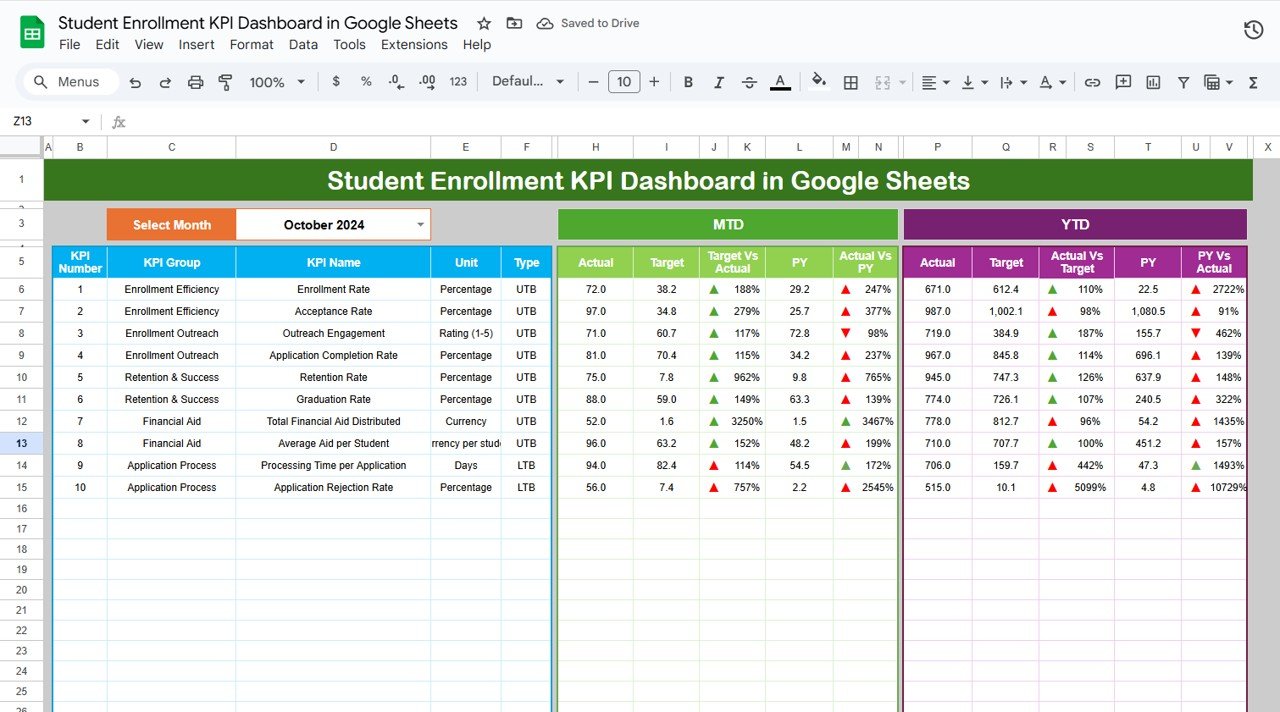
At $9.99 this is the lowest-cost dashboard on the list. It is a Google Sheets enrollment scorecard, so it opens in a browser and can be shared by link — useful when the admissions officer, the principal and the owner all need the same numbers.
Who it is for: schools on Google Workspace and admissions teams that collaborate across campuses.
What is inside:
- Six tabs: Dashboard, KPI Trend, Actual Numbers, Target, Previous Year Numbers and KPI Definition
- A month selector that drives MTD and YTD results, with current year vs previous year comparison
- KPI groups for admission, retention, academics and finance, each marked upper-the-better or lower-the-better
- Green and red arrows showing whether each KPI met its target
Concrete uses: share one live admissions scorecard with every campus; compare this intake season with last year’s; track retention alongside new admissions so growth is not masking losses; and check the numbers from a phone before a parent open day.
Price: $9.99 — get the Student Enrollment KPI Dashboard in Google Sheets.
Best for: the tightest dashboard budget and teams that share by link.
7. School Transportation Services Dashboard in Excel — best for transport coordinators
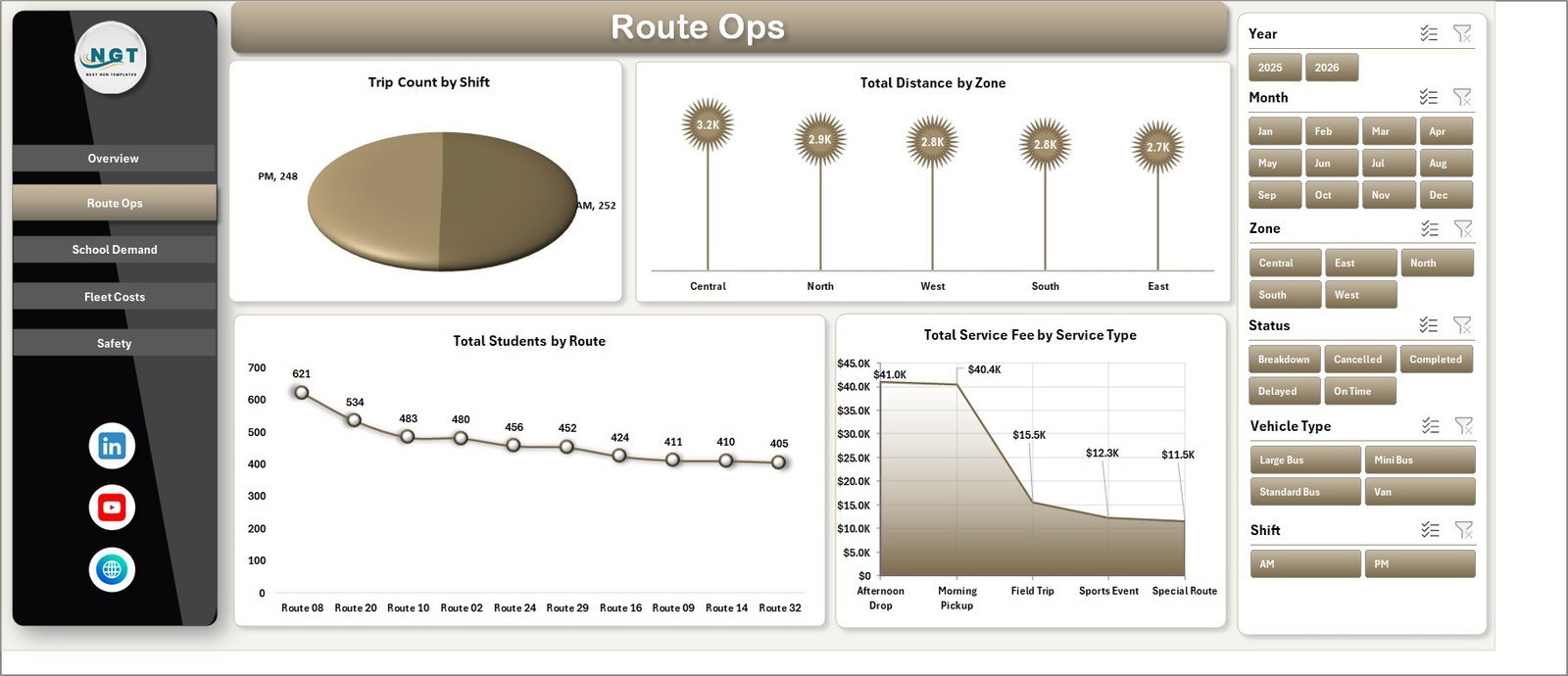
School buses are one of the largest non-teaching costs a school carries, and one of the least analysed. This dashboard puts service fees, student volume, route distance, fleet cost and driver safety in one workbook.
Who it is for: transport coordinators, bursars and operations managers at schools that run or contract bus routes.
What is inside:
- Seven tabs: Overview, Route Ops, School Demand, Fleet Costs, Safety, Data Sheet and Support Sheet
- Four KPI cards: Total Service Fee, Total Students, Total Distance and Total Incidents
- 18 analysis charts, including fuel vs maintenance cost by vehicle type and distance vs fuel cost by route
- Average safety rating by driver, trips by shift and status, and students by route and zone
Concrete uses: find routes whose fuel cost is out of line with distance; see which drivers need safety coaching; balance morning and afternoon shifts; and plan vehicle capacity by zone before the new school year.
Price: $17.99 — buy the School Transportation Services Dashboard in Excel.
Best for: schools that want bus cost and safety numbers they can defend.
8. Student Attendance Data Entry System in Excel — best budget pick
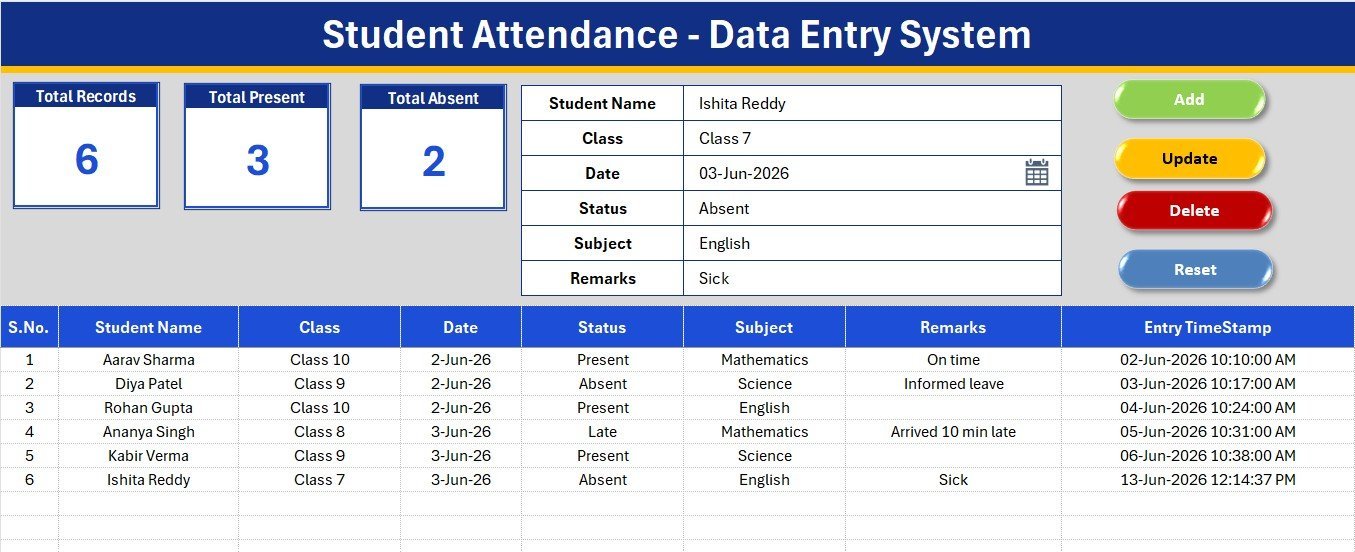
Every other pick analyses data; this one captures it. A six-field form — Student Name, Class, Date, Status, Subject and Remarks — logs attendance through Add, Update, Delete and Reset buttons, and three KPI cards count total records, present and absent as you go.
Who it is for: class teachers and coordinators who mark subject-wise attendance on a laptop, including offline.
What is inside:
- One-screen entry form with dropdowns for class, status and subject
- Status options: Present, Absent, Late, Half Day, Leave and Holiday
- Auto serial number and entry timestamp on every record
- Editable Class 5 to Class 12 and 12-subject lists on a Setting sheet
Concrete uses: replace paper registers for a single grade; feed clean attendance records into pick #1’s data sheet; count Late and Half Day marks separately for follow-up; and run it with no internet. It uses VBA macros, so Mac users who cannot enable macros should choose a Google Sheets tool instead.
Price: $5.99 — buy the Student Attendance Data Entry System in Excel.
Best for: the cheapest way to get disciplined, consistent attendance records.
Which school KPIs should these templates track?
Whichever template you choose, the useful numbers are the same. Targets differ by school type, country and funding model, so treat the ranges below as commonly cited starting points and set your own from your baseline. For national comparisons, the National Center for Education Statistics (NCES) publishes US enrollment, attendance and staffing data.
| KPI | Formula | Commonly cited range |
|---|---|---|
| Average daily attendance rate | Days attended ÷ days enrolled | Many schools aim for about 95% |
| Chronic absenteeism rate | Students missing 10%+ of school days ÷ enrolled students | The lower the better; track by grade |
| Fee collection rate | Fees collected ÷ fees billed | Private schools often target 95%+ by term end |
| Student-teacher ratio | Enrolled students ÷ full-time teachers | US public schools average roughly 15–16 to 1 |
| Enrollment yield | Enrolled students ÷ accepted applicants | Varies widely; track year over year |
| Student retention rate | Students returning next year ÷ eligible students | Private schools commonly target 90%+ |
Chronic absenteeism deserves the most attention because it predicts everything else: a student who misses 18 of a 180-day year is already behind, and absences cluster by grade and month. The same attendance logic applies to staff, which is why our guide to attendance tracker templates in Excel, Google Sheets and Power BI is a useful companion, and teacher development follows the pattern in our training and learning dashboard templates.
How to choose between them
Use this quick decision path:
- You want one school management Excel template for whole-school reporting: School Admin Dashboard in Excel ($17.99), or the Power BI edition at the same price.
- You need to run admissions, documents, classes and staff: School Management System Web App ($39.99).
- Your budget depends on hitting an intake target: Student Enrollment KPI Dashboard in Excel ($14.99) or Google Sheets ($9.99).
- You report monthly against a plan: Primary Schools KPI Dashboard in Excel ($14.99) or Secondary Schools KPI Dashboard in Power BI ($11.99).
- You run school buses: School Transportation Services Dashboard in Excel ($17.99).
- You only need clean attendance capture: Student Attendance Data Entry System in Excel ($5.99).
- You run a church or parish school: track the congregation side with our church and ministry finance templates, ranked from $6.99 to $17.99.
- You want attendance, fees, assignments and events together: Education & School Management Bundle ($34.99).
A sensible combination is the web app or the attendance system for data capture, plus the School Admin Dashboard for the monthly leadership review. Before you pay, our buying guide on how to evaluate an Excel dashboard template lists the checks that matter, and 7 reasons to use a quality KPI dashboard in Excel, Power BI and Google Sheets explains why the format should follow your school’s software.
Template vs school ERP: what does it cost over five years?
Per-student pricing grows with your roll. At an assumed $5 per student per year, a 500-student school pays $2,500 a year and $12,500 over five years; at $8 it is $20,000. Buying the School Admin Dashboard plus the School Management System Web App costs $57.98 once. Even with a freelancer customising the files, you are likely to stay well below one year of licence fees.
That does not make an ERP the wrong choice — you are paying for hosting, support, a parent portal and compliance reporting. It means you should buy software for those features specifically, not for reporting you could own. Our breakdown of one-time purchase vs SaaS subscription costs walks through the same maths for other tools, and template bundles vs single templates shows when the $34.99 education bundle beats buying one file at a time. Planning the school budget too? See our budget templates for Excel and Google Sheets.
When a template is NOT the right answer
A template is the wrong buy in four situations. First, if parents must log in to see grades, pay fees online or receive SMS alerts, you need a student information system with a parent portal. Second, if your school must submit state or district compliance reports in a mandated format, buy software that produces them. Third, if you need biometric or RFID attendance at the gate, that requires hardware integration. Fourth, if you run many campuses with hundreds of staff editing at once, a governed platform will scale better than shared files.
For everything short of that — a single school or small group tracking admissions, attendance, results, fees and transport — a $6–$40 template does the job a per-student licence is oversized for. Be honest about which side of that line you sit on before you spend. Running other businesses alongside a school? Our gym and fitness studio templates follow the same one-time-price model, and how to scale a spreadsheet into a business tool explains when to graduate from a template.
The same template-versus-software trade-off applies well beyond schools. Our guide to the 8 best law firm and legal operations templates compares billing, compliance and KPI dashboards for law firms and in-house legal teams.
Running operations in another regulated industry? Our ranked roundup of airline and airport operations dashboard templates applies the same scorecard approach to flight punctuality, maintenance and airport infrastructure.
Frequently asked questions
What is a school management Excel template?
A school management Excel template is a pre-built workbook that organises school data — students, enrollment, attendance, marks, fees and staff — and turns it into dashboards and KPIs. You enter or paste records into a data sheet, and charts and slicers show attendance by section, fees outstanding and results by grade without building formulas yourself.
Can I manage a school in Excel or Google Sheets?
Yes, for a small or mid-sized school. Excel dashboards handle reporting well, while the School Management System Web App adds admissions, documents, classes, staff and role-based logins on a Google Sheets backend. For parent portals, online fee payment and mandated state reporting, a dedicated student information system is still the better fit.
What is the best free alternative to PowerSchool or Fedena?
No free tool matches a full student information system, but a one-time template covers the tracking and reporting side. The School Management System Web App costs $39.99 once and runs admissions, records, classes and staff, which suits small schools that do not need a parent portal or integrated online payments.
Which KPIs should a K-12 school track every month?
Track enrollment, average daily attendance, chronic absenteeism, fee collection rate, outstanding fees, average marks or pass rate by grade, student-teacher ratio and retention. Attendance and chronic absenteeism matter most, because students who miss school regularly fall behind academically and are more likely to leave.
How do I calculate the student attendance rate?
Divide the total days students attended by the total days they were enrolled, then multiply by 100. For example, 400 students enrolled for 20 days is 8,000 student-days; if 7,600 were attended, the attendance rate is 95%. Track it by grade and month to spot patterns early.
What counts as chronic absenteeism?
Chronic absenteeism is commonly defined as a student missing 10% or more of enrolled school days for any reason, excused or not. In a 180-day year that is 18 or more days. Divide the number of chronically absent students by total enrollment to get the school’s chronic absenteeism rate.
Excel, Google Sheets or Power BI — which format should a school choose?
Choose the tool your staff already use. Excel suits administrators who want one self-contained file; Google Sheets suits Workspace schools that share by link; Power BI suits schools and boards that want interactive drill-down and mobile viewing. The web app suits schools that need data-entry screens and logins for different roles.
How much do these school templates cost?
The eight templates range from $5.99 to $39.99 as one-time purchases with no subscription or per-student fees, and the Education & School Management Bundle is $34.99 for eight tools. School ERP software commonly charges around $3 to $10 per student per year, so a template usually costs less than one month of licence fees.
Can these templates track school fees?
Yes. The School Admin Dashboard shows fees billed, collected and outstanding by grade, stream and month, and the web app tracks pending fee amounts on its dashboard. The Education & School Management Bundle includes a Student Fee Record template that tracks payments, balances and due dates.
Do I need technical skills to set these up?
No advanced skills are needed for the dashboards: you enter data into a labelled sheet and click Refresh All. The web app needs a one-time deployment from your Google account using Google Apps Script, following a documented guide. The Power BI file opens in the free Power BI Desktop, and the attendance system needs macros enabled.
Get more K-12 school administration templates
Ready to stop stitching school spreadsheets together? The School Admin Dashboard in Excel ($17.99) is the school management Excel template for your monthly leadership review, and the School Management System Web App ($39.99) runs admissions, records and staff. For the best value, the Education & School Management Bundle gives you 8 attendance, fee, assignment and event templates for $34.99.
See our dashboards in action on the YouTube channel, @NextGenTemplates, and browse more ready-made tools in our list of 25 best-selling business templates or our cheap Excel dashboard templates under $15.