

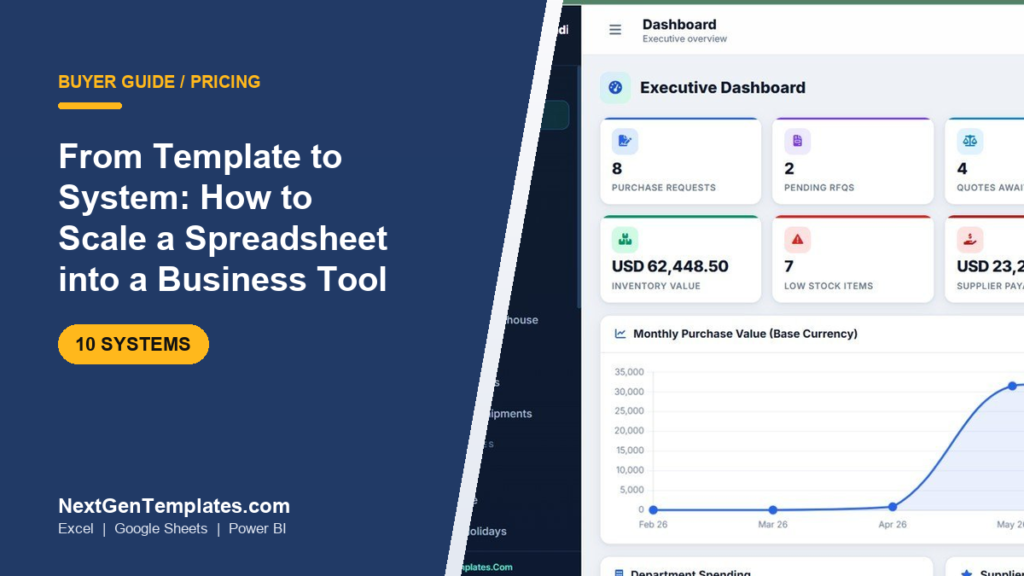
Scaling a spreadsheet to a business system means moving from a single macro-driven Excel file to a multi-user tool with roles, validation and a database behind it. The practical path is a two-rung ladder: start with a $19.99 Excel VBA system, then graduate to a $39.99 web-app system once more than one person needs live access.
Last updated: September 2026
Key takeaways
- A spreadsheet to business system upgrade is a ladder, not a leap: a $19.99 Excel VBA system is rung one, a $39.99 browser-based web app is rung two.
- Buy an Excel VBA system when one or two people share one file; buy a web app the moment three or more people need the same live data at once.
- Every system on this page is a fixed one-time price — $19.99 for Excel VBA tools, $39.99 for web apps — with no per-seat subscription, versus $15–$50 per user per month for equivalent SaaS.
- The best overall pick is the Procure360 Global ERP Management System Web App ($39.99) because one file covers procurement, inventory and supplier payments across departments.
- A bundle only beats single purchases once you will genuinely use eight or more tools; below that, buy the two or three systems you need and save the difference.
 Launch offer
SUMIFS, XLOOKUP, FILTER, LAMBDA and checking AI-written formulas, with real business projects. 11h 47m of video by PK, with practice files, quizzes and a capstone.
Spreadsheet to business system templates compared
| System | Format | Best for | Price |
|---|---|---|---|
| Procure360 Global ERP (Best overall) | Web App | Multi-department procurement & inventory | $39.99 |
| School Management System | Web App | Multi-role operations (staff, students, fees) | $39.99 |
| Holiday & Comp-Off Management (Best value) | Excel VBA | HR leave tracking for one office | $19.99 |
| Appliance Repair Service Management | Web App | Field service jobs & technicians | $39.99 |
| Car Wash Management System | Web App | Walk-in service bookings & billing | $39.99 |
| Parking Management System | Web App | Slot allocation & entry/exit logs | $39.99 |
| Dry Clean Service Management | Web App | Order intake, tagging & pickup | $39.99 |
| Vehicle Movement Register | Web App | Gate security & vehicle in/out logs | $39.99 |
| Catering Service Management | Excel VBA | Event orders & menu costing | $19.99 |
| Late Coming & Early Leaving | Excel VBA | Attendance exceptions for one team | $19.99 |
How we picked these
We searched the full NextGenTemplates catalog of 900+ paid templates and pulled the ten products that best illustrate the two rungs of the spreadsheet to business system journey: three Excel VBA systems that stay inside a single macro-enabled workbook, and seven browser-based web apps that put the same idea behind a login and a shared database.
Selection criteria were narrow on purpose. Every pick had to be a working record-keeping system (not a static template), had to carry a fixed one-time price inside the $19.99–$39.99 band, and had to solve an operational job a growing team actually outgrows a plain spreadsheet on. We excluded free downloads, single-sheet dashboards and anything that only visualises data without capturing it, because this is a buyer’s guide about running a business on the tool, not reporting on it.
The 10 best spreadsheet to business system templates for 2026
1. Procure360 Global ERP Management System Web App — best overall
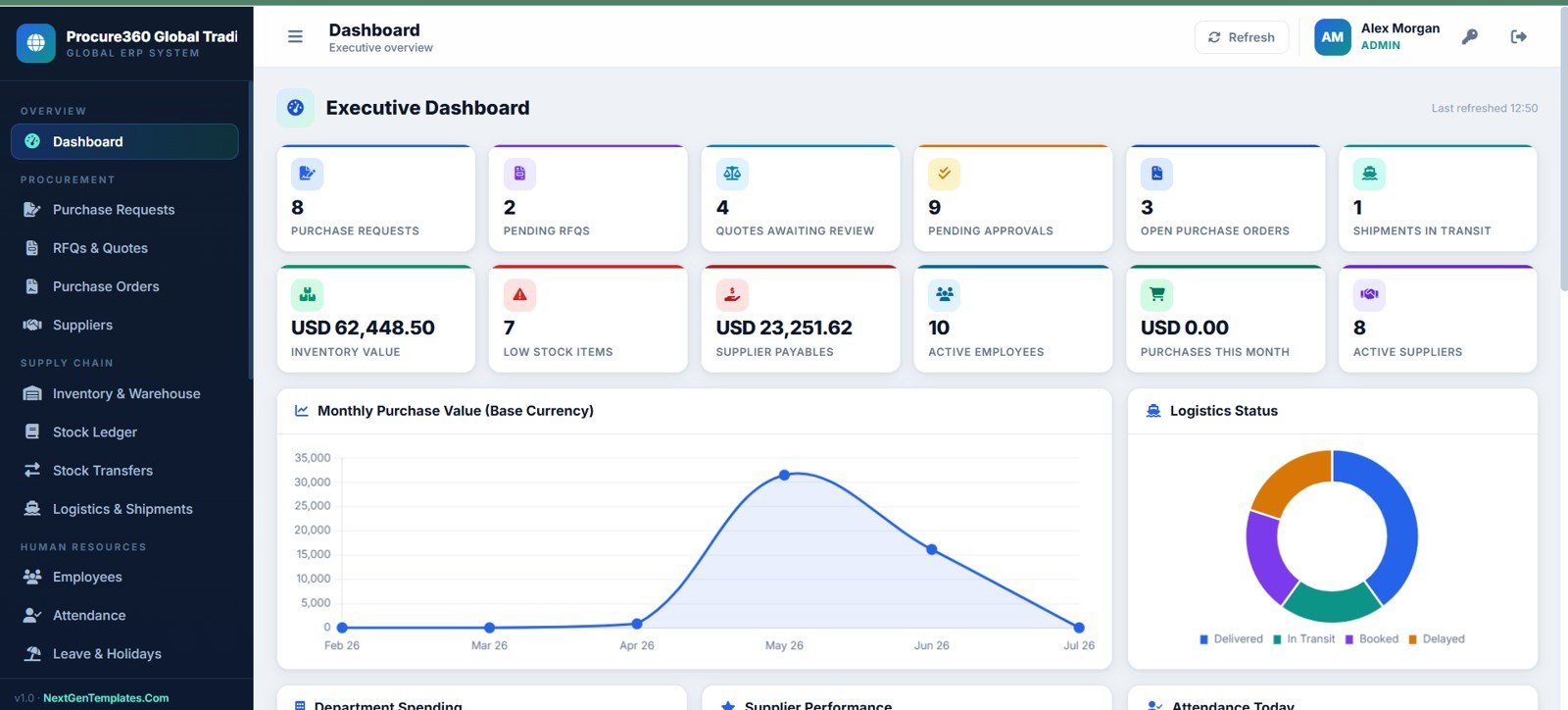
What it is: a full enterprise-resource-planning web app that handles purchase requests, RFQs, quotes, supplier payments and inventory value in one browser-based tool. Who it is for: a business that has outgrown three or four separate procurement spreadsheets and needs everyone looking at the same numbers.
- Executive dashboard with live purchase-request, RFQ and quote counts
- Multi-currency inventory value and supplier payables tracking
- Department-level spending analysis and monthly purchase trends
- Role-based logins so buyers, approvers and finance see only their view
Use cases: a 20-person distributor replacing a shared “Purchases.xlsx” that three people kept overwriting; a workshop tracking $62,000 of inventory value across two warehouses; a finance lead who needs supplier payables at a glance instead of a month-end reconciliation. This is the ceiling of the spreadsheet-to-system jump.
Price: $39.99, one-time. Get the Procure360 Global ERP web app.
Best for: any team that needs procurement, inventory and payments in one login.
2. School Management System Web App — best for multi-role operations

What it is: a browser-based system covering students, staff, classes, fees and attendance behind a single login. Who it is for: any organisation juggling several distinct roles that a single spreadsheet tab can never keep separate — a school, a coaching centre, a training institute.
- Separate modules for admissions, fee collection and staff records
- Role-based access so teachers, admin and accounts each get their own screen
- Attendance and fee-due reporting without manual filtering
Use cases: a tuition centre with 300 students where fee reminders used to live in one person’s head; an institute that needs the front desk to add students but not see payroll. When a spreadsheet grows more tabs than a person can hold in their head, this is the graduation.
Price: $39.99, one-time. Get the School Management web app.
Best for: multi-role operations where different people must see different data.
3. Holiday & Comp-Off Management System in Excel VBA — best value
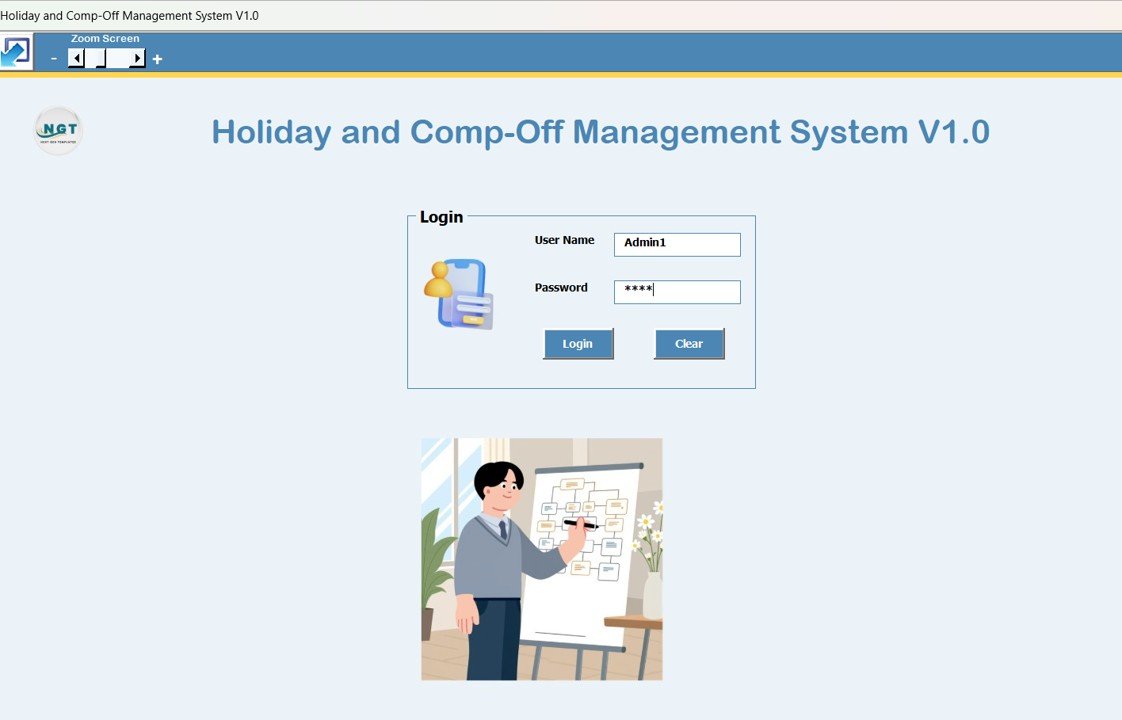
What it is: a macro-driven Excel workbook that tracks leave balances, holidays and comp-off accruals with add, update and delete buttons. Who it is for: an HR person or office manager who wants a real system without leaving Excel or paying a monthly fee. This is rung one of the ladder — a spreadsheet that already behaves like a system.
- Form-driven data entry with validation, not free typing into cells
- Automatic leave-balance calculation and comp-off accrual
- Built-in dashboard and one-click reset, all inside one .xlsm file
Use cases: a 15-person office replacing a leave email thread; a manager who needs an audit trail of who approved what. It proves the concept before you spend $39.99 on a web app.
Price: $19.99, one-time. Get the Holiday & Comp-Off Excel VBA system.
Best for: the cheapest honest step from a plain spreadsheet to a real system.
4. Appliance Repair Service Management System Web App
What it is: a web app for field-service businesses — logging repair jobs, assigning technicians, tracking parts and billing. Who it is for: an appliance or electronics repair shop running jobs on WhatsApp and paper. It replaces the “job register” spreadsheet the moment two technicians need the same list at once.
- Job intake, status tracking and technician assignment
- Customer and device history in one place
- Invoice and payment status per job
Use cases: a repair firm with four technicians that keeps losing track of which job is where; a shop that wants a customer’s full repair history before quoting. Price: $39.99, one-time. Get the Appliance Repair web app. Best for: field-service teams with technicians in the field.
5. Car Wash Management System Web App
What it is: a web app for walk-in service bookings, packages, billing and daily collections. Who it is for: a car wash or detailing business tracking sales on a notebook. Use cases: a two-bay wash that wants package tracking and a daily revenue figure without a spreadsheet per shift; an owner who needs to see collections from home.
- Booking and service-package management
- Billing, discounts and daily collection totals
- Customer records for repeat visits
Price: $39.99, one-time. Get the Car Wash web app. Best for: high-volume walk-in service billing.
6. Parking Management System Web App
What it is: a web app for slot allocation, entry and exit logging, and parking fee calculation. Who it is for: a paid parking lot, a mall basement or an office campus that logs vehicles on paper. Use cases: a 120-slot lot that needs live occupancy; a campus tracking who is parked where. Price: $39.99, one-time. Get the Parking web app. Best for: live slot occupancy and fee capture.
7. Dry Clean Service Management System Web App
What it is: a web app for order intake, garment tagging, pickup scheduling and billing. Who it is for: a dry-cleaning or laundry business tracking orders on tickets. Use cases: a laundry with 60 orders a day that keeps mixing up pickups; an owner who wants ready-by dates and payment status in one screen. Price: $39.99, one-time. Get the Dry Clean web app. Best for: order-and-pickup workflows with lots of small tickets.
8. Vehicle Movement Register Management System Web App
What it is: a web app that replaces the paper gate register — logging vehicle entry and exit, driver, purpose and time. Who it is for: a factory, warehouse or gated campus with a security desk. Use cases: a plant that needs an auditable in/out log for compliance; a warehouse tracking delivery-truck turnaround. Price: $39.99, one-time. Get the Vehicle Movement Register web app. Best for: gate security and auditable movement logs.
9. Catering Service Management System in Excel VBA
What it is: a macro-driven Excel workbook for event orders, menu costing and billing. Who it is for: a caterer or cloud kitchen who works from one computer and wants costing without a subscription. Use cases: a caterer pricing a 200-plate event; a kitchen tracking per-menu margins. This is a rung-one system for a single operator. Price: $19.99, one-time. Get the Catering Excel VBA system. Best for: single-operator event costing inside Excel.
10. Late Coming & Early Leaving Management System in Excel VBA
What it is: a macro-driven Excel workbook that logs attendance exceptions — late arrivals and early departures — with automatic tallies. Who it is for: a supervisor tracking one team’s punctuality. Use cases: a factory line manager building a monthly exception report; an HR lead who needs the data but not a full attendance suite. Price: $19.99, one-time. Get the Late Coming & Early Leaving Excel VBA system. Best for: a single team’s attendance exceptions.
The full price table: Excel VBA vs web app
Here is every price on one screen so you can see the two-tier structure at a glance. Excel VBA systems are the entry rung; web apps are the shared-access rung.
| Tier | System | Users | Runs in | Price |
|---|---|---|---|---|
| Rung 1 — Excel VBA | Holiday & Comp-Off Management | 1–2 (one file) | Excel (.xlsm) | $19.99 |
| Rung 1 — Excel VBA | Catering Service Management | 1–2 (one file) | Excel (.xlsm) | $19.99 |
| Rung 1 — Excel VBA | Late Coming & Early Leaving | 1–2 (one file) | Excel (.xlsm) | $19.99 |
| Rung 2 — Web App | Procure360 Global ERP | Many (login) | Browser | $39.99 |
| Rung 2 — Web App | School Management System | Many (login) | Browser | $39.99 |
| Rung 2 — Web App | Appliance Repair Service | Many (login) | Browser | $39.99 |
| Rung 2 — Web App | Car Wash Management | Many (login) | Browser | $39.99 |
| Rung 2 — Web App | Parking Management | Many (login) | Browser | $39.99 |
| Rung 2 — Web App | Dry Clean Service | Many (login) | Browser | $39.99 |
| Rung 2 — Web App | Vehicle Movement Register | Many (login) | Browser | $39.99 |
Note the whole band sits between $19.99 and $39.99 as a fixed, one-time payment. Compare that to typical SaaS equivalents at $15–$50 per user per month: a five-person team on a $25/user SaaS pays $1,500 a year, every year. For a wider view of where these prices sit, see our 2026 guide to what a business template should cost.
Bundle vs single: the worked example
The most common money question is whether to buy systems one at a time or reach for a bundle. Here is the actual maths, using real prices.
Single-purchase path. Say you need three tools to run a small service business — one web app and two Excel VBA systems:
- Procure360 Global ERP web app: $39.99
- Holiday & Comp-Off Excel VBA: $19.99
- Late Coming & Early Leaving Excel VBA: $19.99
- Total: $79.97, one time.
Bundle path. The Ultimate Small Business Template Bundle packs 15 Excel tools for under $300 total — roughly $20 per tool. That is essentially the same per-tool price as a single Excel VBA system ($19.99), so the bundle wins only on volume.
The break-even. At about $20 a tool inside the bundle versus $19.99 for a single Excel VBA system, the bundle does not become cheaper per tool until you will actually deploy eight or more of its fifteen tools. Buy three tools singly for $79.97 and you have paid far less than a $300 bundle; buy ten and the bundle is clearly ahead. The honest rule: count the tools you will use in the next 90 days. Fewer than eight, buy singles. Eight or more, buy the bundle. Do not buy fifteen tools to “save money” on three you need — that is spending $220 extra to feel thrifty.
How to choose between them
Use this four-line decision tree:
- Does more than one person need the live data at the same time? Yes → web app ($39.99). No → Excel VBA ($19.99).
- Do people need different views (roles/permissions)? Yes → web app. No → Excel VBA is fine.
- Will it run on phones and tablets, not just an office PC? Yes → web app (browser). No → Excel VBA.
- Is this a single operator proving a process before scaling? Start on Excel VBA, upgrade later — you lose nothing by starting on rung one.
If you are still weighing where to buy in the first place, our comparison of Someka vs Vertex42 vs NextGenTemplates covers the marketplaces, and the 2026 small business software stack shows what to template versus what to buy as software.
When a spreadsheet system is NOT the right answer
These systems are honest tools, not magic. Do not buy one if any of the following is true.
- Do not buy an Excel VBA system if you are on a Mac or a locked-down PC. The macros need Excel for Windows with macros enabled; Google Sheets and Excel-on-Mac will not run them reliably. Choose a web app instead.
- Do not buy a web app if you need it hosted and maintained for you. These are self-hosted Google Apps Script apps you deploy to your own account. If you want a vendor to run the servers and handle uptime, buy true SaaS and pay the subscription.
- Do not buy any of these if you need real-time integrations with payment gateways, accounting APIs or e-commerce platforms out of the box. They are self-contained record-keeping systems; deep third-party integration is custom work.
- Do not scale a spreadsheet at all if your data is already in the hundreds of thousands of rows. At that volume you have outgrown both rungs and want a proper database application. For heavy analytics instead of record-keeping, look at Power BI dashboard templates.
Naming these limits up front is the point of a buyer’s guide: the goal is the right tool, not the most expensive one.
Where these systems come from
Every product here is built and sold by NextGenTemplates. The Excel VBA systems are documented in our roundup of production-grade Excel VBA apps, and the best-sellers across formats are collected in our list of the 25 best-selling business templates for 2026. If your first need is stock control specifically, the best inventory management Excel templates guide is a good companion read.
For the mechanics of what makes a macro-driven workbook a “system” rather than a spreadsheet, Microsoft’s own Getting started with VBA in Office documentation is the authoritative primer.
See the systems in action
Walkthroughs of these web apps and Excel VBA systems are on the NextGenTemplates YouTube channel — watch a system run before you buy so you know exactly what you are deploying.
Frequently asked questions
What does it mean to scale a spreadsheet to a business system?
It means moving from a plain file where anyone can type anything into a controlled tool with data validation, defined roles and a database behind it. In practice that is either an Excel VBA workbook with forms and macros ($19.99) or a browser-based web app with logins ($39.99), depending on how many people need access.
When should I move from Excel to a web app?
Move the moment three or more people need the same live data at once, or when different people must see different views. A single shared Excel file breaks down when two people open it together and overwrite each other’s work. That is the signal to spend the extra $20 and step up to a web app.
How much does it cost to turn a spreadsheet into a business system?
On this page, $19.99 for an Excel VBA system or $39.99 for a web app, both one-time. There is no per-user monthly fee. A comparable SaaS product typically runs $15–$50 per user per month, so a five-person team can save well over $1,000 in the first year alone by using a fixed-price system.
Do I need to know coding to use these systems?
No. The Excel VBA systems work through on-screen buttons and forms — you never touch the macro code. The web apps run in a browser after a one-time deployment to your own Google account, which is a guided copy-and-paste, not programming. Both ship ready to use out of the box.
What is the difference between an Excel VBA system and a web app here?
An Excel VBA system lives in one .xlsm file on one computer and is ideal for one or two users. A web app runs in a browser, supports many users with role-based logins and works on phones and tablets. Same job, different scale — the web app is rung two of the ladder for $20 more.
Is a one-time price really cheaper than SaaS?
Almost always, past the first few months. A $39.99 web app is paid once and used for years. A $25-per-user SaaS tool costs a five-person team $1,500 every year. The trade-off is that you host and maintain the app yourself rather than paying a vendor to do it.
Should I buy the bundle or single systems?
Count the tools you will actually use in the next 90 days. Fewer than eight, buy the two or three single systems you need — three tools cost about $80 versus roughly $300 for a 15-tool bundle. Eight or more, the bundle’s roughly $20-per-tool price wins on volume.
Can I upgrade from an Excel VBA system to a web app later?
Yes, and starting on Excel VBA loses you nothing. Many buyers prove a process on a $19.99 workbook first, then move the same workflow to a $39.99 web app once the team grows. Your data structure carries over conceptually, and you have only spent $20 to validate the idea.
Will these run on Mac or Google Sheets?
The web apps run anywhere with a browser, including Mac. The Excel VBA systems need Excel for Windows with macros enabled and will not run reliably on Excel-for-Mac or Google Sheets. If your office is on Mac, choose a web app rather than an Excel VBA system.
Are these systems a one-time purchase with free updates?
Each system is a one-time purchase at the listed price ($19.99 or $39.99). You download the file or deployment package and own it. Check each product page for its specific update and support terms, as these vary by product.
Get more spreadsheet to business system templates
Ready to climb the ladder? Start on rung one with the Holiday & Comp-Off Excel VBA system at $19.99, or jump straight to the shared-access rung with the Procure360 Global ERP web app at $39.99. Need several tools? The Ultimate Small Business Template Bundle packs 15 Excel tools for under $300 once you will use eight or more of them. Watch any of these run first on the NextGenTemplates YouTube channel.