

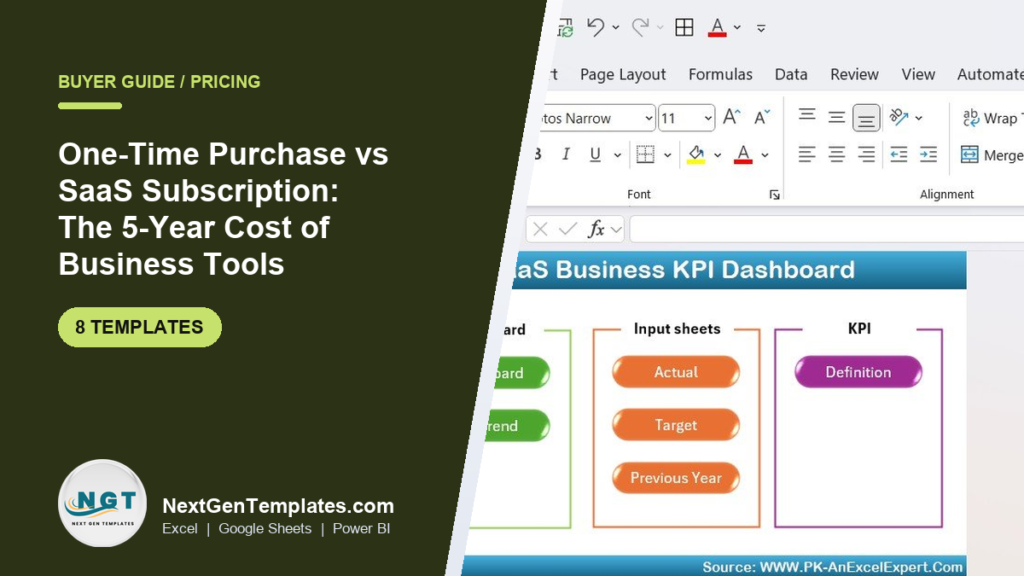
For most small teams, a one-time purchase wins on five-year cost. A $14.99 Excel or Google Sheets template you buy once is a fixed cost forever, while a $99/month SaaS subscription becomes roughly $6,500 over five years after typical price rises. SaaS earns its keep only when you need live data, multi-user access, or automation a spreadsheet cannot deliver.
Last updated: September 2026
Key takeaways
- A single NGT template costs $9.99–$14.99 once; a mid-tier SaaS analytics tool at $99/month costs about $6,500 over five years once annual price increases are counted.
- The break-even point is fast: most subscriptions cost more than a buy-once template within the first two to eight weeks.
- Buy-once makes sense for fixed, well-understood reporting; subscribe when you need real-time data, many concurrent users, or vendor-managed automation.
- The SaaS Business KPI Dashboard in Excel ($14.99) is the best overall buy-once alternative for tracking MRR, churn, and LTV without a monthly bill.
- Owning all eight templates in this guide costs about $104 one-time — less than one month of most SaaS analytics seats.
For a worked industry example, our gym management Excel template buyer guide compares one-time gym templates from $9.99 with gym software that bills every month.
 Launch offer
SUMIFS, XLOOKUP, FILTER, LAMBDA and checking AI-written formulas, with real business projects. 11h 47m of video by PK, with practice files, quizzes and a capstone.
One-time purchase vs subscription software templates compared
| Template | Format | Best for | Price (one-time) |
|---|---|---|---|
| SaaS Business KPI Dashboard (Best overall) | Excel | MRR, churn & LTV tracking | $14.99 |
| Subscription Box KPI Dashboard | Excel | Subscription-box operators | $14.99 |
| Subscription Box Services KPI Dashboard | Excel | Multi-plan box services | $14.99 |
| Online Subscription Platforms KPI Dashboard | Excel | Digital subscription platforms | $14.99 |
| SaaS Renewal KPI Dashboard | Power BI | Renewals & retention reporting | $11.99 |
| Subscription Box Services KPI Dashboard | Power BI | Interactive box analytics | $11.99 |
| Subscription Box KPI Dashboard (Best value) | Google Sheets | Free-to-run cloud reporting | $9.99 |
| SaaS Renewal KPI Dashboard | Google Sheets | Collaborative renewal tracking | $9.99 |
How we picked these
We searched the full NextGenTemplates catalog of 1,200+ paid templates for buy-once tools that replace the everyday reporting jobs teams usually rent SaaS for: subscription metrics, renewals, churn, and revenue tracking. We selected eight dashboards that are (a) genuinely one-time purchases with no recurring fee, (b) available across Excel, Power BI, and Google Sheets so you can match your existing stack, and (c) priced under $15. We excluded free templates (too thin for a money decision) and anything without a working KPI engine, because a static table is not a real alternative to a subscription analytics product.
The 8 best buy-once alternatives to subscription software for 2026
1. SaaS Business KPI Dashboard in Excel — best overall

This is the closest buy-once replacement for a paid SaaS-metrics subscription. It tracks the core numbers a subscription business lives on — MRR, ARR, churn, expansion, and lifetime value — inside one Excel workbook you own outright.
Who it is for: founders, finance leads, and RevOps teams who want board-ready SaaS metrics without paying $100+/month for a hosted analytics tool.
What is inside:
- MRR, ARR, and net-new revenue KPI cards
- Gross and net revenue churn tracking
- Customer LTV and CAC ratio calculations
- Input sheets for Actual, Target, and Previous Year
- Definition tab so every KPI is documented
Use it to run a monthly board pack, model the impact of a churn improvement, or benchmark this quarter against last year — all offline, on data you never hand to a third party. For teams comparing hosted analytics, see our roundup of Power BI Premium alternatives in Excel and Sheets.
Price: $14.99 one-time. Get the SaaS Business KPI Dashboard.
Best for: anyone who wants the SaaS metrics of a subscription tool without the subscription.
2. SaaS Renewal KPI Dashboard in Power BI

When your risk is renewals rather than acquisition, this Power BI file gives you interactive, filterable retention reporting you build once and refresh forever.
Who it is for: customer success and account management teams tracking renewal rates, at-risk accounts, and net revenue retention.
What is inside:
- Renewal rate and net revenue retention visuals
- At-risk account flags by segment
- Cohort-style retention breakdowns
- Slicers for plan, region, and tenure
Point it at an exported CSV from your billing system and you have a renewals war-room dashboard without a per-seat BI subscription on top of it.
Price: $11.99 one-time. Get the Power BI renewal dashboard.
Best for: renewal-heavy teams already living in Power BI.
3. Subscription Box KPI Dashboard in Excel
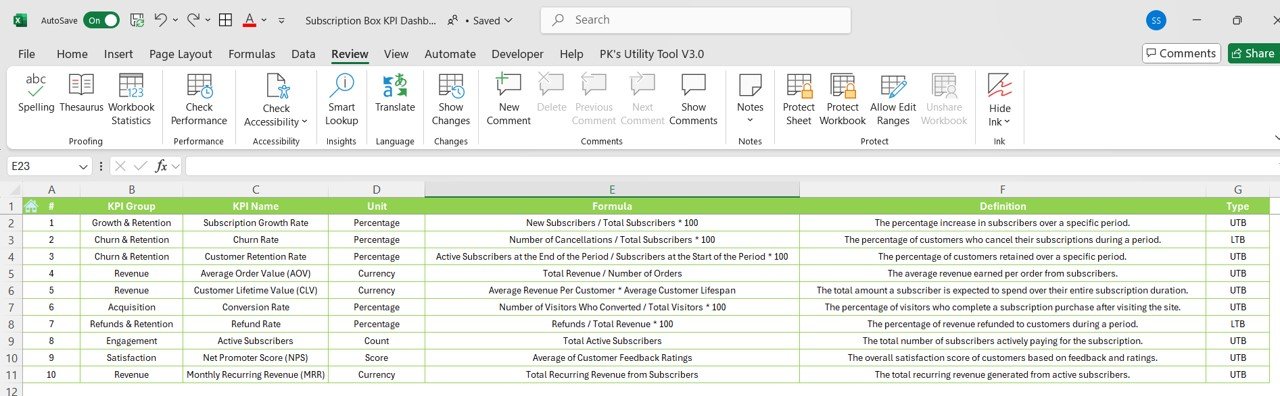
Purpose-built for physical subscription-box businesses, this dashboard tracks the metrics DTC box operators actually manage: active subscribers, box churn, average order value, and fulfilment volume.
Who it is for: subscription-box founders and ops managers who need a monthly performance view without paying for e-commerce analytics SaaS.
What is inside:
- Active vs cancelled subscriber trends
- Average order value and revenue per box
- Churn and retention by cohort
- Monthly and cumulative revenue views
Price: $14.99 one-time. Get the Subscription Box KPI Dashboard.
Best for: DTC box brands that want Excel they control.
4. Subscription Box KPI Dashboard in Google Sheets — best value
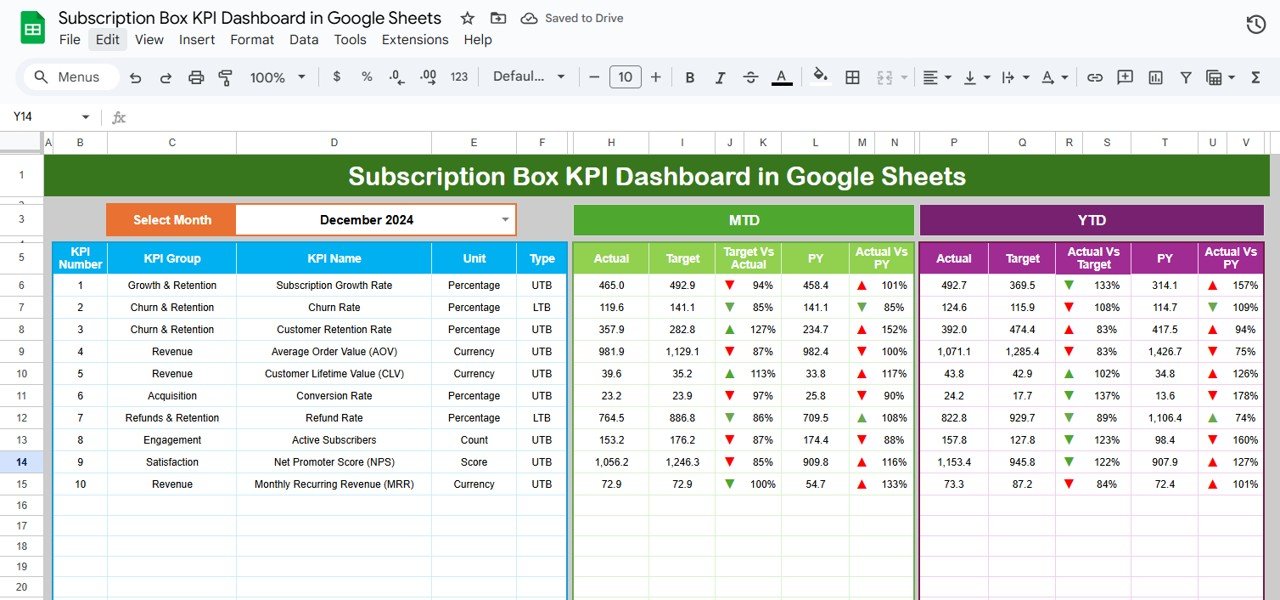
The best-value pick in the guide at $9.99, this Google Sheets version runs entirely in a browser you already have for free. There is no software to install and no seat fee — the classic buy-once, run-anywhere combination.
Who it is for: small teams that collaborate in Google Workspace and want shared subscription reporting without a paid analytics tool.
What is inside:
- Live KPI cards for subscribers, churn, and revenue
- Shareable, comment-friendly cloud workbook
- Auto-calculating charts linked to your data
Price: $9.99 one-time. Get the Google Sheets dashboard.
Best for: collaborative teams who want the lowest total cost of ownership.
5. Online Subscription Platforms KPI Dashboard in Excel
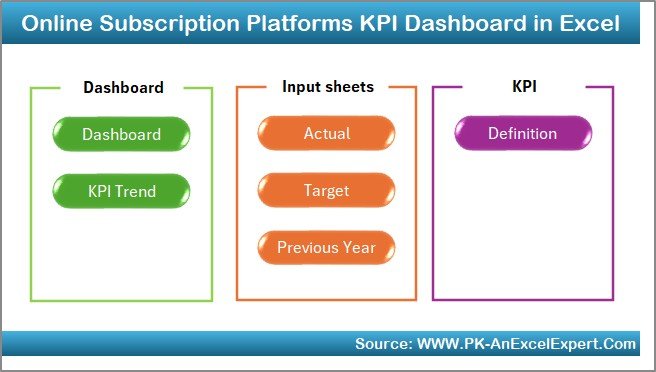
Built for digital subscription platforms — streaming, memberships, content, and app subscriptions — this dashboard focuses on plan mix, trial conversion, and recurring revenue by tier.
Who it is for: membership and digital-platform operators tracking multi-tier recurring revenue.
What is inside:
- Revenue by plan tier and billing cycle
- Trial-to-paid conversion tracking
- Upgrade and downgrade movement
- Active-member and churn trends
Price: $14.99 one-time. Get the platform dashboard.
Best for: multi-tier digital subscription businesses.
6. Subscription Box Services KPI Dashboard in Excel
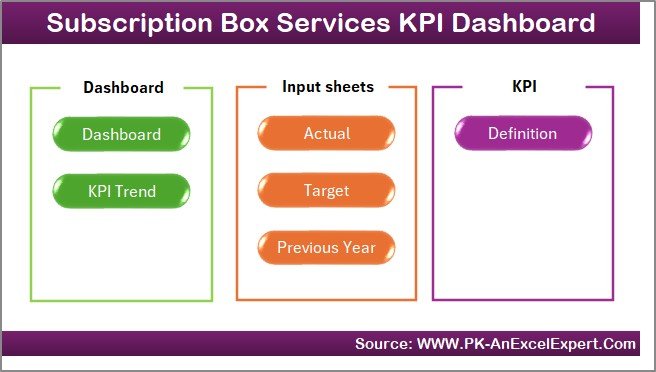
A services-focused variant for box businesses running multiple plans, add-ons, or service tiers, with deeper segmentation than the standard box dashboard.
Who it is for: box services with several plan lines that need per-plan profitability.
What is inside:
- Per-plan revenue and margin views
- Add-on and upsell tracking
- Segment-level churn and retention
Price: $14.99 one-time. Get the services dashboard.
Best for: multi-plan box operators.
7. Subscription Box Services KPI Dashboard in Power BI
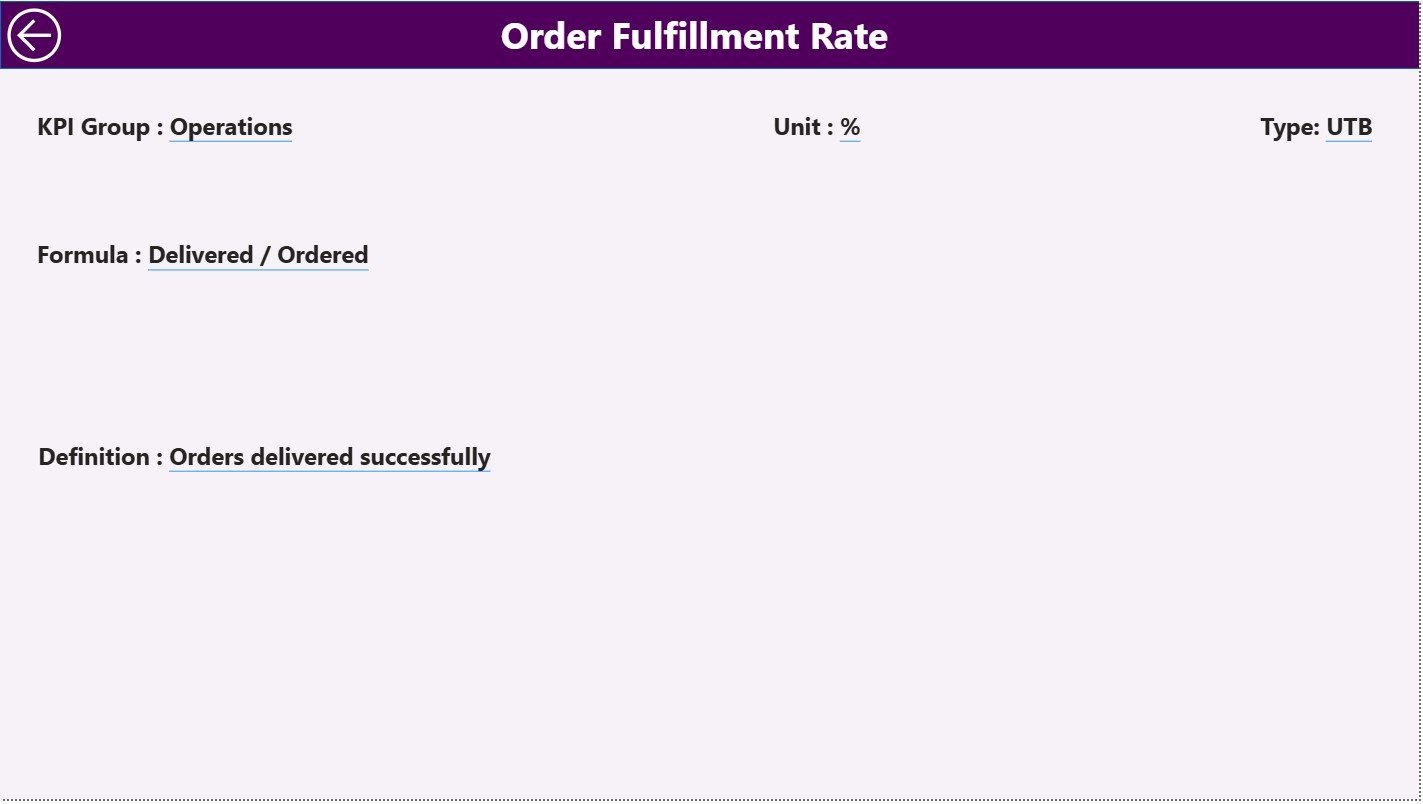
The interactive Power BI edition of the services dashboard, for teams that want click-through filtering and a refreshable model instead of a static workbook.
Who it is for: analysts who want interactive box-services reporting inside Power BI.
What is inside:
- Interactive plan and segment slicers
- Drill-down revenue and churn visuals
- Refreshable data model
Price: $11.99 one-time. Get the Power BI services dashboard.
Best for: Power BI users running box services.
8. SaaS Renewal KPI Dashboard in Google Sheets
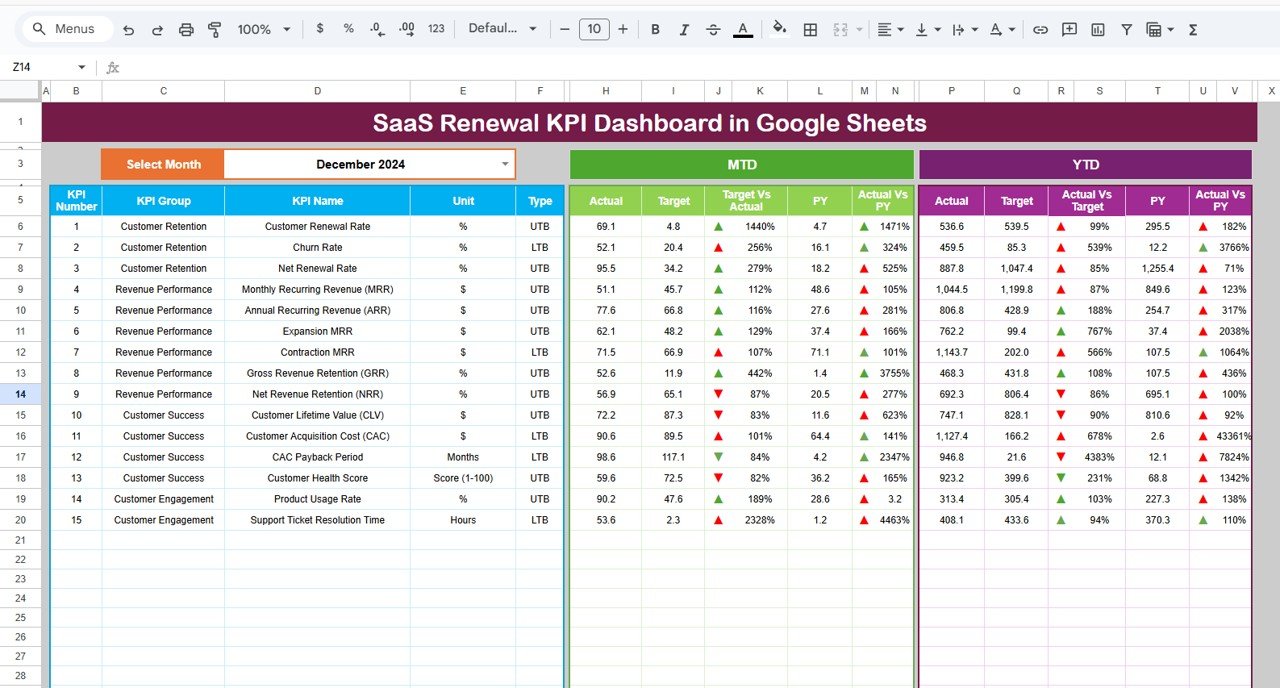
The cloud-native renewal dashboard at $9.99 — the same retention KPIs as the Power BI version, but collaborative and free to run in Google Sheets.
Who it is for: customer success teams that live in Google Workspace and want shared renewal tracking.
What is inside:
- Renewal rate and NRR KPI cards
- At-risk account list
- Shareable, real-time collaboration
Price: $9.99 one-time. Get the Google Sheets renewal dashboard.
Best for: collaborative CS teams on a tight budget.
The real 5-year cost: one-time purchase vs subscription software
The headline number is what makes this decision easy for most small teams. Here is a like-for-like comparison of owning a template versus renting a hosted analytics tool, using representative published list prices (verify current pricing before you buy — SaaS list prices change often).
| Option | Pricing model | Year 1 | 5-year cost* |
|---|---|---|---|
| NGT template (single) | One-time $14.99 | $14.99 | $14.99 |
| NGT — all 8 templates | One-time | $103.92 | $103.92 |
| Power BI Pro (1 seat) | ~$14/user/mo | ~$168 | ~$930 |
| Tableau Creator (1 seat) | ~$75/user/mo | ~$900 | ~$4,970 |
| Subscription-analytics SaaS | ~$99/mo | ~$1,188 | ~$6,560 |
| QuickBooks Online | ~$35/mo | ~$420 | ~$2,320 |
*Five-year totals assume a modest 5% annual price increase, which is conservative — many vendors raise prices faster. Per-seat tools multiply with every extra user.
Worked example: bundle vs single vs subscription
Say you run a subscription business and need proper metrics reporting. You have three realistic paths:
- Buy one template. The SaaS Business KPI Dashboard at $14.99 covers MRR, churn, and LTV. Five-year cost: $14.99.
- Buy the whole stack. All eight templates in this guide — Excel, Power BI, and Google Sheets versions — total $103.92 one-time. That gives every format and every subscription use case, and it is still cheaper than one month of most hosted analytics tools.
- Subscribe. A mid-tier subscription-analytics SaaS at $99/month is ~$1,188 in year one and ~$6,560 over five years after price rises.
The break-even is brutal for SaaS: at $99/month, the subscription costs more than the single $14.99 template in under five days, and more than the entire eight-template stack in about one month. Everything after that is pure saving for the buy-once route. Analysts at Gartner continue to forecast double-digit annual growth in SaaS spending, which means the subscription line on this table only gets worse over time.
Stop renting your reporting. Own the SaaS Business KPI Dashboard in Excel once for $14.99 and keep it for life. Buy it now →
The hidden costs that make subscriptions worse than the sticker price
The five-year table above is already unkind to SaaS, but it uses the advertised price. In practice, subscriptions carry costs that never show up on the pricing page:
- Per-seat multiplication. A $75/month tool is not $75 — it is $75 for every person who needs access. Add three analysts and a $900/year tool becomes $3,600/year.
- Tier creep. The feature you need is almost always one tier up. Vendors put churn cohorts, exports, or API access behind a higher plan, so the real monthly cost is rarely the entry price you signed up on.
- Annual increases. Renewal quotes routinely rise 5–15% a year. You have no control over the line item once your reporting lives inside the tool.
- Data lock-in. When your history sits on a vendor’s servers, leaving means losing dashboards, re-keying data, and often paying for export. A file you own has none of that switching cost.
- Downtime and dependency. If the vendor has an outage or sunsets a feature, your reporting stops. An owned workbook keeps working whether the company behind it does or not.
None of these apply to a one-time template. The price you pay is the price you paid — there is no year-two surprise, no upsell email, and no export invoice. For a deeper look at how owning your reporting stack compares to renting it, see our Shopify Analytics alternatives comparison.
How to choose between one-time purchase and subscription
Use this quick decision guide rather than defaulting to whatever a vendor markets hardest:
| If you… | Choose |
|---|---|
| Report monthly on fixed, well-understood metrics | One-time template |
| Need real-time, always-on live data feeds | Subscription |
| Have 1–5 people who touch the numbers | One-time template |
| Need dozens of concurrent users with permissions | Subscription |
| Want to own your data and work offline | One-time template |
| Require vendor-managed integrations and support SLAs | Subscription |
| Are pre-revenue or watching every dollar | One-time template |
A simple rule: if a spreadsheet refreshed once a month would answer your question, buy once. If you genuinely need the numbers to update themselves in real time for many people, subscribe. Most small businesses over-buy on this — see how format choice changes the maths in our Excel vs Google Sheets vs Power BI comparison.
When a one-time template is NOT the right answer
Buy-once is not a universal win. Be honest about these cases, because forcing a template into the wrong job costs more than a subscription would:
- You need live, automated data. If numbers must sync from Stripe, a CRM, or a warehouse every few minutes with no manual export, a hosted tool or a proper data pipeline is the right buy.
- Many concurrent editors with strict permissions. Once dozens of people need role-based access and audit trails, SaaS governance features are worth paying for.
- You want the vendor to own maintenance. A subscription includes updates, security, and support; a template puts that on you.
- Regulated, high-stakes reporting. Where you need certified integrations or compliance guarantees, do not improvise in a spreadsheet.
If any of those describe you, compare hosted options in our guides to QuickBooks alternatives and SAP reporting alternatives before deciding — some workflows really do belong in software, not a workbook.
Frequently asked questions
Is one-time purchase software cheaper than a subscription?
Almost always over a multi-year horizon. A $14.99 one-time template is a fixed cost forever, while a $99/month subscription reaches roughly $6,560 over five years after price increases. Subscriptions only win on cost if you use them briefly or need features a one-time tool genuinely cannot provide.
What is the difference between one-time purchase and subscription software?
One-time purchase means you pay once and own the tool with no recurring fee. Subscription (SaaS) means you rent access for a monthly or annual fee and lose access when you stop paying. The trade-off is ownership and low cost versus live updates, hosting, and vendor support.
When is a SaaS subscription worth it over a one-time purchase?
Subscribe when you need real-time data, many concurrent users with permissions, vendor-managed integrations, or guaranteed support and updates. If your reporting is monthly, fixed, and used by a small team, a one-time template delivers the same insight for a fraction of the five-year cost.
How much does subscription software cost over 5 years?
It depends on the tool, but expect real numbers. Power BI Pro at ~$14/user/month is about $930 over five years per seat; a $99/month analytics SaaS is roughly $6,560. Per-seat pricing multiplies with every user, so team costs scale far faster than a single one-time purchase.
Do NGT templates have any recurring fees?
No. Every template in this guide is a one-time purchase between $9.99 and $14.99. You download the file, own it permanently, and pay nothing again — no seats, no renewals, and no feature paywalls that appear after you buy.
Can a spreadsheet template really replace subscription analytics software?
For fixed, periodic reporting, yes. These dashboards calculate MRR, churn, LTV, renewals, and revenue automatically once you paste in your data. They cannot replace a live-syncing platform, but for the monthly board pack most teams actually need, a $14.99 workbook does the job software charges thousands for.
Which format should I buy: Excel, Google Sheets, or Power BI?
Buy Excel for offline, full-control workbooks; Google Sheets ($9.99) for free-to-run cloud collaboration; and Power BI for interactive, filterable dashboards. All three are one-time purchases here, so pick the tool your team already uses rather than paying for a new platform.
What is the break-even point between buying and subscribing?
Very early. Against a $99/month subscription, a single $14.99 template pays for itself in under five days, and the full eight-template stack ($103.92) breaks even in about one month. Every month after that, the buy-once route is pure saving.
Are one-time templates updated over time?
You own the version you buy permanently, and NGT releases improved editions you can choose to buy. Unlike SaaS, updates are optional rather than forced — you are never pushed onto a new interface or pricing tier you did not ask for, and your existing file keeps working.
Is it safe to run my business metrics in a template I own?
Yes, and often safer. Your data stays in a file on your own device or drive rather than on a third-party server, so there is no vendor breach risk and no data held hostage if you stop paying. You control backups, access, and retention entirely.
Get more buy-once templates
Own your reporting for life. The eight subscription and SaaS KPI dashboards in this guide start at just $9.99 and never charge you again. Start with the SaaS Business KPI Dashboard in Excel ($14.99), or browse more finance and reporting tools in our finance dashboard templates and budget template guides. Want the reasons a good KPI dashboard pays for itself? Read 7 reasons to use a quality KPI dashboard.
Watch template walkthroughs and build tutorials on our YouTube channel: @NextGenTemplates.