

For most small teams, an Excel template bundle is cheaper than single templates the moment you need three or more tools. Bundles land at roughly $3.33 to $9.70 per template, while singles run $5.99 to $17.99 each. Buy singles only when you need exactly one file and nothing adjacent.
Last updated: September 2026
Key takeaways
- The break-even point is about three templates: buy the Google Sheets Starter Pack ($39.99 for 12) and each file costs $3.33 versus roughly $14 as a single.
- The FP&A Pack is the best overall bundle at $85.99 for 9 Excel, Google Sheets and Power BI templates — a stated 40% saving over buying them separately.
- Single templates still win when you need one specific dashboard, like the $5.99 Student Fee Collection System.
- Bundles carry hidden value small teams underrate: consistent formatting, one learning curve, and templates you did not know you needed yet.
- Do not buy a bundle to “save money” if 90% of it will never be opened — a $12.99 single you use daily beats a $96.99 pack you use once.
 Launch offer
SUMIFS, XLOOKUP, FILTER, LAMBDA and checking AI-written formulas, with real business projects. 11h 47m of video by PK, with practice files, quizzes and a capstone.
Excel template bundles and single templates compared
| Template | Format | Best for | Price |
|---|---|---|---|
| FP&A Pack (9 templates) — Best overall | Excel + Sheets + Power BI | Finance teams that model, budget and report | $85.99 |
| Google Sheets Starter Pack (12 templates) — Best value | Google Sheets | New teams standardising on Sheets | $39.99 |
| Finance Power BI Pack (10 templates) | Power BI | Teams reporting in Power BI | $96.99 |
| HR Google Sheets Pack (10 templates) | Google Sheets | HR and people ops | $45.99 |
| Packaging Machine Downtime Dashboard | Excel | One OEE / downtime use case | $17.99 |
| Backpacker Hostels Dashboard | Excel | A single hospitality P&L | $17.99 |
| Packaging Industry Dashboard | Excel | One packaging ops view | $13.99 |
| Biodegradable Packaging Dashboard | Excel | A single sustainability report | $13.99 |
| Packaging Sustainability KPI Dashboard | Excel | One ESG scorecard | $12.99 |
| Student Fee Collection System | Excel VBA | A single fee-tracking job | $5.99 |
How we picked these
We searched the NextGenTemplates catalog of 1,000-plus paid Excel, Google Sheets and Power BI templates and isolated the four multi-template bundles that a small team would realistically buy, then paired them against six representative single dashboards spanning the full $5.99–$96.99 price band. Selection criteria: real published prices, stated template counts, and formats a five-to-fifty-person team actually runs. We excluded free downloads and one-off niche files that only fit a single company, because they distort a fair per-template comparison.
The real math: bundle vs single
The whole decision comes down to one number — cost per template you will actually use. A bundle is only cheaper if you use enough of it. Here is the per-template cost for each bundle in this guide:
| Bundle | Templates | Price | Cost / template | Break-even vs singles |
|---|---|---|---|---|
| Google Sheets Starter Pack | 12 | $39.99 | $3.33 | Use 3 of 12 |
| HR Google Sheets Pack | 10 | $45.99 | $4.60 | Use 4 of 10 |
| FP&A Pack | 9 | $85.99 | $9.55 | Use 6 of 9 |
| Finance Power BI Pack | 10 | $96.99 | $9.70 | Use 7 of 10 |
The break-even column uses an average single price of about $14 (the midpoint of the singles above). A single template costs $5.99–$17.99. So the math is blunt:
Worked example — a 6-person finance team. They need a budget model, a cash-flow tracker, a P&L dashboard and a forecast. Bought as four singles at roughly $14 each, that is $56 — and they still lack a variance report and a KPI scorecard. The FP&A Pack gives all nine finance templates for $85.99. For $30 more they cover the two gaps they were about to hit next quarter, in the same visual style, with one download. That is the bundle case in one paragraph.
Counter-example — a school office. It needs to track fee collection and nothing else. The Student Fee Collection System is $5.99. Buying any $39.99+ pack to get one relevant file would be a 7x overspend on templates that never get opened. The single wins outright.
The rule of thumb: if you can name three files in a bundle you will use this quarter, the bundle is cheaper. If you can only name one, buy the single. For a broader value walkthrough, see our small business template bundle guide.
The hidden costs the sticker price hides
Per-template price is only the visible half of the decision. Small teams consistently underrate three costs that sit outside the price tag, and every one of them tilts toward bundles.
The learning curve is paid per design, not per file. Six singles bought from six different sources means six layouts, six colour schemes and six ways of laying out a dashboard. Every new file is a fresh five-to-ten-minute orientation. A bundle shares one design language, so once your team learns the first template, the other eleven feel familiar. On a ten-person team, saving even 30 minutes of onboarding per template is real money the price table never shows.
Consistency is worth more than the discount to anyone who reports upward. When your budget dashboard, cash-flow tracker and P&L report all look like they came from the same place, the deck you build for a board or a bank reads as professional. Six mismatched singles do not. That visual coherence is the quiet reason finance and HR teams reach for packs like the FP&A Pack even when they could assemble the same functions from cheaper singles.
Bundles cover needs you have not hit yet. The variance report you will need next quarter is already in the pack. Buying it later as a single costs another $14 and another learning curve; having it sit ready costs nothing extra. This is the future-proofing premium, and it is exactly why the break-even math above is conservative — it only counts templates you use this quarter, not the ones you grow into.
Second worked example — a 10-person operations team. They start needing just one machine-downtime view, so a $17.99 single looks right. But within two quarters they add a packaging-industry dashboard, a sustainability scorecard and an ESG report — four singles at $13.99–$17.99 totalling roughly $63, each learned separately. Had their need been finance rather than niche packaging, a single $85.99 pack would have covered all of it in one style. The lesson: if your needs are niche and unrelated, singles are correct; if they cluster around one function, a bundle almost always wins over time.
The 4 best Excel and Sheets template bundles for 2026
1. FP&A Pack — best overall

What it is: a nine-template financial planning and analysis pack spanning Excel, Google Sheets and Power BI, sold at a stated 40% saving.
Who it is for: finance leads and founders who budget, forecast and report every month.
- Budgeting and forecasting models
- Finance summary and P&L dashboards
- Multi-format coverage so the team can work where it already lives
- One consistent design language across all nine files
A six-person team replacing four separate singles ($56) with this pack gets nine tools and two extra formats for $85.99. At $9.55 per template it is the best all-round pick for teams that do more than one finance job. Price: $85.99. Get the FP&A Pack.
Best for: any team that runs a real budgeting-to-reporting cycle.
2. Google Sheets Starter Pack — best value
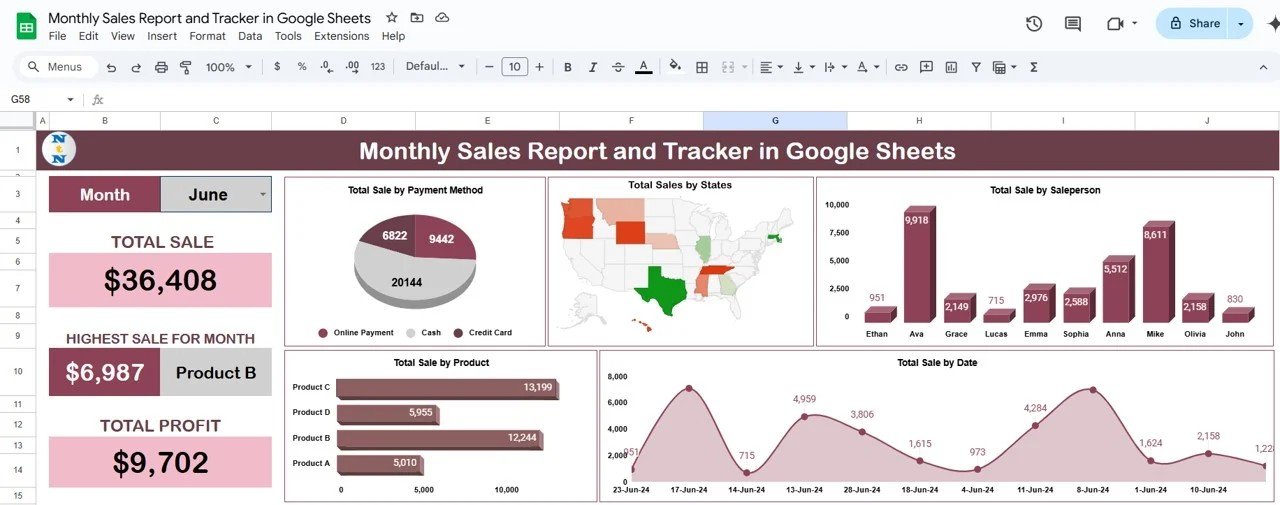
What it is: twelve premium Google Sheets templates for $39.99 — the lowest per-template cost in this guide.
Who it is for: new or remote-first teams standardising on Google Sheets.
- Sales report and tracker
- Planning, tracking and reporting templates
- Twelve files at $3.33 each
- Break-even after using just three of the twelve
This is the cleanest illustration of the bundle math: use a quarter of it and you have already beaten buying singles. Price: $39.99. Get the Google Sheets Starter Pack.
Best for: teams that want maximum coverage for the smallest outlay.
3. Finance Power BI Pack
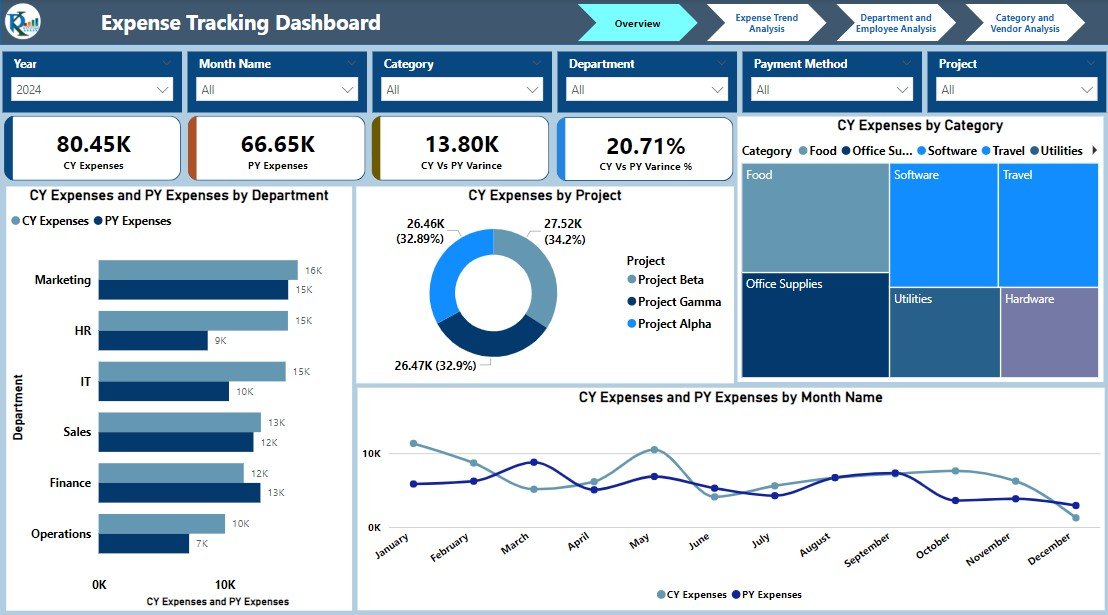
What it is: ten ready-built Power BI finance dashboards for $96.99.
Who it is for: teams that have already committed to Power BI for reporting.
- Expense tracking and cash-flow dashboards
- Pre-modelled data and visuals
- Ten reports at $9.70 each
- Break-even after using seven of ten
It is the priciest pack here and needs the highest usage to pay off, so only buy it if Power BI is genuinely your reporting layer. If you are weighing platforms first, read Excel vs Google Sheets vs Power BI. Price: $96.99. Get the Finance Power BI Pack.
Best for: Power BI shops reporting on finance.
4. HR Google Sheets Pack

What it is: ten premium HR and people-ops templates in Google Sheets for $45.99.
Who it is for: HR teams and office managers handling attendance, leave and records.
- Attendance and leave trackers
- Employee records and onboarding sheets
- Ten files at $4.60 each
- Break-even after using four of ten
For a growing team, HR paperwork multiplies fast, so hitting four-of-ten usage is easy. Pair it with our performance review templates for a fuller people-ops stack. Price: $45.99. Get the HR Google Sheets Pack.
Best for: HR and people ops on Google Workspace.
Not sure which way to go? If you will use three or more templates this quarter, start with the Google Sheets Starter Pack at $39.99. If you need one specific tool, scroll to the singles below.
When a single template beats a bundle
Bundles are not always the answer. When you need exactly one job done, a focused single template is faster to learn and far cheaper. These six show the range:
| Single template | Use case | Price |
|---|---|---|
| Packaging Machine Downtime Dashboard | Track OEE and machine downtime | $17.99 |
| Backpacker Hostels Dashboard | Run one hostel P&L | $17.99 |
| Packaging Industry Dashboard | One packaging operations view | $13.99 |
| Biodegradable Packaging Dashboard | A single sustainability report | $13.99 |
| Packaging Sustainability KPI Dashboard | One ESG / packaging scorecard | $12.99 |
| Student Fee Collection System | Track and reconcile student fees | $5.99 |
Notice these are niche and specific — a hostel P&L or a fee collector will never appear in a general finance bundle, so buying the single is the only sensible move. When your need is this narrow, a bundle would just be shelfware.
How to choose between them
Use this five-line decision tree:
- Need one specific file and nothing near it? Buy the single.
- Can you name three files in a bundle you will use this quarter? Buy the bundle — it is already cheaper.
- Standardising a whole team on one platform? Buy the bundle for the shared visual style, not just the price.
- Locked into Power BI? The Finance Power BI Pack; otherwise stay in Excel or Sheets.
- On the smallest budget? The Google Sheets Starter Pack at $3.33 per template.
A 60-second self-audit before you buy. Open the bundle’s contents list and tick every template you can attach to a real task on this month’s or next month’s plan. If you tick three or more, buy the bundle — the per-template math has already flipped in your favour. If you tick one or two, buy those as singles and revisit the bundle when a third genuine need appears. Do not tick a template because it “might be useful someday”; only count files with a named owner and a named job, because those are the only ones that recover their cost.
When a template is NOT the right answer
Templates — bundled or single — are the wrong buy in three situations. First, when you need multi-user, permissioned, audited data entry across departments, a spreadsheet cracks; buy purpose-built software instead. Second, when your process changes weekly, you will spend more time re-wiring formulas than a proper app would cost. Third, when the data volume runs to hundreds of thousands of rows or needs live database connections, Excel and Sheets slow to a crawl.
Buy a template when your process is stable, your team is small, and you want a professional result today rather than a six-week software rollout. If you outgrow a single dashboard, our inventory management templates and payroll toolkit show how a themed set scales without moving to full software. For a sense of how templates stack up against SaaS tools, compare our Salesforce alternative templates. Bundling economics are a well-studied pricing pattern — see product bundling for the underlying theory.
Frequently asked questions
Is an Excel template bundle cheaper than buying single templates?
Yes, once you use three or more of the bundle’s templates. Bundles here cost $3.33 to $9.70 per template, while singles run $5.99 to $17.99 each. If you will only ever use one file, the single is cheaper; from three files up, the bundle wins clearly.
How many templates do I need to use for a bundle to pay off?
It depends on the pack’s per-template price. The Google Sheets Starter Pack breaks even at three of twelve, the HR pack at four of ten, and the pricier Finance Power BI Pack at seven of ten. Count the files you will genuinely open this quarter before buying.
What is the cheapest Excel template bundle for a small team?
The Google Sheets Starter Pack at $39.99 for twelve templates — $3.33 each — is the lowest-cost bundle in this guide. It is the safest first purchase for a new or budget-conscious team because it breaks even after using just a quarter of its contents.
Which template bundle is best for a finance team?
The FP&A Pack at $85.99. It bundles nine budgeting, forecasting and reporting templates across Excel, Google Sheets and Power BI at a stated 40% saving, so a team running a full budgeting-to-reporting cycle covers every job in one consistent design.
Do template bundles include Excel, Google Sheets and Power BI?
Some do. The FP&A Pack spans all three formats, while the Google Sheets Starter Pack and HR pack are Sheets-only and the Finance Power BI Pack is Power BI-only. Check the format before buying so it matches where your team already works.
When should I buy a single template instead of a bundle?
Buy the single when you need exactly one job done and nothing adjacent — a $5.99 fee collector or a $17.99 machine-downtime dashboard, for example. Paying $40 or more for a bundle to get one relevant file wastes money on templates you will never open.
Are these templates a one-time purchase or a subscription?
They are one-time purchases. You pay the listed price once and own the file, unlike SaaS tools that bill monthly. That is a core reason small teams choose templates: predictable cost with no recurring per-seat fees eating the budget.
Can I customise a template after buying it?
Yes. Every template is a standard Excel, Google Sheets or Power BI file you can rename, recolour and re-formula to fit your data. Bundles add a bonus here: because the files share one design language, your customisations stay visually consistent across the whole set.
What if I only use two templates from a bundle?
Then the bundle probably was not worth it. At an average single price near $14, two files cost about $28 — less than most bundles. Be honest about usage before buying; a bundle only saves money when at least three of its templates earn their place.
Where can I see these templates in action?
Every template has a walkthrough on the NextGenTemplates YouTube channel, where you can watch the dashboards and trackers running with sample data before you buy. It is the fastest way to judge whether a bundle or a single fits your workflow.
Get more Excel template bundles
Ready to stop paying single-template prices? The Google Sheets Starter Pack gives you twelve premium templates for $39.99 — just $3.33 each — and the FP&A Pack covers a full finance stack for $85.99. Browse the whole range in our small business template bundle guide, and subscribe to NextGenTemplates on YouTube for setup walkthroughs.