

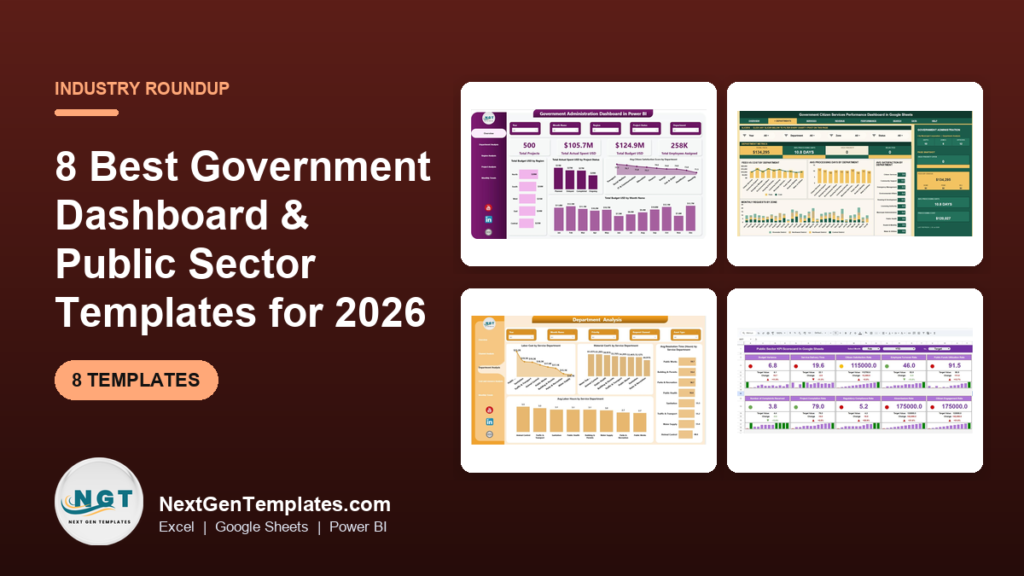
The best government dashboard template for most agencies in 2026 is the Government Administration Dashboard in Excel ($13.99). It puts projects, budget versus actual spending, citizen satisfaction, department and region results in one interactive file. Teams that report against fixed KPI targets should add the Public Sector KPI Dashboard, which starts at $9.99 in Google Sheets.
Last updated: October 2026
Key takeaways
- Our top pick is the Government Administration Dashboard ($13.99 in Excel, $17.99 in Power BI), because it is the only one that covers projects, budgets, workforce and citizen satisfaction in the same file.
- Agencies that report monthly against targets should use the Public Sector KPI Dashboard, which compares actual, target and previous-year figures month to date and year to date.
- The best value is the Government Citizen Services Performance Dashboard in Google Sheets at $9.99, with seven tabs and six KPI cards for requests, fees, completion and satisfaction.
- City public works teams should look at the Municipal Services Dashboard, which tracks material cost, labor cost, resolution time and citizen satisfaction by department and request channel. Smart city mission teams have their own shortlist in our smart city dashboard templates. Agencies running buses, metro or rail should see our public transit and rail dashboard templates roundup instead, built specifically for transit project cost, KPIs and ridership revenue.
- All eight picks cost $9.99 to $17.99 once. Government performance software is usually sold on annual contracts, and Power BI Pro alone costs $14 per user per month.
 Launch offer
From your first Pivot Table to the Data Model, DAX, Power Query and a one-page KPI dashboard. 11h 51m of video by PK, with practice files, quizzes and a capstone.
Government and public sector templates compared
| Template | Format | Best For | Price |
|---|---|---|---|
| Government Administration Dashboard (Best overall) | Excel, Power BI | Agency leaders tracking projects, budgets and satisfaction together | $13.99 to $17.99 |
| Public Sector KPI Dashboard | Excel, Power BI, Google Sheets | Monthly KPI reviews against target and last year | $9.99 to $14.99 |
| Government Administration KPI Dashboard | Excel | Administrators and auditors who need written KPI definitions | $14.99 |
| Government Citizen Services Performance Dashboard (Best value) | Google Sheets | Service desks tracking requests, fees and turnaround | $9.99 |
| Municipal Services Dashboard | Power BI, Excel, Google Sheets | City public works, sanitation and utilities teams | $9.99 to $17.99 |
| Public Health KPI Dashboard | Excel, Power BI, Google Sheets | Health departments tracking vaccination and prevention goals | $9.99 to $14.99 |
| Public Safety KPI Dashboard | Excel, Power BI | Police, fire and emergency services | $11.99 to $14.99 |
| Public Sector KPI Scorecard | Excel, Google Sheets | One-page red, amber, green status for leadership | $12.99 to $14.99 |
Public sector teams sit on plenty of data and still struggle to answer plain questions. The budget lives in the finance system. Service requests live in a 311 or ticketing tool. Project status lives in a shared drive, and satisfaction scores come back from a survey once a quarter. When a council member asks which department missed its turnaround target last month, someone spends a day stitching exports together.
The paid fix is performance management software or a BI platform with per-user licences. Those tools connect to your systems, and some publish open-data portals for residents, but they are usually priced by quote on annual contracts. A government dashboard template costs $9.99 to $17.99 once. It will not pull data on its own, but a monthly export gives you the same core views, and the file belongs to you.
How we picked these
We searched the NextGenTemplates catalog for products built for government, public administration, municipal services, public health and public safety, and kept the ones that model budgets, service delivery, citizen outcomes or KPI targets. We dropped a public relations KPI dashboard that the first shortlist carried, because it measures media coverage, not public services.
Every pick has a live product page, a one-time price and a documented list of sheets, pages or KPIs. Where a tool exists in several formats we list it once and give every price. We ranked on three things, in order: how many core government reporting questions the template answers, how well it fits one specific job, and price.
The 8 best government dashboard templates for 2026
1. Government Administration Dashboard: best overall
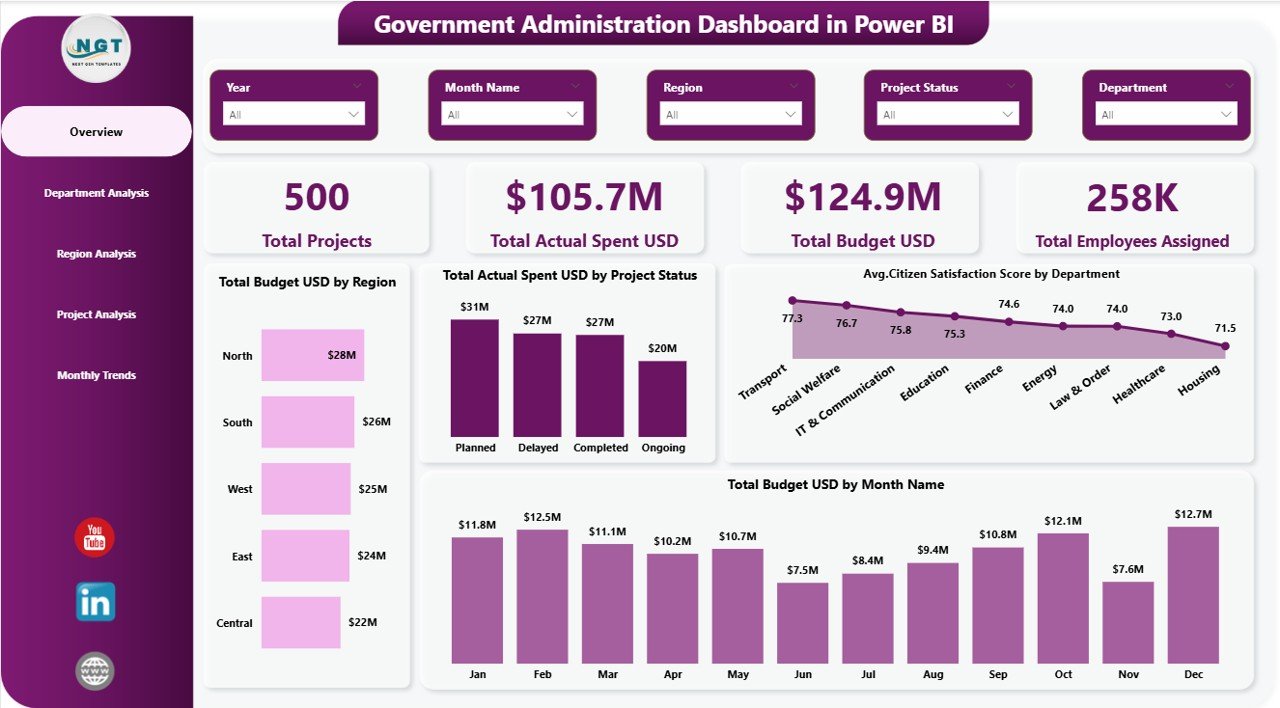
This is the government dashboard template we would hand an agency director first. Most public sector files track either money or services. This one tracks both, so you can see whether the departments spending most of their budget are also the ones delivering projects and satisfied citizens.
Who it is for: city councils, state departments, ministries and the analysts who prepare their monthly packs.
What is inside:
- KPI cards for total projects, total budget, actual spending and employees assigned
- Budget versus actual spending by region, project status and month
- Department analysis to compare efficiency and resource use
- Region analysis to spot development gaps between areas
- Project analysis and monthly trends, with slicers for region, department and month
In the sample data, the Power BI edition shows $105.7M spent against a $124.9M budget across 500 projects. That is 84.6% budget utilization, and the region and project-status charts tell you where the unspent 15% is sitting. The Excel edition ($13.99) has Overview, Department Analysis, Region Analysis, Project Analysis and Monthly Trends sheets built on pivot tables. The Power BI edition costs $17.99.
Best for: leaders who want one file that links spending to results.
2. Public Sector KPI Dashboard: best for monthly target reviews
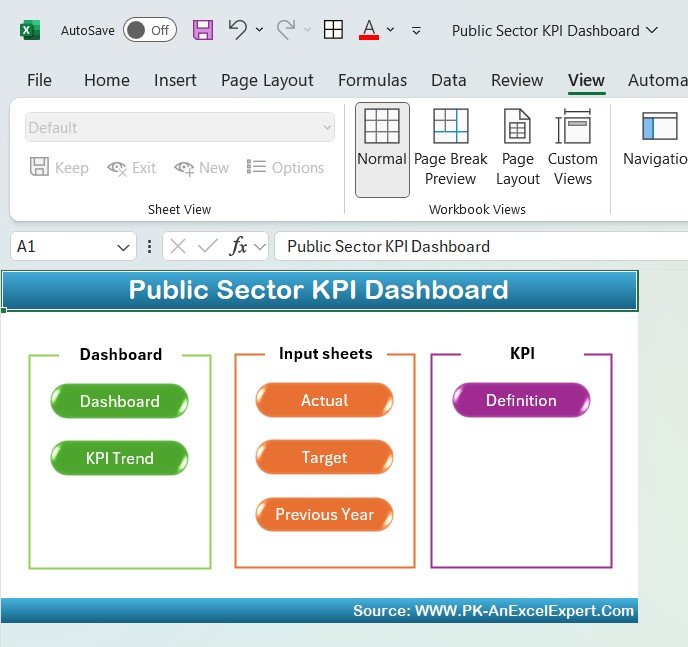
Where the first pick explores raw data, this one reports against targets. You define each KPI once, enter actual, target and previous-year numbers, and the dashboard shows month-to-date and year-to-date results with color-coded alerts when a measure slips.
Who it is for: government agencies, nonprofits and public service providers that report a fixed KPI set every month.
What is inside:
- MTD and YTD views for KPIs such as budget utilization, project completion rate, public satisfaction and resource allocation
- Target versus actual comparison for every KPI
- Trend charts that show how each measure moved over the year
- Editable KPI list and inputs, so you can match your own performance framework
A typical use: set a 90% target for permits processed within 10 working days, enter monthly actuals, and the dashboard flags the months that fell short before the quarterly review. It comes in Excel ($14.99), Power BI ($11.99) and Google Sheets ($9.99).
Best for: performance and planning units that live by a KPI framework.
3. Government Administration KPI Dashboard: best for audit-ready definitions
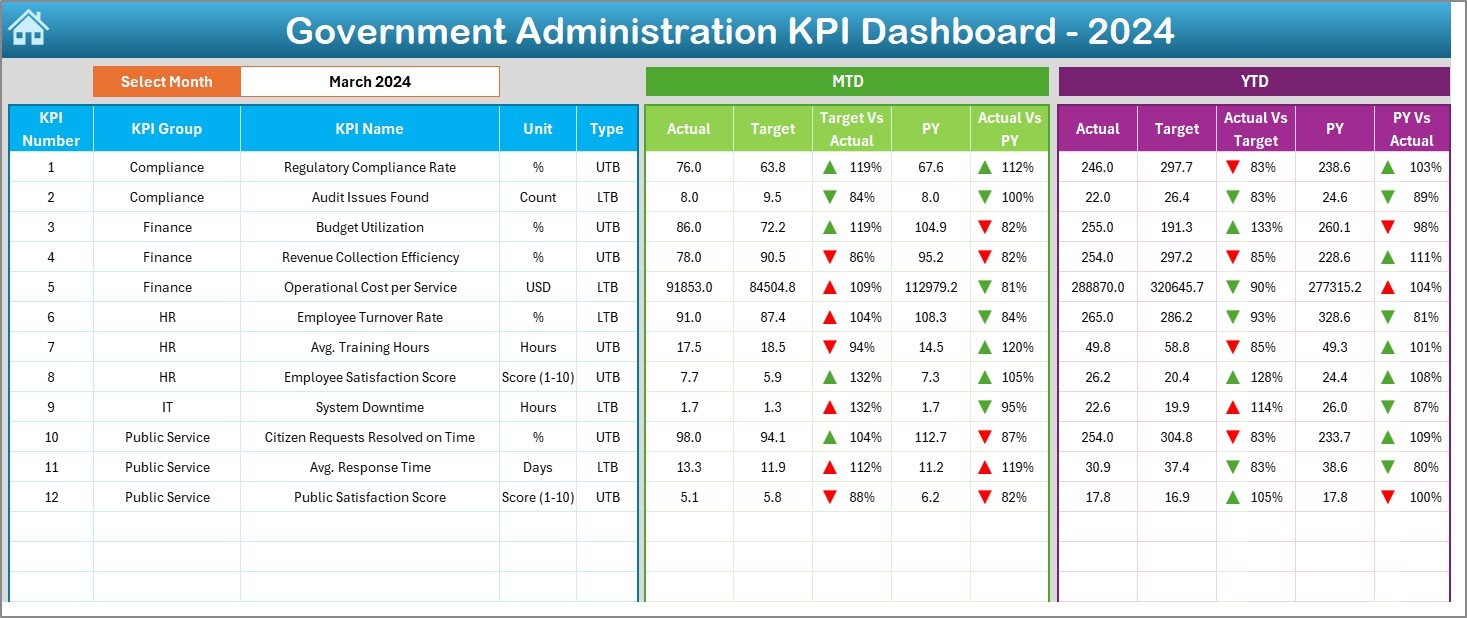
Auditors and oversight committees ask the same question every year: how exactly is this number calculated? This Excel file answers it inside the workbook. Each KPI carries a group, unit, formula and definition, and the trend sheet shows them next to the chart.
Who it is for: government administrators, policymakers and internal auditors at municipal, state and federal level.
What is inside: seven sheets. A Home sheet with navigation buttons, a Dashboard sheet with MTD and YTD actual, target and previous-year figures plus up and down arrows, a KPI Trend sheet, and separate input sheets for actuals, targets and previous-year numbers. A KPI Definition sheet holds the formulas.
Because inputs, targets and history sit on separate sheets, you can lock the targets after budget approval and let department staff update only the actuals. That separation is what makes the numbers defensible later. The Government Administration KPI Dashboard in Excel costs $14.99.
Best for: teams that need every KPI documented for audit and transparency.
4. Government Citizen Services Performance Dashboard: best value
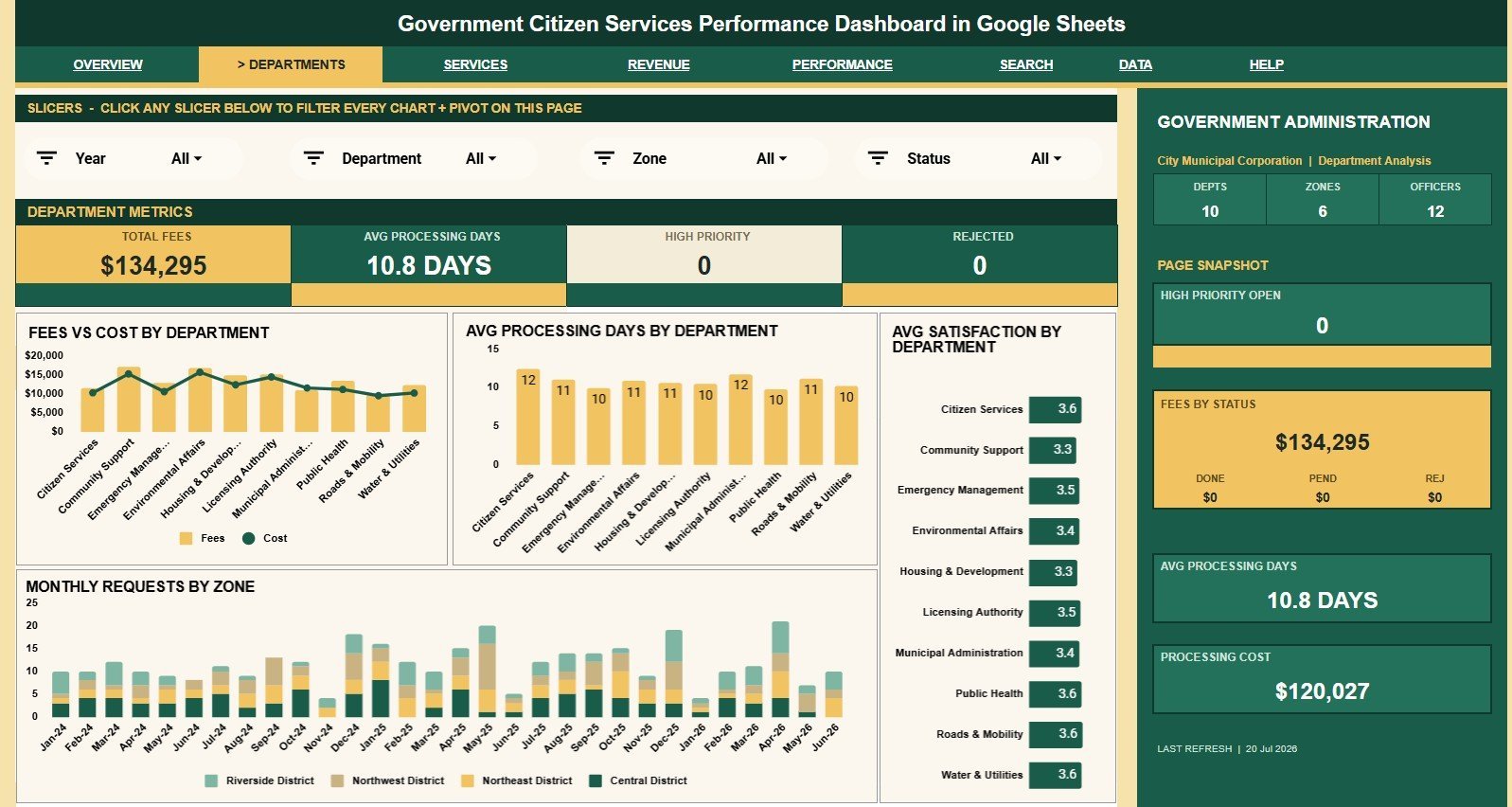
If your office runs a service counter, a permit desk or an online request portal, this is the cheapest way to see how it performs. It turns request records into a seven-tab report on volume, fees, cost, completion, satisfaction, officers and zones.
Who it is for: citizen service centers, permit and licensing offices, and small local governments without a BI team.
What is inside:
- Overview, Department Analysis, Service Analysis, Revenue Analysis, Performance Analysis, Search Sheet and Data Sheet tabs
- Six cards: Total Requests, Fees Collected, Completion Rate, Avg Satisfaction, Open Requests and Net Revenue
- Processing days, officer workload and priority turnaround on the performance tab
- A Request ID lookup that shows a single citizen record in full
Use it to compare fees against processing cost by department, find the zone with the most open requests, or check whether high-priority requests really close faster. The Government Citizen Services Performance Dashboard costs $9.99. Its sister file, the Government Administration Dashboard in Google Sheets ($9.99), uses a similar request-based model with nine KPI cards and 16 chart views.
Best for: service desks that want shared, browser-based reporting for under $10.
5. Municipal Services Dashboard: best for city operations
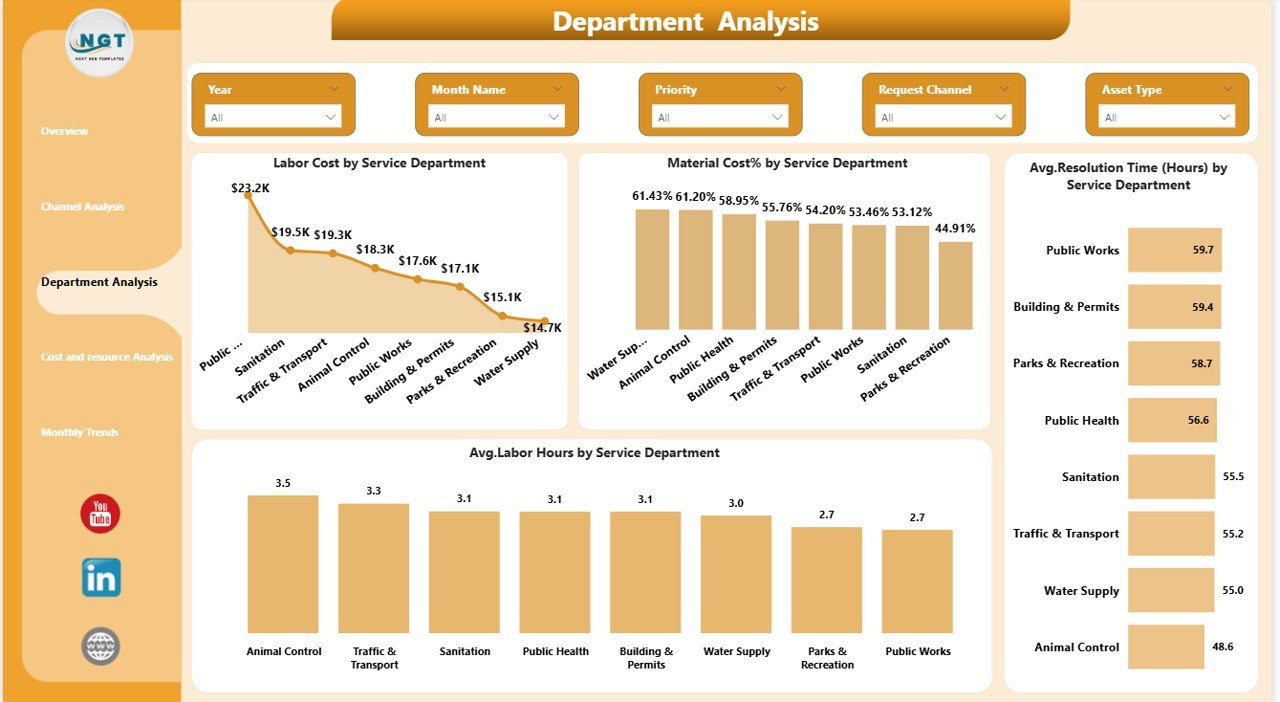
City operations come down to tickets and crews: potholes, missed bin collections, water leaks and broken streetlights. This dashboard follows each service request from channel to resolution and puts a cost on it.
Who it is for: municipal public works, sanitation, water and utilities departments, and city managers.
What is inside:
- KPI cards for material cost, labor cost, total cost, average resolution time in hours and citizen satisfaction
- Pages for overview, channel analysis, department analysis, resource analysis and monthly trends
- Slicers for department, service type, request channel, priority and month
Use it to check whether phone requests take longer to resolve than app requests in the same department, which tells you where to steer residents. It comes in Power BI ($17.99), Excel ($13.99) and Google Sheets ($9.99). For monthly target reporting on waste collection, water supply and road maintenance, the Municipal Services KPI Dashboard costs $12.99 in Excel, $11.99 in Power BI and $9.99 in Google Sheets. Councils that run their own collection fleet can go further with our waste management dashboard templates.
Best for: cities that want cost and resolution time on the same page.
6. Public Health KPI Dashboard: best for health departments
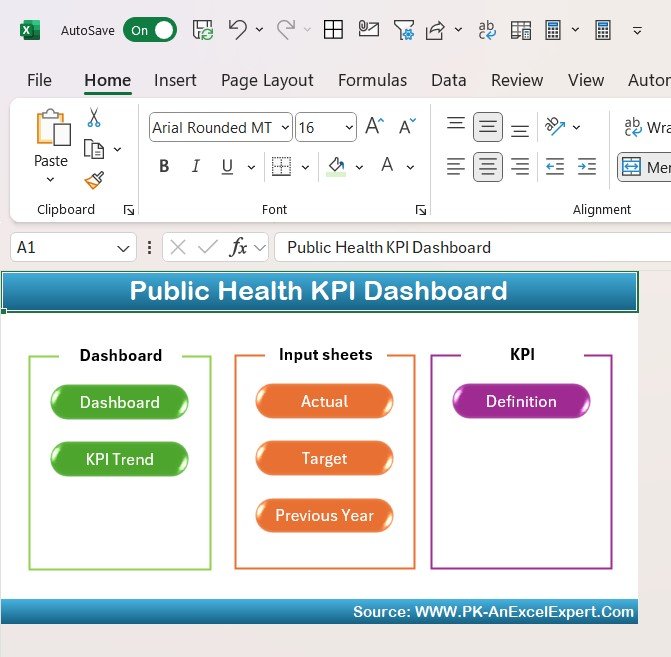
Public health teams report to boards and funders on programs whose results take years to show. A KPI dashboard keeps the leading indicators, such as vaccination coverage and access to care, visible every month.
Who it is for: county and city health departments, public health program managers and epidemiology teams.
What is inside:
- Tracking for disease prevention rates, vaccination coverage, healthcare access and public health spending
- Target versus actual comparison, so you see which programs are on track
- Trend views that show change over the year
- Customizable KPIs to match your community or grant reporting requirements
For example, set a 95% coverage target for a childhood vaccine, enter monthly actuals by program, and the dashboard shows the gap well before the year-end report is due. It comes in Excel ($14.99), Power BI ($11.99) and Google Sheets ($9.99).
Best for: health departments that report program KPIs to boards and funders.
7. Public Safety KPI Dashboard: best for police, fire and emergency services
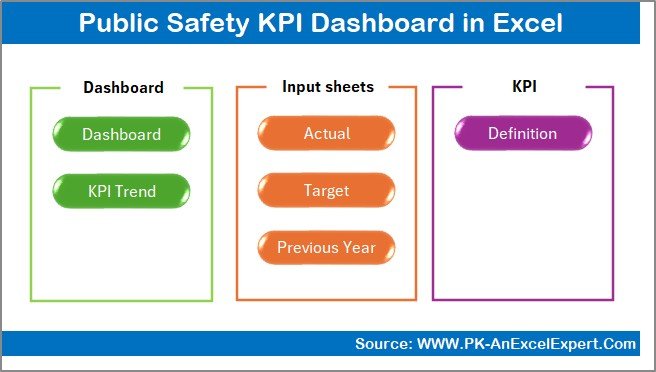
Response time is the number every public safety leader is asked about, and it is rarely the only one that matters. This dashboard puts response time next to resolution rate, operational cost and satisfaction, so a faster response never hides a budget overrun.
Who it is for: police, fire and emergency management departments, and municipal safety offices.
What is inside: seven sheets covering emergency response, incident resolution, operational cost and satisfaction KPIs, with MTD and YTD actual, target and previous-year views, green and red arrows, and a KPI drill-down with dynamic charts. It is built with formulas only, with no macros or add-ins.
Use it to compare this year’s average emergency response time with last year’s by month, or to show the council that a rising call volume came with a stable resolution rate. The Public Safety KPI Dashboard in Excel costs $14.99, and the Power BI edition costs $11.99.
Best for: safety departments that brief councils on response and cost every month.
8. Public Sector KPI Scorecard: best one-page status report
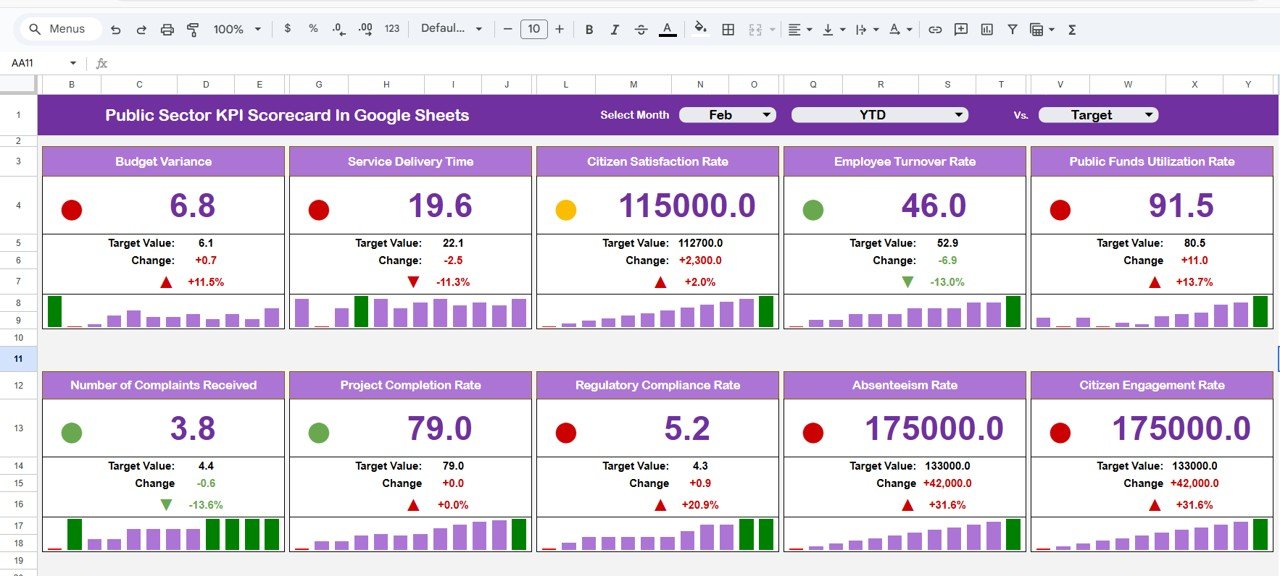
Some audiences do not want charts. A council or board often wants one page that says which measures are green, which are amber and which are red. That is what a scorecard does, and it pairs well with any of the dashboards above.
Who it is for: chief executives, council committees and department heads who review many KPIs in a short meeting.
What is inside:
- Month-to-date and year-to-date values for every KPI on one sheet
- Traffic-light status in green, amber and red, plus up and down arrows
- A dynamic month selector and a KPI trend view
- A definitions sheet with group, unit, formula and definition for each KPI
The Excel edition ($14.99) has four worksheets and handles finance, HR, operations and citizen-service metrics in one workbook. The Google Sheets edition costs $12.99 and is easy to share view-only with committee members.
Best for: leaders who want status at a glance before the detail.
Not sure where to start? The Government Administration Dashboard in Excel at $13.99 covers budgets, projects and satisfaction in one file. If your work is mostly service requests, the Citizen Services Performance Dashboard does the job for $9.99.
How to choose a government dashboard template
| If your main question is… | Choose |
|---|---|
| Are our departments spending their budgets and delivering projects? | Government Administration Dashboard |
| Are we hitting this month’s KPI targets? | Public Sector KPI Dashboard |
| Can we prove how every KPI is calculated? | Government Administration KPI Dashboard |
| How fast do we close citizen requests, and what do they cost? | Government Citizen Services Performance Dashboard |
| Which city department resolves tickets slowest, and at what cost? | Municipal Services Dashboard |
| Are our health programs on track for coverage goals? | Public Health KPI Dashboard |
| Is response time improving without a cost overrun? | Public Safety KPI Dashboard |
| What does the council need to see in five minutes? | Public Sector KPI Scorecard |
Format is the second decision. Pick Excel if your finance team works in Microsoft 365, Google Sheets if several offices update one shared file, and Power BI if your organization already holds Power BI licences. If you are building the KPI list from scratch, our guides to procurement KPIs, HR KPIs, energy management KPIs and ESG KPIs cover measures most agencies also report. Grant-funded bodies should also see our nonprofit and NGO dashboard templates, and school districts our K-12 school administration templates.
When a template is NOT the right answer
A template is a reporting layer, not a system of record. Be honest about these cases:
- You must publish live data to residents. Open-data portals and public performance sites need automated feeds and accessibility compliance. Use dedicated software for that, and keep a template for internal reviews.
- You have millions of records. Excel and Google Sheets slow down with very large request or transaction histories. Power BI copes better, but a database with a BI tool is the right setup at that size.
- Many staff must edit with audit trails. If 40 people update the same numbers and you need a log of who changed what, a governed system beats a shared file.
- The data includes personal information. Citizen names, addresses and case details carry legal duties. Strip them before data goes into any spreadsheet that will be shared.
For most small and mid-sized agencies, though, a monthly export into a well-built template answers the questions a subscription tool would, for less than one month of that tool. The U.S. Census Bureau’s Census of Governments counts tens of thousands of local governments, and most of them are small enough for this approach.
Frequently asked questions
What is a government dashboard?
A government dashboard is a single screen that shows how an agency, department or city is performing: budgets against spending, service requests, response times, citizen satisfaction and project status. Internal dashboards help managers run operations. Public dashboards publish selected numbers to residents for transparency.
What should a government dashboard template include?
At minimum: budget versus actual spending, service volume, completion or resolution time, citizen satisfaction, and a breakdown by department and month. Good templates also keep a KPI definition sheet, so every number has a written formula, and store last year’s figures for comparison.
Can a small city or county use Excel instead of government performance software?
Yes, for monthly reporting. A city with a handful of departments can export data from its finance and request systems once a month, paste it into an Excel or Google Sheets template, and get the same core views. Move to dedicated software once you need live data, public portals or many editors.
Which KPIs should a public sector organization track?
Start with budget utilization, cost per service delivered, average response or resolution time, completion rate, citizen satisfaction score and project on-time rate. Add sector KPIs on top: vaccination coverage for public health, emergency response time for public safety, tickets closed per ward for municipal services.
How do you calculate budget utilization for a government department?
Budget utilization is actual spending divided by approved budget, multiplied by 100. A department that spent $105.7M of a $124.9M budget has a utilization of 84.6%. Read it by month as well as year to date, because a low figure in month ten often means projects are running late.
Are these government dashboard templates one-time purchases?
Yes. Every template on this list is a one-time purchase between $9.99 and $17.99. You download an editable file and keep it, with no per-user or yearly fees. Power BI templates open free in Power BI Desktop; sharing them online needs a Power BI licence.
Can I publish these dashboards for citizens to see?
You can share a PDF or a view-only Google Sheets link, and Power BI reports can be published through your organization’s Power BI service. Check your data first: remove personal details such as names and addresses from request records before anything leaves the department.
Is Excel, Google Sheets or Power BI better for a government KPI dashboard?
Excel suits finance and planning teams already on Microsoft 365. Google Sheets suits small agencies where several people update one shared file. Power BI suits departments that already have Power BI licences and want interactive reports shared online. Most picks here come in two or three formats.
Do these templates work for public health departments?
Yes. The Public Health KPI Dashboard tracks disease prevention, vaccination coverage, healthcare access and public health spending against targets. It comes in Excel, Power BI and Google Sheets, priced from $9.99 to $14.99, so a small county health office can start with the Google Sheets edition.
Get more government dashboard templates
If you only buy one file, make it the Government Administration Dashboard in Excel ($13.99) or its Power BI version ($17.99). It covers projects, budgets and citizen satisfaction in one place. Pair it with the Public Sector KPI Scorecard in Google Sheets ($12.99) when leadership wants a one-page status report. Looking for low-cost options in other areas? See our list of cheap Excel dashboard templates under $15 and the COO operations dashboard template stack.
Watch how our dashboards work, step by step, on the NextGenTemplates YouTube channel.